
All Activity
- Past hour
-
 karl.karl joined the community
 -
 Miscusi joined the community
 -
 Daimx99 joined the community
 -
 MikeSuper00 joined the community
 -
 _nik.11 joined the community
 -
 Zsj-Ken joined the community
 -
 baabaa joined the community
 -
 zhuoge88 joined the community
 -
 MatrixMi23 joined the community
 -
 Pkpal joined the community
 -
 mmhorda changed their profile photo
 -

LG G5 dropped DTS again, and Emby didn't work...?
TurkeyMan replied to TurkeyMan's topic in LG Smart TV
> it could be a model specific issue, but it would be quirky if this is the case and I am really only seeing issues from the two of you. Are there any other G5 users? I was happily using my CX for years, and then I got my G5 and it was instantly broken. I didn't change anything regarding Emby or the server the day I plugged my new TV in, and all the other <G5 users connecting to my server still have no trouble. My friend still has his CX which still works without trouble. - Today
-

Back navigation not working on Favorites screen
scottpro replied to scottpro's topic in Windows & Xbox
This context menu/screen. Once you exit this context menu/screen than the current movie screen/page is stuck unless you use the home icon or home key to exit. It should be easy to replicate this issue.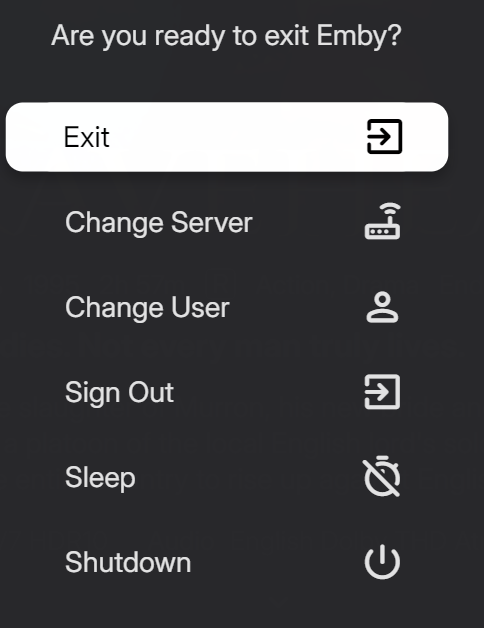
-
Thanks! It works for me and gives all items. Is it your own list? I have noted that if I create a list at MDBList and enter the link BEFORE the list have populated/generated the plugin will then cache an empty list, and therefore you will get error until the cache has emptied. Might be the issue here? You could try to delete the cache file: /plugins/AutoTag/autotag_cache.json and the run again
-

LG G5 dropped DTS again, and Emby didn't work...?
uniQ168 replied to TurkeyMan's topic in LG Smart TV
Weren't there multiple threads regarding this problem? I recall seeing more about it here. I assume some users are bypassing the issue by manually converting their audio tracks. I’ve also asked a friend with an LG G5 TV to install Emby on his home server and test the DTS transcoding, and he ran into the exact same error 10 seconds in. Because of that, I’m also guessing it's an issue specific to the G5 model. EDIT: I also tried the new Emby Beta on my NAS but it didn't make any difference on this matter. -
Same here. I think flatpak would solve it mainly for immutble distros such as Bazzite and SteamOS. (SteamOS is a big chunk of linux desktop users as of today)
-
Great work!! Thank you so much!! Juste tested a couple of lists with mdblist and it works fine! But I don't know why this one doesn't work: https://mdblist.com/lists/emooak/col-films-de-90-minutes-max Nothing seems different with the others... It's a public one like the others but I get "No tems found" from the plugin. Any idea?
-
+1 for flatpak - I dare say that would already be on the radarr though. Current build seems to be mostly working for me, however I keep finding myself defaulting to the browser version more often than not out of habit from not having a usable linux app for the longest time.
-
I think having a flatpak package would solve it. Many linux distros support it (Bazzite, SteamOS, Arch based, etc)
-

Unwanted fanart.jpg files being saved to Movie folders
Happy2Play replied to tanStaafl's topic in General/Windows
But what would prevent Emby for seeing the existing Backdrop? Maybe Locked metadata? -
Thanks for following up !
-

embyforkodi (next-gen) 12.X.X support
quickmic replied to quickmic's topic in Emby For Kodi Next Gen
Thanks, I add some fixes to intercept this issue, but actually this should never happen in the first place. What happened, the season metadata included a SeriesId and the plugin tried to sync the series. For some reason, your server did not return valid data (actually no data at all) for the series. -
Thanks for sharing.
-
Hi quickmic I made some tests by myself and added some logs to ***\Kodi\addons\plugin.service.emby-next-gen\core\common.py (ok, chatgpt helped ) After that i was able to identify the series wich was causing the problem. After removing it from the series folder, new emby scan, and then adding it the series was not found in the emby server. For me it looks like it was an problem with emby. So i will make some tests more and report it here Anyway: I will send you the changed code and the resulting logs. Maybee you will find something to make it more stable.
-

Interview clips are misidentified as alternate versions of the movie
Luke replied to uncle_yuri's topic in General/Windows
Hi, what if you rename the folder to: Dawn of the Dead (1978) -
Hi there, what context menu exactly appears?
-
OK we'll take a look at it. Thanks.
-
HI there, can you please provide a specific example? How to Report a Problem Thanks !
-
Hi, what folder path are you entering into emby server?
-
Unwanted fanart.jpg files being saved to Movie folders
Luke replied to tanStaafl's topic in General/Windows
It depends on whether you have the option enabled to download images in advance or not. Make sure to read the help text underneath the option before changing it. In either case the same image gets downloaded. The option only determines when that happens. -

Unwanted fanart.jpg files being saved to Movie folders
tanStaafl replied to tanStaafl's topic in General/Windows
So you're saying that Emby saves the actual URL that an image is pulled from? It doesn't just scan for missing images and download missing images? Anyway, I have adding dozens of movies since this started and it is hit and miss those that get the fanart treatment. I'll try to run a control on a couple of movies and see what happens. -
embyforkodi (next-gen) 12.X.X support
quickmic replied to quickmic's topic in Emby For Kodi Next Gen
I checked again your log, seems to be more clear now. It's not related to playlists at all. The series was not synced, and there the season updated crashed. I'll fix the issue, but not sure If I make it properly, as I have no test case for that. I try to simulate your setup, however. Can you give me extra info what the Series location actually is. Also debug log might help, you can enable it in the plugin settings and send it to me via PM, thanks. -
Thank you, definitely going to give that a try
-
Yes. When direct playing, the forced subtitle is the only one that is displayed. I understand now that this is just a design FLAW with Roku's video player, there is nothing Emby can do here. This is a fix Roku would have to make. I was under the assumption that this shouldn't be an issue when direct streaming, as the issue of subtitles not displaying correctly is some weird quirk with how Roku handles MKV specifically, with HLS not being affected. Does this issue also affect HLS in some capacity?
-
If you'd like to show your support for an official feature, please go here to do so:
-
Hi, you can currently only achieve this functionality via a community built plugin, please see:







