All Activity
- Past hour
-
 Reini1958 joined the community
 -

Emby has been a consistent source of Headaches on my NVIDIA Shield Pro 2019. Stuttering / freezing / audio
popy replied to Mkilbride's topic in Android
@Lukeit happend again. Yesterday around 22:28 (a few times). I have attached the logs. My system is an unraid with the emby docker container and hw transcoding setup like this: https://forums.unraid.net/topic/101969-guide-setup-emby-with-hw-transcoding-on-unraid-remote-access-through-reverse-proxy-using-swag/ and checked by settings an low resolution on an client -> server dashboard is showing HW transcoding (green icon). I have an idea and test the following now: On my second client i have not noticed the issue (same nvidia shield pro incl. same firmware and emby app). But the android tv app setting: settings -> playback -> audio output -> is set to "Auto". On my client with the issue (see logs) it was set to something "Downmix to DTS...". The files i am playing have mostly aac audio. If i played the same file on both maschines, on one (without the issue) it says "Direct play" for video and audio. On the maschine with the issue it said direct play just for video and transcoding for audio. After changing the setting to "Auto" it also says "direct play" for video and audio. Can you please check the logs for an issue regarding transcoding? Any other hint why it begins to stutter (i have noticed mostly at the end of an ~40 min video - last few minutes). thx logs_emby_server.zip -
 Soufia joined the community
 -
 gtxz6020 joined the community
 -
 davixb joined the community
 -
 porroh joined the community
 -
 Reini58 joined the community
 -
 Guilherme Eduardo joined the community
 -
 Tavrize joined the community
 -
 Ricardo6974 joined the community
 -
 Sandy. joined the community
 -

LG G5 dropped DTS again, and Emby didn't work...?
imiq23 replied to TurkeyMan's topic in LG Smart TV
As mentioned above, exact same problem on my G5 as well. -
IMO I'm not really sure we should. An error in auto-skipping the intro is easily corrected with a back skip or two but the same cannot be said for auto skipping to the next item. If this were marked incorrectly it could be hard to even realize it and even harder to recover from.
-
This part is something for Emby to implement, the plugin will show you Credit skip after you have run through your library. But Emby has not implemented the auto skip part, so you need to click skip for now.
-
Yes, it's my own list. I probably entered the link BEFORE the list have populated. I deleted the cache (autotag_cache.json), restarted emby but still nothing for this one: "No tems found"
-

Interview clips are misidentified as alternate versions of the movie
uncle_yuri replied to uncle_yuri's topic in General/Windows
Ok, it all makes sense now. That was the missing piece. I added that tag to the filenames to keep them identical with the folder and it's all working like it should be now. Thanks folks! - Today
-

Interview clips are misidentified as alternate versions of the movie
Neminem replied to uncle_yuri's topic in General/Windows
@uncle_yuriI think you can still use this folder naming folder : Dawn of the Dead (1978) {tmdb-923} But then you media files will also need to be named like that. Dawn of the Dead (1978) {tmdb-923} - Extended Edition.mkv Dawn of the Dead (1978) {tmdb-923} - US Theatrical Edition.mkv And yes that will help Emby better to identify the movie, when you use {tmdb-XXXXXX} -
Try using MCEBuddy, it uses Comskip (or ShowAnalyzer if you have a preference) will do it remove the commercials for you automatically.
-
Interview clips are misidentified as alternate versions of the movie
uncle_yuri replied to uncle_yuri's topic in General/Windows
Hi Luke, that did fix it actually. I also noticed that I had added {tvdb-923} when it should've been {tmdb-923}. I thought that would be the "other" fix, but when I tried using the right tag, it reverted to the problem behavior. Any idea why that is? (Basically I mean, I thought it would be 'best practice' to add a definitive TVDB/TMDB identifier tag, but if it's better to just use title and year, I'll stick with that) -
That's exactly what I was thinking too because when something goes wrong as they mess to try to fix
-
That request does not mention auto-skipping. That's a question for the plugin's thread.
-

Plugin: EmbyCredits, detect end credits and add auto skip.
Jutsch80 replied to yocker's topic in Plugins
I hope it helps. Honestly, if actually skipping the credits is not an option anyway there's little reason for me to try to get the plugin to work properly EmbyCredits.xml -

Plugin: EmbyCredits, detect end credits and add auto skip.
yocker replied to yocker's topic in Plugins
No option to automatically skip, it only adds a time stamp in the video metadata that tells Emby where the end credits are and Emby takes it from there. I sadly can't think of anything that might be wrong with out any logs. Give me some time and i will make a new version with some more logging to help diagnose the problem. For now though, can you please upload the EmbyCredits.xml file? That should at least help a bit. -
Plugin: EmbyCredits, detect end credits and add auto skip.
Jutsch80 replied to yocker's topic in Plugins
So there is no option to actually automatically skip the credits? Which would be fine, just would like to know. I did set a custom folder and also gave both containers full rights to the custom folder. -
Plugin: EmbyCredits, detect end credits and add auto skip.
yocker replied to yocker's topic in Plugins
It should log it, did you enable debug logging in Emby? The end credit markers added by the plugin triggers the "next episode" pop ups to appear. While Emby automatically shows should them the plugin makes them much more precise in when they should appear. The "OCR test failed: Error while copying content to a stream." fault you are getting could point to you not having set a "custom folder", not having given the right permissions to that folder or enabled direct stream without having hardware capable of it. -
Plugin: EmbyCredits, detect end credits and add auto skip.
Jutsch80 replied to yocker's topic in Plugins
I will do that as soon as Emby logged anything there. The error does not seem to trigger a log of any kind. Btw I got a question. I wouldn't even mind not using OCR at all because it's possible to set markers manually but then I can't seem to find any option to actually skip the credits automatically. The marker just seems to set when the "next episode" pop up appears. Or do I miss anything super obvious here? -

Active Backdrop background and image size globally for all user
kfdlean posted a topic in Web App CSS
Hello, I have a question regarding the “Show background images” display option. When this setting is enabled, which file in the system folder is modified? To give you some context: I enable this option on my server because it improves the overall appearance. However, for some reason, it automatically disables itself for all user accounts. As a result, I have to manually re-enable this setting for every user, which is quite inconvenient. Same thing for the image size. If I knew where this option is configured at the system level, it might be possible to enable it by default. I assume there must be a variable that determines whether this option is disabled by default, correct? Thank you in advance for your help. -
Plugin: EmbyCredits, detect end credits and add auto skip.
yocker replied to yocker's topic in Plugins
Please enable debugging in the settings and in Emby and then upload the emby log here. -
Do I miss something there or does the plugin not deliver on the second part of it's promise? All the documentation and instructions go in detail into how to add the markers to the episodes but I can't find a way in Emby to actually skip an episode from that merker on automatically.
-

Unwanted fanart.jpg files being saved to Movie folders
tanStaafl replied to tanStaafl's topic in General/Windows
I have never had the download in advance set, and just checked it again to make sure the Gremlins didn't turn it on I've never manually locked the metadata, I just let Emby do its thing. @Happy2Play that has been my question from day one.. if there are backdrops existing, why the fanart? Thanks again for the help. -
I'm re-opening the question to see if there's anyway I can know what address is being used to pull the guide data. I've been playing with it for several days b/c I thought all was ok but realized again that when I have my VPN on I seem to be getting failures. The logs seem to reference a host4 and I'm not sure if the mapping of this is to a proprietary domain. When I have my VPN on I get the example below. However when my VPN is off I get several hundred programs as a response. I would like to put the called address in my split tunnel rule to see if I can fix this without turning off my VPN. 2026-02-20 06:04:03.334 Info HttpClient: GET https://host4/v1.1/stations/16125/airings?lineupId=USA-GA67017-X&imageAspectTV=2x3&imageText=true&imageSize=Lg&startDateTime=2026-02-20T00:00Z&endDateTime=2026-03-07T00:00Z 2026-02-20 06:04:03.335 Error LiveTvManager: Error getting programs for channel Discovery Life Channel HD *** Error Report *** Version: 4.9.3.0 Command line: C:\Users\brown_a\AppData\Roaming\Emby-Server\system\EmbyServer.dll -noautorunwebapp Operating system: Microsoft Windows 10.0.18363 OS/Process: x64/x64 Framework: .NET 8.0.22
-
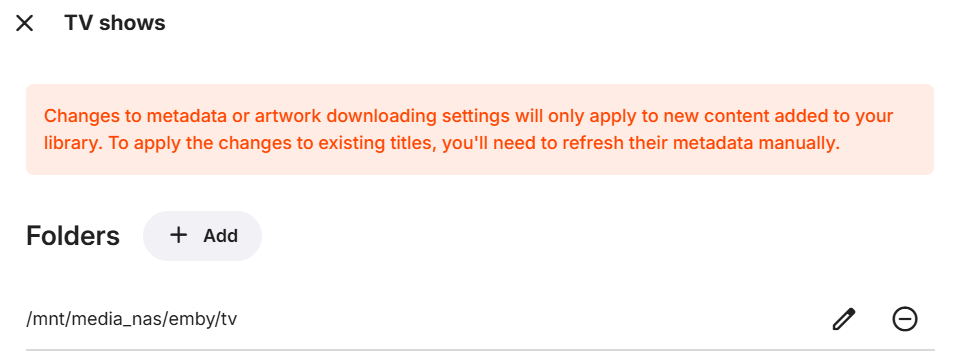
I use /mnt/media_nas. Below is how I selected the TV folder to record to. And here's the permissions as seen through Linux Server (logged in as local jator account): And here's the permissions as seen through the NAS (logged in as local jator account):



-

LG G5 dropped DTS again, and Emby didn't work...?
uniQ168 replied to TurkeyMan's topic in LG Smart TV
Here is at least one other thread regarding this problem. -

Plugin: EmbyCredits, detect end credits and add auto skip.
frankythedog replied to yocker's topic in Plugins
Hello, Great job until now. May I suggest a reset button? This would remove all chapters from the end credits, at the series and/or season level. When detection is inaccurate, it may be helpful to reset them and start again with different settings. What do you think ?