All Activity
- Past hour
-
Excellent for me (one of the previously closed beta testers) Are you using the latest drivers for your GPU/iGPU? I had dropped frames with high-bitrate playback because the client relies on YOUR installed drivers (they aren't updated/included with the Emby client). After updating drivers, all is fine. The Web player may be working fine because: It's forcing the server to transcode it down to something your client can play back smoothly. The bitrate can be lowered in the beta, too. The web browser is using its own HW accelerators. other? So @chesterseenes316please give it a try, the only thing you have to lose is your time. (Report back any problems!)
-
It caused havoc with the icon overflow. Can look into it again if it's a needed feature.
-
 CharlieBravo joined the community
 -
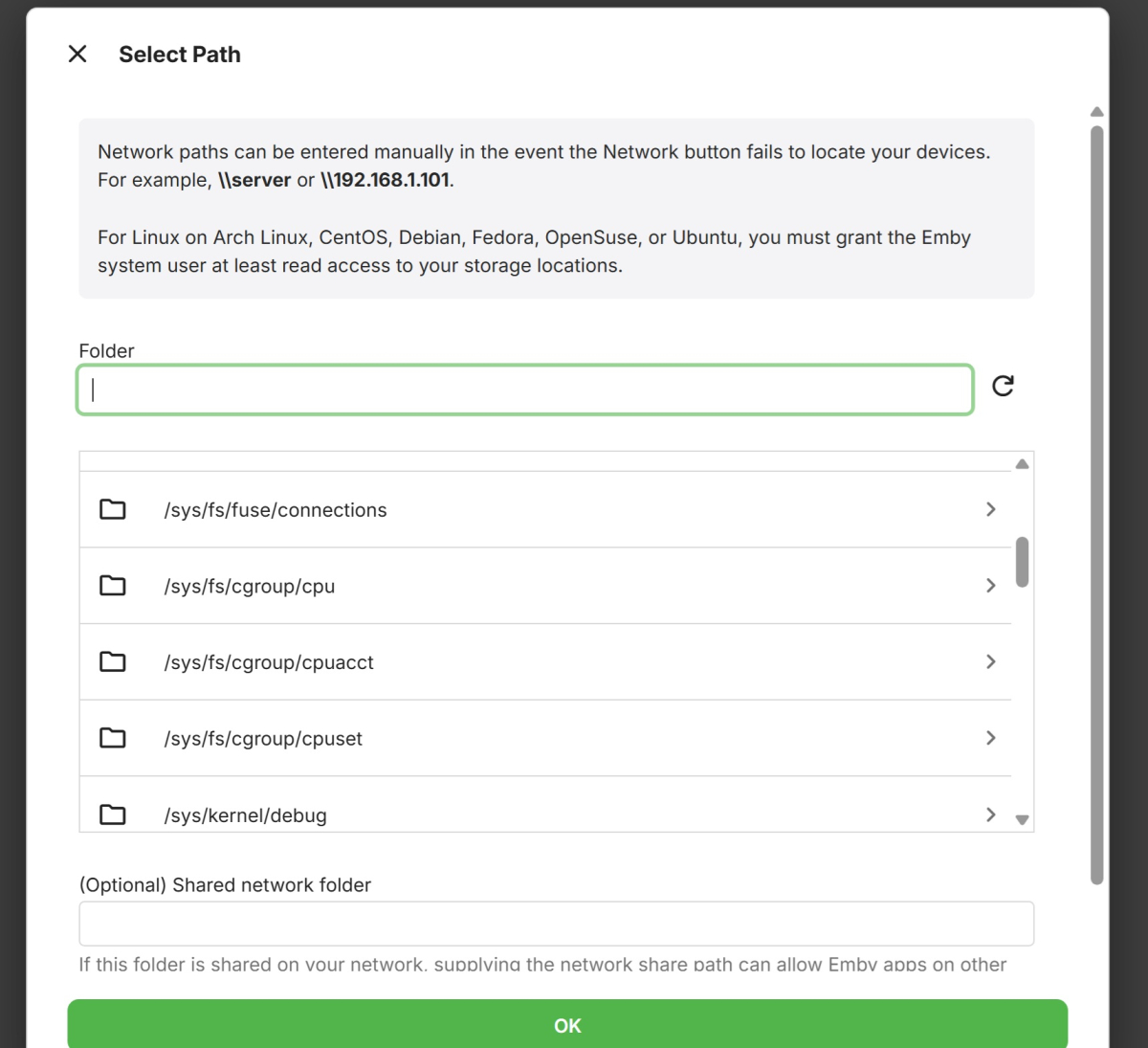
I'm trying to install Emby on my NAS. I reached a point where I don't know how to continue. Here is screenshot of where I left off.
-
Guess this setting was removed through all the plugin iterations - or I'm simply incapable of finding it?
-
 cjncntrybro_fam joined the community
 -
Working good, well done. Thanks.
-
I have uploaded the right one, if that doesn't fix it then there is something wrong deep down i need to fix.
-
 Obtel joined the community
 -
Nah, many thanks to you for all these wonderful plugins.
-
 Mohamed y12 joined the community
 -
Tracearr is even better and has Emby support. https://tracearr.com/
-
Ahh yes, me being an idiot (as always). Uploaded the wrong version. Nice find and many thanks!
-
 arlencamargo joined the community
 -
 zyfa19 joined the community
 -
 Ohhjk joined the community
 -
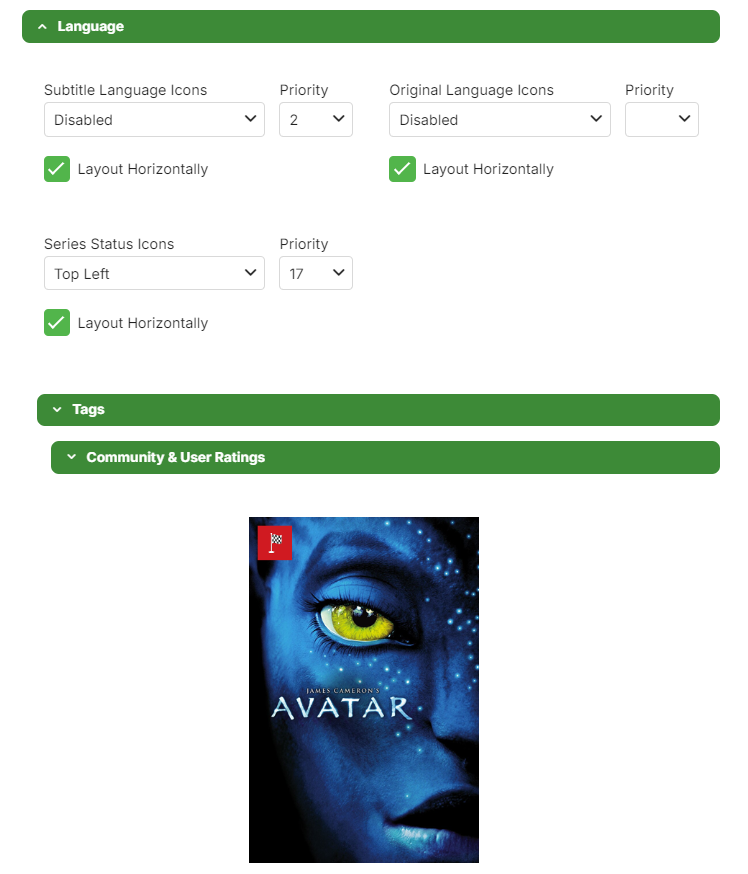
Yes, that works. This doesn't: That is what cannot be achieved/does not produce Status icon: no Subtitle Language, no Original Language, yes Status.

-
Strange..
-
You were as said not really wrong.. Resolutions do my head in tbh., so many different kinds and even TV manufactures cheating with them, for example calling 3840 x 1080 for 4K, I got scammed by Sony once with a TV like that, the X800H i think it was called, it was a big scandal at the time but no one ever got their money back from Sony. Sony, if you are reading this... F*** YOU! I WANT MY MONEY BACK STILL!
-
Not sure if I explained the issue properly: there's no Status icon if Subtitle Languages are not enabled - that should be decoupled. Setting placement is minor, I don't mind it there as long it exists.
-
 claudiofdz joined the community
 -
Yeah, i had no idea where to put it so put it there for now.
-
Thank you for the kind words. I don't really want this in the store as if i some day abandon the plugin (sickness or what ever) it would look bad on the Emby team to have it in the store. The fact that it's free also eases things a little as i don't have to be scared of cheating people out of their money some how. I have been toying with the ideer of making a white list for languages and will add it at some point. For now a solution would be to set the plugin to only use custom icons and only add the languages you want to use, you can find the icons the plugin uses in the github under "Embededicons" It will require you to change the names of the icons from eg. ac.truehd.png to ac_truehd.png though, so bit of work.
-
Guess I really should have said it's neither 720p nor 1080p (like a few others), it really should just be called "HD", with an aspect ratio?
-
Thanks for this, working good - but it appears that Status logic is tied to Subtitle Language logic, i.e. this scenario: does not produce an icon (as example poster does); only if Subtitle Language Icons enabled, it shows.
- Today
-
See if this version fixes it. WatchingEye.dll
-
thank you so much. I really like your plugin. I think I don't need KOMETA now. I think you should make it online in plugin store, so I can buy it. It's really powerful! I have a small thought, the video files always have many audio/subtitle tracks with different language, I don't want to reeocode them after download. The plugin always show the first 5 audio/subtitle tracks' language icons, but they are not what I want to see on the poster. Can it only show the selected language if it is icluded in the movie file, like zh/en//de/dm e.g.? You can add a filter by country in language option.
-

Generate a QR code for a user to scan to connect to a server without emby connect
visproduction replied to displayname0504's topic in Feature Requests
QR code creation works already for any Internet address. Aim it at the IP address or domain if you have SSL setup. Users with browser saved passwords can just automatically log in to the home screen. It works for web browser and mobile now. What else do you need? Did you want Emby to do the QR code creation? Why? It's easy to do that with all sorts of custom images inserted online. I don't understand. What you are asking to be a new feature? -
Yes sounds like dolby vision profile 5, which cannot currently be transcoded, but should be able to be played back properly with the Emby for Windows app with direct play. Probably not on your TV since I've never seen Samsung support DV, unless it's a DV HDR hybrid as mentioned. Can you provide more details of the media item? I don't currently have any DV profile 5 content to test against.
-

I moved and now I can't access my WAN emby server
Lessaj replied to drpickles's topic in General/Windows
If setting the router as the DMZ, then the router is responsible for the firewall, so that should be okay, but wasn't clear to me which device exactly was set. I wouldn't recommend leaving UPnP enabled either. -
The new version is up on yocksers/EmbyIcons github. Added: Icon overlays for if series has ended or still running. Filename rules now support movies, TV shows, seasons and/or episodes. The resolution fix is also there but didn't feel it was worth mentioning.
-
Hes 1420 x 1080 video shouldn't be shown as 720p which was caused by trying to combine different resolutions so that for example 4:3, 16:9 and so on would always show a "correct" resolution. So you are both correct but the implementation wrong. I have changed it to just use what Emby shows now and in missing that a normal height range will be used, 4K = 2160, 1440p = 1440, 1080p = 1080 and so on and sticking to the closest match. This should be more reliable but might cause some problems with none standard resolutions.
-
You decide it too simple, the fact is maybe emby is right. The reason make the width less than 1920 is: The blueray disk's resolution is always 1920×1080, but there is a wide black side at the top and bottom(21:9), or at the left and right(3:2/4:3). So in ISO/BDMV/REMUX, 1080p must be 1920×1080. But we always download encoded files, we call it BDrip. In the encoding process, the application program will cut the wide black side automatically, which made the width less than 1920 or made the height less than 1080. But actually they are the same resolution. The advintage of BDrip is you can get bigger display area even full screen without black side area on widescreen display. So I think emby is right, @TMCswmentioned the definition is right, but is not suitable with the real situation