
All Activity
- Past hour
-
 Victor andrey joined the community
 -

[Fix] Roku Live TV broken on Apple Silicon Docker (linuxserver/emby ARM64)
shiz504 posted a topic in Apple iOS / macOS
I found and fixed the root cause of Roku Live TV playback failures when running linuxserver/emby in Docker on Apple Silicon (M1/M2/M3/M4). The problem Some Live TV channels play fine on Roku while others buffer endlessly or show a black screen. No consistent pattern. The issue only affects Roku clients. Browser, Fire Stick, and Apple TV work fine on the same channels. This has been reported across the Emby community and forums for years. The general consensus was that ARM64 Docker on Apple Silicon cannot do proper Emby transcoding and the recommended workarounds were switching to Emby’s official ARM64 image, running Emby natively on macOS, or migrating to Jellyfin. None of those are necessary. The linuxserver image works. It just needs two things fixed. The root cause Two independent failures stack on top of each other. First, the linuxserver base image sets an LD_LIBRARY_PATH that includes paths to bundled libraries for the container environment. When Emby launches its bundled ffmpeg binary on ARM64, this inherited environment variable causes the dynamic linker to load incompatible libraries. On x86 this is not an issue because the library paths resolve correctly. On ARM64 (aarch64) the loader path is different and the poisoned environment breaks ffmpeg at runtime. Second, when Roku requests an HLS stream for Live TV, Emby often selects a copy codec passthrough (-c:v:0 copy -c:a:0 copy). Roku’s HLS client cannot reliably consume the resulting segments from certain IPTV sources. The stream stalls, buffers, or produces a black screen. Channels where Emby happens to choose a different transcode path work fine, which is why the failure appears random and channel-specific. The key insight is that Emby’s ffdetect capability detection and the actual ffmpeg transcode execution are independent code paths. ffdetect runs at startup, checks the bundled binary, and populates the capability cache (IsEmbyCustom, VideoEncoders, etc.). The live transcode runs later when a client requests a stream. You do not need to fool ffdetect. You only need to fix the runtime environment for the transcode calls. The fix Wrapper scripts mounted via linuxserver’s custom-cont-init.d hook. On every container start, the init script: 1. Copies Emby’s bundled ARM64 ffmpeg and ffprobe binaries to clean locations 1. Replaces the original binary paths with shell script wrappers 1. The wrappers strip LD_LIBRARY_PATH and launch the real binary through the correct ARM64 loader 1. For live transcode calls, the wrapper selectively rewrites copy codec arguments to libx264/aac with low-latency tuning (superfast preset, zerolatency, short GOP, no B-frames) ffdetect still reads the original binary path and gets the expected Emby custom build response. IsEmbyCustom stays true. VideoEncoders stay populated. The wrapper only intercepts actual transcode execution. The fix persists across container restarts and recreates because the scripts live in a mounted host directory, not inside the container image. No Emby binaries are modified. No DLL patches. No custom Docker image required. Tested configuration Mac mini M4 (Apple Silicon ARM64) macOS 26.3.1 Docker Desktop 29.2.1 linuxserver/emby:latest (ARM64/aarch64) Emby Server 4.9.3.0 Roku Streambar SE IPTV source via M3U + XMLTV Validation results: IsEmbyCustom true, 5 VideoEncoders detected, 0 encoder errors, HLS transcode confirmed on multiple live channels producing valid .ts segments, copy codec rewrite verified in container logs. Installation Three steps. Clone the repo, copy the custom-cont-init.d directory, add one mount line to your docker-compose.yml, restart the container. Takes about three minutes. Full instructions, example compose file, validation guide, and the wrapper script are all in the repo: https://github.com/shiz504/emby-roku-as-fix Limitations This fix targets linuxserver/emby on ARM64 Apple Silicon only. x86 users do not have this issue. The forced transcode from copy to libx264 uses CPU (software encoding) since Metal/GPU acceleration is not available inside Docker containers on macOS. On Apple Silicon performance cores this is not a problem for a few simultaneous streams. The wrapper rewrites only the specific copy-codec live transcode pattern that breaks Roku. All other ffmpeg calls pass through unchanged. Channels that already played correctly via direct stream are not affected. If anyone else is running this combination and hitting Roku Live TV issues, give it a try and report back. Happy to help troubleshoot. Shawn McCalla @shawnmccallax -
 shhe999 joined the community
 -
 Niclk joined the community
 -
 meisen joined the community
 -

AVRs, projectors, speakers, sub-woofer stuff
jachin99 replied to Apotropaic's topic in Non-Emby General Discussion
I have the x3600h. So far so good with this one but I'm less critical now about these kinds of things than I used to be. I use it probably every day -
 Hsisidjwdjh joined the community
 -
 Pk2 joined the community
 -
 zeppelin5673883 joined the community
 -
 NanetteF joined the community
 -
 kzzmaru joined the community
 -
 Quyet joined the community
 -
我看你没有回复我 其实就是danmaku功能 应该挺多用户需要的 我看你没回复我了 不知道你知不知道我说的danmaku
-

Firefox takes 5 to 10 minutes to start playing and is jittery
jawala replied to Marco2G's topic in Web App
"Good" to know this is a Firefox bug, not a bug in Emby's browser app! Found this thread when I saw Emby (Firefox actually, apparently), trying to pre-fetch a whole ~16GiB movie ... cancelled it / gave up after ~6GiB (going by server logs) ... haproxy[185627]: [206] 192.168.1.10:48730 [31/Mar/2026:15:33:27.753]... 0/0/0/4/63732 6556730260 - - CD-- 19/19/1/1/0 0/0 {emby.example.org} "GET /emby/videos/185771/original.mkv?DeviceId=... HTTP/1.1" That's 6,556,730,260 bytes. Here's the related Firefox bug report, for those curious: https://bugzilla.mozilla.org/show_bug.cgi?id=2000420 Sucks that most non-tech-savvy users might end up thinking it's Emby at fault! - Yesterday
-
While we are in there ... clicking this button doesn't do anything:
-
thanks
-
the metadata editor would be the best way.
-
And how do I know if something has an external ID or !external ID?
-
If it has an external ID - you can't. Emby willl always remember it for userdata/tracking purposes (watchstates/playstates).
-
Are you saying this is not possible? : How do I delete everything about a title so that if I add it again later it is as if Emby never knew it existed before?
-
OK. user data, which is not metadata, does not get purged from the database unless the user is deleted. this is also what makes it possible to move a movie file from one place to another and have it retain watch data.
-

Guide - SSL Qnap certificate and Emby (manual and automatic)
Luke replied to dieffe70's topic in QNAP
What exactly happens? -
The latest beta server build has a hidden config switch. so if you open up the /config/system.xml file, set ValidateImageTags to true and then start the server. this will make the image tag value required, which will be unique per image and therefore you won't be able to guess a url anymore. It's an opt-in config switch for now to allow for time to identify cases where that param may not be supplied.
-
Record a program, watch the program, delete the program, record the same program again and Emby thinks it has already been watched.
-
I think if you can produce another couple examples then it might be easier to identify the common thread. Thanks.
-
@Brusniss?
-
HI there, can you please provide a specific example? How to Report a Problem Thanks !
-

M3U tuner: 403 Forbidden despite User-Agent and Referrer
AhmedNSane replied to sk222's topic in Live TV
You can also try that IPTV app on an Android emulator, and then intercept those requests using a tool like Fiddler, so you'll know what kind of request headers your IPTV streams accept. Once you do that, you can tweak the streams you added through Dispatcharr accordingly. Good luck! -
Examples above, but I have only local IPs in my log. Still inconsistent behavior.
-
They actually should be, as long as those are remote IPs - but by no means it means it works 100%, you might've just found a bug - but you need to provide specific example.
-
Indeed I see the difference now, if a device/endpoint has a host name, it is obfuscated (e.g., "host2") but if the device/endpoint has an IP address then it is ignored and not obfuscated. (at least in most cases) What's the point of that?
-
M3U tuner: 403 Forbidden despite User-Agent and Referrer
AhmedNSane replied to sk222's topic in Live TV
Have you tried messing around with the Stream profiles when adding a new stream?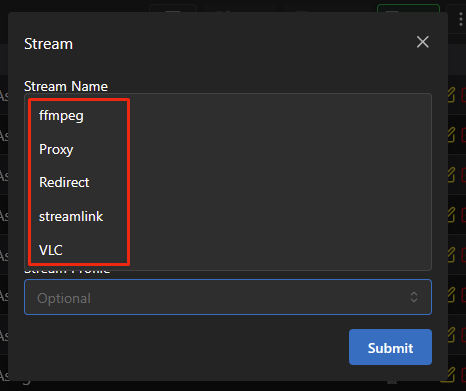
-
hosts are generally masked remote addresses - you can also see them unmasked if you look at the log directly in the Web UI or toggle-off log anonymization before downloading it so you can easily compare raw vs. sanitized log and find out all the addresses.
-
@ebr?
-
What is "host1"? (my HDHR does not respond to that URL) Shouldn't the HDHR device IP address be obfuscated? 2026-03-31 00:00:03.011 Info LiveTV: Discovered tuner device HD Homerun at http://192.168.50.163 2026-03-31 00:00:03.012 Info HttpClient: GET http://192.168.50.163/discover.json 2026-03-31 00:00:03.016 Info HttpClient: Http response 200 from http://192.168.50.163/discover.json after 4ms 2026-03-31 00:00:03.068 Info HttpClient: GET https://api.hdhomerun.com/api/lineup?DeviceAuth=ioMZ5KSi95xUFM-lc72nGfYM 2026-03-31 00:00:03.241 Info HttpClient: Http response 200 from https://api.hdhomerun.com/api/lineup?DeviceAuth=ioMZ5KSi95xUFM-lc72nGfYM after 173ms 2026-03-31 00:00:03.250 Info HttpClient: GET https://host1/v1.1/lineups/USA-OTA35810/channels?enhancedCallSign=true 2026-03-31 00:00:03.250 Info HttpClient: Http response served from cache from https://host1/v1.1/lineups/USA-OTA35810/channels?enhancedCallSign=true Why is the server IP address obfuscated on one line but not the vast majority of places? 2026-03-31 10:02:35.836 Info SessionsService-0HNKCUOBGN6D7:00000004: http/1.1 POST http://192.168.50.162:8096/emby/Sessions/Capabilities/Full. Source Ip: host2, UserAgent: Dalvik/2.1.0 (Linux; U; Android 11; SHIELD Android TV Build/RQ1A.210105.003) 2026-03-31 10:34:47.962 Info SessionsService-0HNKCUOBGN6E3:00000001: http/1.1 POST http://host3:8096/emby/Sessions/Capabilities/Full?X-Emby-Client=Emby Web&X-Emby-Device-Name=Firefox Windows&X-Emby-Device-Id=6bf416da-37cb-41fe-94e7-04c1bc472974&X-Emby-Client-Version=4.9.3.0&X-Emby-Token=x_secret4_x&X-Emby-Language=en-us&reqformat=json. Source Ip: host4, UserAgent: Mozilla/5.0 (Windows NT 10.0; Win64; x64; rv:149.0) Gecko/20100101 Firefox/149.0 Seems very inconsistent.



