All Activity
- Past hour
-
 Hatim511 joined the community
 -
 缘分& joined the community
 -
 PLWS96 joined the community
 -
 Jason172728138 joined the community
 -
 jJay wong joined the community
 -
 PDiebel joined the community
 -
 heichenstein joined the community
 -

Plugin: Home Screen Companion (formerly AutoTag)
soderlund91 replied to soderlund91's topic in Plugins
Beta release - Version 3.1.0.0-beta Download .dll and release notes: https://github.com/soderlund91/HomeScreenCompanion/releases/tag/v3.1.0.0-beta This release contains big improvements of home screen section handling. Use at own risk, I have tested the basic functionality but need your help to fully test, hence a BETA release. Please report any bugs or issues at the GitHub-page or here in the forum. Note Make sure to back up your settings before updating, just in case. Both the plugin and Emby (user data) Note Included a .NET V6 release, this is for legacy use (mostly for MacOS). This version is NOT tested. New Section management: Added function to manage a users home screen sections. You can now reorder sections directly from the plugin itself Create home screen sections: Added ability to create a new home screen section directly when creating a tag or collection. Improvements Created a flag for tag and home screen section in the header of each entry. Removed the source counter to make room. Fixes Bug fix: Fixed an issue when menu was not visible in light theme HomeScreenCompanion.dll HomeScreenCompanion_NET6_MacOS.dll -
 Vybze joined the community
 -
 Miaobaiyue joined the community
 -
The settings for recording paths are in Server Settings for Live TV / Advanced tab The paths are actually library names and where a library has more than one folder path defined, then it would be selecting the library and the parent folder path. I am actually updating the support documentation to give more details on this
- Today
-
Where was this stated ?
-
@RevWayne Recordings by default go into data/livetv/recordings under what is known as the Program Data folder for Emby Server Open the Emby Server settings dashboard and select Dashboard in left sidebar and click on the 3-dots ... and then select View Server Info. You will see the path for the "Program Data" Use Finder Go To Folder... to open that folder and then you can drill down It is probably ~/.config/emby-server and so would be ~/.config/emby-server/data/livetv/recordings
-

Add support of embedded fonts into external ASS subtitles
Steven replied to guilty57's topic in General/Windows
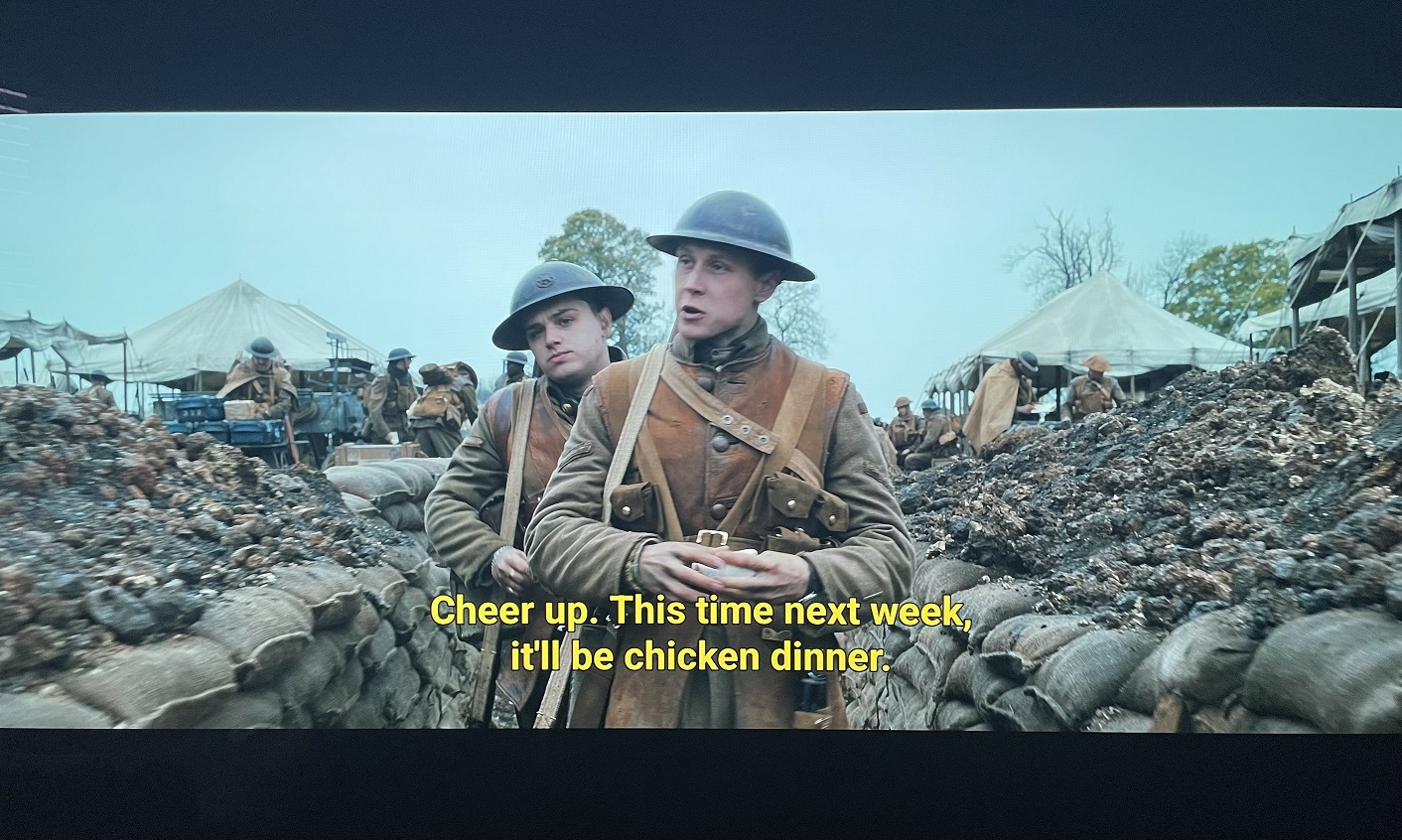
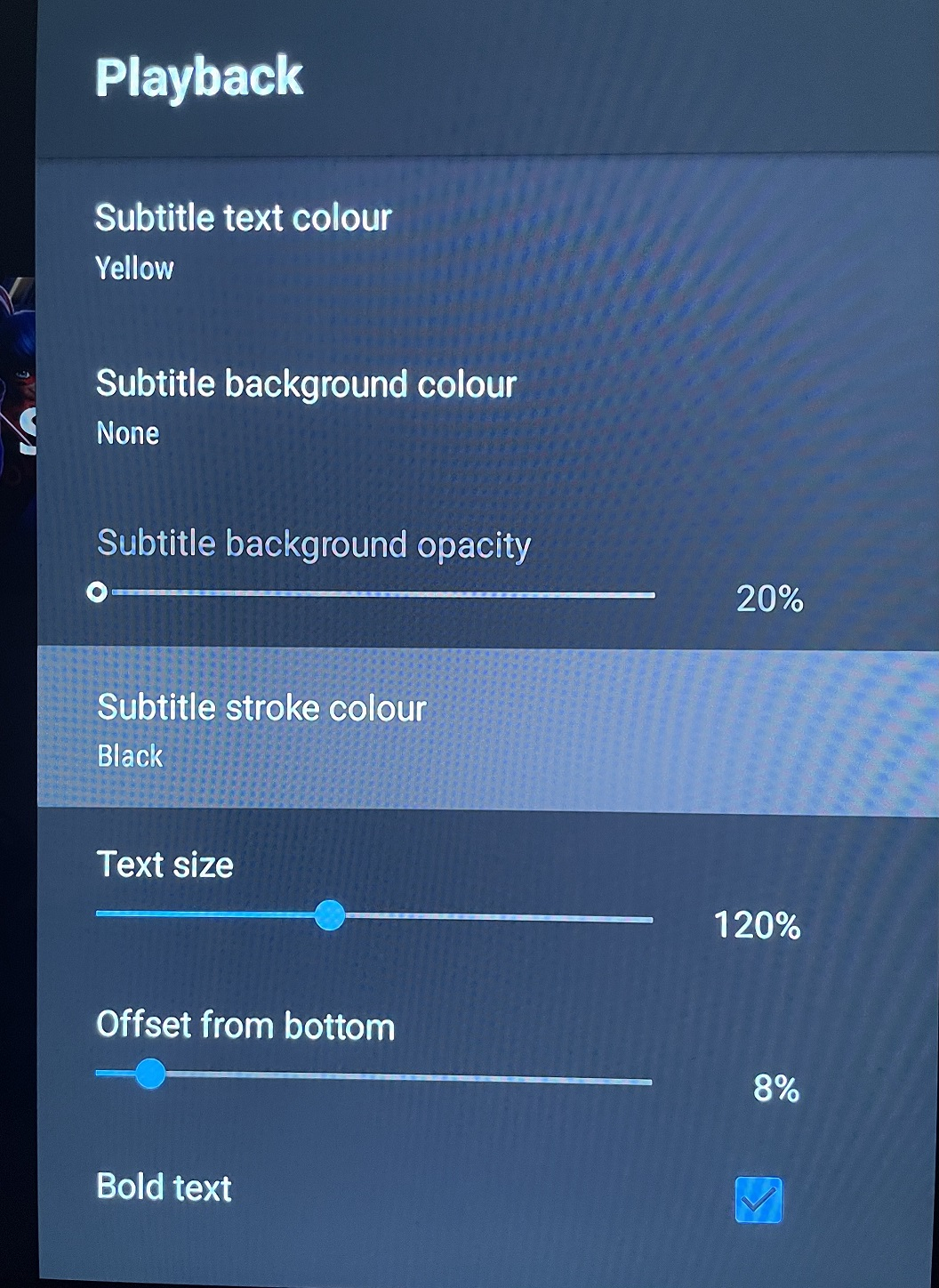
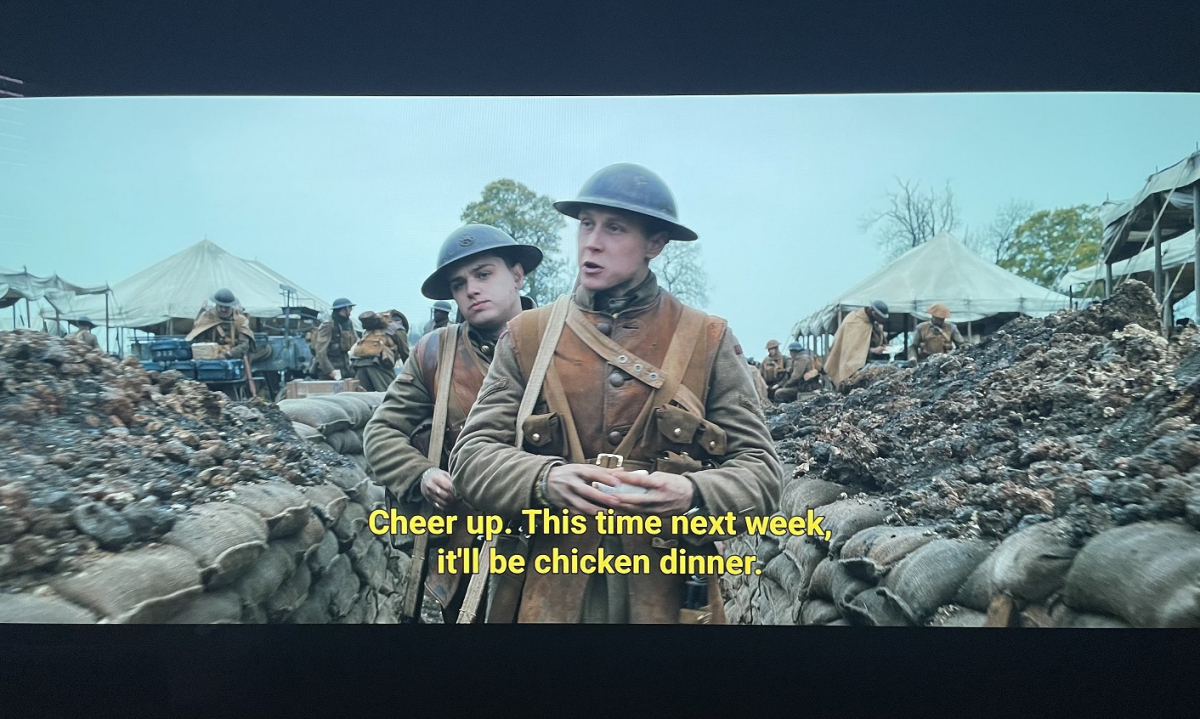
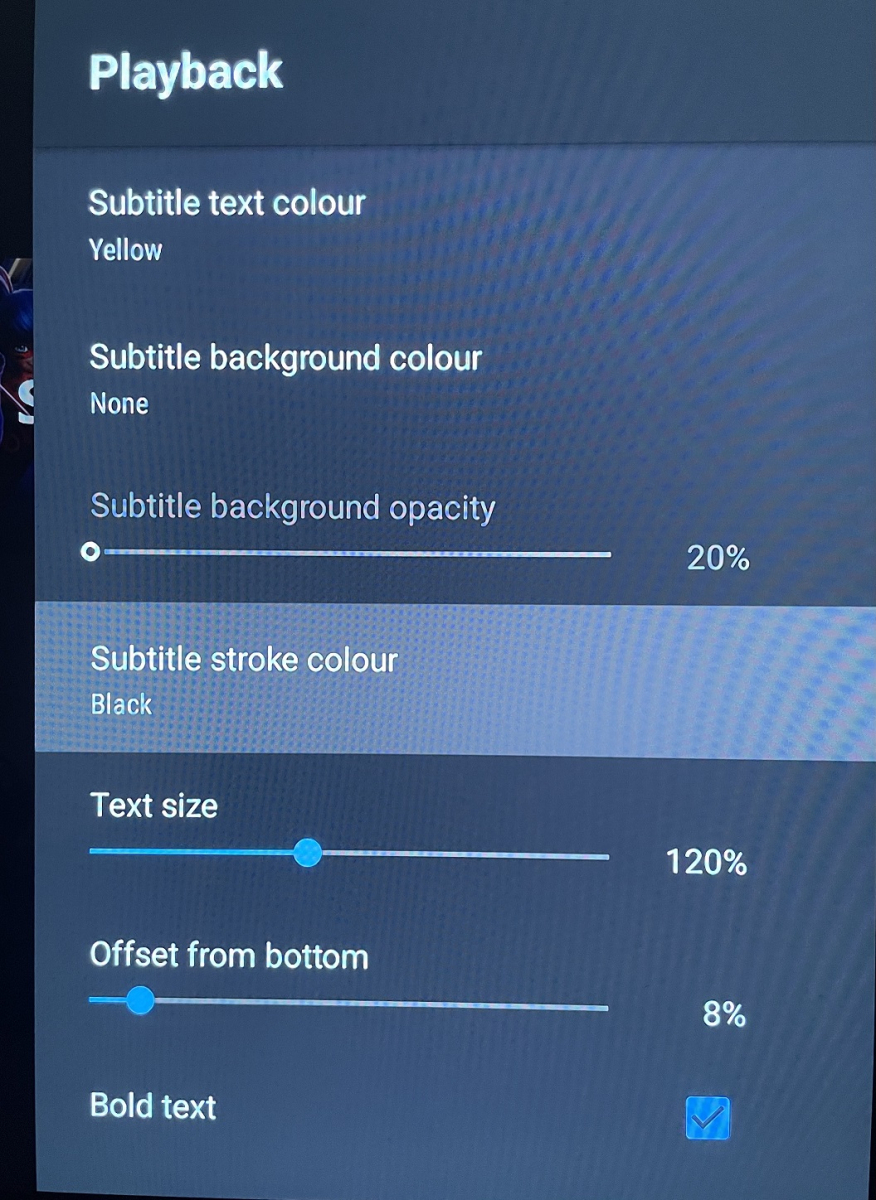
I have been playing around with the Jellyfin fork of Emby and noticed they offer more options with subtitles, and tested on their Android TV app, which doesn't offer choosing fonts, it does allow to select a bold font option. Just thought I would mention, in case this is something that might be a possibility in the future.. Web Options: Android TV: Nice weighted and visible font: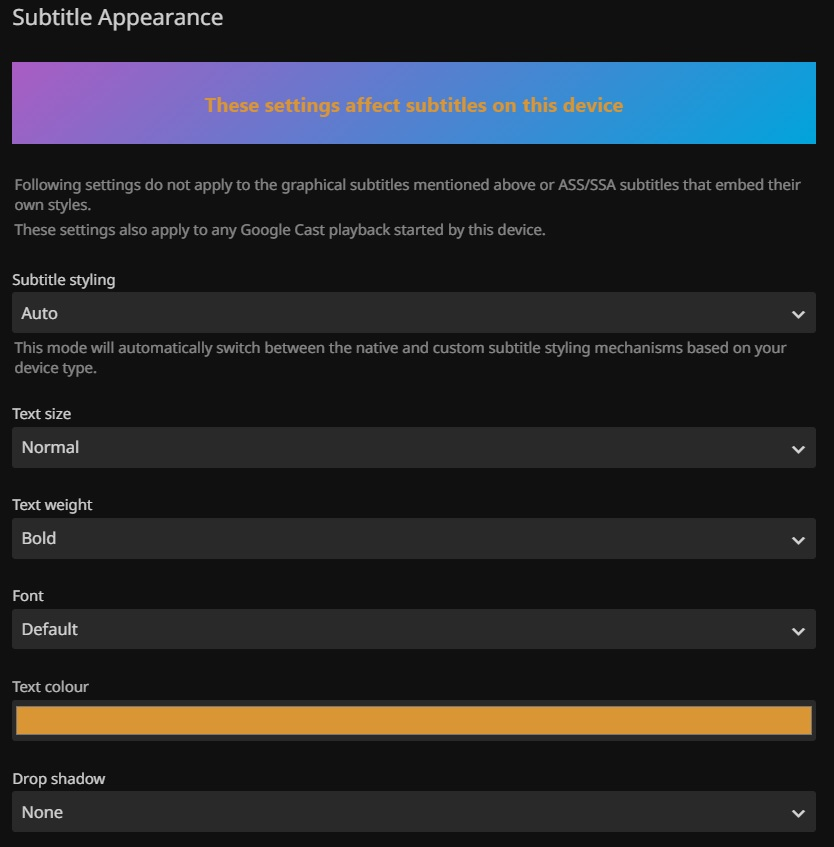
-
Hi there, I've been troubleshooting a hardware acceleration issue with the Emby snap package and wanted to document it for others hitting the same wall. First, my system info for reference: - OS: Ubuntu 24.04.3 LTS (Noble Numbat), Kernel 6.17.0-14-generic - CPU: Intel Core i3-14100F - GPU 1: NVIDIA GeForce RTX 3090 - GPU 2: Intel Arc A380 - Emby installed via Snap The Problem Emby can see and use the Nvidia RTX 3090 for hardware transcoding (NVENC) without issue, but completely fails to detect the Intel Arc A380 for VA-API / QSV transcoding. VA-API is confirmed working at the system level: $ sudo vainfo --display drm --device /dev/dri/renderD129 libva info: VA-API version 1.20.0 libva info: Trying to open /usr/lib/x86_64-linux-gnu/dri/iHD_drv_video.so libva info: Found init function __vaDriverInit_1_20 libva info: va_openDriver() returns 0 vainfo: VA-API version: 1.20 (libva 2.12.0) vainfo: Driver version: Intel iHD driver for Intel(R) Gen Graphics - 24.1.0 However, that same driver path (`/usr/lib/x86_64-linux-gnu/dri/`) appears empty inside the snap's confined environment; the Intel iHD drivers are simply not bundled with the snap package, and the sandbox prevents access to the host system's drivers. Unlike Nvidia (`/dev/nvidia*` devices are world-readable and accessible to the snap via the `opengl` plug), Intel needs those drivers to be included in snap. would be Happy to test any builds or provide additional logs. Would really love to keep the 3090 free for other workloads and use the Arc A380 for dedicated transcoding! (that's why I bought it after all) Thanks, -Max
-

No Trailers on Samsung TV app - taking ages for release still on 2.2.5
FrostByte replied to Robnaeyaert's topic in Samsung Smart TV
That being said you may not need to transcode anything on a Shield server (and client) if your TV is the only device which you watch media and you have a smaller library on usb drives as mentioned. Unless you have anything encoded in AV1 which most people don't. I haven't had to transcode anything since I got me Shield, but it's just my wife and I and we watch everything Samsung. My server is on a big NAS though with 8 drives plus an expansion cabinet. -

Symfonium: Music player and cast with Emby support
Tolriq replied to Tolriq's topic in Tools and Utilities
Version 14.0.0 Notes: This is a major version update. Please be sure to read the full changelog. Please remember to leave an updated written review on the Play Store. Your feedback is essential for improving the app’s ranking and helping secure Symfonium’s future. Added: Added many new now playing settings: Added new waveform bar type. (5 modes with precise settings over bars and reflection) Added icon color, overlay transparency and size settings for string buttons. Added precise size control and transparency level to control buttons. Added configurable protection for lyrics over cover. Added new spacer type for buttons, allowing more asymmetric designs. Added 5 toggleable booleans to custom strings, allowing more dynamic screens. Added more precise control of background blur level. Added text formatting controls for custom strings (Bold, Italic, Uppercase, Underline and Strike). Added share file as a possible button and string action. Added horizontal text position setting for the top bar. Added vertical text alignment setting for multiline fixed-size strings. Added control over transparency levels for most overlays and protections. Added new background overlay types and cleaned up the current implementation. Added 3 new customizable strings over cover. Added option to invert overlay and protection colors. Added option to force black overlays. Added new animated glow expanded background style. (Apple Music style, Android 13+). Added new fill size setting for cover in landscape to have it use as much space as possible in its side position. You can now customize the back and forward amount for expanded and compact player buttons. Added option to keep wave bar slider mode even if the data is missing or loading. Added option to swap buttons and collapse button in top bar. Added “album.type”, “output.current”, “renderer.current”, “renderer.type”, “sleep.timer”, “sleep.timer.seconds”, “sleep.timer.eos”, “player.repeat.mode”, “player.shuffle.mode”, “player.paused”, “filepath”, “filename”, “bool1” to “bool5” as possible custom string values. Added many new “string.*” as translatable custom string values to help making custom styles multi languages. Added a few new default now playing styles. Added fixed tertiary container as possible compact player background color. Added many new page settings: Added different background overlay types and transparency levels. Added precise header and image size controls. Added title and version bold and scale factor. Added subtitle and artists as text scale factor. Added option to show Favorite, Composer filter and More buttons in the button row, with option to split them from the playback actions. Added precise blur level control. Added center text, spacing and size control to albums in album and artist pages. Added option to space evenly buttons. Added option for album page to only show distinct artists in song list. Added custom string support as subtitle for Album and Artist page. Added random sorts to albums in Album and Artist pages. Added option to hide track numbers in Album page. Added many new media lists settings: Minimum columns for grids is now 1. Added nearly all display modes to all item types. Added Single line list, Text only list, Round card grid, Overlay grid, Vertical overlay, Landscape background overlay and Landscape overlay display modes. Landscape grid modes now have round and square versions everywhere. You can now hide unwanted buttons from the top button row. Added new settings to enable offline status and/or favorite status as overlay icons in lists for all media types. Added new setting to enable text centering on square grid display mode. Added new setting to control if Text only display mode is single line or not. Added many new home settings: Added precise size control for the top icon. Added 2 more possible shortcuts rows. Added Sync all as possible shortcut. Added tertiary container color as a possible header color. Added custom text as home row header title. Added precise control of header text font size, vertical padding, number of lines and center text option. Refactored overview style selection to split display modes and styles. Enabled many styles for overview items. Added setting to control visibility of the More button for overview lists. Sizes, spacing and padding can now be configured precisely. Added new Overlay grid, Vertical overlay, Landscape background overlay and Landscape overlay styles. Added new Multiline row and Carousel display modes. Added per-row controls to display Favorite, Offline status and Playlist type overlay icons. Added setting to hide subtitles in overview items. Added button to easily copy settings from another home row. Added option to change playlist affected to pinned playlist row. Added new row Recently added album artist. Added back Polish translation, thanks Medo for the work. Added support for MusicBee Love rating tags. (Loved to Favorite, Banned to Excluded from mixes). Added support for channel selection for PEQ filters (All, left or right) and lowered the minimum frequency to 5Hz. Added new setting to disable background and surface color changes when using dynamic colors. Added Stereo to Mono converter to the DSP. Added new Crossfade Setting: “Mix only” allows for seamless track overlaps without fading the volume. Added option to disable lyrics translations colors and word sync. Added option to disable lyric voice color indicator. Added new option to invert sort arrows. Added support for mixed “&&” and “||” operators with parenthesis support to the template system. Added support for mka, webm tag extraction to custom tag parser. Added new main navigation styles: Bottom docked toolbar, Bottom floating toolbar and Bottom floating toolbar with FAB. Added new “originaldate.year” and “releasedate.year” custom strings to only extract year from those values. Added new API calls to toggle the hide status bar and ignore camera hole settings. Changed: There is major changes in many interface settings, most settings should be properly migrated, but it’s possible some special cases requires you to configure again some details. Many default application and now playing styles have been updated. You can still easily modify them to fit your needs. If you never tweaked your interface now if the perfect time to try the new styles. Player keep paused state option is also applied to now playing cover swipes. Now playing queue properly updates favorites, ratings, … on external changes. Application styles export and import now also contain any custom home icon you have configured allowing to share full interface. Song mood and language smart filters now support all range of text filters. Updated the template engine to support combined && and ||, negative integers, double values and many more tweaks. If your custom strings relied on previous engine quirks, it is highly possible that you need to update your templates. Now playing top bar standard subtitle text now displays their associated icon if present. Use custom strings to remove them if necessary. Hopefully small performance gain in the custom tag parser without regression. Please open issue with tag extraction. Fixed: Fixed selection menu sometimes not visible. Fixed unwanted skip count increments in rare cases. Fixed Jellyfin quick connect sometimes not working. Fixed PEQ/GEG pre amp sometimes not applied after a track change. Fixed Plex offline caching (transcoding) sometimes generating bad mp3 instead of opus. Added a workaround to allow playback of invalid mp3 generated by Plex transcoding. Fixed some mp3 tag and images extraction issues on some cloud providers. Starting a radio mix or instant mix from current song in now playing no more restart the current song. Fixed possible Google Drive authentication issue with some accounts. https://support.symfonium.app/t/version-14-0-0-released/12787 -

Problems reading music video clips with Samsung
Tandhruil replied to Tandhruil's topic in Samsung Smart TV
Thank you for the answer. Effectively, I've no more ffmpeg logs with aac sound videos. I tried different formats on the samsung tv and an android device and add the logs to this message : 1 webm container and AV1 + OPUS codecs 2 mp4 container and AV1 + OPUS codecs 3 mp4 container and H264 + AAC codex For information, if the codec change but the file isn't update in the database, emby still believe its the previous codec and try to transcode it (4th test). Emby samsung client doesn't check the codecs of the file. but it seems there is still troubles between emby an samsungTV device (see embyserver.txt logs of 06/03/2026) If needed I can join the video files to 4tests.zip embyserver.txt -

Plugin: Home Screen Companion (formerly AutoTag)
chander421 replied to soderlund91's topic in Plugins
Just Date Added (& Date Modified if possible), file size, and Played (Last Played/Watched). Using these filters and the others already included in your plugin, it would be possible to completely replace Emby playlists like "Latest Media" & "Recently Released". Smart Playlists 2.0 have those, just in case ^^. Thanks! -
A few more updates.
-
Hi Luke, do you mean the remote stream quality (Mbps)? I already set it to 30 Mbps max. Doesn't Emby check for audio compatibility when starting a movie?
-
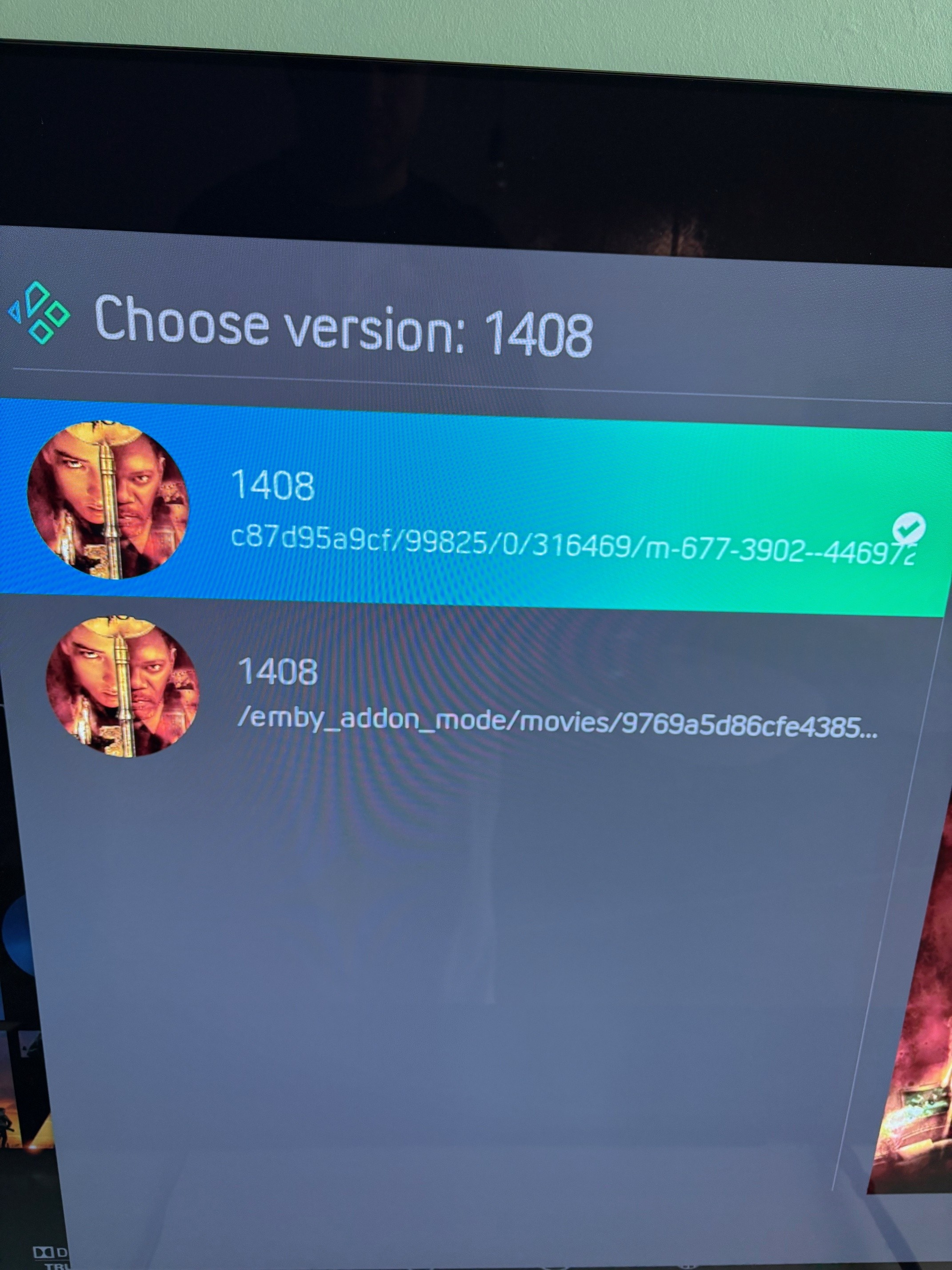
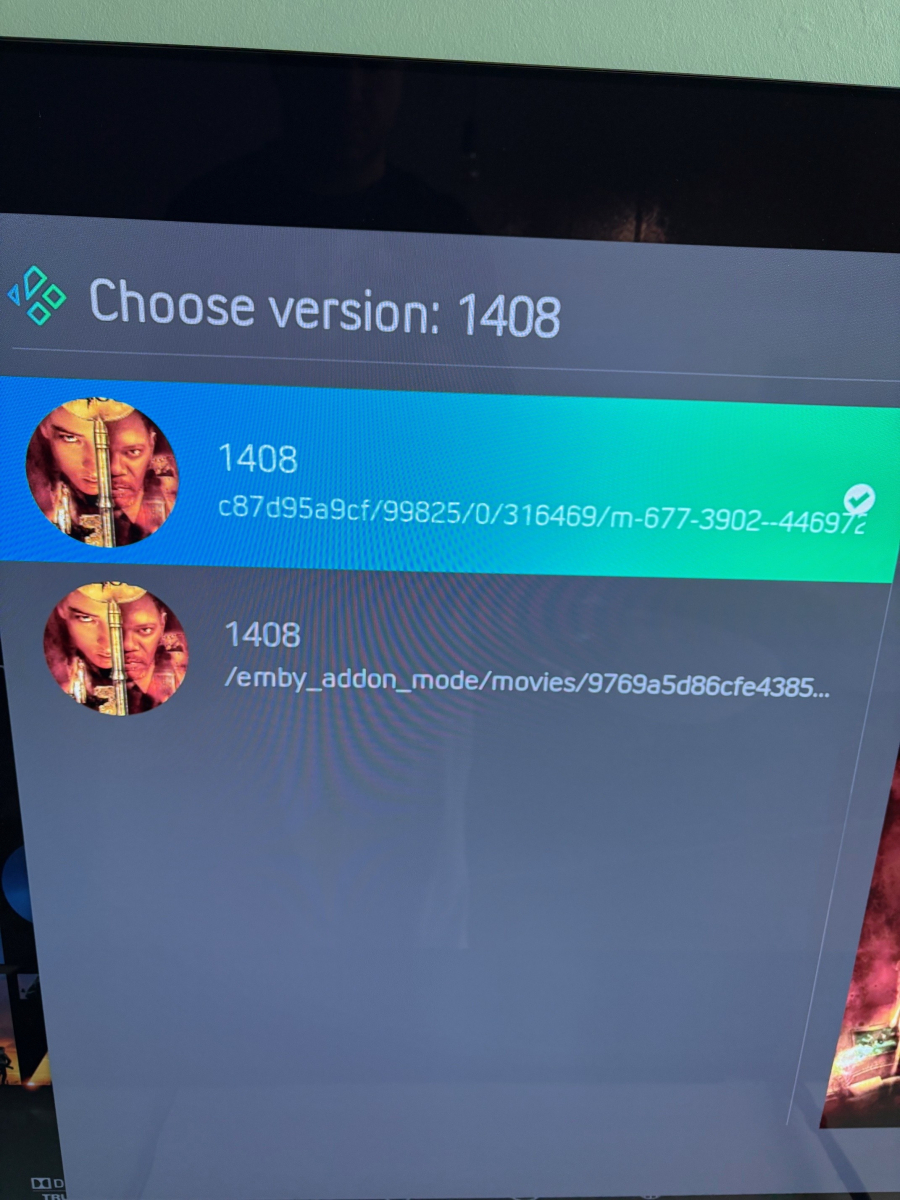
Here's an example of 1408. In the folder they're called Director's Cut and Theatrical Cut, yet Emby doesn't see a difference between them. And I know this used to work with this specific skin. Seems to be something else then?
-
.thumb.jpg.d1639af2d080f59454a5d8102bcb977e.jpg)
External player integration – can Emby send a direct file URL to an external player on Android?
Cotignac posted a topic in Android
I am running Emby on a R_volution PlayerPro 8K Android device. The device has an excellent built-in media player (Dune) that handles Dolby Vision, Dolby Atmos and lip sync perfectly, but it cannot read external SRT subtitle files. I would like to use Emby for library browsing and navigation, and then hand off playback to the built-in Dune player. My questions: Can Emby on Android send a direct network URL (for example an SMB or HTTP path) to the video file, so that an external player can open it directly without going through Emby's own player? Is there an Emby API call or intent that can launch an external Android player with a specific file or stream URL? Has anyone successfully integrated Emby with the Dune player on R_volution or similar devices? The reason I am not using Emby's built-in player is lip sync issues. The reason I am not using R_volution's own R_video app is that it requires a connection to their own servers to access the library, which I consider an unacceptable dependency. Any suggestions are welcome. -
HAHAHAHHAHAHA
-
Read this to setup remote access. Connecting from Client Apps | Emby Documentation
-
Hallo zusammen, Ja bei mir läuft es auch besser (Beta 4.10.0.4) am Smartphone getestet. Fire TV (Cube) und Web teste ich am Wochenende
-
It comes up on Windows inside the home. Remotely, it does not. Neither through the Android app or Windows.
-
I will do this and report back
-
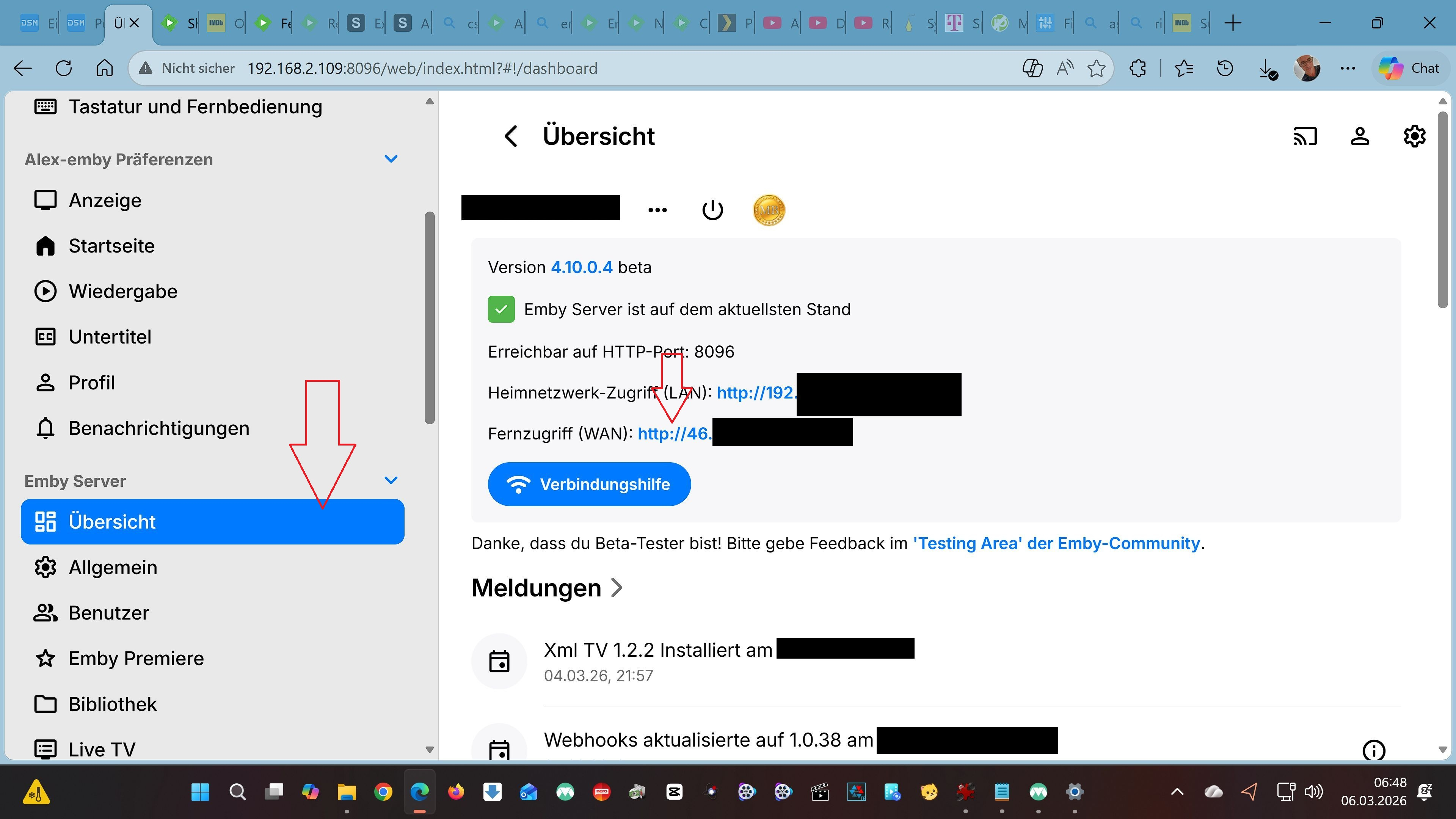
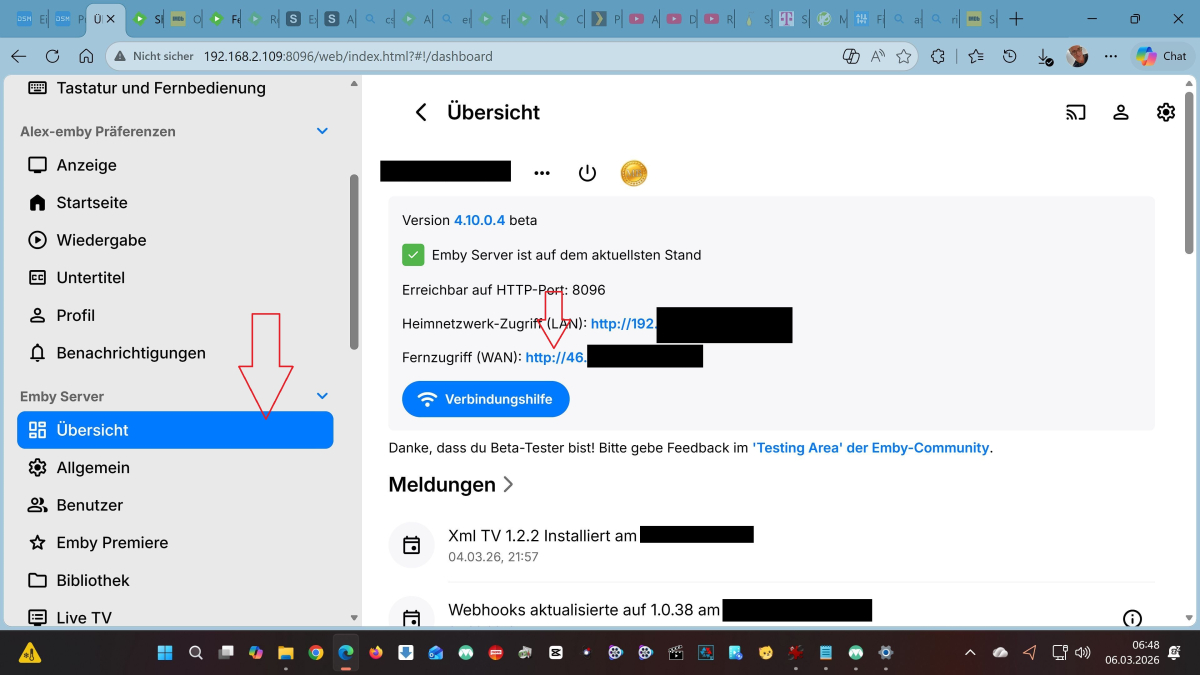
Hallo, Ich bin kein Experte und habe seit Anfang des Jahres mich auch mehr mit meiner Synology beschäftigt. Erst war es JellyFin das läuft im Heim Netzwerk und draußen ... Ständig kein Server ... Dann Plex das läuft und von draußen mit dem Plex Pass auch ohne Probleme. Aber Emby habe ich erst seit ca einer Woche und es ist so einfach zu installieren und im Heimnetzwerk bzw von draußen darauf zuzugreifen. Warum versuchst du es eigentlich über Quickconnect ? Gehe auf "Übersicht" und dort auf die WAN Nummer ... In der Android App meldest du dich mit deinen Emby Daten und dieser WAN Nummer an. LÄUFT Über Quickconnect laufen bei mir auch nur die Synology Apps File Station Audio Station ect Probiere es mal LG Alex
-

Subtitles Not Displaying on Chromecast After Starting Next Episode/Movie
gebruiker replied to gebruiker's topic in General/Windows
Will do. -

Fernzugriff WAN - täglich neu einstellen / verbinden
NCC1701A replied to NCC1701A's topic in Synology
Hallo zusammen, Aktuell habe ich immer noch die selbe IP Adresse. Ich bin mir nicht sicher warum. -

Fire tv stick and hybrid hdr10+/DV files now work?
kaledi replied to kaledi's topic in Android TV / Fire TV
Wow, great work. Thought it was a limitation of the device. -

issues with library, extras, movie listings
LostInTheFold replied to Sorahl's topic in General/Windows
I wanted to let you know that I moved the "extras" titles into the "trailers" folder and that seemed to solve the problem. So the summary of this is that the trailers folder does not have the same issue as the extras folder. Perhaps someone could look into how those two folders are treated. From my perspective, I have found a work around although it isn't the most perfect. I can live with it. If you do end up fixing it, posting to this thread would be great. -
Transcoded streaming over mobile network with the iOS app