All Activity
- Past hour
-
 Seagulls joined the community
 -
 cl604 joined the community
 -
 DHRUV_189 joined the community
 -
 אסתר אמינוב joined the community
 -
 hardi55 joined the community
 -
I've applied the changes and now it works fine. Is there any option to use the A2000 for decoding without this issues? Thank you for your dedication and patience.
-
 Fran333 joined the community
 -
 yz6369 joined the community
 -
 Maram_4m joined the community
 -
 tutututtuu joined the community
 -
 AKG2.0 joined the community
 -

data export from kodi (delete low resolution images?)
GrimReaper replied to familiezufall's topic in General/Windows
You have several options: per-item, per-folder, per-library / Search for missing or Replace all, you pick the one that suits your needs the best. -
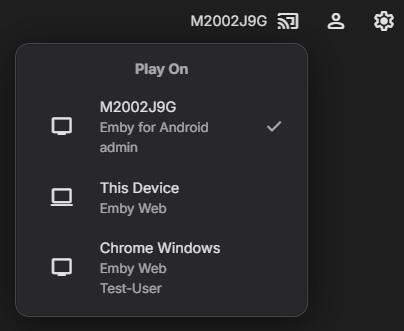
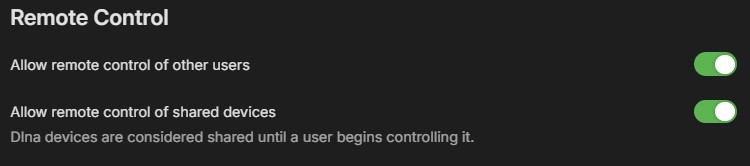
As soon as she opens the Emby app on her AppleTV and is signed in, her device should appear when you tap the cast icon on your device. Select her device, and now it should be displayed next to the cast icon. You can then start a movie or TV show from your library, and it should play on her device. Assuming you've enabled the option in your user profile
-
Good news — your tests ruled out both of my earlier theories. The index is fine (software seeks return in 0.15 s) and the disk is fine (281 MB/s). The problem is somewhere else entirely, and the new logs point at the NVDEC VC-1 decoder: after a seek it produces no frames at all, so ffmpeg dies before writing anything. Before I explain the details, could you try one quick change and tell me what happens? Dashboard → Transcoding → uncheck VC1 under hardware decoding. Leave everything else as it is — keep NVENC encoding on, and keep hardware decoding enabled for H.264 and HEVC. Then play Gran Torino and jump to somewhere around the 30-minute mark. With 4 cores the software VC-1 decode should keep up fine, and NVENC still handles the encoding. Let me know whether seeking works after that. If it does, we've found it and I'll explain what was going on. If it doesn't, send me the new logs and we keep digging.
-
@emveepeeAgreed and sometimes the guide I use has shows older than me marked as "new" so I know there will be conflicts or one-offs. But at least current shows on network TV that uses "Live" as their live version versus a repeat of that show several hours later would be able to be separated with a "Live" option.
-
TV Show Status — TMDB-powered Returning/Ended/Cancelled badges for series
GrimReaper replied to Blueskies278's topic in Plugins
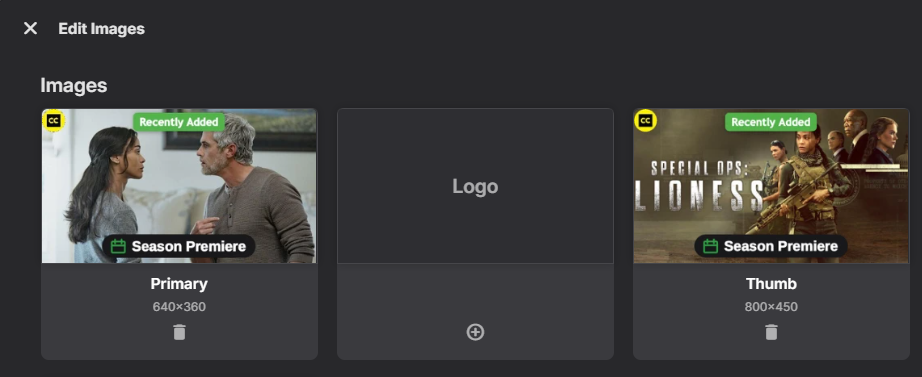
I have written few post about that over the years, most recent topic: As my ultimate goal is/was TV show thumb with episode overlays in CW row (not feasible by Emby core as no naming convention), what I've currently settled on is local webhook listener which copies TV show landscape image on any new episode import as that episode thumb-type image, ultimately providing desired result:
-

data export from kodi (delete low resolution images?)
familiezufall replied to familiezufall's topic in General/Windows
if i refresh metadata, emby refresh only the files they have to refreshed or the complete hdd? -
Shouldn’t you do this in your firewall and / or reverse proxy? Those are devices which generated for security and access control.
-

TV Show Status — TMDB-powered Returning/Ended/Cancelled badges for series
ginjaninja replied to Blueskies278's topic in Plugins
Thats interesting. Episode images, episode thumbs - have premiere|finale and show posters, thumbs have ended, complete, and next air date. By manually adding a thumbnail to s3e1 bottom, i got "continue watching" to show the episode level information - not a realistic outcome becuase you typically wont apply thumbnails to every episode. But the conclusion is that Emby's fall back for finding artwork, episode>show, does not ascribe eg episode to the image processing calculation, if it falls back to show thumb, then it gets the image processing for show thumb, i wonder wether luke could change that behaviour (wether it fits with the emby ecosystem or not). If i ascribe a season thumbnail, it is not used, so episode doesnt fallback to season then show...it goes straight to show , perhaps that is something that luke would more likely consider changing if it fits the ecosystem. I also note i have yet to see any staleness in the image processing, it seems immediate to me, and i have never had to refresh, the last possibility is that luke is persuaded to adopt per user behaviour for the image overlay function, but that would explode the image cache on large families and probably an unrealstic rewrite of image caching as nothing else is per user. Maybe luke could be persuaded to support a no cache configuration for processed images...but its starting to get messy... So really the only workable option in the here and now is for the show poster|thumbnail to show the desired information. And "This season is complete and ready to binge" isnt a show level property with the best will in the world, unless you overlay the show image processing calculation with a users watched status, which as luck would have it, thats what you offer (in the settings at least). The best config is one where potentially up to three bits of information are shown on the show poster / thumbnail. 1. Show ended, next air date 2. Season completeness for the current episode in continue watching for a named user. (on played event recalculates images participating) 3. episode premiere/null/finale for the current episode in continue watching for a name user. (on played event recalculates images participating) perhaps with options as to what the user wants to show on which image poster|thumb.If this is the only way i will be happy to specify a user. Do you think a named user with on played event recalculation might be worth exploring?
-
How did you restart tv? I unlugged it from the wall and still stucked on same emby exit screen ? Thank you for answer.
- Today
-
Everything has been running under emby lxc before and now: 1º: + EBML head size 40 data size 35 |+ EBML version: 1 size 4 data size 1 |+ EBML read version: 1 size 4 data size 1 |+ Maximum EBML ID length: 4 size 4 data size 1 |+ Maximum EBML size length: 8 size 4 data size 1 |+ Document type: matroska size 11 data size 8 |+ Document type version: 4 size 4 data size 1 |+ Document type read version: 2 size 4 data size 1 + Segment: size 26027072746 size 26027072758 data size 26027072746 |+ Seek head (subentries will be skipped) size 86 data size 81 |+ EBML void: size 4010 size 4013 data size 4010 |+ Segment information size 150 data size 144 | + Timestamp scale: 1000000 size 7 data size 3 | + Multiplexing application: libebml v1.3.4 + libmatroska v1.4.5 size 38 data size 35 | + Writing application: mkvmerge v13.0.0 ('The Juggler') 64bit size 41 data size 38 | + Duration: 01:56:40.651000000 size 7 data size 4 | + Date: 2017-07-14 10:45:54 UTC size 11 data size 8 | + Title: Gran Torino (2008) size 21 data size 18 | + Segment UID: 0x99 0x76 0x85 0x09 0xff 0xfa 0xc2 0x28 0x9e 0x8f 0xa0 0x15 0xc2 0xdc 0xde 0x3c size 19 data size 16 |+ Tracks size 508 data size 502 | + Track size 153 data size 150 | + Track number: 1 (track ID for mkvmerge & mkvextract: 0) size 3 data size 1 | + Track UID: 176360255512953789 size 11 data size 8 | + Track type: video size 3 data size 1 | + "Lacing" flag: 0 size 3 data size 1 | + Minimum cache: 1 size 4 data size 1 | + Codec ID: V_MS/VFW/FOURCC size 17 data size 15 | + Codec's private data: size 74 (FourCC: 0x57564331 "WVC1": VC-1) size 77 data size 74 | + Default duration: 00:00:00.041708333 (23.976 frames/fields per second for a video track) size 8 data size 4 | + Video track size 24 data size 22 | + Pixel width: 1920 size 4 data size 2 | + Pixel height: 1080 size 4 data size 2 | + Display width: 1920 size 7 data size 4 | + Display height: 1080 size 7 data size 4 | + Track size 74 data size 72 | + Track number: 2 (track ID for mkvmerge & mkvextract: 1) size 3 data size 1 | + Track UID: 8233816553667599537 size 11 data size 8 | + Track type: audio size 3 data size 1 | + Codec ID: A_AC3 size 7 data size 5 | + Default duration: 00:00:00.032000000 (31.250 frames/fields per second for a video track) size 8 data size 4 2º was giving errors but i´ve checked the execution rights and looks fine: ls -l /opt/emby-server/bin/ total 1268 -rwxr-xr-x 1 root root 581 ago 22 2017 emby-clinfo -rwxr-xr-x 1 root root 577 ago 22 2017 emby-ffdetect -rwxr-xr-x 1 root root 575 ago 22 2017 emby-ffmpeg -rwxr-xr-x 1 root root 930 ago 22 2017 emby-server -rwxr-xr-x 1 root root 581 ago 22 2017 emby-vainfo -rwxr-xr-x 1 root root 104168 ago 22 2017 ffdetect -rwxr-xr-x 1 root root 927568 ago 22 2017 ffmpeg -rwxr-xr-x 1 root root 797032 ago 22 2017 ffprobe Also i´ve tried with the other bin file and it has runned fine: for t in 00:00:10 00:01:39 00:10:30 00:33:30; do echo "== $t"; time /opt/emby-server/bin/emby-ffmpeg -hide_banner -v error -ss $t -i "$FILE" -frames:v 1 -f null -; done == 00:00:10 real 0m0,111s user 0m0,076s sys 0m0,027s == 00:01:39 real 0m0,146s user 0m0,105s sys 0m0,023s == 00:10:30 real 0m0,246s user 0m0,208s sys 0m0,026s == 00:33:30 real 0m0,146s user 0m0,115s sys 0m0,023s 3º: dd if="$FILE" of=/dev/null bs=1M skip=7000 count=200 iflag=direct 200+0 records in 200+0 records out 209715200 bytes (210 MB, 200 MiB) copied, 0,746605 s, 281 MB/s Extra tests: Software: time /opt/emby-server/bin/emby-ffmpeg -hide_banner -v error \ -ss 00:33:30 -i "$FILE" -frames:v 1 -f null - real 0m0,141s user 0m0,117s sys 0m0,023s Hardware: time /opt/emby-server/bin/emby-ffmpeg -hide_banner -v error \ -init_hw_device cuda=cuda:0 -f matroska,webm -ss 00:33:30 \ -c:v vc1_cuvid -hwaccel cuda -hwaccel_output_format cuda \ -i "$FILE" -frames:v 1 -f null - real 0m1,296s user 0m0,033s sys 0m1,022s I´ve attached the logs after the two extras cores were added Logs.zip
-
data export from kodi (delete low resolution images?)
GrimReaper replied to familiezufall's topic in General/Windows
Then as said: If it's a multi-movie folder, they'll still be named: If each movie is in its own folder, they'll be named: -
data export from kodi (delete low resolution images?)
familiezufall replied to familiezufall's topic in General/Windows
i want new files like poster.jpg, discart.jpg etc -
data export from kodi (delete low resolution images?)
GrimReaper replied to familiezufall's topic in General/Windows
Only on Refresh Metadata. Edit: Hm, do you want them to be recreated or you don't want them next to media? -
Just chiming in to say that this is stil not resolved - and that it´s still annoying as hell -, 6 years after it was first reported. Please, please look into it, once and for all. Thank you!
-
data export from kodi (delete low resolution images?)
familiezufall posted a topic in General/Windows
Hi, I originally created my Emby database from a Kodi export. Now, almost all my folders contain low-resolution image files, all following the naming convention `moviename-fanart`, `moviename-poster`, etc. Can I search for all files ending in `-fanart`, `-poster`, etc., and delete them in a batch? Will Emby regenerate all these files upon restarting? -
Hallo ich habe meine Datenbank in emby noch aus einem kodi export erstellt. Jetzt habe ich in fast allen Ordner niedrig aufgelöste Bilddateien und alle haben das Format filmname-fanart, filmname-poster etc Kann ich jetzt alle -fanart, -poster, etc suchen und im bBatch löschen? Erzeugt emby dann bei Neustart alle Dateien neu?
-

Upgraded 4.9.3 -> 4.9.5 (Artwork and data for movies disappearing on scheduled scans?)
mike3821 replied to mike3821's topic in Linux
I went through the server log more closely, and I think the main thing to investigate is the library validation/removal process rather than just the individual missing-image requests. At 06:01:11 Emby starts: ValidatePhysicalRoots start validating 12970 Movies /media/media/Movies Shortly afterward it begins removing large numbers of existing movie folders from the database and deleting their internal metadata directories: Removing item from database, Type: Folder, Name: 3 Ninjas (1992), Path: /media/media/Movies/3 Ninjas (1992), Id: 19140294 followed by: Deleting path /var/lib/emby/metadata/library/... This happens on a very large scale. In this log there are 982 Removing item from database, Type: Folder entries and 2,952 Deleting path /var/lib/emby/metadata/library/... entries. The important part is that these media folders were not actually gone. A short time later Emby starts probing and re-importing the same movies again. For example, 3 Ninjas (1992) is removed at 06:01:56, then at 06:03:33 Emby is ffprobing the movie again, contacting TMDB/OMDb/Fanart, and creating new item records. Since Emby stores downloaded artwork under /var/lib/emby/metadata/library/..., could you please investigate why ValidatePhysicalRoots is removing existing library items and deleting their metadata directories, only to immediately rediscover/rebuild the same media? This seems potentially very relevant to the disappearing artwork issue. If the existing item is removed and its metadata directory is deleted, then the artwork associated with that item can be removed as well. Recreating the movie may also result in new item IDs/image metadata while other references or cached clients may still refer to the old records. There is also a separate artwork error in the log where the client requests: /Items/17194232/Images/Logo?maxHeight=220 and Emby responds: 17194232 does not have an image of type Logo with HTTP 404. However, those Logo 404s occur before this particular mass deletion sequence, so I don't think that specific deletion event caused those particular 404s. My main concern is the repeated pattern of: ValidatePhysicalRoots -> Removing item from database -> Deleting /var/lib/emby/metadata/library/... -> same media immediately rediscovered/re-added Could you please focus on why that is happening and whether it can cause existing artwork/image metadata to be lost during library validation? -

Regarding the issue of 4.9.1.80 and the plugin Bluray Folder Support 1.0.3.0 recognizing BDMV original disc fi
LonelyCat replied to LonelyCat's topic in Synology
Yeah! The dots! Thank you very much for discovering the issue. I am looking forward to fixing it in the next version。 -

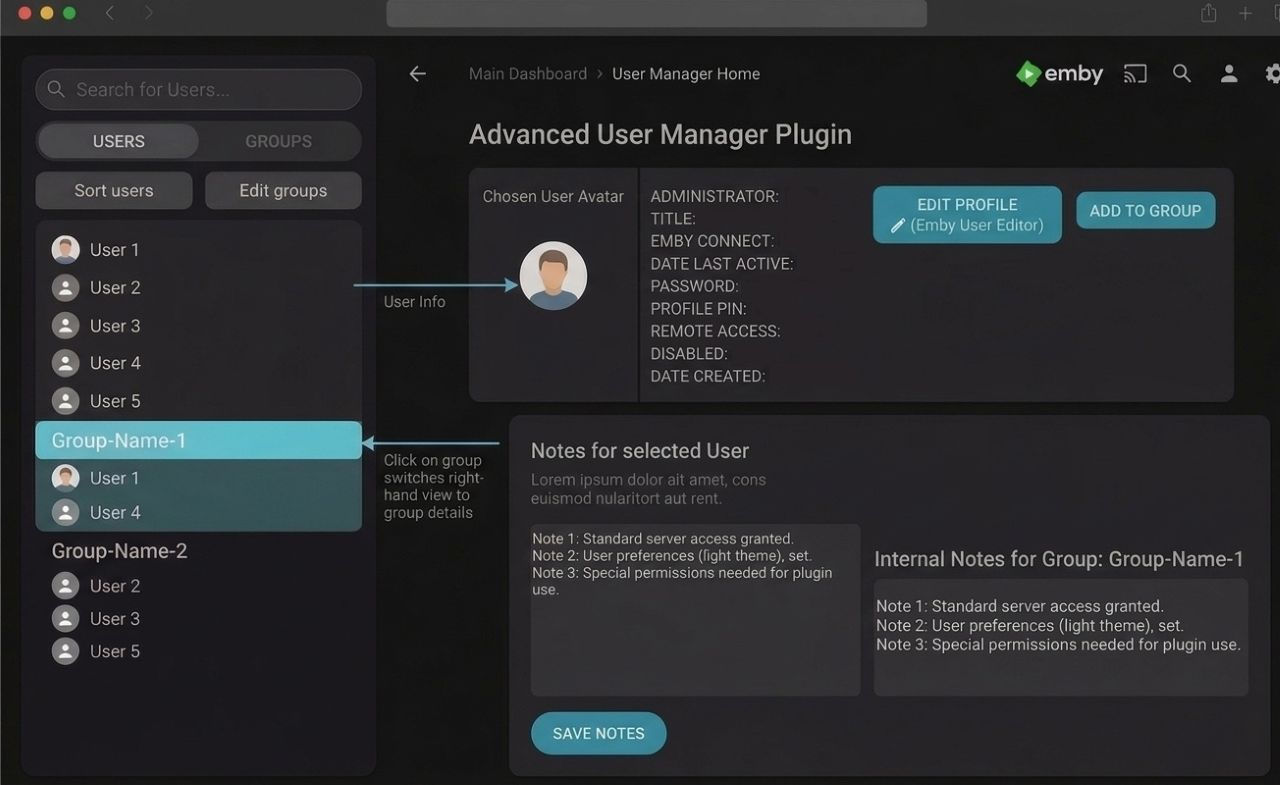
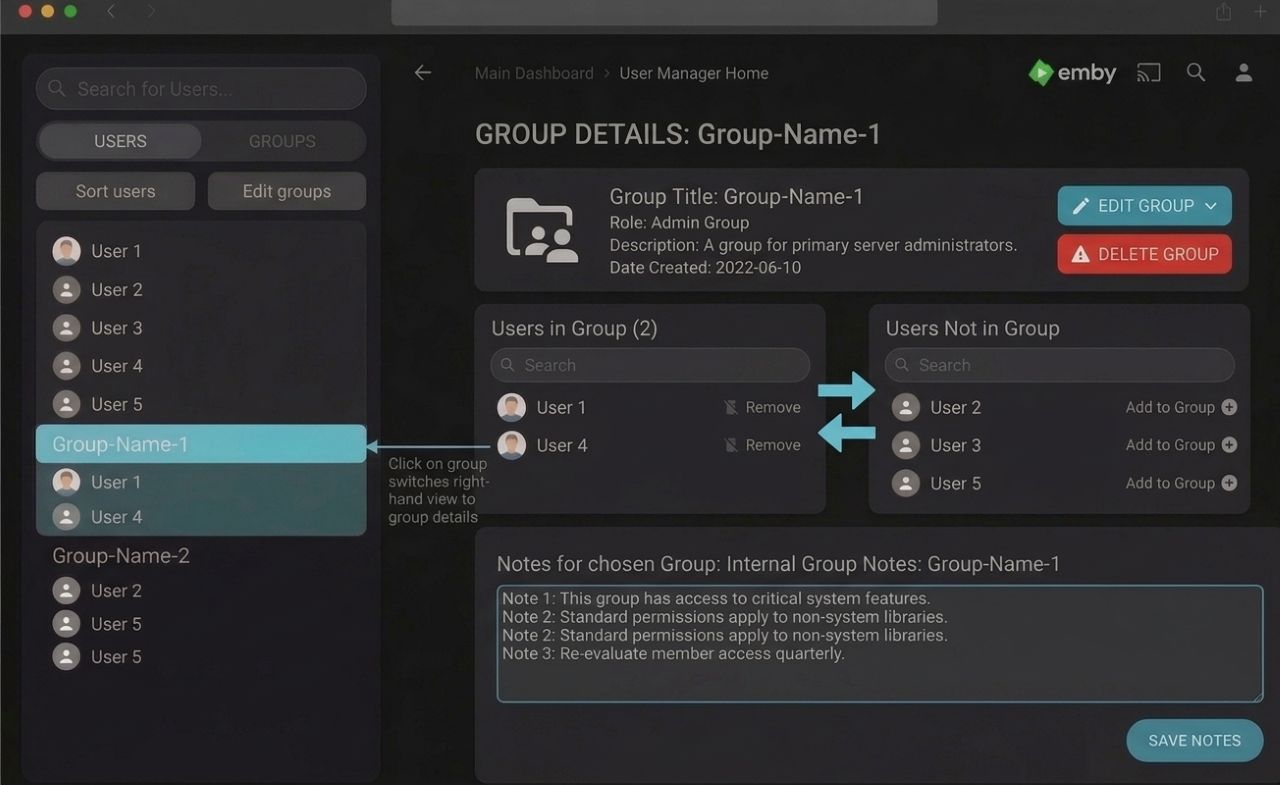
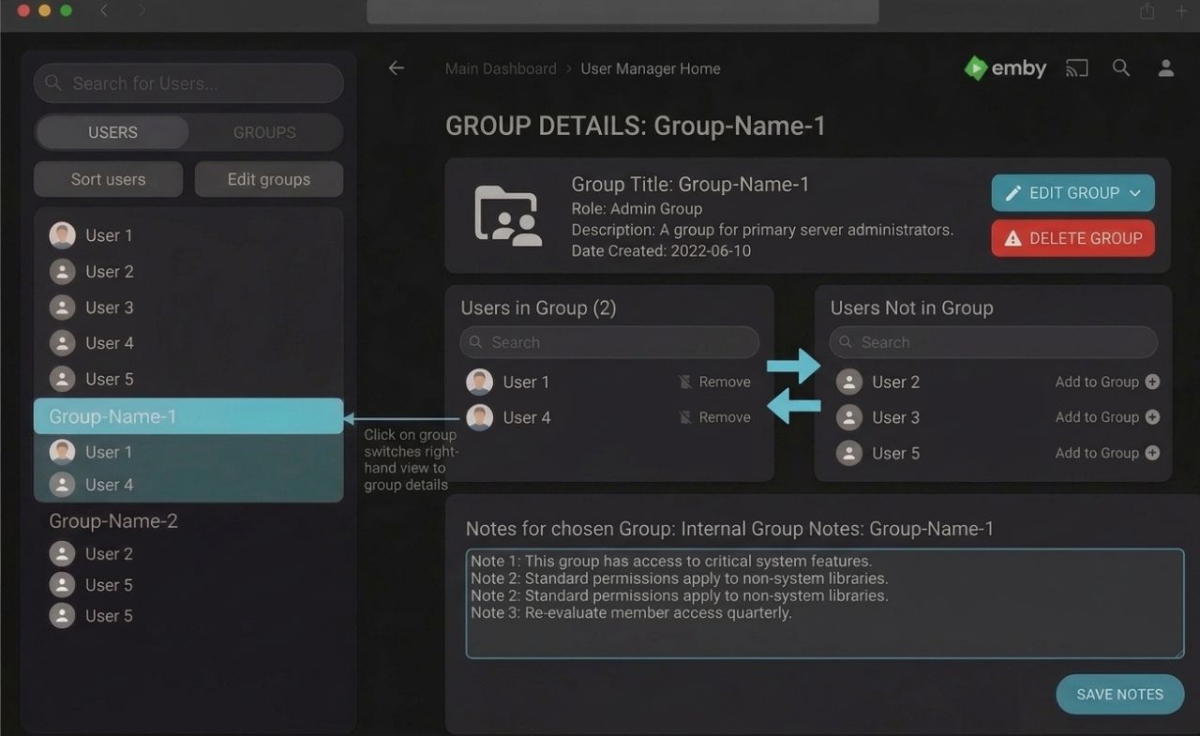
Have an "Admin Notes" section under each user account
SoliFlix replied to bennymac's topic in Feature Requests
If the admins don't implement this natively, I could try to create a plugin for it – here are some AI-generated mockups of what I think it could look like.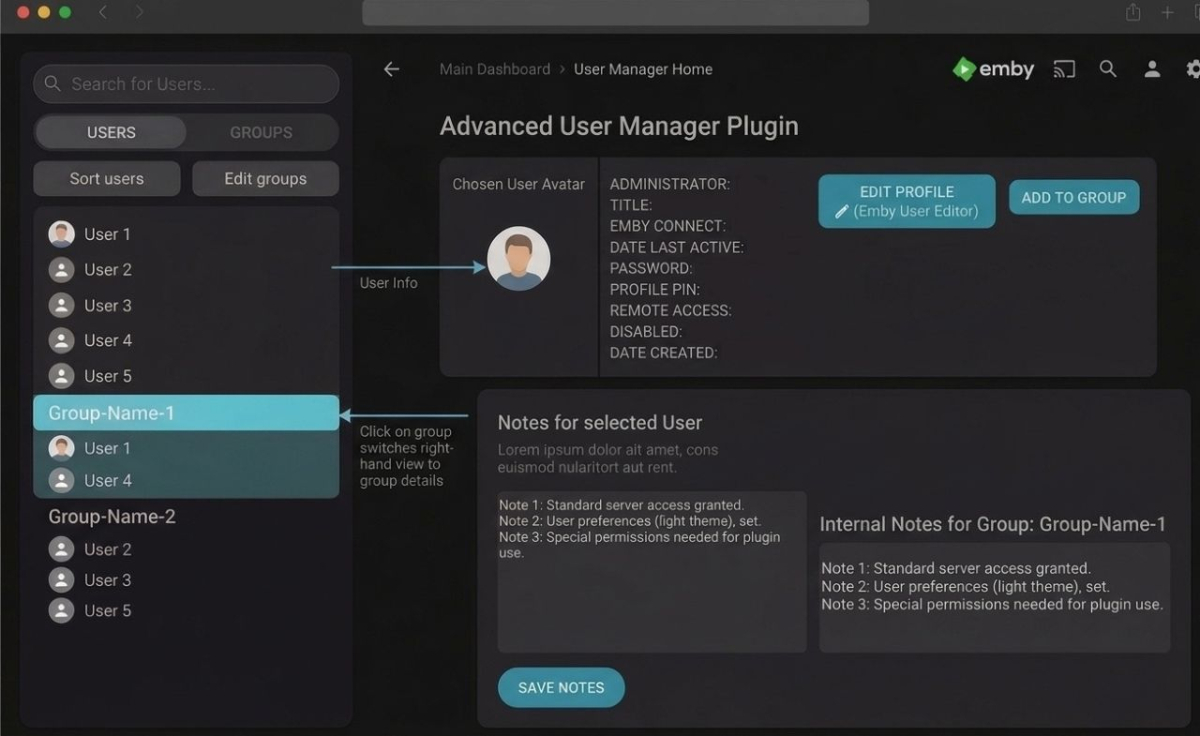
-
Ya, I said the same thing earlier. There has to be a way to make it so that people with fast connections don't have to see the message at all.
-
Thanks — but neither of those two tests actually measured what we need. Here's what they show: The ffmpeg seek test didn't run. real 0m0.002s is 2 milliseconds. A process can't even start that fast, let alone open a 26 GB file and decode a frame. It errored out immediately and the 2>/dev/null hid the message. Most likely the path didn't resolve in that shell — were you on the Proxmox host rather than inside the Emby container? Please re-run it without discarding stderr. The dd test read from RAM, not disk. 9.2 GB/s is faster than any NVMe drive on the market (Gen4 tops out around 7 GB/s). That's the page cache serving a file that was already warm — probably from your own earlier ffmpeg attempt. It tells us nothing about a cold read. The mkvinfo output is inconclusive. I only see the Seek head line; no Cues element appeared. That may mean the index is genuinely missing (which would explain everything), or it may mean the output got cut. I need the full top-level element list. Could you re-run these, inside the Emby container: FILE="/discos/Peliculas/Pelis/G/Gran Torino (2008) [tmdb=13223] 1080p.mkv" # 1. Full element list — I'm looking for whether "Cues" is present mkvinfo "$FILE" | head -40 # 2. Seek timing at several depths, errors visible for t in 00:00:10 00:01:39 00:10:30 00:33:30; do echo "== $t" time /opt/emby-server/bin/ffmpeg -hide_banner -v error \ -ss $t -i "$FILE" -frames:v 1 -f null - done # 3. Cold read, bypassing cache dd if="$FILE" of=/dev/null bs=1M skip=7000 count=200 iflag=direct One more test, and it may be the answer If it turns out the storage is genuinely fast, then the index isn't the problem and I'd suspect the NVDEC VC-1 decoderinstead. Seeking with vc1_cuvid is a known weak spot — the hardware decoder can stall for a long time before emitting the first frame after a seek, and it wouldn't show up when starting from position 0. This isolates it — same seek, software decode vs. the exact hardware path Emby uses: # software decode time /opt/emby-server/bin/ffmpeg -hide_banner -v error \ -ss 00:33:30 -i "$FILE" -frames:v 1 -f null - # hardware decode, exactly as Emby invokes it time /opt/emby-server/bin/ffmpeg -hide_banner -v error \ -init_hw_device cuda=cuda:0 -f matroska,webm -ss 00:33:30 \ -c:v vc1_cuvid -hwaccel cuda -hwaccel_output_format cuda \ -i "$FILE" -frames:v 1 -f null - If the first is fast and the second is slow, the fix is simple: in Transcoding settings, turn off hardware decoding for VC-1 while leaving NVENC encoding on. You lose a little decode efficiency on this one codec and get working seeks. And the thing you didn't mention You added two cores — thanks. But you didn't say whether seeking behaves any differently now. That's the most important piece of information I'm missing. Could you try jumping to the 30-minute mark on the TV again and tell me what happens, and send the fresh embyserver.txt plus any new ffmpeg logs? If it still hangs, the new logs will show whether the failure window moved at all.
-
Plex is far from a home media server Fuck Plex.mp4
-
Here is all the info: Mkvinfo: |+ Seek head (subentries will be skipped) size 86 data size 81 Seek rate: time /opt/emby-server/bin/ffmpeg -ss 00:33:30 -i "/discos/Peliculas/Pelis/G/Gran Torino (2008) [tmdb=13223] 1080p.mkv" -frames:v 1 -f null - 2>/dev/null real 0m0,002s user 0m0,000s sys 0m0,002s Random-access: time dd if="/discos/Peliculas/Pelis/G/Gran Torino (2008) [tmdb=13223] 1080p.mkv" of=/dev/null bs=1M skip=7000 count=200 200+0 records in 200+0 records out 209715200 bytes (210 MB, 200 MiB) copied, 0,0228371 s, 9,2 GB/s real 0m0,026s user 0m0,000s sys 0m0,025s I´ve added two extra cores
-
No Refunds dude, go check out Plex it's only I heard 50 thousand per month to watch ADS all day long.