All Activity
- Past hour
-
I am new to Emby and have lots to learn. I have purchased the appropriate Emby Premier license. Emby says recordings are in \config\emby-server. I can't find that path anywhere on my Mac. I have searched, using Finder, the Users folders, my folder under Users, the Macintosh HD folder, and ever a couple of the attached hd. Nothing. So just where is that folder supposed to be? And how can I make sure the DVR recordings go to the folder I want them to go to, the ones I listed in the DVR Settings part of my dashboard? Thank you for the help. Oh, and if it matters, I am using a Mac Mini M4 running MacOS 26.3.
-
 Zozoattallah joined the community
 -
 Nevary joined the community
 -
 diego_2026 joined the community
 -
 g62morej joined the community
 -
Just pinging this thread to check back on any progress for a native AAOS client. Additionally I have sideloaded the Emby Android client onto my Chevrolet and it works quite well, a few screen navigation issues but I was able to connect to my home Emby Server and watch videos while parked.
-
 elimelech12 joined the community
 -
 NoeliaTudela9 joined the community
 -
Here it is and it looks like it sees only the GPU in the Intel processor: 2026-02-21 20:37:14.108 Info Application: App details Name: Emby Client Beta Version: 2.295.0 Nom de l’appareil:debian Debian GNU/Linux 13 (trixie) ID de l’appareil:4f541598deb3410aaa798514bfeec5ce Colis: Emby Client, X64, Debian GNU/Linux 13 (trixie) Chemin d’accès aux données:/home/vincen/.config/Emby Client Beta/data Chemin d’accès au journal:/home/vincen/.config/Emby Client Beta/cache/logs Racine de toile:/opt/Emby-Beta/resources/bin/web OS Info:: Unix .NET 8.0.22 OS/App:: x64/x64 DesktopEnvironment::KDE - Version 6.3.6 Sesstion:: KDE - Version wayland IsWSL:: False 2026-02-21 20:37:14.125 Info MainViewLinux: MainViewLinux - Run 2026-02-21 20:37:14.125 Info MainViewLinux: MainViewLinux - CommandLine: /opt/Emby-Beta/resources/bin/Emby.Client.Electron.dll --no-sandbox 2026-02-21 20:37:14.444 Info PlatformCodeService: System Spec: OS: Linux Distro: Debian (raw: debian) DE: KDE (raw: KDE) DisplayServer: Wayland CPU: Intel (raw: 11th Gen Intel(R) Core(TM) i7-11800H @ 2.30GHz) IntelGen: TigerLake GPU: Intel (raw: 00:02.0 VGA compatible controller [0300]: Intel Corporation TigerLake-H GT1 [UHD Graphics] [8086:9a60] (rev 01)) IntelGpuGen: TigerLake RAM: Gb32 (bytes: 33429803008) Display1: FHD (raw: 1920x1080) [Primary] (eDP-1) Display2: NoDisplay (raw: ) Display3: NoDisplay (raw: ) Display4: NoDisplay (raw: ) Notes: - os-release VERSION_ID=13 - de version=6.3.6 2026-02-21 20:37:14.445 Info PlatformCodeService: System ^Code: 1DTG56ATZ9OC81SH81Z1 2026-02-21 20:37:14.706 Warn ApplicationStateMonitor: App_BrowserWindowFocus 2026-02-21 20:37:15.788 Debug Application: ConnectWebView 1 2026-02-21 20:37:15.989 Debug InhibitionHost: Try PortalInhibitProvider 2026-02-21 20:37:16.002 Debug InhibitionHost: Adding candidate 'PortalInhibitProvider' 2026-02-21 20:37:16.002 Debug InhibitionHost: Try GnomeSessionManager 2026-02-21 20:37:16.003 Debug InhibitionHost: Dropping candidate 'GnomeSessionManager' 2026-02-21 20:37:16.003 Debug InhibitionHost: Try ScreenSaverProvider 2026-02-21 20:37:16.006 Debug InhibitionHost: Adding candidate 'ScreenSaverProvider' 2026-02-21 20:37:16.006 Debug InhibitionHost: Try FreedesktopPowerManagementProvider 2026-02-21 20:37:16.008 Debug InhibitionHost: Adding candidate 'FreedesktopPowerManagementProvider' 2026-02-21 20:37:16.020 Debug CoreMpvPlayer: .ctor [1 - 0 16]: ctor2 2026-02-21 20:37:16.028 Debug CoreMpvPlayer: .ctor [1 - 7F5B680197A0 16]: ctor2-exit 2026-02-21 20:37:16.029 Debug CoreMpvPlayer: CommandNoThrow [1 - 7F5B680197A0 16]: CommandNoThrow: set d3d11-adapter help 2026-02-21 20:37:16.040 Debug CoreMpvPlayer: CommandNoThrow [1 - 7F5B680197A0 16]: CommandNoThrow: set gpu-context help 2026-02-21 20:37:16.070 Debug CoreMpvPlayer: DisposeAsync [1 - 7F5B680197A0 16]: DisposeAsync 2026-02-21 20:37:16.071 Debug CoreMpvPlayer: EventLoop [1 - 7F5B680197A0 20]: EventLoop: isDisposing detected, exiting loop 2026-02-21 20:37:16.071 Debug CoreMpvPlayer: Command [1 - 7F5B680197A0 11]: Command: quit 2026-02-21 20:37:16.071 Debug CoreMpvPlayer: OnShutdown [1 - 7F5B680197A0 20]: OnShutdown 2026-02-21 20:37:16.080 Debug Application: ConnectWebView 2 2026-02-21 20:37:16.081 Debug JsInteropProvider: AddJsHostObjectCore: AddJsHostObjectCore 1 2026-02-21 20:37:16.081 Debug JsInteropProvider: AddJsHostObjectCore: AddJsHostObjectCore 2 2026-02-21 20:37:16.081 Debug JsHostObjectProxy: Init: JsHostObjectProxy.Init 1 2026-02-21 20:37:16.083 Debug JsHostObjectProxy: RegisterInteropEvent: Registered event handler for JsAppHost.Resume 2026-02-21 20:37:16.083 Debug JsHostObjectProxy: Init: JsHostObjectProxy.Init 2 2026-02-21 20:37:16.086 Debug JsHostObjectProxy: Init: JsHostObjectProxy.Init 3 2026-02-21 20:37:16.086 Debug JsInteropProvider: AddJsHostObjectCore: AddJsHostObjectCore 3 2026-02-21 20:37:16.086 Debug JsInteropProvider: AddJsHostObjectCore: AddJsHostObjectCore 1 2026-02-21 20:37:16.086 Debug JsInteropProvider: AddJsHostObjectCore: AddJsHostObjectCore 2
-
 RevWayne joined the community
 -
 iwiwowqeu2132 joined the community
 -
 DIA123 joined the community
 -
 Yaakov1968 joined the community
 -
Saw this while I was trying to figure the same thing out. Save this as like Seer.js and add this to the bottom of your index.html, above </body> <script src="Seer.js" defer></script> Seer.js (edit the placeholder link at the bottom) const AddRequestMedia = () => { const targetClass = '.headerSelectedPlayer.headerSectionItem'; const headerRightClass = '.headerTop-withSectionTabs .headerRight'; const osdClass = '.view-videoosd-videoosd'; const breakpoint = 1080; // 1. Inject Styles const styleId = 'injected-button-styles'; if (!document.getElementById(styleId)) { const styleSheet = document.createElement("style"); styleSheet.id = styleId; styleSheet.textContent = ` .request-button { background-color: #21A9E1 !important; color: white !important; border: none !important; margin: 0 15px 0 0 !important; padding: 5px 10px !important; font-family: sans-serif !important; font-size: 14px !important; font-weight: 600 !important; border-radius: 3px !important; cursor: pointer !important; transition: background-color 0.3s ease; display: inline-block !important; text-decoration: none !important; text-align: center !important; white-space: nowrap !important; } .request-button:hover { background-color: #1B8CBA !important; } `; document.head.appendChild(styleSheet); } // 2. Advanced Check: Is the OSD actually visible? const isElementVisible = (selector) => { const el = document.querySelector(selector); if (!el) return false; // Checks if element is hidden via CSS or has no size const style = window.getComputedStyle(el); return (style.display !== 'none' && style.visibility !== 'hidden' && el.offsetParent !== null); }; // 3. Logic for Visibility and Layout const updateLayout = () => { const btn = document.querySelector('.request-button'); const headerRight = document.querySelector(headerRightClass); // Hide if screen is small OR OSD is actually visible const isVideoOSDActive = isElementVisible(osdClass); const isSmallScreen = window.innerWidth <= breakpoint; const shouldHide = isSmallScreen || isVideoOSDActive; if (btn) { btn.style.setProperty('display', shouldHide ? 'none' : 'inline-block', 'important'); } if (headerRight) { if (!shouldHide) { headerRight.style.setProperty('width', '30%', 'important'); } else { headerRight.style.removeProperty('width'); } } }; // 4. Observe and Inject const observer = new MutationObserver(() => { const targetDiv = document.querySelector(targetClass); if (targetDiv && !document.querySelector('.request-button')) { const link = document.createElement('a'); link.href = 'https://your-request-url.com'; link.target = '_blank'; link.rel = 'noopener noreferrer'; link.className = 'request-button'; link.textContent = 'Request Media'; targetDiv.prepend(link); } updateLayout(); }); observer.observe(document.body, { childList: true, subtree: true, attributes: true, // Crucial: detects style changes like display: none attributeFilter: ['style', 'class'] }); window.addEventListener('resize', updateLayout); }; AddRequestMedia();

- Today
-
Yes, that's what I meant: with a single command, you can get it back after a FW update. And your settings and caches won't even get lost, because tthey are stored under /home. An essential element of application security is that it gets installed to a place where the account of the user doesn't have permission to write to, otherwise you are opening an attack surface that one might call "a hacker's dream"
-
Yup, that's very close - just one paragraph above is exactly what needs to be done... (the packages are built with electron-builder - with some customizations).
-
Yeah its a LOT different, this one WORKS like a charm lol Saw this a few weeks ago for appimage https://docs.appimage.org/packaging-guide/optional/updates.html#making-appimages-self-updateable
-

Metadata writer edits it into .FLAC files + Option to stop Emby searching for external music ID's
Happy2Play replied to julianlocal's topic in Feature Requests
Almost all issues will come back to embedded metadata and/or multiple versions of embedded tags. As it is really impossible to troubleshoot music content without actually having the content as no ones music is tagged the same. In the end since Emby relies on what ffprobe returns from the tracks you would have the compare the ffprobe results per track per album. -
This is neat, but unfortunatelly with SteamOS it work untill next OS update. root fylesystem gets overwritten except of /home. so anything installed with pacman will be removed. If you could detect steamos and install the package (maybe even the AppImage) to /home/deck/Applications/Emby instead of /opt/Emby. I can help with testing or even adjust the installer if needed With Steam Machine release around the corner it would be good to have Emby working on it too.
-
Unless the Universal Installer has changed since I last used it you still need to disable read only mode in steamos before running the installer: steamos-readonly disable After installing you can turn back on read only mode.
-
Embyy doesn't play hdr with one Movie
Happy2Play replied to familiezufall's topic in General/Windows
Devs will need server and ffmpeg logs for the specific example to possibly provide an answer. Just like no client has been mentioned either. But my guess would be the encoding level. -
The new app is very different from the old one: The legacy app always loads and executes its UI code (htmljs) from an online source, so it's more like when using a browser to app.emby.media - so it was always up-to-date in this regard, but also insecure and subject to a lot of caveats and issues. The new app is fully self-contained, all code is included and it doesn't depend on any online connectivity. The consequence though, is that it needs to be continuously updateable in an easy way for users - that's the point which our AppImage package doesn't fulfil at the moment. It can be done - but it needs to be done first and it may take a while until we get to it. Let me think about what we could do meanwhile....
-

embyforkodi (next-gen) 12.X.X support
e123enitan replied to quickmic's topic in Emby For Kodi Next Gen
https://paste.libreelec.tv/exact-jawfish.log Hi Please I have noticed some unsual behaviors with my emby4kodi as it relate to Titan skill, when click on any of the play list it take quick a time for list e populate, the time for populate depend on the number of movies in each category. When I select a movie to watch is will start nicely, but when I stop the movie it freeze, I have to wait for several mins for the page to refresh. Any thoughts why this issue happen -
Yea, that's the plan. Snap is not much loved by people anyway. The main benefit is that you can have an app in the software catalog that people can find right away on a fresh OS install by just searching for "emby" in the software center. We probably won't give that up, but rather maybe transform it into something which loads the installer to install new app through the new package repo or similar, we'll see...
-
Active Backdrop background and image size globally for all user
Happy2Play replied to kfdlean's topic in Web App CSS
To my knowledge no as they are cached per client settings. As I would never want a mobile client with extra large images. -
The universal installer supports an unattended mode, which means you can get everything - repo and latest app installed with a single command and no further interaction. Please see here: Emby Universal Installer The cool thing about it: This is not really an installer in the typical sense. It's a script which sets up our package repository (APT, RPM, PAC) in the exact same way like you would do it manually for other software, you just don't have to look up and type/copy all those commands to get it done. I don't really know how one is supposed to deliver apps for SteamOS, because we have limited resources and the Linux audience (for apps, unlike server) is not really that big. It's more like a coincidence that it's even working, because we provide PacMan packages for Arch and SteamOS is based on Arch...
-

SRT subtitles not displaying, other unknown subtitles are displaying
ebr replied to davesurfer's topic in Roku
Also make sure none of your subtitle tracks have the "forced" flag as the Roku will only show those if so. -
Hi. Please see: Quick Start
-
I'm an idiot. Thank you very much!
-
Hi. Please talk to whomever you are getting the URL from.
-
Hi! Here are some Icons i use for my Shield, i use Prim al Launcher with dark backdrop, some are for Swedish Play channels. Samples here, full collection in Zip. Mosaic-PNG.zip



-
- 1
-

-

SRT subtitles not displaying, other unknown subtitles are displaying
speechles replied to davesurfer's topic in Roku
You may need to make sure those subtitles are for the actual speaking dialogue. Since it says "Foreign Subtitles" I am guessing it might show only the subtitles when the Yautja (Predator) is speaking to the female android and when she speaks in Yautja back to him. In other words, the subtitles only show up when they are not speaking English. If you want subtitles during the entire movie you need to make sure they contain the full dialogue. -
You would need to get this from the system itself.
-
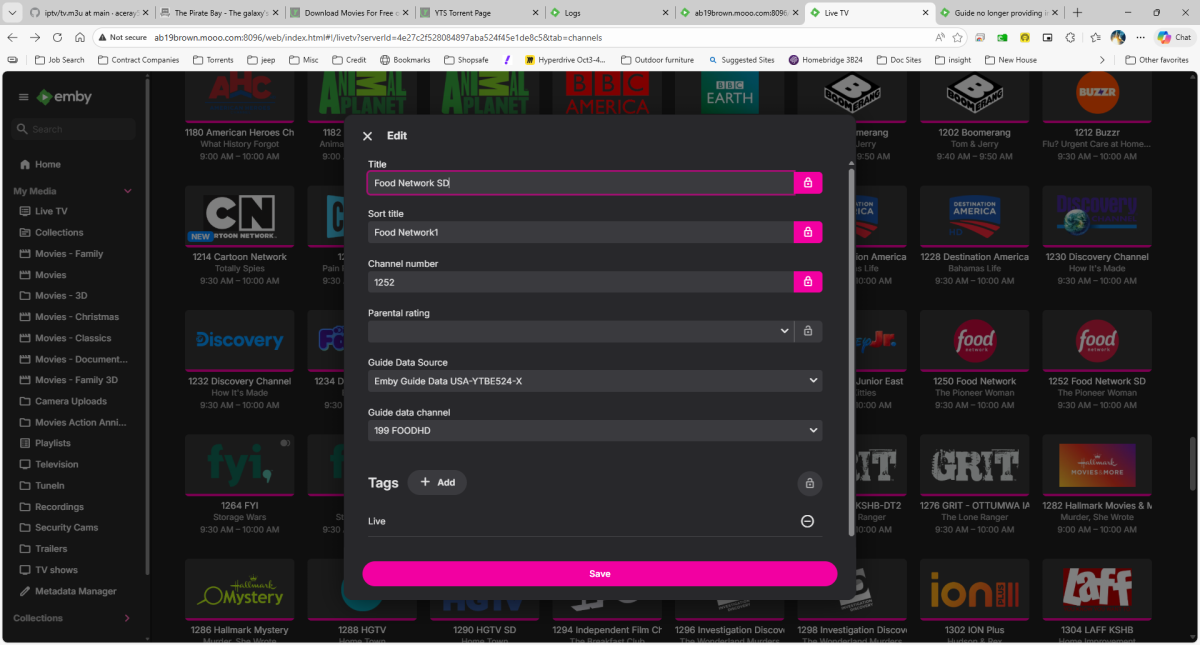
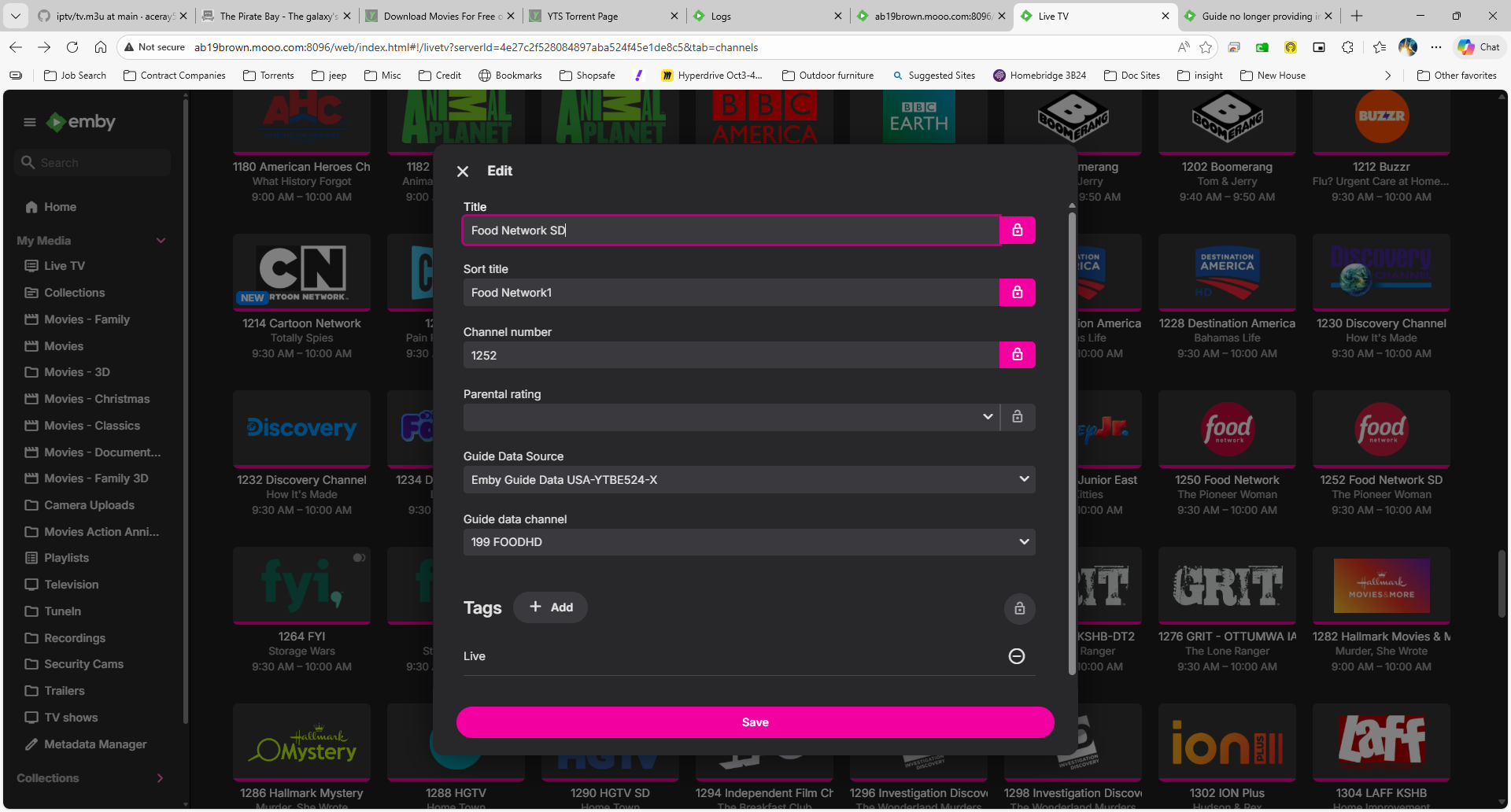
Luke - After some additional research I still have an issue. Example and logs below. Setup - I have a VPN on the server and for some reason starting a short bit ago the guide would download for all channels with no issue. After digging into it, I figured out that "hostx" was anonymized for data.tmsapi.com. I added this domain along with tmsapi.com to the bypass. Once I did this, some of the channels get their guide data and some don't. We will use Food Network SD as the example that did not get data. There are many more within. Restarted server just before 9:30ET. VPN was on with the hosts noted in the bypass. 2026-02-21 09:35:13.473 Info TaskManager: Executing Refresh Guide 2026-02-21 09:37:18.347 Info SqliteItemRepository: Saving 305 programs for channel 7164954 Discovery Life Channel SD (received its guide data). 2026-02-21 09:38:03.837 Error LiveTvManager: Error getting programs for channel Food Network SD (Did not get its guide data) 2026-02-21 09:44:58.252 Info TaskManager: Refresh Guide Completed after 9 minute(s) and 44 seconds Turned the VPN completely off 2026-02-21 09:48:11.219 Info TaskManager: Executing Refresh Guide 2026-02-21 09:49:57.473 Info SqliteItemRepository: Saving 517 programs for channel 7164983 Food Network SD 2026-02-21 09:49:57.933 Info SqliteItemRepository: Removing 75 old programs from channel 7164983 Food Network SD 2026-02-21 09:49:58.031 Info SqliteItemRepository: Removal of old programs complete embyserver (3).txt