All Activity
- Past hour
-
 dany1480 joined the community
 -
 888hzkinun joined the community
 -
I've definitely done a library scan, and I /think/ I've done a forced guide refresh? Possibly just a guide refresh, but I'll redo. I'll add that the channel appears normally when I check the channel guide, and shows which episode should be playing. I will also try other apps. I know it's the same on Android. I chose continuous because I love the idea that the channel is 'playing' in the background, and I can turn it on and catch something random mid-episode, like on cable. Is there another way to achieve this? I will say though that I tried 'playback mode', and all I got was the minute long black screen that's meant (right??) to be there, but no actual media (afterwards it went right to another minute of nothing).
-
 diobld joined the community
 -
 林玉凌 joined the community
 -
 Reinoso joined the community
 -
Still with the problem... Really annoying issue and no solution for a month...
-
 Alanoudhb joined the community
 -
I hope you've done a library scan and (forced) guide refresh after converting your episodes?! In the end, only some (debug) logs will tell us the story. Have you also tried some other browser or a dedicated Emby app? Why you've chosen "Continous" as playback mode?
-
Hi, I had some similar issues with Android auto and opened a thread. Here: Thanks
-

Auto play movie trailer inside folder - Spotlight like @sh0rty inspired
BIGDREY posted a topic in Web App CSS
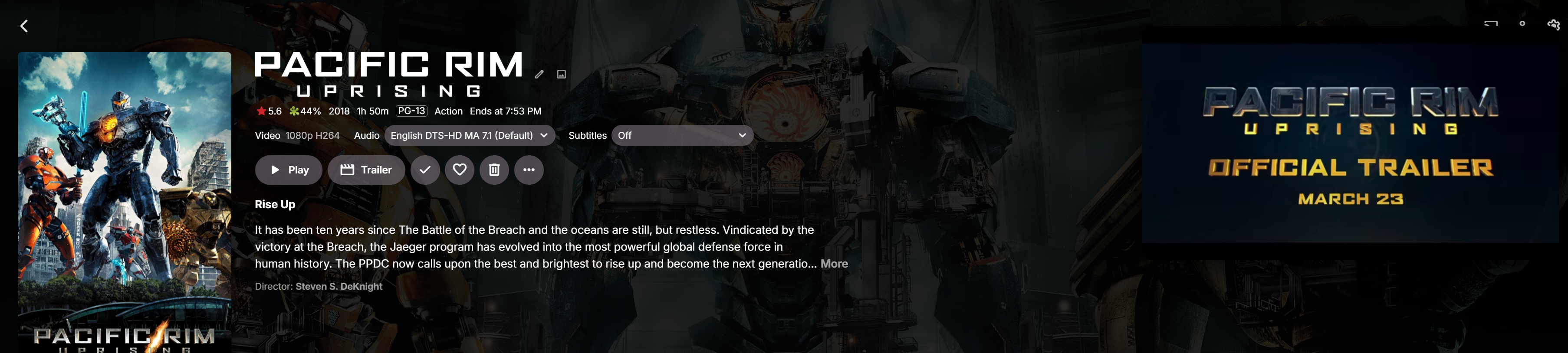
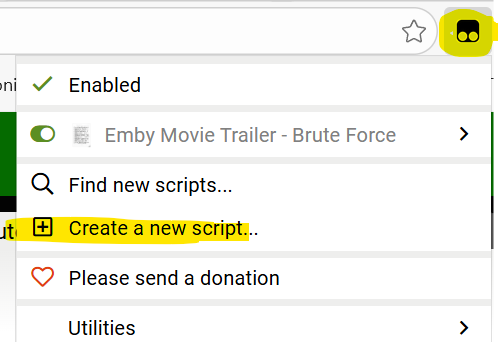
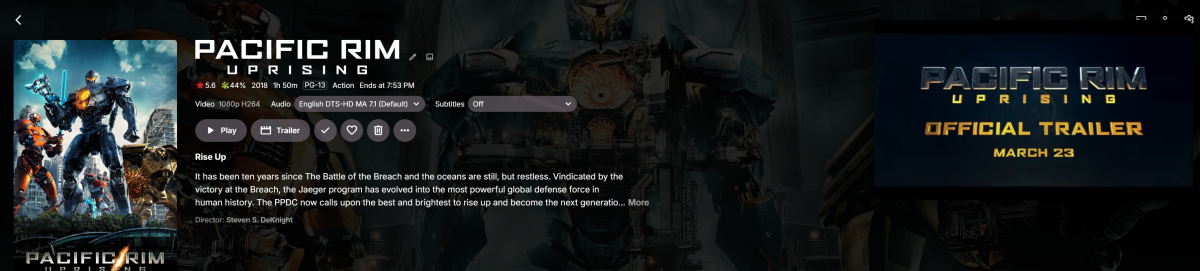
Me and AI spent some time together today and came up this. Inspired by @Sh0rty. What this does is plays a movie trailer in the top right corner of the folder when you open it. I am using the TaperMonkey web browser extension this work. Getting it set up is pretty easy once you install the extension. You need a TMDB API key which you can get for free. Once you have that the rest is easy. Hit the TaperMonkey icon, then create new script copy and paste the code from the file input your API, save it, hit refresh on EMBY and there you have it. EMBY IN FOLDER TRAILER AUTO PLAY.txt
-
Tutoriel : Optimiseur Emby 10-Bit (V20.5) Ce script est un outil de maintenance automatisé conçu pour uniformiser votre bibliothèque multimédia. Il convertit massivement vos fichiers vers le format HEVC 10-bit, garantissant un gain d'espace disque considérable et une lecture fluide (Direct Play) sur Emby. Évolution : Quoi de neuf dans la V20.5 ? Par rapport à la version 19.3, la V20.5 apporte des optimisations majeures en termes de robustesse, de visibilité et de performance : Multi-Instance (Multi-Fenêtrage) : Le code a été réécrit pour permettre de lancer le script plusieurs fois simultanément. Chaque instance utilise un nom de fichier temporaire unique (temp_Lecteur_Heure.mkv), évitant tout conflit. Scan de Progression Visible : Contrairement à la V19 qui était "silencieuse", la V20.5 affiche en temps réel le scan du disque avec un compteur [X/Total]. Les fichiers déjà traités apparaissent en gris ([IGNORÉ]), vous permettant de voir l'avancement global. Auto-Détection des Outils : Plus besoin de modifier systématiquement les chemins $HB et $FF. Le script cherche désormais HandBrake et FFmpeg directement dans le PATH du système Windows. HandBrake CLI : Télécharger ici (Essentiel pour la gestion des pistes audio/sous-titres). FFmpeg : Télécharger ici (Sert de moteur de secours si HandBrake échoue). Correction Unicode "Blindée" : Utilisation d'une méthode de reconstruction par octets pour l'affichage des accents (Séries, Animés). Cela garantit un menu propre, peu importe la configuration de votre console PowerShell. Priorité Audio Étendue : Le support du Japonais automatique a été étendu au lecteur de T et W. Matériel Minimum pour le Double Encodage Pour lancer deux encodages en même temps (en ouvrant deux fenêtres PowerShell), votre machine doit répondre aux critères suivants : Carte Graphique (GPU) : Une NVIDIA GeForce GTX 1050 ou supérieure (architecture Pascal minimum). Une RTX 3050 Ti (pour ma part) est idéale car elle possède un moteur NVENC de 7ème génération très efficace. Processeur (CPU) : Un processeur avec au moins 4 cœurs / 8 threads (ex: Intel Core i5/i7 ou AMD Ryzen 5). Le CPU s'occupe du décodage et du traitement audio pendant que le GPU encode la vidéo. Mémoire Vive (RAM) : 8 Go minimum (16 Go recommandés pour éviter les ralentissements système). Disque de Travail ($T_DIR) : Un SSD est fortement recommandé pour le dossier temporaire afin d'éviter les goulots d'étranglement lors de l'écriture simultanée de deux flux vidéo lourds. Configuration & Utilisation 1. Pré-requis Installez HandBrake CLI et FFmpeg. Assurez-vous qu'ils sont accessibles dans votre terminal (ajoutés au PATH Windows). 2. Paramétrage Dans le fichier .ps1, vérifiez simplement : $T_DIR : Le dossier où le travail s'effectue (ex: Z:\Encoder_Emby). $L_BASE : Le dossier où les logs de succès sont stockés. 3. Lancement en mode "Turbo" Faites un clic droit sur Emby_Optimize.ps1 > Exécuter avec PowerShell. Choisissez un premier lecteur (ex: Y pour les Films). Ouvrez une deuxième fenêtre du script. Choisissez un second lecteur (ex: T pour les Mangas). Surveillez la charge dans le Gestionnaire des tâches (onglet Performance > GPU > Video Encode). [!IMPORTANT] Rappel sur les Lecteurs Le script est pré-configuré pour les labels suivants : (ma config sur NAS) S : Cartoons / T : Mangas / U : Séries / V : Spectacles / W : Animations / X : Animés / Y : Films. Si vos lettres diffèrent, modifiez la ligne : if ("STUVWXY" -notlike "*$SEL*") { continue } en y ajoutant vos propres lettres de lecteurs. Emby_Optimize_V20.5.ps1
-
 Jaroca joined the community
 -
 Flaviocapo345 joined the community
 -
 YOLAN joined the community
 - Yesterday
-

Intel QuickSync H.265 Max Bitrate 39Mbit/s -> falls back to software encoding above this threshold
embart0r replied to embart0r's topic in Linux
Sadly same behaviour. I mean, it actually has max video bitrate like around 60 Mbit/s set in ffmpeg command line when I set 60Mbit/s limit on client. But it won't use hardware encoding - it falls back to software. That's actually the whole point. From transcoding_x.log: >>>>>> FindVideoEncoder - MediaType: hevc, UseHardwareCodecs: True, HWA-Mode: Advanced Info Checking: 'QuickSync DG2 Arc A310 - H.265 (HEVC)' NoMatch Bitrate (57 Mbit/s) exceeds maximum supported rate (39 Mbit/s) NoMatch Encoder does not match Info Checking: 'x265' Info Check successful - selecting 'x265' ... /bin/ffmpeg -loglevel +timing -y -print_graphs_file "/config/logs/ffmpeg-transcode-1daaaf12-a602-4b4c-956d-cae13cc732c4_1graph.txt" -copyts -start_at_zero -init_hw_device "qsv=dev1:hw_any,child_device=/dev/dri/renderD128" -filter_hw_device dev1 -f matroska,webm -ss 00:00:06.000 -c:v:0 hevc_qsv -threads:v:0 1 -hwaccel:v:0 qsv -hwaccel_output_format:v:0 qsv -noautorotate -i "/media/test.mkv" -filter_complex "[0:0]hwdownload@f1,format@f2=pix_fmts=p010,format@f3=pix_fmts=yuv420p,format@f4=pix_fmts=p010,supertonemap@f5=tonemap=bt2390,format@f6=pix_fmts=yuv420p[f6_out0]" -map [f6_out0] -map 0:1 -sn -c:v:0 libx265 -b:v:0 59616001 -g:v:0 72 -maxrate:v:0 59616001 -bufsize:v:0 119232002 -keyint_min:v:0 72 -r:v:0 23.976024627685547 -preset:v:0 veryfast -profile:v:0 main -c:a:0 aac -ab:a:0 192000 -ac:a:0 2 -metadata:s:a:0 language=ger -filter:a:0 "volume=2" -disposition:a:0 default -max_delay 5000000 -avoid_negative_ts disabled -f segment -map_metadata -1 -map_chapters -1 -segment_format mpegts -segment_list "/config/transcoding-temp/130EFC/130EFC.m3u8" -segment_list_type m3u8 -segment_time 00:00:03.000 -segment_start_number 2 -individual_header_trailer 0 -write_header_trailer 0 -segment_write_temp 1 "/config/transcoding-temp/130EFC/130EFC_%d.ts" -map 0:6 -map 0:0 -an -c:v:0 copy -c:s:0 webvtt -max_delay 5000000 -avoid_negative_ts disabled -f segment -map_metadata -1 -segment_format webvtt -segment_list "/config/transcoding-temp/130EFC/130EFC_s6.m3u8" -segment_list_type m3u8 -segment_time 00:00:03.000 -segment_start_number 2 -break_non_keyframes 1 -individual_header_trailer 1 -write_header_trailer 0 -write_empty_segments 1 -segment_write_temp 1 -min_frame_time 00:00:06.000 "/config/transcoding-temp/130EFC/130EFC_s6_%d.vtt" -
1.Willst du Ubuntu als Desktop Variante installieren, also mit GUI oder als Server im headless Modus ? Hintergrund: TinyMediaManager arbeitet unter Linux nur nativ mit GUI. Die Alternative willst du nicht, hatte ich mal auf einer Synology laufen. Da wird in einem Docker Container ein Desktop vorgekaukelt, und du verbindest dich über VNC im Browser. Das ist extrem träge und bietet wenig Komfort, nicht mal STRG+C/V kannst du dann einfach verwenden sondern muss es erst umständlich in ein extra Fenster einfügen um es dann im Container verwenden zu können. 2. NTFS Moderne Linux System können NTFS als read-write mounten. Das sollte kein Problem darstellen 3. Plug and Play easy Ich habe meinen Emby Server von der Synology gerade erst auf Fedora umgezogen, von easy möchte ich, der in der EDV arbeitet, nicht sprechen. Wenn du mit Linux firm bist, mag das sein. Ist das dein erster Kontakt zur Linux Welt kann das sein, je nach der Hardware die du verwenden möchtest. Ich habe einen sehr aktuellen Build, weswegen da viel Arbeit notwendig war, bis das lief. Stichtwort Transcode unter Linux. 4. TMM Ersatz Emby bietet scraping an, aber ich finde es nicht so komfortabel wie TMM. Für einzelne Filme oder Serien geht das, aber mit wachsender Bibliotheksgrößen wirds unangenehm.
-
Emby Theater is already on Flathub or Flatpak I can just wait i'm in no hurry to get anytime soon, Also as I remember wasn't appImage meant for developers as it not store front?. I've made mistakes with linux command and I don't want to go that route, it's not like your traditional msdos commands
-
 EmPlayer joined the community
 -
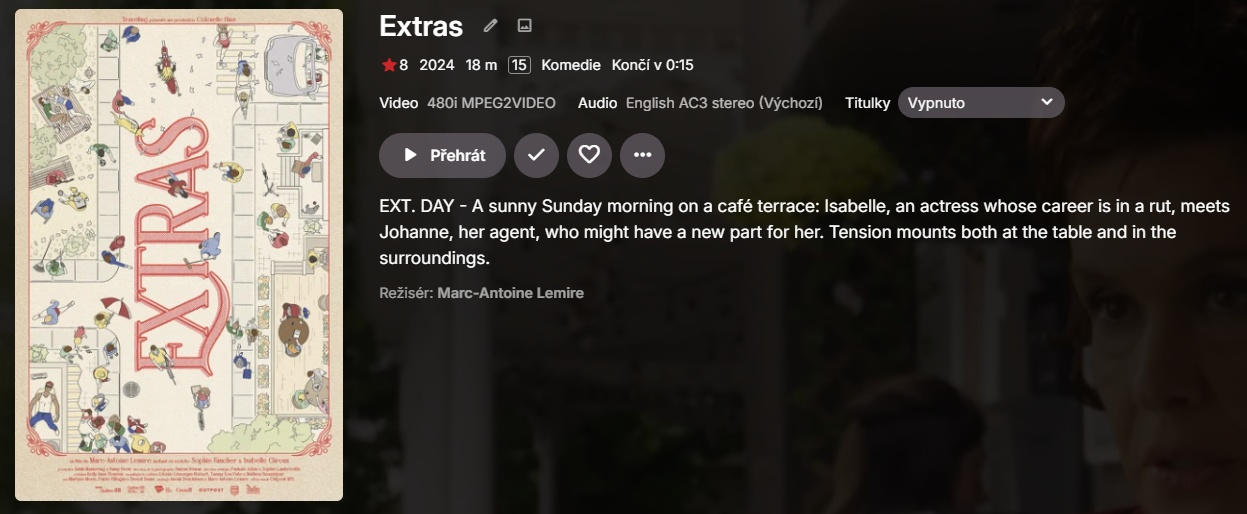
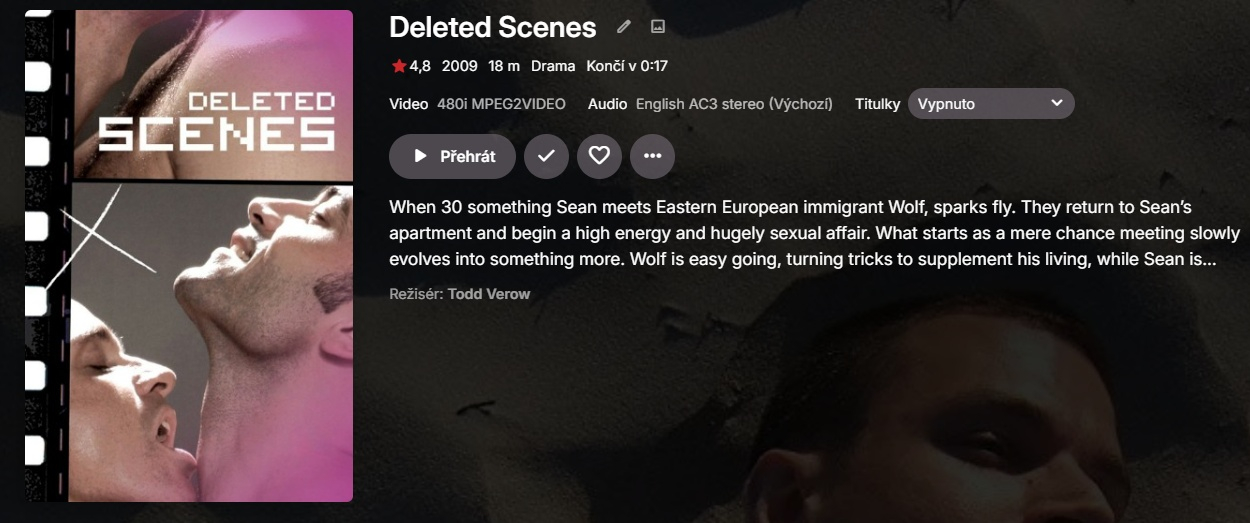
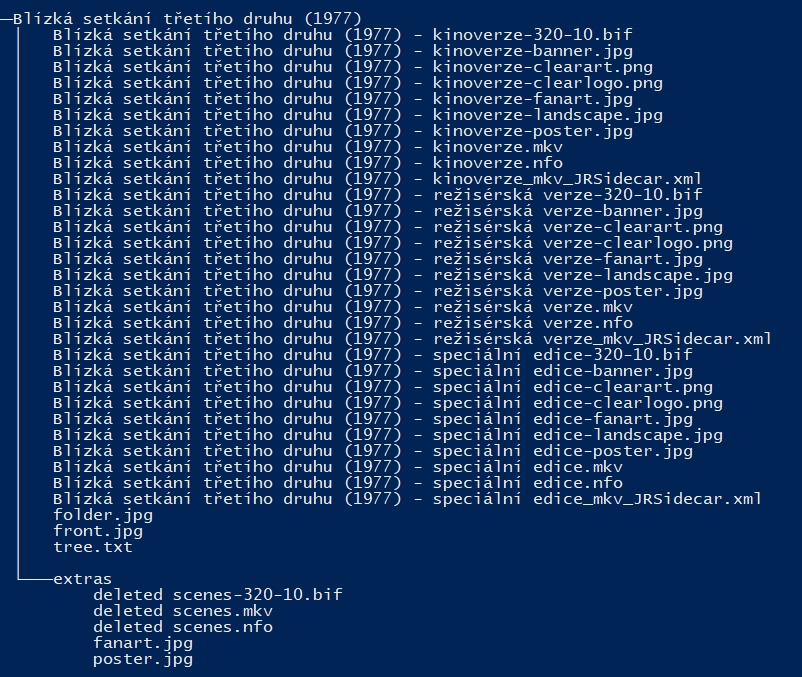
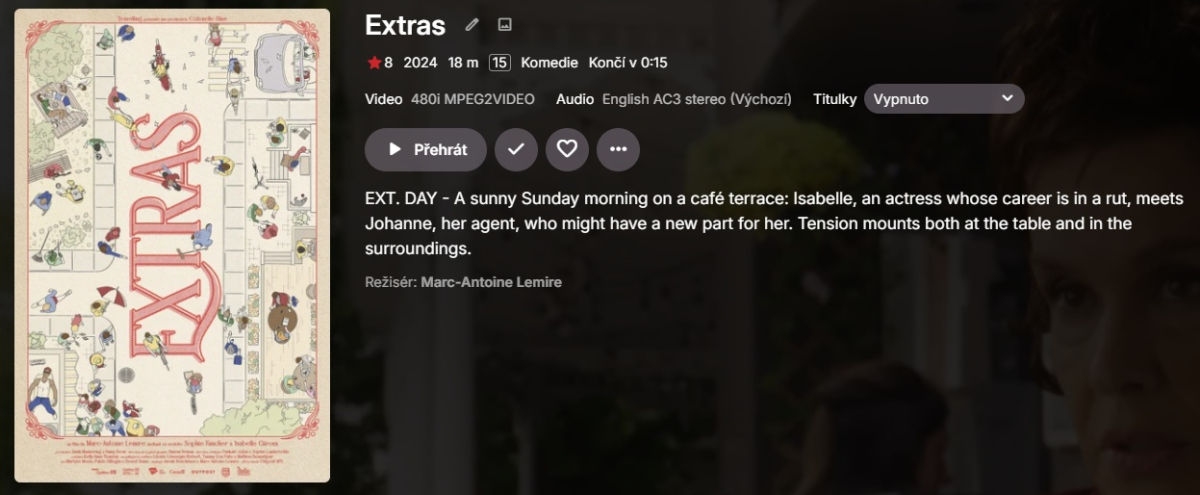
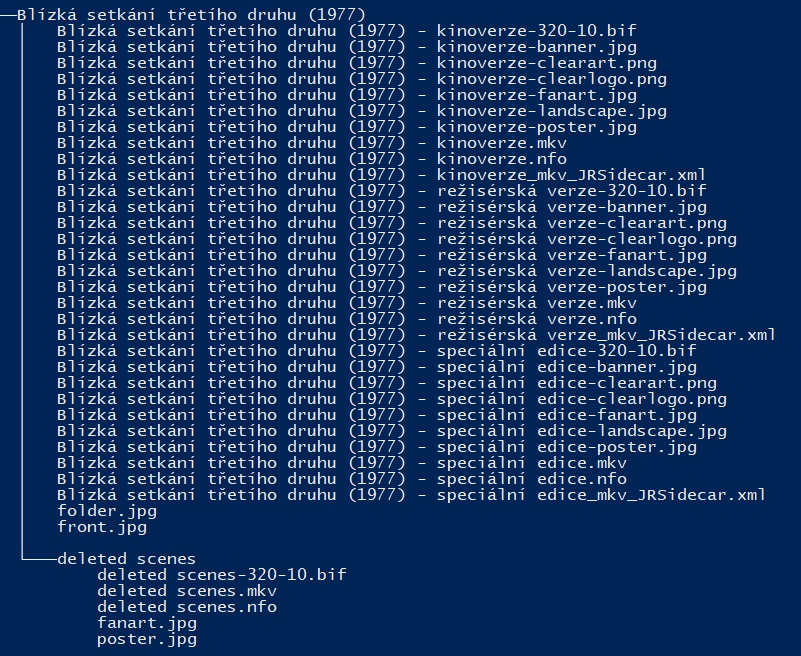
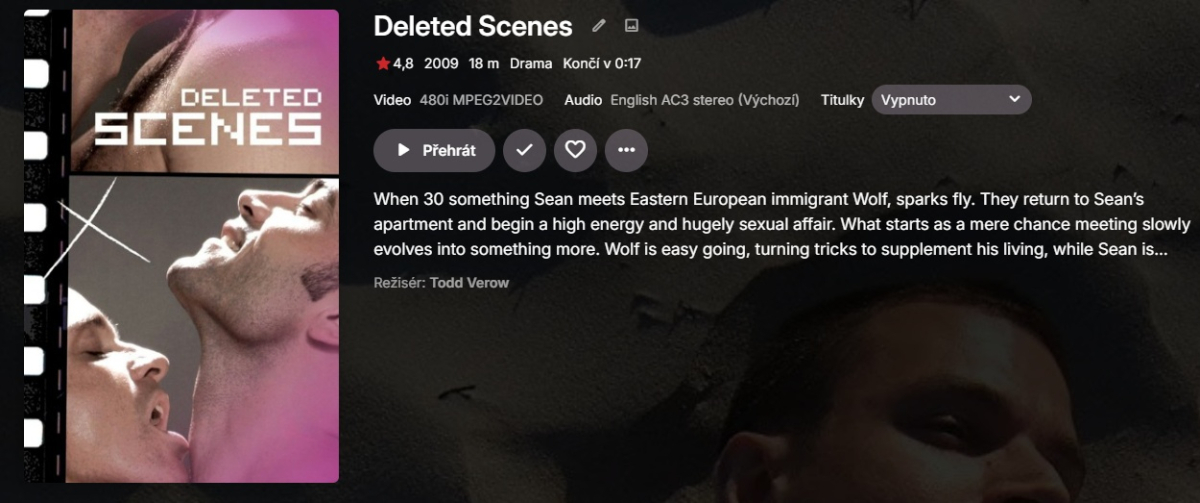
I am on Emby 4.9.3.0 and extras with multi-version movie still does not work. If I put "deleted scenes.mkv" file into "extras" subfolder of the movie folder (Close encounters of the third kind) Emby instead of showing it as an extra identifies the file as the movie "Extras" (tmdbid 1259320). If I put it into "deleted scenes" subfolder Emby instead of showing it as an extra identifies the file as the movie "Deleted scenes" (tmdbid 120044)
-

Back navigation not working on Favorites screen
scottpro replied to scottpro's topic in Windows & Xbox
Other app versions: Emby iOS iPad version: same problem. Emby iOS iPhone version: functions correctly Emby Web Client: functions correctly -

Can I force deinterlacing of broadcast 1080i streams (only)?
wmichael3 replied to wmichael3's topic in General/Windows
Ok - that doesn't do it. (I didn't see your response, thanks - forgot to follow it) But what I did and it works perfectly, is that under Diagnostic Options, I used Parameter Adjustment to do it by changing the ffmpeg parameters: Search for "-c:v:0 mpeg2video -noautorotate" Replace with "-c:v:0 h264_qsv -vf vpp_qsv=deinterlace=advanced -noautorotate" (with a little AI help - I pulled the ffmpeg commands from logs, sent them to an AI - Gemini - , and it came up with the substitution) This takes my interlaced streams and de-interlaces them in hardware - and the problem is gone and the skipping is much faster. No impact to CPU. No impact to any other file type. Yes, this is specific to Intel graphics, but I assume you could do the equivalent for the other hardware graphics. It would certainly be great if this would persist after an Emby restart, but I don't bounce my server or Emby more frequently than monthly. But the problem is solved, anyway. It would certainly be a nice option to add to Emby. -

Back navigation not working on Favorites screen
Lessaj replied to scottpro's topic in Windows & Xbox
How does Emby for Window compare? -
You'll have to tell me how in this case. What do you need? What else can I say?
-
Back navigation not working on Favorites screen
scottpro replied to scottpro's topic in Windows & Xbox
To clarify, I am selecting the Favorites tab at the top of the Home screen/page. I use the term "Screen" because that is the term used in the settings menu (Home Screen). Once in the Favorites tab (screen) I see a list of movies. I navigate to a movie on that screen and select it. This can be done with the mouse or keyboard. Once the movie detail screen/page is displayed the back keys (esc and bs) or icon do not return me to the Favorites tab/screen, in fact it doesn't return me anyway, not even the home screen. The only way to exit the movie detail screen/page is to use the home key or home icon in the upper left. This takes me all the way back to the Home tab/screen. This was working last month as mentioned in my original post. I also did a clean install of ET 3.0.20 with the same results. This is happening on (2) PC's, Windows 10 and 11, so it's not a one off issue. Options: Enable TV display mode - On TV mode home screen: Vertical If I roll back to "data-appversion" 4.9.3.12 it works fine. Any version after that is broken. -
AppImage would be good as well. better than nothing (for seteamos and bazzite). by the way i've noticed that i have to run Emby-Beta with -nompv on SteamOS. are you still adjusting the playback backend?
-

Featurettes, Extras Always Top Level with Two (or more) versions of a Show
kdackiw posted a topic in General/Windows
With the structure (let's say Movies)... /Movies/Movie 1 (1975) /featurettes Movie 1 (1975) - 1080p.mkv Movie 1 (1975) - 4k.mkv It seems that anything in a special folder (featurettes, extras) suddenly all promote to the main level view in Emby and not as part of the movies themselves. They become standalone movies. Bug? Am I missing something? It would appear in my library that this behavior is restricted to movies that have multiple versions in the same folder and said extras. TY. Kev. -
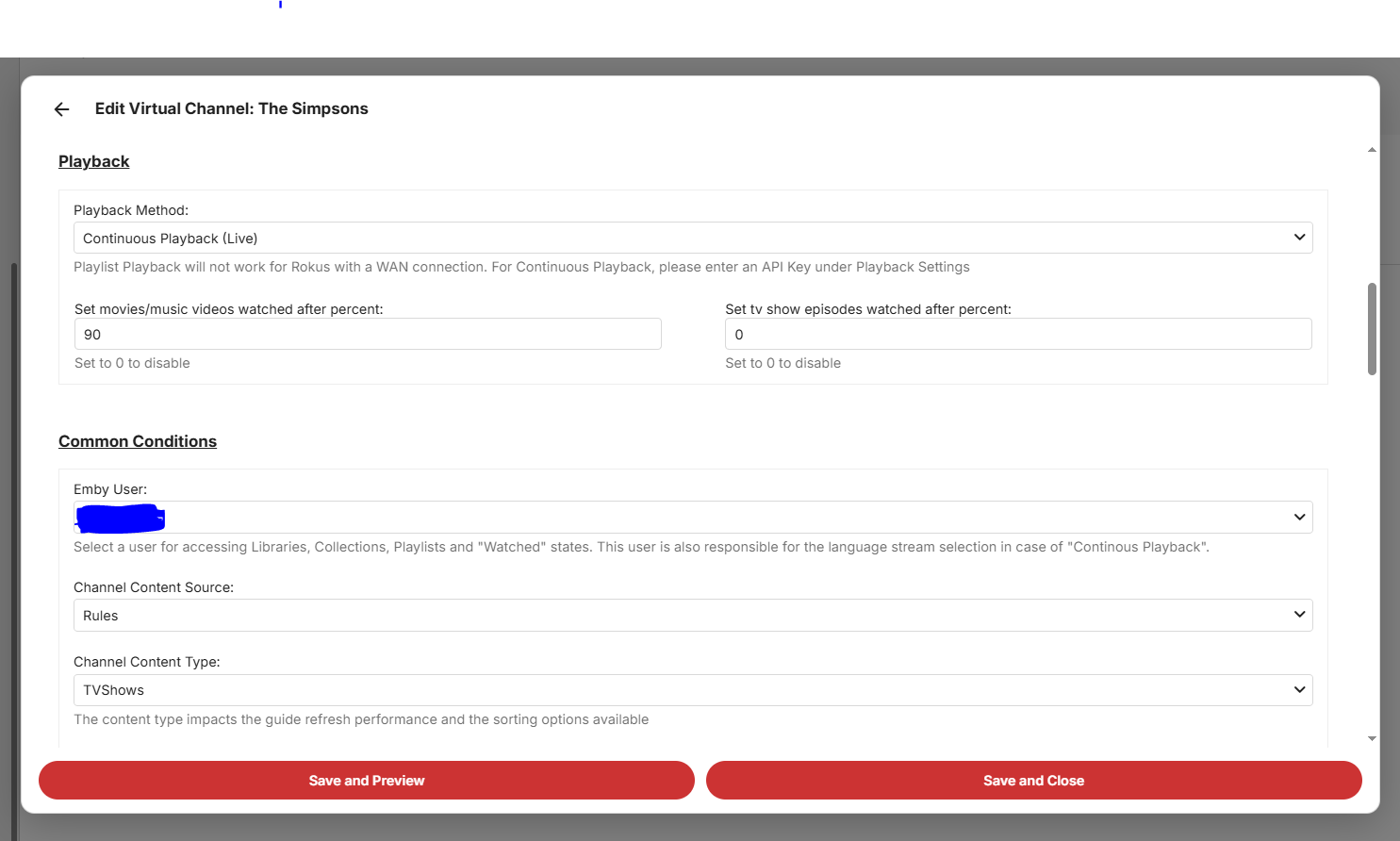
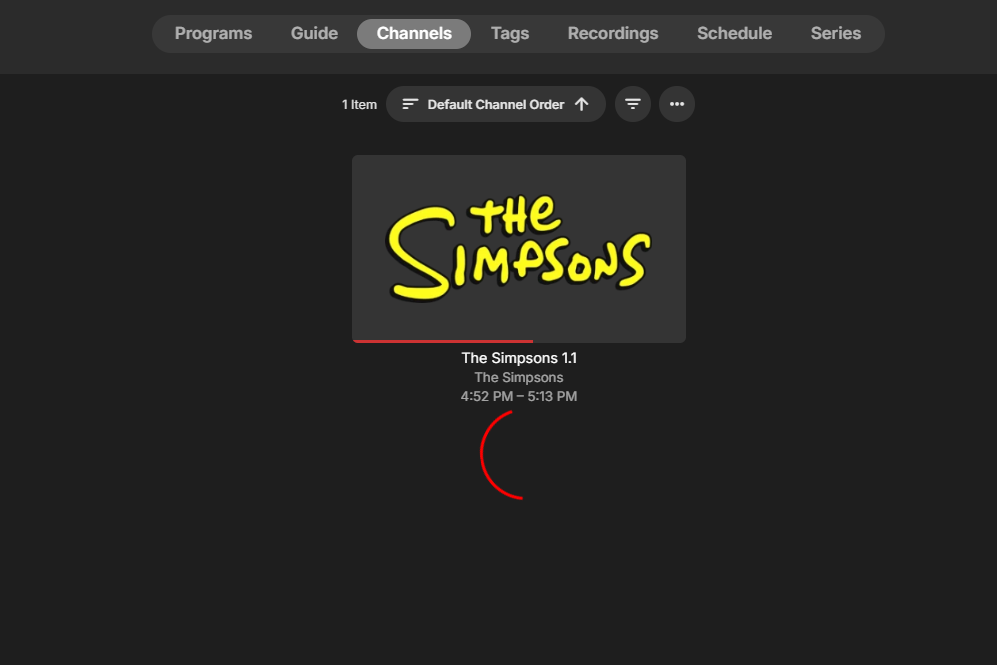
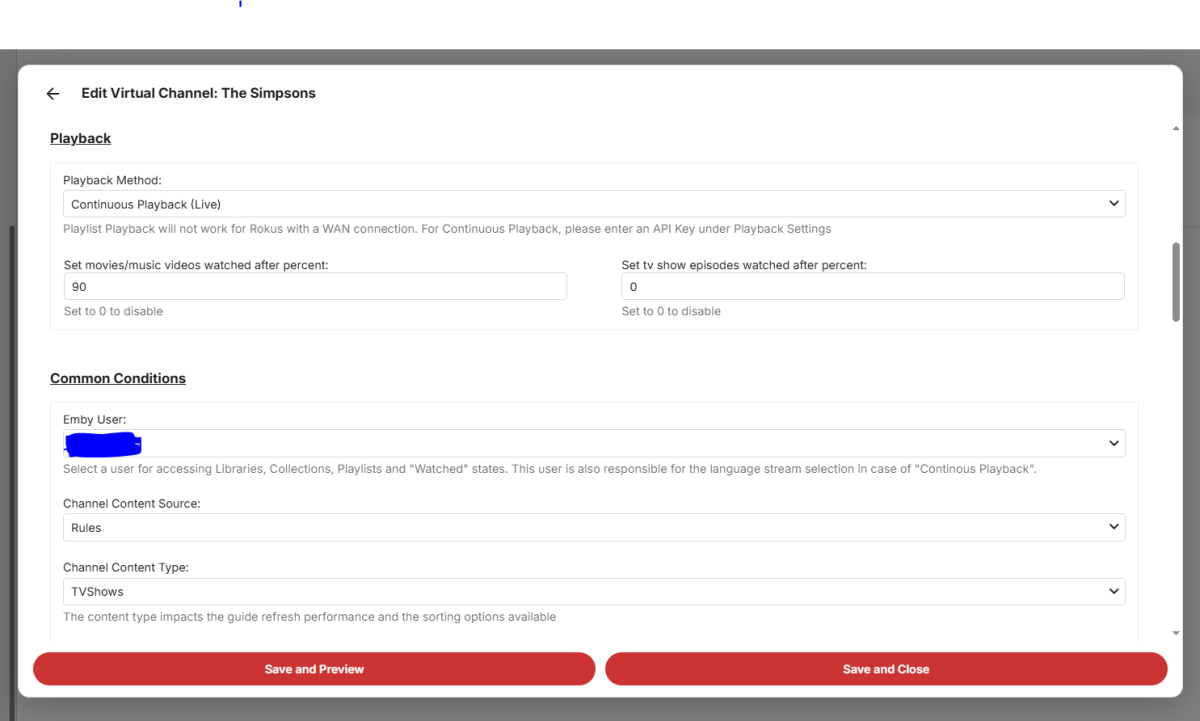
Hello! Apologies in advance, I am much less knowledgeable than the average Emby user, it's a miracle I've muddled my way this far! I feel way out of my depth setting this up to be honest, so please be patient... I set up a pretty basic (so I think...) Virtual TV Channel, just 10 seasons of the Simpsons or so. I think I have all the settings correct, I added an API, and have tried toggling almost everything on and off, but nothing will get the Virtual TV channel to start in Live TV. I've generated (and re-generated) an API key, I tried refreshing the TV guide and resetting the server, and I have an active subscription to Emby. At first, the episodes were not all the same audio/video format, so I converted them all, and I made sure that the format that they converted into is the same as in the settings. However, the Live TV is still not playing... I just get a perpetual loading ring. It's been there for 12 minutes now... What am I doing wrong? \ Here are some of my settings:
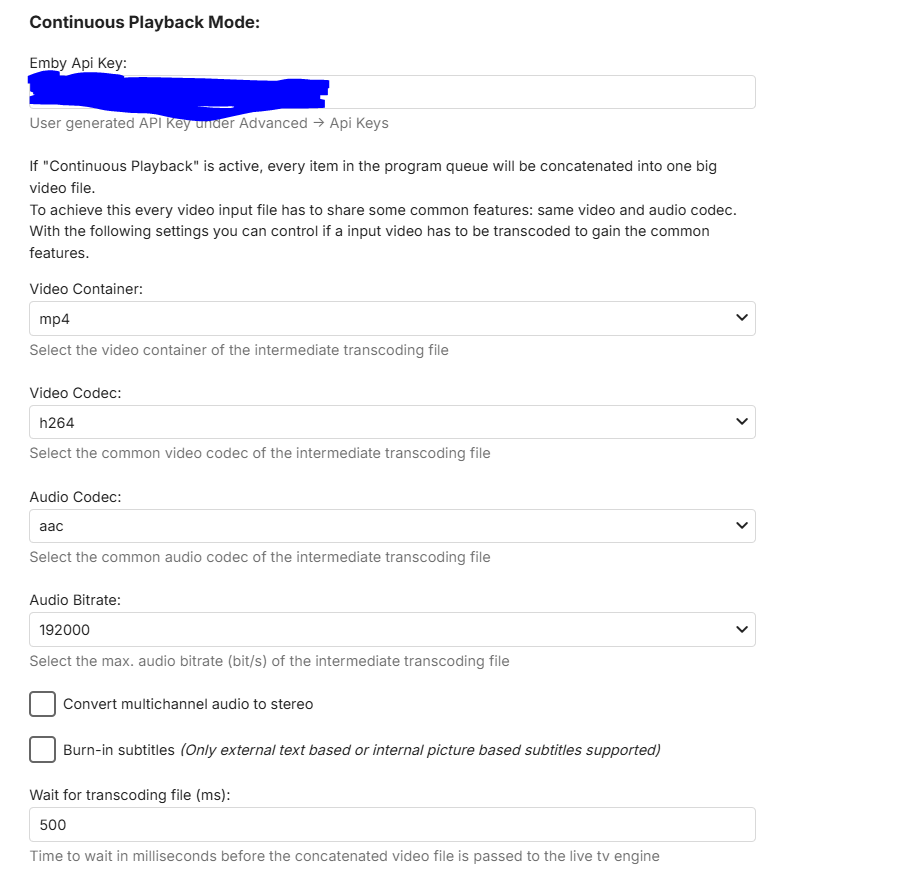
-
I'm afraid, but the only other format we could provide at the moment is AppImage. I don't quite understand what this is supposed to mean. We've gone through dozens of iterations and package versions and there never happened to be any "mess".
-
Back navigation not working on Favorites screen
Lessaj replied to scottpro's topic in Windows & Xbox
I think Favourites is considered a "tab" instead of a "page" so going back doesn't bring you back to the last "tab" but rather the last "page". Similarly if you're on the home page and you click into a library, say Movies, and you click on one of the other tabs like Collections or Genres when you press back it won't bring you back to your default "tab" for Movies, it'll go back to the home page. I don't how this used to work if the functionality has ever changed, I don't really navigate like that... EDIT: Oh I misunderstood until I read the post again, so instead of coming back from the item detail screen to Favourites tab, it's back on home page and therefore another back opens the exit menu. That said, I can't reproduce, it brings me back to Favourites. -
that was it thanks GrimReaper! ...I did't notice that clicking in "default" it open a full page of settings, great!
-

Can I stay on an Emby version without updating indefinitely?
GrimReaper replied to Daftpunkmx12's topic in Linux
There are number of related topics around the forum (thought that was mostly solved - guess not for all). You can join any of the existing topics or open your own. How to Report a Problem Edit: AFAIK this is the biggest ongoing topic: -
It is, CoverArt plugin. Disable treatments in plugin settings (or uninstall plugin altogether).
-

Can I stay on an Emby version without updating indefinitely?
Daftpunkmx12 replied to Daftpunkmx12's topic in Linux
Hmm, I see. The only problem I have is the excessive RAM usage, which changed with the last update. I haven't seen any updates or threads about it, or if it's a glitch/bug or some error that could be fixed later. -
Can I stay on an Emby version without updating indefinitely?
GrimReaper replied to Daftpunkmx12's topic in Linux
Theoretically yes, but that will also preclude not updating client apps, as they have minimum server version that increases gradually and will eventually surpass 4.8.11.0. And that will be very hard to control for all users, as number (or all) of them will certainly have auto-update enabled.