All Activity
- Past hour
-
 dandingdeqiurenpin joined the community
 -
 angelgzosto_ joined the community
 -
 胡琼炜 joined the community
 -
 Macster54 joined the community
 -
 Adzavor joseph joined the community
 -
 weibobo joined the community
 -
index=2 codec_name=unknown codec_long_name=unknown TAG:language=chi TAG:title=中文(简体) index=3 codec_name=unknown codec_long_name=unknown TAG:language=chi TAG:title=中文(繁體) index=2 codec_name=unknown codec_tag_string=[0][0][0][0] codec_tag=0x0000 index=3 codec_name=unknown codec_tag_string=[0][0][0][0] codec_tag=0x0000 in this case,the sever cannot recognize and render the subtitle.
-
 Dumbar joined the community
 -
 Poltergeist5 joined the community
 -
It's so so much better now, thank you so much
-
 Axtro93 joined the community
 -

There is a bug in version 2.3.8 with .ass files
SamES replied to MediaEmby1968's topic in Samsung Smart TV
OK, I've finally found the issue. It was introduced in 2.3.8, but it only affects 2015 & 2016 models, and only on the release server. With beta server it works fine. Finding the right combination to reproduce this was the key. @Lukeurl.pathname is not implemented on these old webkit versions. getExtensionFromUrl() in apiclient needs to handle this case when determining the DeliveryFormat for subtitles. - Today
-
 Previously, EMBY didn't cause problems when you had multiple versions of a media file. For instance, if you have a movie and you had the 480p, 1080p and 4k version, EMBY use to have 3 separate entries in the library for you to choose from. The current version of EMBY is collapsing each version into a single entry in the library and you have to manually choose which version you want to play. that's fine but It should default to the highest resolution when you go to watch the item. I can't imagine why that would not be the default case. You would want to give the user the best possible viewing experience. The reason why you might add a 480p is if you are viewing your library over a slow connection, or on a low resolution device, but allow the user to manually make the call to choose a lower resolution file instead of defaulting to it. I reported this problem almost 9 months ago and there still is not a fix. This seems like a basic fix caused by a regression in the newest releases. It makes EMBY almost not useable when you have a large library and are constantly adding to it. Is supporting users with large and growing libraries not a priority?
 -
From what I see of The Luke Show this will never happen. As for gearing up for something, NOT. Try madness to their method.
-

There is a bug in version 2.3.8 with .ass files
MediaEmby1968 replied to MediaEmby1968's topic in Samsung Smart TV
What you mentioned about the .NET Framework is normal, I think. Linux versions often don't run the same way as Windows versions. Even so, although it could be a bug, I don't think that's the case here. It's been like this for quite some time and it was working fine with version 2.3.4. The strange thing is that it only happens on the TV. If I watch the same video on the server (the website), it doesn't have a problem. My operating system is completely up to date. I don't use Wi-Fi; everything is wired, both the PC and the TV. Regarding the errors on line 520 related to the mount points, that's correct, it happens, but only because the mount path corresponds to an external hard drive that I always keep turned off and only turn on when we want to watch a movie. So when I turn on the PC (server), those paths are disabled, so it's normal that they give errors. In fact, I tested it this morning. I first turned on the external hard drive, then the router (it takes longer to boot than the PC), and then the PC. I downloaded a log file from the server, and those errors don't appear. What's strange is that it doesn't work with newer versions, starting from 2.3.4, but it does work with the 2.2.8 version that came with the TV. Thanks for your time. By the way, what you said about the Franco era was normal; you're older than me. I was very young during the Franco era. -
You did not read the original message very well at all! The issue is NOT left or right, it is on the bottom and maybe the top. The pictures very clearly show the difference. The Android TV app displays the photo correctly (as does Jellyfin and Plex), the Android (standard if they use that term anymore) does not! Pay attention to the signature on the lower left of the picture. They even said in later replies they had seen the issue and were working on it.
-
-
@Lukethanks for the update. Any estimate for then the update is planned?
-

TrailerTheme – Trailer & Theme Song Downloader for Emby/Jellyfin/Plex (Windows)
Gembird79 replied to Gembird79's topic in Third Party Apps
Doch das kommt noch. Da bin ich gerade dabei. Eventuell später auch als Unraid Plugin. -

TrailerTheme – Trailer & Theme Song Downloader for Emby/Jellyfin/Plex (Windows)
ashhaushalt replied to Gembird79's topic in Third Party Apps
It's a shame you don't offer a Linux installer. -

Air Date Fixer — Corrects upcoming dates for your timezone outside the US
Blueskies278 replied to Blueskies278's topic in Plugins
Please note that Alpha 1 is in very early development. Unfortunately, it's only compatible with Emby Server version 4.9.5.0. While I haven't encountered any issues with Alpha 1, there may be many bugs you might encounter with your setup. Please use with caution. I'm currently working on a more robust version of the Air Date Fixer plugin, and it's looking very promising so far. EmbyAirDateFixer.dll -

Emby Beta 4.10.0.15+: Crashing due to Out of Memory on DS918+ Package Center Install
sa2000 replied to DarWun's topic in Synology
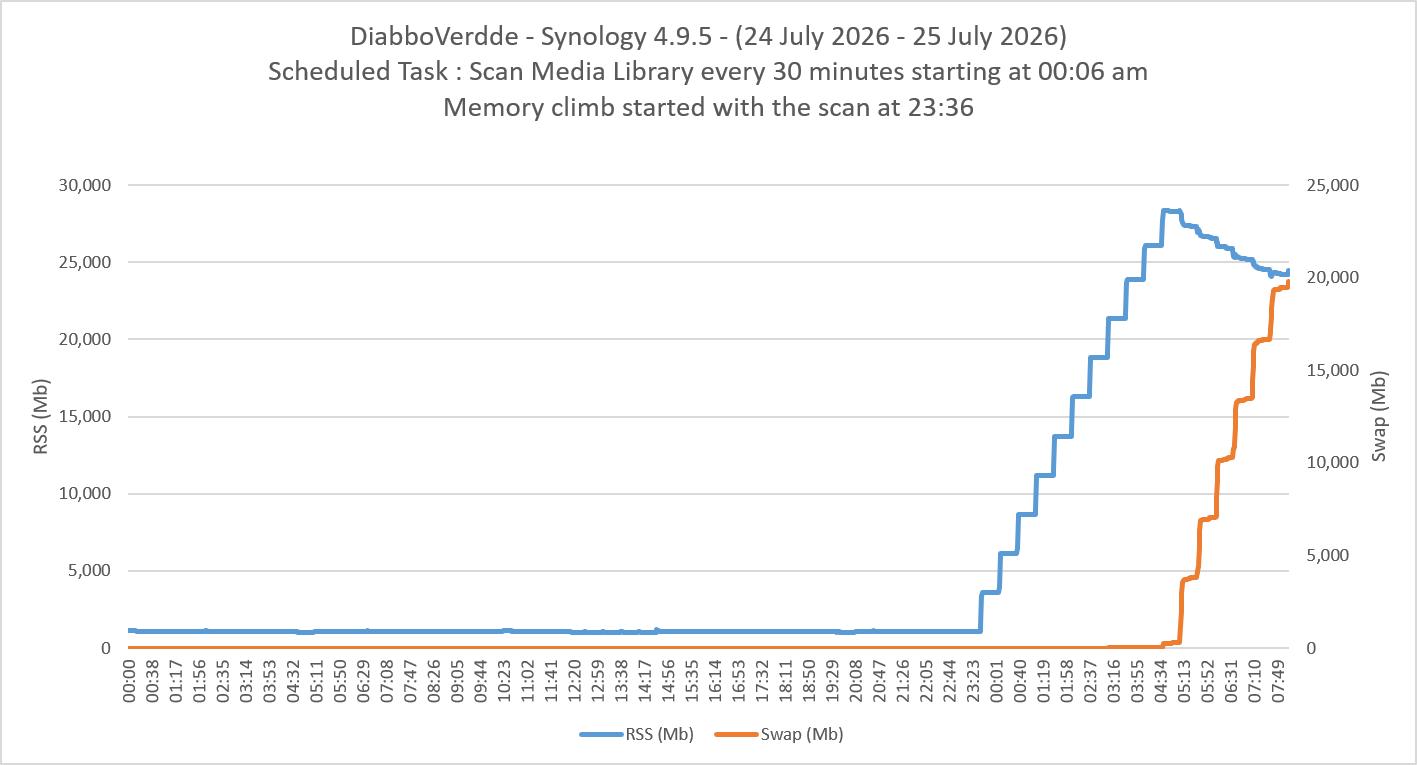
I am sorry that I do not know how .Net handles memory purging. I thought the .Net Memory Garbage Collection kicks in after about 6 or 8 hours - but I also understand that memory may not get released if there is no need for it by demands from other apps. Perhaps @softworkzcould give more info on this. I will be trying to see if I can replicate the issue I am looking into now for @DiabboVerddeusing a copy of the database and dummy media which shows an attempt to release media but not sufficient to stop the OOM crash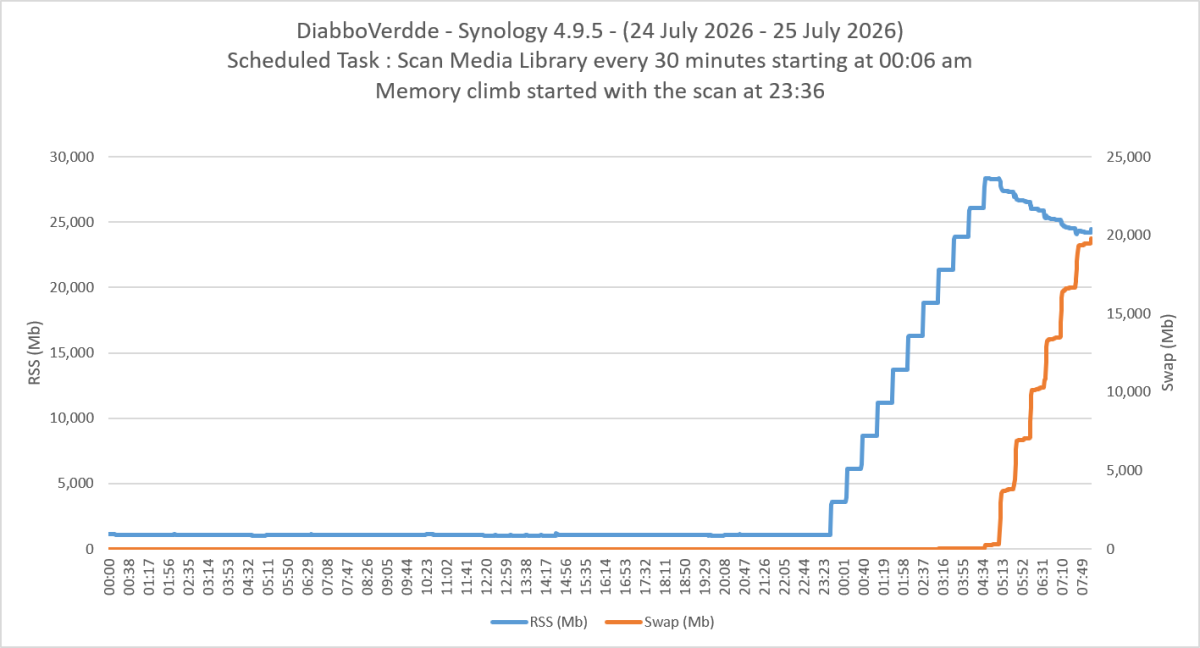
-
You tried v1.0.3.1 with fast probing on?
-
I’d love faster channel zapping too and happy to contribute and test
-

Android App - Live TV Guide - Unable to navigate Categories
meowmix replied to meowmix's topic in Live TV
Thank you so much. You are very wise -

[Beta] ROMote – play your retro game collection in the browser (NES → PlayStation)
digitalirony replied to digitalirony's topic in Plugins
New build, 1.0.0.34 - covers both things you brought up. BIOS (now more than just PlayStation) There's a single "BIOS folder" setting in ROMote Settings. Point it at a folder on your server, click "Set up BIOS folders", and ROMote creates one clearly named subfolder per system that needs a BIOS, puts a README in each explaining what goes there, and shows a table of exactly which file each expects and whether it's already present. It uses the standard EmulatorJS BIOS file names, so the same BIOS pack you'd use with EmulatorJS or RomM works here as-is - no special format. Systems that need one right now: - PlayStation: scph5501.bin (or scph1001.bin, etc.). Optional - without it PS1 uses the HLE BIOS, which runs most games. - ColecoVision: colecovision.rom. Required - this fixes ColecoVision, which couldn't boot at all before. Most other systems don't need a BIOS. Adding another system's is a one-line change for me, so if there's a specific one you need, name it and I'll wire it up. (3DO would be a new console rather than just a BIOS, but I can look at it.) Your old PlayStation BIOS path still works as a fallback if you'd set one. Play links (your labeling idea) Renamed the two links to "Play Game (Browser)" and "Play Game (App)" so it's obvious which to use. Browser is the relative link that follows whatever address you're on, local or remote; App is the absolute link for the native Emby apps, and only shows when an external address is available. Updating Grab 1.0.0.34 (attached), stop Emby, replace ROMote.dll, start it. BIOS takes effect right away, no rescan needed. If you have an External Domain set and want the "App" link on your existing games, run a metadata refresh on the Games library once (newly scanned games get it automatically). Thanks for the suggestions - both of these came straight from your feedback. ROMote.dll -
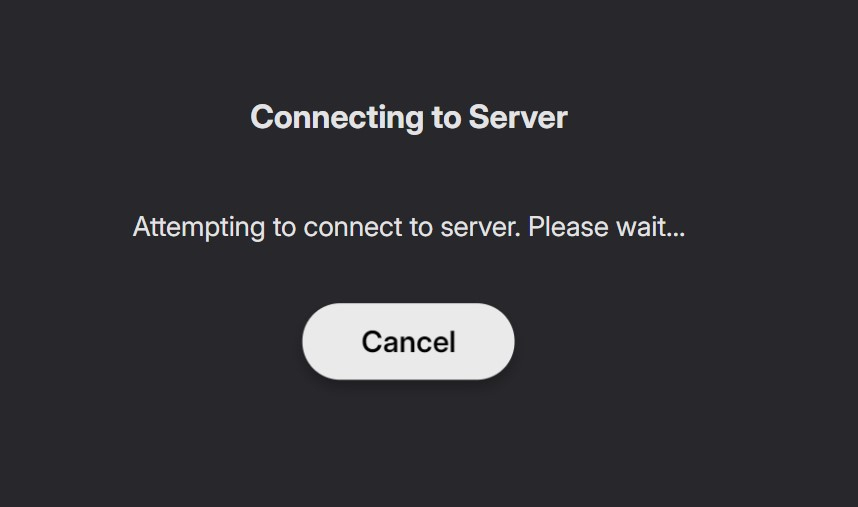
New update was pushed, appversion 4.9.5.17. Seems to fix the "Server Select" screen issue but still shows this screen just before going to the Home Screen. Previously it would show the Emby logo than transition straight into the Home Screen. So I would mark this as "Almost fixed".
-
The ONE thing I'll give Netflix is that I liked that it would give me a big block of suggestions with various options, by genre, type (show/movie), "because you watched this" etc. It actually did a really good job of finding other stuff I like, even weird stuff. I watched a lot of foreign shows b/c of it, and loved there was almost always English Audio.
-

"Not interested" flag for all media at the user level.
Dizzy49 replied to marriedman's topic in Feature Requests
I agree, every few months, I get really annoyed with Emby over a few issues, and this one of them. Usually around the start of a new season of shows and my wife and kid's shows are constantly popping up in the "Latest TV Shows" or "Continue Watching" since I've bene marking them as watched for so long. It seems that there are like 4 or 5 diff/similar requests out there, they should be combined when looking at the # of people wanting this. Like others have said, the "use tags" is a bandaide at best, and not an actually solution. It works for **ME**, but not at all practical for my wife and kids. I'm sure as hell not going to sit down with each person and go through all the stuff they don't like to tag them. NOT A SOLUTION! Asking people to restructure their library is a non-starter in my book, I wouldn't even call that a bandaide, that's a "cut the leg off" fix. -
[Beta] ROMote – play your retro game collection in the browser (NES → PlayStation)
digitalirony replied to digitalirony's topic in Plugins
It detects it based on the file types and file extensions. What extensions are your SNES games? The folders are really just for file system organization. There is an option in the Admin panel under the ROMote Settings, that you can have it sort and organize your ROMs for you, and even remove duplicates and utility roms and such etc. -
Server - Count how many devices use Emby Premiere
Dizzy49 replied to Mick877's topic in Feature Requests
At this point I'd like to figure out which devices are actually using my servers. I have a crap load of devices going back years, so I'm sure there are computers and phones there that I no longer own at all that could be cleaned up. I just don't like messes. -

[Beta] ROMote – play your retro game collection in the browser (NES → PlayStation)
chriztopia replied to digitalirony's topic in Plugins
I found the issue. It was trying by default to go to https and I run my EMBY as http. I did a manual edit and it worked. Works very nicely. It grabbed NES with no issue but SNES I guess it doesn't detect that this folder is SNES? How does it detect the ROM folder and match it to the system? -
[Beta] ROMote – play your retro game collection in the browser (NES → PlayStation)
digitalirony replied to digitalirony's topic in Plugins
Can you provide screenshots? What version of emby are you using? Are you trying to access it from inside of your network, or externally? Did you use the latest plugin that I posted inline above? I did fix some network issues in the last version. Its in this reply: https://emby.media/community/topic/148719-beta-romote-–-play-your-retro-game-collection-in-the-browser-nes-→-playstation/#findComment-1531145 -
[Beta] ROMote – play your retro game collection in the browser (NES → PlayStation)
chriztopia replied to digitalirony's topic in Plugins
I am getting a refused to connect while testing this. Plugin has the link under the game but when I click it, it just wont connect to play.