All Activity
- Past hour
-
 sc228228 joined the community
 -

Add own MKV trailer to movies and make it intro
MediaIntelNUC replied to MediaIntelNUC's topic in General/Windows
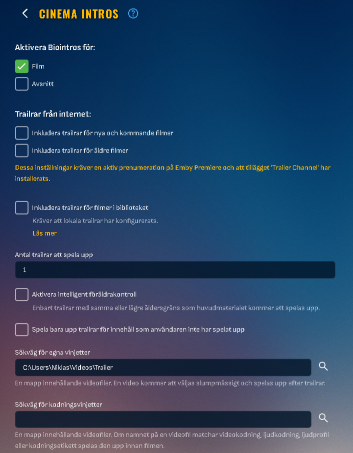
Gotcha! So, i have added the trailers folder with videofile to my C drive, rescanned my movie library and the trailer option is now visible, but the only trailer available is a html to the actual movie, not my trailer, any troubleshooting tips? N.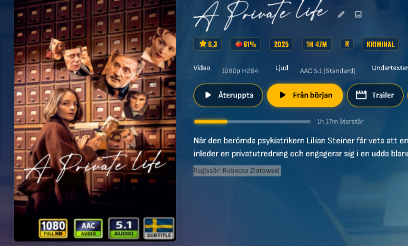
-
 Nalii joined the community
 -
 Naliii joined the community
 -
 PandaChoo joined the community
 -
 icch89 joined the community
 -
 riddikulus joined the community
 -
 Ccwt joined the community
 -
 sigmatv joined the community
 -

Add own MKV trailer to movies and make it intro
GrimReaper replied to MediaIntelNUC's topic in General/Windows
You can keep it in any folder accessible by your system, doesn't have to be within your movie library. I would actually recommend to keep it out of it, as there's no need for that file to be browsable to. -
Add own MKV trailer to movies and make it intro
MediaIntelNUC replied to MediaIntelNUC's topic in General/Windows
Awesome! And, i keep the trailer videofile in its own folder in my movie library and name it "trailer.mp4"? N. -
 like520 joined the community
 -
 ahuaiiii joined the community
 -
Add own MKV trailer to movies and make it intro
GrimReaper replied to MediaIntelNUC's topic in General/Windows
Correct. -
An A310 is on the way, can also HW decode AV1 and can potentially serve higher bitrate than source AV1 H.265 to non-AV1 clients.
-
Add own MKV trailer to movies and make it intro
MediaIntelNUC replied to MediaIntelNUC's topic in General/Windows
Ok! Thanx! So that means if i leave the "codec info path" empty and just use "Custom Intro Path" with my videofile that is the one that will be used? N. - Today
-
I DMed you one about the controller not working on a fresh start of the app, the most outrageous one that happens every time on two Xbox One S.
-
Yep custom tab control is still needed.
-
I've seen this mentioned a few times in different threads. I would really like the feature to turn off folder view for certain users. I have young kids and while the permissions settings seem to work generally well for age restricted content in the Movies & Shows tab, the folder view shows a ton of folders that are way outside their age restriction. e.g. currently I have a maximum allowed parental rating of PG/TV-PG for my kids account, but the folder view contains folders and cover art for R rated movies like The Shining or other titles that may have dark, violent, or suggestive undertones. This could be considered a bug, since based on their permissions they shouldn't see PG13+ content folders. I guess either way, I would personally opt for being able to hide folder view for users, but at the very least it shouldn't be showing folders based on content that is outside the user's parental level.
-

Roku sees server, but shows no users and I can't log into my user profile
KylerMarkle replied to KylerMarkle's topic in Roku
Something weird I've noticed as well since I've tried the whole "uninstall emby" thing a number of times; even after uninstalling on my roku and re-installing, it still has the server memorized, but it's the previous default name of the server which I've since changed. I've also uninstalled emby and unplugged the roku for minutes, and the same strangeness persists. Not sure if it matters, but figured I'd mention it. -
Roku sees server, but shows no users and I can't log into my user profile
KylerMarkle replied to KylerMarkle's topic in Roku
I'm assuming I'm missing something simple and early. Is there something I have to do to confirm the server is up? -
Roku sees server, but shows no users and I can't log into my user profile
KylerMarkle replied to KylerMarkle's topic in Roku
Network discovery is on. For the IP address of the server, should I be including the http: and the :8096 port at the end? I'm sure I've tried every variation at this point, just want to make sure. -

Roku sees server, but shows no users and I can't log into my user profile
speechles replied to KylerMarkle's topic in Roku
Is UPnP disabled on your router? If you have UPnP enabled and this setting checked it should just work. If you do not want to enable UPnP the guide below explains what to do. https://emby.media/support/articles/Connectivity.html
-
Roku sees server, but shows no users and I can't log into my user profile
KylerMarkle replied to KylerMarkle's topic in Roku
Yes, albeit on wifi instead of ethernet. No anti-virus aside from the default windows built in stuff. All the Emby stuff is also set to allow in Windows defender firewall. -
I appreciate the effort of you trying to make things better. I wish I could somehow help.
-

Bug: Transcoding causes buffering plus transcoding when sending to LG TV.
yocker replied to yocker's topic in General/Windows
The ffmpeg log has an example. -

Migrating from TerraMaster NAS to Ubuntu Server (i5-12500) - best approach for preserving watched status with
TMCsw replied to me@jackbenda.com's topic in Linux
Yes, it's the ID.s, the path doesn't matter. -
Hi, can you please provide new log files after doing that? Thanks !
-

playback is often paused, crashes, freezes but for a specific user (its the wife-BIG problem :))
Luke replied to Zeltak's topic in MacOS
OK we are looking into this. Thanks. -
HI, we are working on improving this. Thanks.
-
Bug: Transcoding causes buffering plus transcoding when sending to LG TV.
Luke replied to yocker's topic in General/Windows
HI there, can you please provide a specific example? How to Report a Problem Thanks ! -
Hi, yes this has been an issue forever and it is something we should look at getting resolved. Thanks.
-
Roku sees server, but shows no users and I can't log into my user profile
speechles replied to KylerMarkle's topic in Roku
The Roku is connected to the same router the Emby server is connected through? In other words, there isn't a double NAT situation going on is there? Where you have two routers on the same network each assign their own dhcp? Do you run any anti-virus that might be causing Emby to be invisible? You might need to make an exception for Emby if so. With Windows Firewall Emby should have already made the exception. You can temporarily disable Windows Firewall then try to connect and see if that makes it so the Roku can connect to the server. -
Bug report/feature request: Dolby TrueHD 7.1 transcodes into 192 kBit/s mp3 for Chrome client
Luke replied to AV1Opus's topic in General/Windows
Hi, we'll look at improving it. Thanks. -
Emby Connect, what kind of black magic is this?
Luke replied to MediaIntelNUC's topic in General/Windows
HI, has it continued?