
All Activity
- Past hour
-
 遥远的时间 joined the community
 -
 遥远的时间 joined the community
 -
 JiriNemecPha1 joined the community
 -
 Khalifasaeed671 joined the community
 -
 serendipity12 joined the community
 -
 zeinabBFRR joined the community
 -
 樱桃小狗 joined the community
 -
 HLMcCullough joined the community
 -
 Jorge Luis López joined the community
 -
 Dilbag joined the community
 -

Unwanted fanart.jpg files being saved to Movie folders
Happy2Play replied to tanStaafl's topic in General/Windows
But what would prevent Emby for seeing the existing Backdrop? Maybe Locked metadata? -
Thanks for following up !
- Today
-

embyforkodi (next-gen) 12.X.X support
quickmic replied to quickmic's topic in Emby For Kodi Next Gen
Thanks, I add some fixes to intercept this issue, but actually this should never happen in the first place. What happened, the season metadata included a SeriesId and the plugin tried to sync the series. For some reason, your server did not return valid data (actually no data at all) for the series. -
Thanks for sharing.
-
Hi quickmic I made some tests by myself and added some logs to ***\Kodi\addons\plugin.service.emby-next-gen\core\common.py (ok, chatgpt helped ) After that i was able to identify the series wich was causing the problem. After removing it from the series folder, new emby scan, and then adding it the series was not found in the emby server. For me it looks like it was an problem with emby. So i will make some tests more and report it here Anyway: I will send you the changed code and the resulting logs. Maybee you will find something to make it more stable.
-

Interview clips are misidentified as alternate versions of the movie
Luke replied to uncle_yuri's topic in General/Windows
Hi, what if you rename the folder to: Dawn of the Dead (1978) -
Hi there, what context menu exactly appears?
-
OK we'll take a look at it. Thanks.
-
HI there, can you please provide a specific example? How to Report a Problem Thanks !
-
Hi, what folder path are you entering into emby server?
-
Unwanted fanart.jpg files being saved to Movie folders
Luke replied to tanStaafl's topic in General/Windows
It depends on whether you have the option enabled to download images in advance or not. Make sure to read the help text underneath the option before changing it. In either case the same image gets downloaded. The option only determines when that happens. -

Unwanted fanart.jpg files being saved to Movie folders
tanStaafl replied to tanStaafl's topic in General/Windows
So you're saying that Emby saves the actual URL that an image is pulled from? It doesn't just scan for missing images and download missing images? Anyway, I have adding dozens of movies since this started and it is hit and miss those that get the fanart treatment. I'll try to run a control on a couple of movies and see what happens. -
embyforkodi (next-gen) 12.X.X support
quickmic replied to quickmic's topic in Emby For Kodi Next Gen
I checked again your log, seems to be more clear now. It's not related to playlists at all. The series was not synced, and there the season updated crashed. I'll fix the issue, but not sure If I make it properly, as I have no test case for that. I try to simulate your setup, however. Can you give me extra info what the Series location actually is. Also debug log might help, you can enable it in the plugin settings and send it to me via PM, thanks. -
Thank you, definitely going to give that a try
-
Yes. When direct playing, the forced subtitle is the only one that is displayed. I understand now that this is just a design FLAW with Roku's video player, there is nothing Emby can do here. This is a fix Roku would have to make. I was under the assumption that this shouldn't be an issue when direct streaming, as the issue of subtitles not displaying correctly is some weird quirk with how Roku handles MKV specifically, with HLS not being affected. Does this issue also affect HLS in some capacity?
-
If you'd like to show your support for an official feature, please go here to do so:
-
Hi, you can currently only achieve this functionality via a community built plugin, please see:
-
embyforkodi (next-gen) 12.X.X support
quickmic replied to quickmic's topic in Emby For Kodi Next Gen
Well, I can see you added a library "2026-02-19 21:31:31.199 T:3837 info <general>: EMBY.database.library: ---[ Emby server a8024ae81b3f418796a64b05f5b44644: added library: 448605 ]" and also the plugin syncs it. 2026-02-18 18:58:15.448 T:3827 info <general>: EMBY.database.library: [ a8024ae81b3f418796a64b05f5b44644_kodi_start_sync ] Sports / Tag 2026-02-18 18:58:15.449 T:3827 info <general>: EMBY.database.library: [ a8024ae81b3f418796a64b05f5b44644_kodi_start_sync ] Sports / Studio 2026-02-18 18:58:15.450 T:3827 info <general>: EMBY.database.library: [ a8024ae81b3f418796a64b05f5b44644_kodi_start_sync ] Sports / Genre 2026-02-18 18:58:15.451 T:3827 info <general>: EMBY.database.library: [ a8024ae81b3f418796a64b05f5b44644_kodi_start_sync ] Sports / Series 2026-02-18 18:58:15.452 T:3827 info <general>: EMBY.database.library: [ a8024ae81b3f418796a64b05f5b44644_kodi_start_sync ] Sports / Season 2026-02-18 18:58:15.453 T:3827 info <general>: EMBY.database.library: [ a8024ae81b3f418796a64b05f5b44644_kodi_start_sync ] Sports / Episode 2026-02-18 18:58:15.455 T:3827 info <general>: EMBY.database.library: [ a8024ae81b3f418796a64b05f5b44644_kodi_start_sync ] Sports / BoxSet 2026-02-18 18:58:15.456 T:3827 info <general>: EMBY.database.library: [ a8024ae81b3f418796a64b05f5b44644_kodi_start_sync ] Sports / Folder My first guess is, you (the Emby user in the plugin) might not have permissions for the library. There are no other errors in the log, so basically seems to be fine. If the permissions are ok, I need your Kodi databases for review. I need: emby_XXX.db and MyVideosXXX.db Also please enable debug log (in the plugin settings), trigger a repair-sync and send me that log too (via PM). btw, you can also try to use dynamic nodes (as a test). Are the Sports Shows listed there? -

LG G5 dropped DTS again, and Emby didn't work...?
TurkeyMan replied to TurkeyMan's topic in LG Smart TV
I previously had a CX which also had no DTS and transcoding was working fine for years on that. This is absolutely a G5 specific issue; everyone I know has an LG of various eras, and only my 'new' G5 has raised issues. -
Hi, Currently, as far as I know, the only feature implemented is a more or less automatic „next episode“ button being displayed. In my view the optimum would be a two step system in which there’s a global setting (like there is now) and in addition a per show setting to set the length of the credits (which for a show usually stays the same for the run of the show) and if they should be skipped automatically or the button should appear. is there anything that would make that possible right now or a chance to geht that feature in the future? I’m sure many people would appreciate that for their next binge watch run.
-

embyforkodi (next-gen) 12.X.X support
TheFreeMan replied to quickmic's topic in Emby For Kodi Next Gen
Sorry, quickmic, having difficulties communicating well... First I added a new Library in Emby, called "Sports" of type "TV Shows" Then, I added that library to be monitored in E4K on my LibreElec instance. Then, I hoped to be able to see anything added to the Sports library mixed in with all my other TV Shows under the same TV Show main menu node that I've already got. I just forced an update, then scanned through my TV shows and do not see either "Formula 1" or "V8 Supercars" as are shown in Emby: Log file, which should include the library refresh is attached. log-2026-02-20-02.46.16.zip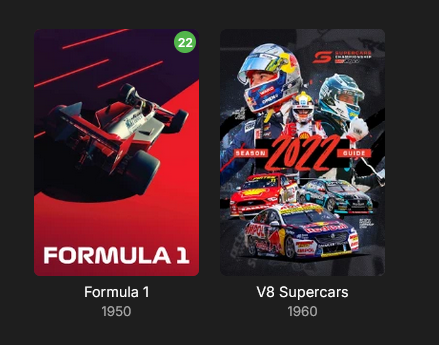
-
Version: 2.234.2.0
-
My model is slightly older, but of a similar generation (no DTS) it could be a model specific issue, but it would be quirky if this is the case and I am really only seeing issues from the two of you. I would try the cable again. I know it is only 100Mb/s but the reality is that you won’t (and shouldn’t) play anything with bitrates higher than that anyway. I play 80Mbps files on my 2017 Samsung with a 100Mb/s port without any problems and to me that is the upper limit on what anyone should be playing and it’s also way above the supported specs from both LG and Samsung. I’ll test the remote connection and let you know how I go.
-
Absolutely! As a minimum, make sure: The port must be secured with SSL/TLS All user names must be hidden for remote access All users have strong passwords Any Administrator accounts must not have remote logins there are many more ways to secure your server, but you need to start with most of this...
-
Having issues too, emby for mac, avi, mkv video is grey, audio is working. Only mp4s seem to be working fine. Some mkvs cannot even be skipped. ipad and iphone work great.










