All Activity
- Past hour
-
 squirrelET joined the community
 -
Hi quickmic I made some tests by myself and added some logs to ***\Kodi\addons\plugin.service.emby-next-gen\core\common.py (ok, chatgpt helped ) After that i was able to identify the series wich was causing the problem. After removing it from the series folder, new emby scan, and then adding it the series was not found in the emby server. For me it looks like it was an problem with emby. So i will make some tests more and report it here Anyway: I will send you the changed code and the resulting logs. Maybee you will find something to make it more stable.
-

Interview clips are misidentified as alternate versions of the movie
Luke replied to uncle_yuri's topic in General/Windows
Hi, what if you rename the folder to: Dawn of the Dead (1978) -
Hi there, what context menu exactly appears?
-
 Felipollo joined the community
 -
OK we'll take a look at it. Thanks.
-
HI there, can you please provide a specific example? How to Report a Problem Thanks !
-
Hi, what folder path are you entering into emby server?
-
Unwanted fanart.jpg files being saved to Movie folders
Luke replied to tanStaafl's topic in General/Windows
It depends on whether you have the option enabled to download images in advance or not. Make sure to read the help text underneath the option before changing it. In either case the same image gets downloaded. The option only determines when that happens. -
 projb joined the community
 -
 queermint_gum joined the community
 -
 xgp960829 joined the community
 -
 sumas482 joined the community
 -
 sumas327 joined the community
 -
 Boombanger joined the community
 -
 DeDordtenaar078 joined the community
 -
 Keeyylhs joined the community
 -

Unwanted fanart.jpg files being saved to Movie folders
tanStaafl replied to tanStaafl's topic in General/Windows
So you're saying that Emby saves the actual URL that an image is pulled from? It doesn't just scan for missing images and download missing images? Anyway, I have adding dozens of movies since this started and it is hit and miss those that get the fanart treatment. I'll try to run a control on a couple of movies and see what happens. - Today
-

embyforkodi (next-gen) 12.X.X support
quickmic replied to quickmic's topic in Emby For Kodi Next Gen
I checked again your log, seems to be more clear now. It's not related to playlists at all. The series was not synced, and there the season updated crashed. I'll fix the issue, but not sure If I make it properly, as I have no test case for that. I try to simulate your setup, however. Can you give me extra info what the Series location actually is. Also debug log might help, you can enable it in the plugin settings and send it to me via PM, thanks. -
Thank you, definitely going to give that a try
-
Yes. When direct playing, the forced subtitle is the only one that is displayed. I understand now that this is just a design FLAW with Roku's video player, there is nothing Emby can do here. This is a fix Roku would have to make. I was under the assumption that this shouldn't be an issue when direct streaming, as the issue of subtitles not displaying correctly is some weird quirk with how Roku handles MKV specifically, with HLS not being affected. Does this issue also affect HLS in some capacity?
-
If you'd like to show your support for an official feature, please go here to do so:
-
Hi, you can currently only achieve this functionality via a community built plugin, please see:
-
embyforkodi (next-gen) 12.X.X support
quickmic replied to quickmic's topic in Emby For Kodi Next Gen
Well, I can see you added a library "2026-02-19 21:31:31.199 T:3837 info <general>: EMBY.database.library: ---[ Emby server a8024ae81b3f418796a64b05f5b44644: added library: 448605 ]" and also the plugin syncs it. 2026-02-18 18:58:15.448 T:3827 info <general>: EMBY.database.library: [ a8024ae81b3f418796a64b05f5b44644_kodi_start_sync ] Sports / Tag 2026-02-18 18:58:15.449 T:3827 info <general>: EMBY.database.library: [ a8024ae81b3f418796a64b05f5b44644_kodi_start_sync ] Sports / Studio 2026-02-18 18:58:15.450 T:3827 info <general>: EMBY.database.library: [ a8024ae81b3f418796a64b05f5b44644_kodi_start_sync ] Sports / Genre 2026-02-18 18:58:15.451 T:3827 info <general>: EMBY.database.library: [ a8024ae81b3f418796a64b05f5b44644_kodi_start_sync ] Sports / Series 2026-02-18 18:58:15.452 T:3827 info <general>: EMBY.database.library: [ a8024ae81b3f418796a64b05f5b44644_kodi_start_sync ] Sports / Season 2026-02-18 18:58:15.453 T:3827 info <general>: EMBY.database.library: [ a8024ae81b3f418796a64b05f5b44644_kodi_start_sync ] Sports / Episode 2026-02-18 18:58:15.455 T:3827 info <general>: EMBY.database.library: [ a8024ae81b3f418796a64b05f5b44644_kodi_start_sync ] Sports / BoxSet 2026-02-18 18:58:15.456 T:3827 info <general>: EMBY.database.library: [ a8024ae81b3f418796a64b05f5b44644_kodi_start_sync ] Sports / Folder My first guess is, you (the Emby user in the plugin) might not have permissions for the library. There are no other errors in the log, so basically seems to be fine. If the permissions are ok, I need your Kodi databases for review. I need: emby_XXX.db and MyVideosXXX.db Also please enable debug log (in the plugin settings), trigger a repair-sync and send me that log too (via PM). btw, you can also try to use dynamic nodes (as a test). Are the Sports Shows listed there? -

LG G5 dropped DTS again, and Emby didn't work...?
TurkeyMan replied to TurkeyMan's topic in LG Smart TV
I previously had a CX which also had no DTS and transcoding was working fine for years on that. This is absolutely a G5 specific issue; everyone I know has an LG of various eras, and only my 'new' G5 has raised issues. -
Hi, Currently, as far as I know, the only feature implemented is a more or less automatic „next episode“ button being displayed. In my view the optimum would be a two step system in which there’s a global setting (like there is now) and in addition a per show setting to set the length of the credits (which for a show usually stays the same for the run of the show) and if they should be skipped automatically or the button should appear. is there anything that would make that possible right now or a chance to geht that feature in the future? I’m sure many people would appreciate that for their next binge watch run.
-

embyforkodi (next-gen) 12.X.X support
TheFreeMan replied to quickmic's topic in Emby For Kodi Next Gen
Sorry, quickmic, having difficulties communicating well... First I added a new Library in Emby, called "Sports" of type "TV Shows" Then, I added that library to be monitored in E4K on my LibreElec instance. Then, I hoped to be able to see anything added to the Sports library mixed in with all my other TV Shows under the same TV Show main menu node that I've already got. I just forced an update, then scanned through my TV shows and do not see either "Formula 1" or "V8 Supercars" as are shown in Emby: Log file, which should include the library refresh is attached. log-2026-02-20-02.46.16.zip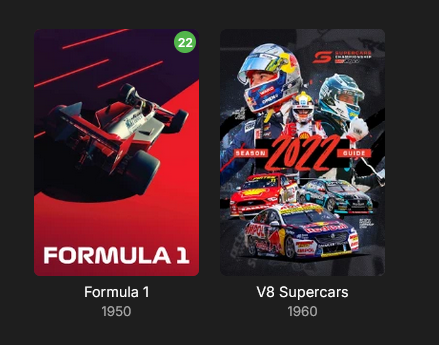
-
Version: 2.234.2.0
-
My model is slightly older, but of a similar generation (no DTS) it could be a model specific issue, but it would be quirky if this is the case and I am really only seeing issues from the two of you. I would try the cable again. I know it is only 100Mb/s but the reality is that you won’t (and shouldn’t) play anything with bitrates higher than that anyway. I play 80Mbps files on my 2017 Samsung with a 100Mb/s port without any problems and to me that is the upper limit on what anyone should be playing and it’s also way above the supported specs from both LG and Samsung. I’ll test the remote connection and let you know how I go.
-
Absolutely! As a minimum, make sure: The port must be secured with SSL/TLS All user names must be hidden for remote access All users have strong passwords Any Administrator accounts must not have remote logins there are many more ways to secure your server, but you need to start with most of this...
-
Having issues too, emby for mac, avi, mkv video is grey, audio is working. Only mp4s seem to be working fine. Some mkvs cannot even be skipped. ipad and iphone work great.
-
When navigating to the "Favorites" screen and selecting a movie on that screen the "Esc key", "Backspace key" or "<" button does not return you back the the Favorites screen. The only key/button that works is the "Home key" or "Home button" which returns you all the way back to the Home screen. When pressing the "Esc key ", "Backspace key" or "<" button multiple times the context menu appears. Also, if you select the "Favorite Movies" link in the Favorites screen the back navigation fails there too. All other screens appear to be working correctly (Movies, Collections, ...). Example: Select (from Home Screen) Favorites->Movie (back navigation fails) Select (from Home Screen) Favorites->Favorite Movies (back navigation fails) Version: Emby Theater 3.0.20 Windows 10,11 Additional info for devs: This problem started happening after "data-appversion" update 4.9.3.13 (01/18/2026). Previous version 4.9.3.12 works correctly.
-
Tutoriel : Ce script est un outil de maintenance "tout-en-un" qui automatise la compression de vos médias tout en garantissant une compatibilité maximale avec Emby. Il transforme vos fichiers (AVI, MP4, WMV...) en MKV HEVC 10-bit de manière totalement autonome. Pré-requis Indispensables Avant de lancer le script, vous devez installer ces deux moteurs de conversion : HandBrake CLI : Télécharger ici (Essentiel pour la gestion des pistes audio/sous-titres). FFmpeg : Télécharger ici (Sert de moteur de secours si HandBrake échoue). Configuration du Script Ouvrez le fichier .ps1 avec un éditeur de texte (Notepad++ ou VS Code) et vérifiez ces 3 lignes : Les Chemins : Assurez-vous que $HB et $FF pointent vers vos dossiers d'installation. Le Dossier de Travail ($T_DIR) : Par défaut configuré sur Z:\. C'est ici que le fichier est encodé avant d'être déplacé. Choisissez votre disque le plus rapide (SSD) pour gagner du temps. Les Logs ($L_BASE) : Le script crée un historique pour ne jamais ré-encoder un fichier déjà traité. Fonctionnalités Avancées Sélection "Touche Unique" : Plus besoin de taper "Entrée". Appuyez simplement sur la lettre de votre lecteur (S, T, U, etc.) pour lancer l'analyse. Compression Intelligente : Vidéo : Passage en HEVC 10-bit via NVIDIA NVENC (Accélération GPU). Résolution : Redimensionne automatiquement en 1080p (Max Width 1920) pour économiser de l'espace. Audio : Conversion en AAC 192k pour une compatibilité parfaite sur tous les navigateurs et TV. Gestion Multilingue : Le script priorise le Français, mais pour les lecteurs T et W, il conserve automatiquement le Japonais (idéal pour les fans d'Animes). Sécurité Totale : Le script renomme l'original en .old, vérifie l'intégrité du nouveau fichier, et ne supprime l'original que si tout est correct. Comment l'utiliser ? Préparez vos lecteurs : Assurez-vous que vos disques (NAS ou internes) sont bien mappés avec les lettres prévues (S à Y). Lancez PowerShell en Administrateur. Exécutez le script : .\Emby_Optimize.ps1 Choisissez votre cible : Appuyez sur la lettre correspondant au disque à traiter. [!IMPORTANT] Chemin des lecteurs : Si vos disques utilisent d'autres lettres, modifiez simplement la ligne if ("STUVWXY" -notlike "*$SEL*") dans le script pour ajouter les vôtres. Emby_Optimize.ps1
-
- 1
-

-
Hello, Just posting here to mention I am also getting a lot of rate limiting from Discogs. My Emby logs are full of these 429 errors after importing songs and scanning library files. Could possibly improve the issue by implementing authentication. That would allow up to 60 requests per minute, compared to 25 a minute for unauthenticated requests. 2026-02-19 20:19:13.541 Info HttpClient: Http response 429 from https://api.discogs.com/database/search?q=Peter Skrabak&type=artist after 123ms 2026-02-19 20:19:13.541 Error App: Error in Discogs *** Error Report *** Version: 4.9.3.0 Command line: C:\Users\RUM\AppData\Roaming\Emby-Server\system\EmbyServer.dll -service Operating system: Microsoft Windows 10.0.26200 OS/Process: x64/x64 Framework: .NET 8.0.22 Runtime: C:/Users/RUM/AppData/Roaming/Emby-Server/system/System.Private.CoreLib.dll Processor count: 12 Data path: C:\Users\RUM\AppData\Roaming\Emby-Server\programdata Application path: C:\Users\RUM\AppData\Roaming\Emby-Server\system MediaBrowser.Model.Net.HttpException: MediaBrowser.Model.Net.HttpException: TooManyRequests at Emby.Server.Implementations.HttpClientManager.CoreHttpClientManager.SendAsyncInternal(HttpRequestOptions options, String httpMethod) at Emby.Server.Implementations.HttpClientManager.CoreHttpClientManager.SendAsync(HttpRequestOptions options, String httpMethod) at Discogs.Plugin.GetResponse(HttpRequestOptions request, String method) at Discogs.Plugin.GetDeserializedResponse[T](HttpRequestOptions request, String method) at Discogs.DiscogsArtistProvider.GetSearchResults(ArtistInfo searchInfo, CancellationToken cancellationToken) at Discogs.DiscogsArtistProvider.GetMetadataResponse(ArtistInfo id, CancellationToken cancellationToken) at Discogs.DiscogsArtistProvider.GetMetadata(ArtistInfo id, CancellationToken cancellationToken) at Emby.Providers.Manager.MetadataService`2.ExecuteRemoteProviders(MetadataResult`1 temp, LibraryOptions libraryOptions, String logName, TIdType id, IRemoteMetadataProvider`2[] providers, MetadataRefreshOptions options, CancellationToken cancellationToken) Source: Emby.Server.Implementations TargetSite: Void MoveNext()
-
LG G5 dropped DTS again, and Emby didn't work...?
TurkeyMan replied to TurkeyMan's topic in LG Smart TV
I could give you access to my server to do a remote test in this environment? My TV is wifi; because those 100m ethernet ports are slower than the wifi, and it's definitely up to date. (actually, my old CX was 100m ethernet, G5 might be better; I should probably plug a cable again) Which specific model do you have? I wonder if all G5's are identical? But yeah, to repeat above; plays exactly 10s then freezes only when DTS transcoding... that's very specific, and it's very difficult to imagine how exactly that symptom could manifest from a network problem