All Activity
- Past hour
-
The solution to this on Server 2025 is to enable caching of SSL pages. On Server this is disabled, while on a desktop OS it is enabled. To enable it simply go to the following reg key and change it from a 1 to a 0. After that it will install just fine, no reboot required. [HKEY_CURRENT_USER\Software\Microsoft\Windows\CurrentVersion\Internet Settings] "DisableCachingOfSSLPages"=dword:00000000
-
 Ilanavevao joined the community
 -
Workaround found — Private Network Access (PNA) seems to be the root cause I had the same issue: web browser on the TV connects to Emby fine (http://192.168.x.x:8096), but the native app always said "server not found." Digging into this, it looks like TitanOS's Emby app is a web app with a public origin, and Chromium's Private Network Access (PNA) spec blocks requests from a public-origin context to a "private" IP address space (RFC1918: 10.0.0.0/8, 172.16.0.0/12, 192.168.0.0/16) unless a permission handshake succeeds — which apparently doesn't work correctly in this app. The fix: give your Emby server a second IP address that falls outside the RFC1918 ranges, so PNA classifies it as "public" instead of "private" (even though it's not actually reachable from the internet). I used an address from the CGNAT range 100.64.0.0/10 (RFC 6598), since it's never used for real internet routing: Added a secondary IP (e.g. 100.64.x.x/32) as an alias on the server's existing network interface, alongside its normal LAN IP. Added a static route on my router so that destination 100.64.x.x/32 is reachable via the server's normal LAN IP as next-hop. Entered that new 100.64.x.x address (with port 8096) in the Emby app on the TV instead of the normal 192.168.x.x address. That's it — the app connected immediately. No port forwarding, no public exposure, no DNS changes needed, entirely within the local network. This matches what others reported here (public IP worked, local DNS override broke it) — it all points to PNA's IP-space classification rather than any real internet routing being involved. Hope this helps someone else stuck on this!
-
 mein_emby joined the community
 -
 albertilloloquillo18 joined the community
 -
 Heloarmi joined the community
 -
 MzI26 joined the community
 -
 Shellyyyy joined the community
 -
 mohand44183@gmail.com joined the community
 -
 AlanGor joined the community
 -
 adriano86 joined the community
 -
 Mayar2638 joined the community
 -
Sorry I've been quite busy lately. I just tried again. Attached are the general log and all transcoding logs from the server. I also sent the logs from the Android TV app for the use 'Cédric' around 10:50 UTC. Ignore the playback of episode 1 I started first as there was some issue with the metadata for this episode which results in multiple versions of the file although there is only one file. After that I did some other tests. First with stopping playback around 10 minutes and resuming. This results in the file playing again from the stopped moment, but the subtitles showing are those from the start of the file. Then I tried to reproduce the subtitles not being enabled on starting the next episode. The first few times this worked as expected but this was with files I had already played in the weeks before so I guess Emby remembers which subtitle to use from the previous playback. Next I Started episode 93 and fast forwarded to the end to allow it to auto start episode 94 which hasn't been played before yet. Now there was no subtitle enabled when the episode starts. I tried to select it manually while playing but this didn't work. I think I've had some instances before where the sub started displaying about 2 or 3 minutes after selecting it during playback but I'm not sure. I"ve also attached the MediaInfo for episode 94. logs.zip Naruto.094.v4.480p.DVD.Dual-Audio.FLAC2.0.Hi10P.x264-JySzE.mkv.MediaInfo.txt
-
No, because I'm not using it as it doesn't work as well as the Android-TV app.
-

Show the path info when in a movie or series
GrimReaper replied to taunnnt0's topic in Feature Requests
Yes, and multiple paths could be listed. Though I don't imagine many users will have them scattered around in more than 1-2 folders. -

Show the path info when in a movie or series
crusher11 replied to taunnnt0's topic in Feature Requests
A series could be stored in multiple locations. - Today
-
Good morning, hope Yall have a good weekend

-
-
To be fair, I'm glad that a feature like this was implemented so quickly. Having the base integrated makes it a lot easier to to build on it instead of injecting the complete codebase. Perhaps some stuff like Spotlight height, Logo and Plot or tagline positioning + Trailer support will make it into Emby officially someday. We never know.
-
Show the path info when in a movie or series
GrimReaper replied to taunnnt0's topic in Feature Requests
Select "Always show season folders" for "Preferred TV show display" under your user Display settings.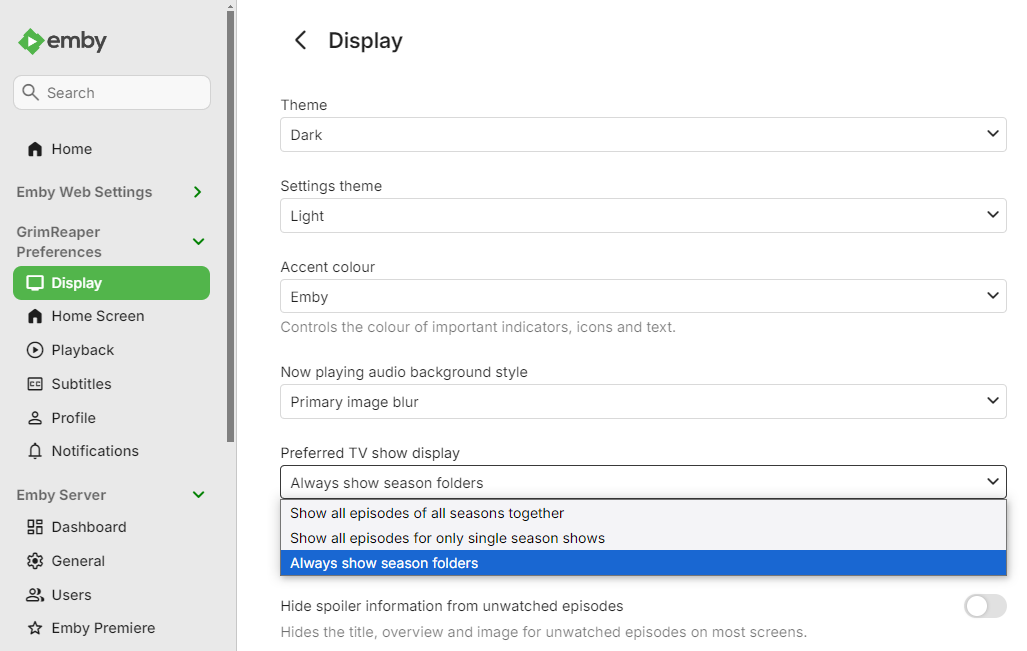
-
Show the path info when in a movie or series
GrimReaper replied to taunnnt0's topic in Feature Requests
TV shows never had it, as there's no tracks info. But true, maybe basics: path/size/Date Added should be displayed as well. -

Show the path info when in a movie or series
taunnnt0 replied to taunnnt0's topic in Feature Requests
Just because I don't want to create a new topic... In the browser is there a way to group all episodes into their season? On mine they're one long row. I rather have it like in a app. Where it has season pic with ep count in upper right corner. Is there a way to do that in the browser? instead of looking like the pic.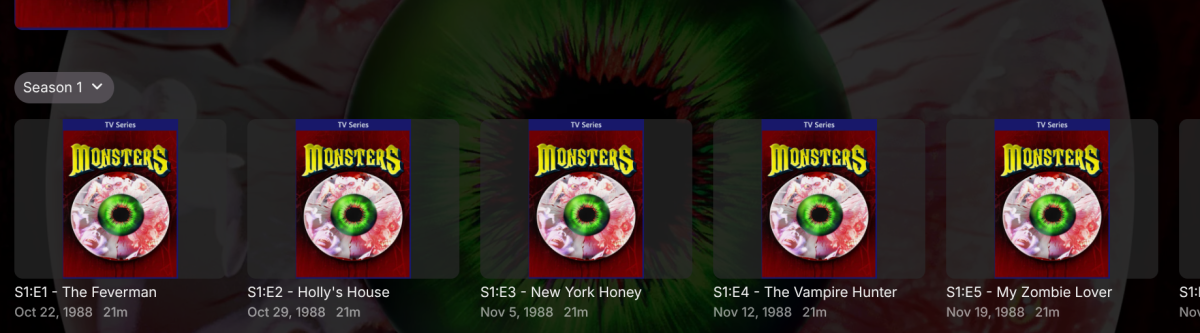
-
Show the path info when in a movie or series
taunnnt0 replied to taunnnt0's topic in Feature Requests
On mine it was selected. It just doesn't show it under series. You have to go into each episode. I think it should show under about. So it is easier to locate and read IMO. -
@GrimReaper It's not in the sidebar either. @ebrPermissions fully investigated @Luke Saved permissions again, no change. Don't put any more effort into this guys, I can access it from adding it as a Home Section which is good enough, and clearly all the easy fixes haven't worked. What I wanted to use it for (making a TV show list for another user) is actually better served as adding a new collection (which I didn't know were global).
-
Where?
-

Emby has stop and fails to record programs sellected directly on the "Guide".
Rolando1948 posted a topic in QNAP
Emby has stop and fails to record programs sellected directly on the "Guide", but does continue to sucessfully record the series programs that have been and remain on its schedule. I just updated the Dashboard on my QNAP TS-253Be (QTS 5.2.10.3577) to Emby ver. 4.10.1.0, and on Saturday night, Oct. 03, I have a recording "Scheduled" that was sellected directly on the "Guide". I will inform if it was sucesfully recorded, or if the anamoly continues. -
the Live TV section is controlled via Feature Access for the user, so when you say you have permissions checked off - can you show us what that looks like?
-
How do I remove the live tv section from my Home Screen on Apple TV? There is no option for it in the web app and yes I have premiere and I also have permissions checked off.
-

Please add audio language filter/complex filters
Luke replied to Modify3453's topic in General/Windows
Hi, yes what he mentioned about the new home screens is now available in the 4.10 release. -
Opus files incorrectly transcode part way through tracks after update to Emby for LG 1.0.51
Luke replied to magickii's topic in General/Windows
That signals to me that the LG player isn't handling it, although I'm surprised you're not getting an error message. -
Updated Emby yesterday on LG and still the same. Simple SRT subtitles just do not play on LG. Playback stops. No problems on my Samsungs - 32", 55" and 75" with SRT subs. Yes, my NAS is slow so I can't transcode at all - so using ASS subs is not possible on any my TVs, I just use SRT subs and no problem. Made a script to transcode multiple ASS to SRT at once on my computer so that is ok.
-

Plugin: Emby SmartLists (AI Port of Jellyfin SmartList Plugin)
feerlessleadr posted a topic in Plugins
Hi All - I have been using Emby way back since the MediaBrowser days, and my biggest issue has always been the lack of smart playlist functionality. I have used a number of the smart playlist plugins that have been released in the past, but could never quite get them to work the way I liked. About a year ago I was poking around jellyfin and saw that a dev released a SmartList plugin that did everything (and more) that I was looking for, and worked great. Since then I've been using jellyfin for music and emby for everything else, but always wanted to consolidate everything back under emby. To that end, I used claude to port the JF plugin to work with emby, and after extensive testing on my system, I figured I would post the port here as well in case others find it useful. The original JF plugin repo can be found here: https://github.com/jyourstone/jellyfin-smartlists-plugin My forked repo with the emby compatible port and dll download can be found here: https://github.com/feerlessleadr/emby.smartlists the install instructions and dlls can be found in the repo. As I mentioned above and in the repo, I exclusively used claude to port the JF plugin to emby, and while I had claude run multiple iterations of testing and security reviews, I'm at best just a hobbyist and not a developer, so if you are not comfortable with that, please do not use this. Mods, if this is not appropriate, please feel free to delete this post. All credit for this plugin goes to jyourstone on github, as all I did was use claude to port this to emby. Hopefully others find this helpful as well. -

Opus files incorrectly transcode part way through tracks after update to Emby for LG 1.0.51
magickii replied to magickii's topic in General/Windows
Ok, had a chance to test this. It appears when I disable "Allow audio transcoding to a compatible format, if necessary, during media playback" for a user and try to play an opus track then the Emby for LG app just shows a loading spinner indefinitely and does not play (or change to the Now Playing view). -

Please add audio language filter/complex filters
Modify3453 replied to Modify3453's topic in General/Windows
@ebrHas a version been released with any of this? -

Emby Homepage "Spotlight Widget" Proof of Concept
DarkStar1977 replied to sh0rty's topic in Web App CSS
Having this for more than a year I really don't understand the "crap" we received with embbeded spotlight feature .... unbelievable !