All Activity
- Past hour
-
 我卜想失眠 joined the community
 -
 ritoo joined the community
 -
 1085889382 joined the community
 -
 Kirche joined the community
 -
 AngryTeacher joined the community
 -
 Paul1963 joined the community
 -
 Fatima Saad joined the community
 -
 Abody13 joined the community
 -
 qzj0010 joined the community
 -
 guillermo1945 joined the community
 -
Hi, I came accross this thread as part of a rabbithole Gemini stuffed me down when trying to use Offline Emby content with my Xreal Beam Pro and AR Glasses, so not even sure if this is possible, I've been at this a few days and late nights so all guidence welcome. Been an Emby Premiere Beta (Version 4.10.0.8 beta - currently) user for a few years and love the product, the only thing letting me down ATM is the support for the Xreal Beam Pro and AR Glasses which I use to watch offline content on my daily commute, because of the playback issues I mainly watch offline Prime and Netflix but would love to have access to my Emby content, that brings us to where I am currently. I can use an external player such as VLC (although Kodi is not presented as an option) with the Xreal Beam Pro but it doesn't record/feedback the watch content, Google Gemini suggested Emby For Kodi Next Gen (EFKNG ) could do this, but I've been struggling to get it working as expected, I'll try and list where I think I am, but after a few days and late nights at this, I've tried so many things my heads spinning. Installed Kodi 21.2 on Xreal Beam Pro (XBP) and Kodi Companion 2.2.1.0 on the server. Installed EFKNG 11.27.1 on XBP, configured and logged into Emby Server using my Emby Connect Credentials, then my local Emby Account - Get welcome to Emby popup with my user picture. No login event on Emby Server although some http 204 entries in the Emby log (I retried once using local Server IP and Login event displayed once but no Currently Playing or Watch status updated) Kodi accesses and plays the files from the shared Download folder on the XBP without issue and recognises the series/episodes(but again no Currently Playing activity or Watched progress updated on the Emby Server. Again, any help gratefully appreciated and if what I'm trying is not possible confirmation of same would prevent further nights of frustration
-
"Read the damn' manual" Um den Funktionsumfang und die Arbeitsweise von emby zu verstehen, ist ein gründliches Studium des Manuals vonnöten: https://emby.media/support/articles/Quick-Start.html Insofern wäre es für Neukunden extrem vorteilhaft, würden Einträge als "How to's" als Tooltipps (Links) in den eher nur groben Produktbeschreibungen verfügbar. Wie gesagt - ich habe mich auf meine EDV-Erfahrung verlassen und darf jetzt meine Sammlung komplett emby-gerecht überarbeiten
-
Hi, Great plugin, really useful. Would it be possible to add the following fields: TVDB ID Folder path contains (for example: C:\Movies\Kids\Dub) Country Thanks!
- Today
-
DVD and Bluray subs are called VobSub and PGS. As I recall, Subrip was originally named after an old program (called Subrip) which ripped text from VobSub (and subsequently other graphical formats) using OCR. The extension SRT is short for SubRip Text, I think. Paul
-

LG TV has a problem playing videos with embedded subtitles.
zodac01 replied to trekflix's topic in LG Smart TV
Same here, also on docker. -
Hi there and thanks for any help in my search. I'm looking to expand the compute power in my setup. Currently I'm running an Synology DS720+ for file storage, backups etc. Lately that has evolved in also deploying some dockers: Immich, Joplin, Emby and the “arr - stack”. The DS720+ can handle that quite easily, except for transcoding more than 1 stream at the time. And that's where my search originates. I expect to deploy more services (like Headscale, Nginx, maybe Adguard) in the next year, yet I don't expect those to be very compute heavy. At the moment, the main reason to look for more compute power is to be able to transcode 3-5 streams simultaneously. I intend to keep my storage on my Synology, and I'm looking to have a separate homelab server for the mentioned services. Also, I intend to buy a solution for the next 3-4 years of use. I will run a Linux distro, maybe on proxmox. Looking at 2nd hand sales, I'm considering two options: SFF/ mini PC or a laptop with dedicated GPU These two are for sale right now in my area: - Beelink SEi13 Pro mini-pc Intel Core i9-13900HK (14 cores, 5,4 GHz), 32 GB LPDDR5, 1 TB NVMe SSD - Lenovo Legion 5 AMD Ryzen 7 5800H, NVIDIA RTX 3070 (8GB), 16GB RAM, 1TB SSD, 16” QHD+ (2560×1600) 165Hz screen The laptop has a screen and battery (so sort of a UPS) and the main reason to consider: dedicated GPU. The Beelink sips power and has 32GB ram already installed. I expect the Lenovo to initially cost about €50-100 more than the Beelink. Also, I expect to Beelink to have lower power cost of about €20/yr Is this overkill for 3-5 simultaneous transcodes? What would you do/recommend?
-

Show album release year on Now Playing screen
FrostByte replied to xterminal's topic in Feature Requests
If this were to be implemented I would like an option to display the original release year instead of the year field. This would require Emby to display ORIGINALYEAR which MusicBrainz can already automatically supply to mp3tag and Picard. From what I understand this information is already stored in Emby but not displayed anywhere. https://emby.media/community/topic/94691-music-tag-original-release-date-tagorigyear-andor-tagoriginalyear/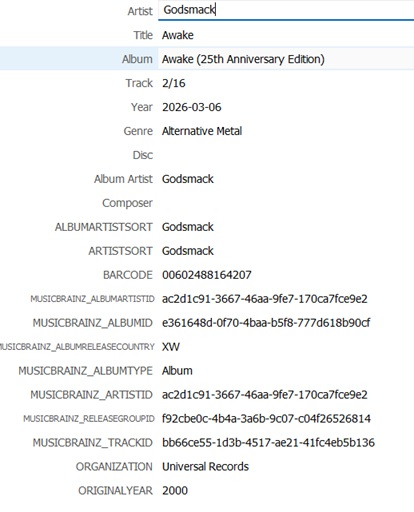
-

Symfonium: Music player and cast with Emby support
Tolriq replied to Tolriq's topic in Tools and Utilities
Version 14.1.0 Notes: Please remember to leave an updated written review on the Play Store. Your feedback is essential for improving the app’s ranking and helping secure Symfonium’s future. Added: Added experimental support of Audiobookshelf as media provider. Added experimental support of mTLS auth to Subsonic, Emby, Jellyfin and Audiobookshelf providers (Android Keychain + import). Added support for animated images (Webp/GIF) in now playing and detail pages (With settings to control their usage or not). Added settings to control left and right block sizes in landscape expanded now playing. Added new renderer setting max bitrate override, to force a specific bitrate when casting to that device. Added new renderer setting Stop casting on stop, to stop casting when stopping playback or queue reach the end. Added new ARTIST/ALBUM parameters to the start media API commands to help distinguish duplicated name media. Added preview for the detail page headers settings. Added setting to control image margins in detail page headers. Added previous chapter and next chapter actions for now playing and compact player buttons. Added chapter custom string values including current chapter and all chapters duration template values for now playing and album page. Added audiobook resume rollback setting to rewind a little when resuming paused audiobooks. Added per-library media type selection to mark audiobook libraries and prepare future library-specific features. Added new additional info field to detailed page headers supporting custom strings. Added now playing custom text token support for current volume (volume.current). Added support for Plex loudness data to replay gain mode. (You still need to enable replay gain in the DSP). Added new “Add to permanent offline cache” track swipe action. Added Czech language support. Thanks to Ondra. Added support for Zstandard for server communication. Changed: PEQ apo profile import now properly import channel configuration. Media Queues now properly save the shuffled indices to allow to unshuffle after a queue restoration. Local device, cloud providers, SMB and WebDAV can now transcode in more cases when casting to UpnP or Chromecast devices. Migrated all FFmpeg code to a new custom FFmpeg 8.1 engine. Please report any issues with transcoding, format or waveform extraction, … Fixed: Fixed simultaneous download limit settings not working. Fix Plex to SONOS transcoding often switching to MP3 when unwanted. Fix possible playlist import issue at root of SMB shares. Fix possible casting issue with some characters in file names. Fix rating bar touch zone not precise enough. Fix tag extraction for some media format on some providers. Fix now playing ui and media session update when updating ratings from a queue loaded just before a server sync. Fix Open Subsonic feature checks not being retried after a reconnection. Fix missing library selection for automatic offline cache of Subsonic providers. Fix large MKA files tag extraction. Improved SMB scanning performance. Fix impossibility to import read only playlists on Subsonic. https://support.symfonium.app/t/version-14-1-0-released/13382 -

Playback Error: No compatable streams (Samsung/LG only it seems?)
doonze posted a topic in General/Windows
Starting yesterday, 3 of my users (2 on samsung, 1 on LG) started getting the Playback Errors. All 3 use my server daily, and never got these errors before. 2 of the users have confirmed their Roku TV's do not get the errors at the same time. I also do not get the errors on my Roku TV, my android app, nor the web app. The weird thing is, all content will throw this error for a while, sometimes for several hours, then start working again for them. Only to go back to throwing errors. I'm on Emby 4.9.3.0 and have been for some time. Nothing changed on my system. I restarted the Emby server and then rebooted my server itself. My Emby runs on Debian Bookworm. Emby logs show no errors, just that the stream starts, then shows the app (LG app for example) stops the playback at 0 seconds. I've attached my logs. References to LG or User Nicole are where I was personally seeing the errors. They are around and just after 00:00 in these logs. Just before the app quits, there are messages like this: 2026-04-11 00:01:58.794 Info MediaInfoService-0HNKNGPJTMGD0:0000000A: Bitrate exceeds DirectPlay limit: media bitrate: 5507519, max bitrate: 4000002 2026-04-11 00:01:58.794 Info MediaInfoService-0HNKNGPJTMGD0:0000000A: Bitrate exceeds DirectStream limit: media bitrate: 5507519, max bitrate: 4000002 Then followed by: 2026-04-11 00:01:59.897 Info SessionManager: Playback stopped reported by app Emby for LG 1.0.50 on LG Smart TV (32LK540BPUA) But like I said no errors. There are no ffmpeg logs at these times; it seems pretty obvious to me that the system wants to transcode as the bitrate is too high for direct play, but is failing to start the transcode so the stream is failing? That's my take from what I see. I do see correct transcoding going on for these same files on my android and Roku apps, accessing these exact same files just before or after they are failing on the LG app. My test were not at the exact same time (to exclude some weird type of contention), but I would switch back and forth between the LG, Android app, and Web app, and walk from the room the Roku TV was in, and the LG TV was in. Any ideas? I've got 2 unhappy users and one disgruntled GF I need to appease. embyserver (1).txt -
How and where do I add it?
-
Yes can confirm the blank side menu does happen sometimes along with misc ui bugs. Not often but it does happen.
-
Yeah so Atmos playback still isn't perfect but it's tolerable. I will probably switch to VLC for longer movies. Not really on topic, but the Windows app is really buggy when it comes to navigation. Last night I was watching a show and at the end I wanted to 'back out' (by pressing the back button) and it refused, instead bringing up the side menu which was completely blank. This happens a lot after watching media (instead of actually navigating to a previous screen, emby wants to open the side menu). During playback on screen commands often vanish (like the full screen button, often just dissapears not long after starting playback).
-
Why is the Date Created setting missing on the Roku TV app? I have a library which is sorted by newest to oldest in the web page for a library but the Date Created setting is missing on the Roku app. The TV app has quite a few less options for settings than the web client. Can we get Date Created added to the Roku Emby client?
-

No art or posters for anything including backdrops on roku app.
speechles replied to Error3972's topic in Roku
Is he using Apple hardware for the server? The Roku being fed HEIC wouldn't work. But I do not think the server does that. But it might because support was recently added for HEIC. @Lukedoes the server ever save images as HEIC? -

No art or posters for anything including backdrops on roku app.
Error3972 replied to Error3972's topic in Roku
It is just a bunch of grey boxes with text. Im only a client of a friends server so I dont have access to the server log unfortunately. It works fine on both pc, web, android,and fire tv. Only having this issue with roku. -
No art or posters for anything including backdrops on roku app.
speechles replied to Error3972's topic in Roku
Can you show a picture? Is it just a bunch of grey boxes with text only where the images should be? Do you have any server logs from that time? Use the "logs" tab of your Emby server to find them. When you download them through your Emby server interface they will be scrubbed of information such as IP addresses, API keys, tokens, etc.. (which could be used to compromise your server). Only share logs obtained through the Emby server interface. Do not find the logs in your OS file system and share them directly that way. Always download them through your Emby server. The logs will show the Roku requesting the images and any possible errors happening when scaling or anything else peculiar would appear in them. -
Remote playback can get restricted streaming from all sorts of network, Wifi, TCP cable and even hardware issues. Sometimes it can be hidden. I've seen TV Ethernet ports only able to do 10 / 100 and the incoming signal from a workstation has a 1GB Ethernet cable and bandwidth. Just that cross connection kills the feed after 20 seconds. If there is a Wifi connection, then even a fireplace iron stoker rod 2 feet away can kill the signal. Then there is the TV App, the browser, the OS that doesn't support direct, kicks it to transcoding and the transcoding is set high that works locally but not for remote with streaming issues. That can kill the stream and start a stutter.
-
OK. I thought subrip is the term used for graphic subs that probably originally came with a blu-ray disc, which I think mostly uses graphic subs. You can often tell just by the size of the embedded file which shows up with MKVTools. Subtitle graphics are usually 15 to 25 MB, while srt files are always just 150 KB or so. https://blog.thescorpius.com/index.php/2017/07/15/presentation-graphic-stream-sup-files-bluray-subtitle-format/ Converter online - useful link: https://subtitletools.com/convert-sub-idx-to-srt-online
-

Hide Playlists from Included In & Group Albums by Release Type + Decade
user24 replied to user24's topic in Web App CSS
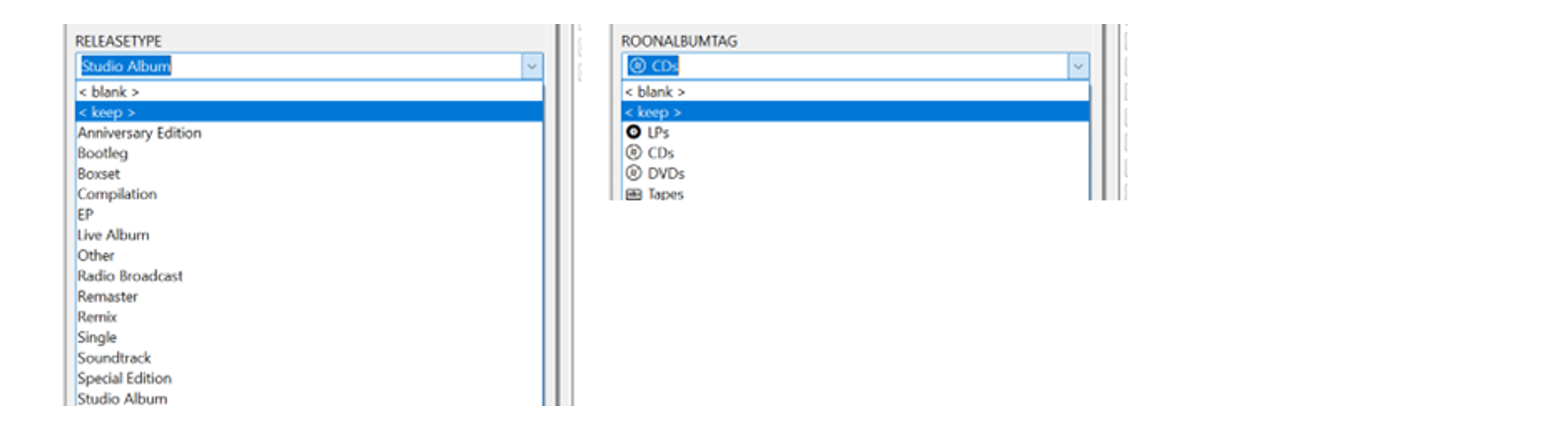
@GrimReaper Just a FYI progress update – and well, the more I use this, the better I am liking it! Still doing a lot of fine-tuning from the music side to streamline the tagging process and get the grouped sections aligned better with my library. I added some custom drop-down menus into Mp3tag – so it’s very quick to add the new tags now: It’s unbelievably super-fast now using the ‘Importer’ to remap the individual tags to the group tags/headings in Emby. There’s no way this would be practical to do with Mp3tag and Emby alone. (I’ll give a separate update on the ‘Importer’ use a bit later on…) I’m also just started experimenting with some new Decade headings to match with the Release Type headings. Will probably scale it down a bit from what I have now: A couple of script changes make it easy to try different scenarios (e.g.) Add: const decadeLabels = { "1950s": "The Rockin' 50s", "1960s": "The Swinging 60s • British Invasion | folk-rock tones | psychedelic color waves", "1970s": "The Classic 70s", "1980s": "The Synthetic 80s", "1990s": "The Indie 90s", "2000s": "The Global 00s", "2010s": "The Trendy 10s", "2020s": "The Emerging 20s", }; (e.g.) Add/change: const label = decadeLabels[decade] ? ` • ${decadeLabels[decade]}` : ""; header.textContent = `${decade}${label} • ${groupAlbums.length}`; I imagine the Custom Release Type sort will be my main ‘go to’ view. It’s already helping me easily see missing Studio Albums from an Artist’s discography. Just compare the new page view directly to the MusicBrainz main Album discography section for well-known popular Artists. Still a lot to tag, organize and experiment with, but so far so good...!!!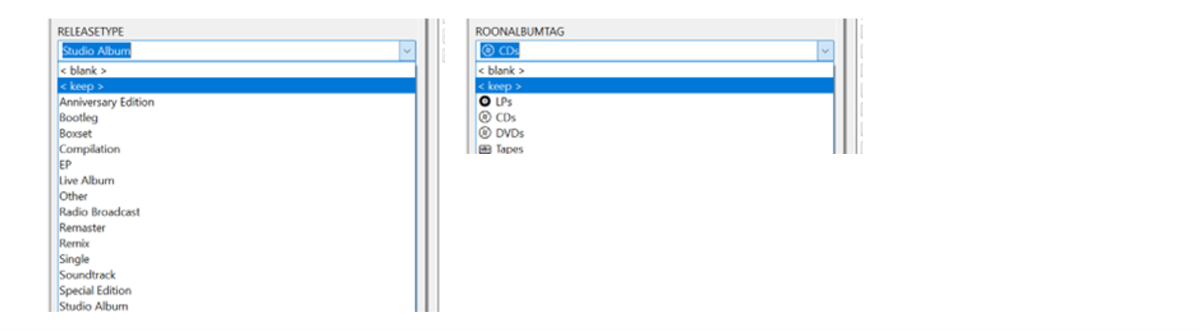



-
Activity and Alerts fall off the Dashboard I believe every seven days if I remember correctly, or x number of entries depending on the section. If you want to see older activity/alerts click the Activity or Alert header button to open entire history.
- Yesterday
-
Yes sorry my bad, it was .28
-
Updates: Return of the header, you can change the frost, disable it, etc. from this area in the variables, I also added in a variable for padding in the media details areas, so it does not sit right up against it. /* EFFECTS (SIDEBAR, HEADER, AND DIALOG POPUPS*/ --sidebar-blur: var(--blur-heavy); /* Frost blur intensity: var(--blur-heavy), var(--blur-light), or none */ --sidebar-bg: var(--navy-base-alpha-75); /* Frost transparency intensity: var(--navy-base-alpha-75), var(--black-alpha-80), var(--black-alpha-95), etc, or var(--retro-navy) to disable */ --header-blur: var(--blur-heavy); /* Set to 'none' for a completely clear header, or var(--blur-heavy) / var(--blur-light) to enable frost */ --header-bg: var(--navy-base-alpha-75); /* Set to 'transparent' for a completely clear header, or use a translucent color to enable frost */ --header-border: var(--standard-border-thickness) solid var(--gold-alpha-15); /* Set to 'none' to disable, or var(--standard-border-thickness) solid var(--gold-alpha-15) to enable */ --header-content-padding: 20px; /* Media details header padding, push the content down from the header */ Fixed more random icons that did not receive the gold color If a filter is applied the filter icon will now have the gold color around it indicating a filter is in use. Backdrop poster animations, and new variables added for that --backdrop-anim-toggle: imgZoomFadeIn; /* Set to 'imgZoomFadeIn' to ENABLE the backdrop animation, or 'none' to DISABLE it */ --anim-backdrop-mask: linear-gradient(to right, transparent 0%, var(--pure-black) 40%), linear-gradient(to top, transparent 0%, var(--pure-black) 40%); --backdrop-image-scale: 80%; /* Percentage of screen to use for backdrop posters (It will always pin to the top right of the screen) */ Bugfix for the list view star hover Media card hover shadow fix Reduced seasonal variable lines to easily enable/disable. Some Live TV fixes And many more bug fixes. I know the variables have been changing a lot lately, I'll try to be better on showing section 1 changes going forward, so you can just update section 2 downwards. Got an idea or found an issue? I'm always listening. Feedback is always welcome. Emby Navy and Gold v4.108.css
-
Show album release year on Now Playing screen
user24 replied to xterminal's topic in Feature Requests
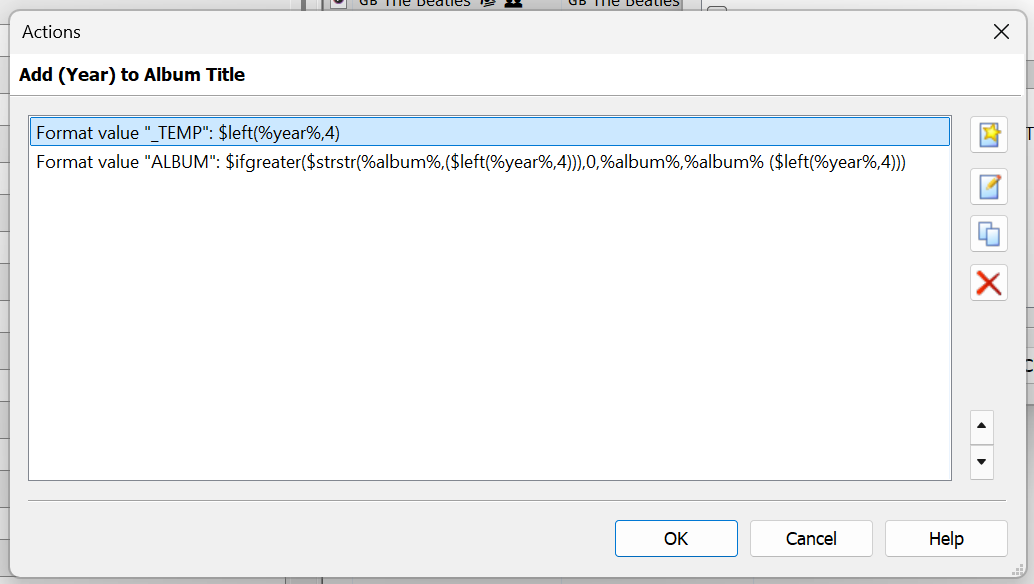
Hi, yes this is a nice idea. AFAIK, this is not currently possible, even if you have all your tagging correct. I wanted it myself, going back a while ago, so added the Year to the Album name (e.g.) "Let It Be (1970)". The end-result is this: As I didn't want to do this manually for all my Albums, I created an Action in Mp3tag to do this automatically. I expect there would be other methods as well? You could run something like this on many Albums at once. If the Year has already been added, it won't add it a second time. Therefore you won't end up with something like "Let It Be (1970) (1970)". While it is a workaround, at least it shows the information. Cheers!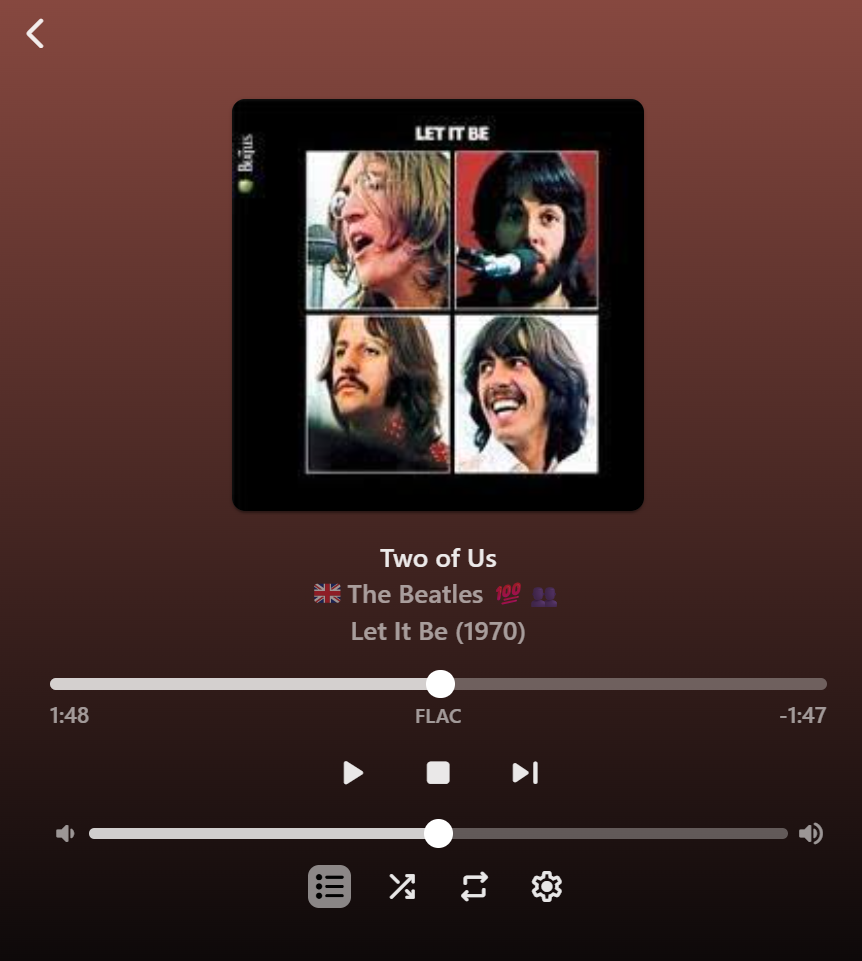
-
 shadypinesma changed their profile photo
 -
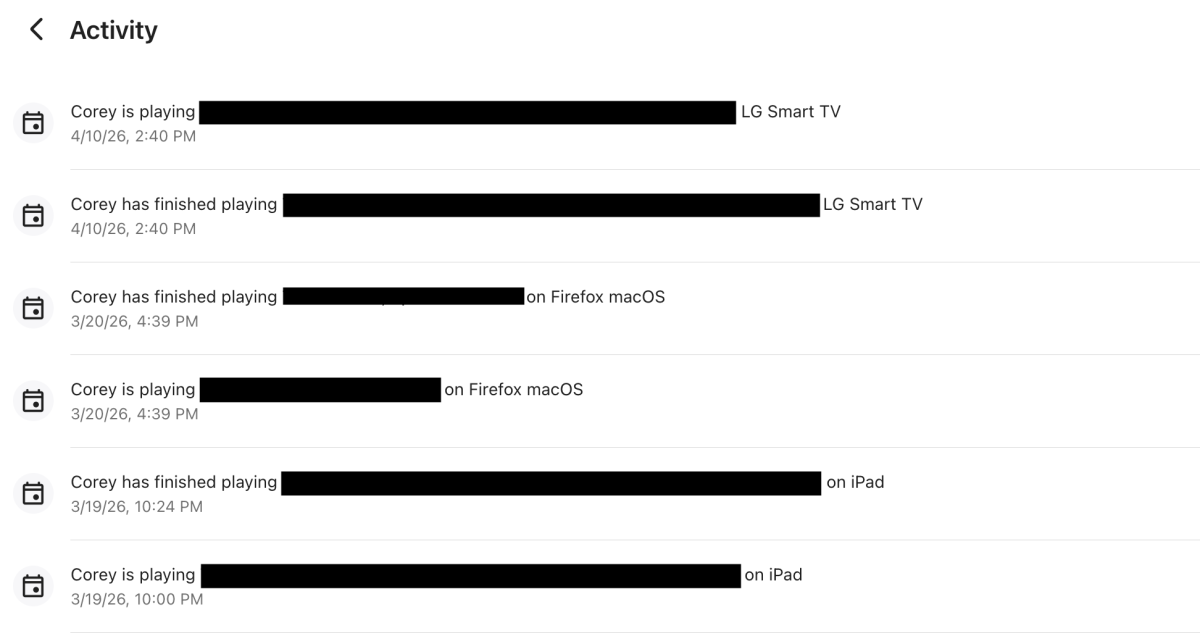
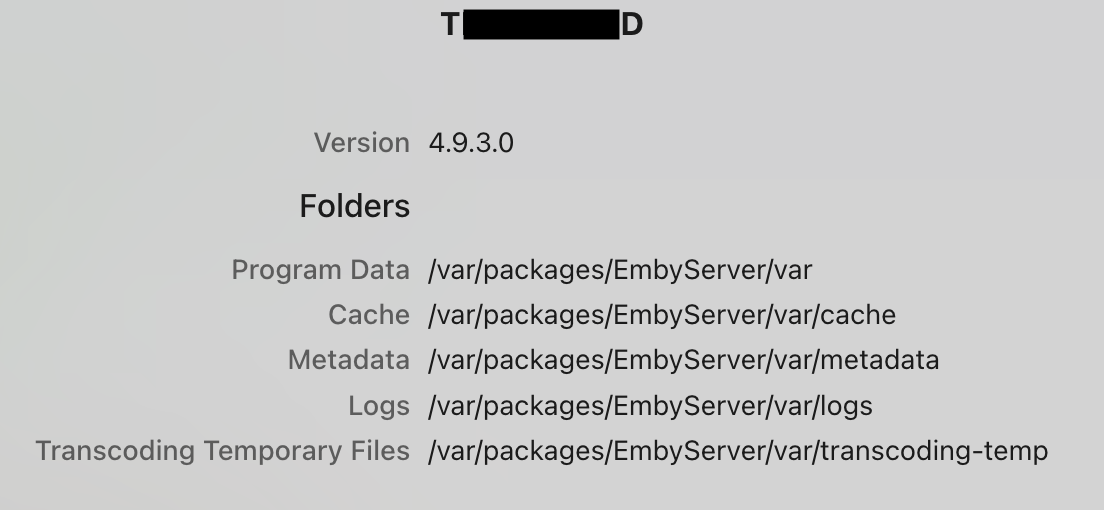
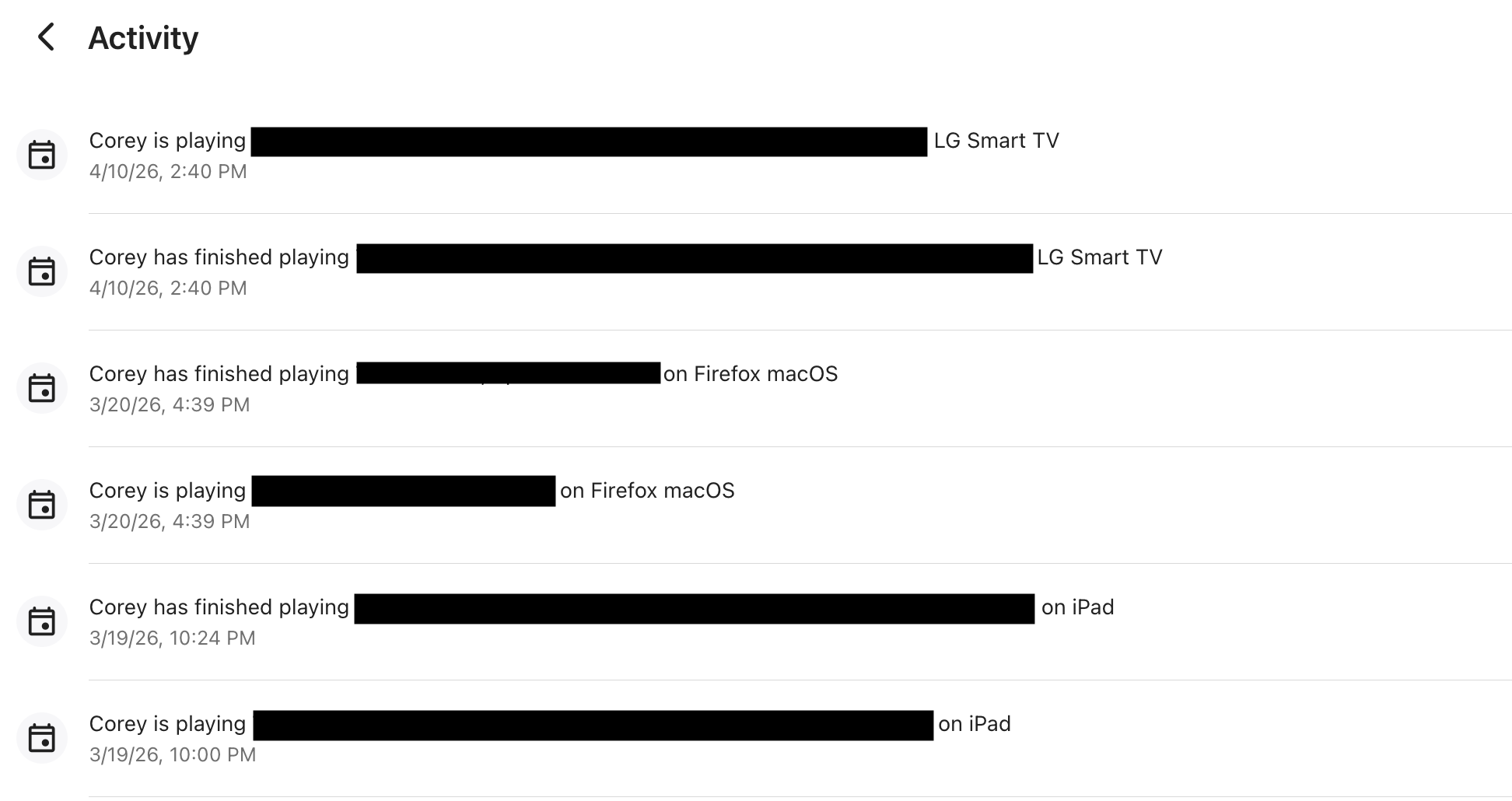
Hello, I’m a new user to the community. I’ve been using Emby since the beginning of the year and have really been enjoying it so far. My technical background is somewhere between beginner and intermediate. I’m reaching out because I’m ran into an issue with my Synology NAS DS725+. In Emby’s dashboard "Activity" (ie: serveractivity) page, the "Activity" dashboard stopped updating any activity after 3/20/2026. Since then, I’ve watched multiple movies and TV shows, but none of that activity is listed. I restarted the Emby Server today 4/10/2026, and now the activity is displaying again. However, I’m trying to understand why the previous ~21 days of activity were not recorded or displayed. Is this expected behavior, or could something have gone wrong with logging during that time? I did update to version 4.9.3.0 during this time, is that related? Also, please let me know what logs, files, or additional information I should provide to help troubleshoot or report this as a potential bug. I access Emby via both Home (LAN) access and Remote (WAN) access on the following: Mac Firefox browser, iPhone and iPad Emby App, and LG's Emby app. Thanks in advance for any help! Version 4.9.3.0 Folders Program Data /var/packages/EmbyServer/var Cache /var/packages/EmbyServer/var/cache Metadata /var/packages/EmbyServer/var/metadata Logs /var/packages/EmbyServer/var/logs Transcoding Temporary Files /var/packages/EmbyServer/var/transcoding-temp