All Activity
- Past hour
-
 mariomolina joined the community
 -
 f7yesh@peluomijas.com joined the community
 -

Nvidia Shield not available for sale - alternatives?
yocker replied to Mister Steve's topic in Hardware
I've never gotten Dolby Vision to work in any great way on my Windows machine with a Nvidia card. I would try Linux but knowing the history Linux has with Nvidia i doubt it will work any better. -
 vmike@mail.ru joined the community
 -
Hi. Are you sure that log had the issue? It looks like from click to playback start is about 2 seconds... 2026-10-07 08:40:04.335 Info MediaInfoService-0HNP3R0G05KCF:00000041: http/1.1 Response 200 to host4. Time: 3ms. POST http://192.168.40.157:8096/emby/Items/394519/PlaybackInfo?UserId=x_secret5_x&mediasourceid=mediasource_394519&starttimeticks=00000000&audiostreamindex=1&isplayback=true&autoopenlivestream=true&maxstreamingbitrate=80000000&subtitlestreamindex=-1. 2026-10-07 08:40:06.430 Info VideoService-0HNP3R0G05KDF:00000001: http/1.1 GET http://192.168.40.157:8096/emby/videos/394519/original.mkv?DeviceId=09509377-910a-5c8e-9e82-60bb0d8821cc&MediaSourceId=mediasource_394519&PlaySessionId=b55674b5e9ca4126a9541e9287489831&api_key=x_secret6_x. Source Ip: host4, Accept=*/*, Host=192.168.40.157:8096, User-Agent=Roku/DVP-16.0 (16.0.4.821-30) 2026-10-07 08:40:06.701 Info PlaystateService-0HNP3R0G05KCF:00000043: http/1.1 POST http://192.168.40.157:8096/emby/Sessions/Playing. Source Ip: host4, UserAgent: Roku/DVP-16.0 (16.0.4.821-30) 2026-10-07 08:40:06.703 Info SessionManager: Playback start reported by app Roku SG 4.1.70 on Trevor's TV playing 28 Days Later. And from the app side, from the first buffer to playback starting is less than a second.
-
 Media-Station joined the community
 -
 swiftsand2402 joined the community
 -
 JorgeEscobar joined the community
 -
 だけど影 joined the community
 -

RTM (inotify) doesn't seem to be working on Diskstation 7.1
Manp82 replied to Manp82's topic in Synology
Yes, that’s the first thing i checked even tho i have no inotify related errors in the logs. i had that script running on startup for god knows how long, I don’t even remember why i added it but it was already there when i noticed RTM wasn’t working. thanks for your reply. -
 NathanTtT joined the community
 -
 Anatol32 joined the community
 -

Nvidia Shield not available for sale - alternatives?
RanmaCanada replied to Mister Steve's topic in Hardware
DolbyVision works fine in Windows 11 with the right hardware. No issues on my 3080 or my i5-1235u when hooked up to my TV. They will correctly play every profile my TV's support. It's when you get to the FEL profiles that almost zero hardware supports, that you run into issues, as every TV these days pretty much only supports streaming profiles of DV, and not UHD profiles. It also doesn't help that TV manufacturers don't explicitly list what profiles their TV's support. They just say DV.. -
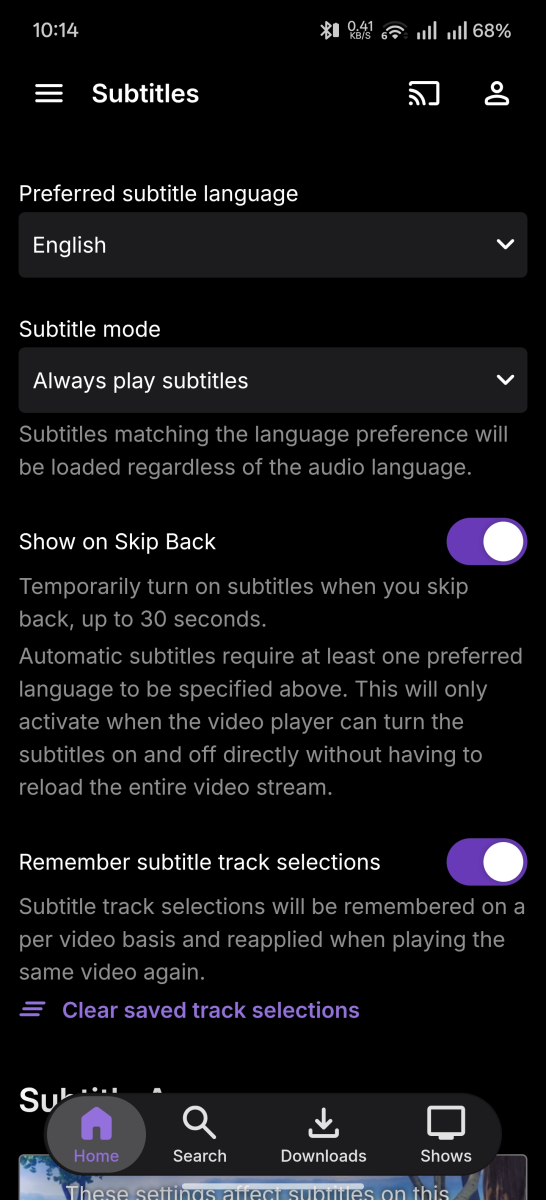
I managed to replicate the bug with logs turned on. Around 10:06 or 10:07, shortly after starting the player, subtitles were running normal, I pressed pause/play and the subtitles switched off. I have the lookback feature on so it might be related to that? emby_android_1791376599352.txt
-

RTM (inotify) doesn't seem to be working on Diskstation 7.1
Tremas replied to Manp82's topic in Synology
Perhaps nevermind... you did mention you had a script running. - Today
-
No, this is a local connection. It is set to Auto
-
Https does work but it needs to be a certificate that the device accepts.
-
Hi, is this on a remote connection? What is the quality setting in the app set to?
-

Emby server/client - ReplayGain or R128 volume normalization support for music
Luke replied to Espen JQ's topic in Feature Requests
In theory that might work. Maybe not on every platform but I’m sure some could do that. -
Emby server/client - ReplayGain or R128 volume normalization support for music
Luke replied to Espen JQ's topic in Feature Requests
Windows uses the native audio player which I think will fall into the same bucket, but we intend to switch to mpv, so that will help with this. -
Hi there, please attach the Emby server log from when the problem occurred: How to Report a Problem Thanks!
-
I can create a folder in windows. I can then create a shortcut to a tv show, movie or anything else as its just a url link. I can create as many folders as I want. I could do this but it would be a lot easier just to do it in emby.
-
I've noticed poor playback performance on the Roku apps that has progressively gotten worse. It has recently gotten nearly unusable on Roku for me. When I select a title for playback, the app will sit and buffer on 13% for 30 seconds to a minute before actually starting playback. In some cases it will then be playing with video and audio out of sync, and I'll need to 'Attempt playback correction' 1 or 2 times, which also takes a while to process. In other cases it will look like it has started playback, but it will just be a black screen. These are direct plays on the local network. It seems to be worse for movies than shorter tv episodes. On other client apps (iOS, Chrome Web Browser), playback starts nearly instantly. It only seems to be Roku I'm having issues with. I've attached my embyserver log, and I sent the logs from Roku after triggering the issue. User Trevor attempted to start playback of '28 Days Later' at 11:58 AM ET on 10/7/2026. If any other examples are needed/wanted, I will be happy to provide. Thanks for any help. embyserver (2).txt
-

Unable to connect using Emby on VegaOS
stevied421 replied to Wonderstuf's topic in Android TV / Fire TV
And the https trick doesn’t work -
Manp82 changed their profile photo
-
So, i'm running Emby server on my DS414 on the latest 7.1 update available and everything seems to be working amazingly for the most part. The issue is basically that real time monitoring on my library folders doesn't seem to be working. I'm running the latest non beta version of emby server 4.10.1.0 but the same behaviour with real time monitoring was happening on the previous 4.9.5.0. everything seems to be set up the right way: - RTM enabled on my libraries - i have the script running on startup setting increased inotify values: /sbin/sysctl -w fs.inotify.max_user_watches=1048576 /sbin/sysctl -w fs.inotify.max_user_instances=4096 and checking the values from ssh returns what was set: root@DiskStation:~# cat /proc/sys/fs/inotify/max_user_instances 4096 root@DiskStation:~# cat /proc/sys/fs/inotify/max_user_watches 1048576 - google suggested running this commad to check which processes are actually using inotify and it doesn't seem that emby is actually using it: admin@DiskStation:~$ sudo find /proc/*/fd -lname 'anon_inode:inotify' 2>/dev/null | cut -d/ -f3 | xargs -I '{}' ps -p '{}' -o pid,comm PID COMMAND 1 systemd PID COMMAND 10947 Plex Media Serv PID COMMAND 13053 synoindexscand PID COMMAND 15712 session_watcher PID COMMAND 1850 dbus-daemon PID COMMAND 1861 dbus-daemon PID COMMAND 1988 syslog-ng PID COMMAND 2114 systemd-udevd PID COMMAND 2177 agetty PID COMMAND 2786 synobackupd PID COMMAND 2926 synoscheduled PID COMMAND 6164 avahi-daemon PID COMMAND 6888 synocrond PID COMMAND 8137 crond - logs suggest Emby is watching my media folders: 2026-10-07 16:36:41.396 Info LibraryMonitor: Watching directory with new FileSystemWatcher for /volume1/video/film for item 4 2026-10-07 16:36:48.539 Info LibraryMonitor: Watching directory with new FileSystemWatcher for /volume1/video/serie tv for item 6007 - the emby user have read/write permission on the folders and i'm pretty sure they're set correctly since it can write metadata and .jpg files to every movie folder just fine. - Plex is able to update its library with no issue as sson as a new file is added. - with a manual or scheduled library scan Emby picks up the new files with no issues. yet Emby doesn't want to pick new files when added either automatically by radarr or manually by me. log attached was taken on a fresh start of the emby server after a reboot of the host nas and after coping a new .mkv file to one of the monitored folders. any help would be greatly appreciated. embyserver.txt
-

Emby server/client - ReplayGain or R128 volume normalization support for music
ManiacDC replied to Espen JQ's topic in Feature Requests
A lot of CDs still suffer from heavy loudness, so most of the time RG is used to reduce volume rather than raise it. However, wouldn't it be possible to simulate going past 1.0 by blanket reducing the volume ahead of time? I wouldn't think you'd want this as the default, but you could add an option for it for those who want it. Could also just be slated as a future enhancement if requested. -

Emby server/client - ReplayGain or R128 volume normalization support for music
Vicpa replied to Espen JQ's topic in Feature Requests
What about Windows? -

Spotlight and Single Collection Feature Requests
ebr replied to kizunarae's topic in Feature Requests
Hi. Exactly what app? What version? -
Emby server/client - ReplayGain or R128 volume normalization support for music
Luke replied to Espen JQ's topic in Feature Requests
Web browser audio players don’t natively support it. We can only simulate it with programmatic volume adjustments, but that doesn’t let you go past 1.0. The same currently goes for the player we use on Android, exoplayer. I’ve seen other apps using this same sort of technique. Without being able to go past 1.0 it’s not a full implementation but it seems like many are ok with it. -
Since about a week ago. If I add a new TV series to emby, the scanner does not add it. If I add a new Movie the scanner adds it If I add a new Season to an existing TV series, the scanner adds the season and episodes New episodes added to any existing TV series are added example: I added Tracker season 04 to the Tracker directory and the new episode was added I added WandaVision (2021) [tvdbid-362392] WandaVision (2021) Season 01 All episodes The scanner did not add the series This is happening with all new series I try to add All media files and directories have 777 permission 11th Gen Intel 6 core i5-11500 @ 2.70GHz 32gb Ram Intel Arc A380 Ubuntu 26.04.1 LTS (apt upgrade) Kernel 7.0.0-38-generic 512gb available memory on emby HD partition 25% available memory on Media HD fs.inotify.max_queued_events=16384 fs.inotify.max_user_instances=16384 fs.inotify.max_user_watches=1048576 4733 WATCHES TOTAL COUNT No programs except Docker and Emby installed Docker version 29.8.2, build 7fc2dff Emby Version 4.10.1.0 Emby Premiere Subscription The TVDB plugin installed
-

KTIVMTX has no guide data
FordGT90Concept replied to FordGT90Concept's topic in Emby Provided Guide Data
Yes -
Unable to connect using Emby on VegaOS
stevied421 replied to Wonderstuf's topic in Android TV / Fire TV
@SamES I'm having the exact same issue on my Fire TV Stick 4K Select. Emby was working normally for me until October 6, then suddenly started showing “Unable to Reach Server.” Every other device in my house can still connect to my Emby server. I also tested Silk on the same 4K Select and http://192.168.1.80:8096 works perfectly — I can log in and access my library. Only the Emby Vega app fails to connect. I've already cleared the app data/cache, restarted the stick, forgotten/reconnected Wi-Fi, manually entered the server IP/port, tried Emby Connect, and removed the device from the Emby Server device list. Since it was working before October 6 and then suddenly stopped, this seems to line up with the other reports here. Please let me know if you need any logs or testing from my 4K Select. I'm also running Emby 0.1.4. -

Keine Vorschaubilder beim manuellen identifizieren von Filmen!
joergurmel replied to joergurmel's topic in German
VPN Nutze ich nicht! -

Unable to connect using Emby on VegaOS
Wonderstuf replied to Wonderstuf's topic in Android TV / Fire TV
Great stuff. Just to clarify, when you say a new version will be available soon, do you mean an update to the Emby app on the Fire TV/Vega OS, rather than an Emby Server update?