All Activity
- Past hour
-
Suspect origin of issue is subtitle positioning metadata, embedded into the media file. Some TV's Apps might handle "Alignment 2" as the short term name for bottom center and other TV apps, perhaps your LG, does not have code to recognize "Alignment 2" and considers it, instead, to be 2 pixels in from top left. This is just a guess. This type of strange issue can come from an online software update from LG. The media file subtitle positions can be fixed with ffmpeg. If this is true, then Emby would, at the most, be trying to fix an issue caused by the media file. Maybe a previous Emby version had some process working to fix this. The better solution is to fix the media file embedded subtitle positions. Have examples been found where the exact same media file works on a different Emby version? Fixing embedded subtitle positions by resetting the metadata inside the media file. see: https://stackoverflow.com/questions/57869367/ffmpeg-subtitles-alignment-and-position
-
 salal joined the community
 -
 Nanjiba joined the community
 -
 Andreina1709 joined the community
 -
 alinasr joined the community
 -
 طلبه محروس joined the community
 -
 shushuLB joined the community
 -
Agree about your opinion. just focus on the overlays of posters, and just work on customize positions and priority. It's good enough and also light enough. I like this very much
-
 dariobolivar joined the community
 -
 emby@stenbit.se joined the community
 -
 ItzDemon_wolf joined the community
 -

External SRT subtitle file not showing up!
fabien_m2002 replied to fabien_m2002's topic in General/Windows
Thanks but too long on this library (1 hour+). I found a way: Go to the serie frontpage -> 3-dots: "Scan library files" -> It works only for the default version! Example: for the serie "Industry", i have 2 versions: FHD & UHD format -> 2 folders. Only the folder for FHD format is scanned, how can i scan files for the second version where my SRT file is? -

External SRT subtitle file not showing up!
rbjtech replied to fabien_m2002's topic in General/Windows
How are you looking for the change - if in a browser, then you simply may need to just refresh the page as the cache will show the previous 'non SRT' version of the page. -

External SRT subtitle file not showing up!
visproduction replied to fabien_m2002's topic in General/Windows
Fab, Try scanning an individual library, instead. You can do that with the 3 dot icon inside each library in Admin / Libraries. (right click with Windows) In practice, as long as the library scan eventually works automatically, you can ignore the issue. Users will eventually see the subtitles in the list, once libraries are rescanned. Many dbase related applications and Internet DNS updates have this delay to show issue. It's an normal process and support usually just tells the users that the update will take some time. -
Thought I'd mention that sometimes files don't have the same name as their folder. I haven't dug into this duplicate searcher, but I thought I'd mention it in case that issue could be confounding the search for some people. . . . I user directory opus as my file manager. It's not free, and a little pricey for an app (but the license lasts for years so I consider it fairly reasonable). I love it. There may be similar functionality in other 3rd party file managers. . . . In that case I outlined above, where media file's names don't reflect their folder name meaningfully for whatever reason, I use my 3rd party file manager "Directory Opus" as follows: - I open the folder that contains all of the media files - I change the view to "flat view" in directory opus (icons for that at the top of it's interface) , so that all of the files are exploded out into a main listing instead of being hidden inside of their folders. - From there I can hit the top column heading to sort by "Type" so that all of the video files appear together in one nice block. - I click the topmost file with a media suffix, hold shift, and select the bottom one to select all. Otherwise CTRL + click individual media-suffix files that are named strange. - In my case, I set the tiny scriptlet detailed below to a button on the top area of the directory opus file browser/manager. - clicking the button, all of the selected media files are renamed to the name of their parent folder. . . . . . . . . . . Here is the "script" that does it in directory opus Method 2: Using a Button/Hotkey Command For frequent use, you can create a custom button or hotkey that runs the command directly. Right-click on an empty space in a toolbar and select Customize. Drag the Rename command to the toolbar or double-click to edit an existing button. In the button editor, modify the command to: Rename PATTERN * TO {parent}.* Save the changes. Now, clicking this button after selecting files will perform the rename operation instantly. Method 3: Using a Simple Inline Rename Shortcut (Opus 13+) In newer versions of Directory Opus, a built-in shortcut is available during inline rename mode. Select the file and press F2 to enter inline rename mode. Press Ctrl + / to automatically insert the parent folder's name while preserving the file extension. Press Enter to apply. . . . . . . . The bulk rename utility might be able to do something like that too, not sure. I typically use that utility to truncate names down closer to just their title. In some cases, I do this either before or after the operation above, in order to cut down long winded descriptions in folder and/or file names. https://www.bulkrenameutility.co.uk/ . . . I think if both the bastard filenames and the long form folder/filenames are addressed, it would probably make searches and indexing easier for apps.
-
By the way do you plam to include external player feature to linux version? I'd say it is a necessity to have it on linux and android (maybe windows too) since there are so many distributions, kernles, drivers, hardware, so one never knows what will be broken at any point of time on some configurations.
- Today
-
I believe they are different
-
Agreed. I don't think my link has been updated yet with the recent changes. Anyway, always best to go with sky's info
-
Never mind, I never noticed that side scroll bar, I guess this is just bad UX design, there is no indication of anything existing below that screen I have found the incorrect image there and removed it
-
The latest Emby beta is 4.10.0.4. So, if you're running DSM 7.2 on your NAS choose the file with synology72_4.10.0.4 and then ending with your processor type.
-
That might be browser issue, not necessarily Emby issue, since you're using Firefox (which ain't exactly known as a great media-consumption browser). Have you tried playback in some other browser (Edge, Chrome, Thorium...)?
-
It doesn't say that at all. The "subtitle encoding regression" was in an earlier beta, and has nothing to do with the subtitle positioning. I don't think they're even working on this.
-
An MKV file. A movie called Signs. By clicking on the movie in Emby, like I would any other content within Emby. Tried it multiple times within that log, probably 4 or 5 times near the end of the log. The log should show this. Nothing. Emby sits on a black screen and spins forever. I cannot get the file to play, regardless of what I do. No idea why any of that would be happening, literally just purchased Emby premium a couple weeks ago and have uploaded my media into it. There should be no reason for any errors or "other processes, no authorized"
-
I need to check other sources because sky q channel numbers may be different from sky glass
-
I had already serch on the GitHub page, but 've no found avr references, also the wiki page in empty. This is just to be sure to use the correct version
-
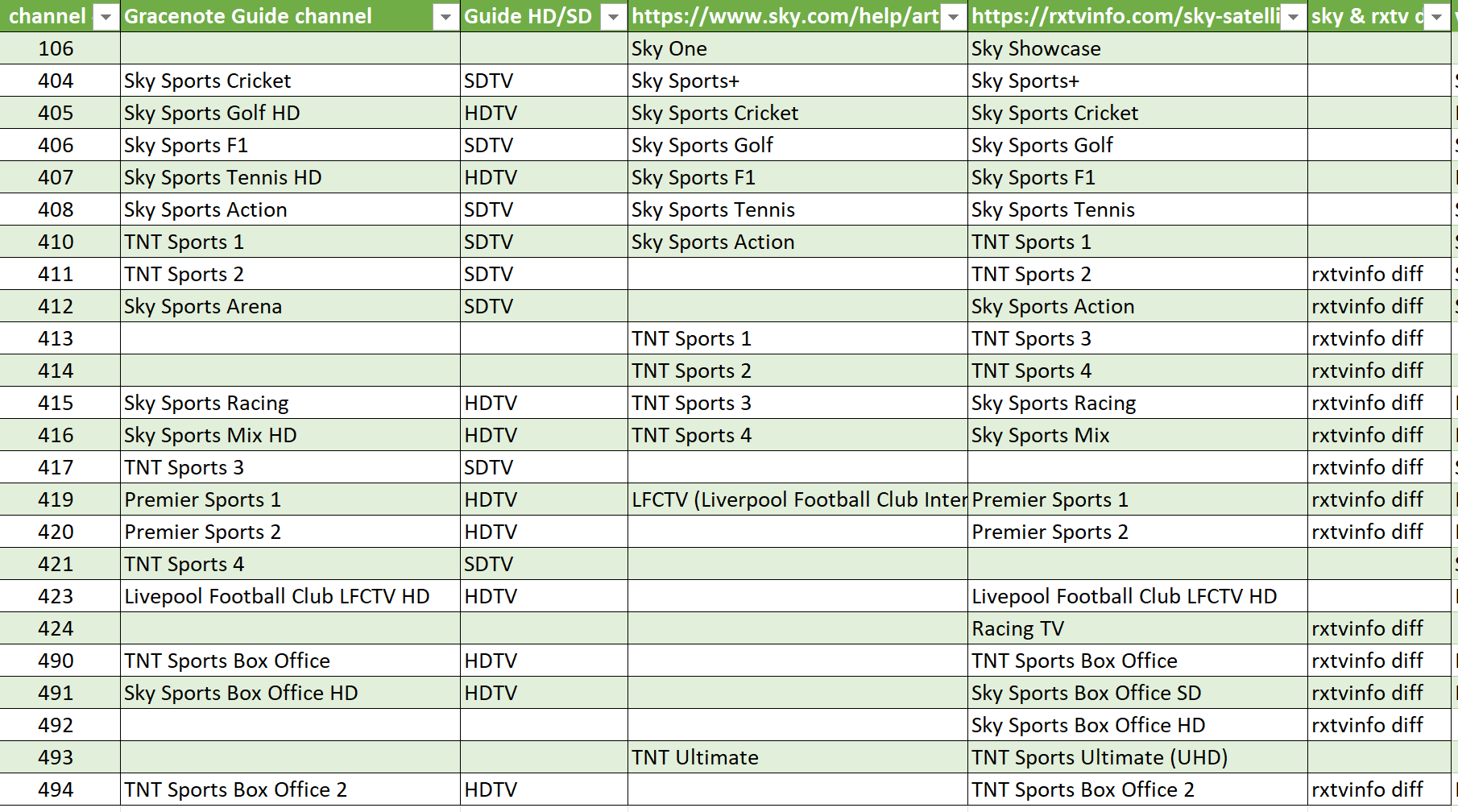
There are differences in channel numbers between https://rxtvinfo.com/sky-satellite-channel-list-uk/ and https://www.sky.com/help/sky-tv/sky-tv-stream/buying-sky-stream/sky-glass-tv-channels/articles/tv-channel-list-sky-glass Obviously we have channels that need correcting on the gracenote lineups for Sky Q but with the mismatches on some between these sources, not sure which is right. But for gracenote I would need to refer them to sky,com web site info This shows the diffs beween the guide, sky.com channel info and rxtvinfo data For Sky One, will need gracenote to add "106" to the lineup 404 needs to change from Sky Sports Cricket to Sky Sports+ 405 to change from Sky Golf to Sky Sports Cricket 406 to change from Sky Sports F1 to Sky Sports Golf 407 from tennis to Sports F1 408 from Action to Tennis The other diffs are not straightforward because of the disparity between the 2 sources In addition to the channel number adjustments - we have also the schedule mentioning the 50x channel number moves for : Sky Sports Premier League Sky Sports Cricket Sky Sports F1 and also on BT Sports 3 mentioning 529 - BT Sports 3 (TNT Sports 3) currently on 417
-

Unable to play MP3 files / constant crashes during audio playback
hallansen posted a topic in Android Server
I've actually had this problem sporadically for a while now, but it's so severe that nothing works anymore. When I play any MP3 file and try to start the next one, the server crashes immediately and has to be restarted manually. The dashboard shows that playback has started, and then the state seems to freeze, and the server doesn't register that playback has stopped. My system details: Emby Server version 4.9.3.0 on Shield TV Pro (Android software version 9.2.2) Android Client version 3.5.28 I've tried it on a tablet and also directly on the Shield with the client. I hope something can be seen in the log data. What I've tried so far: - Completely reset the Shield and reinstalled everything. - Reinstalled the clients. - Tried older server and client versions, without success. - Took one attempt to play audio files from a USB stick plugged directly into the Shield to rule out access problems with the external storage. Images and videos play without any problems. When I use the web browser for audio playback, everything works fine. And, importantly, I have the same server version installed on a Synology NAS, and everything works perfectly there, even with various clients. This is unacceptable, especially since I only purchased the lifetime license at the beginning of the year. embyserver.txt embyserver-63907624388.txt embyserver-63907624472.txt embyserver-63907624549.txt embyserver-63907624627.txt embyserver-63907624726.txt hardware_detection-63907624247.txt hardware_detection-63907624401.txt hardware_detection-63907624484.txt hardware_detection-63907624562.txt hardware_detection-63907624640.txt hardware_detection-63907624738.txt readme.txt -
Try the release notes on GitHub. https://github.com/MediaBrowser/Emby.Releases/releases
-

Are tools like ChatGPT, GPT, Siri, and Grammarly considered Generative AI?
Shanefalk replied to viralsweet's topic in Non-Emby General Discussion
I’ve used it mainly to smooth out stiff AI drafts so they read more like something I’d actually say, and the flow upgrade is pretty sweet. What helped most was how it reshaped sentences without messing with my meaning. Since it keeps the tone natural, it also holds up well when checked by AI Detectors, which gave me some peace of mind for school and client pieces. -
I can now confirm I am seeing the same issue on Cricket and f1 relating to the listing's referencing a different channel number
-
Forgot to add: I did restarted emby first, then changed the trakt pin, then did a library sync. Trully, I don't know what fixed it. I have zero idea.
-

Rotten Tomatoes - Audience Rating / Audience Score
Suliamu replied to Pais's topic in Feature Requests
It would be nice to be able to show the RT audience score at least when the scoring was sourced manually and entered into the .nfo-file. In Kodi this is possible with certain Skins. For example: <ratings> <rating name="imdb" max="10" default="true"> <value>6.400000</value> <votes>171581</votes> </rating> <rating name="metacritic" max="10"> <value>6.000000</value> <votes>47</votes> </rating> <rating name="themoviedb" max="10"> <value>6.200000</value> <votes>3859</votes> </rating> <rating name="tomatometerallaudience" max="10"> <value>4.900000</value> <votes>87630</votes> </rating> <rating name="tomatometerallcritics" max="10"> <value>5.000000</value> <votes>276</votes> </rating> </ratings> This way Emby hasn't anything to do with obtaining the data. And it's the user's obligation to make sure every data is acquired rightfully. Or am i wrong with this? And i agree with the general sentiment in this thread against the critics scores. They are basically misleading and therefore worthless. -

Unwanted fanart.jpg files being saved to Movie folders
tanStaafl replied to tanStaafl's topic in General/Windows
The first image is an actual snapshot of my physical directory on the PC that is the Emby server. The second is a snapshot from another network PC that is viewing Emby and has Admin access to view images, modify etc. The third is a snapshot from the Emby server, again viewing emby and selecting view images. Pretty sure the horse is dead... -
Hi It would be nice to have a a random albums section (20, 50, 100, any amount really) in the music section of the DLNA server. For when I don't know what I want to play.You could do it for movies too. Ta