
All Activity
- Past hour
-
 Kdouthitt92 joined the community
 -
No, users can configure and want control of when the playcounts are updated or not and the lastplayed or not, this is important specially as you move with multiple different servers that would have different behavior + the app being offline first needs to have the proper data always for the smart playlists. If the user have played set at 50% in the app, stop at 60% and Emby have it set at 70% (don't know the default) then the item is marked played and works, then if the user force a sync the servers have priority on that data and the item is now no more played. Something was changed in 4.9 it seems and now just calling POST http://192.168.1.158:8185/Users/d03350dde0a3439bb3b326098db94bc4/PlayingItems/110?PlaySessionId=SYMF90fc68b2ee72425299a1edf11cbf3e3c (100-byte body) {"PlayMethod":"Transcode","IsPaused":"False","PlaySessionId":"SYMF90fc68b2ee72425299a1edf11cbf3e3c"} seems to instantly increase the playcount. I guess the workaround for now would be to add a option on Symfonium side to stop reporting to the dashboard, but somehow people like to see things in the dashboard.
-
Whence does one get these? I had a look at the Lyrics Finder software mentioned in the documentation but it only downloads TXTs.
-

Use primary image for continue watching under Apple TV Home Screen
Luke replied to AndyXH's topic in Apple TV
Hi, yes, lots of new options are coming: -
How do I turn off the very long startup animation in Emby Beta for Linux?
Luke replied to kwirky88's topic in Linux & Raspberry Pi
HI, there currently isn't an option, but several users have asked for this and so I suspect we will add one at some point. Thanks. -
 ricardotorres joined the community
 -
 SuhailaSuha5 joined the community
 -
 Hdjjfj joined the community
 -
 Lorim joined the community
 -
Would it suffice to just not manually manage play counts when streaming from the server?
-
 caarlosgaago joined the community
 -
 Btrjej joined the community
 -
 Vimblik joined the community
 -
 bayterpol joined the community
 -
Android: Downloaded files with Cyrillic (Unicode) characters in path fail to play via built-in player
Luke replied to levsom's topic in Android
@levsom Hi there, let's look at an example. Please attach the information requested in how to report a media playback issue. Thanks! -
HI, we'll look into this, but since we are using the apple provided user interface for carplay I'm not so sure. In other words, the server is just supplying the data.
-
 BrentVos joined the community
 -

Problemas com permissões de Biblioteca pra usuário
Truco? replied to Truco?'s topic in General/Windows
Obrigado pela ajuda, mas eu já tinha resolvido, o código estava especificando quais pastas queria que fossem permitidas, mas não estava especificando as Sub-Pastas que ficariam excluídas, por esse motivo dava aquele erro, de forma que não importa quais pastas eu informasse para o servidor que estava permitido, ele entendia apenas que todos estavam permitidos, ou que todos não estavam permitidos. -
hi, yes we are planning on making this improvement. Thanks.
-
@njmckenzie96?
-
Unable to play MP3 files / constant crashes during audio playback
Luke replied to hallansen's topic in Android Server
Hi, are you still having this issue on the latest build? -

Home network Quality capped at 4Mbps in new App
sloth101 replied to sloth101's topic in Android TV / Fire TV
the problem was that i was unable to select any bitrate above 4mbps for home network. despite having emby installed just today for the first time, i still removed and reinstalled it and now it is working. not sure what bugged the app out the first time. -

Guide - SSL Qnap certificate and Emby (manual and automatic)
sa2000 replied to dieffe70's topic in QNAP
Just adapting the command to what you have cd /share/SSL-Certificate suggest you rename the exisiting emby.p12 file - to check that a new emby.p12 is created by the next command openssl pkcs12 -export -out emby.p12 -inkey SSLprivatekey.key -in SSLcertificate.crt -passout pass:mykey -
Guide - SSL Qnap certificate and Emby (manual and automatic)
sa2000 replied to dieffe70's topic in QNAP
what Luke meant was running the script command lines manually in an ssh terminal session So you would login and then do cd /share/SSL-Certificate So in that folder if there is a new certificate crt file it would use it So assuming there is a valid crt file you need to pick up, you would execute the next command manually in the ssh session and see what gets output back as there may be clues You are still in this directory following the cd (note - the orifinal script was referencing this directory " cd /etc/config/QcloudSSLCertificate/cert" you would execute manually this command line in the ssh session openssl pkcs12 -export -out emby.p12 -inkey key -in cert -passout pass: you would have your password for the certificate after the "pass:" This should create a new "emby.p12" file (adding a note from the original script notes: -

iPad trouble logging in through WireGuard connection
C.S. replied to C.S.'s topic in Apple iOS / macOS
Thanks I'm sure that's also a great workaround. The thing that sorta vexes me though is the app is trying to connect to an address and port that have never been entered manually. It's just, ya know.. there's a reason I never gave her the remote address - I just don't want her connecting that way. In this instance, and I know this setup is not standard, but it's not really edge-case either, I feel like there could be more control over how clients connect. Perhaps a server-side option to instruct clients (after first login) to set either local or remote as the address to always try first. Or my first thought was a place on the login screen to set the connection method to 'Always Local' or 'Always Remote', with the default of course being 'Try both'. Or some kind of workaround that sticks. But I guess that would be a fix, not a workaround. - Today
-
Any updates since December last year ? First M1 has been released 6 years ago and still no proper support of hardware acceleration on the Mac Mini which is probably the best suited machine to host an Emby server.
-
@SilviuB Hi there, let's look at an example. Please attach the information requested in how to report a media playback issue. Thanks!
-

Trakt plugin not allowing to connect to Emby.
dvitale71 replied to GabbaGool's topic in Third Party Apps
I used the "Get PIN." link, pasted the pin and then clicked save. Yet there's no indication that anything worked or was successful. The screens remain intact as you see them below.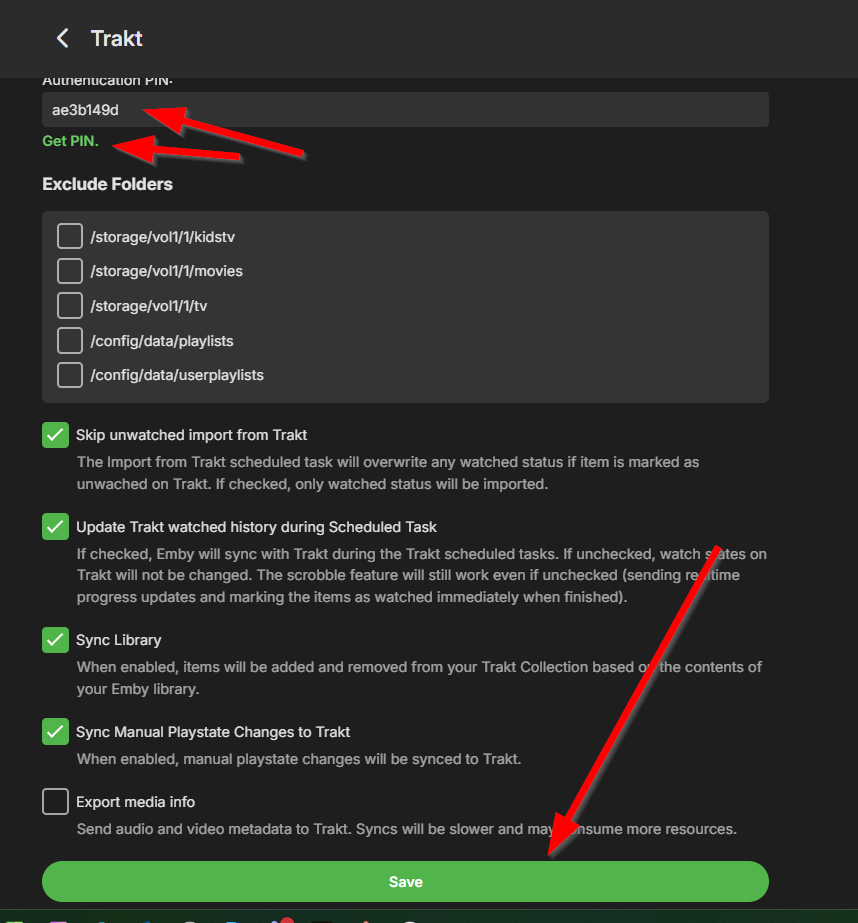
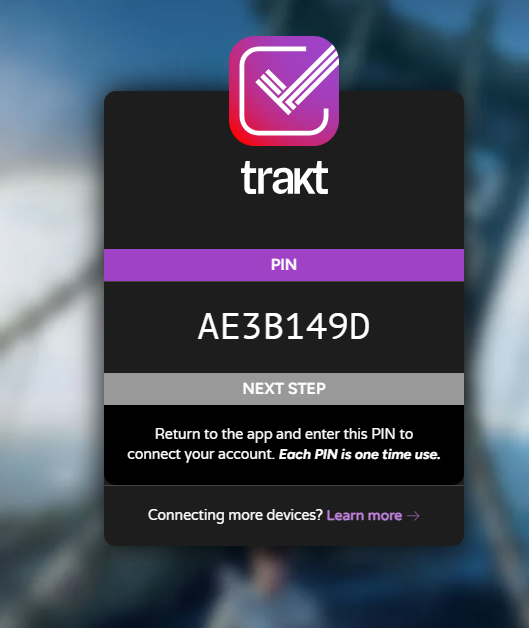
-

Philips Titan OS 8 channel audio playback issues
geomusicmaker replied to geomusicmaker's topic in Other Smart TVs
I've tested it using an external HDMI audio device, a headphone jack based device, an optical out device and the TV's own speakers. It's to do with it handling the audio track. As I say, the same file on the same audio device (all three of them) will play sound when using DLNA, just not through the app. -
Trakt plugin not allowing to connect to Emby.
dvitale71 replied to GabbaGool's topic in Third Party Apps
OK, I'll try that and report back... by the way, I'm the user Gabba-Gool, -

Flatten all LiveTV shows/recordings into one "Recent Recordings" view.
brcarls replied to brcarls's topic in Feature Requests
I thought I had clicked everything, but have mainly been trying to beat the "Recordings" library views into submission with no success. Looks like LiveTV -> Recordings (not the library of the same name!) has "Latest Recordings" up front and center Thanks for the pointer. -

Flatten all LiveTV shows/recordings into one "Recent Recordings" view.
ebr replied to brcarls's topic in Feature Requests
Hi. Have you tried the "Recordings" tab on your Live TV library? -
Flatten all LiveTV shows/recordings into one "Recent Recordings" view.
brcarls posted a topic in Feature Requests
LiveTV recordings to me are ephemeral, I'm not trying to build a TV series library by recording shows off the air. I just want to record a few shows, watch them, then delete. The way Emby puts recordings into different folders for each Show adds extra clicks to view one show, then back out, go down into another show, etc... (vs the way I'm used to with NextPVR/Kodi of all recordings being presented in one view without having to navigate into and out of each Show.) Is there any way to either have Emby not put recordings into sub-folders for each show? Or, alternatively, to merge/flatten all recordings subfolders into one view? (I'm using the Emby for Android app.) -
Very Nice. Thank you.
-
The server hosting your m3u is probably checking user agent and blocking based on certain criteria. Unless they publish that information (which they probably don't), then the only way to figure out what works is to just keep trying different combinations until it works.




