All Activity
- Past hour
-
 MGonzalez1976 joined the community
 -
 azucena23 joined the community
 -
Hi. Did you try restarting the app? What version of the app?
-
 carlosadriansam joined the community
 -

Plugin: Home Screen Companion (formerly AutoTag)
soderlund91 replied to soderlund91's topic in Plugins
I'm currently working on a play count for all users, so with that you almost get what you are looking for. I might look into adding watchtime aswell. Will be in the next update Working on this right now, will be in the next release. We do still need it if you use external list for example, or local collection. Thank you! And thanks for trying it out! -
 Daanibrav joined the community
 -
 carlossegundacuent joined the community
 -

Movies don't resume, they start from beginning
Nabukodonosor replied to Nabukodonosor's topic in Android TV / Fire TV
No. -
 Cactusbone joined the community
 -
Please provide some server logs - How to Report a Problem @sa2000
-
 Phifi joined the community
 -

Emby + YouTube .strm link not working on Android TV app v2.1.43
ebr replied to Boni340's topic in Android TV / Fire TV
Hi. Okay, but same question... -
 Jp_123 joined the community
 -
 aurora65554 joined the community
 -
 MIKE_BED joined the community
 -
Hi. Can you try searching for our standard android app (Just "Emby" on Amazon and "Emby for Android on Google) on the same device's app store and see how that compares? Thanks.
-

playback is often paused, crashes, freezes but for a specific user (its the wife-BIG problem :))
alex77777 replied to Zeltak's topic in MacOS
You can also enable "stats for nerds" on the device it is being played on to see this. -

Rated R Movie - with a Fan Edit as a PG-13 version
Gilgamesh_48 replied to michaeltruncale's topic in General/Windows
There used to be a "split apart" option and that would do at least part of what you want, if it still exists. Also you can edit the metadata of either movie to make them show up as unique. -
In the NFO, or in the Emby GUI? If I lock it in the Emby GUI, I would expect that to prevent it from ingesting the change to the NFO, which is the opposite of what I want—not to mention that the whole reason I'm editing the NFO in the first place is that it's a multi-version film and I can't edit this version in the Emby GUI, so locking anything in the Emby GUI won't have any effect on what I'm doing.
-

Rated R Movie - with a Fan Edit as a PG-13 version
GrimReaper replied to michaeltruncale's topic in General/Windows
Scroll down when on movie detail screen, click "Split Versions apart" button. -
playback is often paused, crashes, freezes but for a specific user (its the wife-BIG problem :))
alex77777 replied to Zeltak's topic in MacOS
Go to Dashboard on Emby and you can see what is being played and if the stream is being transcoded or direct played. Typically transcoding happens if subtitles are enabled, or if the quality setting is set lower than the source video. There are tricks to get the Apple TV to direct play when it typically would transcode so if that is the issue I can help you with that.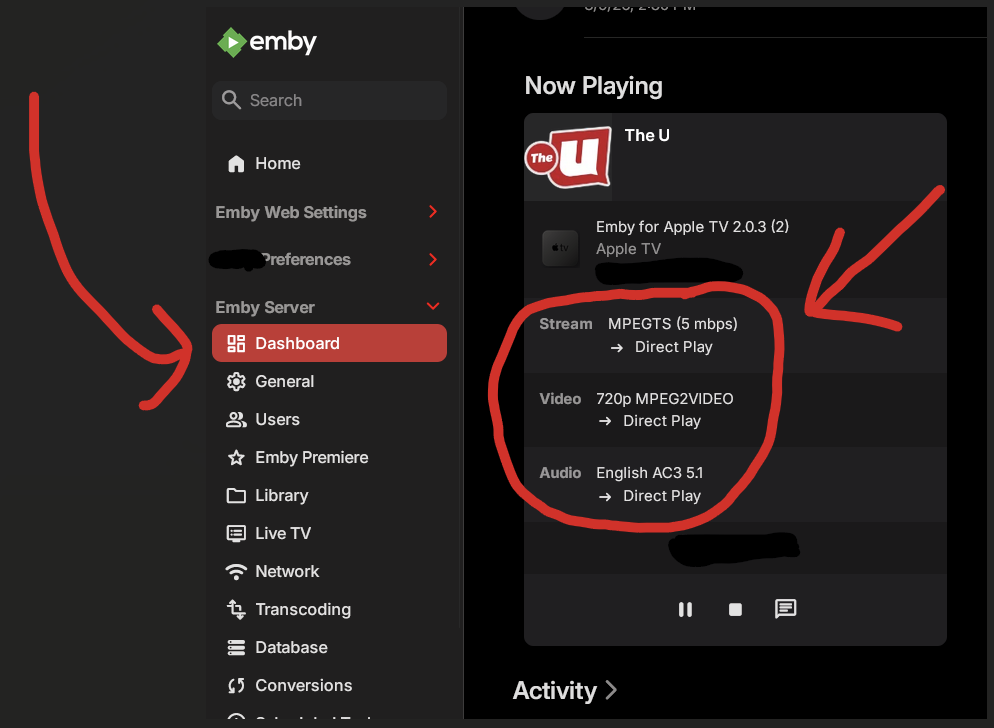
-

Rated R Movie - with a Fan Edit as a PG-13 version
michaeltruncale posted a topic in General/Windows
I have a rated R movie, and a fan edit of the same movie that has been cleaned to make it PG-13. both Movies are in separate folders un a Movies folder and after the library scanned files it just included the new file as a different version of the original rated R movie, How can I make it distinct from the rated-R version to change the rating to PG-13, I have the folders separate and named differently. After I identified the movie it then again consumed it just as a version under the existing movie so I don't see how I can update the details for the PG-13 version. Thoughts? -

Movies don't resume, they start from beginning
yocker replied to Nabukodonosor's topic in Android TV / Fire TV
@NabukodonosorHave you changed movie locations or replaced any movie files? - Today
-

playback is often paused, crashes, freezes but for a specific user (its the wife-BIG problem :))
Zeltak replied to Zeltak's topic in MacOS
thx @alex77777i dont think so (is there a definitive way to check)? -
Je sais que c'est la bêta. Je n'ai pas écrit que je n'étais pas en bêta. Ça doit être la traduction auto
-
playback is often paused, crashes, freezes but for a specific user (its the wife-BIG problem :))
alex77777 replied to Zeltak's topic in MacOS
I'm curious, Is the stream being transcoded in anyway when she watches on her devices? -
4.10.0.5 is a beta release
-
Movies don't resume, they start from beginning
Nabukodonosor replied to Nabukodonosor's topic in Android TV / Fire TV
No dude, I just moved it so you can see I moved it back and clicked on the Resume button. I really can't believe we have to discuss weather I know how to click a button or not. You can clearly see I moved it back to the resume button and you can hear the click. Let's move pass this. -
Tat, Consider you may have a collection of media that has not perhaps been conformed to all one standard and limited to specific codecs and bandwidth that are compatible and works for your hardware and for all your users. Yes, of course, Emby's advantage is that it can take care of that for you. But there can be limits. Maybe some of your media has timeline errors that only show up if you run a error probe check. Or some of your media might have a combination of high bit rate, high frames per second, high end audio and graphic subtitles all at once. This combination can be handled by Emby... but some server capacity and bandwidth for some remote users with different players and networks might NOT work 100%. OK, I understand you do not want have to test, remux or renecode your content, so it's all within some limit to make sure everyone can view it. But if you did do that, your issues might go away. Emby is suppose to be able to handle that. All online commercial streaming sites already do this automatic remux and limits all of their content, before any media even appears on their site. You are asking Emby to handle all the options that is not even done by any competitive service. Plex doesn't offer that. I believe Plex uses their servers. Online Netflix, Hulu, or Prime doesn't do that, their content is all remuxed and tested. I think that getting to the bottom what you're experiencing is that you are pushing the limits, beyond what can be expected to be handled automatically for every case on every media combination. If you want less errors, for the most part, you should use media that has bandwidth limits, specific audio codec and limited subtitle types so your media is more consistent. Using media that has many differnet issues, that might even have some uncaught file or timeline errors is always going to cause your streaming to run into problems.
-

Add ability to *move* media from one library to another
tedfroop21 replied to mastrmind11's topic in Feature Requests
Yup. I read the guides and organized my media first, like the helpful guides in the help section suggested. -
Exactly how is you folder naming, season and episode naming? Here is how I do it, and that only fails on edge cases, like "#1 HAPPY FAMILY USA" Folder : Ash vs Evil Dead (2015) [TvdbId=296295] Season : Season 01 etc. Episode : Ash vs Evil Dead - S01E01 - El Jefe [Bluray-1080p].mkv
-
HT, I avoid using so many dashes and I think I never have your issue. Dashes are used inside EMBY to break apart name from subtitles to make subtitles drop down lists not repeat the title. Emby is already using dashes to change titles around. I believe dashes can throw off comparing your title against the imdb or other online list of episodes that don't have dashes. I think that is where your title confuses the online search code that can't handle the dashes. I use names like this: The Magicians S02E13 We Have Brought You Little Cakes (2015) - 1080P Online database matching can run into all sorts of issues if you don't use the exact format recommended. Think about this. How can a new online search code be tested against 10,000 possible name variations that people come up with? It can't. It works if you have the exact title they ask for. Hope that helps.
-
Go to the line in the NFO. ( the pencil icon next to the movie name) Look at the right end of the Genres line, click the little lock icon to lock that field from being changed.
-

Add ability to *move* media from one library to another
Neminem replied to mastrmind11's topic in Feature Requests
So you want Emby to add control over your file system? One bad configured account could destroy you media collection and more. -

Reliable way to identify a single playback session via API?
Cr8iveLosr posted a topic in Developer API
Similar to Tautulli, I'm building analytics using the Emby API and I'm running into an issue with playback tracking. During normal playback the client sends repeated updates like: /Sessions/Playing/Progress /Sessions/Playing/Stopped /Users/{UserId}/PlayedItems/{Id} Because progress updates are sent frequently (and during pause/seek), a single viewing session generates many events. If you track these directly it looks like multiple plays for the same item. What I'm trying to determine is: What is the correct/official way to identify a single playback session using the API? For example: Is there a recommended session lifecycle to follow? Is there an API endpoint that exposes completed playback sessions? Or is the only reliable method reading the PlaybackActivity table in library.db? If there isn't currently an API solution, is there a recommended approach for analytics tools that need accurate play/session history without direct database access?