All Activity
- Past hour
-
 ualej64222 joined the community
 -
 bugbug joined the community
 -
 jaimepolisuk joined the community
 -
 ElienayRA26 joined the community
 -
 briansydney joined the community
 -
 哥凹高高哥 joined the community
 -

HLS transcoding for Apple's native player: fMP4 segments, and an HDR + SDR variant pair
vdatanet replied to vdatanet's topic in Developer API
There's a preview version on the App Store with Jellyfin support only. I'm still working on the app, but for now I've disabled Emby support until this bug is fixed. https://apps.apple.com/app/id6777638751 -
Qll All local. I lock the connection on each individual read and write. It's all created inside emby, no copying. I'll run that check. Thanks.
-
 GerjeamR joined the community
 -
It sat with a grey screen for 5 minutes until I force closed it, then I saw the java io error in the app log. Tried it again later and it did load to the hone screen, but it was very slow. This is one of the main reasons I can't use the app, as it is too slow to load and unreliable. Does the app not use the same connection methodology as the ATV app? If not, why not?
-
 ugafe39125 joined the community
 -
 Wendyliz22 joined the community
 -
 Lamesnake joined the community
 -

HLS transcoding for Apple's native player: fMP4 segments, and an HDR + SDR variant pair
AJV20 replied to vdatanet's topic in Developer API
is there a testflight for this new app? -
What's the current state of the MVP vs Native Player in the AppleTV Client
vdatanet replied to Lostboy66's topic in Apple TV
It's not a player problem, it's a server problem. -

Automatic in Playlists replacement if file got changed
Jägs replied to Julian21's topic in Feature Requests
FWIW, I requested something similar years ago: It's one of the main things I miss about Subsonic, so I've not really rebuilt my playlists so much as I keep the originals around until this behavior—simply removing the files—changes. - Today
-
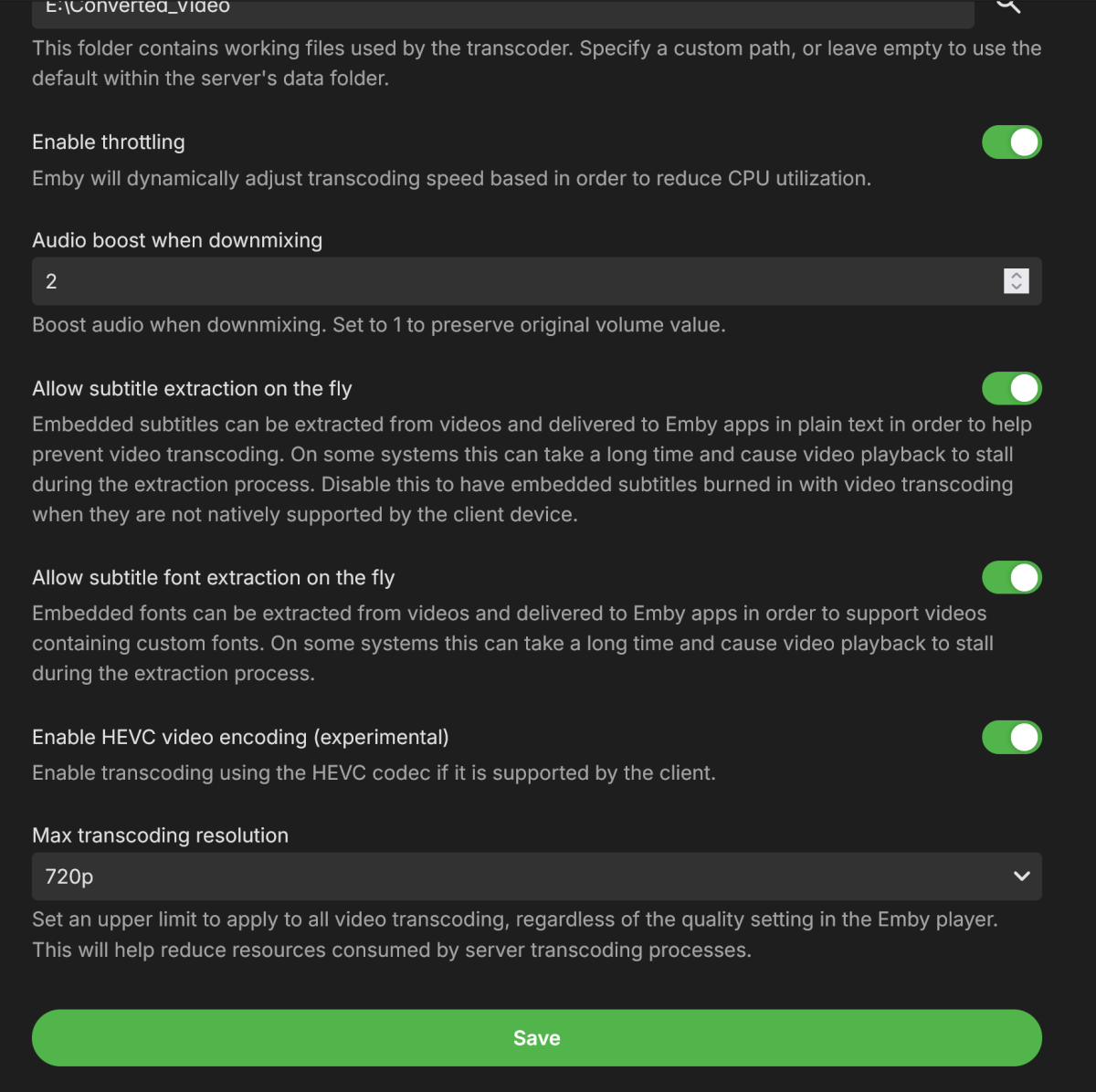
Seems to work now. But isnt this still a bug? It shouldn't crash. This is a windows box to answer the other comment. Im not sure I love the text "this can take a long time and cause video playback to stall...." whats dumber? IS that is what was happening... WITH this OFF.
-

TV Show Status — TMDB-powered Returning/Ended/Cancelled badges for series
Blueskies278 replied to Blueskies278's topic in Plugins
Update: I've done most of the core work, and it's looking promising so far. I'm trying to implement the logic for when all TV show episodes have aired: it will automatically change from Next Airing to Complete. Once all episodes have been watched, it defaults back to Returning - Last Aired, or Cancelled / Ended. This is going to be a tough one to crack. -

4K HEVC shows as 1080p, think I can't find any setup to fix?
yocker replied to PeteGul's topic in Android
Try turning off match resolution. Some movies are in resolutions like for example 3840x1600 (amongst others) some TVs and AVRs don't recognize those resolutions and scale down to 1080p to be able to view them. Turning off match resolution will keep the TV in 4K and show the movies in that instead. Turning off the option can introduce a slight judder when watching 1080p and below videos though. @LukeMaybe an option to automatically turn it on at specific video resolutions could be made? -
2.0.8.0 Update app icon Add group by to collection screen Show resume button if next up episode is resumable Improve video playback error handling Support A-Z picker on list screens Fix remove from resume context menu option Various subtitle rendering fixes Subtitle font fixes Improve logo display on detail screen Fix various mpv crashes
-
Emby for Apple TV Released Changes 2.0.8.0 Update app icon Add group by to collection screen Show resume button if next up episode is resumable Improve video playback error handling Support A-Z picker on list screens Fix remove from resume context menu option
-
- 1
-

-

4K HEVC shows as 1080p, think I can't find any setup to fix?
Luke replied to PeteGul's topic in Android
Hi, can you please provide an app log? Thanks. -

What's the current state of the MVP vs Native Player in the AppleTV Client
Deihmos replied to Lostboy66's topic in Apple TV
I was contemplating remuxing my videos to MP4 format for compatibility with Apple TV, but every movie I attempted this with encountered playback issues. The audio would abruptly cut out for a few seconds when using the native player. Tested it just recently and had the same issue. Posted about it a while back. There are third-party apps like Plezy that work with Emby that plays back Atmos with MKV just fine. So, there must be something missing in the Emby player. -
Is the database on the local file system or on a network location? Are multiple processes accessing the db at the same time? Are you reading/writing at the same time? Did you copy the db file without copiying other files (like .wal or .shm)? From cli (or SQLite Studio), run "PRAGMA integrity_check;" on the DB
- Yesterday
-

4K HEVC shows as 1080p, think I can't find any setup to fix?
visproduction replied to PeteGul's topic in Android
Is 4K possible to play direct on your TV? I assume that works. So, is it just the playback info Display mode that does not list 4K? Is that the problem? Minimum 4K video is normally considered to be a height of 2160px. Your media copy height is 2076px. Therefore, it misses the height, normally considered to be 4K. This could have happened if the media top and bottom black bars were removed from an original 16:9 aspect ratio which would have been 3840 x 2160. I think that having 3840 width should be enough to qualify for 4K, but I suspect that the code looks only at the height to designate 4K, because that is the standard. Maybe these values can be tweaked so 4K 1.85 aspect ratio without black bars doesn't get recognized as Display mode 1080P. I have not looked at Emby's code, but typically 4K height 2160 is the minimum. Maybe media released in 4K is 2160 with black bars for movie content with aspect ratio higher than 1.78 (16:9). I have not checked all the blu-rays and online media standards for 4K. Media edit metadata, you can label it 4K if you wish just manually so 4K shows up on the media page. You can also put it in the file name after a dash. -
I added the correct line of code into the custom css field. Ive had emby since it was still called media browser. Im familiar with it very well. this doesnt work for me. I tried doing it, resetting the server, everything. Is there a reason as to why it isnt engaging? its emby server 4.9.5.0
-
Done as stated: <PackageReference Include="MediaBrowser.Server.Core" Version="4.8.0.27-beta" /> <PackageReference Include="SQLitePCL.pretty.core" Version="1.2.2" /> <PackageReference Include="System.Memory" Version="4.5.5" /> No difference. Have two sql calls, which randomly fail. with the following being reported 026-08-22 16:29:56.358 Debug App: Sqlite: 11 - database corruption at line 88897 of [17144570b0] 2026-08-22 16:29:56.358 Debug App: Sqlite: 11 - database corruption at line 88897 of [17144570b0] 2026-08-22 16:29:56.358 Debug App: Sqlite: 11 - statement aborts at 12: [SELECT DISTINCT StudioNames FROM Media WHERE IsEpisode AND StudioNames IS NOT NULL AND StudioNames IS NOT NULL AND StudioNames != ''] database disk image is malformed 2026-08-22 16:29:56.358 Debug App: Sqlite: 11 - statement aborts at 7: [SELECT COUNT(DISTINCT(PrimaryName)) FROM Media WHERE IsEpisode] database disk image is malformed Though I can run the exact queries at from the command line with no issues. Any thoughts? Is the best practice to not use SqlLite for large data extraction, analysis and reporting?
-
Thanks
-
Plugin: EmbyCredits, detect end credits and add auto skip.
yocker replied to yocker's topic in Plugins
I meant to write 20% as you mentioned but guess i hit 3 instead of 2. Disabling it should speed it up a bit since it's an extra "detection method" used before the actual detection. I should make it disabled by default tbh. I've added what we discussed to my todo list and will start work on it next. -

Plugin: EmbyCredits, detect end credits and add auto skip.
Baenwort replied to yocker's topic in Plugins
The CPU used percentage isn't 30% as the FreeBSD htop command doesn't use 100% as the max but rather 100 x number of threads. If you look at the top of the htop window you will see most threads are under 30%. The CPU% column is the percent of a thread that is being used by that process. If a thread is using multiple threads fully then the percentage will show greater than 100. I've disabled that and we'll see what the new calculation for time remaining levels out at. -
The difference is that the loading dialog is delayed by 800ms, but in order to avoid it looking like a flicker, it will stay up for at least 300ms even if the operation completes sooner than that. So if your connection succeeds at 900ms, it will wait to 1100ms. Now that we have the 300ms hold, maybe we can bring the dialog delay back down to 600ms, because it is less likely that the connection will complete that fast, so therefore the hold will be less likely to occur.
-
What exactly do you mean by won't load?
-
Hi, please show the entire screenshot. thanks.
-

[Beta] ROMote – play your retro game collection in the browser (NES → PlayStation)
buba replied to digitalirony's topic in Plugins
Okay, friend, hopefully it will happen someday. For now, the plugin is fine. Thanks for replying -

[Beta] ROMote – play your retro game collection in the browser (NES → PlayStation)
digitalirony replied to digitalirony's topic in Plugins
That is the hope. But there is a lot of pieces that would have to fall in to place, and not all TVs would be compatible. But it would require that the devs of emby make some changes to emby core code for me to work on that.