
All Activity
- Past hour
-
 Amenine13 joined the community
 -

Playback Error - no compatible streamsare currently available
twofacetoo replied to twofacetoo's topic in General/Windows
Okay, the laptop is still scanning, but I just checked on my desktop PC where it was all setup before, and IT only shows the F drives in the library settings, after I changed it to E on my laptop. So for whatever reason, it looks like it's still going by what it says on my desktop PC to find the files. Once the laptop is done updating, I'll see if I can hook the drive back into my PC in 'E', set it up to use F and E just like the laptop, then move the drive back to the laptop and see if it works I have no idea HOW this is happening but it seems to be happening. I definitely set the library to E on my laptop, I KNOW that, and I'm in the process of adding F back in, the laptop shows '2 folders', but the desktop only shows 'F' -
 Ahmedgggg joined the community
 -
 jakelikesnaps joined the community
 -
 siamnd joined the community
 -
 Carbo2022 joined the community
 -
 enckey joined the community
 -
 Nony joined the community
 -
 Bob.myhm joined the community
 -
 2748354 joined the community
 -

Playback Error - no compatible streamsare currently available
Neminem replied to twofacetoo's topic in General/Windows
Sure there is you just need to add the extra drive / folder to Emby library. But right now Emby is seeing all your files at F driver when you try to play movies. Which tells me that Emby has not finished removing from F drive and adding them to E drive or that you have not added E: to your libraries. And I did not see any attempt to finde E: 2026-06-28 06:27:24.025 Info LibraryMonitor: Skipping realtime monitor for F:\Movies because the path is currently not available 2026-06-28 06:27:24.026 Info LibraryMonitor: Skipping realtime monitor for F:\TV Shows because the path is currently not available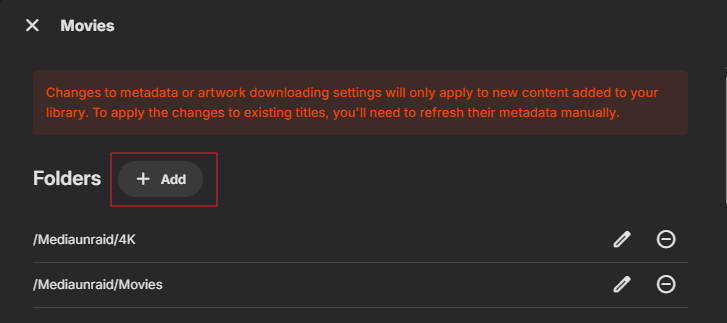
-
Playback Error - no compatible streamsare currently available
twofacetoo replied to twofacetoo's topic in General/Windows
I've set the drive itself to F, and I'm also setting the libraries back to F, but is there really no way of changing that internally? Because I was looking to get another drive anyway, so E and F would both have 2tb of storage available for more content. So if I end up having to move something over to E (say, 'movies'), is this going to be at all doable? It's taking a minute to scan all the content on the laptop, so I'll update when I have a result -
Playback Error - no compatible streamsare currently available
Neminem replied to twofacetoo's topic in General/Windows
11:32:33.150 F:\Movies\Untouchables\The Untouchables (1987).mp4: No such file or directory Emby can't find you F drive. I would change the drive letter back to F: - Today
-
Playback Error - no compatible streamsare currently available
twofacetoo replied to twofacetoo's topic in General/Windows
I just opened it all up again, tried to play my copy of 'The Untouchables', same error, these four logs were generated at the same minute when I tried. embyserver.txt ffmpeg-directstream-57373f73-4036-4647-a032-afcc155ef90c_1.txt ffmpeg-transcode-31c32575-3a3b-436c-bda2-79fef85af98e_1.txt ffmpeg-transcode-83fea902-b67e-4825-aa68-2e702489b4b9_1.txt -
 tousled changed their profile photo
 -
Playback Error - no compatible streamsare currently available
Neminem replied to twofacetoo's topic in General/Windows
Try with the most recent after you recreated the issue. -
Home Cinema Control (HCC): Emby library UI with OPPO/Chinoppo local playback
tousled posted a topic in Third Party Apps
Hi everyone, I’m opening a new thread because I didn’t want to hijack older OPPO/Xnoppo-related discussions. I’ve been working on a project called Home Cinema Control (HCC). The idea is simple: Use Emby as the library and browsing interface, but let an OPPO / Chinoppo player handle the actual playback locally through SMB/NFS path mapping. So instead of trying to make Emby transcode or stream content to a device that may not handle certain formats properly through DLNA/client playback, HCC acts as a bridge: Emby library → HCC → SMB/NFS path mapping → OPPO/Chinoppo local playback The project is inspired by the same kind of workflow that Xnoppo made useful for OPPO/Chinoppo users, but the goal is to make it more modern, maintained, Docker-friendly and easier to configure through a web UI. Current focus: Emby integration. OPPO / Chinoppo playback target. SMB/NFS path mapping. Docker deployment. Web configuration UI. Playback reporting back to Emby where possible. Clear logs and diagnostics. LG webOS TV control at the moment. Also supported: Better configuration for libraries, path mappings and monitored devices. Planned / under consideration: Sony / Philips / Android TV / Google TV support. Home Assistant integration. Philips Hue / Ambilight cinema scenes. Kodi / Zidoo / Dune playback targets if there is enough interest. The main use case is not to replace Emby. Quite the opposite: HCC assumes Emby remains the main library UI. The goal is to keep the comfort of browsing in Emby while using dedicated local playback hardware for users who care about: UHD remuxes. ISO / BDMV / folder-based libraries. Dolby Vision / HDR. Atmos / DTS:X / HD audio. NAS-based storage. OPPO 203/205 clones such as M9702 / M9201 / M9203 / M9205. Avoiding unnecessary transcoding. Keeping a family-friendly library interface without giving up playback quality. GitHub: https://github.com/tousled/home-cinema-control Current release / setup instructions: https://github.com/tousled/home-cinema-control/releases/tag/1.1.2 I’d really appreciate feedback from Emby users, especially anyone who: Uses or used Xnoppo. Has an OPPO / Chinoppo player. Stores movies on a NAS/Remotely through SMB or NFS. Has trouble with ISO / BDMV / full-disc playback. Wants Emby as the browsing interface but prefers external/local playback. Runs Emby in Docker, Unraid, Synology, QNAP, ASUSTOR or similar. Thanks in advance for any feedback, criticism, compatibility reports or suggestions. -
Playback Error - no compatible streamsare currently available
twofacetoo replied to twofacetoo's topic in General/Windows
Any idea which ones so I can add them here? Or would it just be the most recent ones? I've generally had few issues with Emby, this one came out of the blue. -
Playback Error - no compatible streamsare currently available
Neminem replied to twofacetoo's topic in General/Windows
Ok dev's will need logs -
Playback Error - no compatible streamsare currently available
twofacetoo replied to twofacetoo's topic in General/Windows
For the library files? Yes, I did. -
Playback Error - no compatible streamsare currently available
Neminem replied to twofacetoo's topic in General/Windows
After you moved the drive did you run a full scan? -
Most peeps are going to want to use as few steps as possible to do something. This would reduce the steps and time it takes. Now that said I'm sure nothing will come of this since other half finished features have been setting for years to be finished.
-
Hello I've the same problem, do u have an issue ?
-
Playback Error - no compatible streamsare currently available
twofacetoo posted a topic in General/Windows
Hey all, running into an issue here that's completely crippled Emby on my side. I stored all my Emby content (movies and shows) on a 2tb external hard drive, to avoid them cluttering up my computer. The drive was listed as the F: drive on my computer, so all the files were accessed via F. I recently came into possession of a relative's old laptop (Win10 from 2021) and decided to make it devoted to running Emby 24/7. So I moved the external drive and plugged it into the laptop (now the E drive), then moved the programdata folder over from my appdata folder on the original computer, and moved it to the laptop as well, to the same location. Now I can access Emby on the laptop browser (Firefox, same as my desktop PC) and can see my content listed, all the movies and shows, but they're all giving the same playback error when I try to watch them. I've tested it on various movies and shows, none of them are working, all giving the same error every time, and if memory serves this actually started before I even made the move. I've checked the files are being accessed from the correct place, I updated the library to access both the E and F drives, then just the E drive on the laptop to simplify things, and it still isn't working. I'm running into the playback error message on my desktop PC and my TV, when both used to work perfectly fine, as well as the laptop itself. I use a VPN on my desktop PC, I didn't intend to use it on my laptop, but I downloaded it again anyway just to see if it worked, but even with it enabled, the issue is still here. Let me know what logs are required and I'll attach them in a reply, I just want to get this fixed because as it stands, the entire system is down for me now. TLDR: I've encountered the above error on my TV and two separate computers, it cropped up prior to moving the files, but seems to still be appearing even now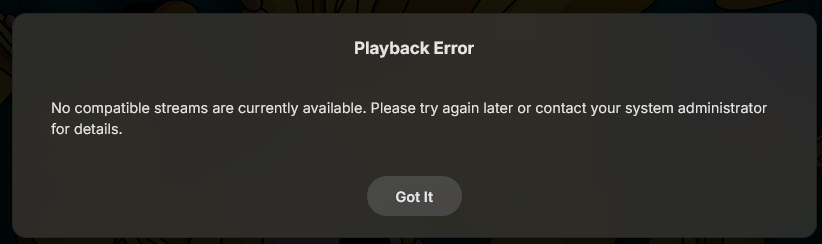
-

Emby for Android TV app fails login if the server is entered as a bare hostname
MikaelKW replied to MikaelKW's topic in Android TV / Fire TV
Hi, I tested with the standard Emby for Android app on the same test device/BlueStacks. Result is the same as with Emby for Android TV. When entering the server as a bare hostname: emby.example.com login fails with: Access token is invalid or expired The proxy log shows the login request as a GET: GET /emby/Users/authenticatebyname?X-Emby-Client=Emby+for+Android&X-Emby-Device-Name=SM-S908E&X-Emby-Device-Id=[redacted]&X-Emby-Client-Version=3.5.36&X-Emby-Language=en-us HTTP/2.0" 401 When entering the server explicitly as: https://emby.example.com login succeeds. The proxy log then shows the correct POST request: POST /emby/Users/authenticatebyname?X-Emby-Client=Emby+for+Android&X-Emby-Device-Name=SM-S908E&X-Emby-Device-Id=[redacted]&X-Emby-Client-Version=3.5.36&X-Emby-Language=en-us HTTP/2.0" 200 So it is not only Emby for Android TV. The standard Emby for Android app behaves the same where bare hostname fails, explicit "https://" works. -

iOS app crashes straight after splash screen
dani1962 replied to shooftie's topic in Apple iOS / macOS
The issue is fixed for me with the latest update, thanks a bunch. tested on iPad 11 Air and iPhone 13 Pro (both with ios 26.5) Codecs tested: HEVC/hvc1, 4K/hvc1, H264/avc1, Subs (SRT) on and off. -

Is there a way to move media library folders while preserving metadata and watch history?
GrimReaper replied to Arthur0's topic in General/Windows
Use Backup & Restore plugin with "Include metadata subfolders" options ticked. No, unless NFOs/artwork saved with media. -
You can follow related discussion here: Doesn't appear so, more likely that the beta will be pushed as stable soon(ish).
-
My apologies if this isn't the correct place to post this... Using Firefox on Windows with Windows Emby Server version 4.9.5 When switching my movie library between Date Added order and Title order, the switch doesn't apply. The drop-down at the top lists it as being in title order, but I don't get the alphabetical list on the right. If I go back and select Title order again, the list appears and everything is fine. It was definitely more reliable under 4.9.3. I'll add it's not ALL the time, but probably about 1/3 of the time, I have that problem.
-
I see beta build 4.10.0.16-beta got a security update for FFMPEG under entry of Update ffmpeg build to disable magicyuv decoder The vulnerability is called “PixelSmash” (tracked as CVE-2026-8461), a critical heap out-of-bounds write in FFmpeg’s MagicYUV decoder. Are there plans to release just a security update for 4.9.5 customers? I don't run beta on production server and the beta going GA is probably some way off still. Thanks
-
note that the server version is 4.9.5.
-
The issue that i noticed is that some audio like atmos unbale to detect by Emby server. Please check and fix this issue. Audio info in Emby (ios/ android TV/ chrome web browser) Title Hindi EAC3 5.1 (Default) Embedded Title Dolby Atmos 5.1 Language Hindi Codec EAC3 Layout 5.1 Channels 6 ch Bitrate 768 kbps Sample Rate 48,000 Hz Default Yes Audio info with Mediainfo: Audio ID : 2 Format : E-AC-3 JOC Format/Info : Enhanced AC-3 with Joint Object Coding Commercial name : Dolby Digital Plus with Dolby Atmos Codec ID : A_EAC3 Duration : 1 h 59 min Bit rate mode : Constant Bit rate : 768 kb/s Channel(s) : 6 channels Channel layout : L R C LFE Ls Rs Sampling rate : 48.0 kHz Frame rate : 31.250 FPS (1536 SPF) Compression mode : Lossy Stream size : 657 MiB (10%) Title : Dolby Atmos 5.1 Language : Hindi Service kind : Complete Main Default : Yes Forced : No
-
Yup working again.. cheers
-
Hi, yes that is fine. No problem.
-

Emby for Android TV app fails login if the server is entered as a bare hostname
Luke replied to MikaelKW's topic in Android TV / Fire TV
Hi. Can you try searching for our standard android app (Just "Emby" on Amazon and "Emby for Android on Google) on the same device's app store and see how that compares? Thanks.




