All Activity
- Past hour
-
 Shahalam12 joined the community
 -
 kaierqi joined the community
 -
 liang gao joined the community
 -
 JanMartin141181 joined the community
 -
 Pupunu joined the community
 -
 MARIANJULIAN joined the community
 -
 Verginniya joined the community
 -

media .actors folder Import / Export - standalone plugin
GrimReaper replied to mickle026's topic in Plugins
You don't need to use plugin for import, that function is built into the Emby core nowdays. -
 Noor🤎 joined the community
 -
 beatrizdomyol joined the community
 - Today
-
I've got the exact same problem. Arm7 version on Xiaomi MiBox Also, when you get to the end of the slideshow, it doesn't start over Also I never use the EHS
-
 tianfei joined the community
 -

media .actors folder Import / Export - standalone plugin
highlanderhcs replied to mickle026's topic in Plugins
Pretty sure this is a dead topic. Just incase, trying to do the import portion of this plug-in but doesnt seem emby is doing anything other than saying "running" when started. Nothing shows in tasks. Going to look into the logs later but didn't know if this plugin is active or not. the python script that I tried before is last dated the same as this plugin so thought it was a dead project also. -
Thanks for making this app available. While it is not perfect, it works and has allowed me to add quite a few useful channels to Emby. I don't subscribe to cable or other IPTV services so this is a great add on and expands my channel selection. There are a couple tweaks I'd like to see, and I have created issues on your github page. Pluto and Tubi work great,but I will note that I don't have much use for Roku as the epg material they make available is limited to just a few hours and not very useful. It also seems that there are several Roku 'channels' that come back as "service unavailable". Once again, thanks for your hard work on this!
-
Yes and sorting by channel number shows them in the correct order but then when going back to default channel order they were not in the right order. It eventually corrected itself.
-

TV Show Status — TMDB-powered Returning/Ended/Cancelled badges for series
booga69 replied to Blueskies278's topic in Plugins
And after playing with it a little, IT'S AMAZING. That's one of the most useful plugins for Emby that I've tried so far ! Kudos to you. I have only one Feature/improvment request : Would it be able to add a setting for the plugin where we'd be able to change the text for the badges, so that we can translate them ? -
I'm fairly certain this was after a guide refresh but now it's good. I noticed it was sorted correctly last night on my Google TV.
-
In Chrome browser, yes.
-
I'm assuming the OP needs to answer this question as well. In my case, yes, this is in the web app.
-
TV Show Status — TMDB-powered Returning/Ended/Cancelled badges for series
booga69 replied to Blueskies278's topic in Plugins
EDIT : Apologies, it was a permissions issue. When I moved the plugin dll with Double-Commander, it assigned root permissions to the file. Fix : 1. Using SSH as root, I navigated to the plugins folder where I had copied the dll 2. I used : chown emby:emby EmbyTVShowStatus.dll to reset the permisisons. 3. On restart of Emby Server, the plugin is now showing ! -
@ebr : do you wand more information ? Version 2.1.26g Tests performed using the local Emby user "Maison". Test started at 13:10 (UTC+2) / 06:10 (UTC-5). Audio output set to Auto: Le 19:15, playback speed control was not working. Histoire parallèle: playback speed controls were unavailable and the fast-forward/speed buttons were not displayed. Futurama: playback speed controls were unavailable and the fast-forward/speed buttons were not displayed. Audio output changed to Stereo Downmix: Le 19:45, playback speed control was working. Histoire parallèle: playback speed controls worked correctly. Futurama: playback speed controls worked correctly. Observation: The issue appears to be related to the audio output setting. When audio output is set to Auto, playback speed controls are unavailable. When switched to Stereo Downmix, playback speed controls work normally. Log sent at 13:17 (UTC+2) / 06:17 (UTC-5). Version 2.1.55 Tests performed using the local Emby user "Maison". Test started at 13:18 (UTC+2) / 06:18 (UTC-5). Results: Le 19:45, playback speed control did not work. Futurama: playback speed controls worked. Airplane! (Y a-t-il un pilote dans l'avion ?): playback speed controls did not work. Histoire parallèle: playback speed controls worked. Log sent at 13:21 (UTC+2) / 06:21 (UTC-5).
-

NVIDIA Shield screensaver appears while paused, then playback resumes behind it
FrostByte replied to Dr. Technolust's topic in Android
Agree. Odd it's doing that for me and not others -
Thank you. HW tone mapping works for me too (Intel Quicksync in a i3-1315u)
-
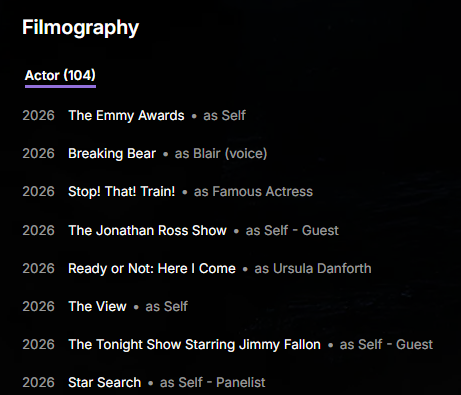
I like it, but we need to add filters or something to limit what appears on the list. For a person who makes different types of appearances in shows/movies, the list is bloated by appearances as "self". Take Sarah Michelle Gellar, for example: Most of her recent credits are like that. I'm sure others might want those on the list, but for me it's bloat, and not needed.
-
TV Show Status — TMDB-powered Returning/Ended/Cancelled badges for series
booga69 replied to Blueskies278's topic in Plugins
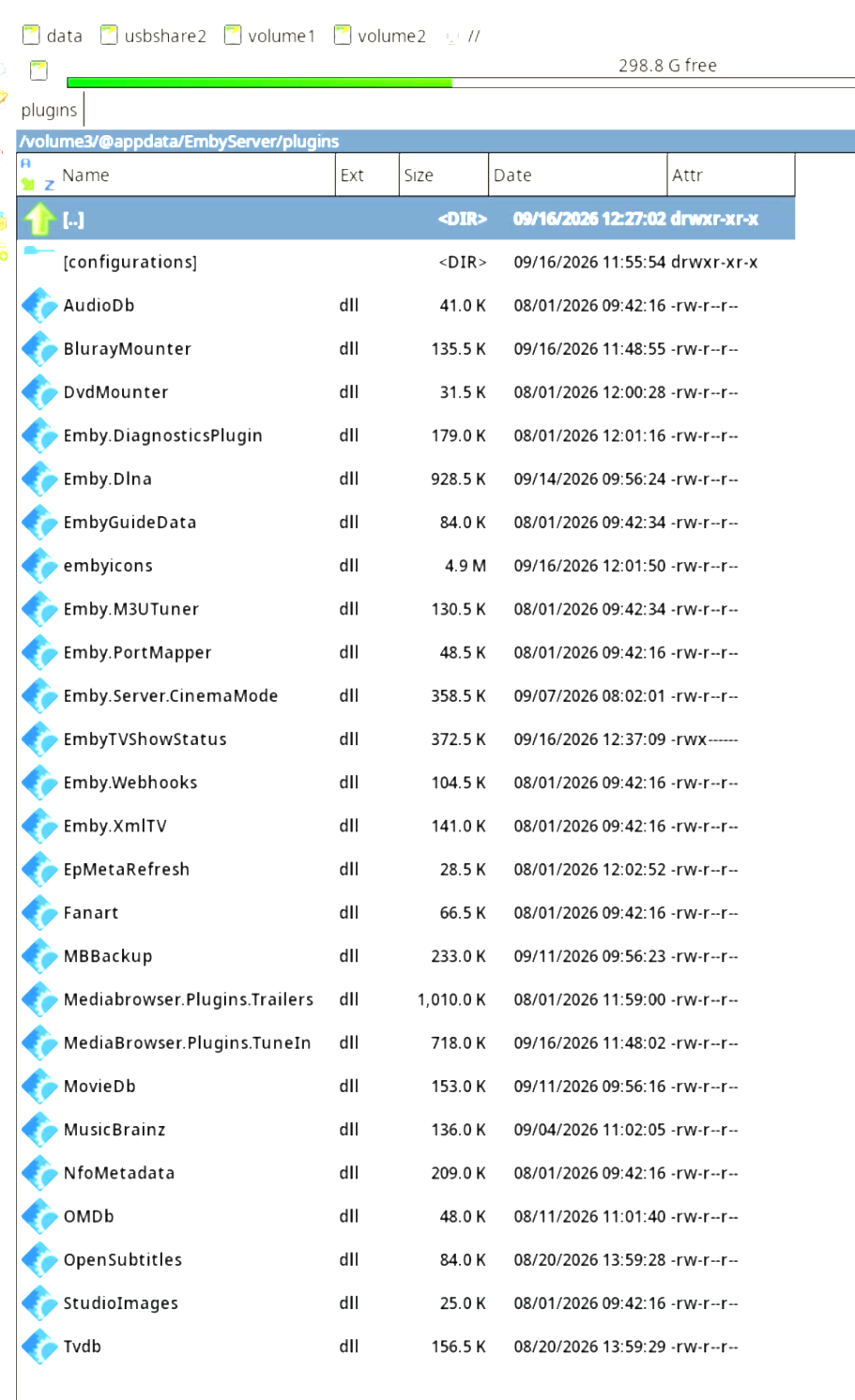
Hello, this plugin sounds very interesting. I've tried installing it on my Emby server version 4.10.0.40 running on Synology DSM 7.3 (installed as a package). I copied the latest versions dll (tried the last three versions you've posted on this thread) into the Embyserver plugin folder located for me at : /volume3/@appdata/EmbyServer/Plugings/. You can see the file in the screenshot below. I then restarted my Emby Server, but your plugin doesn't show up in the plugins list. Could this be a problem with this version of Emby Server ? I believe it's a fairly recent update. Thanks for any help you can provide, and keep up the good work !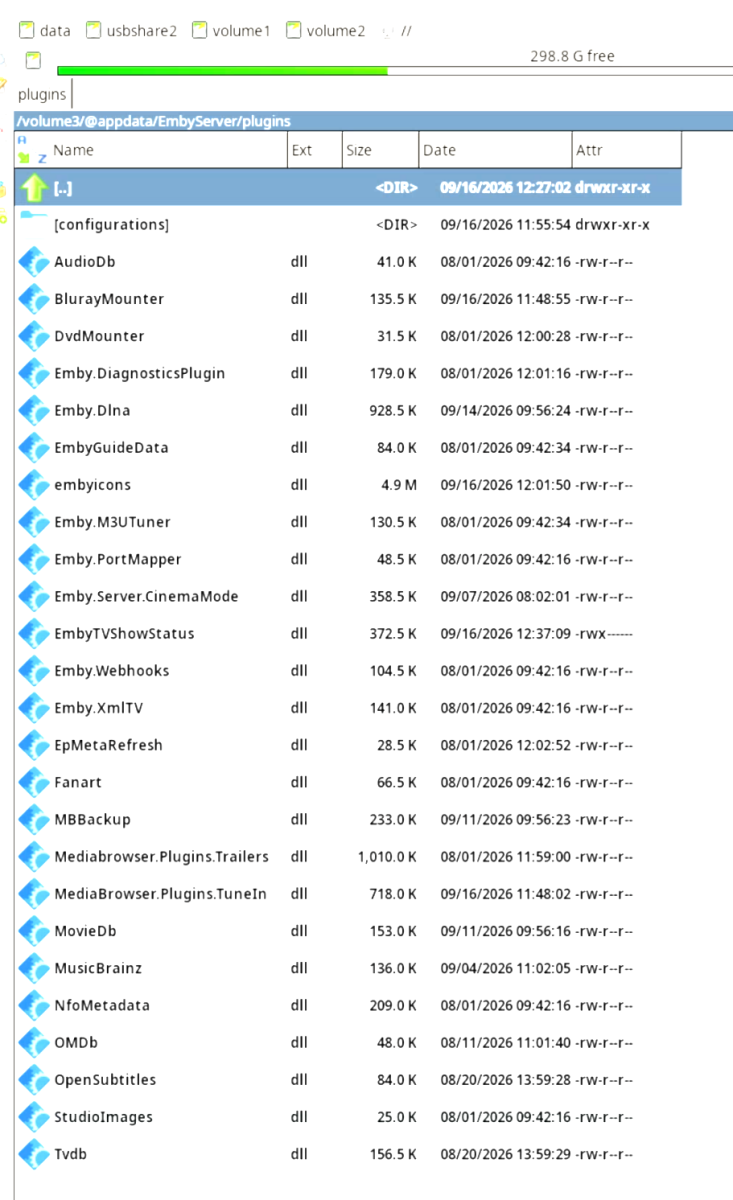
-
Hi! Is the sort order only changing back for the top list section? So what the top list function do is download the order that is presented in mdblist. So it doesn’t matter what sorting you set for the tag or collection. This might be why it’s changing back, to guarantee that you get the numbers present in the right order. (Using a custom sort name) The top list will mirror the order from the mdblist you have, so if you want to have a list that is changing, make sure to edit your list (on mdblist) to update every 12/24 h, and have a random sorting!
-

Plugin: EmbyCredits, detect end credits and add auto skip.
yocker replied to yocker's topic in Plugins
@RedNo7I spoke too soon. I think i see a problem with your setup. Let's move this to PM to not fill the thread. -
Minor Issues: Two shows sharing same TVDB ID.
GrimReaper replied to Smitty018210's topic in General/Windows
Yeah, there'll always be some edge cases where different items share same external IDs (and not even from same provider or items of the same type) that will produce some unexpected results. But they can typically be resolved with a bit of manual intervention. Glad you figured it out in this case, though. -

Minor Issues: Two shows sharing same TVDB ID.
Smitty018210 replied to Smitty018210's topic in General/Windows
ok, thanks. Like I said just a strange issue! -
Hi, I'm trying to add my Emby server API to Scrob tracker. Both are running in docker on my Synology NAS. Reading the link below it states it's under Expert drop down and Advanced then click Security. In my server I do not have these options. I have advanced and API. I have created an API and named it Scrob, when I put this into Scrob settings it doesn't work. Any help would be appreciated. Thanks! https://dev.emby.media/doc/restapi/API-Key-Authentication.html
-
Minor Issues: Two shows sharing same TVDB ID.
GrimReaper replied to Smitty018210's topic in General/Windows
I can only assume full library scan was not yet completed at the time and you just haven't noticed the merging once it was through. But that's just an assumption. -
Minor Issues: Two shows sharing same TVDB ID.
Smitty018210 replied to Smitty018210's topic in General/Windows
None, disabled them years ago. After I add shows I always run full scan. -
Minor Issues: Two shows sharing same TVDB ID.
GrimReaper replied to Smitty018210's topic in General/Windows
Do you have any internal meta-providers enabled in Emby? When you initially added those shows, was it with RTM only or full media library scan done? -
Minor Issues: Two shows sharing same TVDB ID.
Smitty018210 replied to Smitty018210's topic in General/Windows
OK, I will look into this, thanks. I know this is small case sample/issue. I am sure not a lot of shows fall into this category. Any idea why it worked when I added the series to begin with? Then disappeared? -
Minor Issues: Two shows sharing same TVDB ID.
GrimReaper replied to Smitty018210's topic in General/Windows
You should have main identifying scraper in Universal scraper settings, and that one will get "default" tag under <uniqueid> node in the NFO and is the one Emby will honor and behave accordingly.