All Activity
- Past hour
-

M3U live streams remain counted after Web Player PlaySessionId changes - false simultaneous stream limit
igortxo14 posted a topic in Synology
Hi, I am running Emby Server 4.11.0.6 as the native Synology package on a Synology DS218+ with DSM 7.2. I have an M3U tuner configured with a maximum simultaneous stream limit of 3. I have been experiencing an issue where Emby eventually reports: M3U simultaneous stream limit has been reached even though nobody is actually watching Live TV. This caused two scheduled recordings to fail overnight because Emby believed all three M3U streams were already in use. After investigating the server logs, it looks like some Live TV streams are not being released correctly when using Emby Web in Chrome on Windows. I have now been able to reproduce the issue. Reproduction I played three Live TV channels consecutively from: Emby Web 4.11.0.6 Chrome 154 on Windows 11 Same user and same browser session Two channels behaved correctly: NBA TV The stream was opened with: consumerId: a3c3d315dd864a008876c0fd2a5cc06e When playback was stopped, the same consumerId was removed: LiveStream consumerId removed: a3c3d315dd864a008876c0fd2a5cc06e followed by: consumer count is now 0 and the live stream was closed successfully. VAMOS The same happened here. The original consumerId was removed and the stream reached: consumer count is now 0 Problematic example The third channel, US: SPACE CITY HD, reproduces the problem. The live stream is initially opened with: consumerId: 8fb5f04fb97246cb8c95aef9a0bb38b2 and: consumer count is now 1 Shortly afterwards, the Web Player appears to renegotiate playback after a Direct Play error. The log contains: TranscodeReasons=ContainerNotSupported,DirectPlayError The playback session then changes from: 8fb5f04fb97246cb8c95aef9a0bb38b2 to: 0ffef5cceb9748e49340688addfb059b and then again to: 8d58352102b544c6a6e0bb1c655f847e The log explicitly shows the old play sessions being removed and _lastPlaySessionId being changed. However, the live stream consumer still appears to be associated with the original: 8fb5f04fb97246cb8c95aef9a0bb38b2 When I stop playback normally from the Web Player, Emby reports: Playback stopped ... US: SPACE CITY HD PlaySessionId: 8d58352102b544c6a6e0bb1c655f847e It then tries to remove that ID: LiveStream consumerId already removed: 8d58352102b544c6a6e0bb1c655f847e LiveStream consumerId removed: 8d58352102b544c6a6e0bb1c655f847e but the result is: Live stream 9d59432f131a4ecaad9256b8186bd29d consumer count is now 1 instead of 0. The live stream is therefore never closed. Effect This seems to leave an orphaned/stale M3U live stream registered internally by Emby. If this happens three times, my configured limit of 3 is reached even though there are no actual Live TV viewers. This is what happened overnight. At 01:00 a scheduled recording failed repeatedly with: MediaBrowser.Controller.LiveTv.LiveTvConflictException: M3U simultaneous stream limit has been reached. A second scheduled recording at 04:00 failed for the same reason. At approximately 07:40, Live TV playback was still rejected with the same simultaneous stream limit error. I restarted Emby, and during shutdown MediaSourceManager closed exactly three old live stream objects that should no longer have existed. After the restart, Live TV worked again. Additional observation This does not appear to happen with every channel. It seems to occur when the Web Player has to change its PlaySessionId during playback, particularly following a Direct Play/Direct Stream failure and playback renegotiation/transcoding. Channels where the PlaySessionId remains the same are released normally and reach: consumer count is now 0 I am attaching the server log from the clean reproduction described above. Thanks. embyserver (1).txt embyserver-63926955624.txt -
 Zelt joined the community
 -
 aloktiwari1988 joined the community
 -
 eilaf_07 joined the community
 -
 Cooperppp joined the community
 -
 Sorav joined the community
 -
 arunmayan joined the community
 -
 danzone4u joined the community
 -
 Karl4291 joined the community
 -

Unable to connect using Emby on VegaOS
newline replied to Wonderstuf's topic in Android TV / Fire TV
I'm having this exact same problem. Silk browser is able to reach my local Emby server, but the app can't connect. Brand new FireTV 4K Select Emby Version: 193 Last updated: Oct 6, 2026 -
 calmsky8424 joined the community
 -
 80762 joined the community
 - Today
-
When will this be released to Google Play?
-
Hello, the option to delete media immediately AFTER having watched it works fine, but if you ignore it and later try to delete it manually through the context menu (and say 'yes' to all), the media links/references in Kodi get deleted but the files on the PC still exist. Doesn't seem to work properly. Might want to look into this
-

Keine Vorschaubilder beim manuellen identifizieren von Filmen!
joergurmel replied to joergurmel's topic in German
Hier noch mal nen neuer Log, unten nur mit Emby. ! debug Console.txt -

Additional Options for metadata folder and storing images etc. next to media
katbyte replied to Clackdor's topic in Feature Requests
i'm not worried about a drive spinning up (they never stop in my server) I would like to balance performance (what lives on smaller fast expensive SSDs locally) and space (what is on the slower larger NAS HDDs) testing now the detail screen is maybe? slightly faster to load for the libraries where images and thumbs sit locally but its nearly impossible to tell. the nature of click/load new screen hides it well. while for the artwork/posters scrolling down through a library it is very obvious which library has them locally and which does not. So maybe the option i'm really looking for is "cache posters for library browsing locally with no expiration" ? -
 dad_1 changed their profile photo
 -
3.5.68 Fix startup crash on certain devices running Android 7 Fix sporadic cases of 4K video playing in 1080p Core UI Changes from 26.0.33 to 26.0.34 Spotlight fixes for older devices
-
Emby for Android 3.5.68 Released Download Emby for Android Changes 3.5.68 Fix startup crash on certain devices running Android 7 Fix sporadic cases of 4K video playing in 1080p Spotlight fixes for older devices
-

Add a buffer to the pixel dimensions of the "match video resolution" feature
Luke replied to rekit's topic in Android
Hi, can you please try Emby for Android 3.5.68+ and let us know if this issue is resolved for you? Thanks ! -
4K HEVC shows as 1080p, think I can't find any setup to fix?
Luke replied to PeteGul's topic in Android
Hi, can you please try Emby for Android 3.5.68+ and let us know if this issue is resolved for you? Thanks ! -
26.0.34 Spotlight fixes for older devices
-
Emby Web App Update: Version 26.0.34 The Emby Web app has been updated to version 26.0.34 Go and try out: https://app.emby.media/ Changes 26.0.34 Spotlight fixes for older devices
-
Right, the most likely answer is they were turned on temporarily by this new feature.
-
FYI:
-
I believe it has happened even after manually turning them on. I will try to replicate it again with logs. I don't know what a skip back feature is.
-

Nvidia Shield not available for sale - alternatives?
yocker replied to Mister Steve's topic in Hardware
It is a good device but one thing to note in case it matters, it doesn't support lossless passthrough. At the fear of derailing this thread. All TVs are spying like the LG, look up Samba for Sony as an example. LG are just the ones that got reported on it for now. -

Transcoding options gone 4.10.1.0
CaptainBard0906 replied to CaptainBard0906's topic in General/Windows
It's not creating one when the video attempts to play when set to transcade. Video won't even start if I have it set to transcode. It wasn't an issue before this version. It's an Intel 10 gen chip. I am not home right now I will try when I get home and see if it will create one. -
OK can you attach the ffmpeg log from that? Thanks.
-
Plugin: EmbyCredits, detect end credits and add auto skip.
yocker replied to yocker's topic in Plugins
To everyone using the PaddleOCR docker container. I recommend you remove it or at least make sure not to open it up to the internet. @sydlexiushas warned about it having a vulnerability: CVE-2022-30333. Instead go to: PaddlePaddle/PaddleOCR: Turn any PDF or image document into structured data for your AI. A powerful, lightweight OCR toolkit that bridges the gap between images/PDFs and LLMs. Supports 100+ languages. And install per their instructions. The plugin will continue supporting PaddleOCR, just no longer have a ready made docker container for it. -
Transcoding options gone 4.10.1.0
CaptainBard0906 replied to CaptainBard0906's topic in General/Windows
If I set it to yes and force a transcode the video stops playing. -
OK and if you set it to yes, do you get hardware transcoding?
-
Transcoding options gone 4.10.1.0
CaptainBard0906 replied to CaptainBard0906's topic in General/Windows
Luke here is a transcode log as well as a hardware detection log. ffmpeg-transcode-af10a98d-5ccd-4a8b-879a-4b06af099604_1.txt hardware_detection-63926911591.txt -
Hi there, please attach the Emby server log from when the problem occurred: How to Report a Problem Thanks!
-
Hello CaptainBard0906, ** This is an auto reply ** Please wait for someone from staff support or our members to reply to you. It's recommended to provide more info, as it explain in this thread: Thank you. Emby Team
-
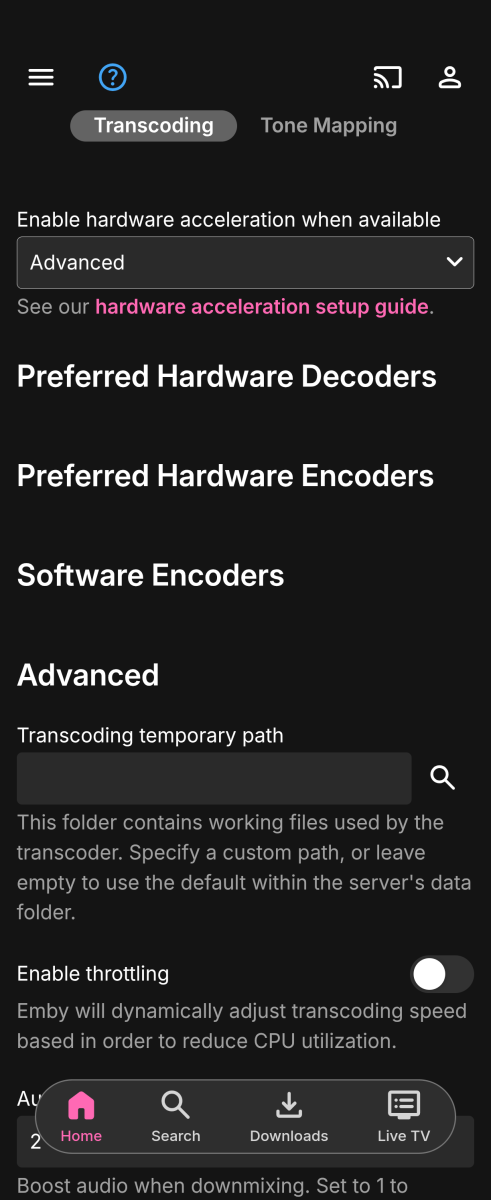
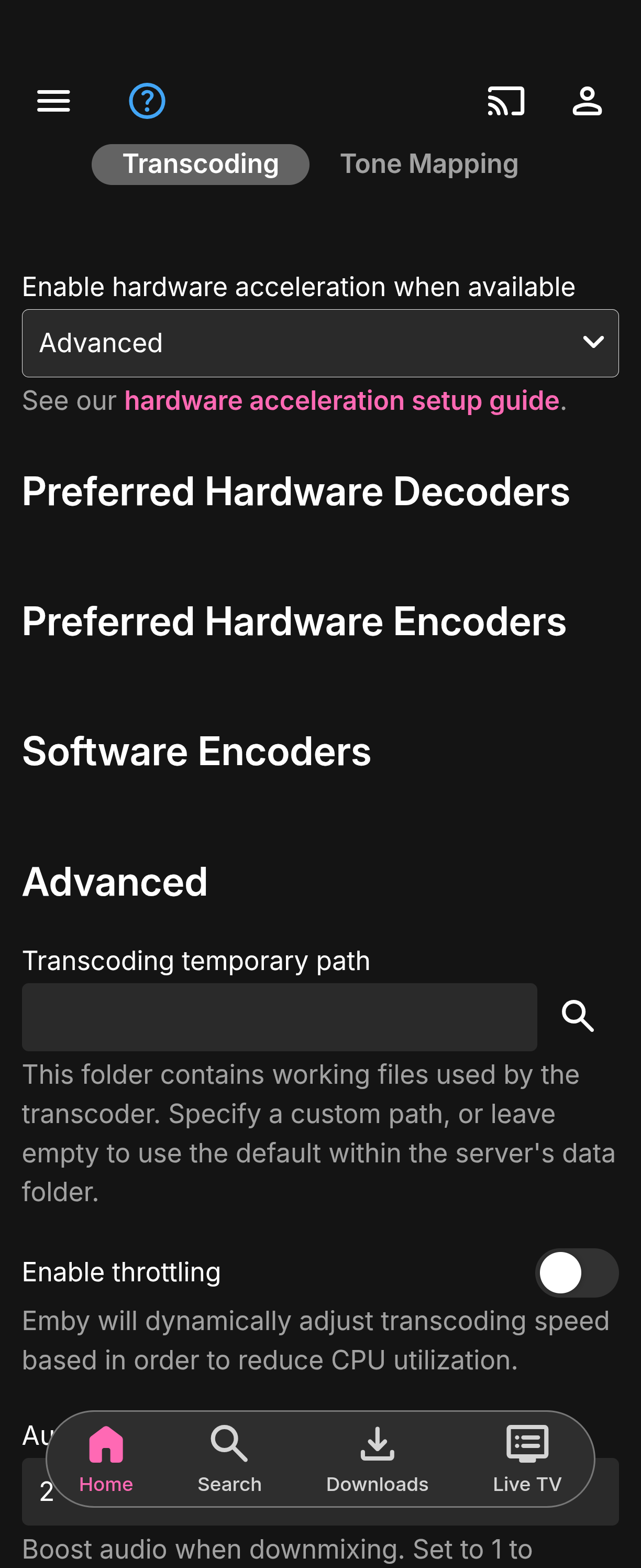
Server updated to 4.10.1.0 on windows and the transcoding options are gone when having it set to advanced. Not sure if this would cause live TV to not work. Every channel is now black.