
All Activity
- Past hour
-
 Nawal10 joined the community
 -
Gracias! this is 100% the setting I was looking for! Thank you!
-
 SaraSR joined the community
 -
This is fixed for the next release. Thanks
-
 سلحفاه المشاهده joined the community
 -
 Samuel y Rocio joined the community
 -
 saad. joined the community
 -
 ThatRyGuy joined the community
 -
 Sadoooqe joined the community
 -
 Charles85 joined the community
 -
 JamieOller joined the community
 -
 Karan65 joined the community
 -

[Tutorial] Optimizing Emby (Native): Transcode and Cache in RAM (Tmpfs) via Entware WD PR4100
Luke replied to WDPR4100's topic in Western Digital
Thanks for sharing. - Today
-

[Tutorial] Optimizing Emby (Native): Transcode and Cache in RAM (Tmpfs) via Entware WD PR4100
WDPR4100 posted a topic in Western Digital
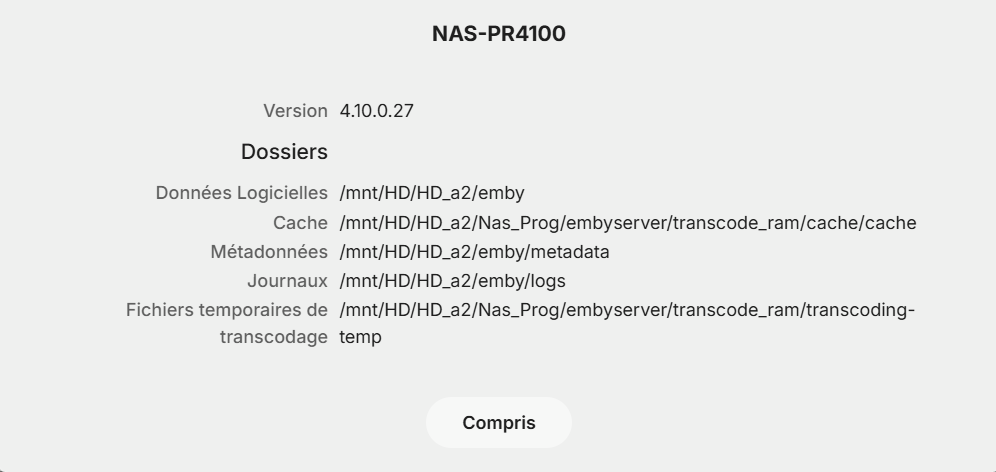
This tutorial explains how to move Emby's transcoding and cache directories to a virtual disk in memory (RAM using tmpfs). This provides maximum performance and, most importantly, protects your mechanical hard drives (HDDs) from the heavy and constant write operations generated by video transcoding and thumbnail generation. Prerequisites: A NAS running Entware (tested on WD My Cloud PR4100). Sufficient RAM (Recommended: at least 16GB of RAM so you can comfortably allocate 6GB to the system). Root SSH access. Step 1: Create the Automatic RAM Mounting Script Entware automatically executes scripts located in /opt/etc/init.d/ when the NAS boots up. We will create a script that sets up a 6GB tmpfs RAM space and prepares the necessary directories. Connect to your NAS via SSH as root. Create or overwrite your startup script by running this command block: cat << 'EOF' > /opt/etc/init.d/S99embyram #!/bin/sh RAM_DIR="/mnt/HD/HD_a2/Nas_Prog/embyserver/transcode_ram" CACHE_DIR="$RAM_DIR/cache" case "$1" in start) if [ ! -d "$RAM_DIR" ]; then mkdir -p "$RAM_DIR" fi # Mount RAM with a 6GB allocation mount -t tmpfs -o size=6G tmpfs "$RAM_DIR" if [ ! -d "$CACHE_DIR" ]; then mkdir -p "$CACHE_DIR" fi # Broad permissions to allow native writing without errors chmod -R 777 "$RAM_DIR" echo "Emby RAM (6GB) transcode and cache mounted successfully at $RAM_DIR" ;; stop) umount "$RAM_DIR" echo "Emby RAM transcode unmounted." ;; *) echo "Usage: $0 {start|stop}" exit 1 ;; es: exit 0 EOF (Adjust the path /mnt/HD/HD_a2/Nas_Prog/embyserver/transcode_ram to match your own NAS directory structure if necessary). Step 2: Test and Run the Script Immediately To apply the script right away without rebooting your NAS: Unmount the old point if it already existed: umount /mnt/HD/HD_a2/Nas_Prog/embyserver/transcode_ram Run the startup script: sh /opt/etc/init.d/S99embyram start Verify that the 6GB are active: df -h | grep transcode_ram Step 3: Configure Emby from the Web Interface Now that your RAM space is ready, you need to tell Emby to use it. Log into your Emby admin dashboard as an administrator. For Transcoding: Go to Server > Transcoding (or Paths). In the Transcode path field, enter: /mnt/HD/HD_a2/Nas_Prog/embyserver/transcode_ram Click Save. For Cache: Go to Server > General (under the Advanced section). In the Cache path field, enter: /mnt/HD/HD_a2/Nas_Prog/embyserver/transcode_ram/cache Click Save. Step 4: Restart Emby Restart your Emby service so it applies the new paths. That's it! The setup is fully persistent: every time the NAS reboots, the Entware script will automatically recreate the 6GB RAM space with the correct permissions, and Emby will seamlessly store its cache and transcodes there. entware_20.11.17_PR4100.bin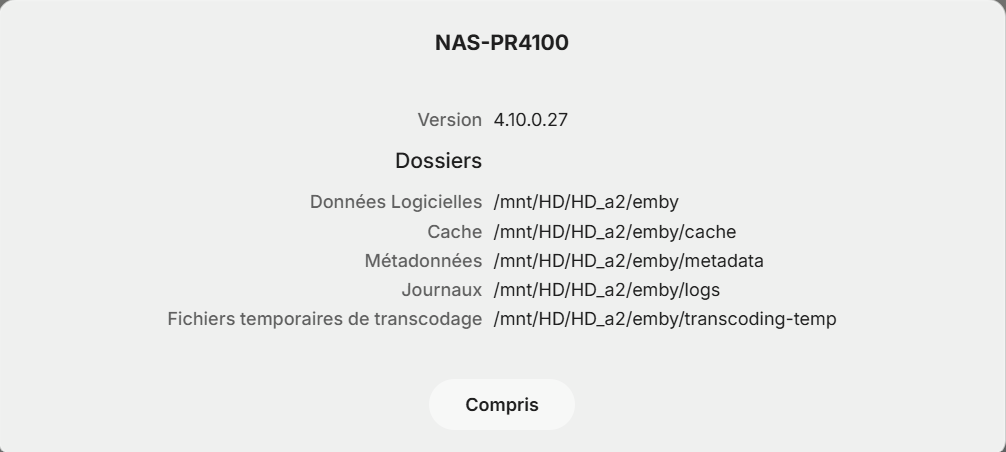
-
Intro detection - it's just never worked for any tv show; I've never seen the button even once. I usually just hit the 10 second advance button a few times, but that can bog things down sometimes. Do you know of a better way to send any data that might be relevant for diagnosing?
-
Hi everyone I have just updated my LG Emby app and the subtitle issue has been resolved
-

Stumped trying to get an API key to work with Powershell for Movies reporting
FatherSaint replied to FatherSaint's topic in Developer API
- 9 replies
-
- 1
-

-
- powershell
- script
- (and 1 more)
-
Stumped trying to get an API key to work with Powershell for Movies reporting
FatherSaint replied to FatherSaint's topic in Developer API
-
logs from emby server
-
Hi there, please attach the Emby server log from when the problem occurred: How to Report a Problem Thanks!
-

Playing an Emby playlist downloaded to Iphone, play via Apple Car Play - How do you do it?
ginjaninja replied to ginjaninja's topic in Apple iOS / macOS
Thanks for confirming, Thats great to hear about improvements on the horizon, i look forward to new developments, ps i pmed a request to join the beta IOS program, if thats possible. I dont know if its a function of carplay or VLC, but audio playback is flawless in the sense that....when i get out of the car the phone/vlc/the car seem to remember the audio state...and when i get back in the car the audio just resumes (same as if i used my local usb stick)......very impressive....maybe that something emby could hope to replicate one day (perhaps it already does with online content, ive not checked) -
folders are named by movie name (from the movie db) Winnetou und das Halbblut Apanatschi (1966) Winnetou und Shatterhand im Tal der Toten (1968) Winnetou und das Halbblut Apanatschi (1966) – kópia -> copy of Winnetou und das Halbblut Apanatschi (1966) - another testing

-
3.5.50 Fix possible cause of app hang on startup Core UI Changes from 26.0.15 to 26.0.15
-
Emby for Android 3.5.50 Released Changes 3.5.50 Fix possible cause of app hang on startup Core UI Changes from 26.0.15 to 26.0.15
-

Completed Sort and filter of the content of collections
malghana replied to harold's topic in Feature Requests
Hey, Thanks for adding this feature and it's great in Collection, Would you kindly expand the selection in Edit Metadate to include all sorting option, currently there are only two and i would love to see all options there + a way to sort up or down, so for example i'm aiming to do sorting by date added where newest media is shown first Thanks!!! -
Hi, thanks for following up !
- 3 replies
-
- 1
-

-
- transcode
- transcoding problem
- (and 1 more)
-

After reactivating: emby doesn't work anymore
Hausmeier replied to Hausmeier's topic in TerraMaster NAS
Thanks for the good explanation. It really helped. Don't know what the problem was but rebooting solved it -
The latest update (8.5.2) of Infuse has solved the issue, subtitles now work without any diagnostic settings change
- 3 replies
-
- 1
-
-
- transcode
- transcoding problem
- (and 1 more)
-
You can restart a TerraMaster NAS normally through the TOS web interface, or by using the physical power button if the system is unresponsive. Soft Restart via TOS Web Interface Log in to your TerraMaster Operating System (TOS) dashboard in your web browser. Click on the Power icon or go to Control Panel and find the General Settings or Hardware & Power menu. Select Restart and confirm your choice. Wait a few minutes for the system to shut down and turn back on. Hard Restart Using the Power Button Locate the physical Power button on the front of your TerraMaster NAS. Press and hold the power button for about 5 to 10 seconds until the device shuts down completely (all lights turn off). Wait 10 seconds, then press the power button once normally to turn the NAS back on.
-

A new approach to making IPTV behave more like traditional tuners
EODCrafter replied to PowerCC's topic in Third Party Apps
Is that like Nancy's bird bath? -

alte Bilder (fanart, poster etc) aus kodi export löschen
supersaugi replied to familiezufall's topic in German
du kannst doch einen neuen Suchlauf mit Emby machen , welche scraper ebnutzt wird kannst ja in den Bibliotheken einstellen lg -
After reactivating: emby doesn't work anymore
Hausmeier replied to Hausmeier's topic in TerraMaster NAS
Sorry, can't find a way how to reboot it. No button for it in TOS -
 Highscreen79 changed their profile photo
 -
After reactivating: emby doesn't work anymore
Hausmeier replied to Hausmeier's topic in TerraMaster NAS
ok, i'll try -
Can you try rebooting the NAS and see if that helps?
-
After reactivating: emby doesn't work anymore
Hausmeier replied to Hausmeier's topic in TerraMaster NAS
Well, in the TOS menu I clicked on deactivate and then on activate. But it doesn't start anymore. Which kind of information do you need? I don't know much more...



