All Activity
- Past hour
-
 Sadat003 joined the community
 -
 demo0954298 joined the community
 -
 SP/davi joined the community
 -
 wfm1232026 joined the community
 -
 pvc100 joined the community
 -
 Lisa_1971 joined the community
 -
 MMMonta joined the community
 -
 a_1234664366 joined the community
 -
 Ianmao joined the community
 -

TV Show episodes on old Samsung TV aren't visible
olgerd replied to olgerd's topic in Samsung Smart TV
Hi! When I press Continue watching it starts showing episdode somewhere from the middle of tv show (4th out of 10 for example). -
Thank you I will make that change…
-
You'd change your commands to use "rwX". Yes, that's an upper "X".
-
What would you suggest that I use in place of “rx”?
-
If you only use "rX" then Emby won't be able to create files (nfo, sub-titles, metadata, etc.) or manipulate the media (convert, delete, etc.)
- Today
-
Continuous changelog for Emby Windows & Xbox Stable in a single topic for reference. The topic remains locked. Please create your own topics or reply to the individual release posts.
-
I would also set the user to be default on all folders so if you get any new content the facl would apply, also apply within any subdirectories... sudo setfacl -Rm user:emby:rx,d:user:emby:rx /media/paulie”
-
I ran this command: “sudo setfacl -m user:emby:rx /media/paulie”. It works great. Does anyone see any danger in using this? My library address, as I chose it is: /media/paulie/MyMedia/Movies which Emby has no trouble locating.
-

Add the following metadata providers and/or a Book Orbit integration?
Lyfesaver replied to Lyfesaver's topic in Feature Requests
AudNexus does kick serious butt, however the Audible provider gives a bit more info (genres being the most important one) Google and Hardcover are both awesome for eBooks I have not moved on to my graphic novels/comics yet, will report back when I do -
This was back in November 2025? Is there any beta updates that fix this issue?
-

Feature to turn on/off chapter progress OSD in Emby clients
Saremgm replied to Saremgm's topic in General/Windows
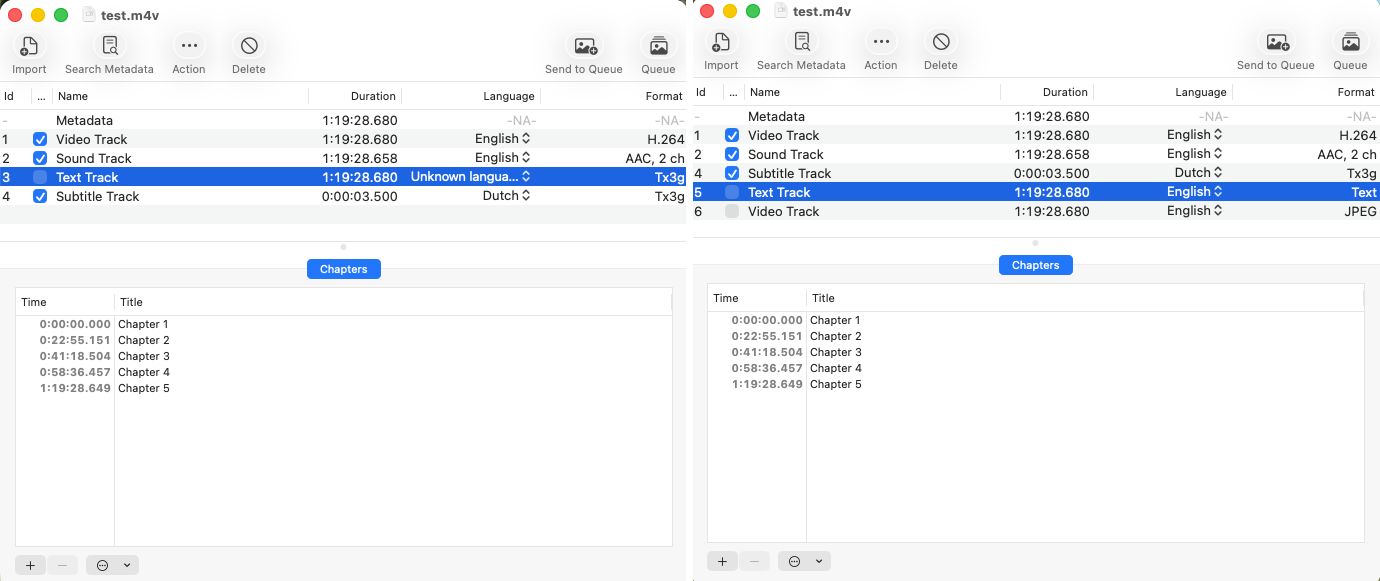
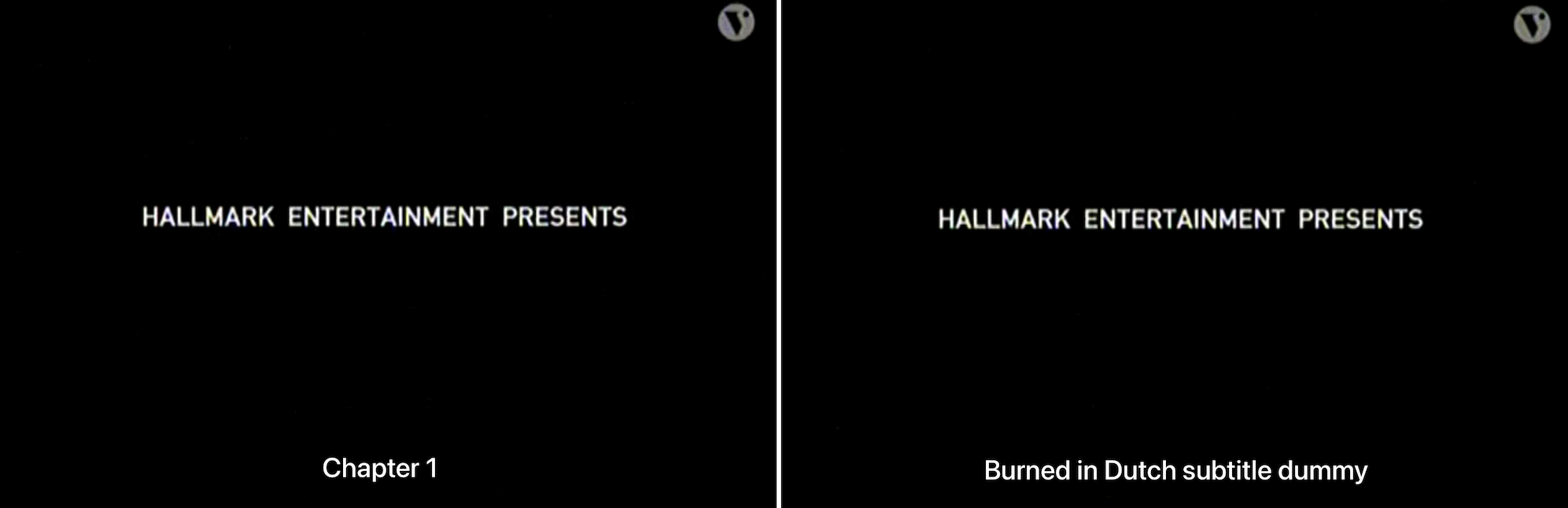
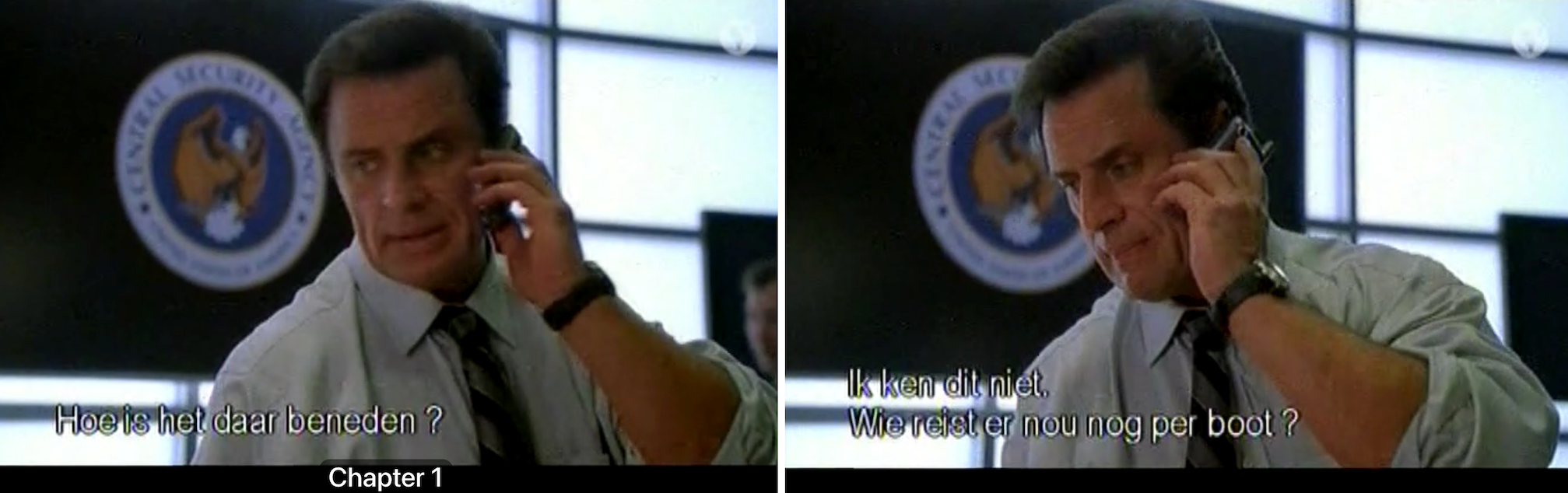
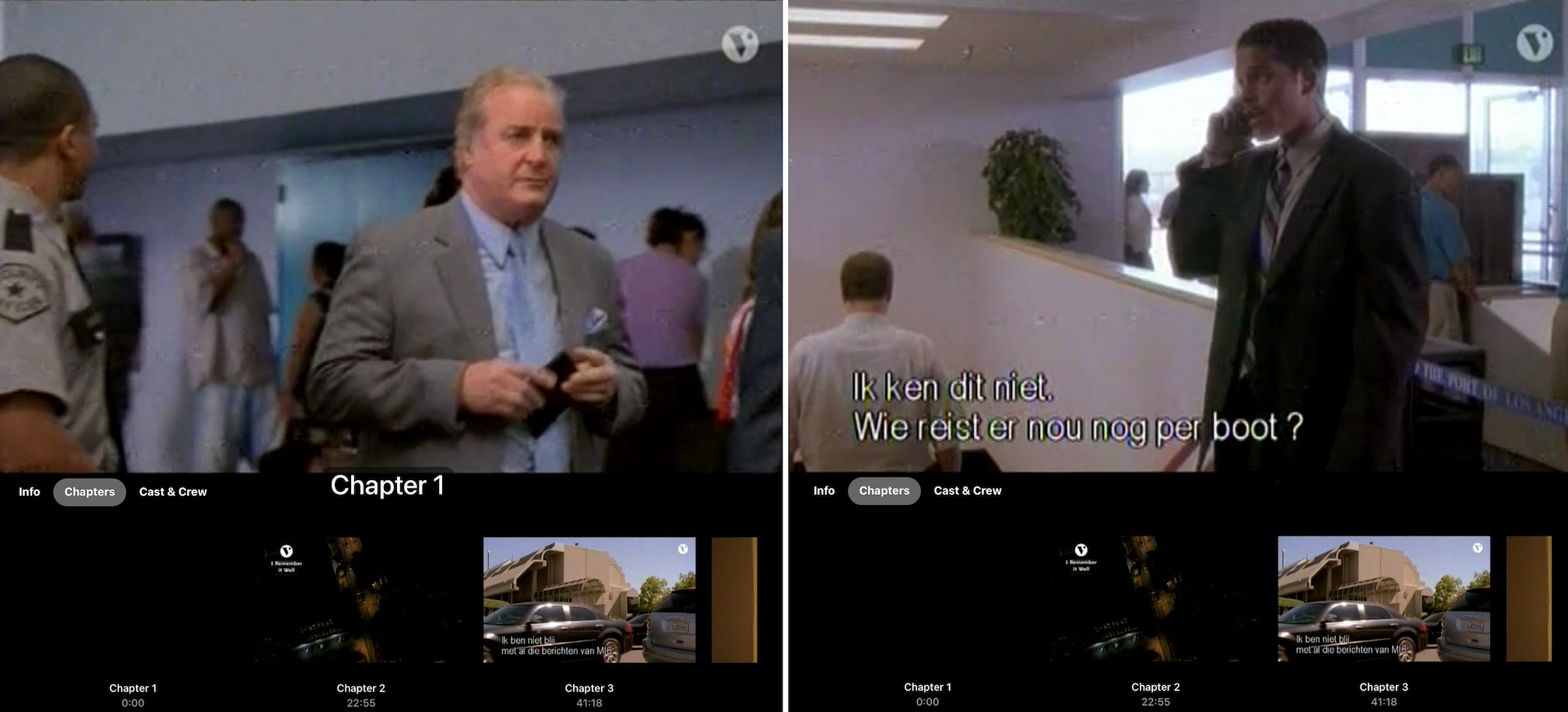
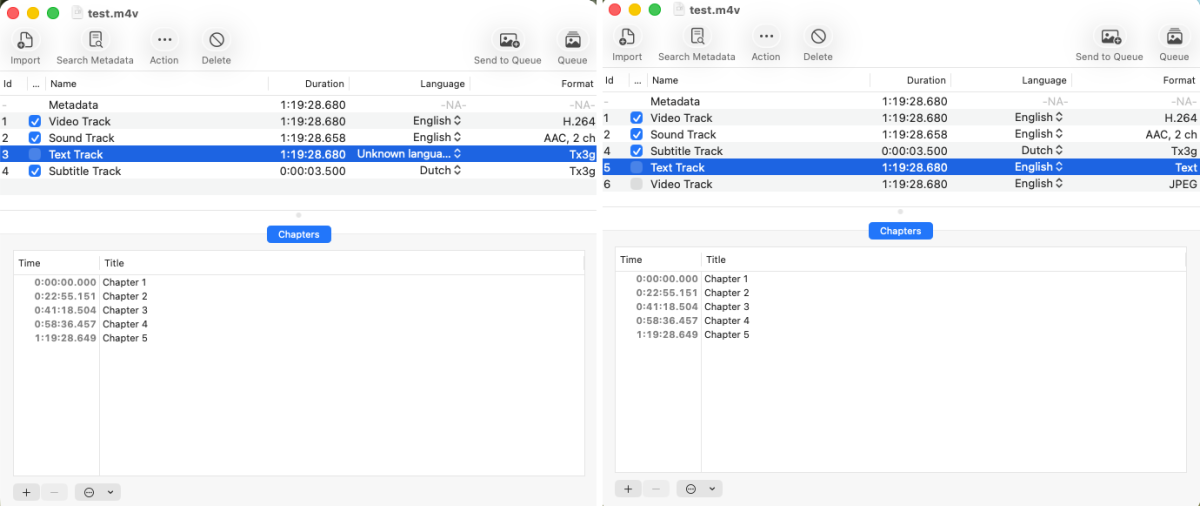
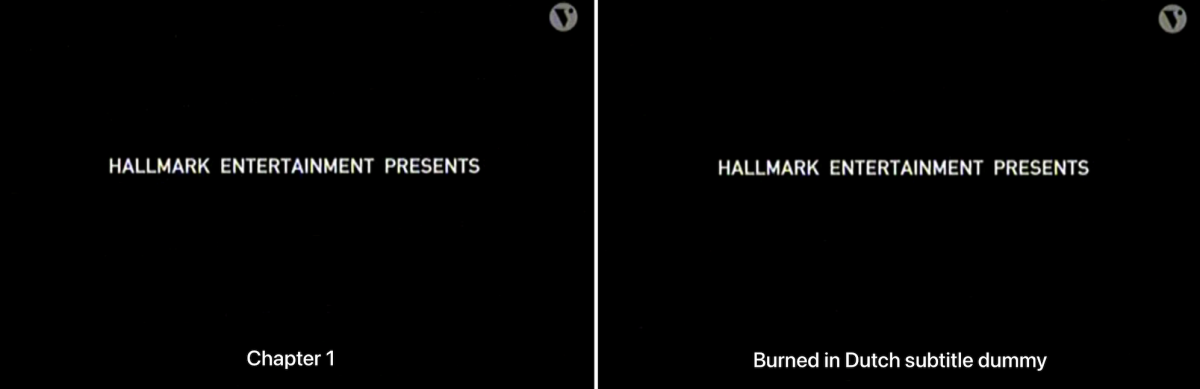
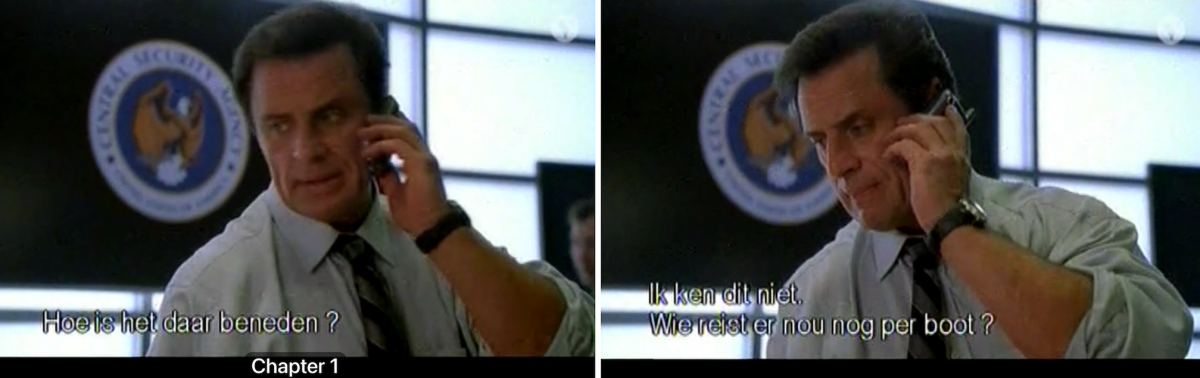
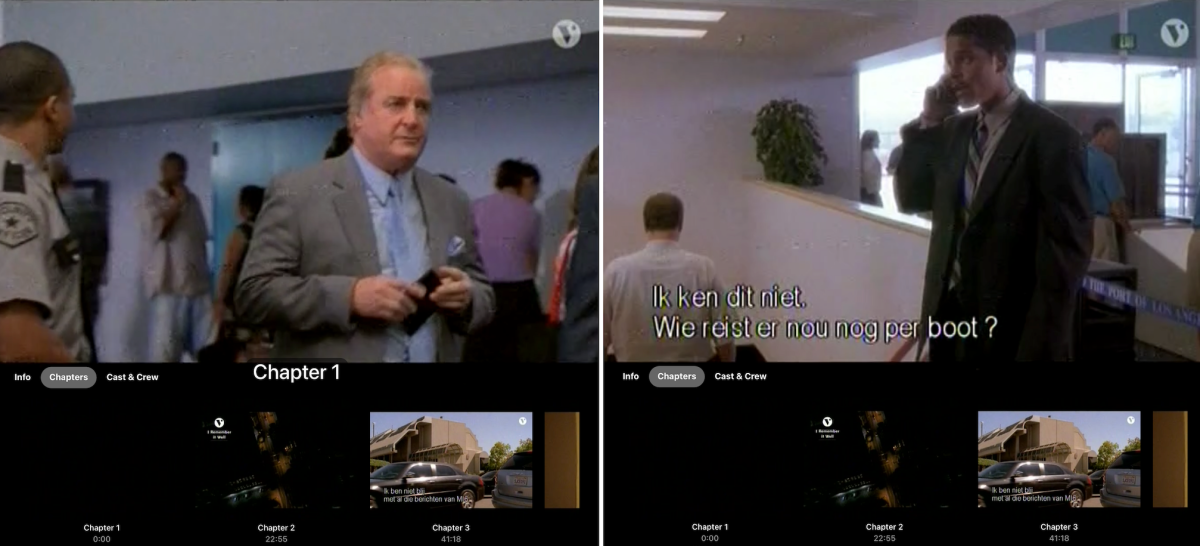
Luke et al, Can I have your thoughts on my findings please. I really think something funny is going on the the Emby client since my movies played without any issue in Plex and do not in Emby. My summary so far in a few words. Issue: The Emby client for i(Pad)OS/tvOS shows subtitles and chapter information as expected depends on the type of the chapter track. Check it yourself: For an .mp4 container containing audio, video, subtitle(s), and chapter tracks: (WRONG) When the chapter track in an .mp4 container is of type 'Tx3g', the chapter track is considered to be a chapter track AND subtitle track ignoring subtitle language including any other subtitle tracks (but chapter information shows correctly when tapping on 'chapter' in the OSD menu). (CORRECT) If that same chapter track in the same .mp4 container is of type 'Text', the chapter track is considered to be a chapter track (and chapter information shows correctly when tapping on 'chapter' in the OSD menu), and also the subtitle track is considered a subtitle track with respect to the assigned subtitle language. Described behavior is the same for Emby for Apple TV and i(Pad)OS. This .mp4 movie played without any issues in Plex. Subtitle and chapter data did show correctly also in Plex. --- What I did to discover Tx3g/Text chapter track issue I use Subler v1.9.1 from https://subler.org/ to look into an .mp4 container and import/export tracks. I just picked a random movie from my movie archive. The one I picked is one hour and 19 minutes long (original filename and extension: 'Jane Doe - Yes, I Remember It Well (2006) {imdb-tt0472269}.mp4'). It has Dutch subtitles burned in (the movie was recorded long ago from Public TV and converted from VHS cassette to an .mp4 movie). For the sake of simplicity during this test, I renamed it to test.mp4 Below a screenshot of how this movie is presented in Emby for iPadOS. ## The chapter track and Dummy subtitle track To signal Plex and Emby (Dutch) subtitles are already present, I created a very simple file 'Burned-in Dutch Subtitle Dummy.nl.srt' that I import with Subler into the .mp4 container. After imported, this track is called 'Subtitle Track', is assigned 'Dutch' in Subler and Subler shows this imported track as format 'Tx3g'.The contents of the 'Burned-in Dutch Subtitle Dummy.nl.srt' is just text and shown below between "": "1 00:00:01,000 --> 00:00:03,000 Burned in Dutch subtitle dummy 2 00:00:03,000 --> 00:00:03,500 " The chapter track was automatically created when digitizing this movie by Elgato Turbo h.264 USB hardware encoding dongle. To convert the chapter data from Tx3g to Text, I did this: Export the chapter track in Subler by selecting the chapter track via File > Export to file test.3.und.txt, Delete the existing chapter track, Import the exported chapter track into the .mp4 container in Subler, Save the .mp4 file. The contents of the exported chapter file 'test.3.und.txt' is shown below between "". "CHAPTER00=00:00:00.000 CHAPTER00NAME=Chapter 1 CHAPTER01=00:22:55.151 CHAPTER01NAME=Chapter 2 CHAPTER02=00:41:18.504 CHAPTER02NAME=Chapter 3 CHAPTER03=00:58:36.457 CHAPTER03NAME=Chapter 4 CHAPTER04=01:19:28.649 CHAPTER04NAME=Chapter 5 " Just to make things less complex, I saved the modified movie file and renamed it back to the original name 'Jane Doe - Yes, I Remember It Well (2006) {imdb-tt0472269}.mp4' before copying it to the Emby movie directory. But I noticed that Subler is dong some magic on its own. I installed MP4Box via brew install gpac. When I export the chapter track info via MP4Box -dump-chap 'path/to/movie/moviename.mp4' I get two different .ttxt files The chapter data contents extracted from the original movie with Tx3g chapter data "<?xml version="1.0" encoding="UTF-8" ?> <!-- GPAC 3GPP Text Stream --> <TextStream version="1.1"> <TextStreamHeader width="0" height="0" layer="0" translation_x="0" translation_y="0"> <TextSampleDescription horizontalJustification="left" verticalJustification="bottom" backColor="0 0 0 ff" verticalText="no" fillTextRegion="no" continuousKaraoke="no" scroll="None"> <FontTable> <FontTableEntry fontName="Helvetica" fontID="1"/> </FontTable> <TextBox top="0" left="0" bottom="0" right="0"/> <Style styles="Normal" fontID="1" fontSize="13" color="ff ff ff ff"/> </TextSampleDescription> </TextStreamHeader> <TextSample sampleTime="00:00:00.000" sampleDescriptionIndex="1" xml:space="preserve">Chapter 1</TextSample> <TextSample sampleTime="00:22:55.151" sampleDescriptionIndex="1" xml:space="preserve">Chapter 2</TextSample> <TextSample sampleTime="00:41:18.505" sampleDescriptionIndex="1" xml:space="preserve">Chapter 3</TextSample> <TextSample sampleTime="00:58:36.459" sampleDescriptionIndex="1" xml:space="preserve">Chapter 4</TextSample> <TextSample sampleTime="01:19:28.651" sampleDescriptionIndex="1" xml:space="preserve">Chapter 5</TextSample> </TextStream> " The chapter data contents extracted from the modified movie with Text chapter data "<?xml version="1.0" encoding="UTF-8" ?> <!-- GPAC 3GPP Text Stream --> <TextStream version="1.1"> <TextStreamHeader width="0" height="0" layer="0" translation_x="0" translation_y="0"> <TextSampleDescription horizontalJustification="center" backColor="0 0 0" scroll="None"> <TextBox top="0" left="0" bottom="0" right="0"/> </TextSampleDescription> </TextStreamHeader> <TextSample sampleTime="00:00:00.000" sampleDescriptionIndex="1" xml:space="preserve">Chapter 1</TextSample> <TextSample sampleTime="00:22:55.151" sampleDescriptionIndex="1" xml:space="preserve">Chapter 2</TextSample> <TextSample sampleTime="00:41:18.504" sampleDescriptionIndex="1" xml:space="preserve">Chapter 3</TextSample> <TextSample sampleTime="00:58:36.457" sampleDescriptionIndex="1" xml:space="preserve">Chapter 4</TextSample> <TextSample sampleTime="01:19:28.649" sampleDescriptionIndex="1" xml:space="preserve">Chapter 5</TextSample> </TextStream> " The modified version differs form the original version in that the <TextStreamHeader> is smaller. It does not contain <FontTable> and <Style> sections. ## The screenshots ALL Screenshots below are shown in pairs: - Left side: the original .mp4 with Tx3g chapter data. - Right side: the modified .mp4 with Text chapter data. Screenshot of both .mp4 in Subler before and after modification. During my tests, I also tried to set the language of the chapter track, for instance to Japanese in the hope it would not show. Unfortunately, that did not have any impact. The time sensitive chapter data kept showing up as a subtitle. Below a sreenshot when the movie starts playing from the beginning. Expected behavior: Subtitle track shows "Burned in Dutch subtitle dummy" at the first 3 seconds at the beginning of the movie. Time sensitive content of chapter ("Chapter 1") track is NOT shown. Left side: WRONG, Right side (GOOD) Screenshot of the chapter info when playing the movie. Left side (WRONG): chapter data has format Tx3g Emby client considers chapter track both as chapter AND subtitle track, regardless of what subtitle languages is set as preference while ignoring displaying the real subtitle track. Right side (GOOD): chapter data has format Text When the chapter data has format Text Emby client recognizes the chapter track as chapter track and contents of the separate Dutch subtitle track is shown as expected. No matter the type of the chapter track, the Emby client shows correctly the different chapters via the OSD menu Can you figure out what is causing this issue in the source code of the Emby client (and please fix it)? Thanks Sare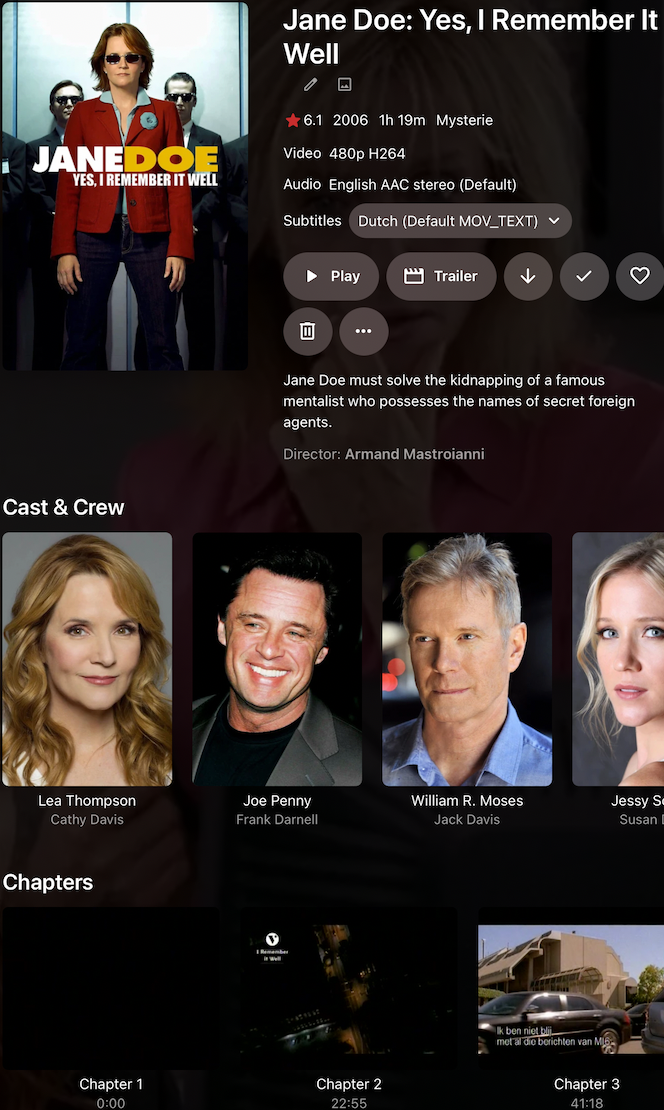
-
I have got this issue on IPhone and IPads and it's driving me potty. I have update everything, restated everything and even deleted and restarted the downloads, deleted and reloaded the app, but nothing seems to sort the issue. All the content is stuck on "Ready to Transfer" I will be going on holiday soon and I need to have some content to watch on the plane.
-

Need Advice - Stuttering Video using External HDD
PapalPenguin replied to PapalPenguin's topic in Hardware
I also noticed my troubles went away when I wasn't downloading torrents directly to my external drive, which I figured out was a SMR Drive, which plays a role, so I setup qbittorrent to download directly to my nvme drive and upon completion it moves the files to the external which reduces the amount of drive activity causing less struggles, I do plan to buy a 22 TB Internal HDD from GoHardDrives to expand my storage and eventually be the sole location for media, although I might just put new stuff on it and leave the usb as is until I can transfer it over to the new drive. But this seems to be working fine now as long as I keep the activity lower on the usb drive -
Have you opened 8096 in the os firewall? Can you connect from a browser on another device? Need more info.
-

2 verschieden Bibliotheken mit gleichen Filmen - in Sammlung alles doppelt?
K1ng_Lear replied to sylvio2000's topic in German
Ich habe keine Ahnung, aber ich vermute alphabetisch. Ansonsten merkt er sich üblicherweise das zuletzt, von diesem User, abgespielte. -
Hi. There is no longer an unlock available for that platform but you should get five free TV devices. How many do you have?
-
Through our normal use of Open Subtitles.
-
I recently installed a fresh copy of CachyOS (Arch based) and have it setup to my liking including Emby, but for some reason no matter what I enter for the server address in the Fire TV app I cannot connect to the server on my system. I am completely out of ideas at this point.
-
When Echo A is playing playlist A and "Alexa Next" is issued on Echo B, Echo A moves to next track. When Echo A is playing playlist A and "Alexa Ask m.b home play Next" is issued on Echo B, Echo B plays what is presumably the next track in playlist A session, Echo A continues to play out the song it is on but doesnt move onto the next song. You can repeat this vice versa and steal the session back to Echo A. interesting.... I guess we just need to know how to interact with alexa and code for two use cases. Multiple different listening sessions in the house A single listening session in the house, potentially moving between devices... [and potentially in the future ... multiroom simultaneous output , half joking]
-
Yeah a good GUI was exactly what I felt was missing from existing plugins. If you have any feedback, good or bad, just let me know I’m vibe coding this 100% so I’ll just tell Claude to fix it in between diaper changes. I’m thinking of implementing another project I have made into the plugin as well where you can use a m3u file and create .strm files for all movies and series. https://github.com/soderlund91/strmcreator But I’m unsure how it works with other providers, and might be better to keep them apart.
-

[BETA] Ear Wax - NOW AVAILABLE - Testers Wanted
ginjaninja replied to MarvinB's topic in Amazon Alexa
@MarvinB@hatharry Interesting Emby Alexa also exhibits cross contamination of commands. at least for ("Alexa next" on Echo A affects Echo B). Alexa is trying to be helpful it seems. If you only have intention of one session across whole account/house i guess this could be useful. Maybe Alexa 'design principles' expects people to switch alexa account (potentially supported by multiple emby skill account linkings 1 for each user) before playing music (but in practise who wants to do that...). Better to to fit in with Alexa than fight against it, if only we knew what Alexa was thinking... -

2 verschieden Bibliotheken mit gleichen Filmen - in Sammlung alles doppelt?
sylvio2000 replied to sylvio2000's topic in German
Oh, das habe ich mit Jellyfin verwechselt. Bei Emby ist keine Zahl. Aber zu Emby habe ich noch eine Frage: Wie entscheidet Emby, welche Version standardmäßig abgespielt wird? Ich habe es bisher nur mit 1 Film getestet, aber da ist immer die Urlaubs-Version vorausgewählt. Dies ist aber die qualitativ schlechtere Version. Ich hätte halt gerne als Standard die hochwertigere Version. -
Regarding functionality, everything worked as intended. I guess it's just visual.
-
Thanks for feedback....Hmm that looks dangerous better get onto that. The settings are only changed when 'save' or 'run now' is clicked is my understanding, so i am hoping that is just a visual anomaly, but special care required for now. The Run Now Status progress button is doing some page refreshes ...will look into. and i was so please with that progress ui element..i better not have to remove it.
-
Ja. Man muss nur aufrpassen, wenn keine Folge gewahlt ist wird die ganze Serie gelöscht. Ist eine Folge angewählt wird nur die Folge gelöscht. Hier könnte man sich schnell verklicken.