All Activity
- Past hour
-

Upgraded 4.9.3 -> 4.9.5 (Artwork and data for movies disappearing on scheduled scans?)
mike3821 replied to mike3821's topic in Linux
I went through the server log more closely, and I think the main thing to investigate is the library validation/removal process rather than just the individual missing-image requests. At 06:01:11 Emby starts: ValidatePhysicalRoots start validating 12970 Movies /media/media/Movies Shortly afterward it begins removing large numbers of existing movie folders from the database and deleting their internal metadata directories: Removing item from database, Type: Folder, Name: 3 Ninjas (1992), Path: /media/media/Movies/3 Ninjas (1992), Id: 19140294 followed by: Deleting path /var/lib/emby/metadata/library/... This happens on a very large scale. In this log there are 982 Removing item from database, Type: Folder entries and 2,952 Deleting path /var/lib/emby/metadata/library/... entries. The important part is that these media folders were not actually gone. A short time later Emby starts probing and re-importing the same movies again. For example, 3 Ninjas (1992) is removed at 06:01:56, then at 06:03:33 Emby is ffprobing the movie again, contacting TMDB/OMDb/Fanart, and creating new item records. Since Emby stores downloaded artwork under /var/lib/emby/metadata/library/..., could you please investigate why ValidatePhysicalRoots is removing existing library items and deleting their metadata directories, only to immediately rediscover/rebuild the same media? This seems potentially very relevant to the disappearing artwork issue. If the existing item is removed and its metadata directory is deleted, then the artwork associated with that item can be removed as well. Recreating the movie may also result in new item IDs/image metadata while other references or cached clients may still refer to the old records. There is also a separate artwork error in the log where the client requests: /Items/17194232/Images/Logo?maxHeight=220 and Emby responds: 17194232 does not have an image of type Logo with HTTP 404. However, those Logo 404s occur before this particular mass deletion sequence, so I don't think that specific deletion event caused those particular 404s. My main concern is the repeated pattern of: ValidatePhysicalRoots -> Removing item from database -> Deleting /var/lib/emby/metadata/library/... -> same media immediately rediscovered/re-added Could you please focus on why that is happening and whether it can cause existing artwork/image metadata to be lost during library validation? -
 Flynnob2012! joined the community
 -
 Nawaaf joined the community
 -

Regarding the issue of 4.9.1.80 and the plugin Bluray Folder Support 1.0.3.0 recognizing BDMV original disc fi
LonelyCat replied to LonelyCat's topic in Synology
Yeah! The dots! Thank you very much for discovering the issue. I am looking forward to fixing it in the next version。 -
 tianwei5023 joined the community
 -
 Baishen222 joined the community
 -
 Jscpptj joined the community
 -
 Korean14 joined the community
 -
 abelgomez joined the community
 -
 Mevludin joined the community
 -
 Nawaf.3 joined the community
 -
 Moito46 joined the community
 - Today
-

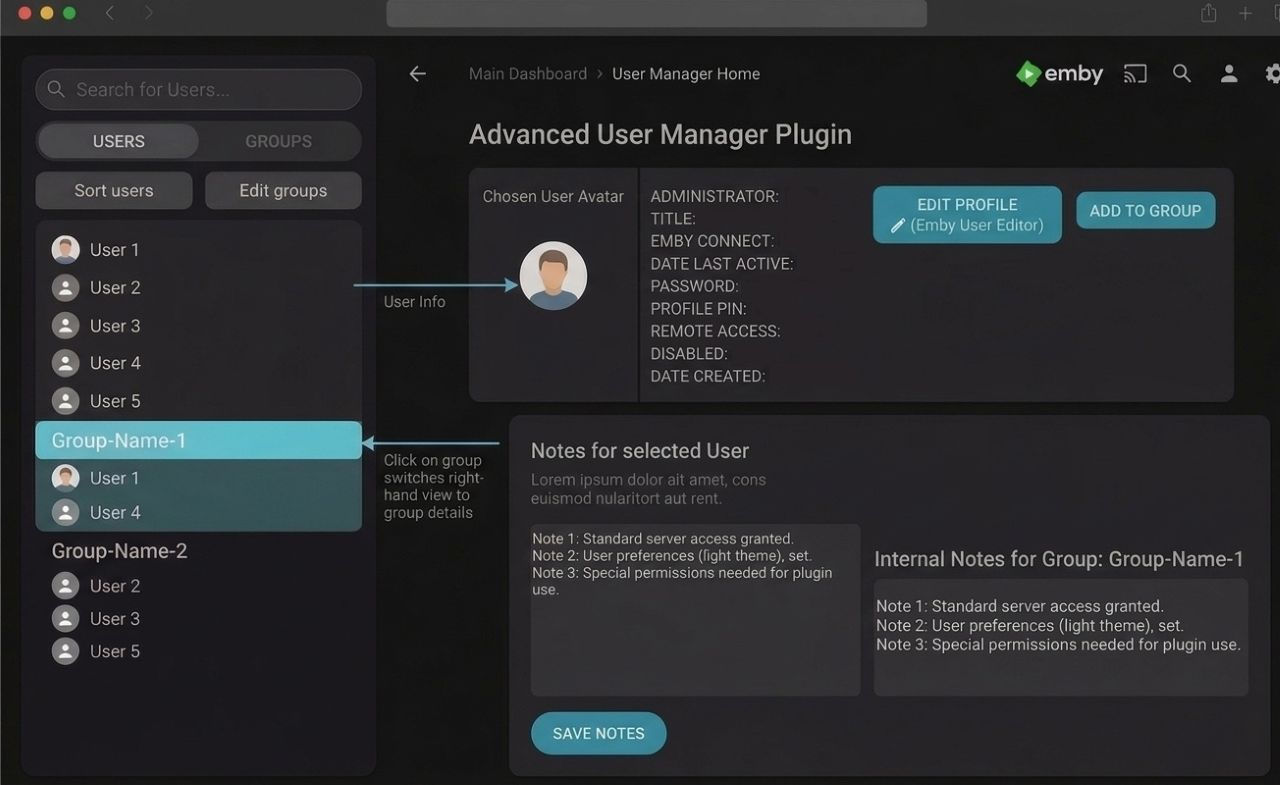
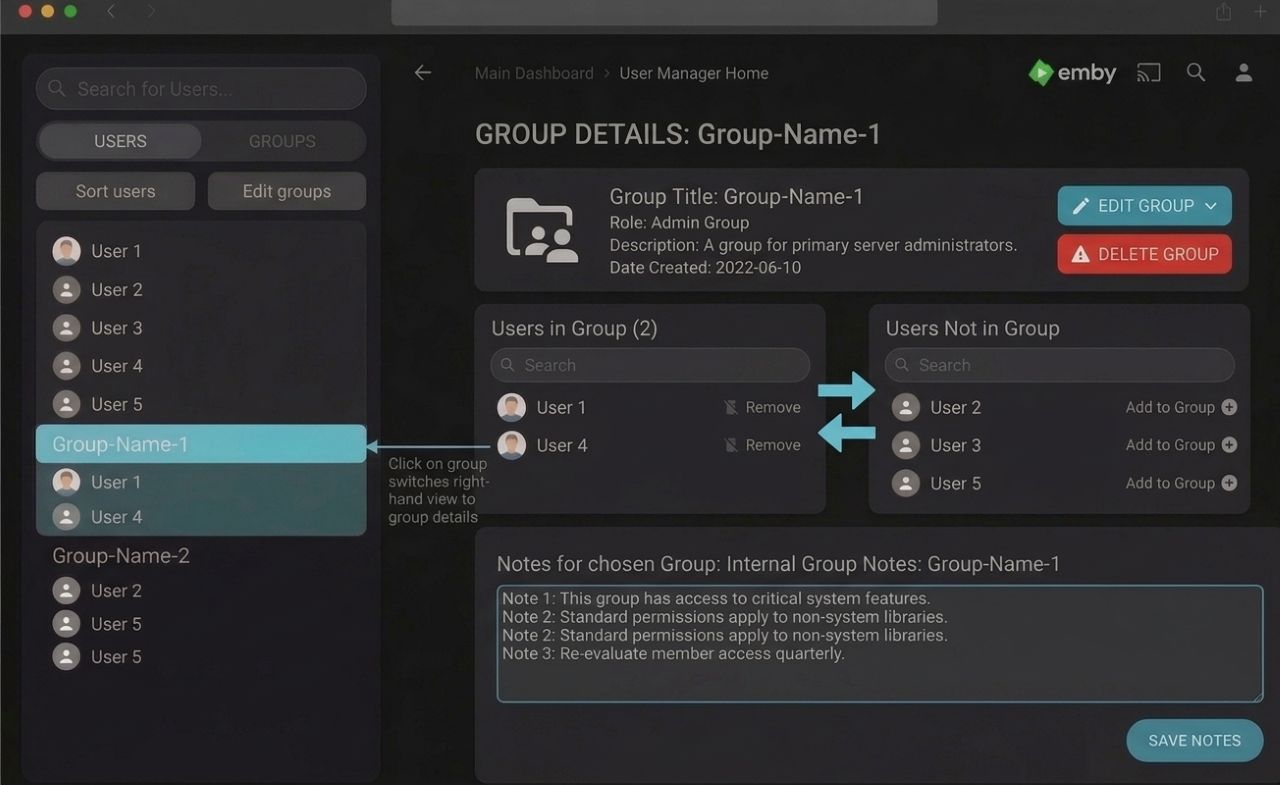
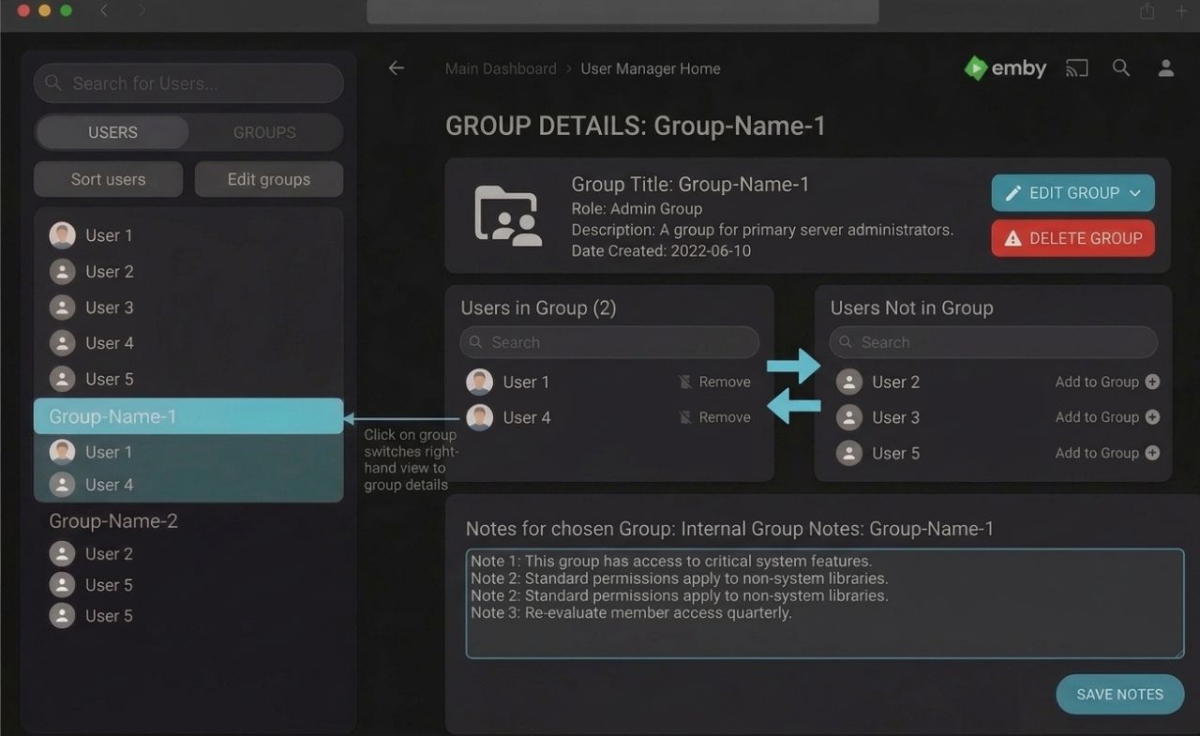
Have an "Admin Notes" section under each user account
SoliFlix replied to bennymac's topic in Feature Requests
If the admins don't implement this natively, I could try to create a plugin for it – here are some AI-generated mockups of what I think it could look like.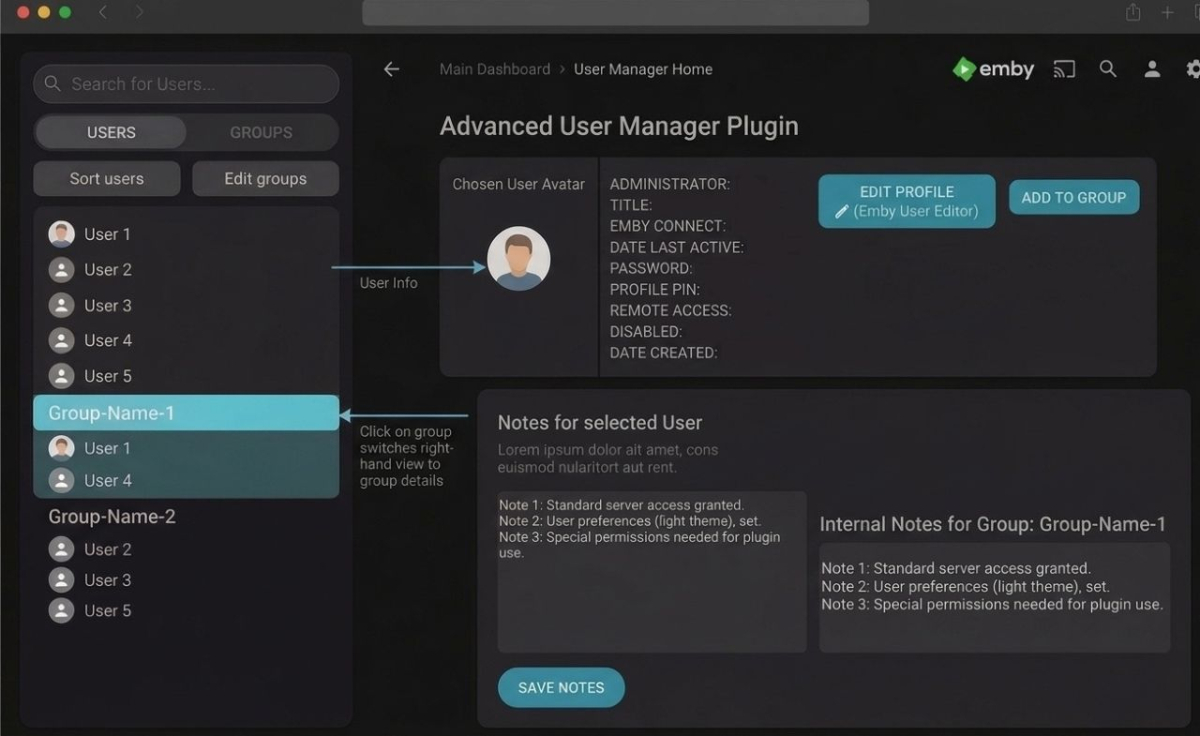
-
Ya, I said the same thing earlier. There has to be a way to make it so that people with fast connections don't have to see the message at all.
-
Thanks — but neither of those two tests actually measured what we need. Here's what they show: The ffmpeg seek test didn't run. real 0m0.002s is 2 milliseconds. A process can't even start that fast, let alone open a 26 GB file and decode a frame. It errored out immediately and the 2>/dev/null hid the message. Most likely the path didn't resolve in that shell — were you on the Proxmox host rather than inside the Emby container? Please re-run it without discarding stderr. The dd test read from RAM, not disk. 9.2 GB/s is faster than any NVMe drive on the market (Gen4 tops out around 7 GB/s). That's the page cache serving a file that was already warm — probably from your own earlier ffmpeg attempt. It tells us nothing about a cold read. The mkvinfo output is inconclusive. I only see the Seek head line; no Cues element appeared. That may mean the index is genuinely missing (which would explain everything), or it may mean the output got cut. I need the full top-level element list. Could you re-run these, inside the Emby container: FILE="/discos/Peliculas/Pelis/G/Gran Torino (2008) [tmdb=13223] 1080p.mkv" # 1. Full element list — I'm looking for whether "Cues" is present mkvinfo "$FILE" | head -40 # 2. Seek timing at several depths, errors visible for t in 00:00:10 00:01:39 00:10:30 00:33:30; do echo "== $t" time /opt/emby-server/bin/ffmpeg -hide_banner -v error \ -ss $t -i "$FILE" -frames:v 1 -f null - done # 3. Cold read, bypassing cache dd if="$FILE" of=/dev/null bs=1M skip=7000 count=200 iflag=direct One more test, and it may be the answer If it turns out the storage is genuinely fast, then the index isn't the problem and I'd suspect the NVDEC VC-1 decoderinstead. Seeking with vc1_cuvid is a known weak spot — the hardware decoder can stall for a long time before emitting the first frame after a seek, and it wouldn't show up when starting from position 0. This isolates it — same seek, software decode vs. the exact hardware path Emby uses: # software decode time /opt/emby-server/bin/ffmpeg -hide_banner -v error \ -ss 00:33:30 -i "$FILE" -frames:v 1 -f null - # hardware decode, exactly as Emby invokes it time /opt/emby-server/bin/ffmpeg -hide_banner -v error \ -init_hw_device cuda=cuda:0 -f matroska,webm -ss 00:33:30 \ -c:v vc1_cuvid -hwaccel cuda -hwaccel_output_format cuda \ -i "$FILE" -frames:v 1 -f null - If the first is fast and the second is slow, the fix is simple: in Transcoding settings, turn off hardware decoding for VC-1 while leaving NVENC encoding on. You lose a little decode efficiency on this one codec and get working seeks. And the thing you didn't mention You added two cores — thanks. But you didn't say whether seeking behaves any differently now. That's the most important piece of information I'm missing. Could you try jumping to the 30-minute mark on the TV again and tell me what happens, and send the fresh embyserver.txt plus any new ffmpeg logs? If it still hangs, the new logs will show whether the failure window moved at all.
-
Plex is far from a home media server Fuck Plex.mp4
-
Here is all the info: Mkvinfo: |+ Seek head (subentries will be skipped) size 86 data size 81 Seek rate: time /opt/emby-server/bin/ffmpeg -ss 00:33:30 -i "/discos/Peliculas/Pelis/G/Gran Torino (2008) [tmdb=13223] 1080p.mkv" -frames:v 1 -f null - 2>/dev/null real 0m0,002s user 0m0,000s sys 0m0,002s Random-access: time dd if="/discos/Peliculas/Pelis/G/Gran Torino (2008) [tmdb=13223] 1080p.mkv" of=/dev/null bs=1M skip=7000 count=200 200+0 records in 200+0 records out 209715200 bytes (210 MB, 200 MiB) copied, 0,0228371 s, 9,2 GB/s real 0m0,026s user 0m0,000s sys 0m0,025s I´ve added two extra cores
-
No Refunds dude, go check out Plex it's only I heard 50 thousand per month to watch ADS all day long.
-
Emby.mp4
-
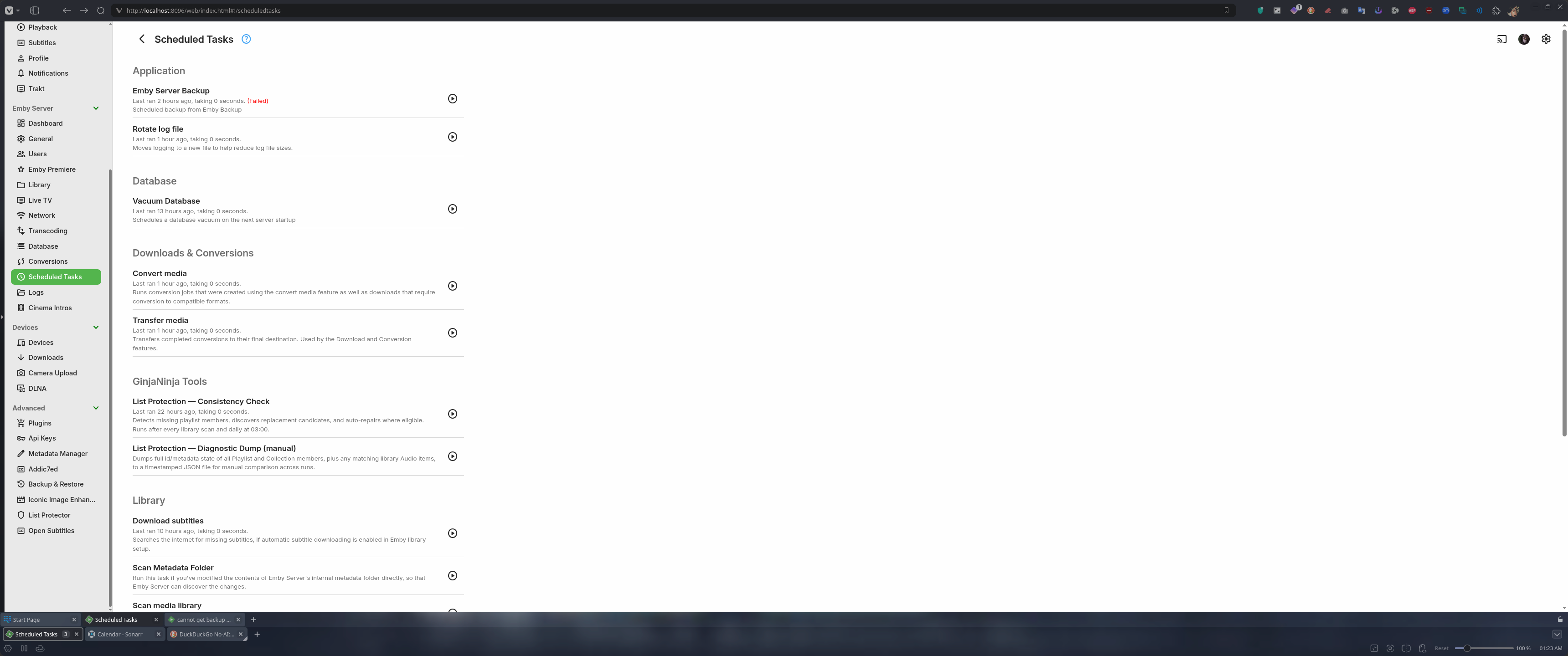
All good now, cache needs to be cleared completely so icons are again redrawn. Cheers
-
Emby seek failure — summary What's already fixed Compared to the earlier logs, this session is clean: no Cinema Mode trailers, no ScripterX exceptions, no library scan running, no subtitle extraction. All three playback starts from position 0 work perfectly — NVDEC/NVENC on the A2000, ~16x realtime. What's still failing: seeking I tabulated all nine ffmpeg processes by seek offset and time to first frame (Output #0 ffmpeg -ss segment Time to first frame 502623 — (start) 0 0.11 s 8566cd — (start) 0 0.11 s ec8167 — (start) 0 0.24 s 8cf2e1 00:01:39 33 3.86 s 628a12 00:10:30 210 killed at 10 s 174bd3 00:10:30 210 killed at 7 s ee0dc3 00:21:30 430 killed at 10 s f083f6 00:21:30 430 killed at 9 s 9c9f51 00:33:30 670 killed at 9.6 s ee36e8 00:33:30 670 killed at 7.9 s Seek time scales with how far into the file you jump. A jump to 1:39 takes 3.86 s and barely makes it; anything past ~10 minutes never arrives in time. Key detail: in the failing logs, ffmpeg opens and probes the file normally in ~0.93 s (identical to the working ones), prints the stream mapping, and then goes silent: 09:49:43.112 Stream mapping: 09:49:43.112 Stream #0:0 -> #0:0 (vc1 (vc1_cuvid) -> h264 (h264_nvenc)) 09:49:43.112 Stream #0:1 -> #0:1 (copy) 09:49:43.112 Press [q] to stop, [?] for help [nothing more — SIGKILL 9 seconds later] No Output #0, no frames. Opening the file is fine; positioning inside it is what's slow. The LG app waits exactly 10 seconds, then kills ffmpeg and re-requests — the loop we saw before. Why Running the numbers on the one good data point: 1:39 at 29.7 Mbps is ~368 MB into the file, covered in 3.86 s ≈ 95 MB/s. At that rate, 10:30 (2.3 GB) would need ~24 s and 33:30 (7.5 GB) ~78 s. That matches the observed failures exactly. So ffmpeg appears to be reading the file linearly to reach the seek point instead of jumping directly. Two possible causes: The MKV has no Cues index. Without Cues, the Matroska demuxer walks clusters until it finds the target. The file is from 2017, muxed with libebml 1.3.4 + libmatroska 1.4.5 and no writing-application tag, which is unusual. Storage is slow at random access. 95 MB/s is about the ceiling of a spinning disk or a gigabit network mount. How to tell them apart # 1. Does the file have an index? mkvinfo "/discos/Peliculas/Pelis/G/Gran Torino (2008) [tmdb=13223] 1080p.mkv" | grep -i -E "cue|seek head" # 2. How long does a real seek take? time /opt/emby-server/bin/ffmpeg -ss 00:33:30 \ -i "/discos/Peliculas/Pelis/G/Gran Torino (2008) [tmdb=13223] 1080p.mkv" \ -frames:v 1 -f null - 2>/dev/null # 3. Is random-access read OK? time dd if="/discos/Peliculas/Pelis/G/Gran Torino (2008) [tmdb=13223] 1080p.mkv" \ of=/dev/null bs=1M skip=7000 count=200 If dd with skip=7000 returns in under a second but ffmpeg takes a minute, it's the index. If dd is also slow, it's the disk. Fixes If it's the index, rebuild it losslessly, no re-encode: mkvmerge -o "Gran Torino (2008) [tmdb=13223] 1080p.fixed.mkv" \ "Gran Torino (2008) [tmdb=13223] 1080p.mkv" A few minutes of copying and seeks become instant. Worth trying first — cheap and reversible. Either way, this file remains the worst case: 26 GB of VC-1 at 29.7 Mbps against a 5 Mbps remote limit, so it always transcodes and always runs near the timeout. Re-encoding to H.264 or HEVC at 8–10 Mbps would bring it to ~7 GB: less data to traverse on a seek, and possibly direct play. With the A2000, an NVENC pass is about ten minutes. Still outstanding: Processor count: 2. Every retry spawns a new ffmpeg while the previous one is still dying, and two cores don't help. Four vCPUs would give some headroom in those critical seconds.
-
.thumb.jpg.d1639af2d080f59454a5d8102bcb977e.jpg)
External player integration – can Emby send a direct file URL to an external player on Android?
Cotignac replied to Cotignac's topic in Android
Not really. I'm looking at other options. -
 flord22 changed their profile photo
 -
What I have in mind will take help, will be a lot of work uploading pics etc more than what I can do myself. My goal would be to run a plugin and have all cover art show for everything and if it misses something have a forum people can say what is missing. Here is what the Emby plugin looks like Plugin.mp4
-
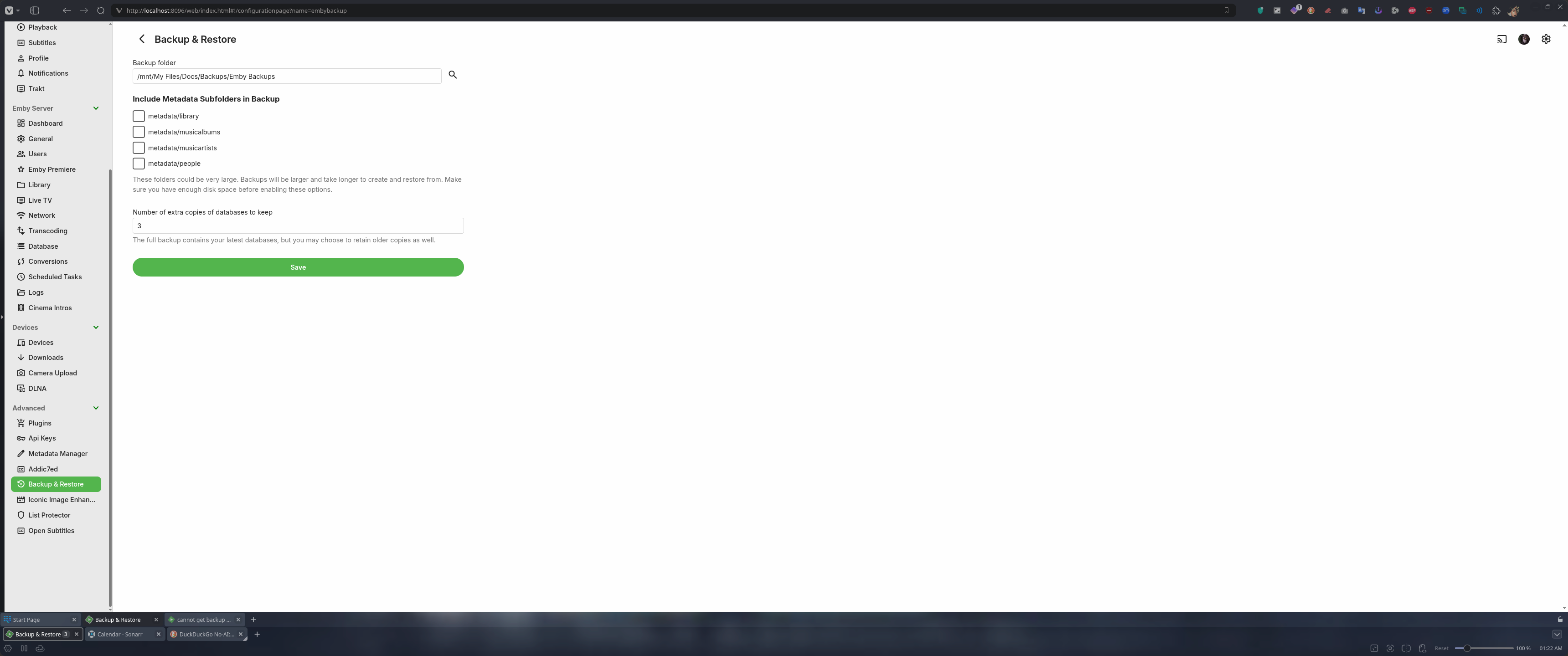
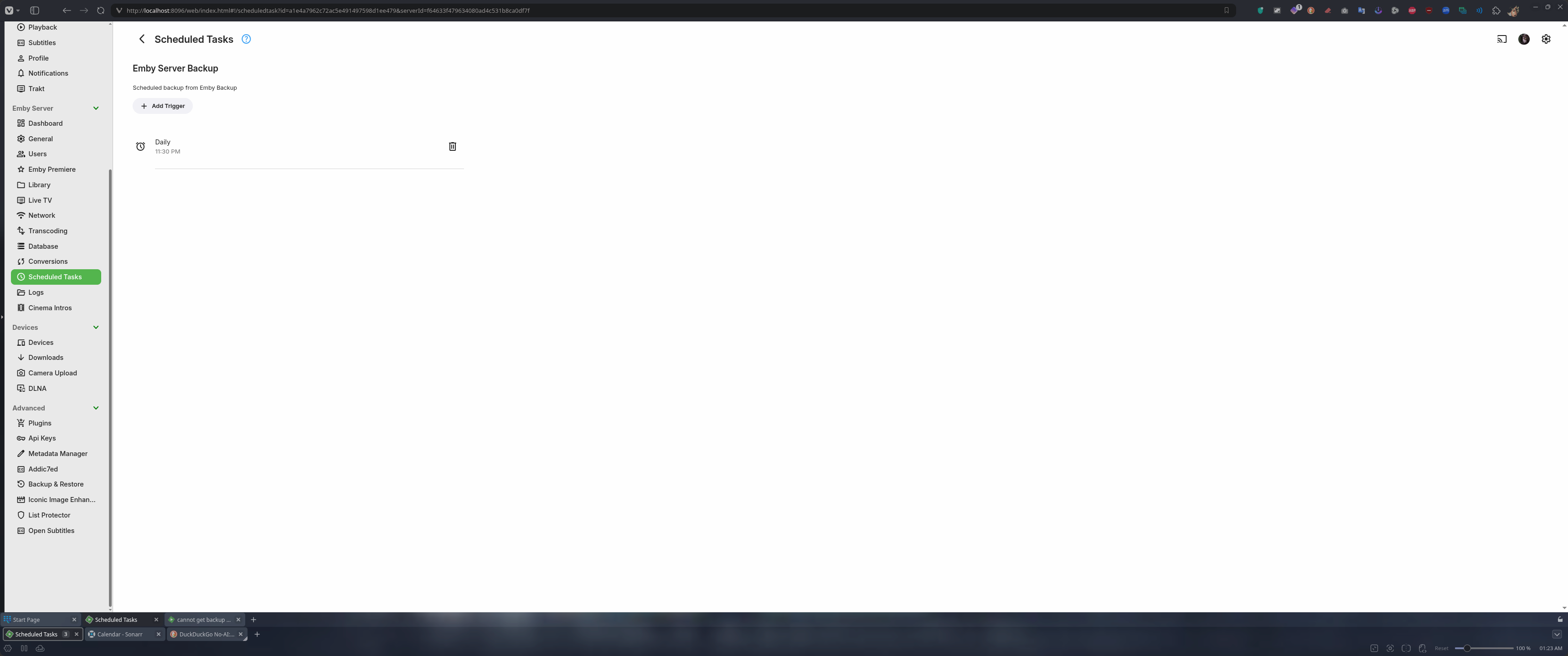
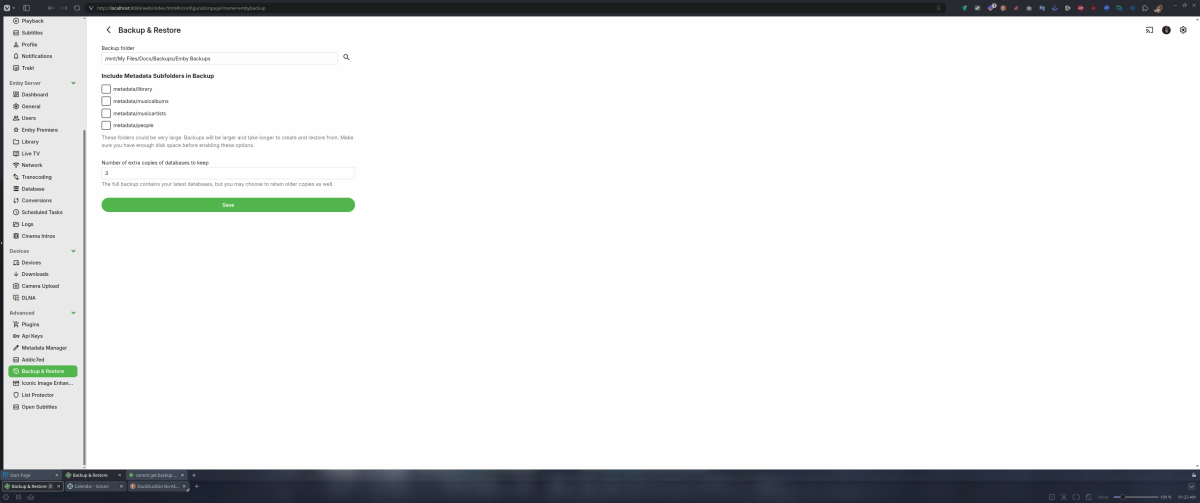
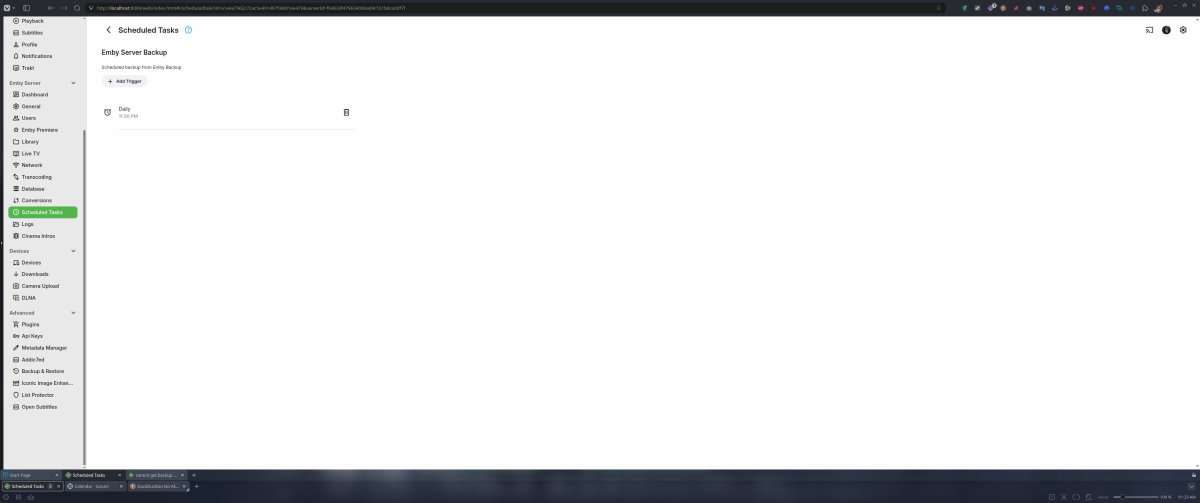
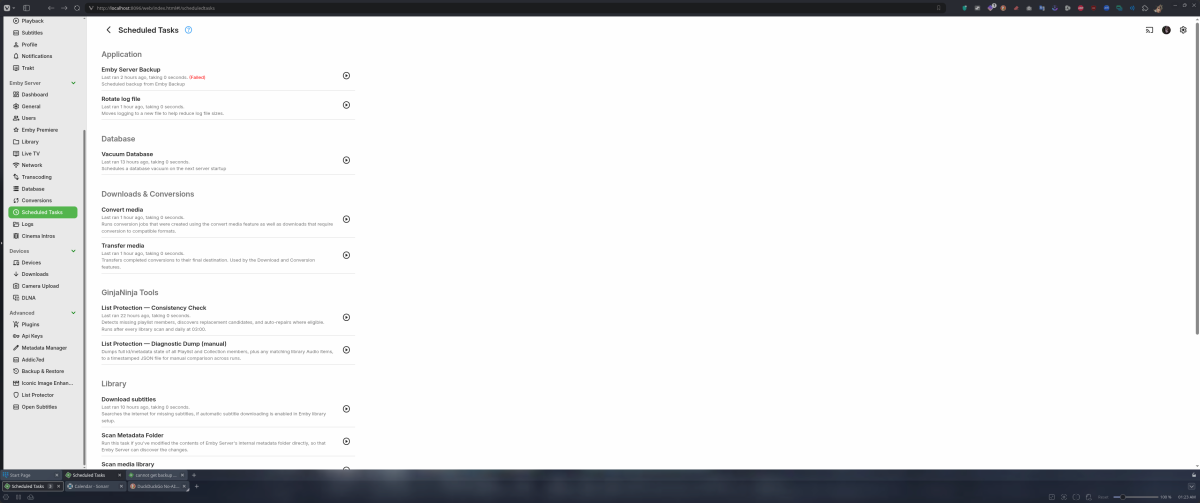
Sorry fir the late reply I didn't get notified of your post for some reason. All I did was go in and set the backup location and then set the time I wanted the back up. That by rights should be all I should have had to do.
-

[4.9.5.0] Live TV stream and ffmpeg process remain orphaned after client disconnects (TVHeadend)
Uncle_Frank replied to CrySoft's topic in Live TV
Yeah I been there years ago running TVH through Emby did the same thing but sadly lots of things do this and keeps a spot hanging on the Emby side. Even running Xtreme UI Panel or openwebif or dreambox url all does the same thing sadly. Still trying to wrap my head around the fact you use TVH lol that's so out dated and buggy as hell not to mention you can tail it and grap channels remotely without the owner knowing until they look at streams. You must be using satellite tv, if not, wtf you on TVH for it's 2026 if your on an iks server you can run it through a plugin that uses VLC media player as the actual output to any client even HLS. But still why you on TVH ? I would never run TVH it's to exploited unless it's on a LAN. Not trying to be a dick but if you are running satellite tv you should retire it and grab a cccam sub and run it through your own server or use an STB and run that through a linux STB server easily. Works great on Redhat. -
Hi, there's already an open request for this or something functionally equivalent. Please join in and contribute to the existing discussion at:
-
I´ve fixed few issues related to nfs and now it works fine, here is how it´s being mounted: /Peliculas on /discos/Peliculas type nfs4 (ro,nosuid,nodev,noexec,relatime,vers=4.2,rsize=1048576,wsize=1048576,namlen=255,hard,proto=tcp,timeo=600,retrans=2,sec=sys,clientaddr=192.168.1.247,local_lock=none,addr=192.168.1.252,user,_netdev) The speed shouldn´t be an issue also: dd if=/discos/Peliculas/Pelis/G/Gran\ Torino\ \(2008\)\ \[tmdb\=13223\]\ 1080p.mkv of=/dev/null bs=1M count=2000 2000+0 records in 2000+0 records out 2097152000 bytes (2,1 GB, 2,0 GiB) copied, 10,3508 s, 203 MB/s I´ve disabled the real time monitoring and library scans, unisntalled scripterX. They have tried and the movie reproduces fine since start but if they try to go fordwards or backwards few seconds/mins it breaks and stop reproducing. Logs.zip
-

Emby for iOS fails to complete Google Cast connection to Google Home Mini
Robin5446 posted a topic in Apple iOS / macOS
The Google Home Mini is discovered correctly in the Emby iOS app. When I select it, the speaker plays the normal Google Cast connection sound, but Emby does not complete the connection: No checkmark appears next to the Google Home Mini. The active playback device remains the iPhone. Playback stays on the iPhone. The Google Home Mini never starts playing the audio. The result is the same whether I select the Cast device before starting playback or while music is already playing. Environment Emby Server 4.9.5.0 Emby for iOS 2.2.56 with IP 192.168.A.x Emby Server running on a Synology NAS with IP 192.168.C.x Google Home Mini as Cast receiver with IP 192.168.B.x iPhone, Emby server and Google Home Mini are located in separate routed VLANs/subnets Google Cast from the Qobuz app on the same iPhone to the same Google Home Mini works correctly. This confirms that the iPhone, Google Home Mini, Cast discovery and basic inter-VLAN communication are functional. I captured the traffic on the gateway during an Emby Cast attempt. The capture shows: The iPhone successfully establishes a TCP connection to the Google Home Mini on port 8009. The TLS handshake completes successfully. Cast application data is exchanged in both directions. The Emby server can communicate with the Google Home Mini on ports 8008 and 8009. HTTP requests to the Home Mini on port 8008 receive HTTP 200 responses. After the Cast attempt, the Home Mini successfully performs DNS queries and connects to Google services via HTTPS/QUIC. However, I do not see the Google Home Mini subsequently requesting the actual media stream from the Emby server. All relevant local subnets are configured under Emby's LAN Networks setting 192.168.A.0/24 192.168.B.0/24 192.168.C.0/24. The Emby debug log confirms that playback requests are classified as local: isInLocalNetwork: True. I tested both downloaded/offline content and normal server-side content. With an offline item, I saw a separate error where the iOS app requested an item using an ID such as: local:<item-id> and the server returned: System.FormatException: Unrecognized Guid format HTTP 500. However, I then tested a normal music item that had not been downloaded to the iPhone. In that case: Emby used the normal server item ID. PlaybackInfo was generated successfully. Direct Play, Direct Stream and Transcoding were enabled. The request was correctly classified as local. No obvious PlaybackInfo or transcoding error occurred. Despite this, Emby still reported the playback session as running on the iPhone, not on the Google Home Mini. The Home Mini also never appeared as a playback client in the Emby server log and never requested the media stream from the server. Since casting from Qobuz works correctly on the same iPhone and Home Mini, and the packet capture shows that the initial Cast communication succeeds, this appears to be an issue with the Emby iOS Cast session handling rather than general network connectivity. Can anyone help or confirm? -
I just need to switch everything over to Emby especially my tv guide which I'm not happy with as it has empty data in the guide I don't like that one bit so I will switch over everything to Emby. This is the guide I don't like with missing data Video.mp4
-
-
Thank you for the detailed info, like hearing other thoughts always smart people with better ideas and knowledge is what I like. Yes I am going to make a site for pictures and yes it's not something I done before so yes I will be asking Q's lol. I just want a picture site for Emby clients what I really want is people to be able to upload to the site under categories like poster, backdrop, logo, thumb. That should be good I think.
-
Yes it is
-
Glad that pointed you somewhere useful. I'm going to pass on working on the site itself, though — I stick to helping out in the threads here, and I don't take logins to anyone's accounts. Nothing personal at all. If you post questions in the forum as you go I'll chime in where I can, and that way other people get the benefit too. One thing I'd flag before you spend the gift card: Wix is the wrong tool for this. It's a page builder for brochure sites, not an asset host. No S3-style API, storage and bandwidth caps, and no sane way to serve thousands of image files to a media server. You'd hit the wall fast and the money's gone. If you do want to spend on hosting, put it into object storage instead — Cloudflare R2, Backblaze B2 or Bunny. That's the same thing Fanart.tv and TMDB are doing under the hood, it's a few dollars a month, and a $100 card would last you years. But honestly, give Posterizarr a week first. It solves the actual problem you showed in that screenshot, on your own library, for free. If you still want a site after that, at least you'll know exactly what you need it to do — and you'll have spent nothing to find out. Good luck with it either way, and post back how it goes.
-
Damn bro you on one, I'm not reading through all this post but if you give me a break down I will help you out if I can.
-
Thanks a lot, Luke! This was the solution.