All Activity
- Past hour
-
 Carlos García Barba joined the community
 -
 Eranhasayg1978 joined the community
 -
 Johanvil82 joined the community
 -
 ROYALTV joined the community
 -
 Narmiırs joined the community
 -
 Barretes joined the community
 -
 Pepe11 joined the community
 -

Any file with this filename will not be added to the library
gu5gus replied to gu5gus's topic in Linux
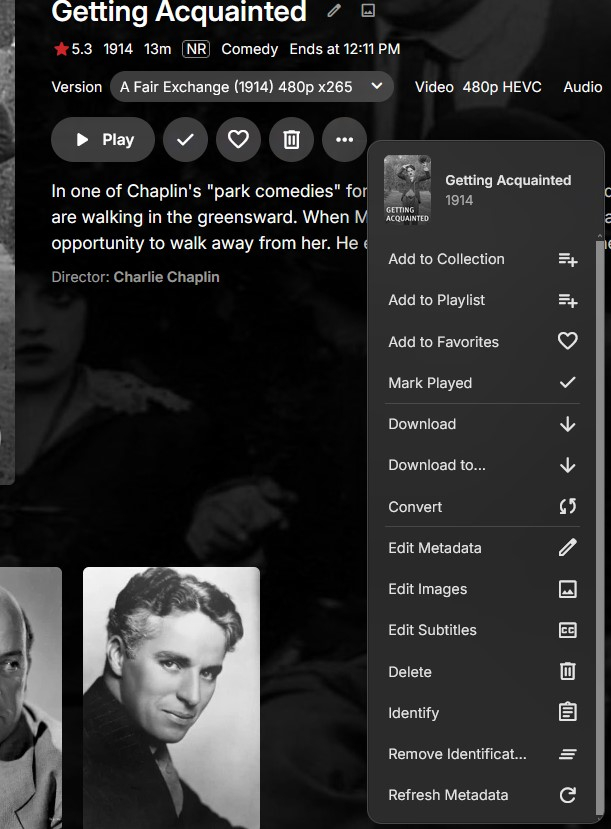
There's actually not the usual Split Versions Apart option for any of the duplicates in this library. Instead I have these options (not showing is Add To Collection because I scrolled down) Edit: Add a second screenshot with a clearer view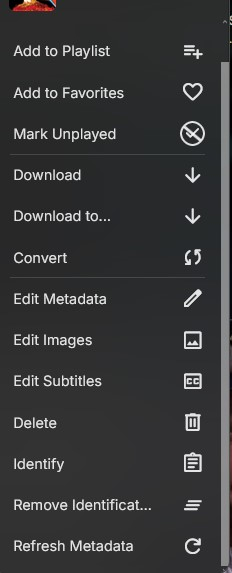
-
(1)(1)(1)(1).thumb.jpg.b48588c08b9d9a9c78b081d5b100545e.jpg)
Fluxer instead of Discord server events?
mhutchison replied to mhutchison's topic in General/Windows
So, I tried and no go. You can install the Fluxer client and make a "community" just like Discord but the webhook URL does not work in either the Discord and Webhook option in Emby. -

Completed Sort and filter of the content of collections
ebr replied to harold's topic in Feature Requests
Because the basic FR was completed. You wish it to be expanded - which is fine - so we just add to the discussion here. - Today
-
Of interest: https://support.google.com/chromebook/answer/2982029?sjid=5743134076073193503-NC === Possible hack fix? https://github.com/cjw1115/enable-chromium-ac3-ec3-system-decoding
-
i have this issue as well the update it keeps showing me an update is available but there isn't one on truenas scale. below is what is showing on emby Version 4.9.4.1 beta Emby Server 4.10.0.3 is Available for EMBY
-
I created a new Library for my large collection of Music, so I can access it all from Emby. I just purchased a monthly subscription for "TheAudioDB" so I can use it on the Emby Server to help with music images, metadata, etc. The problem I'm having is that I have no idea on how to add this API Key to Emby for TheAudioDB plug-in. When I click on this plug-in, it says: "The plug-in has no settings to configure." The version of the TheAudioDB plug-in is 1.0.20.0 The version for my Emby Server is 4.9.3.0 Let me know if you need any additional information. Any help would be appreciated
-

Playback Error No compatible streams are currently available
DietzR replied to DietzR's topic in General/Windows
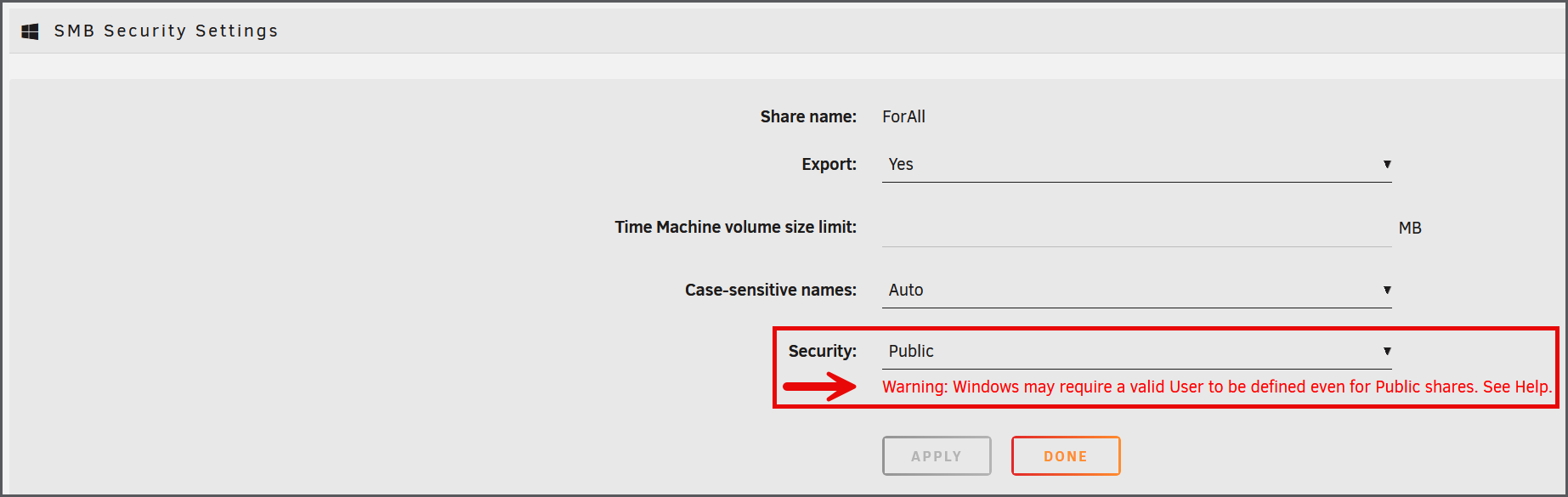
The reported problem has been solved in the meantime. The trouble had been created by a recent upgrade of UNRAID OS. In previous Unraid releases a public accessible media folder did not require any credentials. Unraid has changed this and since Vers. 7.xx credentials (user name and password) are required for any public folder. And when accessing such a public folder by a WIN 10/11 device, another obstacle came in play. I did configure now identical credentials in Windows , Emby and Unraid and now the playback of any media stored in the public media folder of the Unraid Server works. Thank you for your proper advisory which was a great help to solve my problem.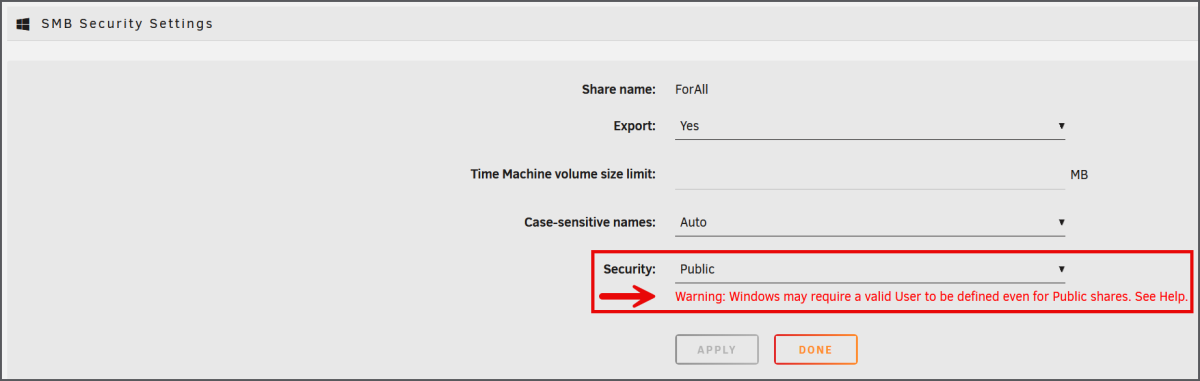
-
What didn't solve the issue: Scan/refresh meta of library Scan/refresh meta of album Refresh meta of artis Rename folder -> scan complete library The only way to solve it was: Remove folder from library -> scan library (wait until complete) -> move folder back into library Upon closer inspection all other albums of this artist were also affected by duplicates. @user24I think you actually found the proper way to replicate it, but no clue how I managed to move those folder into an other artist's. I also couldn't reproduce it by: Rename folder Duplicate folder with other name -> rescan (shows duplicates) -> remove folder (duplicates gone) Rename folder -> scan -> move back But you're right, this is not the only strange thing I've seen: * I noticed that "The Prodigy" was identified as "Prodigy", but the underlying albums had the correct associations to "The Prodigy". * Albums not being identified all together, but using "Identify" works fine uing the Emby title. This also goes for songs * And some other minor issues I forgot already lol. Still very curious how this duplication glitch can occur, especially considering Emby actually returns the same item (same ID) twice in it's "search" payload.
-
Perhaps not 100% fully duplicated - even though can I get the two sets of songs quite easily - the paths are different - even though only one is true - the database sees both - likely due to the partial/folder only scan Anyway, I have been finding various music modifications particularly difficult to take effect since the last two stable versions - Luke says it is fixed - but I'm not completely sure it is??? - therefore I've been doing similar to your method - remove the offending album folder altogether - rescan the parent folder to remove it from the db - then put it back and rescan - a bit frustrating - but it does work. I'll check back later to see if you've found anything...
-
I would like to see an option to use a local Emby Collection or Playlist as a source.
-
I’m unable to play an MKV file that plays fine with VLC media player. I’ve attached the logs. Can you please review them and let me know what the problem is? embyserver.txt
-
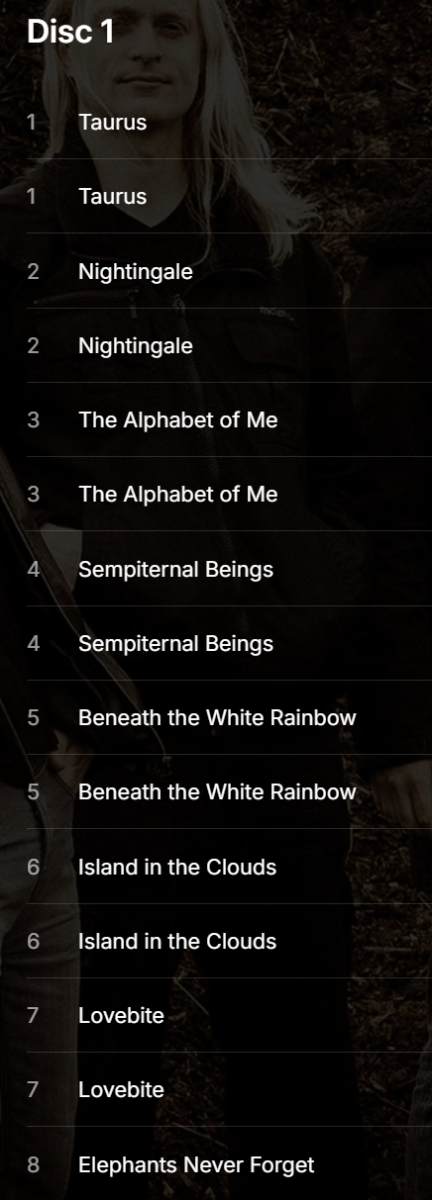
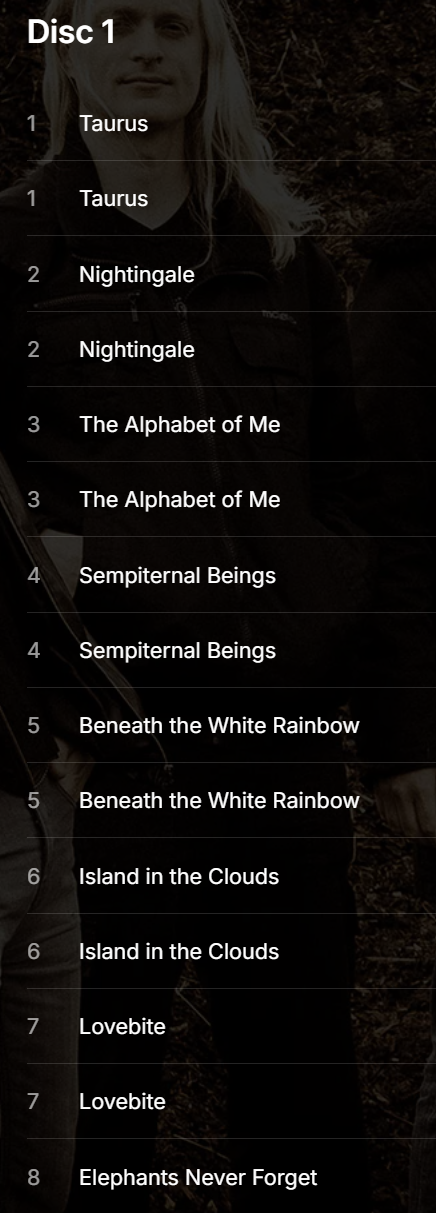
Cool you managed to somewhat duplicate that this issue though, thanks for letting me have my sanity! No clue what folder it was previously in so that's pretty hopeless. I've rescanned the entire library (doesn't take that long on my device) but the duplicates are still there. Expanding on what I've figured out so far; there do seem to be some duplications going on. The Items query returns exact duplicates when fetching the album data: [ { "Name": "Taurus", "ServerId": "XXXXXX", "Id": "156408", "CanDelete": false, "CanDownload": true, "SupportsSync": true, "RunTimeTicks": 2889733330, "IndexNumber": 1, "ParentIndexNumber": 1, "IsFolder": false, "Type": "Audio", "ParentLogoItemId": "114715", "ParentBackdropItemId": "114715", "ParentBackdropImageTags": [ "cfb85da384eb0195e89c619ee0f97a0a" ], "UserData": { "PlaybackPositionTicks": 0, "PlayCount": 0, "IsFavorite": false, "Played": false }, "PrimaryImageAspectRatio": 1, "Artists": [ "HAKEN" ], "ArtistItems": [ { "Name": "HAKEN", "Id": "114715" } ], "Composers": [], "Album": "Fauna", "AlbumId": "156476", "AlbumArtist": "HAKEN", "AlbumArtists": [ { "Name": "HAKEN", "Id": "114715" } ], "ImageTags": { "Primary": "2ed0f3becdef68ac3b3ca37029d31ca5" }, "BackdropImageTags": [], "ParentLogoImageTag": "fc6e7fcae749ed87f77874145de63fbd", "MediaType": "Audio" }, { "Name": "Taurus", "ServerId": "XXXXXX", "Id": "156498", "CanDelete": false, "CanDownload": true, "SupportsSync": true, "RunTimeTicks": 2889733330, "IndexNumber": 1, "ParentIndexNumber": 1, "IsFolder": false, "Type": "Audio", "ParentLogoItemId": "114715", "ParentBackdropItemId": "114715", "ParentBackdropImageTags": [ "cfb85da384eb0195e89c619ee0f97a0a" ], "UserData": { "PlaybackPositionTicks": 0, "PlayCount": 0, "IsFavorite": false, "Played": false }, "PrimaryImageAspectRatio": 1, "Artists": [ "HAKEN" ], "ArtistItems": [ { "Name": "HAKEN", "Id": "114715" } ], "Composers": [], "Album": "Fauna", "AlbumId": "156476", "AlbumArtist": "HAKEN", "AlbumArtists": [ { "Name": "HAKEN", "Id": "114715" } ], "ImageTags": { "Primary": "2ed0f3becdef68ac3b3ca37029d31ca5" }, "BackdropImageTags": [], "ParentLogoImageTag": "fc6e7fcae749ed87f77874145de63fbd", "MediaType": "Audio" } ] I'm now going to try to reproduce this more accurately from my end. Will keep you guys posted, thanks so far.
-

Intermittent "No Compatible Streams..." Error (STRM files)
sundevil67 replied to sundevil67's topic in Web App
That IP address looks like my Mac Mini / Emby Server. I can’t say that my provider is blameless all of the time, or that my ISP never sneaks in & siphons some bandwidth, or that my VPN can be 100% counted on for consistent speed. Emby can randomly choke on a show the provider’s native app can play. It might work the next day. Finding a direct cause/effect has been impossible, but I may have stumbled upon a bit of helpful diagnostic info last night. Let's forget about the STRM files for a second... I was watching a recording using the Samsung app, & the spinning wheel of despair showed up.. Emby was behaving as if I was trying to render a 3D feature-length 3D. I switched over to my Mac Mini & popped open the (local .ts) file with VLC. The app was speedy, responsive, and the playback flawless. Does that tell you anything? Is there anything else I can try? ChatGPT was directing me to adjust transcoding settings that I couldn't actually find. Thanks for the assist... -
I moved around some file which seems to have broken my server update. I have since deleted the TV shows from my storage and from emby but unfortunately still stuck at 93% for hours. For example, I had some Late Show episodes with Colbert , those I deleted from my storage first but never updated on my server. Any help would be appreciated to resolve. UPDATE: it finally finished... took a few hours but the scan finally finished.
-
Hey, the only time I had ever seen this previously is when there were two copies on an album - in same or different folders - sometimes exactly the same audio format (e.g.) mp3 and mp3 or sometimes (e.g.) mp3 and flac. But I know you are careful with what you do, so just tried to replicate now and I did find one one experimental way to get to happen with 4.10.0.3 (so far): I moved an album folder from one parent albumartist folder to another Then rescanned the new parent albumartist folder only, via the music folders menu tab Now Emby sees two sets of the songs under the album (like you are experiencing) Then rescanned the original parent albumartist folder (that doesn't have the album folder anymore) Now Emby only sees the one set of songs under the album Typically, when I modify or add new music files I scan the relevant parent folder, which mostly works. There has been some weirdness lately with the last couple of stable versions that has been difficult to replicate, but requires refreshing virtual album metadata as well. Not sure if this will help, but perhaps try just rescanning both parent folders that have been changed and see if that works? Should be much quicker than scanning your whole music library at least!... (I'm still trying a few more things)...
-

Completed Sort and filter of the content of collections
crusher11 replied to harold's topic in Feature Requests
Why is this marked as completed? -
-
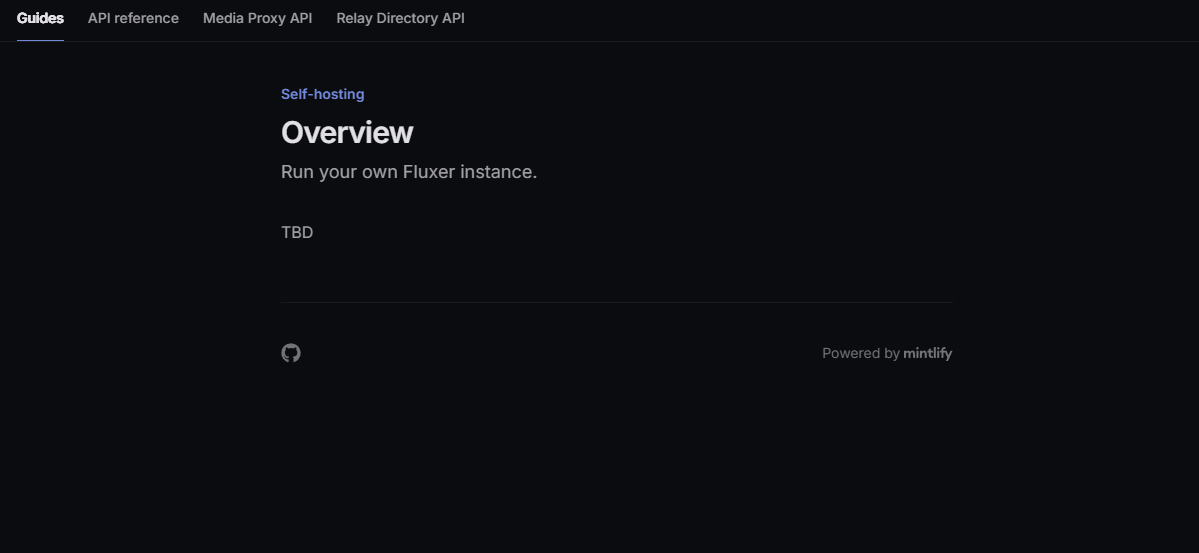
Ok thanks. Might be interesting to test, with the changes coming to Discord. But I will wait testing it till its more mature Overview - Fluxer Still no setup guide for selfhosting.
-
Fluxer instead of Discord server events?
mhutchison replied to mhutchison's topic in General/Windows
Yeah, it's open source and can be self hosted. Looks pretty much like Discord. So, guessing it has the same URL scheme for channels, hopefully. -
Can't say I have, but curious. Is fluxer selfhosted? Do you have more in about it?
-
Has anyone tried Fluxer yet to see if it works the same way as Discord Notifications?
-
v2 to better go with square theme?


-
Yeah this one's a real pain. When I view either duplicate items, they go to the same item ids URL, so they seem to share the same ID. They also show up twice in search results so it's not something specifically with the album's playlist. It's almost as if the entry exists in multiples in the DB which is weird considering I would assume the item ID to be a primary (unique) key. Let's see what else I can dig up.
-
I guess you need to reproduce it and then supply logs. If you don't have logs from that time. But no I have not see that before.
-
I've noticed some of my songs (or more likely, albums) are being duplicated on Emby's side. I haven't found a 1-on-1 method to reproduce, but it seems to happen to albums that are moved from one folder to another or when the parent folder is renamed. The songs from the screenshot also show the exact same path for each song. Refreshing metadata or scanning library files (per song, artist or album) doesn't remove the duplicates Moving the folder out of all of Emby's library folders, scanning (waiting for the album to be removed) and adding it back in seems to resolve the issue, but that's not a very practical workaround. Does anyone have any clue what's going on or how this can be fixed from within Emby?