All Activity
- Past hour
-
Yes, here's the OS details: Edition Windows Server 2025 Standard Version 24H2 Installed on 8/13/2026 OS build 26100.33296 Experience Windows Feature Experience Pack 1000.26100.275.0 Also since this is a server OS, Desktop Experience is installed, as well as the DX runtimes. Plan was to use the nVidia Tesla A2 (Driver v610.88) for transcoding.
-
 Rosaji27 joined the community
 -
 Abdulaziz.alghais1@gmail.com joined the community
 -

Audio HLS with TranscodingContainer=mp4: the playlist is served, the segments throw a 500
vdatanet replied to vdatanet's topic in Developer API
Yes — and it turns out that comparison is the answer. Your web client builds the same URL for the same endpoint: getAudioStreamUrl() in modules/emby-apiclient/apiclient.js hits Audio/{Id}/universal with the same parameter names I was using, and it fills TranscodingContainer from the Container of whichever transcoding profile was matched. The difference is which value ends up there. In modules/browserdeviceprofile.js the audio HLS transcoding profile declares Container "ts" on Chromium and "aac" everywhere else, Safari included — never "mp4". The video HLS profile in the same file does push m4s. So the web app never takes the audio fMP4 path at all, which is why nothing shows up there. Measured against the same track, the same server and the same session, changing only that one parameter: TranscodingContainer=ts playlist 200, segment 0 -> 200, 91,556 bytes TranscodingContainer=aac playlist 200, segment 0 -> 200, 91,556 bytes TranscodingContainer=mp4 playlist 200, init.mp4 -> 500, every segment -> 500 The two values your own web app uses both work. Only mp4 fails, with the null reference at TranscodingCommandBuilder.HlsGetCommandLineArguments and no ffmpeg process ever started. I'm asking for mp4 because I want fMP4 audio segments for Apple's native player, the same way the video path already offers m4s. Happy to test a build whenever you have one. -
I will try and uninstall and reinstall official release .54 and see if it fixes
-
No those were created by Emby.
-
anarrojurado joined the community
-

Plugin: EmbyCredits, detect end credits and add auto skip.
yocker replied to yocker's topic in Plugins
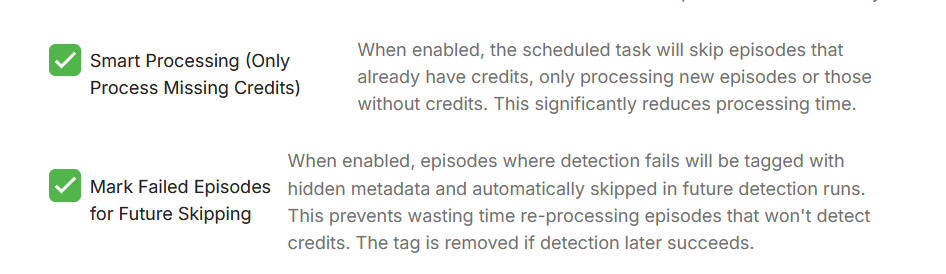
That's strange. There is nothing that should stop it then other than some settings in Emby. This is the schedule task in Emby. See if the time limit is set as that will stop it. Edit: I mean if it is set incorrectly. Also are these enabled in the plugin?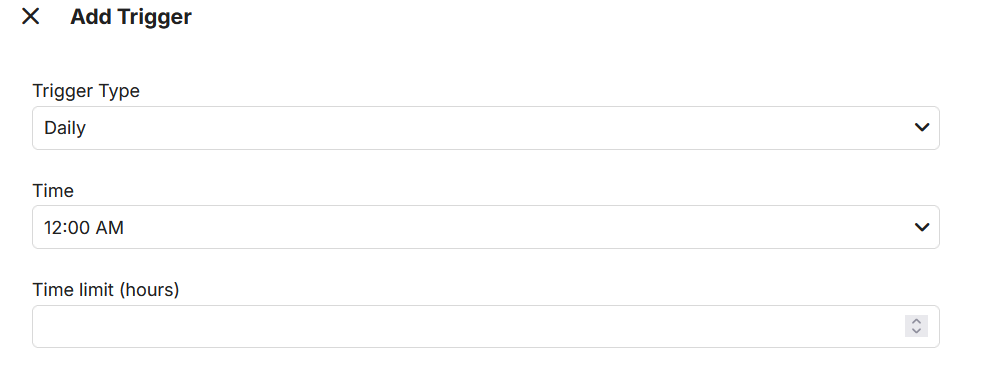
-
 Jonot11 joined the community
 -
HLS segment list is computed from the container's declared duration and is never checked against the media.
vdatanet replied to vdatanet's topic in Developer API
Following up on my own 4.10.0.30 post: I found why the tail still hangs, and this time I can show it with your own app. The last segments are the same file. Byte for byte. On the 21-minute episode from the top of this thread: my own tvOS app, 6-second segments Emby for Apple TV 2.0.9, 3-second segments md5(segment 220) = d57aadc9... md5(segment 440) = d57aadc9... md5(segment 221) = d57aadc9... md5(segment 441) = d57aadc9... md5(segment 442) = d57aadc9... 2 identical, 2,646,476 B each 3 identical, 2,646,476 B each Both go through the same path — HLS with .ts and the video copied — and both stop in the same place. Every one of those requests returns 200, so from the server's side nothing looks wrong. Why it happens, from your own command lines. You restart ffmpeg per segment and seek to the nominal segment boundary, with the video copied: -ss 00:22:00.000 -f segment -c:v copy -> segment 220 -ss 00:22:06.000 -f segment -c:v copy -> segment 221 With -c:v copy ffmpeg cannot start anywhere except a keyframe. In this episode the last keyframe is at 1319.693 s and there is none after it, so every run whose -ss lands past it rewinds to that same keyframe and emits the same frames. That also predicts the count, and the prediction holds: the number of duplicated tail segments is the number of segment boundaries that fall after the last keyframe. With 6-second segments there are two (1320.000, 1326.000) and I get two identical segments; with 3-second segments there are three (1320.000, 1323.000, 1326.000) and I get three. I isolated the condition with four synthetic files that share the exact same arithmetic — 1326.336 s declared, 222 segments at 6 s, the last starting at 1326.000 — and differ only in where the last keyframe falls: last keyframe segment 220 vs 221 playback 1324.000 different (528,092 / 138,180 plays to the end 1320.000 different (907,664 / 351,372 plays to the end 1319.720 IDENTICAL, 366,788 B hangs at the end 1319.693 (real) IDENTICAL, 2,646,476 B hangs at the end 280 milliseconds of keyframe placement is the whole difference. If the last keyframe sits exactly on a segment boundary, or if there is another keyframe after it, the tail is fine. The synthetic that reproduces it, if you would rather build your own than take mine: ffmpeg -f lavfi -i "testsrc=size=1920x1080:rate=25" -frames:v 33150 \ -c:v libx264 -preset ultrafast -crf 32 -pix_fmt yuv420p -profile:v high \ -force_key_frames "expr:gte(t,9.693+n_forced*10)" -sc_threshold 0 video.mkv ffmpeg -f lavfi -i "sine=frequency=440:sample_rate=48000" -ac 2 -t 1326.336 \ -c:a ac3 -b:a 192k audio.mka ffmpeg -i video.mkv -i audio.mka -map 0:v:0 -map 1:a:0 -c copy sample.mkv That puts the last keyframe at 1319.720 with none after it. Play it, seek to about 20:00, and let it run out. It reproduces on both apps, and the segment md5s match the same way. One thing worth knowing, because it explains why this is hard to reproduce on demand: Emby Web on Safari swallows the duplicate and ends cleanly. So "it works for me" and "it hangs every time" can both be true on the same build, the same file and the same server. If the restart seeked to the keyframe that actually precedes the requested segment, and a segment were dropped when it cannot advance past the previous one, I believe this tail would end. Happy to run anything against this setup, I have it ready. -

Audio HLS with TranscodingContainer=mp4: the playlist is served, the segments throw a 500
Luke replied to vdatanet's topic in Developer API
I guess compare to a web app url for that endpoint? -
 ucons1999604 joined the community
 -
I am using the new Windows client. This problem started a couple months ago. When tuning in a TV station (tuner channel), the audio does not play properly - cutting in and out for approximately 30 seconds. Eventually it rights itself and sounds fine. This does not happen when I play a recorded TV show, for example. I am bitstreaming / passing through all audio through hdmi to a receiver. Audio being bitstreamed is typically dolby digital 5.0.
-
 Richu joined the community
 -
 umasa2530721 joined the community
 -

Plugin: EmbyCredits, detect end credits and add auto skip.
RedNo7 replied to yocker's topic in Plugins
no, that's not enabled.
-
If it's on both sides yes.
-
 Eroyal joined the community
 -
 Oppi IPhone joined the community
 -
 Vanesitadan joined the community
 -
.54 is publicly released but I don't know why it would be any different in regards to this.
-
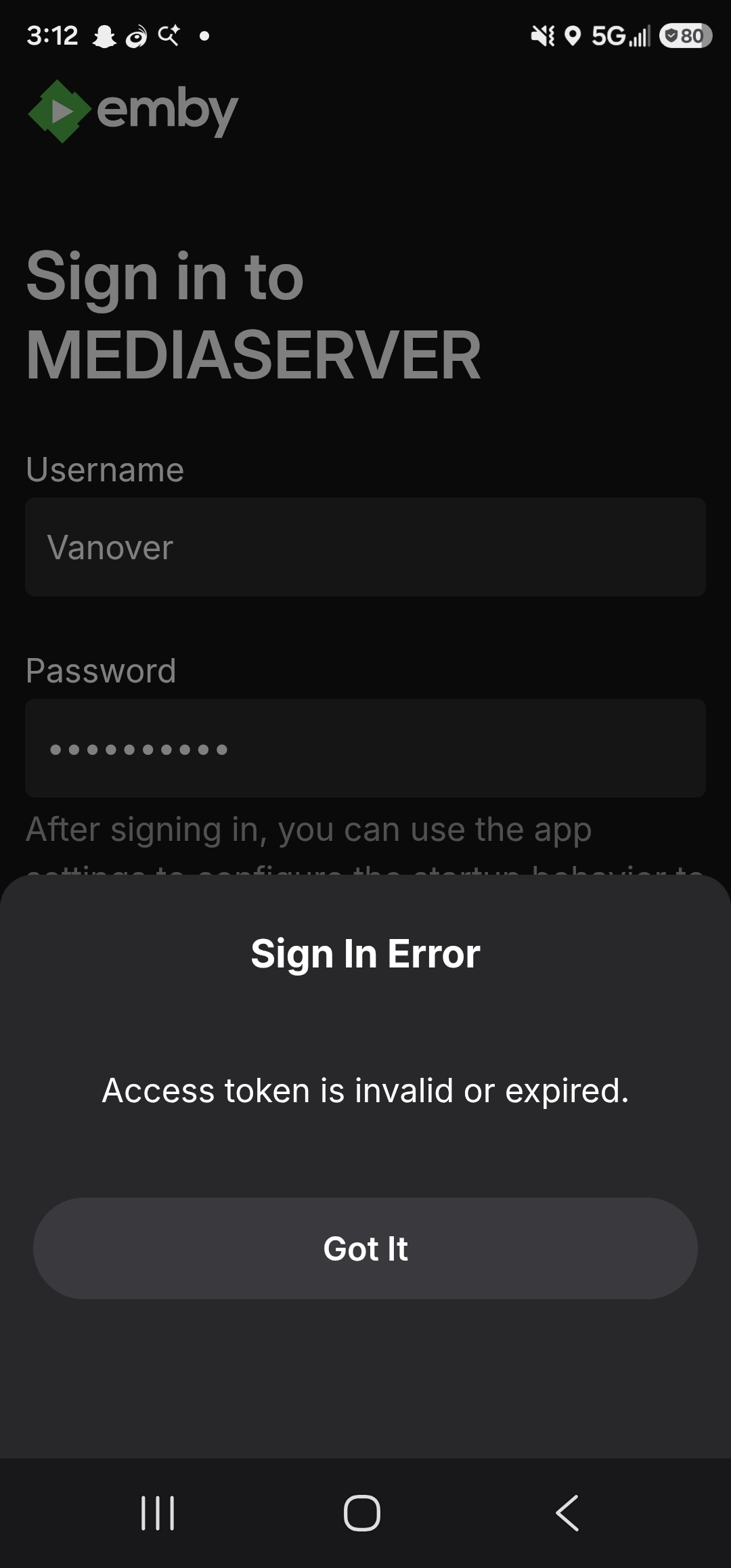
Okay here is where I am if I leave the port blank on the app I can connect to the server, most likely since the port is already set up on in the tunnel. Now when selecting a user and trying to log in receive the error access token is invalid or expired.
-
OK thanks that is how I understand it, but they could access emby if they had tailscale installed?
-
Yes
- Today
-
.thumb.jpg.f69348db42747d19edcb08378f0e22ce.jpg) reptarsrage changed their profile photo
reptarsrage changed their profile photo -
OK I looked at tailscale, only question I have is will everyone that uses my emby need to have tailscale installed on there device?
-
I'm still seeing this issue - the skip forward icon is missing. It renders a small white box which I assume to be the missing icon indicator. All other icons render as expected Emby App v1.0.51 (08/26/2026) LG webOS TV OLED65B8PUA (software v05.50.70) Emby Server v4.9.5.0
-
Audio HLS with TranscodingContainer=mp4: the playlist is served, the segments throw a 500
vdatanet replied to vdatanet's topic in Developer API
Coming back to this one with a fresh measurement, because I had a 4.10.0.30 container up for another thread and this took two minutes to check: it still happens on the current beta. Setup: clean install in a disposable container, 4.10.0.30, nothing from my own server. The source is synthetic — 90 s of pink noise in FLAC at 614 kbps: ffmpeg -f lavfi -i "anoisesrc=color=pink:sample_rate=48000:amplitude=0.5" -ac 2 -t 90 \ -c:a flac -sample_fmt s16 -metadata title="Test track" -metadata artist="Test" \ -metadata album="Test album" "01 - Test track.flac" One thing worth knowing before you try it: the source has to be big enough to force a transcode. My first attempt was a sine tone, which FLAC squeezes down to 118 kbps — under the MaxStreamingBitrate=192000 in the request — so the server direct-played it and nothing failed. With a source above the limit it fails every time. The request is the same one from my first post, plus a PlaySessionId: GET /Audio/{id}/universal?UserId={uid}&DeviceId={dev}&MaxStreamingBitrate=192000 &Container=mp3,aac,m4a&AudioCodec={codec}&PlaySessionId={psid} &TranscodingProtocol=hls&TranscodingContainer={mp4|ts} The playlist is served correctly either way — 30 segments, #EXT-X-VERSION:7 with EXT-X-MAP for mp4, #EXT-X-VERSION:3 for ts. It is the segments that differ, and it does not depend on the codec I ask for: AudioCodec TranscodingContainer=mp4 TranscodingContainer=ts aac 500 (init.mp4 and every seg) 200, 91,556 B mp3 500 200, 86,856 B opus 500 200, 70,312 B flac 500 200, 247,784 B alac 500 200, 251,544 B All ten cells, same session pattern, same file. Every 500 body is "Object reference not set to an instance of an object.", and the stack in your log is the same one I sent in August: FfRunException: Object reference not set to an instance of an object. ---> System.NullReferenceException at Emby.Server.MediaEncoding.Encoder.TranscodingCommandBuilder.HlsGetCommandLineArguments(...) at Emby.Server.MediaEncoding.Api.Hls.DynamicHlsService.GetCommandLineArguments(...) at Emby.Server.MediaEncoding.Api.BaseStreamingService.StartFfMpeg(...) at Emby.Server.MediaEncoding.Api.Hls.DynamicHlsService.GetDynamicSegment(...) And ffmpeg never launches for the mp4 path: across that run your log has 12 "ProcessRun 'StreamTranscode' ... Execute" lines for the 12 ts segment requests, and zero for the 16 mp4 ones. It fails while assembling the command line, before any process starts. Happy to run anything else against this container while I have it, or to attach the log. -
[Help] Official Emby Theater RPi4 Image on Armbian: Choppy H.264, Missing v4l2m2m, Invisible Playback Overlay
reptarsrage replied to Modify3453's topic in Linux & Raspberry Pi
Hey @softworkz are there any updates on when MPV HW acceleration support for Raspberry Pi devices will be added? Is there a topic I can follow to get updates on this? Thanks -
@AgostinoMedia I sent you a PM
- 22 replies
-
- 1
-

-
- alexa skill
- alexa
- (and 1 more)
-

How to stream from OBS to RTSP and watch on Emby without transcoding
godfuture replied to YKEmbyMedia's topic in Synology
Hey guys, I come from I guess in this thread here its about mediamtx providing a stream to emby, right? Could emby also be used to provide media to mediamtx such that others could stream it? I would love something like silent cinema or silent party where emby is playing towards a media streamer where others could easily subscribe for video or audio. For example, if a Raspi is providing a wifi hotspot next to its regular wifi network connection and hosts mediamtx, it only needs to appear as emby client. As a user I could select playback in Raspi. This would be awesome for some summer nights. -
Hi, is windows fully up to date?
-
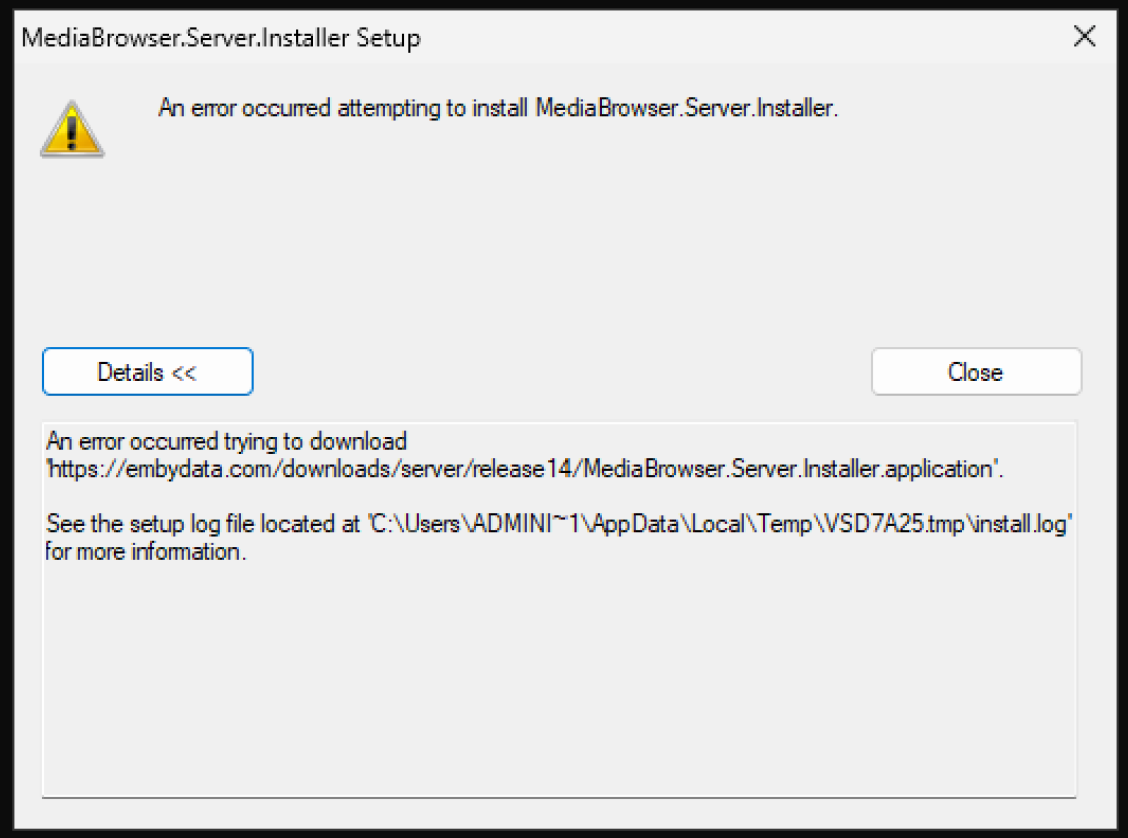
When attempting to install the Windows Emby server on a clean Windows 2025 Standard install on a Dell PowerEdge rack server (Intel Xeon based), the setup.exe immediately fails. Install log contains the following: The following properties have been set: Property: [AdminUser] = true {boolean} Property: [InstallMode] = HomeSite {string} Property: [NTProductType] = 3 {int} Property: [ProcessorArchitecture] = AMD64 {string} Property: [VersionNT] = 6.2.0 {version} Launching Application. URLDownloadToCacheFile failed with HRESULT '-2146697208' Error: An error occurred trying to download 'https://embydata.com/downloads/server/release14/MediaBrowser.Server.Installer.application'. However, if I put that exact URL into the Edge browser, it resolves fine. Anyone else run into this?
-
Hi, if you're still having an issue with this and you happen to run the beta server, then please let us know if the latest build helps with this. Thanks.