
All Activity
- Past hour
-
 Moh14213 joined the community
 -
 周周___ joined the community
 -
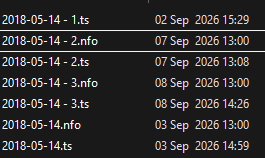
Emby Version 4.9.5.0 When recording a radio program it is using the original AIR DATE and not the episode date for the recording. This means its been overwriting all shows. Original air date: 14 May 2018 Matt and Mollie 2018-05-14 - 1.ts <?xml version="1.0" encoding="utf-8" standalone="yes"?> <episodedetails> <aired>2018-05-14</aired> <dateadded>2026-09-07 13:00:05</dateadded> <year>2018</year> <plot></plot> <genre>Talk</genre> <genre>Game Show</genre> </episodedetails>
-
 Fengjx joined the community
 -
J'ai l'impression que c'est quand je rafraichis le guide qu'il annule la plannification.
-
 148Nawafq8 joined the community
 -
I made a test today to "prove" I dont believe it's about storage. 2 days ago I set 8 episodes in a TV show to download in 4 Mbps. 6 out 8 downloaded, 2 was in ready to transfer. I then deleted the 6 downloded episodes. Nothing happended with the 2 episodes waiting. I then set a season of another TV show to download. All 8 downloaded successfully. I then set a season of another TV show to download. 9 out of 10 downloaded, 1 is now in "Ready to transfer". Hope this helps
-
 RolfRoosalu joined the community
 -
 LiangHaijun joined the community
 -
 Gio26 joined the community
 -
 Harun kaplan joined the community
 -
The TV app no longer has on-board software decoding capability. I don't see that changing any time soon so, if you need that, the standard app is the way to go.
-
 primipadilla joined the community
 -
 retyza joined the community
 -
@ebrany idea if the decoding could be moved to in app like the other application and if the subtitle selection when playing the next episode could be fixed?
-
Set ACdb,tv up yesterday.
-
Shutting down your server would be an easy way to tell but what does the Emby dashboard show? Log activity?
- Today
-

The left bar on the dashboard page has been blank
kira yamato replied to kira yamato's topic in Apple iOS / macOS
This bug is still present in ver 2.2.58. -

Tells me I need a password to my own account for my server
ebr replied to Donovan1's topic in Android Server
Exactly what web site? -
Is there a tutorial for Emby to be added to Podman? After doing research I decided that for my containers I did not want Docker with Portainer. One less layer and rootless.
-

Tells me I need a password to my own account for my server
Donovan1 replied to Donovan1's topic in Android Server
Everything is from the emby website, if I had an email to contact them I would -

Feature request: Video Preview Thumbnails – 'When media is added only'
GrimReaper replied to Kopernikus's topic in Feature Requests
You can already achieve that, select "as a scheduled task and when media is added" and then delete scheduled task (and you can still run it manually whenever you desire). -
This is interesting. PlutoFix does nothing with recording, it just provides a continuous stream and guide data to Emby. I’m interested to see how that behaves going forward. The movie vs TV show issue may be related to the XMLTV metadata provided in the EPG. I’ll have to investigate what I’m currently passing through and see if Pluto provides any program type data I can include.
-

Feature request: Video Preview Thumbnails – 'When media is added only'
Kopernikus posted a topic in Feature Requests
Hello Emby team, I would like to suggest an additional option for Video Preview Thumbnails. Currently, the available options require choosing between a scheduled task and a combination of scheduled task + when media is added. It would be very useful to have a separate option: “When media is added only” This would allow users to generate video preview thumbnails automatically for newly added media without requiring a recurring scheduled thumbnail extraction task. This is particularly useful for users with large media libraries stored on HDDs/NAS/Unraid systems. A recurring thumbnail extraction task can unnecessarily wake HDDs and scan/process a large existing library, even though the user only wants thumbnails generated for new content. For example, the desired configuration would be: Existing library: thumbnails can be generated manually when desired. New movie/episode added: automatically generate preview thumbnails. No recurring scheduled extraction task. This would provide a very useful middle ground between completely disabling automatic thumbnail generation and running a recurring scheduled task. Thank you for considering this feature. -
Hello Emby team, I would like to suggest an improvement to the Scheduled Tasks scheduler. Currently, for tasks such as Video Preview Thumbnail Extraction, the scheduling options are limited to relatively short intervals such as daily or weekly. It would be very useful to have longer configurable intervals, for example: Every 30 days Every 60 days Every 90 days Every 120 days Every 180 days Every 365 days Even better would be the ability to specify a custom interval in days. I run Emby on an Unraid server with a large media library stored on HDDs, while Emby's application data and metadata are stored on an SSD/NVMe cache. My goal is to minimize unnecessary HDD spin-ups and background disk activity. For example, I would like to use Video Preview Thumbnail Extraction both: When new media is added, so newly imported movies and episodes are processed immediately. As an occasional scheduled task, for example every 120 days, as a safety net for media that may have been missed or failed during the initial processing. At the moment, the shortest practical option is to run the task weekly, which is unnecessarily frequent for this use case. Removing the scheduled task avoids the HDD activity, but also removes the possibility of having an occasional automatic safety-net run. A configurable interval in days would solve this elegantly and would be particularly useful for users with large libraries on HDD-based NAS/Unraid systems. Thank you for considering this feature request.
-
Settings>Plugins tab in the sidebar>click on CoverArt thumb>click on "default" profile (or create another profile), select desired treatments/badges/options.
-
Sorry, can i ask how do I use this plugin? I have it installed, but cannot see where I go to use it?
-
I tried to play a movie in a streaming app, but when I hit play it started up “Maroon” by Taylor Swift. Pressing play and pause causes the streaming app's play/pause icon to flash, but only plays and pauses the music. Exiting to the Android TV home screen shows no sign anything is playing. It's running through the entire Midnights album. It's gone way too long without an ad for it to be Spotify, and the only other source I can think of would be Emby. The Emby app doesn't show anything playing, but then neither does the Shield's home screen so that doesn't necessarily mean anything. I just have no idea what's going on here.
-

How to disable picture-in-picture (PiP) when using the new Android app
DraconisMaximus replied to FrostByte's topic in Android
The fact that this is not an opt in feature is insane. Blaming this on the "Android Defaults" is disingenuous at best. Like network access, it is a permission that is allowed by default, but the individual app still has to request it. That's why apps like Netflix and YouTube don't auto PIP. Most people do not want this and it should definitely require manual enabling. -
Pressing “Home” Button Keeps PIP Media Playing - Can This Be Disabled?
DraconisMaximus replied to Tigga5's topic in Android
Blaming this on the "Android Defaults" is disingenuous at best. Like network access, it is a permission that is allowed by default, but the individual app still has to request it. That's why apps like Netflix and YouTube don't auto PIP. Most people do not want this and it should definitely require manual enabling. -

Plugin: EmbyCredits, detect end credits and add auto skip.
VirulentPip replied to yocker's topic in Plugins
@yockerSolved! Seems I needed to have "Show up next preview" switched on for it to appear. -

Plugin: EmbyCredits, detect end credits and add auto skip.
yocker replied to yocker's topic in Plugins
Skipped mens what the plugin skipped for that run like for example of they already have time stamps or previously failed. -
Plugin: EmbyCredits, detect end credits and add auto skip.
yocker replied to yocker's topic in Plugins
I will run some tests to see if I can replicate. It should work correctly but you will have to run detections on the folders separately. The series will show up two times in the list depending on if they are in the same library. -

Plugin: EmbyCredits, detect end credits and add auto skip.
RedNo7 replied to yocker's topic in Plugins
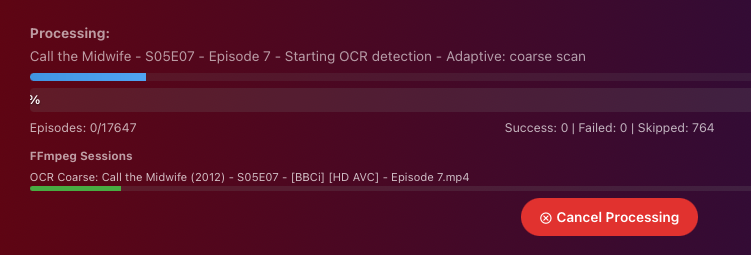
Does the 'skipped' number only refer to those skipped having been scanned during that run (i.e. the current run hasn't yet re-scanned the episodes/series that were skipped previously)? Saturday: Just now after changing OCR keywords and stopping/restarting: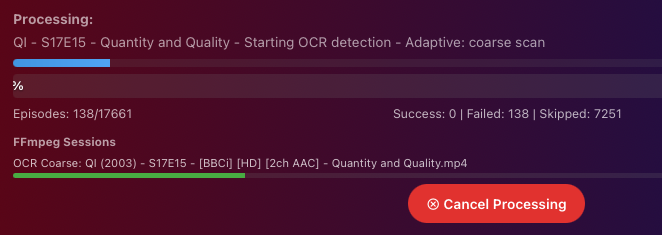
-
Plugin: EmbyCredits, detect end credits and add auto skip.
VirulentPip replied to yocker's topic in Plugins
I get Skip Intro pop ups no issue, but zero for credits. I have 4K share and HD share (unraid) so different folders, however I have revoked 4K folder for myself and it made no difference. So far I have tried on the following, Windows Desktop, Shield TV AndroidTV + Android, LG TV and FireCube3, the LG one was a fresh install so reinstalling won't help. I guess the next step is to log into my sisters profile and check.




