All Activity
- Past hour
-
Wasn't sure if it was definitely established CableCard was dead, so thought maybe try again with different software. FYI NextPVR would be different software to try. The separate NextPVR plugin would let NextPVR talk to Emby.
-
 aldanaayelen joined the community
 -
 jpablopicon joined the community
 -
 VbiuE joined the community
 -
I don't get the issue here. If Emby doesn't want to deal with the differences in different distros then why is emby against flatpak?
-
Sorry but again not reading my rant. Card blew up and don't think Comcast will replace it. Willing to try though if they do. Is this the next PVR plugin? I noticed it's from 2024 so wasn't sure.
-
 Julio003 joined the community
 -
Would it help to try with other software - I think NextPVR works with CableCards (whatever they are...)
-
 Degen joined the community
 -
 nr5rs joined the community
 -
 Peach_Girl joined the community
 -
 yony.x joined the community
 -
 shak44 joined the community
 -
 Yair84 joined the community
 -
Please note - again - the Emby Linux app is not a SteamOS app. It's not made for SteamOS and SteamOS is not a primary supported platform. While there's some hype around SteamDeck devices, this is still a small niche among Linux devices with GUI and Linux itself is a niche again. So we're talking about a niche inside a niche, and a platform where the app doesn't even run properly (only without mpv or not in GameMode), so there's not much to win, realistically, as that part cannot be changed.
-
This is nothing when you compare this with Windows gaming PC market shares.. If you would know figures and compare to Windows/Xbox app, you wouldn't say that. Reality doesn't match what you are thinking. Just look at the Beta Forums - there's not much happening. Of course, everything is possible - we are watching this closely and will adapt. Thanks
-
Know you guys are usually pretty good at responding but not sure if you read my rant. What do you want me to send an example of? I can't even use it anymore for recording because of my situation mentioned so was more of a question of what others are using based on what I mentioned.
-
I understand it is Beta, but with Steam Machine release (which is around the corner), and millions of Steam Decks on hands, what defenitelly wotks today and works well is PLEX HTPC. if Emby wants at least a sip on those users then Emby app should be easy installable on SteamOS. Preferably a flatpak. If it was up to me i would target that Linux audience as a priority.
-

Intel QuickSync H.265 Max Bitrate 39Mbit/s -> falls back to software encoding above this threshold
embart0r replied to embart0r's topic in Linux
For the hw transcode test above I was actually using the ffmpeg version they're shipping from inside the container. -
Release : Emby Optimize V20.5 (Version Linux) Voici la conversion du script de maintenance pour serveurs Emby. Cette version Bash est conçue pour automatiser l'encodage H.265 10-bit NVENC sur les systèmes Linux. [!CAUTION] AVERTISSEMENT : Ce script a été porté de PowerShell vers Linux mais n'a pas pu être testé sur une machine physique pour le moment. CONSEIL DE SÉCURITÉ : Avant de lancer le script sur l'intégralité de votre bibliothèque, créez un dossier de test avec 2 ou 3 fichiers vidéos pour vérifier que les chemins, les permissions et l'encodage GPU fonctionnent correctement sur votre configuration. Ce guide vous permet d'installer un script qui automatise la conversion de vos vidéos au format H.265 10-bit en utilisant l'accélération matérielle NVIDIA (NVENC). 1. Prérequis Avant de commencer, votre système doit avoir accès aux outils d'encodage : HandBrake CLI : L'outil de conversion. Pilotes NVIDIA : Pour que votre carte graphique puisse encoder. Installation sur Ubuntu/Debian/Mint : sudo apt update && sudo apt install handbrake-cli -y 2. Le Script (emby_optimize.sh) Copiez l'intégralité du bloc ci-dessous dans un fichier nommé emby_optimize.sh. #!/bin/bash # ============================================================ # OPTIMISEUR EMBY 10-BIT V20.5 (Linux Universel) # ============================================================ # --- CONFIGURATION : MODIFIEZ VOS CHEMINS ICI --- DIR_CARTOONS="/home/$USER/Videos/Cartoons" DIR_MANGAS="/home/$USER/Videos/Mangas" DIR_SERIES="/home/$USER/Videos/Series" DIR_SPECTACLES="/home/$USER/Videos/Spectacles" DIR_ANIMATIONS="/home/$USER/Videos/Animations" DIR_ANIMES="/home/$USER/Videos/Animes" DIR_FILMS="/home/$USER/Videos/Films" # Dossiers techniques T_DIR="/tmp/Encoder_Emby" L_BASE="$HOME/.cache/Emby_Optimize_Logs" # --- LOGIQUE DU SCRIPT --- mkdir -p "$T_DIR" "$L_BASE" show_menu() { clear echo "============================================" echo " OPTIMISEUR EMBY 10-BIT V20.5" echo "============================================" echo "[S] Cartoons [T] Mangas [U] Séries" echo "[V] Spectacle [W] Animations [X] Animés" echo "[Y] Films [Q] Quitter" echo "--------------------------------------------" } if ! command -v HandBrakeCLI &> /dev/null; then echo -e "\e[31m[!] HandBrakeCLI non trouvé. Installez-le d'abord.\e[0m" exit 1 fi while true; do show_menu read -p "Choisissez une catégorie : " SEL SEL=$(echo "$SEL" | tr '[:lower:]' '[:upper:]') [[ "$SEL" == "Q" ]] && break case $SEL in S) ROOT="$DIR_CARTOONS" ; LANG="fra" ;; T) ROOT="$DIR_MANGAS" ; LANG="jpn,fra" ;; U) ROOT="$DIR_SERIES" ; LANG="fra" ;; V) ROOT="$DIR_SPECTACLES" ; LANG="fra" ;; W) ROOT="$DIR_ANIMATIONS" ; LANG="jpn,fra" ;; X) ROOT="$DIR_ANIMES" ; LANG="fra" ;; Y) ROOT="$DIR_FILMS" ; LANG="fra" ;; *) continue ;; esac L_ROOT="${L_BASE}/Logs_${SEL}" if [ ! -d "$ROOT" ]; then echo -e "\e[31m[!] Chemin introuvable : $ROOT\e[0m" sleep 2 ; continue fi echo -e "\e[33m--- SCAN EN COURS : $ROOT ---\e[0m" mapfile -t files < <(find "$ROOT" -type f \( -iname "*.mkv" -o -iname "*.mp4" -o -iname "*.avi" -o -iname "*.mov" \)) total=${#files[@]} current=0 for file in "${files[@]}"; do ((current++)) rel_path="${file#$ROOT/}" log_file="${L_ROOT}/${rel_path%.*}.txt" if [ -f "$log_file" ]; then echo -e "\e[90m[$current/$total] [IGNORE] $(basename "$file")\e[0m" continue fi echo "--------------------------------------------------------" echo -e "[$current/$total] [ACTION] -> $(basename "$file")" TS=$(date +"%H%M%S") work_out="${T_DIR}/temp_${SEL}_${TS}.mkv" HandBrakeCLI -i "$file" -o "$work_out" \ -e nvenc_h265_10bit -q 28 --encoder-preset fast \ --maxWidth 1920 --audio-lang-list "$LANG" \ -E av_aac -B 192 --all-subtitles --markers if [ -f "$work_out" ] && [ $(stat -c%s "$work_out") -gt 1048576 ]; then old_path="${file}.old" mv "$file" "$old_path" final_path="${file%.*}.mkv" if mv "$work_out" "$final_path"; then rm "$old_path" mkdir -p "$(dirname "$log_file")" echo "OK" > "$log_file" echo -e "\e[32m[OK] Terminé.\e[0m" fi fi [ -f "$work_out" ] && rm "$work_out" done echo -e "\n\e[36m--- TERMINÉ ---\e[0m" ; sleep 2 done Configuration du script Ouvrez le fichier emby_optimize.sh et modifiez les variables au début selon votre installation. Variables à adapter : DIR_... : Remplacez les chemins par défaut par les points de montage de vos disques (ex: /mnt/media/Films). T_DIR : Le dossier temporaire où le script va créer le fichier en cours d'encodage. Assurez-vous d'avoir assez d'espace disque ici. L_BASE : Le dossier où seront stockés les fichiers .txt de suivi (pour éviter de ré-encoder un fichier déjà traité). Comment l'essayer ? Copiez le script dans un fichier emby_optimize.sh. Autorisez l'exécution : chmod +x emby_optimize.sh. Testez : Pointez une des variables (ex: DIR_FILMS) vers un dossier de test contenant 1 ou 2 fichiers seulement. Lancez : ./emby_optimize.sh. Si tout fonctionne sur vos fichiers de test, vous pourrez alors l'appliquer à votre base de données complète !
- Yesterday
-
I’ve been tweaking my Emby home layout recently, and hiding library names definitely makes the interface feel cleaner and more minimal. It’s surprising how small text elements can change the overall look of a screen. If anyone likes customizing visuals beyond layout, I’ve found tools like https://thestylishname.com/ useful for generating clean Unicode text styles for labels or profile names. Little design touches can really elevate the whole media experience.
-
Hi there, let's look at an example. Please attach the information requested in how to report a media playback issue. Thanks!
-
Yes This... I was just coming here to report that as well. I also had to run the installer twice to get everything successfully installed on its own on both my steamdeck & steam mini-pc. Not sure why that happened... If emby is only installable using terminal + disable the read-only system, it is going to make a lot of general users uncomfortable or just not do it all together. Don't get me wrong, the universal installer is great, but I think it would still be a turn-off for the average users. Especially after OS updates when they discover they have to run it again; it opens the door for a support ticket nightmare as well, with people thinking the emby app is broke (since average users don't understand why its happening)... I believe a flatpak version would resolve this with app discoverability in the repository, the discover/software GUI installer (no terminal required), and no need to disable the read-only file system. Would that be something considered in the future after a stable version is released? Otherwise, even for myself personally, Even though I know what I'm doing, I would just opt to use the browser version as I use SteamOS as my "smart-tv" media player nowadays. Thanks.
-

embyforkodi (next-gen) 12.X.X support
e123enitan replied to quickmic's topic in Emby For Kodi Next Gen
01_KODI.log pls see this log its has several errors, when I play/stop movie it freeze for several mins Thanks for your supports -
Hi. Anyone uses Emby on Samsung phone with DEX + Xreal Glasses? I cannot control the video when a movies starts. Once it is on DEX mode and phone screen acts as a touchpad. if i touch the screen then no controls appearing Is there any known workaround or fix?
-
Thanks everyone for the feedback. I'm still trying to figure out all these settings. The end goal is to be able to get away from Infuse for my movies. Right now that is what I have to use to get the audio passthrough for non DD audio. I just want the best audio experience I can get and Dolby Digital is on the low end of that. I'll take LCPM over AC3. I always select what I believe to be the highest quality choice (IMHO) available and want it passed to my AppleTV. That way if the format is supported it will be used, otherwise it will be LPCM.
-
My family still loves WMC and won't let it go with their XBox 360 extenders. Emby doesn't present as a replacement for them unfortunately. Anyway, I had a HDHomeRun Prime with a cable card on my network and running to record shows in Emby and try and get the family to adopt it. That said, besides shows frequently failing to fully record and stopping after say 38 minutes or whatever the HDHomeRun prime started dropping off the network the other day. I eventually tracked it down to what I thought was the power supply but once I had a new one and it was up again, it seemed to see my cable card but not connect to Comcast. When I trying and look at the card settings it shows "Information is not available." People say that means the cablecard is dead. It showed the same on a second HDHomeRun I picked up to see what was going on as well so now have a spare useless one. Anyway, I digress. What are other people using to record shows on Emby? Thinking I'm missing something that this is actively being developed and cablecards seem to be dead. Most people say Comcast is going to refuse to replace and activate another card which means it's a dead option for me unless somehow it goes differently. What are others recording TV shows with?
-
Yeah, I went to delete the show I just watched and deleted 15 shows because of this. Keep in mind this "button" doesn't exist in the android app. Guess it doesn't really matter anymore but will post that in another topic.
-
Ah! Ok. Thanks!
-
Hi, not sure if this is possible but no harm asking. I have two emby instances running, one for internal use and one for external use. The internal one runs on my downloader machine and everytime i download a "linux iso" there is an auto trigger for library update using realtime monitor. The external one runs on another machine which access the drives over SMB. However it only updates on a schedule. I'd like to trigger this update from the first machine. Is this possible?
-

Movie Theme Songs Plugin Questions and Support Thread
adminExitium replied to radeon's topic in Plugins
Just realized that may be a bit pricey compared to MediaFire, so I have also had good experiences with Pixeldrain: https://pixeldrain.com/ -
Movie Theme Songs Plugin Questions and Support Thread
adminExitium replied to radeon's topic in Plugins
Cloudflare R2 should be only 30$ per month (https://developers.cloudflare.com/r2/pricing/) if you don't need to list the actual files and store just a JSON file containing the full list. Their downloads are free too and should be plenty fast for everyone. -
hardware_detection-63907289148.txtembyserver.txt The exact error message displayed is "Unable to tune to channel at this time." This occurs with both local OTA channels and FIOS channels. This was around 4:45-4:55 P.M. EST. User name is Dave.
-

Server transfer missing metadata, keep current .nfo info, sessions, etc..
buhochileno posted a topic in Linux
Hi everyone! I recently moved my Emby server to a new computer. The old server was running a really old version, so I preferred to start from scratch. I plugged in my USB drives and created the libraries again. After a loooooong scan, most of my TV shows showed up correctly, but I noticed that some didn’t. Those were locked because, when I originally added them, I edited the metadata for custom reasons and didn’t want it to be modified by a general library scan or refresh. For some of them, I was able to unlock the show, press “Refresh Metadata”, and select to look only for missing metadata, and it worked. “The Bullwinkle...” show is one of those cases. But with others, like the next two on the right (“Los Caballeros...” and Candy Candy), I try the same and nothing happens. No images, nothing. Both of them have their IMDb and TVDB IDs correct. This happens with several shows. One thing the old server had correct is what was already in the .nfo files for those shows in terms of seasons and episodes. I curated a bunch carefully to match what I have. Sometimes TMDB and TVDB do not match regarding the number of seasons and which episodes are in which season, especially for older shows. So I’m looking for a strategy that will preserve and respect the current .nfo files for the show, not recreate them, and just download the missing images. Even the episode descriptions and summaries are already in the episode .nfo files. Please suggest the best strategy for that. I don’t want to make a mess. It was really hard to curate the correct order of many old shows back when I had the old server. Thanks! Sorry if it is the wrong forum to ask..I wasn't sure in wich one this topic will be more appropiate...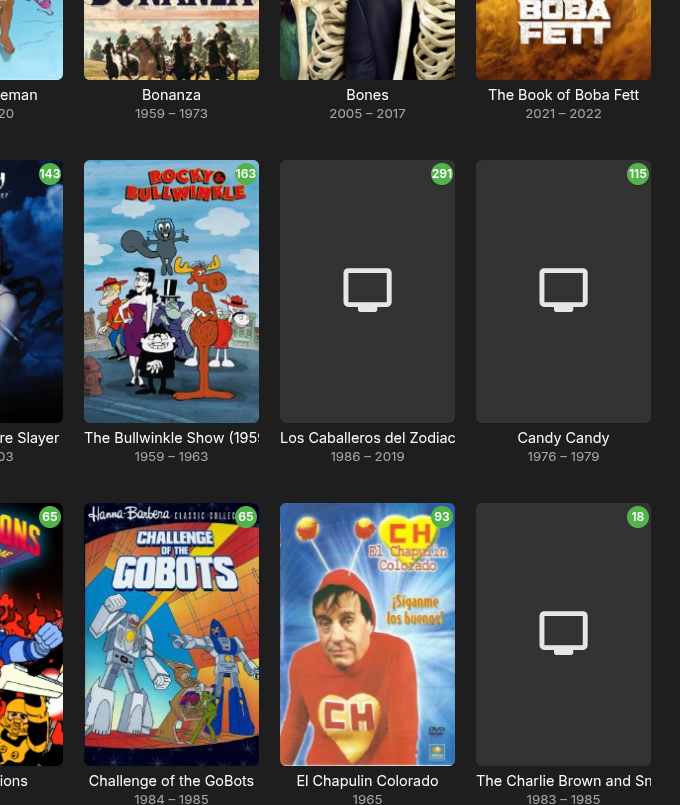
-
Hi, has this helped?

.thumb.png.1ddf135ad99a72646a26d671a28ffe35.png)