All Activity
- Past hour
-

No Trailers on Samsung TV app - taking ages for release still on 2.2.5
FrostByte replied to Robnaeyaert's topic in Samsung Smart TV
No, it's not a server. Just client. You would still use and connect to your current server, so nothing changes there. Just instead of running the Emby app from the TV itself the Emby app is running on a little box connected to your soundbar and the picture only is displayed on your TV. Sort of like hooking up a UHD or BD player. https://www.nvidia.com/en-us/shield/shield-tv-pro/ -
 firetuzik joined the community
 -
I've another request, should you be up for the challenge... My previous transcode killer had the option of only kicking VIDEO transcodes, as those are the CPU/GPU killers. Transcoding AUDIO for a 4k stream is sometimes required due to codec/client support, but is far less taxing to the server, and generally does not cause any serious impact. Are you able to check for the type of transcode AUDIO/VIDEO and allow a toggle for ALLOWING or PREVENTING each type based on resolution as before? Many thanks!
-
 Jojoismybaby0 joined the community
 -
 Pascal21 joined the community
 -
 Ruibo joined the community
 -
 ajie2008 joined the community
 -
 Jojomylove123 joined the community
 -
 Shopoth joined the community
 -
 Ka.tja joined the community
 -
Yes, check out this thread discussing the new home screen features in 4.10.x
-
Hallo Luke, Ich habe mir mal die neueste Beta installiert und werde das später in der Arbeit / Pause testen und am Wochenende in Ruhe und ein Feedback geben. Danke LG Alex
-
 MadisonPro joined the community
 -
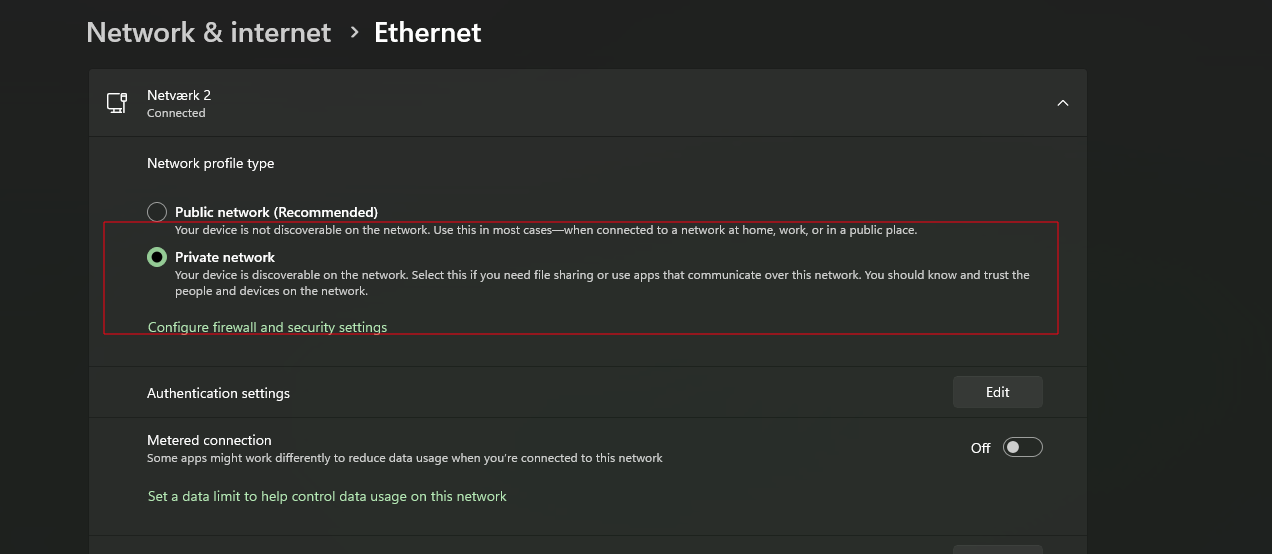
It's on private.
-
Figured that was the case. Haven't had time to do serious troubleshooting over the past few weeks. I've tried the suggestions from CoPilot, but those haven't worked. I'll keep revisiting until I get it figured out.
-

Instagram Reels Download – Save Your Favorite Short Videos Easily
Jenson963 posted a topic in Feature Requests
Instagram Reels Download – Easy Way to Save Your Favorite Videos Short-form videos have become extremely popular in recent years, and one of the biggest platforms for this content is Instagram. Among its many features, Instagram Reels allows users to create and watch entertaining short videos that range from comedy and music to education and lifestyle tips. Sometimes you may find a Reel so interesting that you want to save it on your device. This is where instagram reels download tools become very helpful. What is Instagram Reels Download? Instagram Reels download is the process of saving Reel videos directly to your mobile phone, tablet, or computer. Normally, Instagram allows users to save videos within the app, but these saved videos remain inside the platform and cannot be watched offline. With the help of a Reel downloader, you can store the video in your device gallery and watch it anytime without needing an internet connection. Why Users Want to Download Instagram Reels There are many reasons why people choose to download Instagram Reels. Some of the most common reasons include: 1. Offline Watching Downloaded videos can be watched anytime without using mobile data or Wi-Fi. 2. Sharing with Friends Many users like to share downloaded Reels on messaging apps like WhatsApp or other social media platforms such as Facebook. 3. Content Inspiration Content creators often download trending Reels to study editing styles, music choices, and creative ideas. 4. Educational Content Many Reels provide tutorials, tips, and useful information that people want to keep for later viewing. 5. Personal Collection Some users simply like collecting funny, motivational, or memorable videos.-
- 1
-

-
Vielen Dank für deine Antwort Schade daß das nur für den Web Browser geht Am Fire Cube würde sich das auch schön machen oder am Smartphone. Naja vielleicht kommt das ja noch. Die Programmierer geben sich so viel Mühe die machen das bestimmt
-

Add support of embedded fonts into external ASS subtitles
Steven replied to guilty57's topic in General/Windows
Thanks everyone for the response. Yeah this is more complicated than I had anticipated! I have just extracted all subtitles from all my movies/shows and set as .srt's, so they remain when the file is upgraded etc, and then went down the rabbit hole of wondering how to change the font. Testing this on my PC using MPC I thought it was straightforward until I tested with Emby. I also assumed even just defining the existing font as bold it would have an effect, but then I discovered that the font used was GoNotoKurrent, which doesn't contain other weights. I do find the current font gets a bit swallowed in some scenes keeping it at a reasonable size, due to it being a thin font, but it's a very first world problem. Thanks again for the replies. - Today
-
 adiMAX changed their profile photo
 -
3.5.30 also breaks SW AV1 playback on Nvidia Shield Pro (works in 3.5.16 and apparently was broken in 3.5.28 but fixed again in 3.5.29). If that could be looked at please?
-

Add support of embedded fonts into external ASS subtitles
guilty57 replied to guilty57's topic in General/Windows
For just this reason, I prefer for a very long time Plex, as it just renders font attached external ass subs without problem. Now, I'm using Plex on android TV os, and infuse on tvos. But Emby is more problem-free than Plex when it is about performance. So, when this is implemented, I'll switch back to Emby. -
I can't reproduce this and it isn't a behaviour that I've seen reported by anyone else. If it is specific to 2025 models then I'm not sure that I will be able to reproduce. Can you PM a sample file to me that has this issue and I will try and confirm that it isn't a file related issue?
-

Add support of embedded fonts into external ASS subtitles
pwhodges replied to guilty57's topic in General/Windows
I would not be confident that you will get the solution you are looking for, especially as the use of separate ASS subtitles, let alone with attached fonts, is so rare (I have never come across them). In the time you've already waited for a solution it would have been easy to merge the subtitles with the videos using MKVToolNix (which will convert the fonts attached to ASS files into MKV attachments), and get round the issue completely; you could even have developed scripts to do it easily if you continue getting media in this format. Paul -
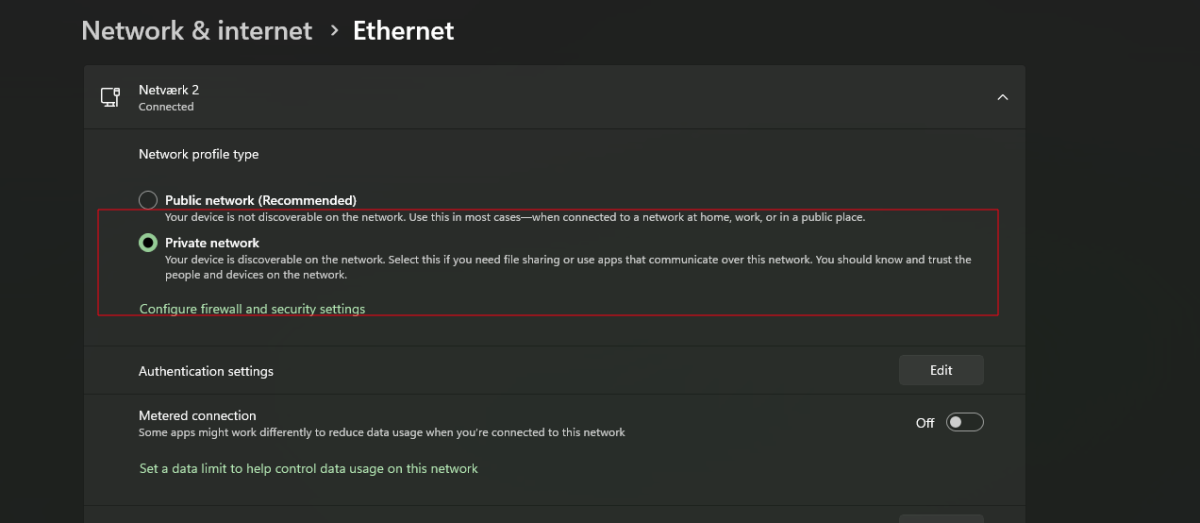
Did you network change from privat to public? It needs to be set to privat.
-
Thanks but for some reason I don't get the 'Edit Subtitles' in the dropdown menu. I have the opensubtitles plugin, and I can login to the opensubtitles.com site Having just checked Downloads, there are none showing in emby server. I selected a path to save the plugins on my NAS server, and there is a plugin folder there with 20 *'dll filles there. The path is: /mnt/WinShare/Media/TV Shows Now my NAS server has a zfs file system, and I don't think the dll files can be read, unless I am barking up the wrong tree. Advise please.
-
A riesgo de ser pesado... Ha habido algún avance en este tema? Saludos.
-
Add support of embedded fonts into external ASS subtitles
guilty57 replied to guilty57's topic in General/Windows
Main purpose of this topic is to ask help about how to view font attached ass subtitles. For external use especially. Not the video. -
Yes, correct. I did that and it still came up with errors. Went into the firewall and un-selected emby saved. Went back in and selected emby. Nothing has changed. My Plex server is working fine.
-

Unable to connect to my remote server through Wifi
yodayun replied to yodayun's topic in Android TV / Fire TV
Yeah, a reddit user suggested ChatGPT, and the AI overlord has granted the wish. The TV was updated and it deleted all known servers/credentials. All i had to do in the end was to manually input the complete url into the app for it to find it again. We can close that thread. Thanks -
I must say I am also very satisfied. 4K works, live TV with the TVH plugin works. No crashes. Very good work.
-
Hallo zusammen, ich komme nicht mehr auf die Emby Konfigurationspage über mein Synology NAS. Ich bin schon so weit gegangen um habe das komplette NAS zurückgesetzt, ohne Erfolg. Nach Installation der Emby App, öffnet sich das Browserfenster und nach einer Weile erscheint "ERROR: Gateway Timeout". Mein Betriebssystem ist Mac OS, die Firewall auf dem Synology NAS deaktiviert. Es funktionierte fast 1 Jahr fehlerfrei, nun dies. Was kann ich tun?
-

Intermittent "No Compatible Streams..." Error (STRM files)
Happy2Play replied to sundevil67's topic in Web App
Suggest the strm files are not pointing to actual media files. Emby will not play anything it cannot get media info from. 2026-02-12 03:15:34.623 Debug App: Running FFProbeProvider for /Volumes/My Passport/M3UFiles/TV Shows/The Pitt (2025)/Season 02/The Pitt (2025) [tt31938062] S02E03.strm 2026-02-12 03:15:34.624 Info MediaProbeManager: ProcessRun 'ffprobe' Execute: /Applications/EmbyServer.app/Contents/MacOS/ffprobe -i "https://providerURL/username/password/tvshow/tt31938062/2/3" -threads 0 -v info -print_format json -show_streams -show_chapters -show_format -show_data 2026-02-12 03:15:34.859 Debug MediaProbeManager: ProcessRun 'ffprobe' Started. 2026-02-12 03:15:35.234 Debug EncodingManager: Deleting temp folder /Users/username/emby-server/transcoding-temp/8B3B7E 2026-02-12 03:15:35.372 Info MediaProbeManager: ProcessRun 'ffprobe' Process exited with code 0 2026-02-12 03:15:35.375 Error App: Error in ffprobe *** Error Report *** Version: 4.9.3.0 Command line: /Applications/EmbyServer.app/Contents/MacOS/EmbyServer.dll Operating system: Darwin 24.3.0 Darwin Kernel Version 24.3.0: Thu Jan 2 20:24:06 PST 2025; root:xnu-11215.81.4~3/RELEASE_ARM64_T8103 OS/Process: arm64/arm64 Framework: .NET 6.0.36 Runtime: Applications/EmbyServer.app/Contents/MacOS/System.Private.CoreLib.dll Processor count: 8 Data path: /Users/username/emby-server Application path: /Applications/EmbyServer.app/Contents/MacOS Emby.Server.MediaEncoding.Unified.Ffmpeg.FfRunException: Emby.Server.MediaEncoding.Unified.Ffmpeg.FfRunException: ffprobe failed - streams and format are both null: -i "https://providerURL/username/password/tvshow/tt31938062/2/3" -threads 0 -v info -print_format json -show_streams -show_chapters -show_format -show_data ffprobe version 5.1-emby_2023_06_25_p4 Copyright (c) 2007-2022 the FFmpeg developers and softworkz for Emby LLC built with clang version 18.1.8 [https @ 0x600002e68240] HTTP error 404 Not Found https://providerURL/username/password/tvshow/tt31938062/2/3: Server returned 404 Not Found { } at Emby.Server.MediaEncoding.Probing.MediaProbeManager.GetMediaInfoInternal(String inputPath, String primaryPath, MediaProtocol protocol, Dictionary`2 requestHeaders, Boolean extractChapters, String probeSizeArgument, Boolean isAudio, Boolean hasMixedProtocols, CancellationToken cancellationToken) at Emby.Providers.MediaInfo.FFProbeVideoInfo.ProbeVideo[T](MetadataResult`1 metadataResult, MetadataRefreshOptions options, BaseItem[] collectionFolders, LibraryOptions libraryOptions, CancellationToken cancellationToken) at Emby.Providers.Manager.MetadataService`2.RunCustomProvider(ICustomMetadataProvider`1 provider, MetadataResult`1 itemResult, String logName, MetadataRefreshOptions options, BaseItem[] collectionFolders, LibraryOptions libraryOptions, RefreshResult refreshResult, CancellationToken cancellationToken) Source: Emby.Server.MediaEncoding TargetSite: Void MoveNext() -
I’m assuming you are on a windows machine and you’re talking about the taskbar icon in the bottom right hand side… What happens when you right select on the emby server icon like you did when you rebooted the server but select ‘Configure Emby’ instead? This should open up a browser using the local host and the configured Emby port. If this doesn’t open then there’s potentially something seriously wrong with your local firewall or anti-malware software. There was also a windows update back in October 2025 (KB5066835) that caused some local host issues for HTTP/2
-

Plugin: Home Screen Companion (formerly AutoTag)
soderlund91 replied to soderlund91's topic in Plugins
Probably my mistake.. It was like almost 2am I was pretty tired and stressed trying to get that fix out Best way to test is by navigating to the Home Screen settings in the plugin and check if the selected user in source user is grayed out in the “sync to” section. If so, you have the latest update. Not sure why this happened.. I rebuilt the .dll with no changes to the code and now it works. Thanks for reporting! Edit: Updated the dll on github and attached here aswell. No real need to update if it work as above. I'm gonna put out another bugfix later today/tonight with the reported bug for light theme where the menu doesnt show. HomeScreenCompanion.dll -
Wops, i will fix that. I don't feel comfortable with messing with the Emby user and passwords (if even possible) but i can look into making the password system better. I just never really felt it was needed as it was just watch parties. All i can think of for now is separate passwords for creating and deleting though. Both and be equally destructive.