All Activity
- Past hour
-
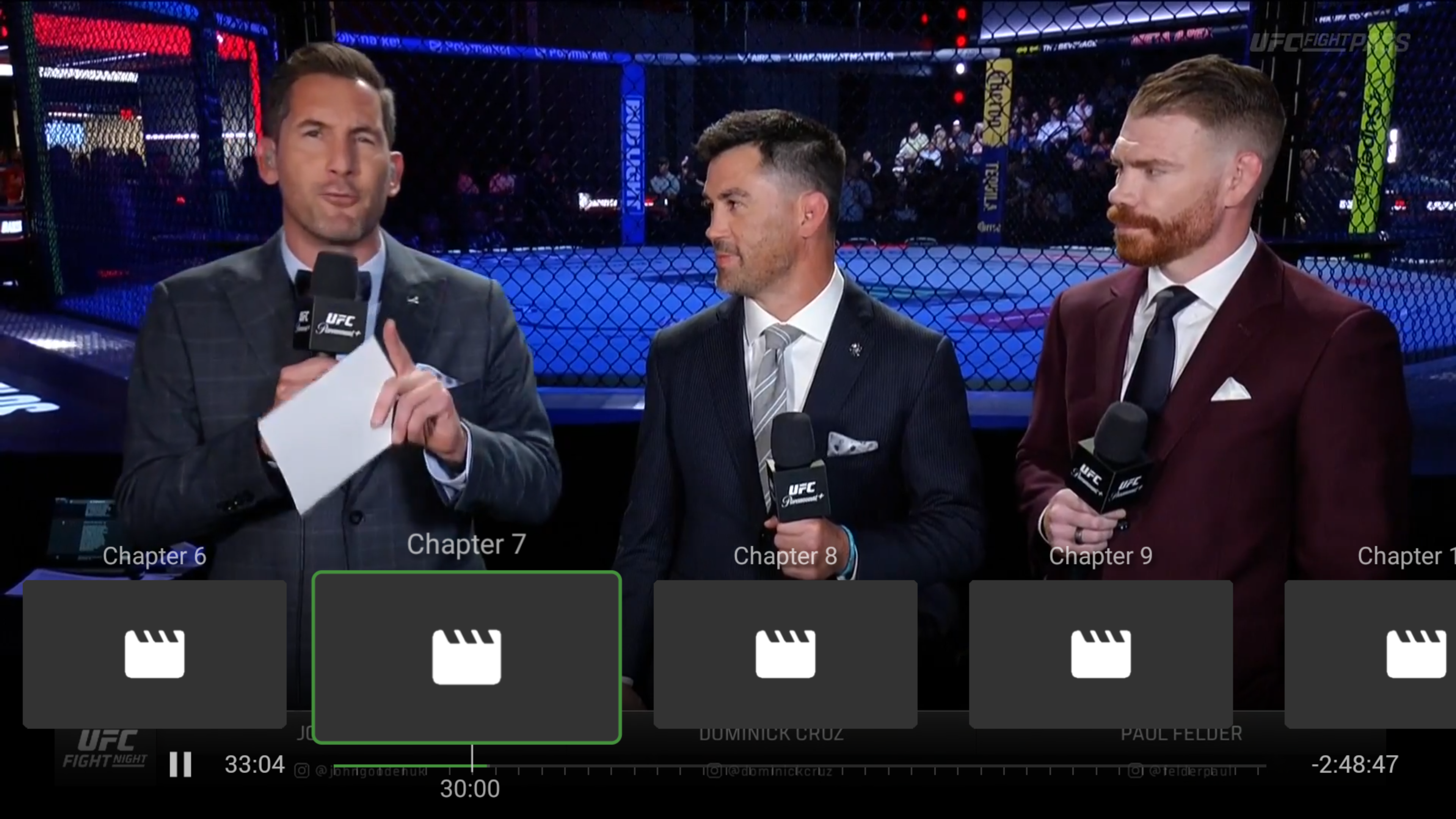
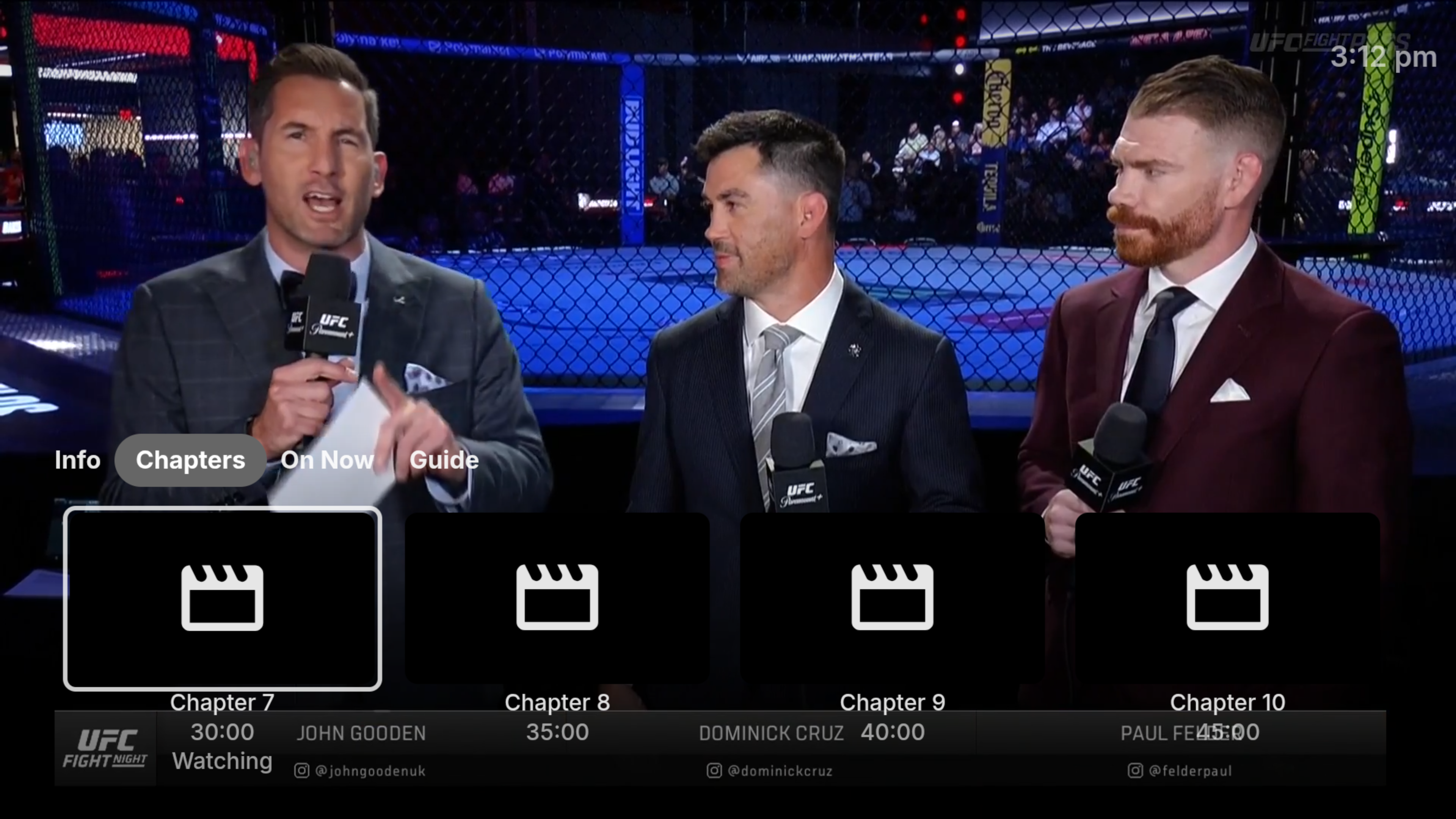
I have been using the ATV on my Shield Pro for ages, and tried and stopped using the Android version due to how it operates the Chapters features. With the ATV app, you can access Chapters via pushing the Up button after any other action to do with playback (apart from Sop obviously). That is, you can skip back or forward, then press up for Chapters, press down for info access to Subs etc then up for Chapters. On Android, you can only access Chapters via Up when nothing else has occurred and there is no on screen display, if you are in the Down button area, then you have to click down again, and another click to the right and wait for the chapters to load. Another major pain point is that the Android version doesn't show the current playback time. In the example screen shots below, you can clearly see you're at 33:04 on ATV. On Android, you have no idea. You only know that you're in the bracket 30:00- 34:59. If you are trying to skip forward 10mins as I constantly do with UFC, I don't know if that is two or three chapters. I could accidentality end up with playback into action I do not yet want to see. One positive is that it does show the Chapters are in 5 min blocks, but I know that already as I chose it in the server settings. Android TV: https://i.imgur.com/3TmteKQ.png Android: https://i.imgur.com/VEmh4WC.png
-
 HandsomeAlun joined the community
 -
 mick_smith joined the community
 -
 asad.arshad joined the community
 -
 Jamaan joined the community
 -
 YyyEdmar joined the community
 -
 Ximo58 joined the community
 -
 Raedalrajeh joined the community
 -
 nokhook joined the community
 -
 小dy joined the community
 -
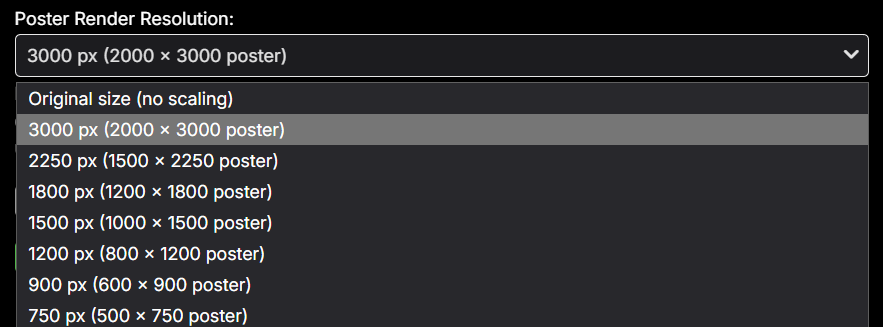
New beta version 5.60.9.0. 1) Performance improvements, 2) Fixed small memory leak (talking low megabytes) 3) Added a poster scale option, this can improve drawing speeds a lot specially for smaller systems.
- Today
-
It will randomly select with no logic that's the problem.
-
I am new to Kodi, so there is a good chance that I don't know what I am doing. I have Kodi 20.5 running alongside Emby 4.10.0.40 on Ubuntu 24.04. I have Emby for Kodi 10.1.0 installed on Kodi and Kodi Companion 2.2.1.0 installed on Emby. Kodi works fine until I exit, at which point it hangs 100% of the time and requires kill -9 to end it. If I remove the Emby for Kodi plugin, then it exits normally. Any suggestions about where to start looking?
-

Latest version of Emby - Random lockups - Connection Timeout to https://api4.thetvdb.com
vaise replied to vaise's topic in General/Windows
I have (with AI's help) implemented two monitoring user scripts to check every 5 minutes if the emby local web page is working, and if not, restart the container, and also to check every 5 minutes what the containers memory is (if over 8GB), and alert me, plus write to a history log file. -
Latest version of Emby - Random lockups - Connection Timeout to https://api4.thetvdb.com
vaise replied to vaise's topic in General/Windows
I can't change the title now - should I open a new post with the out of memory issues ? The first failure - I never check logs, just restarted. The second was what I posted this initially, and the logs. Since then its all killed with no logs. Related? I don't know. -
embyserver.txt embyserver.txt
-

Latest version of Emby - Random lockups - Connection Timeout to https://api4.thetvdb.com
Luke replied to vaise's topic in General/Windows
Well your original issue was tvdb timeouts. I wonder if they're just throttling you. -
Latest version of Emby - Random lockups - Connection Timeout to https://api4.thetvdb.com
vaise replied to vaise's topic in General/Windows
AI thinks this was 4.9.5.0 a month ago ? but it also was worried about database changes....... AI says that was the stable 'latest' version as at mid May 2026. Today's straws I have clutched at - - deleted emby cache file and restarted container to rebuild - changed container to 16GB RAM instead of 8GB - but note I had tried 12GB when this first happened - hence why I think its a leak. - Removed subtitle and font extraction on the fly - Stopped frigate container from using the GPU - Stopped Calibre container from using the GPU (its all emby now). - Confirmed enable throttling is set in emby - Confirmed transcoding is to disk - Reviewed all transcoding remote clients - Contacted them to upgrade or I will turn off their transcode capability. Note - I rarely see transcoding, I tune my system to be direct play - I have a few non Emby for Android holdouts I am rounding out - as they seem to transcode. -
Hi there, please attach the Emby server log from when the problem occurred: How to Report a Problem Thanks!
-
Hi there, please attach the Emby server log from when the problem occurred: How to Report a Problem Thanks!
-
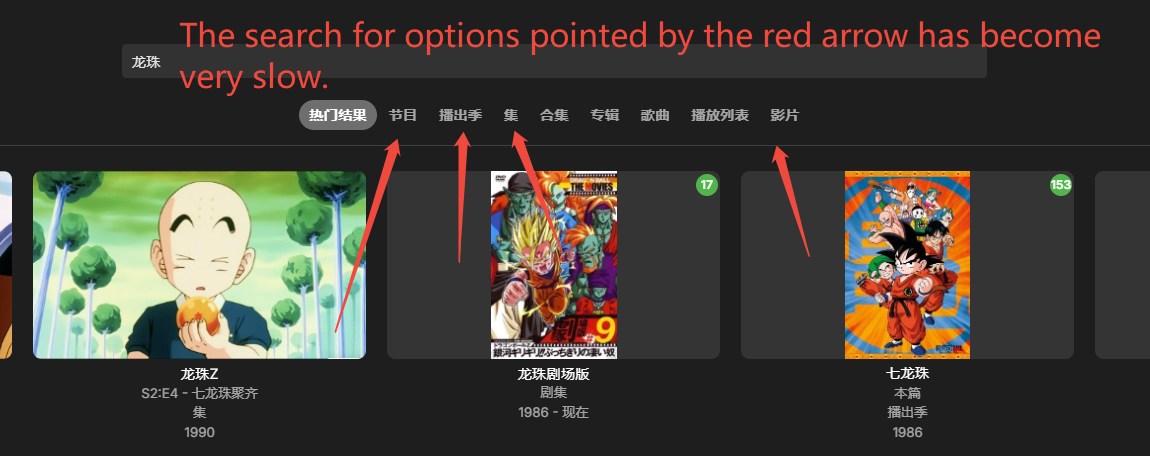
I had AI analyze the logs, and it really is an Emby issue. Investigation Conclusion The logs (Emby 4.10.0.40, Synology, with the media library located on the large-capacity /volume4 storage) have clearly identified the problem. This is a query-path defect in the new full-text search (FTS) introduced in the 4.10 release. It is not an environment configuration issue. The Difference Between the Two Search Paths (Confirmed by the Logs) 1. Default Search (Fast, ~150–250 ms) When entering a search keyword, the frontend calls a lightweight interface (/emby/ItemTypes + /Items without a type filter). For example, searching for “生化危机” (Resident Evil) takes only about 148–155 ms. 2. Clicking the Type Filter (Slow, 2–19.7 seconds) After clicking the type filter on the right side (Movie / Series / Season / Episode), the request changes to: IncludeItemTypes=Movie&SearchTerm=... The server then generates SQL like this: from mediaitems A join fts_search9 on A.Id=fts_search9.RowId and fts_search9 match @SearchTerm where A.Type=5 AND EXISTS (SELECT 1 FROM AncestorIds2 ...) Group by A.PresentationUniqueKey ORDER BY Rank ASC LIMIT 50 The logs show that queries of this type take an extremely long time. For the same “美国队长” (Captain America) movie search, the query repeatedly took approximately: * 19,368 ms * 19,371 ms * 19,383 ms * 19,426 ms * 19,440 ms * 19,445 ms * 19,775 ms The slowest query took 39,035 ms. The execution time is highly consistent and reproducible, which indicates that this is not an occasional system-load issue, but rather an inappropriate query plan caused by the combination of: * FTS matching * Type filtering * Per-row AncestorIds2 subqueries * Rank sorting Why the SQLite Errors in the Logs Are Not the Root Cause There are 97 occurrences of the following SQLite error in the logs: Sqlite: 9 - statement aborts ... interrupted This is a symptom, not the cause. The query is still running when the user gets tired of waiting and leaves the page or switches to another search/filter. The client then disconnects, and Emby cancels the still-running query. This is why the logs also contain messages such as: Response completed after client disconnected Therefore, the SQLite interruption messages are a consequence of the slow query rather than the original problem. Why This Does Not Happen in 4.9 There was no such problem with 4.9. The 4.10 series rewrote the search implementation and introduced the fts_search9 (FTS5 full-text index) search path. The type-filtered search happens to hit the worst possible query-plan combination involving FTS matching + type filtering + per-row AncestorIds2 subqueries + Rank sorting. This is a regression introduced in Emby 4.10.0.40. Recommendations (in Priority Order) 1. Upgrade to the Latest 4.10.x Beta The FTS search has continued to receive optimizations in subsequent versions of the 4.10 series. If the latest version is still slow, I recommend temporarily reverting to the 4.9 stable version. 2. Run the “Optimize Database” Scheduled Task Go to: Dashboard → Scheduled Tasks → Optimize Database It is recommended to run it manually once. This performs VACUUM + ANALYZE, which allows the SQLite query optimizer to recalculate statistics and potentially choose a better query execution plan. For this type of slow query, it may significantly improve performance. 3. Report the Issue to Emby Please provide the slow-query section beginning with “query time (slow 6x)”, including the approximately 19.7-second SQL query shown above. This is the information the Emby developers need most to investigate the problem. 4. Temporary Workarounds After searching, directly open the desired item from the default search results and avoid using the type filters on the right. Alternatively, enter the corresponding media library and use its advanced filtering instead of the global search type categories.
-
Lately Im getting tons of errors in my log 026-09-27 20:58:29.701 Error App: Error in TheAudioDB *** Error Report *** Version: 4.10.0.40 Command line: C:\Emby-Server\system\EmbyServer.dll -service Operating system: Microsoft Windows 10.0.22631 OS/Process: x64/x64 Framework: .NET 8.0.30 Runtime: C:/Emby-Server/system/System.Private.CoreLib.dll Processor count: 20 Data path: C:\Emby-Server\programdata Application path: C:\Emby-Server\system MediaBrowser.Model.Net.HttpException: MediaBrowser.Model.Net.HttpException: NotFound at Emby.Server.Implementations.HttpClientManager.CoreHttpClientManager.SendAsyncInternal(HttpRequestOptions options, String httpMethod) at Emby.Server.Implementations.HttpClientManager.BaseHttpClientManager.SendAsync(HttpRequestOptions options, String httpMethod) at AudioDb.AudioDbArtistProvider.EnsureArtistInfo(String musicBrainzId, IDirectoryService directoryService, CancellationToken cancellationToken) at AudioDb.AudioDbArtistProvider.GetMetadata(RemoteMetadataFetchOptions`1 options, CancellationToken cancellationToken) at Emby.Providers.Manager.MetadataService`2.ExecuteRemoteProviders(MetadataResult`1 temp, LibraryOptions libraryOptions, String logName, TIdType id, IRemoteMetadataProvider`2[] providers, MetadataRefreshOptions options, CancellationToken cancellationToken) Source: Emby.Server.Implementations TargetSite: Void MoveNext() Any ideas?
-
In this version, the default popular search results show up quickly, but when I click on the options on the right like shows, seasons, episodes, or movies, it just keeps loading for a long time before showing results. I remember this wasn’t a problem in version 4.9. It only appeared in version 4.10.0.40, and it seriously affects the efficiency of searching for things. ...
-
Latest version of Emby - Random lockups - Connection Timeout to https://api4.thetvdb.com
vaise replied to vaise's topic in General/Windows
I am now on Version 4.10.0.40. I don't know what I was on last month for example, but it was the 'latest' at the time. -
Emby does not recieve Metadata for an Episode from TVDB
Luke replied to Kyouma's topic in General/Windows
HI, please let me know if the tvdb plugin update 1.6.7 resolves this. Thanks. -
Wie habt ihr eure Schallplattensammlung sortiert? (+ genialer Gratis-Tipp)
Luke replied to Wildhor's topic in German
Thanks for sharing. -
Latest version of Emby - Random lockups - Connection Timeout to https://api4.thetvdb.com
Luke replied to vaise's topic in General/Windows
From what version number to what version number? -
Thanks for sharing.
-
Hi, what caused everything to get erased?
-
Latest version of Emby - Random lockups - Connection Timeout to https://api4.thetvdb.com
vaise replied to vaise's topic in General/Windows
I am just out of ideas on what to try here. Plugins and external systems all gone. The system has gone from something I don't think about to something that needs regular restarts and I have no known reason for that. It all started with the new release, so I just want to roll that back to see if it is stable again for a week for example. If it is stable, then it is the new release that has an issue with my config, and I am running out of time before I leave my system for 7 weeks so need it stable before then. So can I do this and not break anything ? But then, I don't know what version I was on now - what was the latest release before this new version ? -
Not currently, but that’s potentially doable.
-
Emby Theatre for Windows can't connect to server
Luke replied to spiller37's topic in Windows & Xbox
Do you have remote access restricted? -
Latest version of Emby - Random lockups - Connection Timeout to https://api4.thetvdb.com
Luke replied to vaise's topic in General/Windows
No but there’s no reason to do that. -
Linux: PathTooLongException when scanning files with long UTF-8 filenames
Luke replied to sichongzou's topic in Linux
Hi, right now this looks like an issue in the dotnet runtime where it throws an error when we try to list directory contents. More investigation is needed to see if it can be avoided somehow.