
All Activity
- Past hour
-
@ginjaninja Hi, I havent heard anything from you lately, so I am checking in to see how testing is going and to update you on a few changes.. 1) I have finally figured out how to shuffle a playlist from the beginning consistently. 2) and random playback is even more random before. Give the above changes a listen Above all, send me your one off/edge cases, MAYBE just MAYBE, they can be addressed
-
 salem96 joined the community
 -
 naki999 joined the community
 -
 giorgiadettori68 joined the community
 -
 mmiikkee joined the community
 -
 Rotem5 joined the community
 -
 Jadzin joined the community
 -
 Rotem9 joined the community
 -
 1434250234 joined the community
 -
 wenwem joined the community
 -
 jingni joined the community
 -

Mint: No compatible streams are currently available
EriksUsername replied to EriksUsername's topic in Linux
Update 2: I tried setting up the hard drives so they would mount at system startup, but that just changed the owner to root and didn't fix the 'no compatible streams' problem. - Today
-
Hi I have two problems with my Emby system, both regard Friend’s TV show. 1: Emby for Android won't show dvdsub on my nVidia Shield TV 2019 pro. Tested on an iPhone it loads subs Android phone does not load subs, another Android tv system loads subs(Get tv box in Norway, tested one week ago), Emby web shows the subtitles. It is my Shield and Android phone that does not show it. Logs can be sent in PM if needed as they are not depersonalized. 2: The show won't auto resume either. Other tested shows will. Is there any setting that I have forgotten, or is it an Android bug? I think it is strange that it works on web and iPhone. This tells me (I think) that it is not a server problem. Phones and everything is updated to latest builds. The server is on latest beta.
-
@GrimReaperTry this one. Should be correct this time. Any subtitles downloaded by Emby (with e.g. opensubtitles) can now be extracted and copied to video library or custom folder. MetaExtractor.dll
-
Mint: No compatible streams are currently available
EriksUsername replied to EriksUsername's topic in Linux
Update: after reconnecting the hard drives to the docking station and restarting, the problem seems to be solved again. Puzzling ... -
Mint: No compatible streams are currently available
EriksUsername replied to EriksUsername's topic in Linux
Hm, I do have both external hard drives mounted via a docking station. I'll check to see if connecting them directly solves the issue. Edit: no luck, the problem persists. -
I've noticed lately that the translation page is taking a long time to load.
-

Mint: No compatible streams are currently available
GrimReaper replied to EriksUsername's topic in Linux
Your server log is flooded with path not found errors: Same can be observed in ffmpeg log: Is your mount point getting disconnected? As if it were a permission issues you'd see access denied error entries, so it likely ain't. -
Hi, I recently migrated from Windows to Linux Mint (Mate) and I'm having recurrent problems with streaming files on client devices. One day things are working fine and the next I'm getting the error message "No compatible streams are currently available. Please try again later or contact your system administrator for details." I've attached two server log files, I'd greatly appreciate it if you would be so kind as to point me in the right direction. My knowledge of Linux is limited but I can usually fix basic problems, except in this case. Thanks! ffmpeg-transcode-b807f23e-f7a8-4aea-aa8f-1ce30058b79b_1.txt embyserver.txt
-

SerieTv genres with empty folders/genres
Hispanico957 replied to Hispanico957's topic in General/Windows
Thank mate but 4.10 it's still beta Hispa -

Playback issues with certain shows on Sony Bravia using Emby app
cnieuweboer replied to Zaryt's topic in Android TV / Fire TV
Emby for Android 3.5.36 Emby for Android TV 2.1.23g -
Hola, tengo un HTPC con W11 conectado a un Home Cinema y a una TV. Es la mejor manera de sacar audio de calidad 5.1 DTS o posterior (tambien lo tengo en Plex). Por el momento voy escapando con un chromecast que manejo desde el movil. Saludos
-
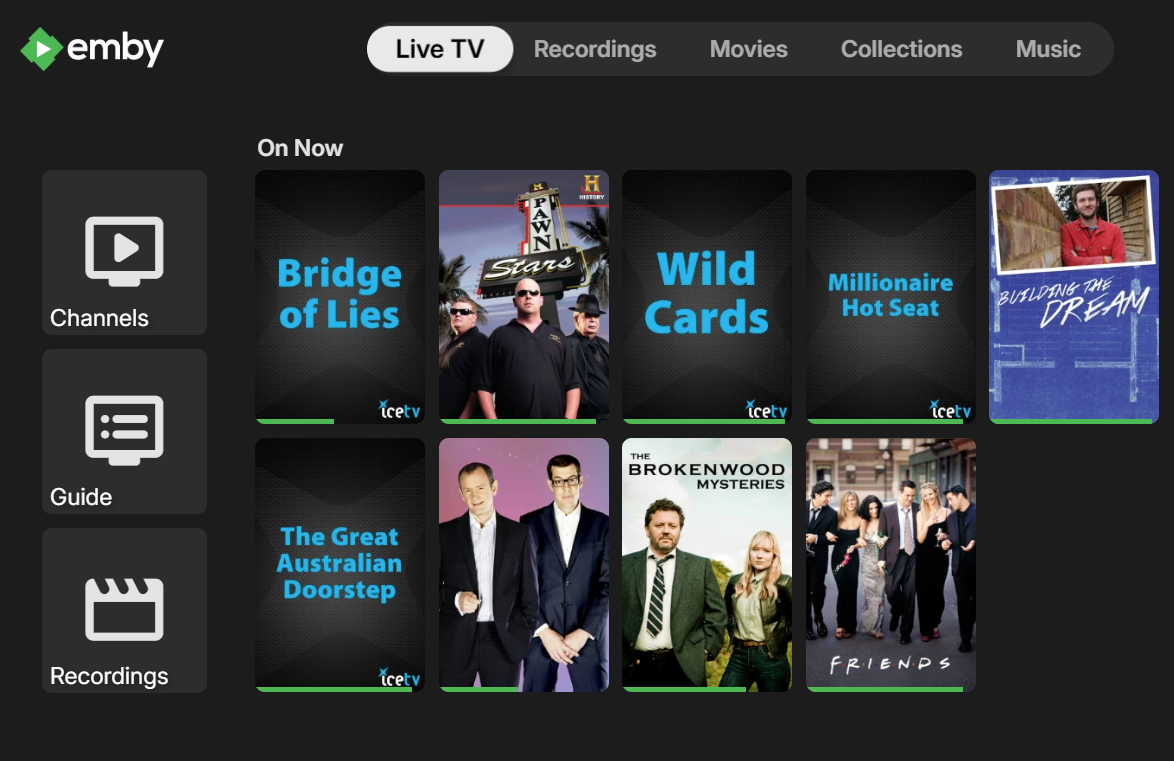
I just loaded the new update at work to watch listen to world cup and noticed that latest recordings next to on now is missing. This release is a huge letdown first the horrible and useless view for recordings and now the few latest recordings have been removed as well. At home I still haven't updated because of the showstopper bug with recordings view can we please get this fixes before windows update takes over and doesn't let me go back. It is really disappointing what is happening with this product it is just going downhill.
-
Another pc crashing on first start after updating to latest version. Xeon 2276m
-
Hi there, please attach the Emby server log from when the problem occurred: How to Report a Problem Thanks!
-
Great, thanks. Please keep us posted.
-
Hi, can you give it another try?
-
I will test this in the morning. (And if you're right, there should be some indication of this in the library configuration page!) But in the meantime the bigger question remains: why does Emby have musicbrainz lookups overwrite user implemented metadata? That just seems fundamentally wrong. Why can that not be fixed?
-
Hi, this has been resolved in the upcoming 4.10 server release. Thanks.
-
Hi, this has been resolved in the upcoming 4.10 server release. Thanks.
-
Hi, this has been resolved in the upcoming 4.10 server release. Thanks.
-
OK there is some special sauce happening here. Because you have fanart enabled, that forces musicbrainz to be enabled as well. This is because fanart is based on musicbrainz ids, and before we put this in place, users who had disabled musicbrainz were constantly reporting that fanart wasn't finding any images. The same also applies for audiodb. It's all based on musicbrainz ids. If you disable those, then you'll get the behavior you want.
-

MediaSync - Automated -arr/Emby sync tool, media pipeline dashboard (coming soon)
gbarone123 replied to gbarone123's topic in Third Party Apps
Thanks for testing 2.1.4 and confirming the issue still exists. I’m trying to determine whether MediaSync is storing the library type incorrectly or if the issue is happening later in the dashboard. Could you run the following commands inside your MediaSync host and paste the output? docker exec mediasync python -c 'import sqlite3; c=sqlite3.connect("/config/mediasync.db"); [print(r) for r in c.execute("select library_id, library_name, library_type from source_library_map order by library_name")]' docker ps --format "table {{.Names}}\t{{.Image}}" -

Will creating a new library with symbolic links to existing items cause issues?
Luke replied to podonnell's topic in General/Windows
Hi, yes the Home Screen features in the upcoming 4.10 release may provide some of what you’re looking for. -

Can a plugin leverage the UI on a channel's detail page?
Lyfesaver posted a topic in General/Windows
When going to a Live TV channel and opening it's detail page you can see the buttons for Play, Record, etc.... can a custom plugin add buttons to the UI there? Overall goal would be to add "Play from beginning" button if that movie/episode is in the library.





