All Activity
- Past hour
-
 AlNizam joined the community
 -

Plugin: EmbyCredits, detect end credits and add auto skip.
yocker replied to yocker's topic in Plugins
Hmm that doesn't sound like the normal Emby behavior. Never heard of it removing chapter info after play, i will look into what i can find about it. Do you have other plugins that edit chapters? A Raspberry PI isn't really recommended as it's not powerful enough. I'm surprised you actually got any of the OCR to work on it. OCR is a form of AI that reads images/texts and gives back what it sees. For PaddleOCR it's recommended to have a Nvidia GFX card and and 100GB disk space, Tesseract requires way less space but i would recommend a somewhat modern CPU. -
 John302 joined the community
 -
 Vero1907 joined the community
 -
 Vero1983 joined the community
 -
 Kurisuchan joined the community
 -
 Sardar Kerimov joined the community
 -
 Krzysztof_08 joined the community
 -
 qiang1 joined the community
 -
 Jesus valido joined the community
 -
 bgo joined the community
 -
That does not work, probably because the show's folder is not the root folder of the library. If I put .embyignore in the library's appropriate root folder, and then reference the .hidden folder(s) relative to that location, then it works: */.hidden */*/.hidden */*/*/.hidden This seems less than ideal though. There seems to be no way to ignore the folder containing .embyignore like the old system did. If you are going to have * ignore all the files, why not also ignore the folder itself? Or if the containing folder must be explicitly mentioned, give us a way to do it from within the file, e.g. using a dot (.) or slash dot (/.). Or for a root-level .embyignore, give us a way to easily match a pattern at any depth.
-

Plugin: EmbyCredits, detect end credits and add auto skip.
spk2010 replied to yocker's topic in Plugins
Hi, first of all, thanks for the plugin! I have the same problem, the end markers disappear when an episode is played. For now I have solved it like this: instead of using Emby's task scheduler, I launch a script that uses the Credits Detector API. First it checks if a backup exists, if there is one it restores it, then it starts detecting all episodes with /CreditsDetector/StartDetection and "SkipExistingMarkers": true, I wait for it to finish (/CreditsDetector/GetProgress) and finally it overwrites the backup. I would like to comment on another thing, the recommended docker container does not work on my RaspberryPi 4, I had to end up using hertzg/tesseract-server and with another script delete the temp files. again, thanks for the work done!! -

MediaInfo For Emby Plugin(HDR, Vision, Atmos, DTS:X)
kaledi replied to Cheesegeezer's topic in Plugins
Thanks - will try this tonight. The strange thing is that the migration from one PC to another involved me restoring an existing emby back up and the mediainfo files were directly transfered - i.e. same versions. Therefore, I can't see why this should have changed. The one application that may have updated was handbrake and wonde if this is the cause - it has been the cause of previous issues (if I recall correct), by inserting multiple flags for the same thing in the same field e.g. HDR HDR HDR -

MediaInfo For Emby Plugin(HDR, Vision, Atmos, DTS:X)
rbjtech replied to Cheesegeezer's topic in Plugins
Thanks. Checking the code - the strange new format from mediaInfo (it says SMPTE ST 2086 twice for some reason) was already fixed - so maybe I just didn't publish the fix .. "HDR_Format":"Dolby Vision / SMPTE ST 2086 / SMPTE ST 2086", "HDR_Format_Version":"1.0 / ", "HDR_Format_Profile":"dvhe.08 / ", "HDR_Format_Level":"06 / ", "HDR_Format_Settings":"BL+RPU / ", "HDR_Format_Compression":"None / ", "HDR_Format_Compatibility":"HDR10 / HDR10 / HDR10", Save the previous DLL - below is the latest DLL version that I reviewed the code for - this is the very latest but please test on a sample first. v1.0.2.1 Emby.MediaInfo.dll - Today
-
@luifrans3were you able to fix your issue, I am at a similar boat. It works in my local network but not when I am trying to connect from outside (remote access). I probably need to setup my router or firewall, can you assist me ?
-

Returning to my media screen from 'movie page' returns to the top of page
JohnyMc posted a topic in Apple iOS / macOS
When viewing a movie page in Emby Server and hitting the back button to return to the full list of alphabetically sorted films it goes back to the top of the page, so you can be viewing a film starting with 'S' and it returns to 'A' meaning you have to scroll through the entire list again to get back to the 'S' films.... Is this normal ?? Cheers -
@seanbuffYes Unraid 7.2.3 I have IGPU Top installed and it shows no action for emby, but works fine for Plex. I even installed Jellyfin to see if it also works there, and it does. So it's Emby exclusive not working. Can it be a licence issue? Transcoding is a paid feature, right? I have a really old emby lifetime licence. Can I nuke the licence and reapply somehow?
-
Mine does not have the trailing slash, and HW acceleration works fine in 4.10.0.5 Did you mean Unraid 7.2.3 ? And you confirmed you have installed the Intel GPU Top plugin?
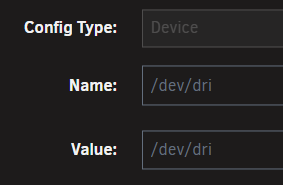
-
Hmm this is odd, the only difference I see from your setup and mine is, that I have a trailing / Don't think that should be it.
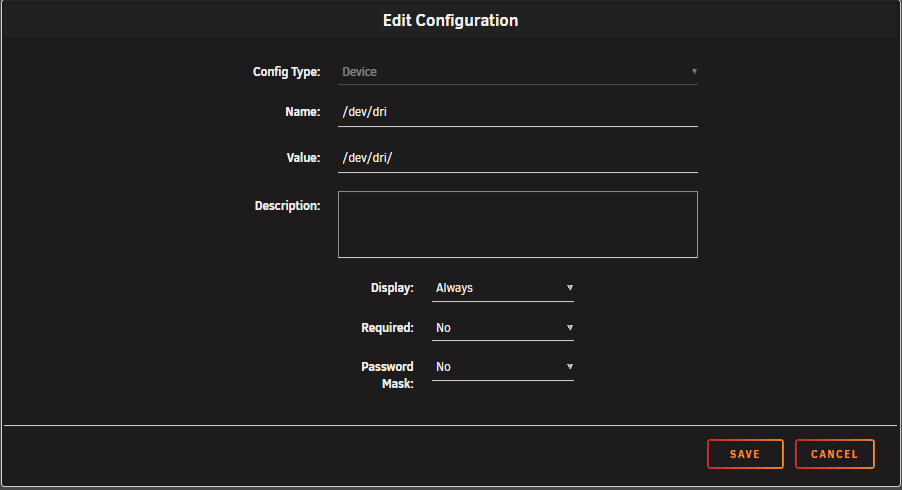
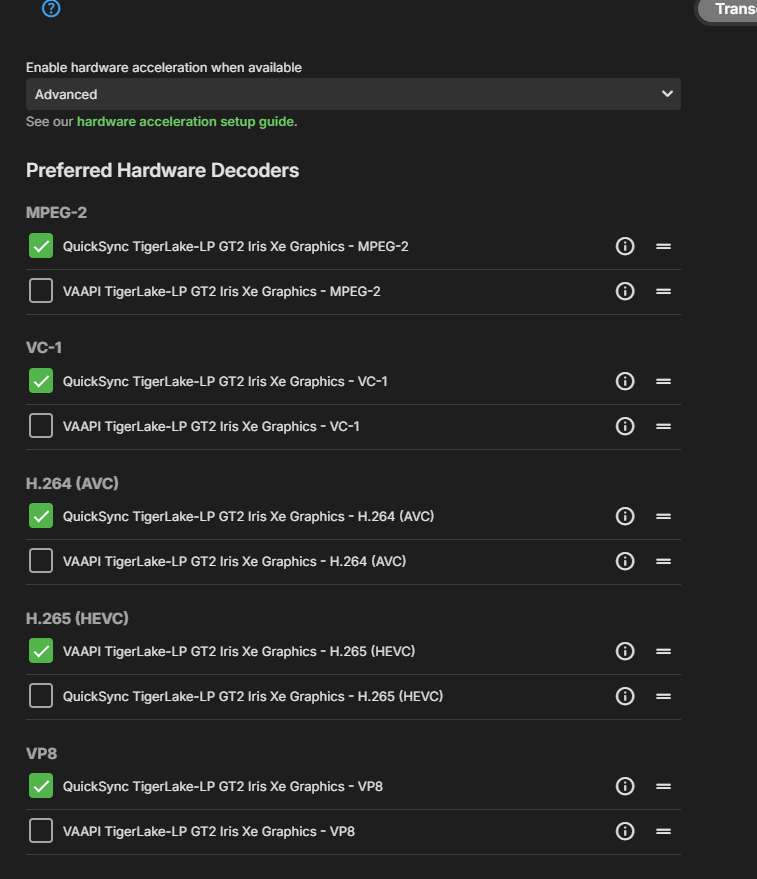
-
I don't know. It is a Samsung TV and I didn't install any apps or so. So it seems to see in factory default my DLNA servers. In the "Home" menu I see "Emby" and some others like my NAS or Plex. Playing the file this way, I see in the log, that Emby recognizes my TV and uses the custom profile. Playing the same video with the Emby app on Android, I can't see this.
-

How to ignore the folder containing .embyignore?
Happy2Play replied to Fweep's topic in General/Windows
Think you have to change the content of the embyignore file as the wildcard only ignores the files not the folder Where you want to ignore the folder also .embyignore containing .hidden/* in Girl Code (2015) folder Excluding Files & Folders | Emby Documentation -
.thumb.jpg.d1639af2d080f59454a5d8102bcb977e.jpg)
Automated Blu-ray ISO to MKV Conversion on Synology NAS using Docker + MakeMKV
Cotignac replied to Cotignac's topic in Synology
To give you a better understanding of what the script does and how it works, I have attached the installation manual. It covers the full workflow, folder structure, Docker setup, Portainer configuration, and all available environment variables. If you have any questions, or if you would like access to the script itself, feel free to reach out — either in this thread or by private message. iso_convert_manual_en.pdf -
@Neminemthanks for your answer. I made my own thread before discovering this general Unraid thread: I installed IGPU TOP and I see no action there...
-

What are some tips for helping users find content?
seanbuff replied to podonnell's topic in General/Windows
Not in 4.9 no, but the Dev team did lay the groundwork for some really powerful ways to surface your media in creative ways in 4.10.x See this thread for more details: -
Hi, what software on the TV is playing the video?
-
Hi there, please attach the Emby server log from when the problem occurred: How to Report a Problem Thanks!
-
If the rule is, say, “last played date > 100,” it's not clear whether or not unwatched items should be included.
-

Help with library sync/refresh accuracy
quickmic replied to jordn613's topic in Emby For Kodi Next Gen
The only option for a clean state after you reinstalled the emby server is a factory reset (in the next gen plugin settings). In 11.X and 12.X versions, it should not wipe any settings in Kodi beside the plugin settings (optional) but it will clean ALL Kodi media libraries. If you have no Emby (Kodi native) content synced, it will wipe them too! If you afraid losing settings, take a full Kodi backup (the backup option from plugin is not enough in this case). Beside your library issues, don't count that Kodi never has fatal issues. -
-

Default Subtitles Not Automatically Selected
emby.trace706 replied to emby.trace706's topic in Android
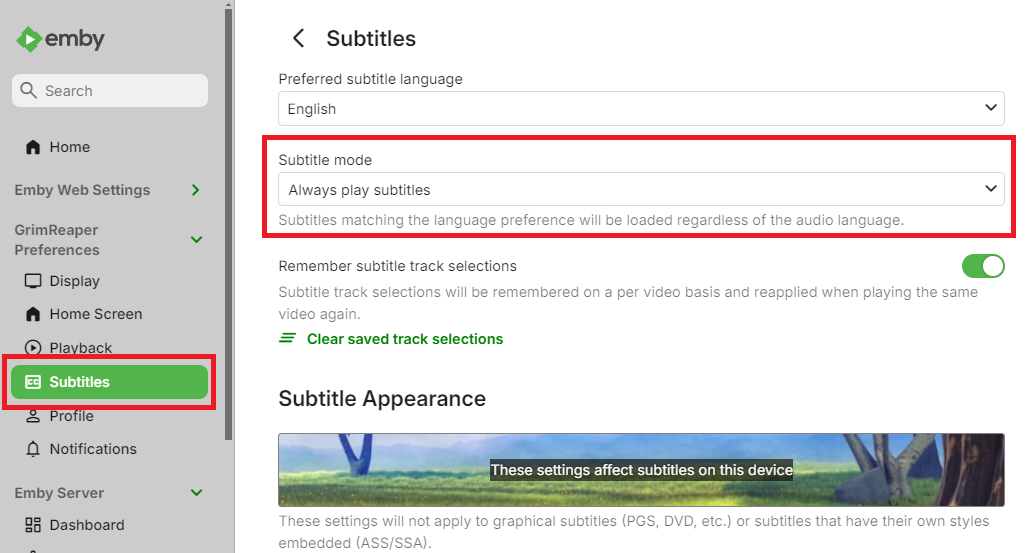
What do you mean by subtitle mode? Subtitles are on by default. Im expecting English, however there are multiple English subtitles available, such as the English subtitles for the Japanese audio of the episode, and English subtitles for the Englished dubbed version of the episode. There is also another set of subtitles for only the songs and signs throughout the episode. In the drop down list, the first option is the songs and signs, the second option, which is the default and what I am expecting, is the English for the Japanese audio, and the 3rd option is the English subtitles for the English audio. -

A lot of videos are stopping only 10 seconds into playback
TVTech replied to dimitrik's topic in LG Smart TV
I started having the same playback issues since the last server update on March 4. Happens on all Emby clients. So what was the point of an update if y'all didn't fix the most serious problem that all these folks reported since last year? How can someone enjoy their media if they can't even play them properly? I spent the last hour reading older complaints on here from users reporting similar playback issues dating back to last year, and as usual all none of these were ever resolved by the Emby team. You ask for logs, then say you're looking into it, then silence. -
Some more information/specific example would be required: what is your Subtitle Mode set to? What language you're expecting? What subtitle is actually preselected if not expected one?
-
I have folders named .hidden in which I previously had empty files named .ignore. This was sufficient to hide the entire folder from Emby. The folders reappeared due to the changes in 4.9, so I renamed the .ignore files to .embyignore and put an asterisk in each one. I rescanned my files but the .hidden folders are still showing up in Emby. For example, I have folders: TV/Programs/Girl Code (2015)/.hidden TV/Programs/Girl Code (2015)/Specials TV/Programs/Girl Code (2015)/Season 1 TV/Programs/Girl Code (2015)/Season 2 TV/Programs/Girl Code (2015)/Season 3 TV/Programs/Girl Code (2015)/Season 4 Inside .hidden is the .embyignore file along with some conversion notes and scripts—no playable content. Emby (web & Roku) shows .hidden as a "season" of the TV show, with no content. What's the trick to getting rid of it again?