















Jump to content

Emby Blog

  • entries
    585
  • comments
    5104
  • views
    3661706

Contributors to this blog

  • Luke 359
  • ebr 70
  • Carlo 31
  • sross44 27
  • 7illusions 15
  • ScottIsAFool 12
  • Abobader 11
  • radeon 8
  • xnappo 8
  • darwindeeds 7
  • Redshirt 6
  • Cheesegeezer 5
  • leedavies 3
  • Aphid 3
  • bigjohn 3
  • snazy2000 3
  • softworkz 3
  • techywarrior 3
  • Soultaker 2
  • chef 2
  • gcw07 2
  • marcelveldt 1
  • hurricanehrndz 1

Setting Up Kid Accounts and Parental Controls in Emby


Keeping Entertainment Family-Friendly: Setting Up Kid Accounts and Parental Controls in Emby

One of the most powerful features of Emby is the ability to create individual user accounts. This becomes especially useful for families as parents can give kids their own profiles while keeping control over what content they can access. In this guide, we’ll walk you through how to set up kid accounts and enable parental controls in Emby, step by step.


Why Create Kid Accounts?

  • Age-appropriate viewing: Ensure younger family members only see content suited to them.

  • Personalized experience: Kids can have their own watchlists, progress tracking, and favorite shows.

  • Peace of mind: Parents maintain control over what media is available while keeping the main library unrestricted.


Step 1: Create a New User

  • Log into your Emby Server Dashboard.

  • Go to Users in the left-hand menu.

  • Click + Add User.

  • Give the account a name (e.g., “Kids” or your child’s name).

  • Choose whether it will be a local user or linked to an Emby Connect account (for remote access).
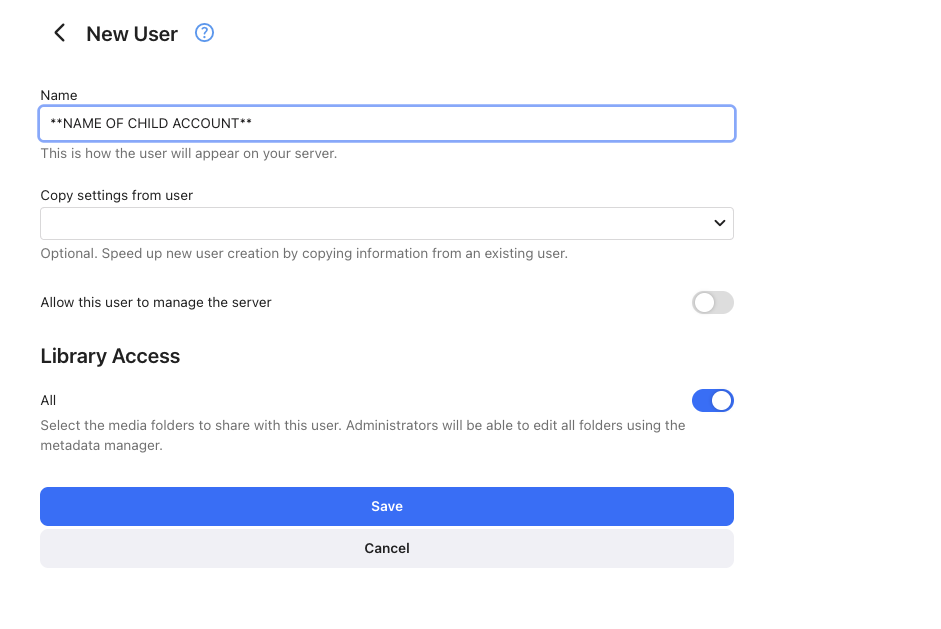
image.png


Step 2: Assign Libraries

When setting up the account, you’ll have the option to choose which libraries the user can access. For example:

  • Allow access to “Kids Movies” and “Cartoons.”

  • Block access to “Horror,” “Adult Shows,” or any other unsuitable libraries.

This ensures your child only sees the content you approve.


Step 3: Enable Parental Controls

Within the user’s settings, navigate to Parental Controls. Here you can:

  • Set movie and TV show ratings (e.g., allow only PG or below).

  • Restrict unrated content if you prefer.

  • Block specific titles that you don’t want accessible, even if they meet rating criteria.
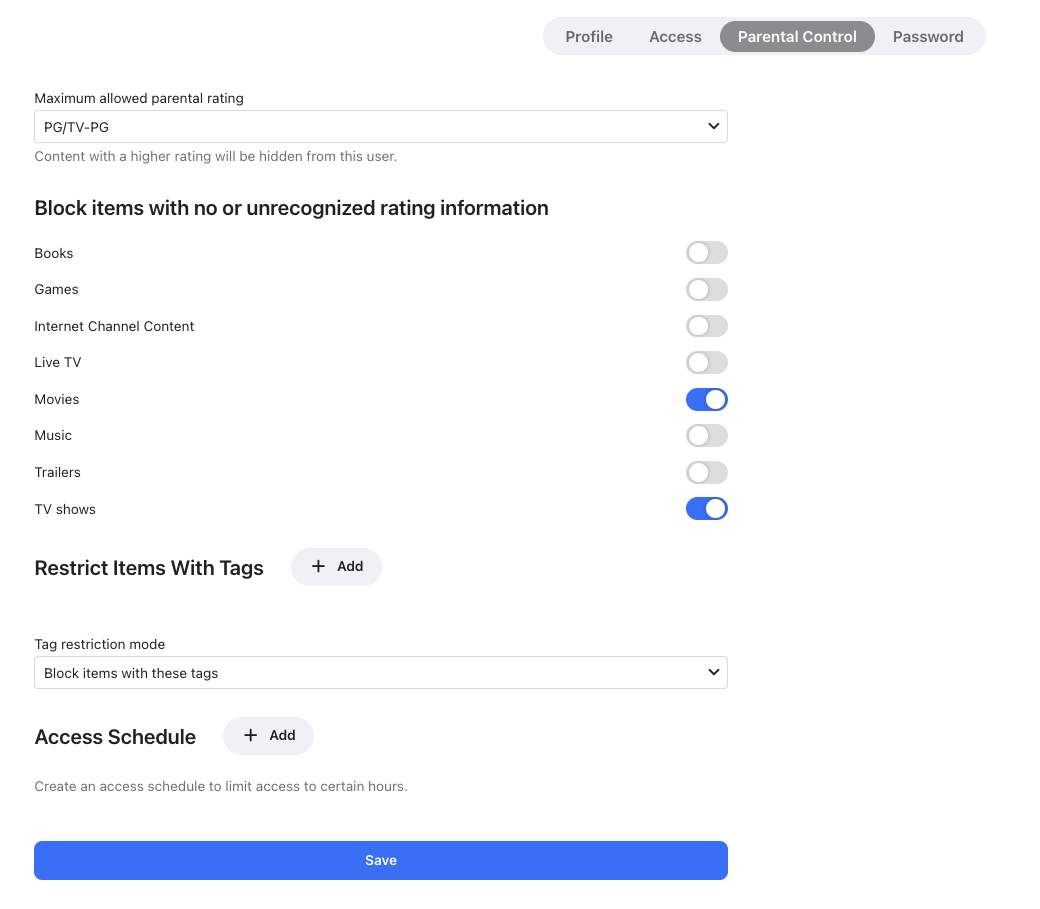
image.png


Step 4: Add Playback Restrictions

Emby also lets you manage how and where kids can watch content:

  • Limit streaming devices (e.g., only the living room TV, not mobile).

  • Set time restrictions for viewing.

  • Disable certain features like live TV or external plugins.


Step 5: Test the Account

Once set up, log into the kid’s account yourself to confirm:

  • Only age-appropriate content is visible.

  • The playback settings behave as expected.

  • The account has a fun, personalized feel for your child.

This way, you can make adjustments before turning it over to your kids.


Conclusion

By creating dedicated kid accounts and using Emby’s robust parental controls, you’ll give your children a safe and customized experience while maintaining control over the family media server. It’s simple, effective, and ensures that everyone enjoys Emby their way.

Edited by sross44

  • Like 1

7 Comments


Recommended Comments

cremonies

Posted

1. This would be great if restrictions were separate for TV and movies. 

2. Too many movies fall under PG. ability to edit multiple files tags to limit what is visible would be great.

  • Agree 2
sross44

Posted

3 hours ago, cremonies said:

1. This would be great if restrictions were separate for TV and movies. 

2. Too many movies fall under PG. ability to edit multiple files tags to limit what is visible would be great.

That's good feedback. Definitely appreciated thank you @cremonies

  • Like 1
waterman981

Posted (edited)

On 10/2/2025 at 8:40 AM, cremonies said:

1. This would be great if restrictions were separate for TV and movies. 

2. Too many movies fall under PG. ability to edit multiple files tags to limit what is visible would be great.

One of the things I do is set the "Custom Rating" field on the movies that I want to wait until they are older (or younger).  Perhaps you want to let them watch the MCU before they turn 13, change it down to PG.  Or you want to up the 1969 "True Grit" from it's original G to PG or PG-13.

I had previously tried using the tags with the restrict items set to "Allow only items..." and would put each of my kids names in a separate tag, then add that tag as I added movies, but it definitely became a management nightmare.  But this may be what you are looking for with #2

Edited by waterman981
  • Like 1
willie_dynomite

Posted

It would be awesome if you guys would set it up so that PEOPLE could be tagged with an ADULT or NC-17 tag so they could be excluded from searches by users whose max content allow rating is "R" or below. It shouldn't be THAT difficult to do.

  • Thanks 1
Dan77

Posted

I'd like to be able to have another restriction mode for genres - i.e. many animated movies (Madagascar etc) are PG, so creating a kids profile i need to allow PG but that tedns to include a lot of non-kid content. Romance, Drama, etc.

Being able to filter to allow 'Family', 'Animation' etc could be useful

seanbuff

Posted

3 hours ago, Dan77 said:

i.e. many animated movies (Madagascar etc) are PG, so creating a kids profile i need to allow PG but that tedns to include a lot of non-kid content. Romance, Drama, etc.

For this scenario, you could use Custom Rating and set those to 'G' to keep them kid friendly.

Dibbes

Posted

On 10/2/2025 at 4:40 PM, cremonies said:

1. This would be great if restrictions were separate for TV and movies. 

2. Too many movies fall under PG. ability to edit multiple files tags to limit what is visible would be great.

I found setting up separate libraries for the kids is the easiest way to go with the least amount of management overhead.

Create an account or sign in to comment

You need to be a member in order to leave a comment

Create an account

Sign up for a new account in our community. It's easy!

Register a new account

Sign in

Already have an account? Sign in here.

Sign In Now
×
×
  • Create New...
