Nearest-Neighbor Video Scaling
Nearest-neighbor scaling assigns each output position the value of the closest source sample.
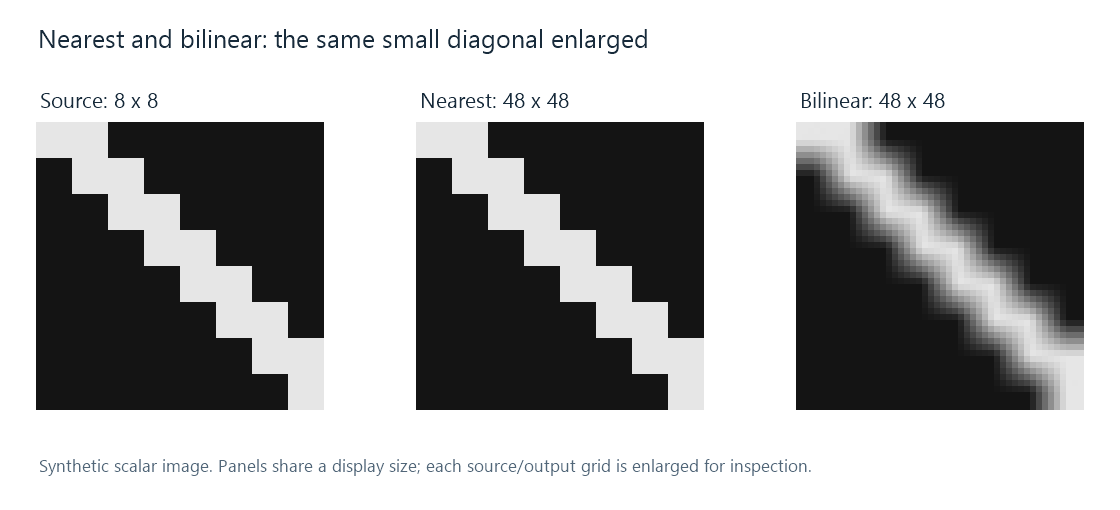
The source has only two scalar values. Nearest-neighbor retains those values and enlarges their regions; bilinear calculates intermediate values. All panels are displayed at the same inspection size.
Nearest-neighbor scaling maps an output position into the source grid, selects the nearest sample, and copies its value. It makes no weighted mixture of neighboring values.
That can be exactly the desired behavior for an image whose individual pixels are part of its design, such as pixel art or a diagnostic sample pattern. In an Emby app displaying such source material, the renderer's enlargement determines whether those sharp pixel regions remain distinct or become blended.
Which sample is closest?
For a source row (0.1, 0.5, 0.9) at positions 0, 1, and 2, a mapped output coordinate x = 0.4 selects position 0 and value 0.1. Coordinate x = 0.6 selects position 1 and value 0.5. Crossing the boundary at x = 0.5 changes the choice abruptly.
An implementation specifies how to break an exact-distance tie and handle positions outside the source. With the illustrative rule floor(x + 0.5), a tie selects the higher index. Edge clamping restricts that index to the available array.
In two dimensions, the same coordinate selection applies to rows and columns. The operation's small neighborhood makes it inexpensive, and the output uses source values directly.
Why noninteger enlargement changes the block widths
At a regular integer enlargement, source regions can occupy equal numbers of output columns and rows. At a noninteger factor, some must receive more output positions than others.
For the center-aligned three-to-five mapping developed in the scaling walkthrough, the source coordinates are −0.2, 0.4, 1.0, 1.6, and 2.2. Nearest selection with clamped edges produces 0.1, 0.1, 0.5, 0.9, 0.9. The first and last source values each occupy two output positions; the middle occupies one.
As an image moves or the mapping phase changes, those unequal assignments can change. A thin diagonal can acquire a different staircase shape, and a narrow line can vary in width. The blocks arise from coordinate selection rather than a change in the source's component values.
A reduction can omit an entire feature
If the destination is smaller, nearest-neighbor still selects one source position per result. A thin feature lying between the selected positions may contribute nothing.
The alternating row 0, 1, 0, 1, ... makes this explicit: selecting every second sample can produce only zeros. Shifting the selection by one source position produces only ones. A downscaler designed to represent the average area instead filters the fine alternation before placing the new samples. That aliasing question is a consequence of the one-sample selection itself.