Video Quantization Parameter (QP)
A quantization parameter selects quantization strength in a video coding process and is not a universal picture-quality score.
A coded correction value of 21 can be reconstructed as 20 with one quantizer and 24 with a coarser one. The choice changes both the value recovered and the amount of detail the encoder needs to describe.
A quantization parameter (QP) selects quantizer strength through the particular codec's rules.
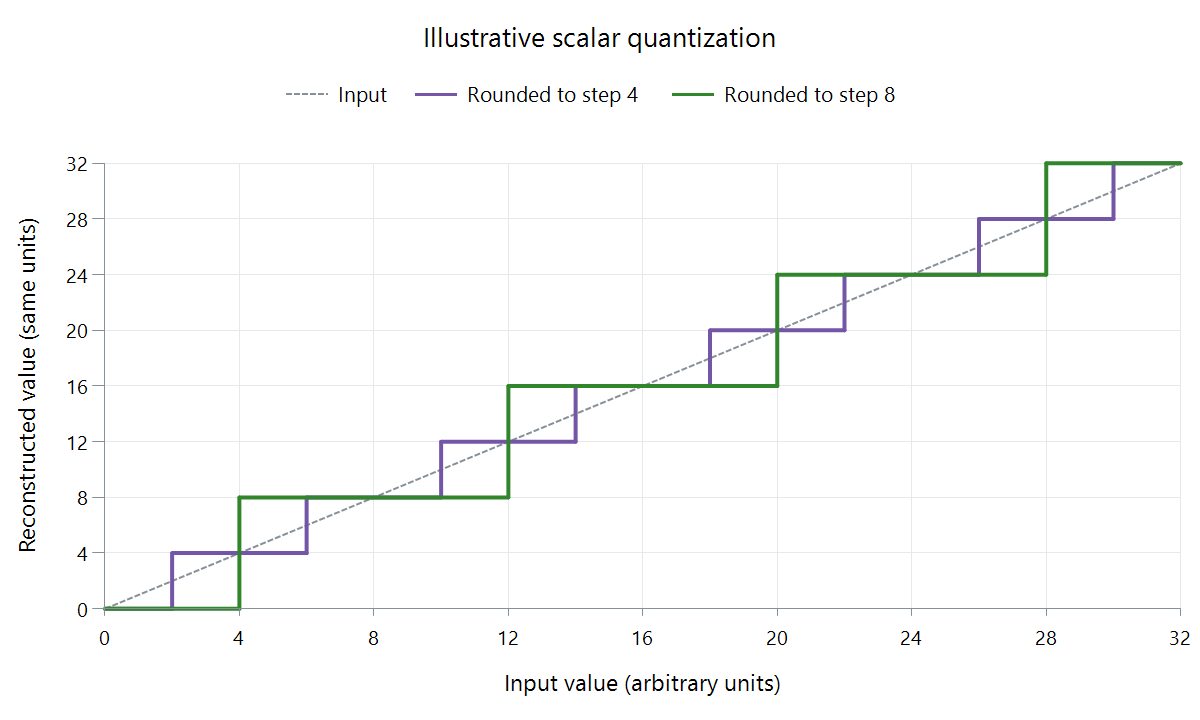
Original scalar model: output =step ×floor(input/step +0.5), with arbitrary steps 4 and 8. It isolates rounding, not the exact quantization equation of a named codec.
Rounding to coarser reconstruction levels
| Input correction | Round to multiples of 4 | Error | Round to multiples of 8 | Error |
|---|---|---|---|---|
| 3 | 4 | +1 | 0 | −3 |
| 9 | 8 | −1 | 8 | −1 |
| 21 | 20 | −1 | 24 | +3 |
| 27 | 28 | +1 | 24 | −3 |
The coarser step has fewer reconstruction levels. Several precise input values share one output, leaving less precision to encode. The error can also change direction, depending on where the input falls between levels.
In a transform codec, those quantized values describe patterns across a block. Changing a coefficient changes its contribution to the reconstructed correction, rather than necessarily changing only one visible pixel.
A codec maps QP onto its scale
For ordinary 8-bit AVC luma coding, QP ranges from 0 to 51. With the same relevant scaling, an increase of six doubles the quantization step.
Using QP 20's scale as 1 for a declared relative comparison:
| QP | Relative scale |
|---|---|
| 20 | 1 |
| 26 | 2 |
| 32 | 4 |
These are relative factors at six-step separations, not a declaration that QP 20 has an absolute step of one sample unit. The transform/scaling context supplies the absolute meaning.
Different codecs and greater sample depths use their own indices and conventions. AVC's higher-depth internal quantizer index includes a depth offset, for example. A reported QP needs that context before being compared to another encode.
A mode decides how the parameters are assigned
Constant QP is an encoder's quantizer-control policy. It can define a base value and different picture-type settings or offsets. x265 documents its selected base for P-slices and related I/B values.
CRF uses an adaptive rate-factor model that can produce varying picture and region quantizers. Bitrate control can also change QP to fit a data/buffer budget.
These modes operate at different levels of the decision. A fixed base quantizer does not impose equal frame bytes: one picture can contain far more information to code at that precision than another.
Interpret a reported average
Imagine two equally weighted regions using QP 20 and QP 32. Their arithmetic mean QP is 26.
In the relative AVC scale above, their scales are 1 and 4, whose mean is 2.5. A uniform QP 26 region instead uses relative scale 2. The equal mean QP has hidden a different distribution.
This is a numerical illustration with equal weights and unchanged scaling, not a reconstruction-quality prediction.
A log can also average over picture types, region sizes or other weights. Its number summarizes those assignments, while the actual bitstream reconstructs each region with its applicable quantizer.
See Also
- Lossy Video Compression
- Constant Rate Factor (CRF) for Video
- Constant Quality Video Encoding
- Video Compression Artifacts