Leaderboard




Popular Content
Showing content with the highest reputation since 06/12/25 in Posts
-
Is there plans on the roadmap for OpenID. I have searched but not found any indication this is in development. With many admins taking up SSO through Authelia or Authentik to enhance security it would be great for Emby to support it. One of the easier open standards is OpenID which the aforementioned support. Users could continue to use LDAP if they wish while others can use the arguably better SSO experience.36 points
-
EmbyWatch - A brilliant app built by a community user! One of the best things about the Emby community is the creativity that comes from it. Every so often, one of our users takes their love for media servers to the next level and builds something that makes life easier for the rest of us. Today, we’re excited to share EmbyWatch, a brand-new Android app developed by community member @asgard25It is an an incredible example of what happens when passion and innovation meet. A User-Built Tool, Made for Admins What makes this story special is that EmbyWatch wasn’t created by a company or a professional app studio. It was created by one of YOU! — just someone who wanted to make managing a server more intuitive and accessible from anywhere. Want to be even more impressed? This is only the second Android app that asgard25 has developed! EmbyWatch is designed to help server admins and advanced users keep track of what’s happening on their Emby setup in real time. It’s not about playback or browsing media, it’s about giving you the tools to monitor, manage, and control your server, all from your phone. Powerful Features at a Glance EmbyWatch brings a surprising amount of functionality for such a young app. Here’s what it can do: Real-time monitoring: See who’s watching what, where they’re streaming from, and how much bandwidth they’re using — all live. User management: View your users, check activity history, and even send messages directly to connected users. Device overview: Identify every connected client, from smart TVs to mobile apps, with connection times and device info. Library insights: Quickly review all your media libraries with detailed counts and metadata. Task control: Run or schedule maintenance tasks like library scans and metadata updates remotely. Plugin visibility: See your installed plugins and available updates. Logs and server details: Access logs, CPU load, uptime, and more — wherever you are. Notifications and widgets: Stay informed with live alerts and optional Android widgets for quick monitoring. For anyone managing a shared server, EmbyWatch feels like having a live dashboard in your pocket. A True Example of Community Ingenuity We love seeing users like asgard25 take their experience with Emby and turn it into something that benefits everyone. EmbyWatch really is a reflection of how open and flexible the Emby ecosystem can be when people put their ideas into action. This project shows exactly what makes our community special, a shared passion for improving and creating! So whether you’re managing your own home setup or running a multi-user server, EmbyWatch offers a simple, powerful way to stay connected to your system. Huge thanks to asgard25 for sharing EmbyWatch with the community and for showing what’s possible when creativity meets passion. We’re proud to see our users building tools like this that make Emby not just a media server, but a thriving ecosystem shaped by its fans. If you’re an admin or an advanced user, check out EmbyWatch on Google Play and see how it can make managing your server easier than ever. We can’t wait to see what asgard25 — and others in our amazing community — build next. View the full article24 points
-
I'd really like to have 2 Factor Authentication added to the login screen. It's just this (optional) extra layer of security to help secure the server (which, especially if people use camera uploads) contains pretty private data. There are for every type of programming language quite a few libraries available, so implementation on a server shouldn't be too hard to realise22 points
-
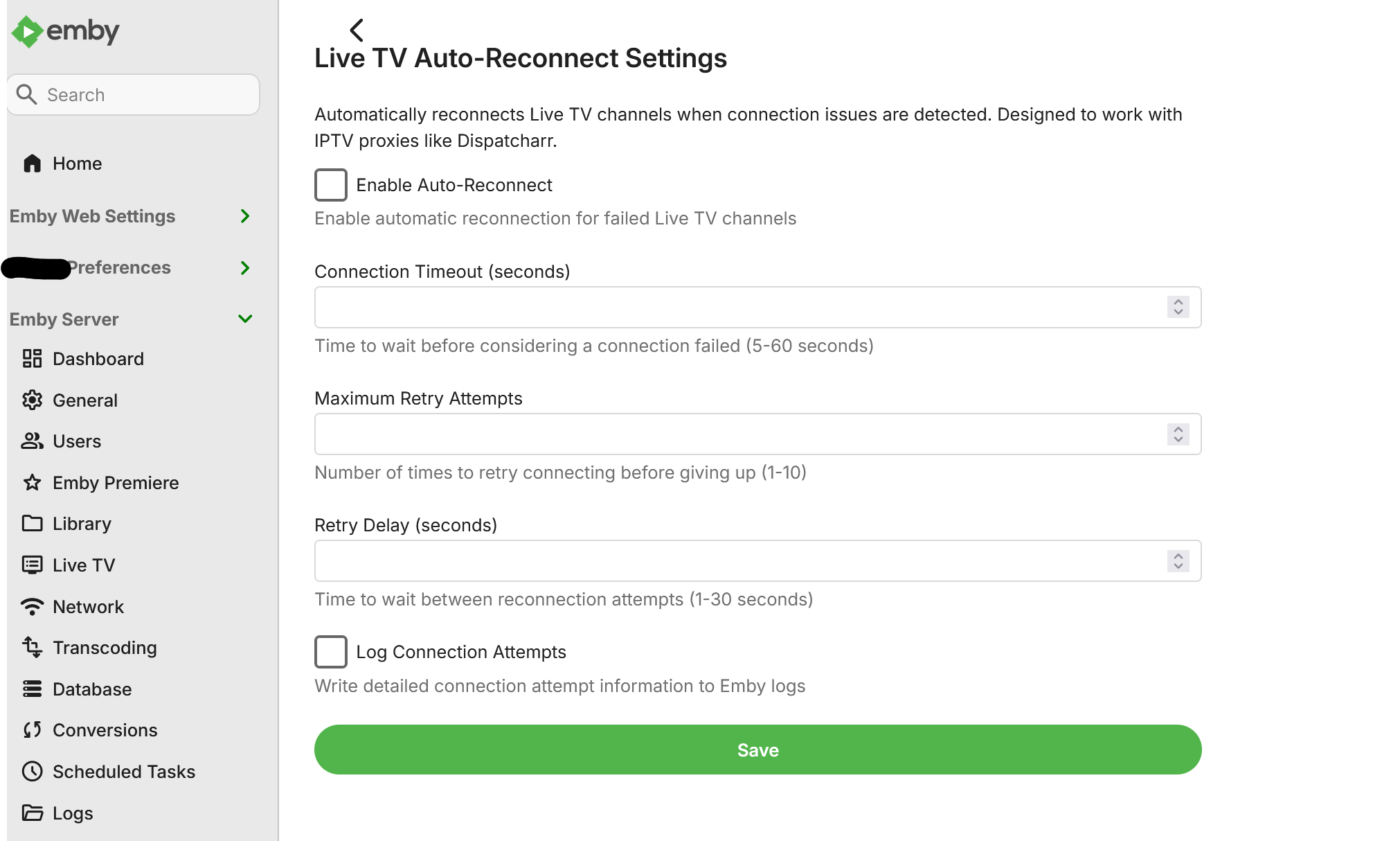
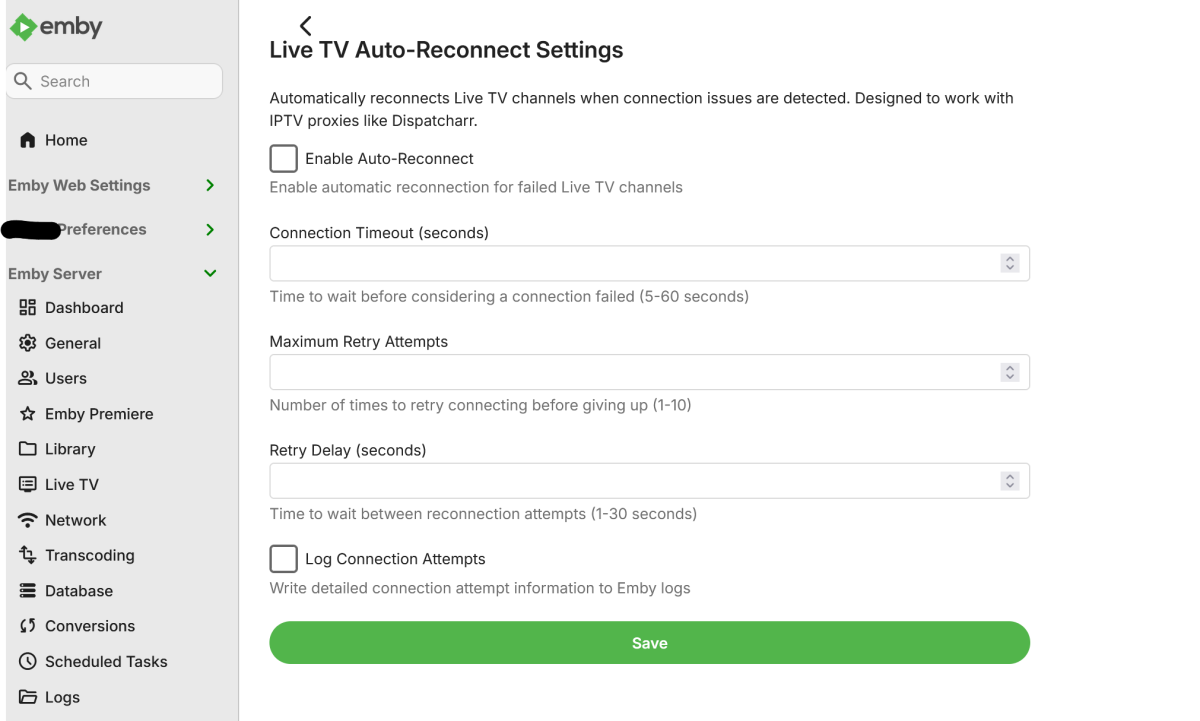
I use Dispatcharr as an IPTV proxy that assigns multiple backup streams to each channel. When a stream experiences issues (buffering, stuttering, or complete failure), Dispatcharr automatically fails over to the next available stream in the sequence. Current Issue: When Emby encounters a problem connecting to a Live TV channel, it tends stops the connection attempt entirely after a few seconds. Even though Dispatcharr switches to a backup stream on the backend, Emby has already stopped trying to connect and does not automatically retry. Requested Solution: Add configurable settings for Live TV channels: Connection timeout duration (time to wait before considering a stream failed) Auto-reconnect behavior (automatically retry connection after timeout) Number of retry attempts This would allow Emby to detect when a stream has failed and automatically reconnect, which would then pick up the backup stream that Dispatcharr has switched to. Also, as a bonus, adding native Xtream Codes (XC) functionality would be greatly appreciated.21 points
-
Be able to create playlist based on a certain criteria, like genre and or year, in order to create a dynamic playlist that it refreshes automatically when new content is added. This way you can for example, create a tv comedy playlist from the 90's, or a new sci-fi Movies playlist. Some other criteria for rules could be the rating, watched/unwantched, score, tags, language, audio codec, etc The possibilities could be endless19 points
-
First and foremost: 1. This is heavily vibe-coded with the help of Claude Sonnet 4.5 and just a proof of concept (though it's fully functional on my side)! 2. Tested with stable Server 4.9.1.80 on a 1080p-Screen 3. Pretty sure that the code is not the best and shpuld be reviewed by anyone with good js-Skills. 4. This Banner just works on the Web Client. I hope one of the experienced devs here can make more out of it, e.g. a Plugin. Perhaps something like that can be incorporated as a menu option by Emby itself in the future. What the Spotlight does: On every Homepage load the Spotlight takes 10 items (Movies/TV Shows) from 50 latest Releases in the library and displays them as a slideshow. Banner is clickable to get to the item detail screen. Ratings are also included. Download from: https://github.com/v1rusnl/EmbySpotlight 20251005-1807-48.9352916.mp4.b64639dcb41419847c7795874d16a84b.mp416 points
-
Could you allow users to customize the order of movies in collections instead of only having it by alphabetical or by release date? Example: I want to have a collection of Batman movies, both animated and motion pictures but want the motion pictures together followed by all the animated ones. With the current order options, this isn't possible. Thanks!15 points
-
That would only be valid when there would be a TVnext entry in that list that would also exist for 10 years already and it would be ranging behind. The SmartPlaylist entry has 165 votes. When you sum up the votes from all the feature requests that TVnext fulfills or enables (by providing the technical basis), then you get a result of 315, which is almost double. And those requests are just a fraction of what it actually delivers in total. Eventually, it's not "a feature", it's a package of dozens of features. That there aren't more related requests in the Feature Request forum is surely also because these would have seemed too unrealistic to even post a request for, since the current live tv doesn't have a basis upon which such features could be built and delivered. So please Grim, excuse me contradicting. I haven't posted in this conversation for a long time, but in this case, the relations need to be set straight. SmartPlaylists being a feature that is more requested (by votes) or has a higher demand (in general) is a view that doesn't hold true in any way. At the bottom line, the point where it gets wrong is when trying to compare these two things in the first place.15 points
-
Here is the latest list of versions for Emby software across the server and clients. Emby Server Stable: v4.9.5.0 (2026/05/18) Release Notes Beta: v4.10.0.14 (2026/06/04) Release Notes For other platforms, please refer to the download page. Emby for Android TV Google Devices Stable: v2.1.23 (2025/12/27) Beta: v2.1.46 (2026/04/15) Amazon Devices Stable: v2.1.23 (2025/12/27) Beta: v2.1.46 (2026/04/15) Stable Release Notes Beta Release Notes Universal Android app Stable: v3.5.16 (2026/01/26) Beta: v3.5.36 (2026/05/10) Release Notes Download the latest Beta here. Emby for Kodi See here for the latest information. Emby for Roku Stable: v4.1.63 (2026/05/04) Release Notes Beta: v4.1.64 (2026/05/13) Release Notes Emby for Windows (Windows Store for PC & Xbox One) Stable Release Notes Beta release notes Emby for Linux Beta Release Notes Emby for Samsung Smart TV (Orsay) E-series to H-series TVs only Release Notes Emby Theatre for Samsung Smart TV (Tizen) Release Notes Emby Theatre for LG Smart TV Stable: 1.0.50 (2026/01/19) Emby for iOS Stable: v2.2.53 (2026/05/16) Stable Release Notes Beta: v2.2.52 (2025/04/11) Beta Release Notes Emby for Apple TV Stable: v2.0.3 (2025/12/26) Announcement Beta: v2.0.6 (2026/04/11) Release Notes Emby for tvOS (Apple TV) Stable: 2.1.6 (2022/12/23) Release Notes - TBA Beta: 1.5.1 (10) (2021/03/02) Beta Release Notes Emby For MacOS Stable: 2.1.6 (2022/05/09) Details here. I will keep this post up-to-date as much as possible, but please send me a PM about anything I haven't updated, or is missing. Special thanks to @Borskfor supplying a lot of the updated information. Thanks.14 points
-
I'm a plex life time member, but I have been using Emby for over six years continuously, but there is a feature which I have always thought is missing in Emby which I would like and encourage the developer to consider including especially in this dispensation where families can social or commingle due to COVID 19. Today, I received a notification from Plex about it new feature titled Watch together you can read about it here https://support.plex.tv/articles/watch-together/ The feature allows friends and families at distance to watch same movies together instantly, you simply invite all your buddy, once they signed to the system which can be seeing in the server then play and pause as needed, this I think is cool feature should be added to emby. Let's here your though if Emby developer should consider adding this feature to our beloved Emby Media https://www.bing.com/news/search?q=Plex+Watch+Together&qpvt=plex+watch+together&FORM=EWRE14 points
-
As of EMBY server update to version 4.9 the folder view has change to a "windows explorer" like structure in which single item movies are not display as movies anymore but as folders. This is being discuss here: So the official request is to go back, or at least implement a legacy view, so we can have the folder view we've been having since the beguining of time. Thanks14 points
-
The wait is over! We are excited to announce public availability of the new Emby Linux app beta program. Why a Native Linux App? While Emby’s web app works well across platforms, there are limits to what a browser-based player can achieve, especially when it comes to modern video and audio playback. The Linux app was created to go beyond those limits. At the core of this decision is one simple goal: BEST IN CLASS VIDEO PLAYBACK. Browsers continue to improve, but they inevitably lag behind native applications when it comes to advanced video technologies, hardware acceleration, and reliable fullscreen playback. Emby users expect smooth, high-quality playback — and delivering that consistently requires a native application. Benefits Over the Web Player The new Linux app provides several advantages over watching through a browser: More reliable video playback with fewer browser-related limitations Better performance and lower system overhead Improved full screen behavior across Linux desktop environments Direct integration with native video playback technologies A cleaner, distraction free viewing experience By separating video playback from the browser entirely, the app is able to take full advantage of the system and deliver a smoother experience. Designed for Linux Desktops The Emby Linux app is built to feel at home on Linux. It works across major Linux environments . The result is a modern Emby experience that’s faster, more consistent, and purpose built for Linux users. Available Now The new Emby Linux Beta app is now available and we are waiting for your feedback! Want to get started right away? Head on over to the beta instructions page for more! Please provide feedback in this forum: Linux Beta View the full article14 points
-
I have been working on this for a while now and want to see if there is any interest at all for something like it. Anyone familiar with Unraids plugin named "Fix common problems" will instantly know what this is intended to do, for those that don't, the idea is to scan logs for errors in the Emby logs, show and if common known problem explain them and show a solution to the problem. The plugin is far from complete and might take a long time to finish (if it gets finished at all, no promises at all!!) because of all the possible problems that the plugin needs to recognize. Right now all it can do is find problems and report that the problem is there. I would just like to know if there is any interest in this before i use more time working on it.14 points
-
Home Screen Companion Plugin https://github.com/soderlund91/HomeScreenCompanion Below is a summary for this plugin, visit GitHub for latest release and full documentation. Home Screen Companion is a plugin for Emby Server that automatically manages home screen sections using tags and collections for your Movies and TV Shows — and keeps your home screen sections in sync across multiple users. It works by connecting one or more sources to a tag and/or collection in your Emby library. Sources can be external lists from Trakt, MDBList or TMDb, rules-based filters on your own library, AI-generated recommendations, or your existing local collections and playlists. Each source runs on a schedule, and the plugin makes sure your tags and collections always reflects the current state — adding and removing movies and series automatically. The plugin can then use the tags or collections to create a home section and give you a living and curated home screen experience. With Home screen companion you can also manage the home screen sections for all users - copy, manage and create home sections directly from selected source. No need to set it up for every individual user, just copy it from one user and you can have a server wide home screen! Important Requires minimum Emby server 4.10.0.10 Key Features Different source types — External List, Smart Playlist, AI List, Local Collection, Local Playlist Automatic tagging and collections — items are added and removed as lists change Advanced scheduling — annual, weekly, or specific date windows Per-entry home screen sections — automatically managed sections for any tag or collection Home screen sync — mirror one user's home screen layout to any number of other users Top-List — Create a "Top 10 movies of today", and the plugin will create a new home section for selected users with numbered posters Home screen sync — mirror one user's home screen layout to any number of other users Source Types External List Connect to curated lists on Trakt or MDBList. The plugin fetches the list on a schedule, matches items to your library by IMDB ID, and keeps tags and collections in sync automatically. Smart Playlist Build dynamic lists directly from your library using a flexible rule builder. No external service needed — the plugin scans your library and tags items that match your criteria. AI List Generate recommendations using AI. Write a natural language prompt and the plugin calls an AI model to produce a list of movies and shows, then matches them against your library. Local Collection and Local Playlist Tag items based on an existing Emby Collection. Combine with scheduling to create time-limited promotions of curated content — no external API needed. Tags The plugin take the source type you have and put a tag on Movies and Series. You can choose at what level to put the tag, either the Series, Seasons, or the episode. Collections Any source type can automatically maintain an Emby Collection alongside its tag. Playlist Any source type can automatically maintain an Emby Playlist for all or selected users. Scheduling Set up advanced rules when the tag or collection should be active. For example you only want to tag a Christmas list during December, or you only want your collection be available during Halloween. With the scheduler, tags and collections get added and removed automatically. Home screen Add a dedicated home screen section to any tag/collection entry. The plugin creates, updates, and removes the section automatically on each sync, no manual Emby configuration needed. Just select your source and enable the home screen option - and you will have this source as a row on your home screen for all selected users. Home Screen Sync - server wide home screen With this function you can easily copy a users full home screen sections to all other users. No need to set this up for every user now! Just configure the home screen sections and library order for one user, and you can have a server wide home screen that looks the same for all selected users in the blink of an eye. Top-List The plugin can create a "Top 10" style of home section for selected users. This can be done by either manually select what movies you want, or use existing tags to have a list that is auto-updated. Installation Download the latest .dll from the Releases page (GitHub). Place the .dll file in your Emby plugins folder. Restart Emby Server. Screenshots More screenshots in below spoiler13 points
-
It'd be great if server admins could generate a QR code for a user to scan with their app to connect to a server, without using EmbyConnect.13 points
-
Similar to this old post, I'm suggesting a tab that would be titled Watchlist and could be placed in between Suggestions and Favorites. The functionality would pretty much be a copy of Favorites, just with a + symbol added next to the heart and other symbols that let you favorite a movie etc. The previous post had mentioned extra functionality such as automatically removing a movie from Watchlist after it has been watched. This would be nice, but is unnecessary because after watching a movie you can simply click the + symbol a second time to remove it from Watchlist. I would imagine this would be very easy to implement as a rebranded copy of Favorites. Adding other features could come later. Edit: added link to old post12 points
-
Watching Eye is a plugin designed to give you granular control over your server's streaming environment. It's the perfect tool for managing user watch time, monitoring server performance, and ensuring a smooth viewing experience for everyone. Key Features: Watch Time Limiter: Set daily, weekly, monthly, and even yearly watch time limits for specific users. Create global watch time rules that apply to all users, with the option to exclude certain individuals. Establish specific time windows during which users are allowed to watch content, perfect for parental controls. Transcode Notifications and Blocking: Receive instant notifications when a user's stream starts transcoding, helping you identify potential playback issues. Proactively block transcodes based on video resolution or container format to conserve server resources. Customize notification messages to inform users why their video is transcoding and suggest solutions. Playback Control and Monitoring: Automatically stop streams that have been paused for an extended period,. Keep a detailed log of transcoding events and when users reach their watch time limits. Download on Githuib - WatchingEye.11 points
-
@@Luke stated in a previous post (https://emby.media/community/index.php?/topic/49933-replaygain-music-support/) adding support for this could easily be done for at least the theater client seeing as the player used already supports replaygain. I'm making this feature request in hopes that this support is added, as I have no dev experience myself11 points
-
Unless I'm being a bit blind (highly possible!), I'd love a way to hide a couple of the top green navigation items without hacking it in myself. For example, in Movies I don't want the 'Trailers' item to appear for any profile and for TV I don't need the 'Upcoming' nav link. Obviously not a major issue but thought it would be a nice thing to have, perhaps allowing them to be re-ordered like the home page items but again just a nice extra,11 points
-
Example configuration page.
 11 points
 -
Feature Request: Have User Groups and all settings applied at the Group Level That way you can just assign users to the appropriate Group and all settings will be inheritated.11 points
-
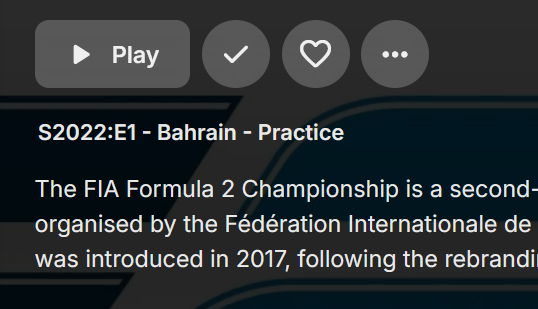
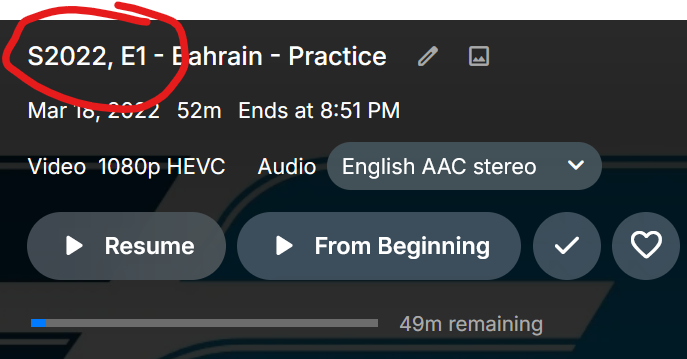
Is there any way to revert to the colon? Prior to 4.9: 4.9:
 11 points
 -
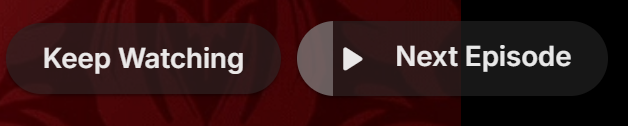
Tired of seeing end credits before Emby loads the next episode of your favorite TV show? Now you can remove that iritation! EmbyCredits detects those end credits and add a marker for Emby to use so end credits can be skipped. In the catalog under Metadata or at: https://github.com/yocksers/EmbyCredits This is either by done chroma fingerprinting and comparing the episodes or by the plugin extracting png/jpg images of the TV show, sending them to a tesseract docker container, the tesseract finds a match and reports that back to the plugin that then adds the skip to Embys database. Emby then shows a "Keep Watching | Next Episode" when it sees the marker. NOTE: Requirements: yock1/embycreditocr installed if OCR detection is wanted (recommended and most precise method). In the plugin you add the Tesseract server IP: IMPORTANT!!!!! As the plugin extracts a lot of images it needs a custom folder to do this as to not fill up Emby docker disk images so set this setting: Then add some keywords to search for (i have added a few but for more precise detection you should add some more that are fitting to your library). Choose a library or a single episode and press process. The plugin can also be set to run as a scheduled task or auto detection for when new shows or episodes have been added to Emby. Speciel thanks to friends who helped developing and @Neminemfor help with testing! If you like this plugin then please consider donating at https://buymeacoffee.com/yockser so i can sit back and relax once in a while with a nice coffee. Disclaimer: Use at your own risk! The plugin has been tested and re-tested but bugs are devious little things that can creep in unnoticed. Do with the plugin what ever you want, change the code, call it your own creation or even take money for it.. I don't care. The original will be here for free!
 10 points
 -
I frequently use the filter of Unwatched for movies and TV shows. And with music, you get recommendations based upon "similar" artist or songs. I would like a flag option to mark media as "Not Interested" or whatever verbiage would be better for the masses. This would have to be at the user level and not stored in a NFO file since I would like to filter out things my family likes, but only on my profile. As my libraries grow, I am having more content for my family. Since I am the only male in the house, my users have tastes that are distinctly different from mine. Whether it be real surgery shows, true murder, sappy romances, or telenovelas; these are things that I will never - and I do mean never - watch. The same thing goes for the music collection. I don't mind classic musical soundtracks, but my daughters collection of Broadway musicals is vast. And annoying. Now I could make them as Watched, but then that would go into the algorithm "Since you watched this, you might like this...", I would like to avoid doing that. I've poked around quite a bit, but I don't see anything like this currently nor did I see anything like this requested. If it has been requested but called something else, I would love to know about it so I can like that post. Thanks in advance.10 points
-
In Jellyfin there is that option for m3u tuners. As me and probably most people will use Dispatcharr now or soon, this is being done twice at the moment - by Dispatcharr and by Emby. So if we can disable that in Emby we will hopefully get a slightly faster stream start. BR10 points
-
I mentioned it in another thread, but thought I'd put it here since this looks like a new section--just for posterity. Would like to have a bulk meta data editor function. For example, if I have 750 videos whose producing studio is the same, I want to select those videos and apply the name of the studio to those videos. Similarly, if there is a custom tag I want to apply to a subset of those movies, I want to be able to select them in bulk and apply the tag to those videos (instead of selecting them one by one).10 points
-
With College Football and NFL seasons starting up in the States, a multi-screen option for Live TV would be a nice addition to the Emby feature set. I am thinking of what the WatchESPN app offers thru their Web Browser access. The ability to open a multi-screen window that breaks into four (4) screens that allows you to select streams (Live or Replay) for each and then go full screen. Audio is from whichever of the four screens you have as active. I can accomplish the same right now with the HDHomeRun Quick View TV app. I open multiple instances of the Windows app and then snap them to each corner on my 110" projector screen. Equivalent of four (4) 55" screens. Would be nice if this were a remote friendly option from within Emby Theater and the WebUI clients. I have only seen it in Web Browsers at the moment and not any of the Win10 UWP apps (FS GO, NBCSn, WatchESPN). But, Fox Sports Go just released a multi-screen solution for their Apple TV app. https://techcrunch.com/2016/08/26/fox-sports-go-hits-apple-tv-allows-viewing-of-four-games-at-once/10 points
-
I am looking to see if a SAML2/OAuth plugin is something others would use. I myself would love this feature to share Emby publicly with family members and friend and worry a little less about insecure passwords that some may use. I personally am a big advocate for security as I work in IT and see how a lack of good security can cause havoc. I love Okta and what it offers. Anyone can sign up and use it for free under 1000 users if you sign up as a Developer. That is just plain awesome. Let's see who else is interested. I am excited to find out! Thanks10 points
-
You two go get a room, and leave us rest bitching about 5+ years of waiting for functional IP TV in emby. I think there has been enough bitching for the moment. Feel free to resume later, but for now I think, the message has been received. Let me share some gossip instead... You have no idea what an important role the WebStreams plugin is playing in the context of TVnext. Initially, it was meant to be integrated in TVnext, but hardly anybody was able to follow or visualize and imagine what I was talking about exactly, so for me, this had become... The Hardest Sell We've all learnt that there's nothing worse you can do than (actually or seemingly) taking away an existing feature in a new/updated version of a software application. And yet there was exactly one such kind of removal that was inevitable in the making of TVnext, which is - simply said - about dropped support for VOD streams as (fake) TV channels. The below conversation is fictional but roughly resembles the average of the kind of conversations that I had with many people at that time - not just internally, but also with external people and with some of our beta participants as well: Feature Removal? softworkz: "Please be prepared that VOD streams are not supported and not handled by TVnext. TVnext is about live TV streams and also supports non-TV live streams but not playback of static files that are just disguised as live streams" other: "What? You cannot do that! Users expect that to work, all other apps are doing it like that, you must not take this feature away!" softworkz: "Yes, I'm fully aware about how people are reacting when they feel that a feature is taken away from them. That's why I have the following great plan:" other: (already stopped listening) softworkz: "The plan is to replace the lacking VOD playback feature with something that is so much better and nicer and unique and even unprecedented, that nobody will ever be missing it." other: "No - people expect this to work like everywhere else." softworkz: "What do you mean - what exactly are people expecting? That the first episode of series XYZ, season 1 is on channel 1456153 and the second on 1456154 while the first episode of the next season is on channel 1623214?" other: "Yea, that's how it works everywhere." softworkz: "But we are Emby - our mission is to present media content in the best possible way, enriched with all kinds of metadata - who would want to access series content via non-memorable, 6- to 10-digit channel ids without any other metadata than a short description and a single image - if at all? We can present this in a much better way!" other: "Nah, people will freak out when they cannot do like that anymore, this won't be accepted" softworkz: "But how can that be? This is so clearly inferior to everything else. This doesn't even allow having saved playback positions, neither any kind of 'watched' indications etc. There are no series and season entries for grouping - in sum: you get almost none of the features that Emby provides normally." other: "All others are doing it the same way; people are used to it and expecting it to work like that." softworkz: "Why should people prefer Emby then, when it doesn't do better than any of the other apps? And I still can't imagine how anybody would be seriously using it that way: How do you navigate a TV guide when it has 10k, 20k, or even more channel rows? And all of those rows (unless actual live tv) having a single 'program' that is repeating 24/7? When you want to play an episode or film, you search for a TV channel of that name? And when you have 50k TV channels due to that, how can you find an actual TV channel when you get so many search hits? And how is channel management supposed to work? When you want to bring a certain channel from the end to the middle, or from the middle to the start or end? You hold down your finger on the mouse button for several minutes when drag-drop sorting? For every single channel that you want to move?" other: "Sure it's not ideal, but that's how it has always worked, and people want that!" softworkz: "Yes, but..." other: "No, this must continue working!" softworkz: "But the WebStreams concept is so cool - nobody else has that! I'm sure, people will love it. Anyway, TVnext cannot handle VOD - it's impossible unless we drop so many essential features that it's not even worth proceeding." other: "Hmm, well, err, but no...etc etc." softworkz: (sigh) WebStreams Plugin After all those discussions, I had realized that I couldn't get that idea sold as such. The sole promise of providing something better in the end wasn't sufficiently convincing. Yet, there wasn't an alternative to dropping VOD from live tv either. At the same time, this had grown and become a really hot topic, putting the project on the edge, even though it had been explicitly documented and discussed early that this split between live and vod streams will need to happen. The only way out that I had seen at this time was to turn the sole promise of "providing something so much better that nobody would ever complain about lacking VOD channels" into a reality - outside of TVnext, independent of TVnext and delivered even before TVnext. That's how the WebStreams plugin came to life. Some got convinced quickly, for others it still took a while, but as of now, I don't think that there's any remaining doubt that the WebStreams plugin is the way to go for handling VOD content in Emby - even though it's been a long way...10 points
-
After many trial-and-error I've finally been able to get it working by rebuilding the `intel-media-driver` library with the latest version, the hard part was compiling this with dependencies having compatible ABI as the ones running on the Emby image (thanks closed source), which I found with image `ubuntu:18.04`. Sharing here to everyone who was stuck like me. To get this working you need to make your custom image of the emby image with the updated dependencies. The following steps took me 15 minutes to build on a 20 cores CPU, the build process will take longer with less cores (therefore, much longer on a N150 if you're compiling directly there). 1) Create an empty folder with a file `Dockerfile` file with the following content FROM ubuntu:18.04 AS builder WORKDIR /workspace RUN apt-get update && \ apt-get install -y \ build-essential \ git \ cmake \ automake \ autoconf \ libtool \ m4 \ pkg-config \ libdrm-dev RUN mkdir build build/usr build/lib # Libva RUN \ git clone https://github.com/intel/libva.git && \ cd libva && \ git checkout 2.22.0 && \ ./autogen.sh --prefix=/workspace/build/usr --libdir=/workspace/build/lib && \ make -j$(nproc) && \ make install && \ cd - # Gmmlib RUN \ git clone https://github.com/intel/gmmlib.git && \ cd gmmlib && \ git checkout intel-gmmlib-22.7.2 && \ mkdir build && \ cd build && \ cmake -DCMAKE_INSTALL_PREFIX=/workspace/build/usr -DCMAKE_POLICY_VERSION_MINIMUM=3.5 -DCMAKE_INSTALL_LIBDIR=/workspace/build/lib -DCMAKE_BUILD_TYPE=ReleaseInternal .. && \ make -j$(nproc) && \ make install && \ cd ../../ # Media Driver RUN \ git clone https://github.com/intel/media-driver.git && \ cd media-driver && \ mkdir build && \ cd build && \ export PKG_CONFIG_PATH=/workspace/build/lib/pkgconfig && \ cmake -DCMAKE_LIBRARY_PATH=/workspace/build/lib -DCMAKE_INSTALL_PREFIX=/workspace/build/usr -DCMAKE_INSTALL_LIBDIR=/workspace/build/lib .. && \ make -j$(nproc) && \ make install RUN find /workspace/build -name "*.so" -exec strip --strip-unneeded {} \; FROM emby/embyserver:4.9.1.0 AS emby COPY --from=builder /workspace/build/lib /lib 2) Build the image using `docker build -t emby-n150-fixed .` This will take a while, the more CPU cores you have the shorter (took me about 30 minutes with 20 cores) 3) Check that this is working by running `docker run --rm -it --device /dev/dri:/dev/dri --entrypoint vainfo emby-n150-fixed`, if this returns something as follows, then it worked: Trying display: drm libva info: VA-API version 1.22.0 libva info: Trying to open /lib/dri/iHD_drv_video.so libva info: Found init function __vaDriverInit_1_22 libva info: va_openDriver() returns 0 vainfo: VA-API version: 1.22 (libva 2.22.0) vainfo: Driver version: Intel iHD driver for Intel(R) Gen Graphics - 25.2.5 (4b3a078bd) vainfo: Supported profile and entrypoints VAProfileNone : VAEntrypointVideoProc VAProfileNone : VAEntrypointStats VAProfileMPEG2Simple : VAEntrypointVLD VAProfileMPEG2Simple : VAEntrypointEncSlice VAProfileMPEG2Main : VAEntrypointVLD VAProfileMPEG2Main : VAEntrypointEncSlice VAProfileH264Main : VAEntrypointVLD VAProfileH264Main : VAEntrypointEncSlice VAProfileH264Main : VAEntrypointFEI VAProfileH264Main : VAEntrypointEncSliceLP VAProfileH264High : VAEntrypointVLD VAProfileH264High : VAEntrypointEncSlice VAProfileH264High : VAEntrypointFEI VAProfileH264High : VAEntrypointEncSliceLP VAProfileVC1Simple : VAEntrypointVLD VAProfileVC1Main : VAEntrypointVLD VAProfileVC1Advanced : VAEntrypointVLD VAProfileJPEGBaseline : VAEntrypointVLD VAProfileJPEGBaseline : VAEntrypointEncPicture VAProfileH264ConstrainedBaseline: VAEntrypointVLD VAProfileH264ConstrainedBaseline: VAEntrypointEncSlice VAProfileH264ConstrainedBaseline: VAEntrypointFEI VAProfileH264ConstrainedBaseline: VAEntrypointEncSliceLP VAProfileVP8Version0_3 : VAEntrypointVLD VAProfileHEVCMain : VAEntrypointVLD VAProfileHEVCMain : VAEntrypointEncSlice VAProfileHEVCMain : VAEntrypointFEI VAProfileHEVCMain : VAEntrypointEncSliceLP VAProfileHEVCMain10 : VAEntrypointVLD VAProfileHEVCMain10 : VAEntrypointEncSlice VAProfileHEVCMain10 : VAEntrypointEncSliceLP VAProfileVP9Profile0 : VAEntrypointVLD VAProfileVP9Profile0 : VAEntrypointEncSliceLP VAProfileVP9Profile1 : VAEntrypointVLD VAProfileVP9Profile1 : VAEntrypointEncSliceLP VAProfileVP9Profile2 : VAEntrypointVLD VAProfileVP9Profile2 : VAEntrypointEncSliceLP VAProfileVP9Profile3 : VAEntrypointVLD VAProfileVP9Profile3 : VAEntrypointEncSliceLP VAProfileHEVCMain12 : VAEntrypointVLD VAProfileHEVCMain12 : VAEntrypointEncSlice VAProfileHEVCMain422_10 : VAEntrypointVLD VAProfileHEVCMain422_10 : VAEntrypointEncSlice VAProfileHEVCMain422_12 : VAEntrypointVLD VAProfileHEVCMain422_12 : VAEntrypointEncSlice VAProfileHEVCMain444 : VAEntrypointVLD VAProfileHEVCMain444 : VAEntrypointEncSliceLP VAProfileHEVCMain444_10 : VAEntrypointVLD VAProfileHEVCMain444_10 : VAEntrypointEncSliceLP VAProfileHEVCMain444_12 : VAEntrypointVLD VAProfileHEVCSccMain : VAEntrypointVLD VAProfileHEVCSccMain : VAEntrypointEncSliceLP VAProfileHEVCSccMain10 : VAEntrypointVLD VAProfileHEVCSccMain10 : VAEntrypointEncSliceLP VAProfileHEVCSccMain444 : VAEntrypointVLD VAProfileHEVCSccMain444 : VAEntrypointEncSliceLP VAProfileAV1Profile0 : VAEntrypointVLD VAProfileHEVCSccMain444_10 : VAEntrypointVLD VAProfileHEVCSccMain444_10 : VAEntrypointEncSliceLP You can compare and run the same command on the emby image, you should have a bunch of errors instead. 4) (OPTIONAL) For your convenience, I uploaded the image on DockerHub if you want an easy way to see if it works, use the image rajiska/emby-n150-fixed:4.9.1.0, though I'd recommend to build the image yourself10 points
-
Hi Guys, I recently moved from Kodi with MySQL for lack of proper multi user management and server side support, I have to say I'm impressed with Emby. Together with the Kodi Plugin it really takes the solution to a whole new level, count me in among the supporters! One feature I would like to see is the ability to recommend movies or shows to other users: I share my Library with close friends and family but it is a big library so they are always calling me to recommend them a movie to watch. It would be really cool if after watching a movie I can click a Recommend button and choose the users I think would like the movie, then it is displayed on their suggested movies at the top with the name of the user who recommended it... Sorry if there is something like this is already there, I am new to the interface and don't fully know it but could not find such feature... Thanks!10 points
-
A new plugin is in the Emby plugin catalog for Emby Premiere users, largely developed by @softworkz. This plugin requires Emby Server version 4.9.1.27+, so unless you're running that, you will not see it. WebStreams This is designed to be a better version of the IPTV plugin. You can now import both single streams as well as M3U lists into Emby Server. Eventually we may also add RSS support and merge the podcasts plugin into this. Beyond RSS, there is also the potential to support other formats if there's enough demand for them. Features Import both single streams and M3U lists into Emby Server TV episodes within M3U are displayed with Series and Season hierarchies, just like regular libraries (make sure to select the appropriate content type when adding a source) Rich metadata support using MovieDb and TVDB (make sure to select the appropriate content type when adding a source) Ability to filter what gets imported Known Issues We need to add more visibility into the server's background refresh queue. You can see the progress of it on the webstreams config page. Currently if you restart the server in the middle of this, then you will need to run the refresh channels scheduled task.9 points
-
TheTVDB now supports more alternative orders than just Aired/Absolute/DVD. Can Emby query these additional orders and add them as options? Two examples of shows I've seen this used are Re:Zero which has a "Director's Cut" display order and Money Heist which has a "Netflix" order. https://thetvdb.com/series/re-zero-starting-life-in-another-world https://thetvdb.com/series/la-casa-de-papel9 points
-
Jellyfin is more popular as pirates hate to pay for stuff. Period. The fact it's open source means nothing. Jellyfin is extremely fragmented and still based on Luke's ancient code. Remember, Jellyfin was created because someone didn't like the fact there was a nag screen to pay for an open source product. They created Emby Unlocked and went forward and forked what is now Jellyfin. It's an inferior product that works well enough that people are willing to put up with its issues as it costs them zero dollars, yet costs them time and frustration.9 points
-
Ok so my request is to be able to search each library separate as it stands when you search it searches everything, and if like me you have 30k music tracks 10k books/comics 10k episodes and 10k+ movies, searching is slow so is it possible to have a search section for each library individually9 points
-
My request is to be able to chose to add items to the home screen. Specifically in my case, I am thinking of playlists and collections. Here's some reasons I'd like to see this: The home screen is the first piece of the user interface a person will see when they pull up Emby. I often places movies in bulk into my media library. This sometimes means people never see the new movie I've made available. Happens a lot, actually. While all movies are searchable or can be found by sorting, I believe the interface would benefit from having the customization option. I have created a "Justin Recommends" collection and would LOVE to be able to put that on the home screen. By keeping this optional, no one is forced to use it. If you don't have a use-case, then it's just a feature. If you look at things like Netflix, many movies and shows get "featured" and by doing that, a lot of people end up watching that wouldn't otherwise (imagine if The Tiger King was just another buried documentary you had to hunt for, no one would have heard of it). I appreciate your time. If you've considered this before and decided against for reasons other than difficulty implementing the feature, I'd ask you to reconsider. I believe that being able to customize our servers helps us personalize and tailor them to our audience and our needs, and that helps promote a feeling of ownership. I also truly believe that this small change could lead to some powerful results. In my case, I know that it would be of huge benefit to accomplishing what I would like to do with my Emby server. Thank you.9 points
-
Since we can now detect end credits, or manually add them in other cases, it would be nice to see this, rather than an automatic percentage/time remaining, trigger the "next episode" popup and decide whether an episode is resumable or not. Even better if it could expand to movies for the latter point.9 points
-
Reading though these posts is like going back 5 years in time, where all of the questions have already been asked As most people here know, I am an ardent ATV app user, but even I have to admit that the Universal Android app has come a long way in those 5 years, but it still isn't as good as the ATV app! The ATV app is buttery smooth, as it has been built for a specific platform, whereas the Universal Android app has been shoe-horned into the same space. There are currenrtly 95+ pages discussing the differences between the app in the link above, with many items still outstanding. I can't see how 2 apps developed for the same device/platform are so different in the way they act, seeing as they were developed by the same team of developers. Anyway, until there is no other choice, I will continue to use the ATV app, and try and report all of the issues with the Universal Android app, when I see substantive changes.9 points
-
If you’re new to the world of media servers, you might be wondering what they are, why people use them, and where Emby fits in. Whether you have a collection of movies, TV shows, music, personal videos, photos, or all of the above, a media server helps you take control of your entertainment. Let’s break it down. So, What Is a Media Server? A media server is simply a system that allows you to store your media in one place and access it from anywhere — your TV, phone, tablet, computer, or even while on the go. Instead of hunting through drives, folders, or different apps, a media server organizes and presents your library in a clean, familiar interface with artwork, descriptions, cast info, and more. Think of it as your personal streaming service that is built around your collection, not someone else’s. An important note and one we can not stress enough, is that Emby does NOT provide any movies, shows, channels or other media. Emby is only for organizing and streaming YOUR own content. Why Choose Emby? There may be several media server solutions out there, but Emby has a philosophy that sets it apart: Your Media. Your Way. With Emby, you are in control! Your library is yours, your privacy is yours, and your server is yours. No forced cloud accounts. No data harvesting. No locked-down ecosystem. Emby is built around choice and customization, allowing you to decide: Where your media is store How your library looks Who can access it What devices you stream to Whether you want to manage media manually or automatically All while keeping your experience intuitive and easy. Beautiful and Powerful Emby automatically fetches artwork, metadata, and episode information to make your library look amazing. The apps are clean, fast, and available across: Smart TVs Streaming boxes like Fire TV, Apple TV, Shield, Android TV Android, iOS, and tablets Game consoles Web browsers And with Emby Premiere, there's even more! You can unlock powerful features like: Offline downloads DVR with Live TV Advanced parental controls Hardware transcoding for smooth streaming Whether you're just starting or you're a longtime media enthusiast, Emby scales with you. This Is Just the Beginning Over the next few days, we’ll walk through: How to install Emby How to add your media Tips for organizing your library And how to stream anywhere So stay tuned — your personal media journey is just getting started. Your Media. Your Way. Welcome to Emby. View the full article9 points
-
I'd rather Luke work on the Core Smart Views - all the time he is debugging this, he could be working on the core feature that does the same - just saying...9 points
-
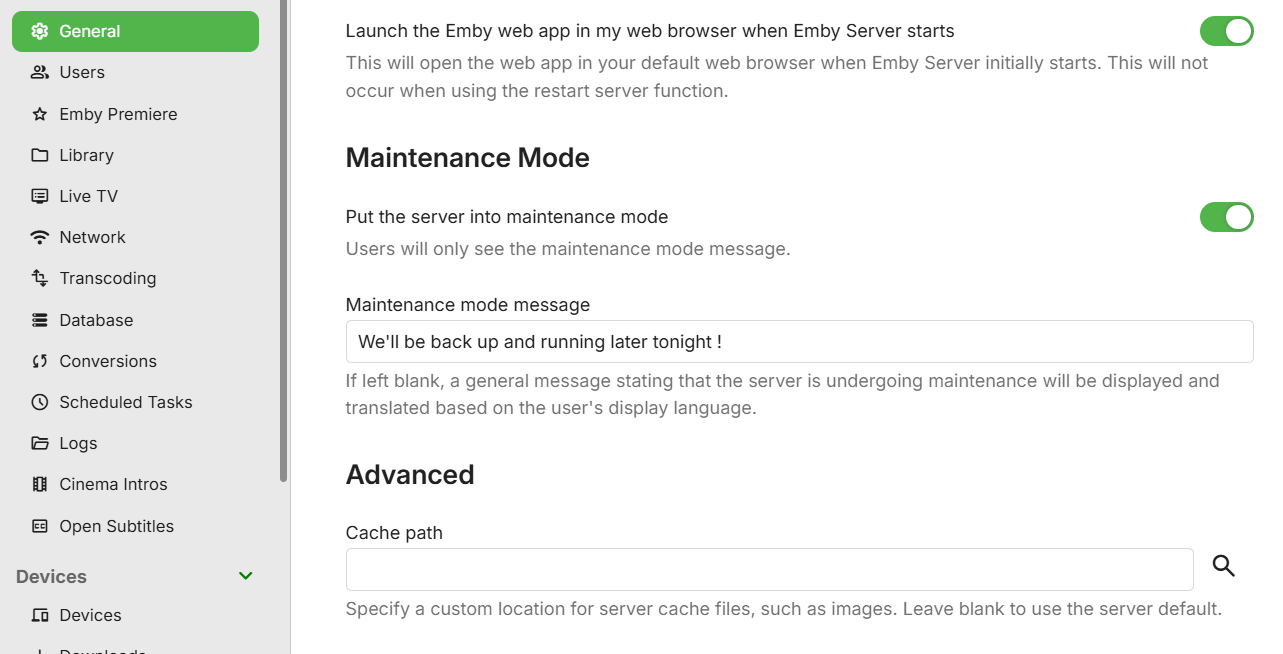
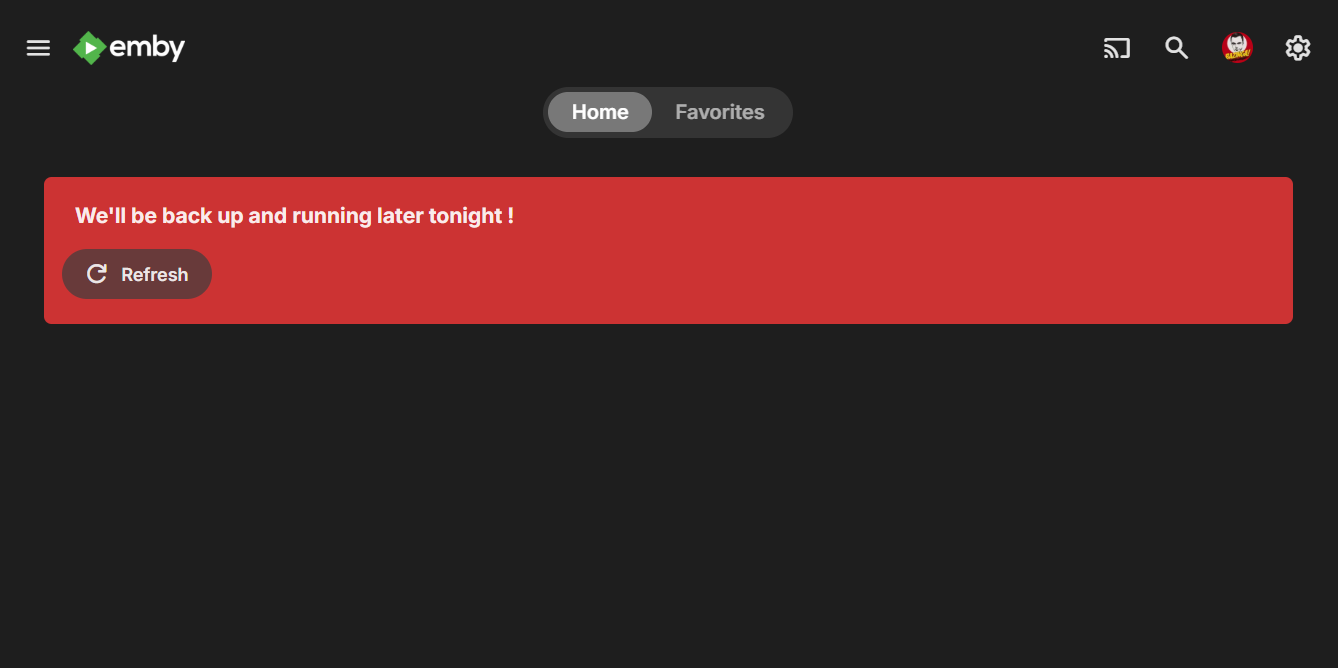
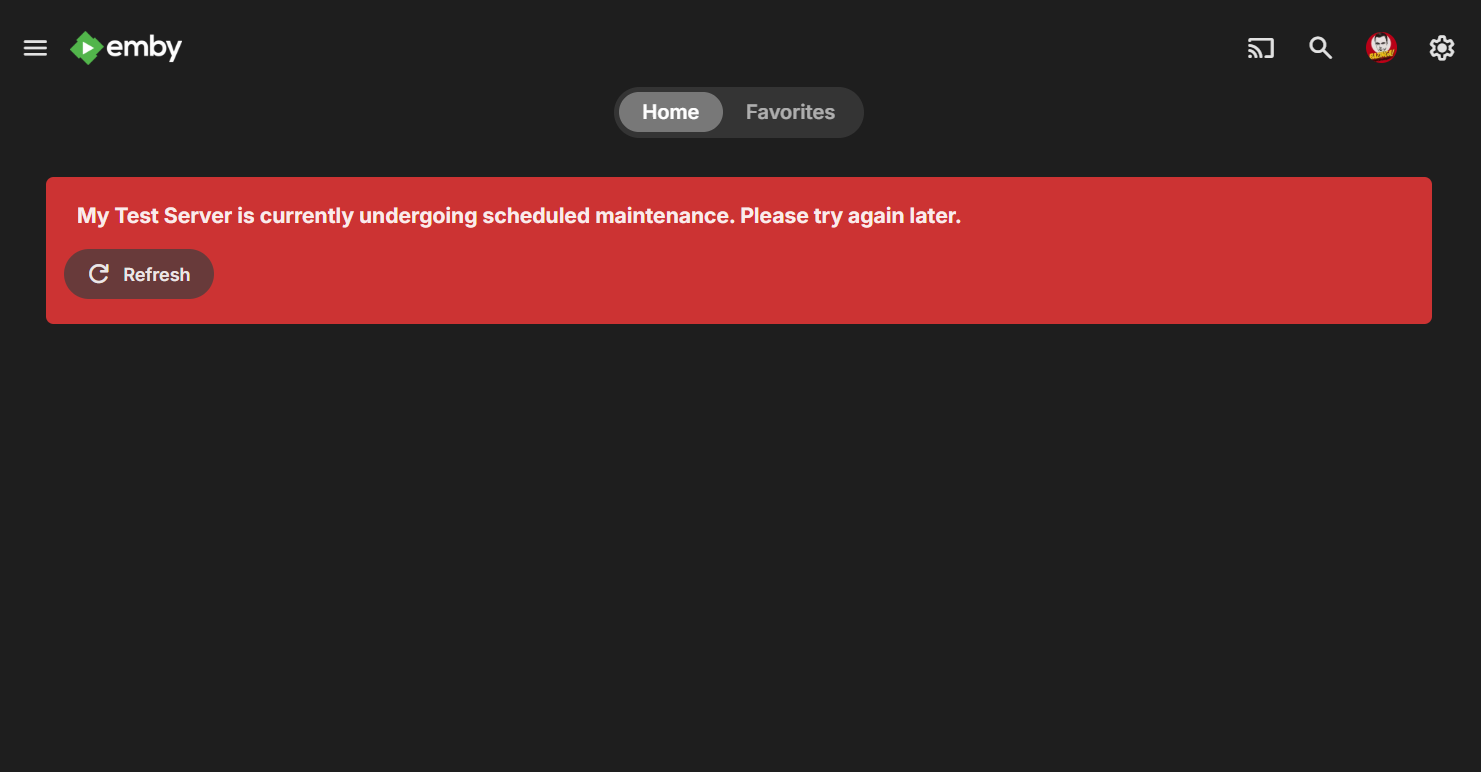
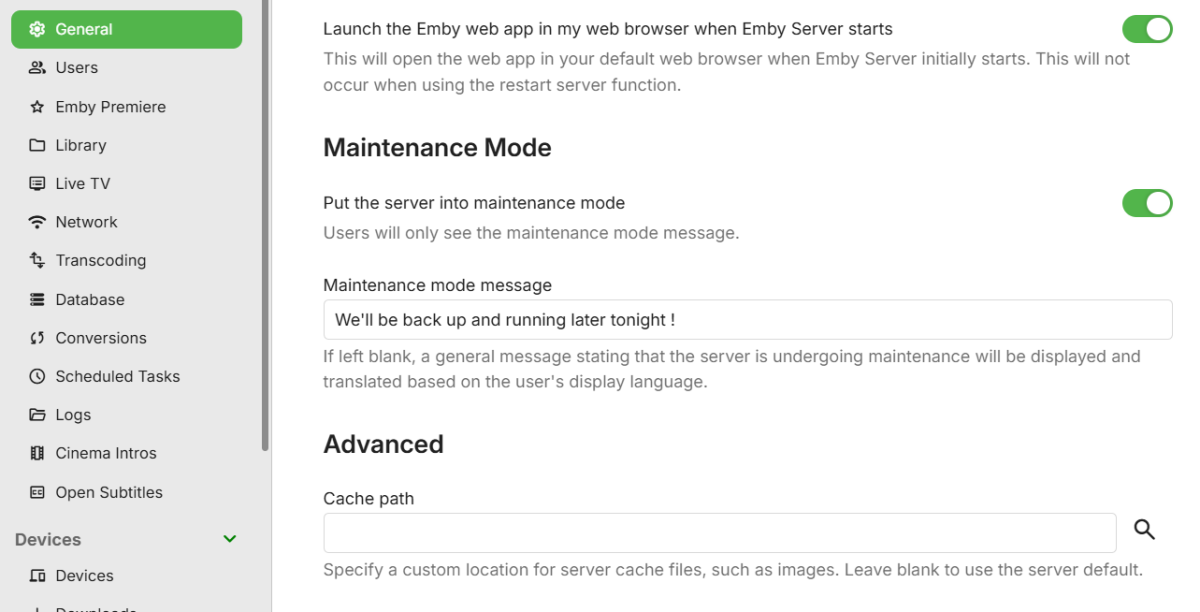
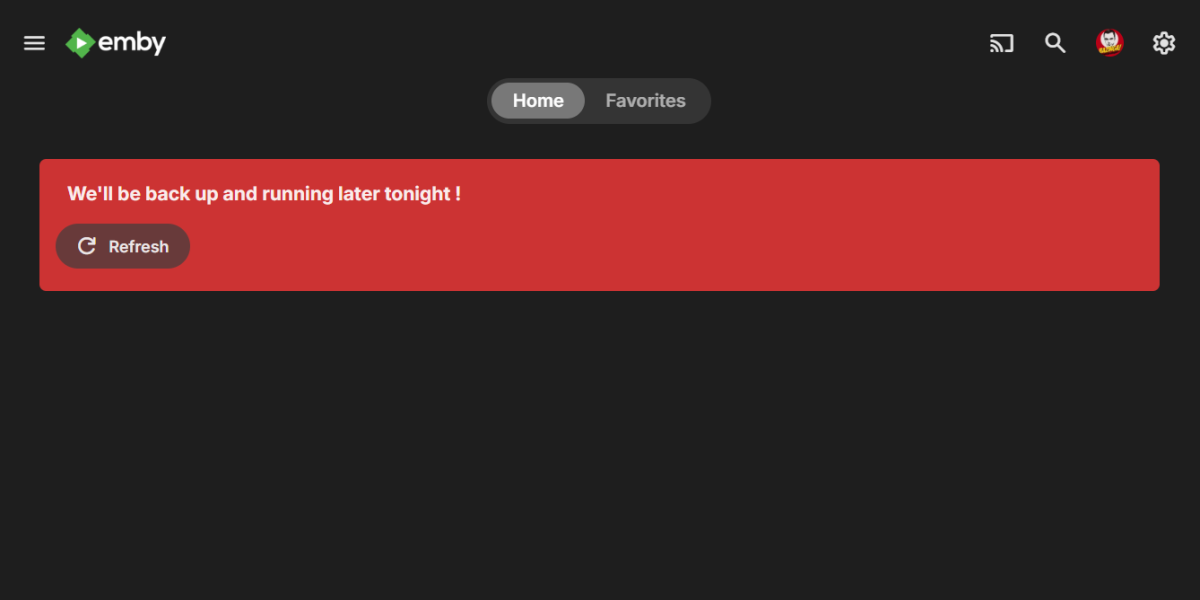
Maintenance mode coming soon on the server beta channel:
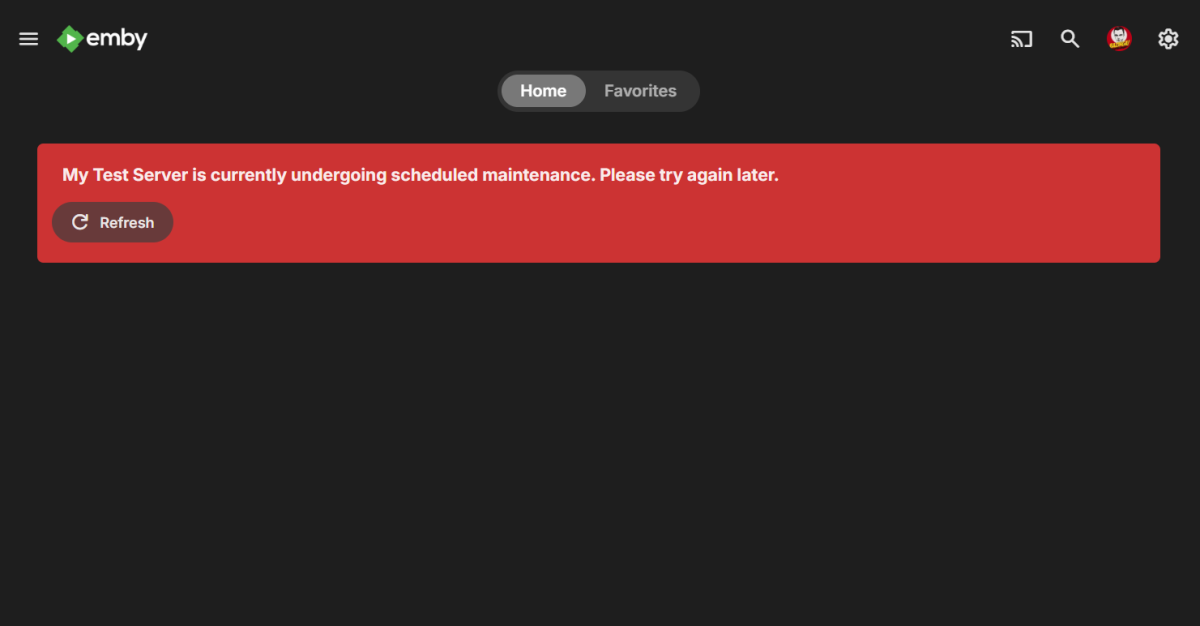 9 points
 -
I hit "play all" on a collection and it doesn't show the next film in "Next Up" after I quit out of it. This is apparently intended behaviour, and the same applies to playlists. This is absurd. Why even have the "play all" option? Who's sitting down to watch a full collection's worth of films, or a full playlist? I have playlists for The Prisoner for its various episode orders, and there's no way I'm getting through them in one sitting. I was going to make that my next show to watch but if I'm going to have to keep track manually of my progress through the playlist it makes the playlist fairly pointless TBH. There's no reason playlists or collections shouldn't show up in Next Up.8 points
-
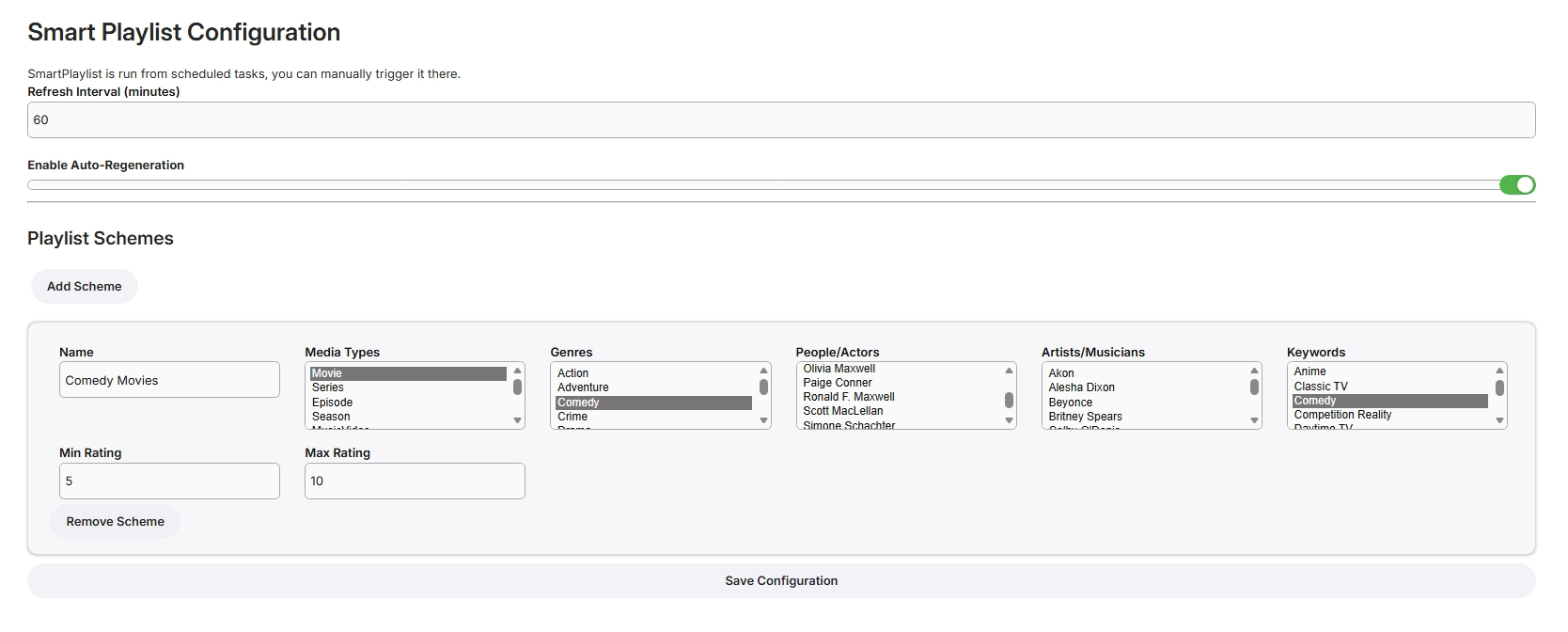
I have never used smart playlists so wasn't exactly sure what to build but here goes... Create Lists Here, add new schemes for more lists From scheduled Tasks Playlists are generated in the playlist library, only minimally tested! SmartPlaylistPlugin.dll
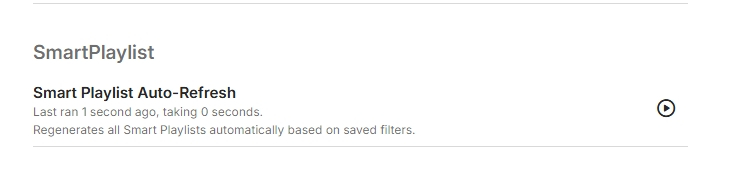
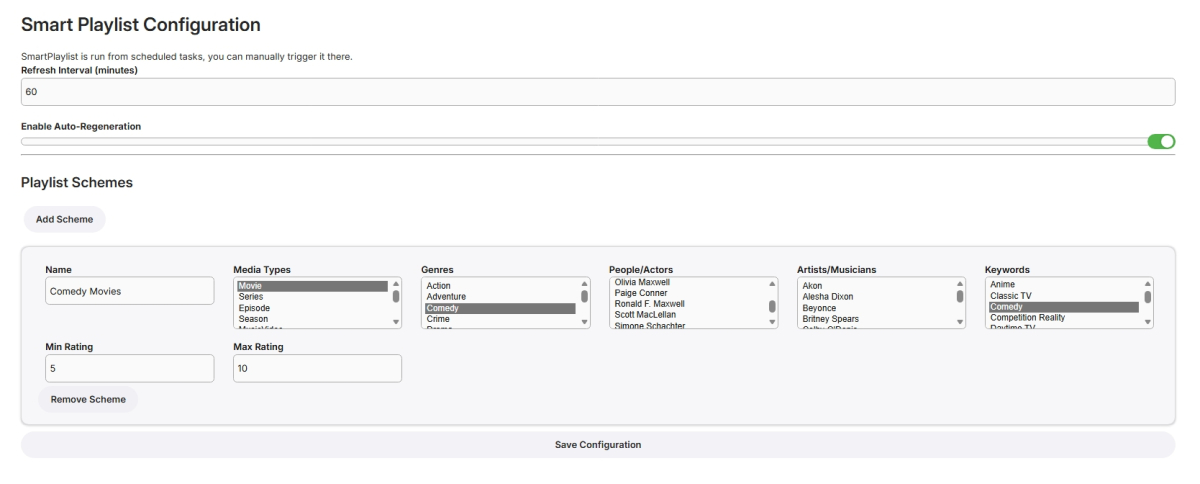 8 points
 -
Colorwise based on tedhinklaters Finimalism JF theme, which I really like Lots of base code borrowed by the great @fillidill. Cannot thank him enough for the great base he set up with the Plex inspired Emby theme. A few things: I made this for myself in first place (FullHD Monitor), tested virtually up to 4K and it looked OK to me CSS is working with 4.9.1.80 stable, I will try to fix visual errors coming from changed CSS in future Emby updates The episode count icon is placed to be in line with the Coverart and EmbyIcons Plugins. If you don't use it, change line 341 For everything else, the code is provided as is due to the lack of time on my side. Please don't ask for any changes like the base colors, instead feel free to change the theme to your own delight and post the css here so that everyone can benefit from your work. In times of so much coding LLMs, changing the theme to your favor shouldn't be a big problem anymore (I also used it to clean up the code and remove doublettes). Bildschirmaufnahme 2025-10-02 212535.mp4 Download from here: https://github.com/v1rusnl/Embymalism8 points
-
Hi, Thank you for the great product. It is a pleasure to use it. I have seen some posts but they are years ago regarding my request. Is there a plan to have notification (when adding movies, shows, live tv etc.) from the emby app ? This means to get a push message on my android phone, iphone, windows app, etc. With 3rd party software its not so cool. Thank you.8 points
-
Major achievements? Honestly, I’m struggling to find any. From a user perspective, 2025 has mostly felt like a year of dodging critical bugs while the features nobody asked for continued to underwhelm. What I’d like to see for 2026 is for the dev team to actually enroll in a Security 101 course. It’s becoming a bit pathetic how often fundamental security best practices are ignored or treated as "low priority" while the community is left to find and document the holes ourselves. For instance, we’re still dealing with: Unauthenticated Access to Private Data: We are literally on page 6 of a thread where anyone can access library images just by knowing an ID. No token, no login, no problem. The response time on fixing basic privacy leaks is glacial. Unauthenticated access to images by itemid Permissions Bypasses: Having "Critical Security Vulnerability" in a thread title regarding Live TV permission bypasses should usually warrant an immediate emergency patch, but here we are. Critical Security Vulnerability: Live TV Permission Bypass PIN Bypasses: The fact that a simple "Home" button press can bypass security PINs is a masterclass in "Security by Wishful Thinking." Security Issue: Using home button makes PIN bypass possible And then there is the "Universal" Android app. It’s truly a "major achievement" to spend years trying to replace the perfectly functional Android TV app with a bloated, stuttering "one size fits none" mobile port. It fails miserably at providing a smooth 10-foot experience, yet the devs seem hell-bent on sunsetting the one version that actually works for TV users. If the goal for 2025 was to prove that a paid product can have slower security responses and worse UI regressions than its free competitors, then mission accomplished. Ultimately, for 2026, the devs need to start concentrating on legitimate bugs and community concerns instead of @Luketreating this like his own personal pet project. This is a paid product with a community of users, not a private sandbox where critical security and usability issues can be hand-waved away just because they don't fit a specific internal vision. Fix the foundation before adding more "achievements" to the pile.8 points
-
In tweaking my server a bit over the last few days, and in reading and replying to some posts here, a couple of (what seem to me) rather simple security enhancements came to mind. 1. Option to require password. This could be both a global or individual user setting. It doesn't have to change the behavior of anything else. Actually... I couldn't believe this wasn't there somewhere. Am I missing it? Couldn't a user just delete their own password and open a security hole? 2. Global option hide profile pictures/login. Right now, the only way to do this is per user, which is fine for someone like me that only has 5 It doesn't seem like these would be difficult changes unless I'm missing something.8 points
-
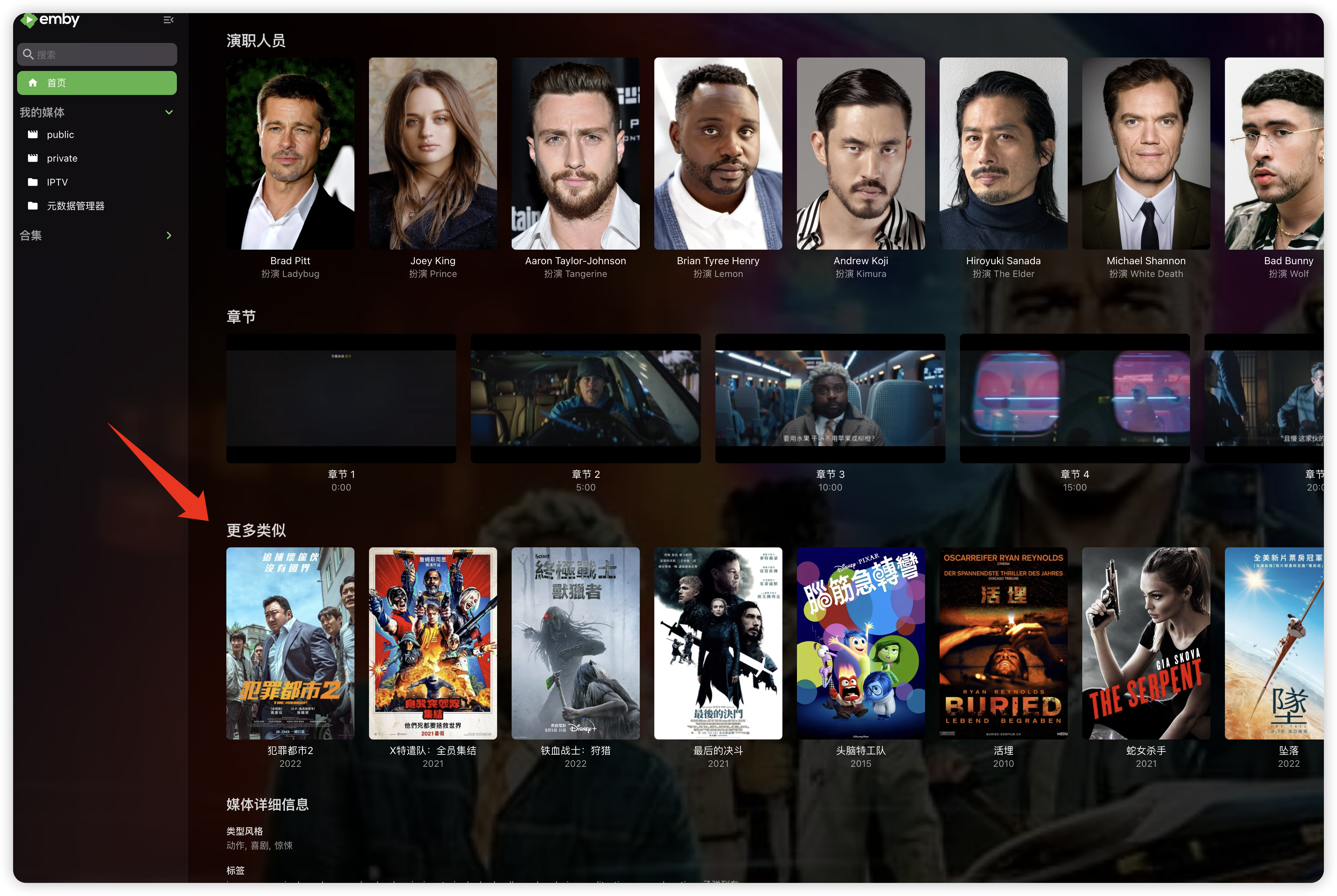
"More like this" will recommendations are made based on multiple media libraries,I don't like this, I prefer him to only recommend similar ones in the current media library, otherwise I would rather turn it off. What should I do?
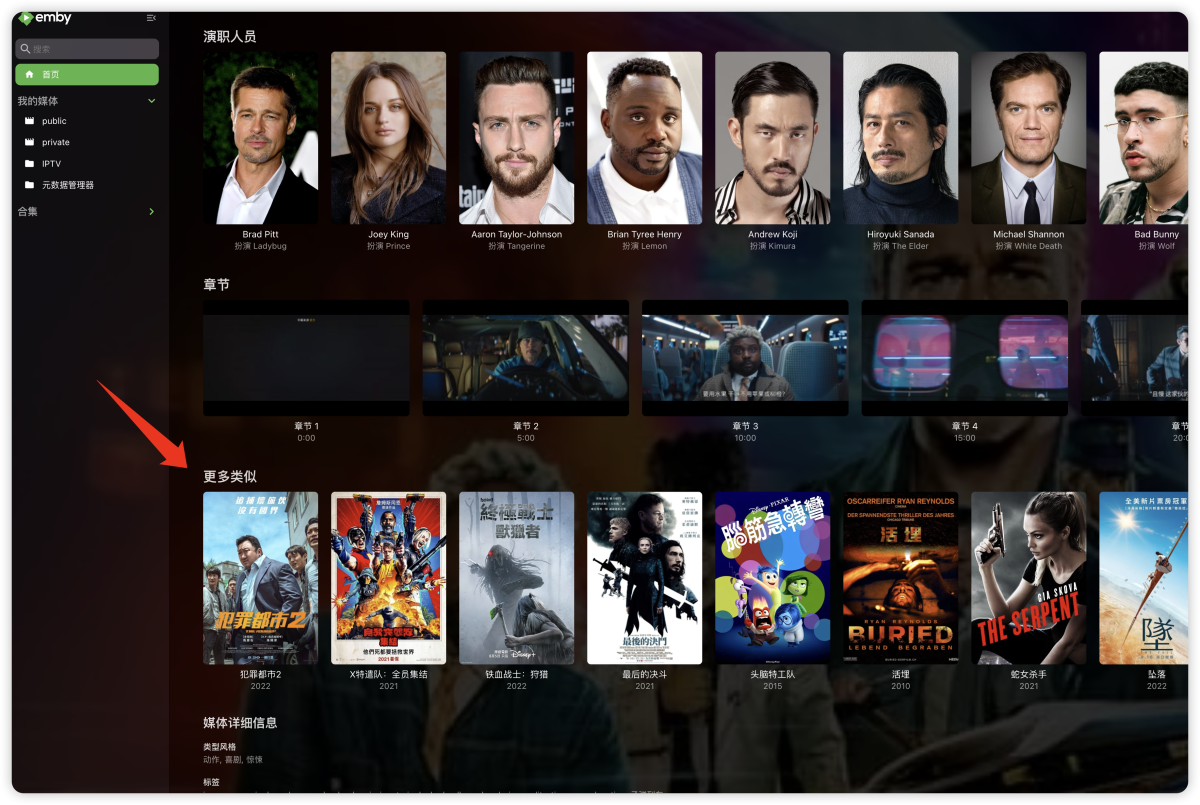 8 points
 -
Hi, keep an eye on the beta channel for this in the near future. Thanks.8 points
-
Yes, it is - not technically but logically! TVnext handles live TV streams from many different origins - but always live streams. And ONLY live streams! The current live TV implementation and many M3U based stream sources are sometimes mixing up VOD streams and live streams, even though these are fundamentally different. Delivering TVnext without support for static (non-live) streams would have been a degradation of the live TV feature (albeit not being live streams), so a solution was required to handle those kinds of streams, in order to make TVnext acceptable for everybody. So we had developed the WebStreams plugin pretty early to close this gap. All participants of the TVnext beta have seen it already. The WebStreams plugin is not just a stop-gap solution for a "missing" feature in TVnext - it is much more: It is the result of completely rethinking the way how VOD content ought to be represented in Emby - which means: Movies, tv show episodes, videos, and other streams do not show up in Emby as a kind of "fake TV channel" with fake guide entries pretending that it would be a continuous broadcast of the same program being repeated 24/7 - not anymore! Instead, with the WebStreams plugin, that kind of content is shown in separate libraries just like your local content and enriched with metadata in the same way! The WebStreams plugin is an essential step towards TVnext and an important prerequisite which had always been planned to be published before proceeding with TVnext.8 points