
Leaderboard




Popular Content
Showing content with the highest reputation since 06/05/26 in Posts
-
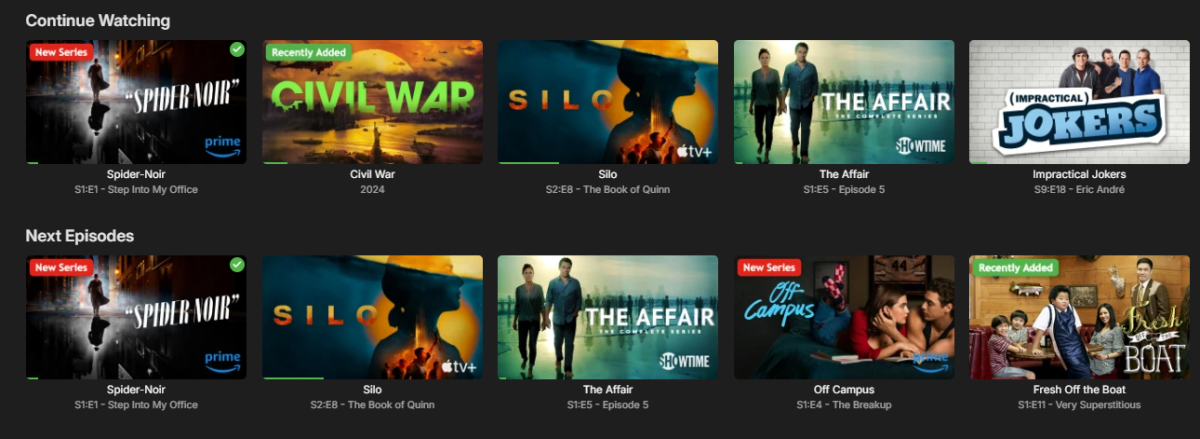
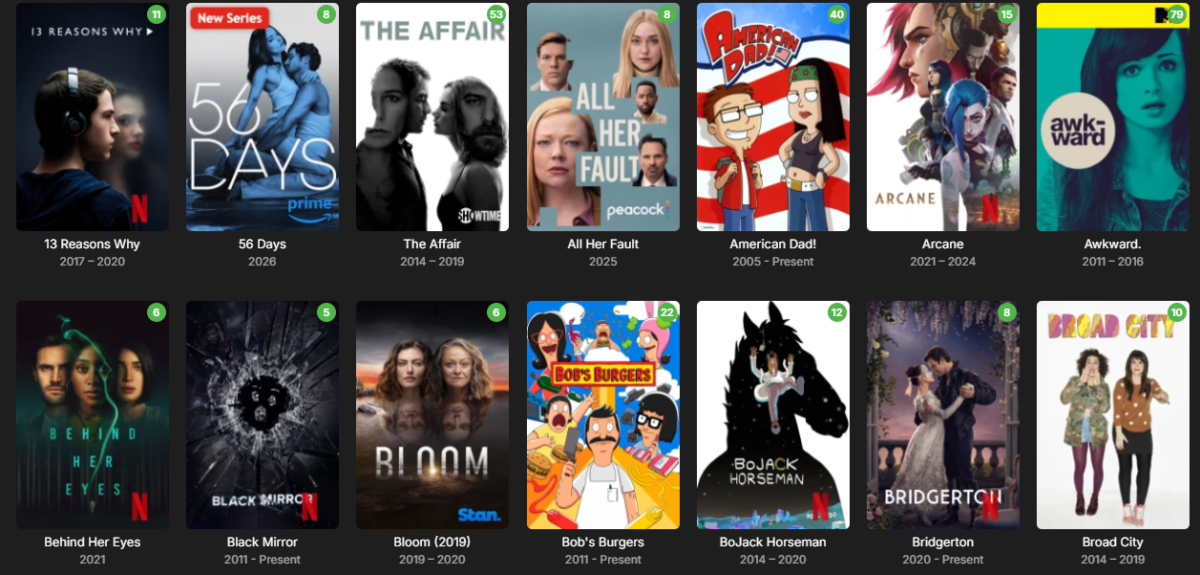
Sneak peek at the next update! Packed with dynamic studio logos (like Netflix and Prime Video), the ability to upload your own custom studio logos, and other new features. Coming soon.
 5 points
 -
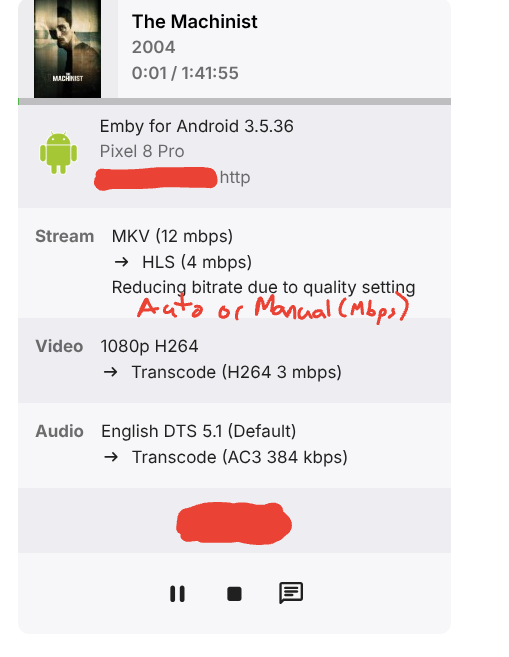
I'd like the ability to see what auto thinks should be the bitrate vs what the user selects in the app. Does auto run every time and then just honor the manual override? I ask because I have a user that continuously connects and transcodes at 800k, which is like flip phone bitrate and he's on an iPad. If I knew what auto thought, I could recommend to him that he's getting garbage video because that's what he chose, not what the server is capable of. Thanks edit: yes, i know I can go check netdata and see, but when I'm not at home or there's more than 1 user, the admin page is way more meaningful and accessible.4 points
-
I'm really sorry but, i don't want to be the cause of trouble for the developers of Emby. I'm running through some ideas in my head for a key system for it, sadly such things are easily hacked. At any rate, the plugin should work for a good while still as i don't think Emby still change much in any way that will impact the plugin. Good idea, I might just do that.4 points
-
4 points
-
Being not just a lazy person, but also one who prefers keyboards over mouse clicks I sure would love the ability to search the plugin catalog! Horizontally scrolling through each category is needless tedium, IMO. A search box would be heaven-sent! BTW, I wasn't too lazy to search the FR section for prior requests on this subject...if this is a duplicate, it wasn't for want of searching (BTW, this forum software is really crummy at it. Booleans operators like "AND" are ignored as far as I can tell).3 points
-
This could be an option that could be added to the new home screen options in the beta server.3 points
-
I wanted to share something I've been experimenting with, in case it's useful for this request. It turns out that delivering the video over HLS with fMP4 (fragmented MP4) segments opens up a really nice path for these MKV HEVC HDR files on the Apple TV. Rather than transcoding (and tone-mapping) the video, the server can simply remux the MKV into fMP4 over HLS and stream-copy the HEVC video untouched — it's essentially just a container rewrite, so it's very light on the server and, importantly, it keeps the HDR intact. Here's the result on an Apple TV 4K, playing a 4K HEVC Dolby Vision (Profile 8.1) title: (Jellyfin + Custom Jellyfin Apple TV app -developed by myself-) ffmpeg … -i "….mkv" -map 0:0 -map 0:2 -map -0:s \ -codec:v:0 copy -tag:v:0 hvc1 -bsf:v hevc_mp4toannexb \ -codec:a:0 copy -f hls -hls_segment_type fmp4 … Stream mapping: Stream #0:0 -> #0:0 (copy) Stream #0:2 -> #0:1 (copy) The -codec:v:0 copy is the key part — the HEVC HDR stream is passed through as-is and plays in HDR on the TV, with no tone mapping and negligible CPU. One small thing on the client side, in case it's helpful: with a multi-variant HLS playlist (an HDR remux rendition plus an SDR fallback at the same bandwidth), the native AVPlayer tends to pick the SDR one unless the client specifically selects the VIDEO-RANGE=PQ variant. Once the client targets the HDR rendition, it plays great. So the fMP4/HLS remux route looks like a genuinely useful option here — gentle on the server and it preserves HDR on the Apple TV. Just sharing in case it helps, and happy to go into more detail. FFmpeg.Remux-2026-06-07_17-01-04_32ce8d77902368b0e4edd358b2059492_8848d63c.log3 points
-
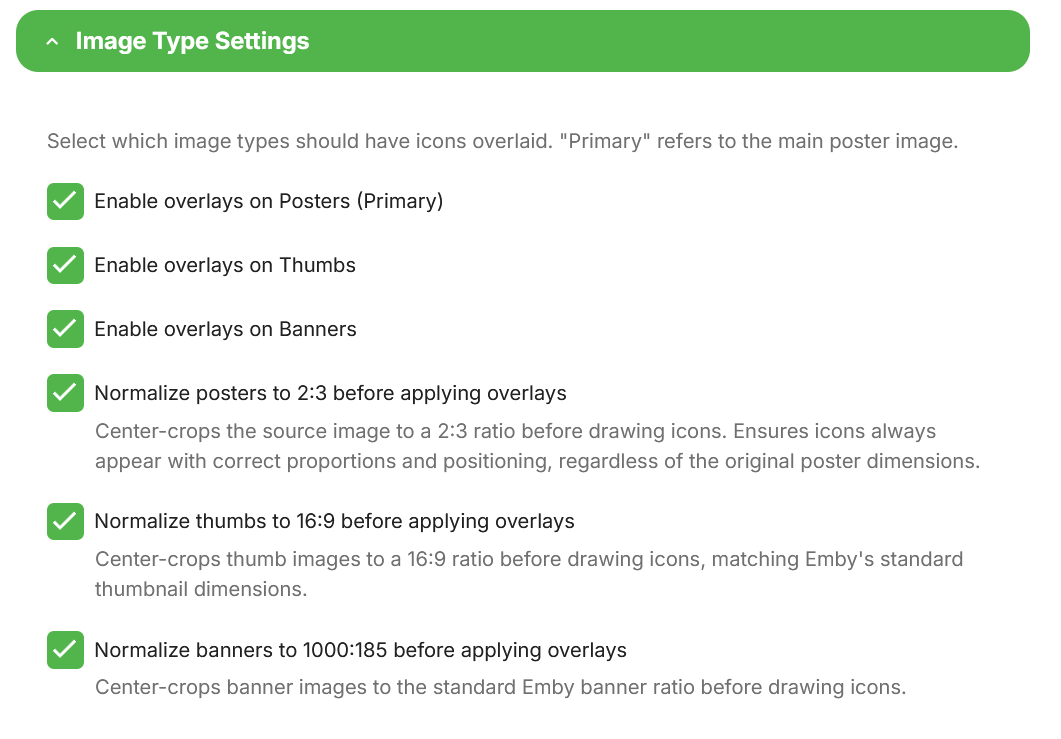
@Asdepique777It's done. You can get the new version from the catalog, beta v5.54.2.0. This should give some options to play with. I suggest testing horizontal mode and report back to me, as i might not have hit that correctly. Now unless there are bugs then i WILL get my vacation!! No more plugins until summer is over and i run out of beer!
 3 points
 -
Thanks @pwhodges, yes my wan address and "what is my ip" give the same IP and it is NOT in 100. range. My router does not have an IPv6 address and my dns has no aaaa record. ipconfig/all on my windows server gives no ipv6 address. so my best guess is i am solidly on ipv4. If im not on CGNAT then i think i just went down a wormhole of misguided hypothesis/analysis...maybe i just have an alexa issue.3 points
-
Just an added Note: Why not stick with what works? And test the new stuff? Note: EBR still seems to take pride in making the ATV app Great Some day the other version will be better, but after many years it’s still not!3 points
-
Absolutely so disappointing that the live tv recordings view has been replaced with this absolutely rubbish view. I complained in Beta but didn't think it will be put through to stable without an option to go back to the original view. If you like to save your recordings for long time the view outside the live tv served it's purpose but for us that like to watch delete and repeat this view is horrendous. So disappointing we wait years for improvement like fast channel change but we get this instead what we didn't ask. WMC over 20 years ago you could easily switch between different views in tv recordings and here we are 20 years later we can't have options you take it or leave.2 points
-
Yes. That's the latest that isn't broken.2 points
-
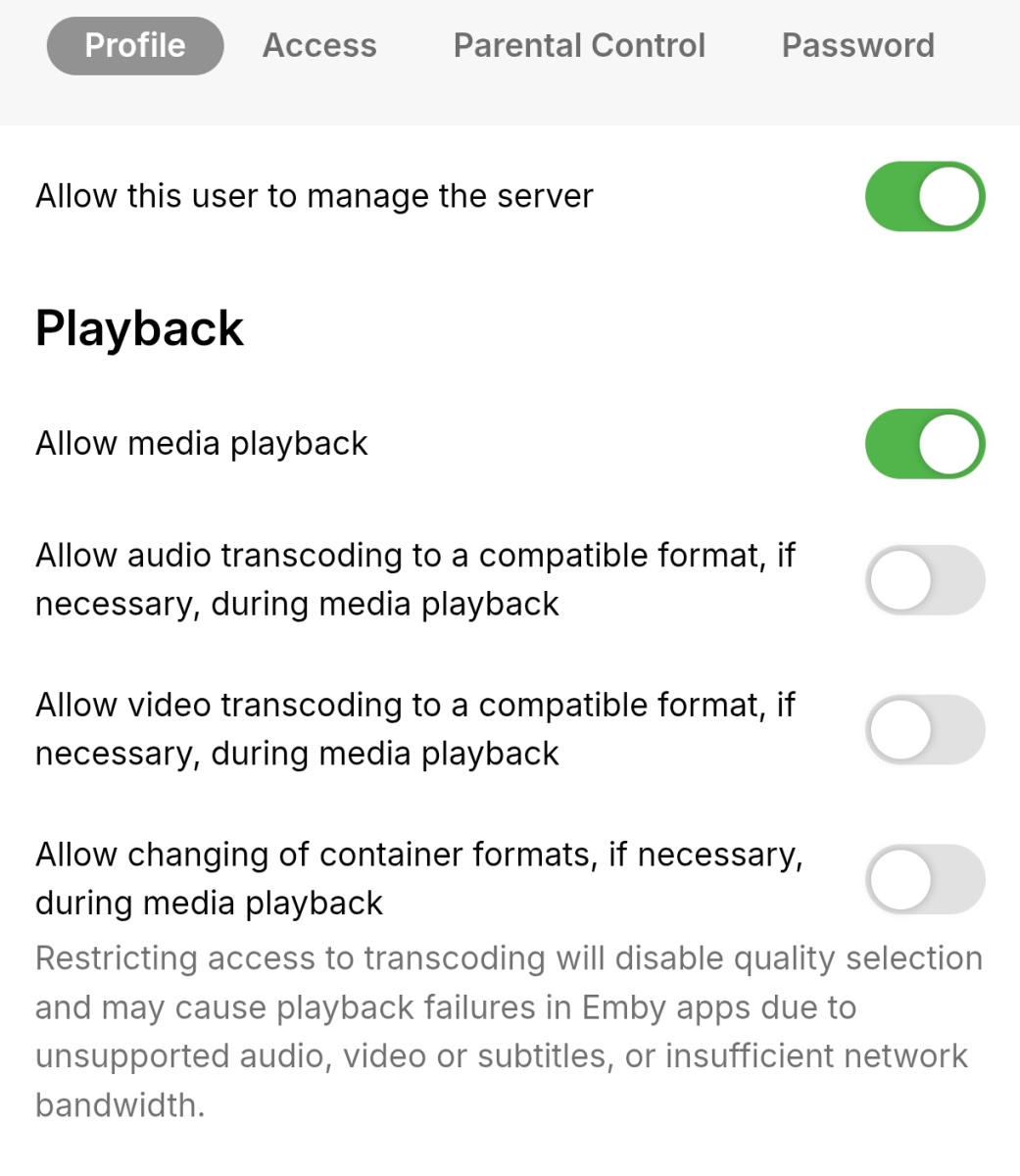
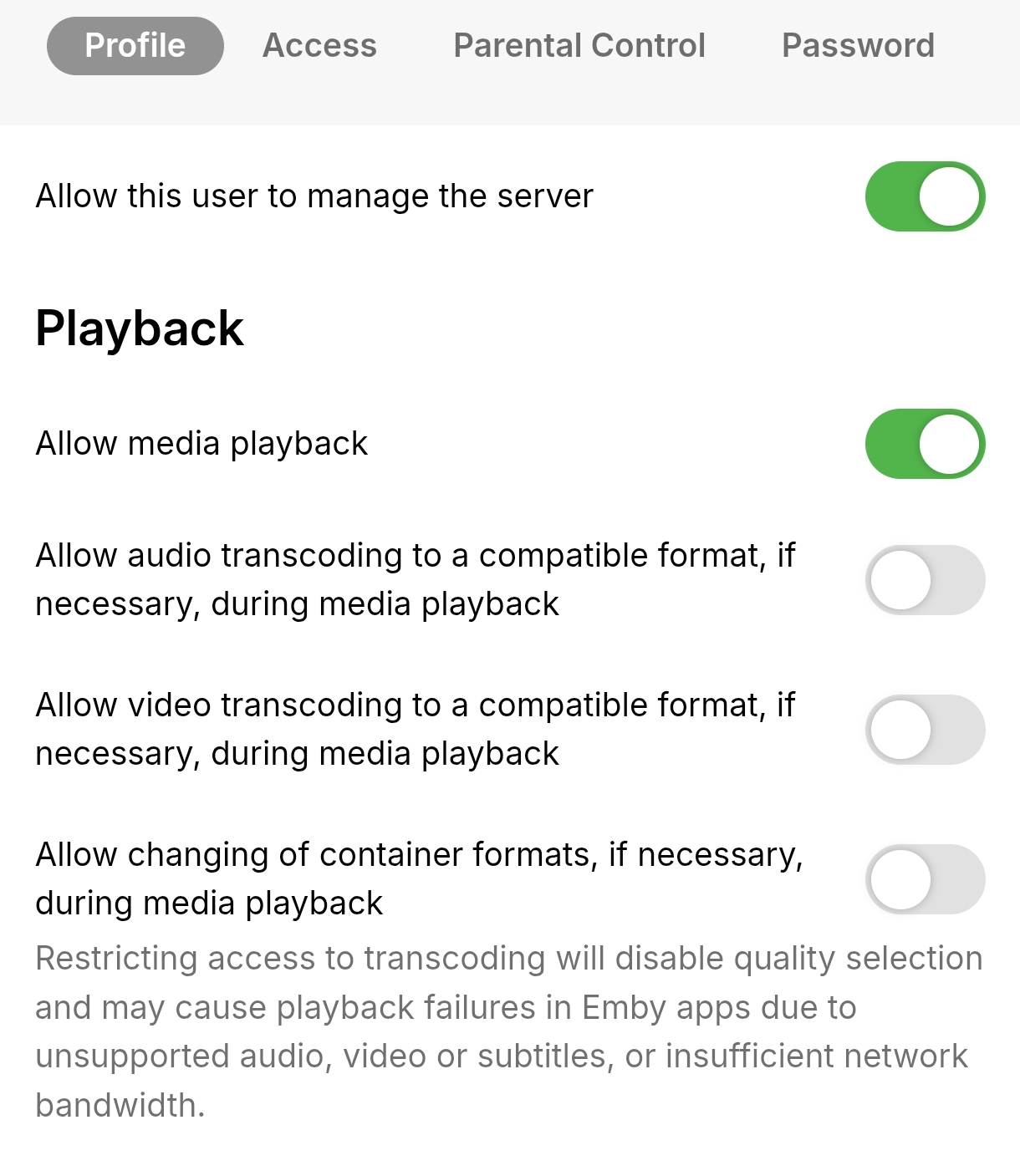
I went into the user management settings on the server and disabled all options related to audio/video transcoding and container format changes for my user. After doing this, the same AV1 videos that previously triggered transcoding now play via Direct Play on the Android TV client. For reference, I have extracted the relevant portion of the Emby server logs (not the complete log) showing this behavior. embyserver.txt
 2 points
 -
I think I found the problem... I try to fix it.2 points
-
OK the log has some errors coming from Gracenote's server. I would keep an eye on it and see if it continues to persist. @sa2000can report it to them if it does.2 points
-
Trying to find out something to keep it alive. Maybe a limit on the amount of users in it and then closed source. That should at least keep most from using it for piracy use.2 points
-
For years, there have been repeated requests to add the option to use the AND operator in filters—so that the media being filtered must meet all of the specified criteria. Currently, this can only be achieved through smart playlists and collections, which is rather cumbersome. Additionally, it only works via the web interface on a PC—not on a mobile device. However, this topic has been consistently ignored up to now. Is it really that difficult to implement this function in the standard filter?2 points
-
@Lyfesavertry this plugin Never used it but @yockerwork is solid2 points
-
@yockerSo much for summer holiday?2 points
-
Good evening. This issue does not just happen on Roku. I just had a stream get stuck on a Samsung TV where it was bouncing back and forth between the final seconds of the movie being watched. I had to click the stop button for it to go away. It was also driving CPU usage up for the Emby process. Log is included. Is this fixed in beta? Emby Server Version: 4.9.5.0 embyserver.txt2 points
-
Hi. Because browser video players have limited capabilities so they often require remuxing or transcoding whereas your other devices are direct playing.2 points
-
Sorry, I understand how that could have been confusing. What I meant was that - through our use of the OS site (with the plugin) - we will take advantage of all the new subs available via this new method.2 points
-
2 points
-
I only use the Transcode Notifications and Resolution Blocking features, which would be really nice to be part of the core server, but until that ever happens I hope a minimal version of the plugin can be made available with just what's in the Notifications tab of the plugin.2 points
-
Getting your Plugin in the catalog Basically write @ebrand ask politely.2 points
-
There is now a setting that the admin can use to take care of that.2 points
-
The now playing view should display the reason for the MaxStreamingBitrate= selection. If the client is using Auto it should display "Auto", if the client is using a manual quality selection it should should the quality selection (10 Mbps). With Auto Quality being broken it is helpful for admins to recognize when clients are using Auto and direct them to set a manual quality.
 2 points
 -
A big 100+ page thread here, which discusses the differences between the Emby for Android TV (ATV) app and the Universal Android (Standard) app. It's probably about 50/50 as to which app people prefer.2 points
-
Edge is the superior choice for watching any video as it supports all the formats and therefor doesn't require any transcoding. Firefox is slowly catching up. Chrome does support a good amount of formats but not as many as Edge. Pure browsing is a whole other discussion.2 points
-
Okay I’ve been testing this and it seems like for mobile apps and remote users it will select the secondary audio automatically IF the second track is flagged as default in the mkv container. For example: my movie has 2 tracks. First track is Dolby trueHd, and second is eac3 compatibility. If both are labeled as default, remote users and my phone will automatically play the second track. And devices that can natively play trueHd, will play that one. However, it only works automatically if both are labeled as default. If my secondary audio track does not have “yes” enabled in the container, the apps don’t automatically select it. Not saying this is wrong, but this is what I’ve discovered on how to get it working.2 points
-
Your drive has bad sectors and is starting to fail. Instead of buying from Amazon I would suggest goharddrive or ServerPartDeals. They both sell refurbished drives with 2-5 year warranties. 12TB with 5 year warranty "only" $320 (they used to be $75 before the AI/Surveillance Centre Apocalypse) 24TB with 5 year warranty for $560 I have personally bought from goharddrive in the past, and lots of users on reddit do as well. If you can come to Canada, you can get drives for cheaper shipped out of the states..24TB external for $660 CDN, or $474 USD..2 points
-
Ok so I don't have the same content to test against (it was too big and I needed space.) BUT I did test against known channels that produced this error in the past and I had no issues at all. Thank you so much (all of you) for your hard work. It is greatly appreciated!2 points
-
The plugin takes the posters aspect ratio and uses a % of that to scale the icons and placement. I can certainly add an option to use 2:3 scaling, pretty easily even, i'm just not sure if it will negatively affect the posters. I will look into it but can't promise when it will be done, kinda on my summer break now and been trying (and failing) to limit the amount of work i have to do.2 points
-
Atm. you can just use what ever you prefer, the developers have said that later on the Emby for Android TV will be phased out for Emby Android instead.2 points
-
Then switch back to ATV!2 points
-
New Emby server Beta release, v4.10.0.14.2 points
-
If that's how you (and others) are using collections, then perhaps we need to consider reinventing them to be more like playlists where they are personal to each user.2 points
-
Digital output format would be what you want to change. A RokuTV device will show "Passthrough" as an additional option for digital output format. A Roku set-top-box or stick will need to use "Custom" and then enable DTS or not and choose the correct flavor of Dolby Digital either non-plus or plus. The "Passthrough" option of the RokuTV will allow the HDMI(-ARC/eARC) to pass these through. Using Auto it must determine support from the HDMI-CEC chain. If you have an AVR this might cause problems with auto-detection if the AVR is turned off, but the Roku is always on, as the order the devices are turned on matters. Detection is done as the Roku boots up. In order for Auto to work correctly all the time the Roku will need to turn off with the AVR and turn on with it. Using Custom will work correctly all the time without needing to make sure of the order of devices is turned on correctly. Audio mode allows you to quickly enable Stereo without goofing with the other settings. For when you want to do this. Preferred streaming format isn't really used by the Emby app. We aren't providing streams without multiple audio tracks. We don't provide your media. So we don't read this value from the Roku which would tell us how you want your audio packaged from our content delivery network. Since we do not have a CDN serving video this one exists for everything else, but Emby. Those who have content will surely use this to determine how best to handle your audio stream delivery. Since Emby is limited by what your media item has for audio this is why we can never use that field.1 point
-
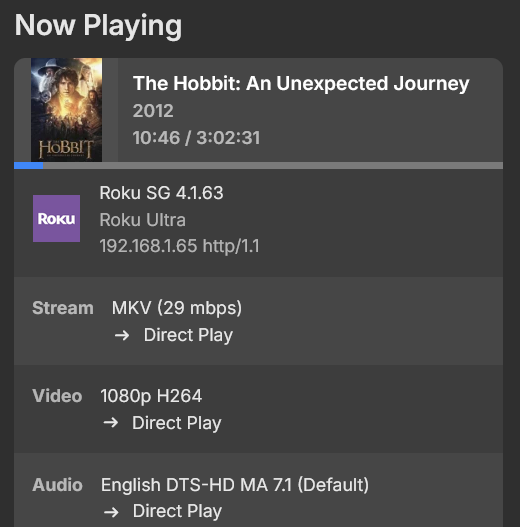
Roku does nothing but pass through DTS. It only "plays" Dolby formats. IE: All Roku does is steer the audio stream to a device to decode it. I had issues when I started here and came to understand DTS is a three way negotiation between Emby, the Sink Device (TV) and the AVR and all three must be capable of handling the 7.1 stream or you get 5.1. After updating my Sink device (TV), no problems playing DTS-MA
 1 point
 -
Think of DTS as either 5.1 or 7.1. The Roku can play DTS. The Roku cannot play lossless streams. It must always use the DTS "core". Even if you have DTS-HD MA in 6 channel, rather than 8, the Roku isn't playing the lossless stream. It is playing the lossy "core" from the DTS stream. DTS should pass-through. The player just goes hmm.. whatever.. here is the stream. Untouched. Passes it down the wire. Just puts it out on the pass-through audio stream. After that.. it is up to your equipment to decode that or remove the DTS "core" from the stream and play it. This is why you must both enable pass-through then rather than use "Auto" use "Custom" and choose which codecs to allow. Usually DD5.1 and DTS turned on. Then restart the Roku. After that the Roku now understands you want DTS to pass-through. It is doing this because you hear silence with 8 channel DTS. That must mean the pass-through is working, or it means Roku isn't passing through the DTS to the receiver. But it does mean the Roku is doing it since this shows as Direct Play. @ebrDo you have a TV that supports DTS which can connect to a Roku? I do not or I would do this myself to test. Simply disable audio transcoding for a test user. Then play that file with that test user that has DTS-HD MA in 8 channels. Can you hear the lossy DTS "core" playing from the DTS-HD MA track? or do you also hear silence? If you also hear silence this is most certainly a recent Roku firmware bug.1 point
-
Thanks for your quick reply. And no worries at all, there's absolutely no urgency. It's really just a nice-to-have feature that I thought could improve the consistency of the overlays on libraries where posters don't all follow the same aspect ratio. Enjoy your summer break and don't feel any pressure to work on it. If it eventually makes its way into the plugin someday, that would be great, but it's certainly not a priority. Thanks again for taking the time to look into it!1 point
-
Moved to the Emby Server (Linux) forum1 point
-
Hi, we'll take a look at it. Thanks for reporting.1 point
-
@johyphenelThis should fix it. Again sorry you became the target of my rant, it was absolutely not meant for you but just as a general explanation. WatchingEye.dll1 point
-
Why not do it based on IANA list of non routable IPs ? If the IP is not in the non routable IP ranges, you anonymize it no ? non routable IPs have no problem of privacy as you can't track them at anything1 point
-
The queries show up in the logs, if you want to try to optimize them and DM Luke with the changes. But I believe this is a feature change i.e. bringing in fuzzy search properly, because the simple fix of reverting the current fuzzy queries with word split will upset other people who have come to rely on that. And for the proper Fuzzy Search, I have already provided the docs of how to implement it here, just waiting for Luke to find the time to do it correctly.1 point
-
OH MY GOD .... im so Sorry ... i found the Reason. i had 3 .ignore Files in the Movie and Series Folder for some Cover Folders. .embyignore .ignore .plexignore i deleted them and now everything is working.1 point
-
+1 by country. I sometimes feels like watching a movie from a specific country. It is impossible. It is almost perfect otherwise1 point
-
While I'm not trying to be rude... Jellyfin supports now ... Already. Why are some of these features not working??.. and if not working documentation should be better to let people know.. been fighting issues in my thread wasting time thinking it's my system.. when it's just an emby issue.1 point
-
I would also like to vote for this, AV1 is a hugely efficient codec that would benefit 4k content and rural / bad / mobile connections a lot! AV1's adoption has been far faster than h265 ever was, they first spent years optimising for ARM decode, and then the hardware encoders started coming out. I myself also use Emby with an AV1-encoding capable card. I get that yes, not everyone could use it, but I feel like just having the option available to us in the settings would be nice! That way the people who want to experiment can, while other users just keep going as is1 point













.thumb.png.225edb9636a79b10cd220c27f59990f3.png)










