Leaderboard




Popular Content
Showing content with the highest reputation on 06/10/26 in Posts
-
Absolutely so disappointing that the live tv recordings view has been replaced with this absolutely rubbish view. I complained in Beta but didn't think it will be put through to stable without an option to go back to the original view. If you like to save your recordings for long time the view outside the live tv served it's purpose but for us that like to watch delete and repeat this view is horrendous. So disappointing we wait years for improvement like fast channel change but we get this instead what we didn't ask. WMC over 20 years ago you could easily switch between different views in tv recordings and here we are 20 years later we can't have options you take it or leave.2 points
-
Trying to find out something to keep it alive. Maybe a limit on the amount of users in it and then closed source. That should at least keep most from using it for piracy use.2 points
-
For years, there have been repeated requests to add the option to use the AND operator in filters—so that the media being filtered must meet all of the specified criteria. Currently, this can only be achieved through smart playlists and collections, which is rather cumbersome. Additionally, it only works via the web interface on a PC—not on a mobile device. However, this topic has been consistently ignored up to now. Is it really that difficult to implement this function in the standard filter?2 points
-
@Lyfesavertry this plugin Never used it but @yockerwork is solid2 points
-
@yockerSo much for summer holiday?2 points
-
Being not just a lazy person, but also one who prefers keyboards over mouse clicks I sure would love the ability to search the plugin catalog! Horizontally scrolling through each category is needless tedium, IMO. A search box would be heaven-sent! BTW, I wasn't too lazy to search the FR section for prior requests on this subject...if this is a duplicate, it wasn't for want of searching (BTW, this forum software is really crummy at it. Booleans operators like "AND" are ignored as far as I can tell).1 point
-
Hi. This is coming in our next release.1 point
-
You can use the backup feature to import watch data for users. It is not a live sync but it's the closest thing available.1 point
-
OK the log has some errors coming from Gracenote's server. I would keep an eye on it and see if it continues to persist. @sa2000can report it to them if it does.1 point
-
Hi, no issue anymore because I did a clean install (server) on my Shield TV pro and set it up again with a clean database, new libraries (rescand everything again) and all users. Works all fine now, no server shutdowns anymore. PS.The backups I had (via the back-up plugin app) also didn't resolve it, what makes sence if it was a corrupt database or file what I think was most likely. Troubleshooting the problem any further just took to much time but maybe the logs are still useful. Kind regards Ronald1 point
-
I'll check this out, thanks!1 point
-
Hi, yes it is something we can look at adding. Thanks.1 point
-
Hi, yes we can look at adding these kinds of things. Thanks for the feedback.1 point
-
maybe the time between beta and stable branch should be scaled up? last releases look really buggy and not tested through. something like whole library gets readded or even, more worse, the current search problems - things like this must show up in some way in the beta channel before pushing it to stable. for me it's enough if there are only two stable releases a year.1 point
-
中文的 ,我自己写的,插件很简单 chrome翻译即可 ,不是什么很难的事情, 默认设置即可, 依赖片头扫描的数据。我不想写英文的readme 这个插件其实本来是我自己用的1 point
-
This could be an option that could be added to the new home screen options in the beta server.1 point
-
No need for a log Eric, it fixed itself!! Thanks though.1 point
-
Not me that added this function so my summer is still on.1 point
-
I ran a bunch of tests and believe I found the issue. I have pushed 2.0.1 which should solve your library issue. I also made improvements to the UI based on yours and others feedback. You can pull the new image, it’s live on my GitHub now.1 point
-
Good evening. This issue does not just happen on Roku. I just had a stream get stuck on a Samsung TV where it was bouncing back and forth between the final seconds of the movie being watched. I had to click the stop button for it to go away. It was also driving CPU usage up for the Emby process. Log is included. Is this fixed in beta? Emby Server Version: 4.9.5.0 embyserver.txt1 point
-
It does seem to be, as @seanbuffmentioned the 'Spotlight, with EHS enabled' thing. I thought the Windows / Xbox app was done by softworkz and therefore would be perfect.1 point
-
Well I feel stupid, as I could swear I tried clicking that as it looked to be triggered.. oh well thanks @ebr1 point
-
I swapped my router in the past week - the old one had started acting up a bit - and I haven't encountered problems with longer, uninterrupted playing sessions since changing the router. Might've been some setting on my router, but at the very least it seems like my issue was more of a networking problem than a software problem.1 point
-
Whether library names can be hidden depends on the application you're using. Some apps provide a setting to display only icons or cover images, while others always show the library names for navigation purposes. If you can share the app name and version, it will be easier to determine whether this option already exists or if a feature request is needed. In some cases, custom themes or alternative views may provide a cleaner interface without displaying library names prominently. For users who also need Arabic date and age calculation tools, تحويل التاريخ is available here:1 point
-
I just installed Emby to Linux mint and had the same exact problem. My media was in a folder whose path was /media/paulie/MyMedia/Movies. Emby couldn’t “see” it, so after poking around I located my fix. I ran this command: “sudo setfacl -m user:emby:rwX /media/paulie”. Yours would be: “sudo setfacl -m user:emby:rwX /home/john”. It works great. BTW, I just turned 88 a week ago. NEVER GIVE UP!1 point
-
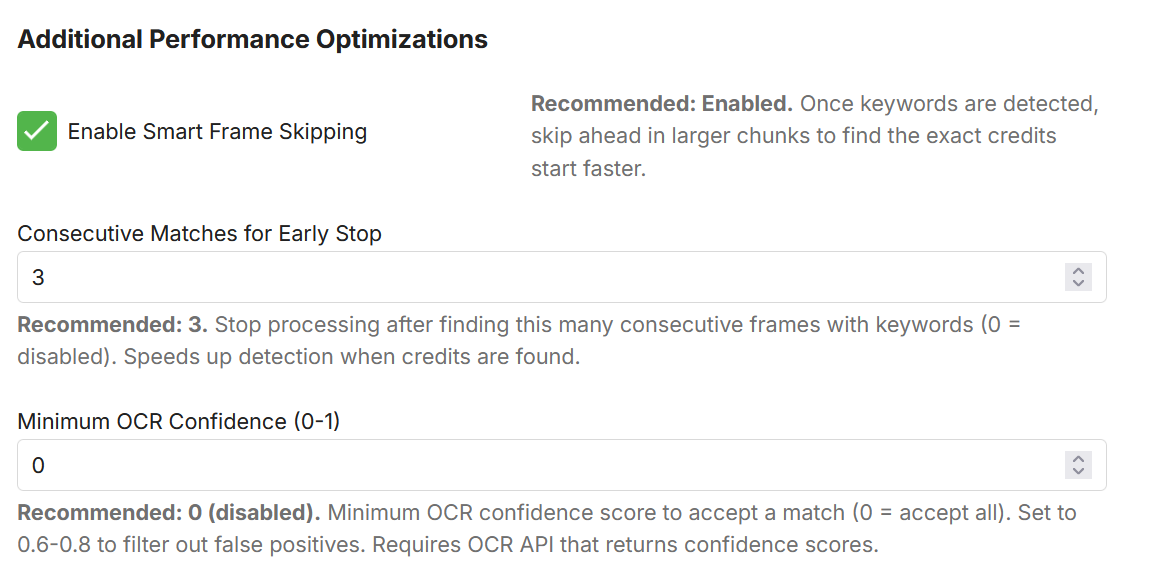
New version up in the catalog (2.6.2.0). New OCR method that improves the detection speed. Smart Frame Skipping very simply dynamically skips frames and thus skips frames not needed for detection and in that way improves the detection speed. Remember to report any bugs you might find! Enjoy!
 1 point
 -
1 point
-
Here are some tips on custom studio logos Naming Check your Emby item's studio metadata first - go to an item → Edit metadata → Studios and note the exact string. Your studio name must match that (case-insensitive match is done server-side) If a studio has multiple names in your library (e.g. HBO vs Home Box Office), you'd need separate PNGs for each variant or clean up your metadata to be consistent Priority Each custom logo has a Priority field (1–99, default 50). If an item's studio list matches more than one logo, the higher priority wins Built-in logos (Netflix, Disney+, etc.) also compete — set your custom logo priority above 50 to override a built-in if the studio name overlaps Tint The Tint colour column only does anything when "Tint to colour" is checked globally on the Studio Logos tab Use clear PNG with punched out texts for best results Use "Magic Tint" to automatically picks either white or black as the tint colour based on the brightness of the poster corner where the logo will be placed. Magic Tint overrides the per-studio manual colour pickers when active. Try it and tell me how it goes for you on custom studio logos. examples of good and bad logo for tinting example logo 1 GOOD one abc a clear png logo with the abc text are punched out so when tinted the text and logo are shown clearly example logo 2 a plain circle logo with abc written over it, tinting shows a solid white circle



 1 point
 -
Release Notes Version 1.3.0.0 Added option to hide the "NEW" badge on played items. Added "Clear Image Cache" button which forces plugin-rendered posters to be re rendered . Added Live Preview — Real-time badge preview in the Appearance tab with badge type selector. Added Studio Logo Overlay — Overlays a streaming-service logo on matching posters. Logo Tinting — Supports original colours, per-studio tint, or auto white/black (Magic Tint) based on poster brightness. Studio Switches — Per-studio toggle, tint colour, size override, and priority (1–99) for conflict resolution. Custom Studio Logos — Option to upload PNG logos for any unlisted studio; supports tint, size, and priority controls. EmbyNewOverlay.dll1 point
-
Emby Windows: A new Stable version 2.310.0.0 is available Changes 2.310.0 Update to latest UI features Update translations Fix backspace behavior on search view in TV mode Enable YouTube playback Fix Trailers Fix non-working gear button in video OSD [Win] Update HDMI audio detection [Win, Xbox] Enable screen savers [Win] Fix hidden volume control in TV mode Update WebView2 [Win] Rework threaded xaml island animation [Win] MPV: Disable mpegts as container [Win] MPV: Fix live TV playback [Win, Xbox] UI Update [Win] Fix app hanging on start [Xbox] Fix Crash [Win] Slightly improved startup time [Win] MPV: Change HLS segment constraints [Win] Fix duplicate downloads (sync feature) [Win] Fix hidden errors on startup and shutdown [Win] Update to WinAppSDK 1.8 [Win, Xbox] Fix errors about missing sleeptimer [Win, Xbox] Fix streams error on audio playback [Win] Improve full-screen buttons [Win] When navigating back from the home view, show menu instead of exiting [Win] Fix full-screen exit button [Win] Show keyboard shortcuts under settings [Win, Xbox] Update subtitle font [Xbox] Fix unresponsive app on startup [Win] Fix failing downloads with long file names [Win] Fix refresh rate switching [Win] Fix keyboard navigation on start 2.234.0 [Xbox] Fix rate switching when current rate is > 60Hz [Win] Fix rate switching when current rate is > 120Hz [Win] Provide opt-out for hard refresh-rate limiting [Win] Fix horizontal scrolling issues [Win] Sync: Fix display order of downloaded items [Win] Display settings: Always show sound scheme selection [Win, Xbox] AudioPlayer: Fix audio playback resume at position [Win, Xbox] Sound Effects: Avoid doubled sound on Enter key [Win] Fix hang on start [Win] Adjust "Don't revert display mode" feature when initial switch is hard limited1 point
-
Coming from a duplicate topic I made, I hope they add a "Use modified date" option in the "Date added behavior for new content" menu which is located in the advanced library settings. With that option I will be able to see all modified content for all types, specially for music, as I always edit the tags or when a file is replaced by a different one, for example when I replace an MP3 file with a FLAC file, the idea is to be able to play that content directly from the "Latest" rows on Emby home without having to search for each item:
 1 point
 -
I’ve added a “Music” directory which plays my extensive mp3 classical music files through my great speaker setup. Sweet!1 point
-
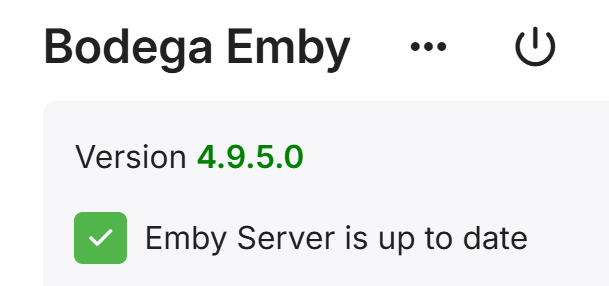
Holey Moses it is fixed! I have been waiting all this time as a test. All Hail Inter-Dev Cooperation!
 1 point
 -
THANK YOU THANK YOU THANK YOU my Emby installation is shining tanks to your help. Go Emby!1 point
-
Seems to be a basic function that has long been overlooked.1 point
-
Yes, after some investigating still happens. I think when anything is being transcoded (audio mostly from what I've seen)1 point
-
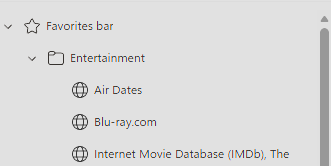
Sorry for not being more clear on that. It is a regression (I think) with the latest Edge update. It has nothing to do with Emby. After updating to v149 of Edge, the Favorites drop down shows this: All custom icons are gone.
 1 point
 -
When comparing the two servers I noticed the Emby user was not created on the new server. I believe Emby was having issues with permission so I created the Emby user, added it to the proper group and then stopped and started the container again. Then I did another restore and all my playlists are now looking ok. Thanks for the response1 point
-
plex with alexa had a play feature called Random Album Radio which would play a random album, and when that was done, play another random album, and so on.1 point
-
Thanks @pwhodges, yes my wan address and "what is my ip" give the same IP and it is NOT in 100. range. My router does not have an IPv6 address and my dns has no aaaa record. ipconfig/all on my windows server gives no ipv6 address. so my best guess is i am solidly on ipv4. If im not on CGNAT then i think i just went down a wormhole of misguided hypothesis/analysis...maybe i just have an alexa issue.1 point
-
A port checking site. Rebooting the router has resolved the issue.1 point
-
I will say it appears to be improved - I think I only saw one miss out of maybe a dozen so far.1 point
-
I’ve recently started using Emby for music so I’m literally going through all this as we speak. I’ve come from random MP3s that I haven’t touched in years to an old iTunes library that was reasonable organised but still has tags all over the place. What works for me is to use MusicBrainz Picard before adding to Emby. Add your files to it, scan and hopefully select the right album version and save. This seems to produce a good consistent result for me. If my particular album isn’t found, well I’ve created a free MusicBrainz account so I can add the release in myself and then go back to Picard to find the release version I’ve just created. Yes it’s extra work, but it’s quite satisfying giving back to the community in the hope someone else can benefit from my contributions. Whether someone has the same taste in music as me, well that’s another story.. If you have massive random compilations or maybe your own created compilation. Then I’d recommend mp3tag. I do this where I have tracks that are part of incomplete albums/singes. If your file name contain the track number, title and artist then there is a function to extract them into tags for you. I’d manually add in a disc number and you can create a custom ‘disctotal’ tag (not sure if Emby uses this). The important thing is to define the ‘Album Artist’ tag to something like ‘Various artists’. This way your Emby library appears cleaner in my opinion. So the artists of proper albums appear under Album Artists. Anyone in a compilation appears under the Artists menu. Other things that I’ve found useful is configuring the music metadata providers to download multiple backgrounds for artists, as well as a logo and banner.1 point
-
This plug-in should be promoted more prominently, it's amazing. Only thing I need/want is how to add both movies and series together. I only can find a way to have movies and episodes, but not series per se. Anyone got an idea?1 point
-
I'd really like to have 2 Factor Authentication added to the login screen. It's just this (optional) extra layer of security to help secure the server (which, especially if people use camera uploads) contains pretty private data. There are for every type of programming language quite a few libraries available, so implementation on a server shouldn't be too hard to realise1 point
-
Be able to create playlist based on a certain criteria, like genre and or year, in order to create a dynamic playlist that it refreshes automatically when new content is added. This way you can for example, create a tv comedy playlist from the 90's, or a new sci-fi Movies playlist. Some other criteria for rules could be the rating, watched/unwantched, score, tags, language, audio codec, etc The possibilities could be endless1 point
-
Hi yes the Home Screen is just the start of it. Thanks.1 point
-
Hi, we will be revamping our home screen options so stay tuned for that. Thanks.1 point
-
Hi Luke, thanks for the information! I'm really happy to hear that. This feature will greatly enhance the usefulness and purpose of tags and other metadata. As it stands, the filter function makes little sense. Maybe there's also a way to allow logical operators directly in the search field. I use a private photo server for my images, and in my opinion, it's brilliantly implemented there. If you're interested, here's the description: https://contecon.de/picapportwiki/full-text-search-of-photos-supported-metadata/ Thanks1 point
-
Hi, yes this is something we'd like to add in future updates. Thanks.1 point






.thumb.png.225edb9636a79b10cd220c27f59990f3.png)