Leaderboard




Popular Content
Showing content with the highest reputation on 05/27/26 in Posts
-
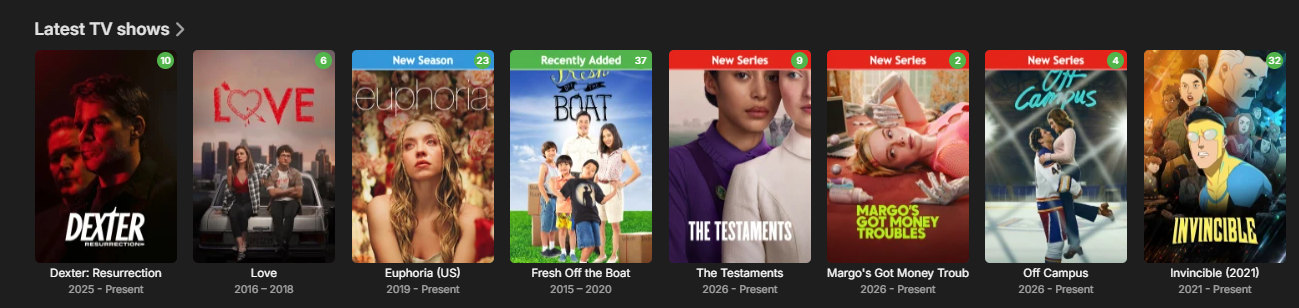
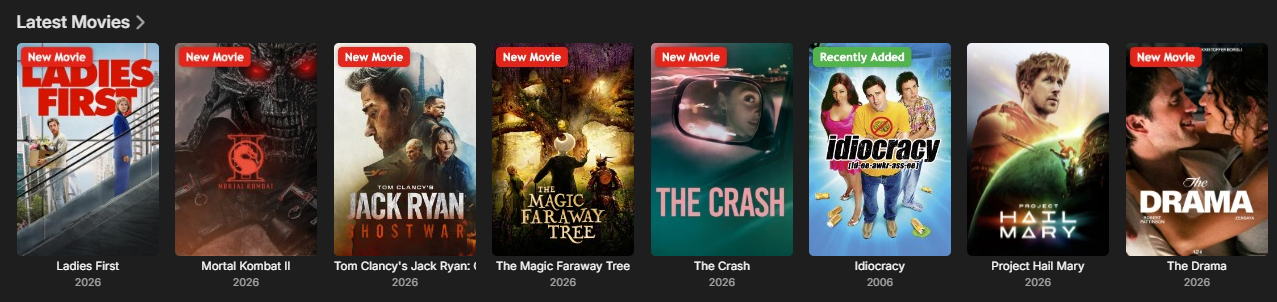
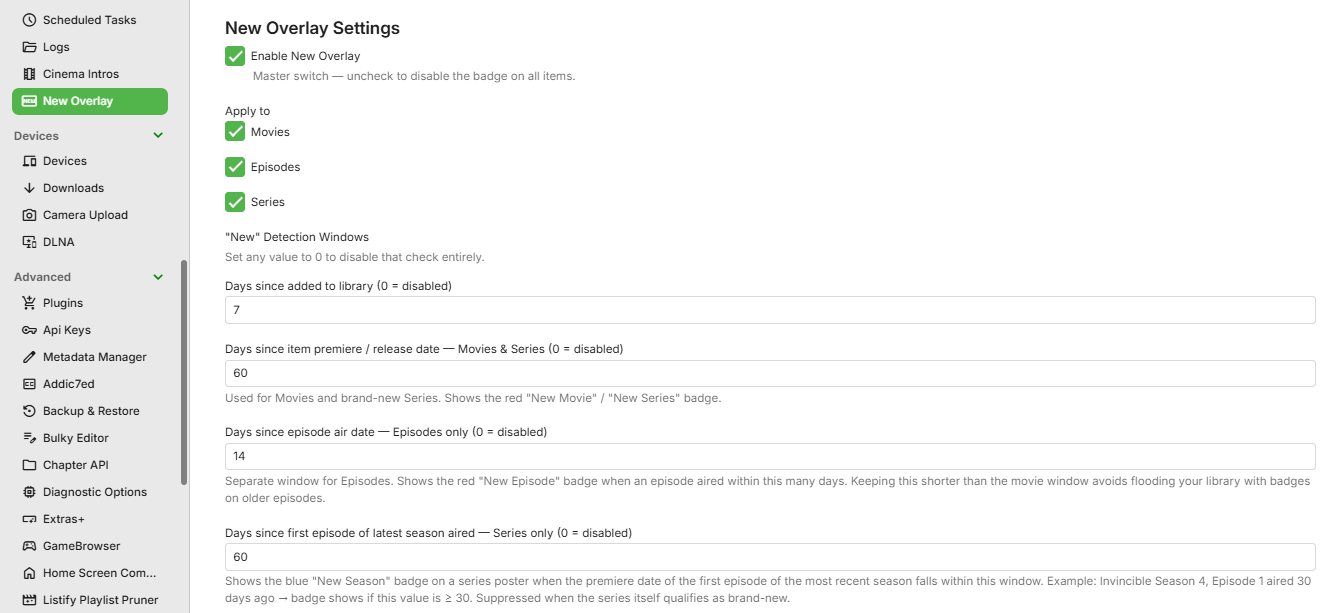
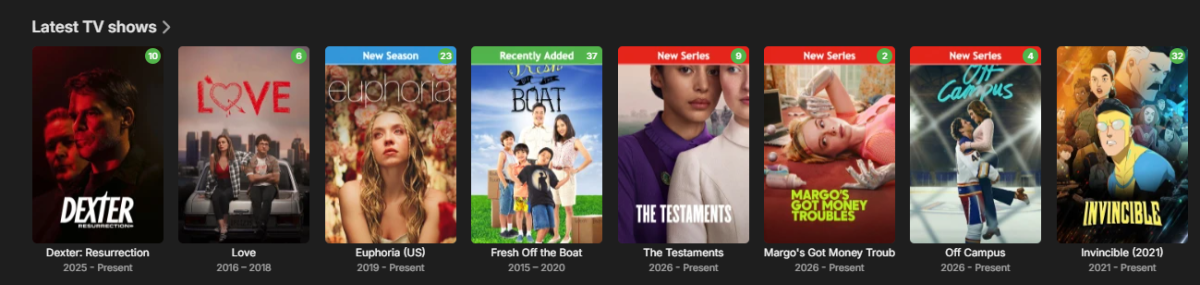
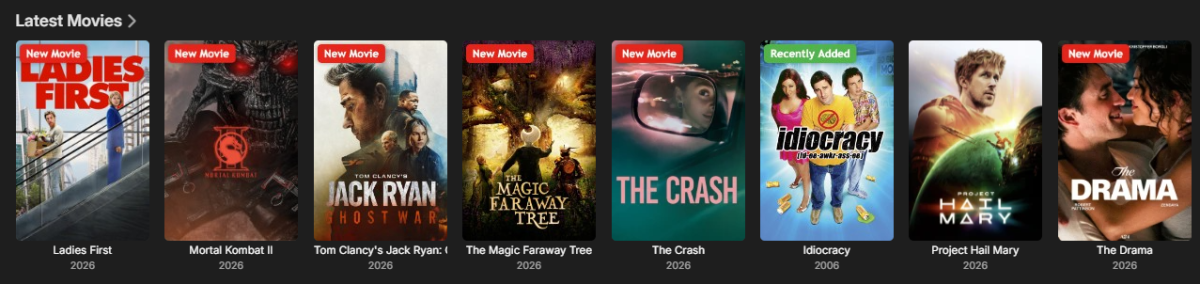
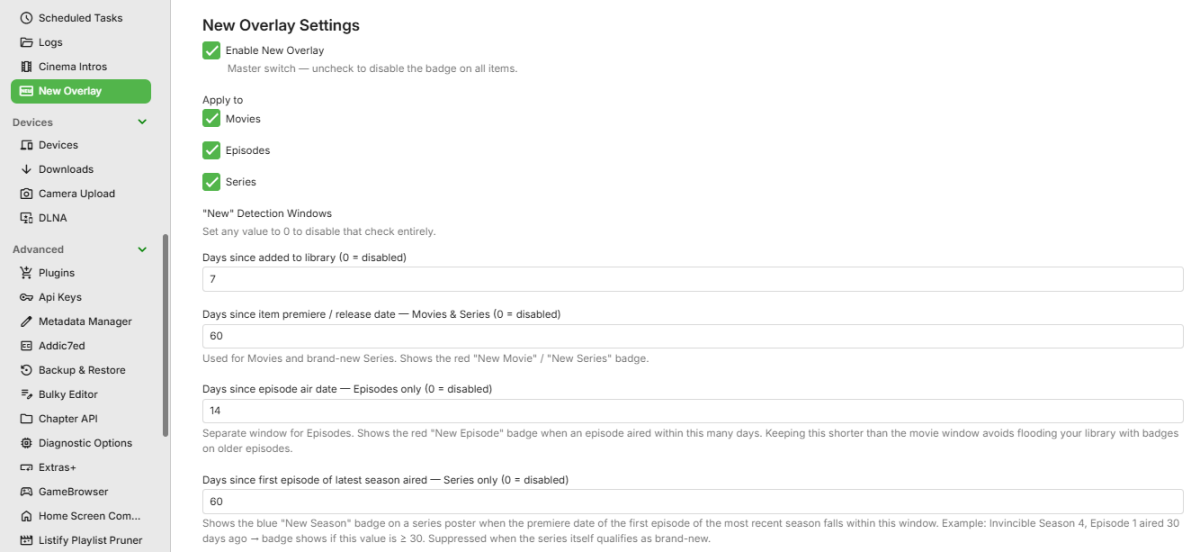
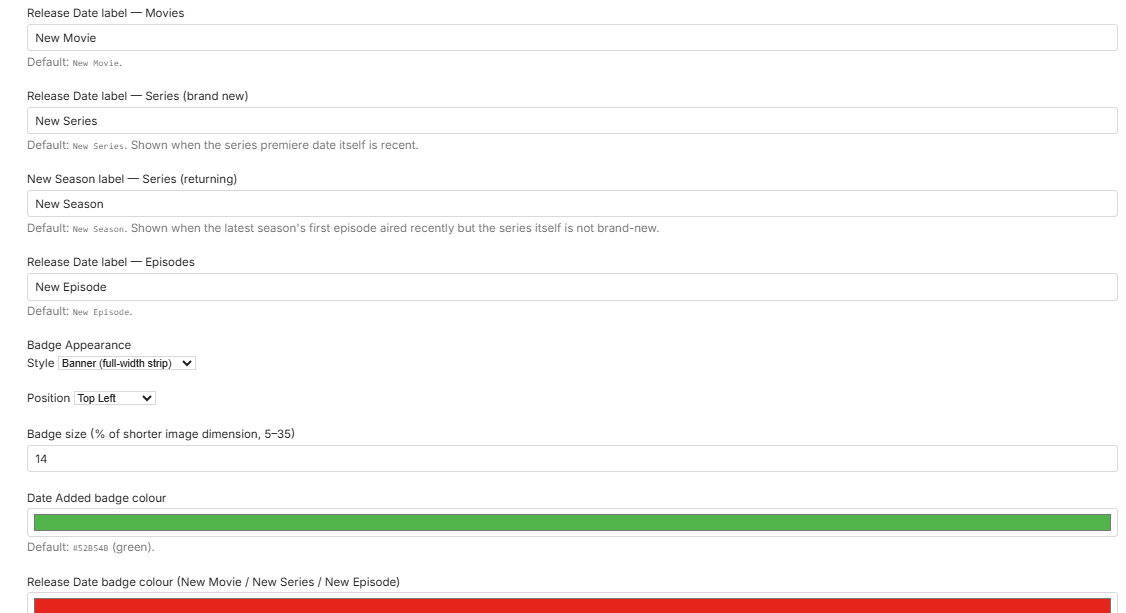
I created a plugin that adds customizable “New” badges, banners, or ribbons to library items based on release date or date added. It works with movies, TV series, and episodes, making it easier to highlight newly released or recently added content in your library. Give it a try and let me know what you think. Here are some screenshots: EmbyNewOverlay.dll
 4 points
 -
Hey, I'm Pas, the creator of TheIntroDB! I'm glad to see the community already adopting the plugins and sharing them before me lol. Currently, TheIntroDB has 84,789 public segments across 2,061 TV shows and 282 movies! And because the times are submitted and verified by users, the segments are much more reliable automated identification. Plus, it not only supports intros and credits, but also recaps and previews! I might not be very active on the forum here, but I'm responsive on Discord: https://discord.gg/ZbkSHAwWPg You can find more info and help contribute here! https://theintrodb.org4 points
-
There are also hundreds of people who do not have this issue, so it not as easy as saying "it's on Emby's end". Even if it is something in Emby that could be changed to work better in your environment, there is still the need to find out what is different in your cases. It's hard to know even what questions to ask; but answering those which are is at least a step. Paul4 points
-
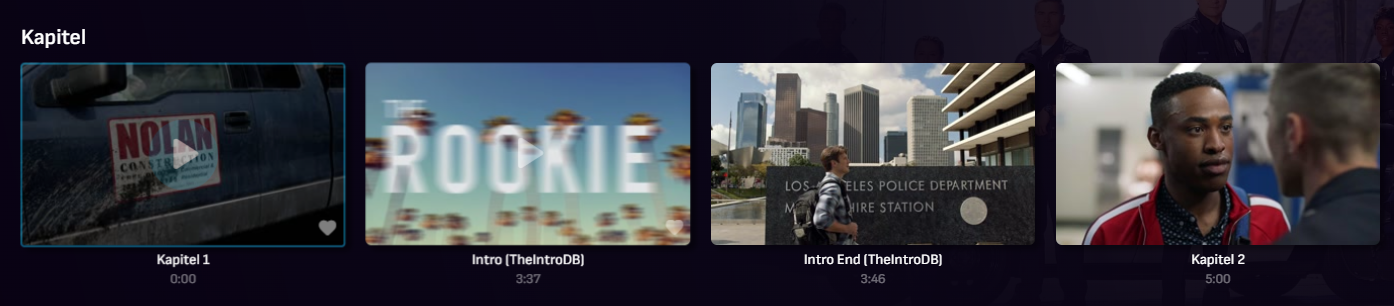
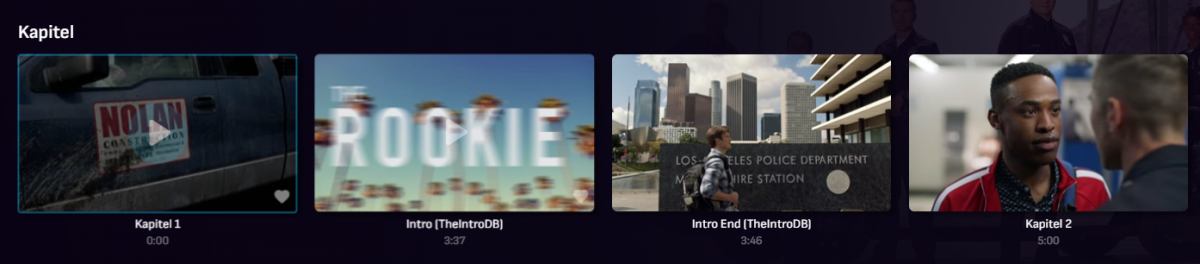
I am not the creator, but I recently found this Plugin now available for Emby (for people that don't want to spend time on extracting Intro, Credits etc. on their own systems). The DB relies on community feedback. For sure it's not as perfect like e.g. @yocker's tesseract extraction since there are lots of different versions and releases of movies/TV shows, but dev is very responsive and the Emby plugin simply works since last version. Perhaps interesting for a few users here like me. As far as I can see, the plugin sets up an own db in emby data folder and injects identified markers as chapters into Emby. https://theintrodb.org/ https://github.com/TheIntroDB/emby-plugin
 3 points
 -
4.10.0.13 Works without any errors. No other env vars need to be set or folders to mount. Thank you! s6-rc: info: service s6rc-oneshot-runner: starting s6-rc: info: service s6rc-oneshot-runner successfully started s6-rc: info: service fix-attrs: starting s6-rc: info: service fix-attrs successfully started s6-rc: info: service legacy-cont-init: starting s6-rc: info: service legacy-cont-init successfully started s6-rc: info: service legacy-services: starting services-up: info: copying legacy longrun emby-server (no readiness notification) s6-rc: info: service legacy-services successfully started2 points
-
Truenas app catalog seems to have been updated and 4.9.5.0 is now available2 points
-
I for 1 don't have connection issues Its always something in the server admins setup that's not setup right. Or has not been done.2 points
-
@Gerbs isn't even running Windows and has the issue. So I definitely feel it's not a Windows indexing issue.2 points
-
Home Screen Companion Plugin https://github.com/soderlund91/HomeScreenCompanion Below is a summary for this plugin, visit GitHub for latest release and full documentation. Home Screen Companion is a plugin for Emby Server that automatically manages home screen sections using tags and collections for your Movies and TV Shows — and keeps your home screen sections in sync across multiple users. It works by connecting one or more sources to a tag and/or collection in your Emby library. Sources can be external lists from Trakt, MDBList or TMDb, rules-based filters on your own library, AI-generated recommendations, or your existing local collections and playlists. Each source runs on a schedule, and the plugin makes sure your tags and collections always reflects the current state — adding and removing movies and series automatically. The plugin can then use the tags or collections to create a home section and give you a living and curated home screen experience. With Home screen companion you can also manage the home screen sections for all users - copy, manage and create home sections directly from selected source. No need to set it up for every individual user, just copy it from one user and you can have a server wide home screen! Important Requires minimum Emby server 4.10.0.10 Key Features Different source types — External List, Smart Playlist, AI List, Local Collection, Local Playlist Automatic tagging and collections — items are added and removed as lists change Advanced scheduling — annual, weekly, or specific date windows Per-entry home screen sections — automatically managed sections for any tag or collection Home screen sync — mirror one user's home screen layout to any number of other users Top-List — Create a "Top 10 movies of today", and the plugin will create a new home section for selected users with numbered posters Home screen sync — mirror one user's home screen layout to any number of other users Source Types External List Connect to curated lists on Trakt or MDBList. The plugin fetches the list on a schedule, matches items to your library by IMDB ID, and keeps tags and collections in sync automatically. Smart Playlist Build dynamic lists directly from your library using a flexible rule builder. No external service needed — the plugin scans your library and tags items that match your criteria. AI List Generate recommendations using AI. Write a natural language prompt and the plugin calls an AI model to produce a list of movies and shows, then matches them against your library. Local Collection and Local Playlist Tag items based on an existing Emby Collection. Combine with scheduling to create time-limited promotions of curated content — no external API needed. Tags The plugin take the source type you have and put a tag on Movies and Series. You can choose at what level to put the tag, either the Series, Seasons, or the episode. Collections Any source type can automatically maintain an Emby Collection alongside its tag. Playlist Any source type can automatically maintain an Emby Playlist for all or selected users. Scheduling Set up advanced rules when the tag or collection should be active. For example you only want to tag a Christmas list during December, or you only want your collection be available during Halloween. With the scheduler, tags and collections get added and removed automatically. Home screen Add a dedicated home screen section to any tag/collection entry. The plugin creates, updates, and removes the section automatically on each sync, no manual Emby configuration needed. Just select your source and enable the home screen option - and you will have this source as a row on your home screen for all selected users. Home Screen Sync - server wide home screen With this function you can easily copy a users full home screen sections to all other users. No need to set this up for every user now! Just configure the home screen sections and library order for one user, and you can have a server wide home screen that looks the same for all selected users in the blink of an eye. Top-List The plugin can create a "Top 10" style of home section for selected users. This can be done by either manually select what movies you want, or use existing tags to have a list that is auto-updated. Installation Download the latest .dll from the Releases page (GitHub). Place the .dll file in your Emby plugins folder. Restart Emby Server. Screenshots More screenshots in below spoiler1 point
-
How to add and configure an M3U Tuner1 point
-
I interpreted this to mean it would. If not, I am assuming I should just use the %fn.%ext and make sure my naming includes the resolution.... Sorry Here is the link: I believe this was just related to properly detecting the movie name from within the file name.1 point
-
v1.0.0 Initial release. NEW badge overlay for Movies, Series, and Episodes. Three detection modes: Date Added, Release Date (days window), and New Season. Configurable badge style (Ribbon, Badge, Banner), position, size, colour, opacity, and labels per item type. Priority order: Release Date > New Season > Date Added. Automatic cache invalidation via daily cache key buckets.1 point
-
I am assuming one of the devs/team have been looking into the issue and tinkering as at the moment trailers are working again on both the older app and the new one on my TV. Thanks1 point
-
@MediaIntelNUC Did you update you server to 4.10.0.13? I don't use the plugin on Beta, so never tried.1 point
-
Rebooting my Mac seems to have fixedit. I'll keep monitoring. Thanks.1 point
-
I have used it with Beta Server for the last 8 month-ish and it have worked flawless through several beta updates1 point
-
Hey everyone, just wanted to share something I've been working on. I picked up an RK3588 a while ago and waited a solid year for this feature to drop, but gave up and sold it this winter when nothing happened. Fast forward to last week, it suddenly dawned on me that we could achieve this indirectly using a third-party proxy. This is still an early-stage prototype, and so far, I've only tested it on Intel hardware. I haven't got my hands on a 3588 to test it yet, but I figured this might give the community a good head start: https://github.com/tces1/emby_transcoder/blob/main/README.en.md1 point
-
I enabled debugging and checked the log after scrolling trough some movies that have the issue, posting part of the logs. embyserver.txt1 point
-
@Tom1241since Emby release a new stable version, and it is using the discussed naming scheme (last digit is "0"), I believe that it is now on Truenas / Stavros' responsibility to update the Truenas app.1 point
-
The solution is to insert a string like this: \\DiskStation1525\music1 point
-
Hi, please check out our quick start guide: Quick Start1 point
-
Yes also have it as an upcoming on the homepage1 point
-
Maybe this is new, but i found this on their website: https://webostv.developer.lge.com/develop/guides/screensaver It seems to me, we need the type three screensaver setting. Mom is always complaining that the LG screensaver comes on while playing music and that she cant see the pretty emby scrren.1 point
-
Emby has always, or for a long time at least (AFAIK) had external links, such as MusicBrainz, Discogs, The AudioDB, for music. These are normally in the About>Links section at the bottom of the relevant pages. They open in their own window/tab when using a browser. I guess you have seen these standard ones already? I have just moved them elsewhere and made a new heading, with CSS. To get the additional ones, such as Website, Wikipedia, Qobuz, or any others that you prefer, then you could use this plgin: https://emby.media/community/topic/120013-custom-external-links-provider-ids/ Again, for security reasons, the links open in their own window/tab. I only use it with the Emby web app and have no idea if it works elsewhere? It's really useful though and works with the latest Emby beta.1 point
-
Ok, Thanks.1 point
-
Sure so here is the original configuration file. When I have time in next few days I'll reinstall it and map specifically the missing genre you listed and will let you know the result Thanks a lot for all the investigations GenreCleaner.xml1 point
-
Here they are, enjoy and please use Issues in GitHub for any missing icons you might find. I'll generate new releases as needed. https://github.com/majorsl/EmbyIcons-MaterialIcons/1 point
-
I'm interested to see what @sa2000finds in log set 3 and now also in log set 4 (attached to this post). I however found something unexpected. I have been thinking of a recovery from this situation, so I can suggest to your team a special button that can help those of us who have spent 200+ hours manicuring our large libraries recover from this without having to blow away our library and recreate it, losing all of our custom metadata. So I started methodically refreshing metadata artwork to see if this would recover from the original issue. I got about 3500 items into the library and stopped to wait for the system to catch up downloading artwork. Previously I thought it was successfully redownloading artwork for all entries, but this was just based on less than 10 instances where I tried it and it worked. Having now tried about 3000, I can see that plenty of them are refusing to download. I am fully certain that 100% of the ones that are refusing to download now had artwork downloaded successfully before the original issue began. I did a partial count and 593 of 3555 were missing artwork but had their artwork before the original issue happened. What's interesting is that they appear to have had the actor artwork successfully downloaded. I know this because many of the ones I checked have unique actors in them that aren't anywhere else in my library, and my checks before redownloading artwork always had the actor artwork missing. Attached are the logs from my manual attempt to redownload the missing artwork in the "Movies" library for around 3000 movies, it also should contain routine library scans since it covers about 1.5 days. I did a check to see if the same was present in "Movies 2TEST" library and it was the same there based on spot checks. I noticed something else. Ordering the "Movies" library by Title (alphabetical) resulted twice in groups of movies being listed out of order. It seemed that the groups listed out of order were the media contained in the "Christmas TV Specials & TV Episodes" folder, which I had been viewing in Library > Folders view just before. I have been using Emby several times a week every week for the past 9 years and I have never seen this happen before. So, how can someone recover from my original issue of artwork going missing permanently when it happens? I had the following thoughts: Add a feature to be able to export and import a monolithic zip export of the custom metadata. This would possibly allow people with database issues or whatever this is to carry over their custom metadata from the old library to a new library. Custom metadata is just text so this should result in reasonable file sizes. Perhaps set a limit to the zip size to 100 MB and split it up in that fashion for very large libraries with very many customizations. I understand that the import to a new library would involve quite a bit of new code, but I don't see an alternative really since I don't think the next suggestion will address the issue (because no one fully understands it). Add some sort of database integrity check that can be manually executed. The check would verify all paths and remove anything that's invalid. Or whatever else is appropriate for this issue that no one seems to understand at the database level. This would require someone to dig around in my database, which I am happy to provide if you provide the instructions to retrieve it. Even better, create a button that creates a new library with the same path, creates the appropriate copies of the custom metadata, initiates the scan of the new library, and trashes the old library. Honestly I would prefer the export and import custom metadata feature since that means I could also create backups. I think we are probably near the end of my usefulness in this matter. But I'll continue to update if I see anything. log set 4.zip1 point
-
I'm loving this plugin so far, after only a few days. Thanks for putting this together and improving it frequently. The AI lists are great. With the old smart playlist plugin I tried making rule-based playlists of like "World Cinema" before and it was too janky to get working like I wanted. This plugin just smashes that. I'm curious if there are limitations to the AI integration or if this can be expanded at all? I'd love to be able to have multi-input data to customise this to get a more "Netflix Algorithm" feel to recommendations. Example: Top Picks For You - source 1 is a taste profile, source 2 is a pool of unwatched items to recommend based on taste profile Source 1: Favourite list (or specific playlist/tag) Source 2: Unwatched items (even if derived from playlist) I've tried out a prompt with the current settings but find the max 100 recent items (I assume also includes all TV episodes) is too partial of a footprint for this. After adding an "unwatched" filter to the 20-30 items returned, it may only have 4-5 items in the collection. I could achieve this by baking favourites in the prompt, but achieving this for multiple accounts and libraries or genres might get a bit difficult to manage.1 point
-
New beta out (v5.53.0.0) Added support for TV series icons in collections. On my summer break but was bored out of my mind this weekend so worked on this. Please report any bugs you might find to me.1 point
-
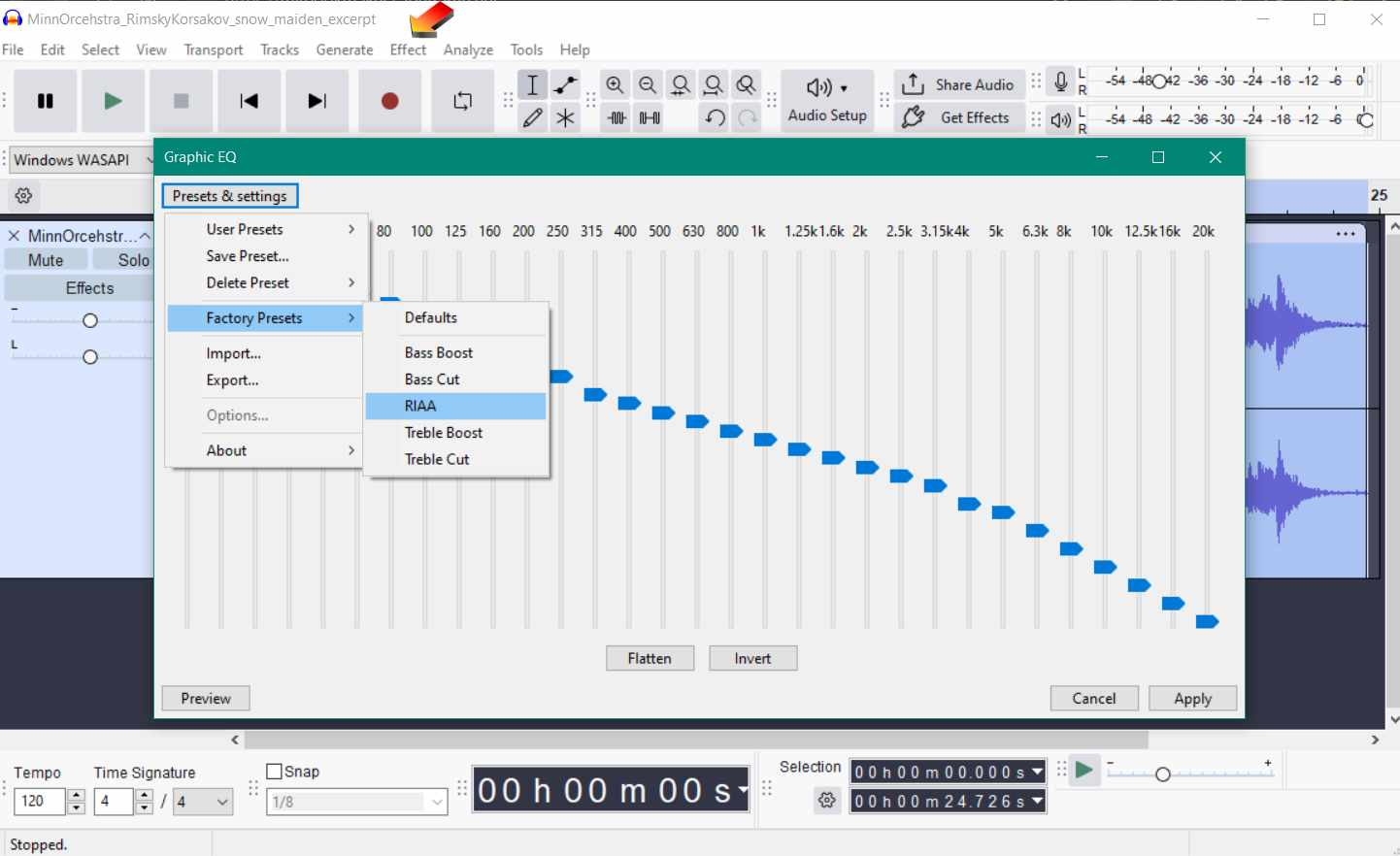
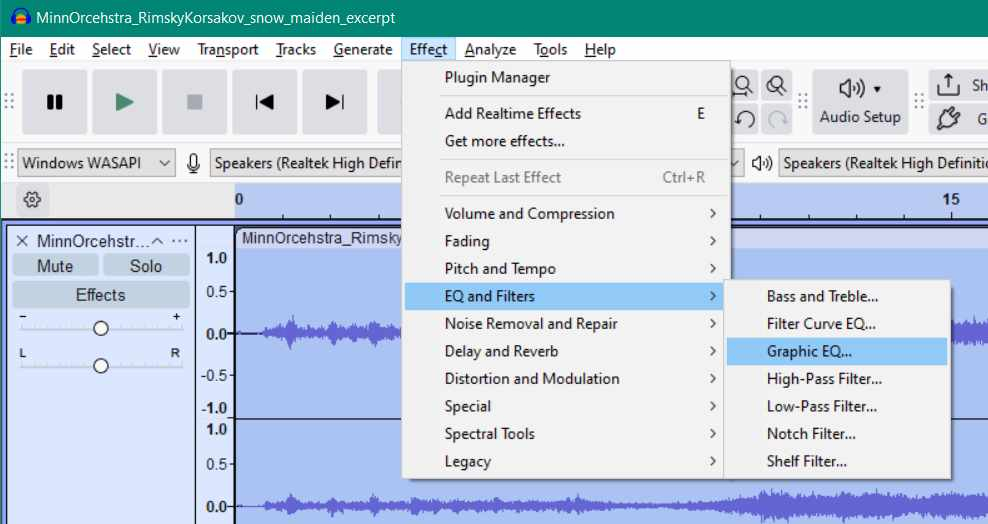
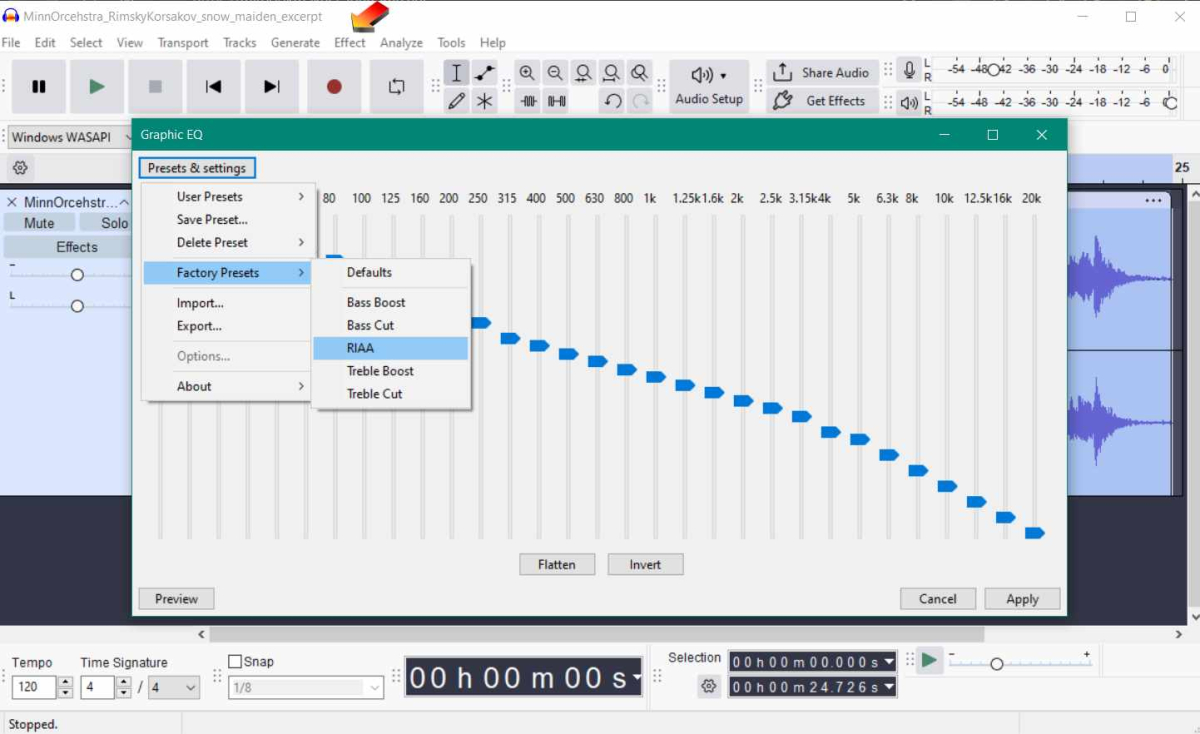
You need a RIAA EQ filter curve or a phono pre-amp (stand alone, or part of a proper amplifier) running between the LP playback and the digitial recording, in order to correctly EQ a LP disc to a digital copy. You would get a incorrectly EQ'd copy, if you connect a turntable directly to digital recording Aux input on a computer. It's possible to get good quality by treating such a bad EQ digital copy after it is recorded by running the RIAA EQ filter inside Audacity. I think a quality phono pre-amp might do a better job of it. You might have a RIAA filter, built into some turntables with USB out. I am not familiar with that hardware.
 1 point
 -
As per previous advice, I would not use a duplicate library - this was the 'only way' to do it before - and it caused all sorts of problems. Now we have the ability to dynamically create rows/collections etc via tags, then I can't think of a good reason why you would want to go back to the old method. If an item has a 'top picks' number on it - but it's not in a top pics row (for example), then I agree it may look a bit odd - but as you suggest, replace with 'top pic + #' should remove any confusion. A top pick in an alternate row is still a top pic afterall.1 point
-
I personally don't care for the modified covers in general. Right now I just use a smart playlist called "popular this week" that has a play count greater than 1 from any user within the last 7 days. There is no way to rank how popular an item is (number of play counts or number of users with a play count) but its fine for my usage, I just sort by random. I do this all with tags as they are the cleanest. With a playlist you could define the order of the items better, as in sort from most popular to least. I would probably not be the best candidate for advice as I wouldn't use a feature that tagged a cover with a number or badge. I would use a feature that allowed the top items to be better sorted in a home screen view though.1 point
-
Major release - Version 3.0.0.1. Download .dll here and full changelog: https://github.com/soderlund91/HomeScreenCompanion/releases/tag/v3.0.0.1 This release contains major updates, improvements and bug fixes. New name - Home Screen Companion Read why below. Warning No longer support for Emby server version 4.9.x.x. Requires 4.10+ How to update from AutoTag (Optional/Recommended) Download a backup from the plugins settings menu Download HomeScreenCompanion.dll and put it in your /plugins folder. Remove AutoTag.dll from /plugins folder Restart Emby (Optional) If everything has migrated well you can remove AutoTag.xml.old from /plugins/configurations folder _____________________________________ New Home Screen manager: Added a new function that copies the home screen sections from a selected user to others. You no longer need to manually edit the home screen for multiple users. For example, if you create a tag or collection that you want to show on the home screen, you now only need to set it up for one user and then automatically copy it to all selected users in one go. Unlike Emby’s built-in copy function, this only copies the home screen sections. Improvements Local media information: Added ability to match with "NOT" logic. For example, you can filter movies that do not speak English. Local media information: Added an info popup with help to understand the symbols for equal, greater etc. Schedule override: Added ability to override a tag/collection based on schedule. Example: if you use the tag "spotlight", but for Halloween you want that to override during October and also use the tag "spotlight". Then the ordinary spotlight tag will become inactive, and only the Halloween one will get the tag spotlight. (If multiple overrides are used at the same time and for the same tag, they will be combined) Emby's scheduled tasks: Moved the tasks from "Library" into a separate Home Screen Companion title Fixes: Collection images: Uploaded images are now deleted when unused. Bug fix: Fixed a bug where you could select a non-existing date in the recurring schedule, for example Feb 31. v3.0.0.1: fixed a bug for home screen copy if the source and copy to was the same. Now prevented _____________________________________________________ Why change the name? What started as a simple script to add tags from an external list has grown into much more. The plugin is now also used to create collections, and a "smart playlist" feature has been implemented using local media information. The idea behind this plugin was originally to create tags to use in conjunction with Emby’s new Home Screen Sections. I mainly build this plugin for my own needs. My goal is to have a plugin that helps manage and automate the home screen as much as possible. Now that I’m adding the ability to actually manage the home screen directly, I feel that the original name no longer describes the plugin accurately. It's still the same plugin, just with more and more functionality being added. However, it is evolving into a companion for managing the home screen — hence the name. HomeScreenCompanion.dll1 point
-
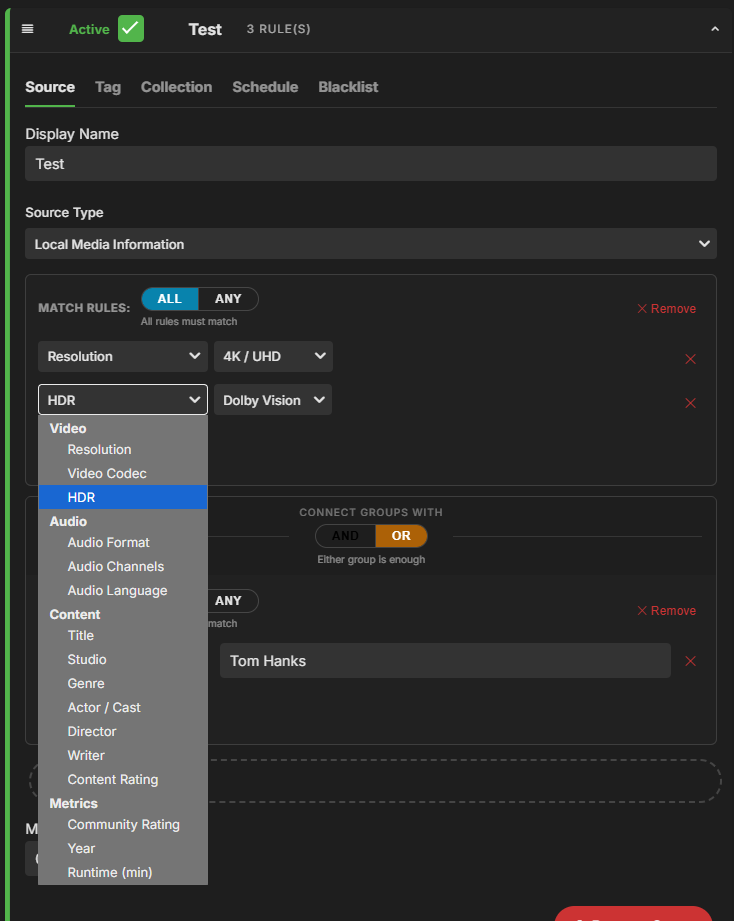
Beta release - Version 2.3.1.0-beta Download .dll here: https://github.com/soderlund91/AutoTag/releases/tag/v2.3.1.0 Also attached to this post Releasing this as a beta sinse i havent tested all functionality, and i need your help to find bugs etc. Please help me find and report! This update includes major improvements to the handling of local media information. Make sure to back up your settings before updating! Improvements Local media information: Significantly improved selection and filtering when using local media information as a source. Added multiple filtering options (e.g., resolution, media codec, title, actor, director). Added AND/OR logic for filtering. UI/UX: Introduced a separate menu for tag settings (creating a tag is enabled by default). If you dont enter a separate "tag name" it will get it from the Display name from the source-tab. Also removed the option from Collection-tab to not create a tag. Fixes Save button: Fixed an issue where saving was possible during an active run (could lead to data corruption). Known bugs When running a filter based on local media information on a large library, Emby may become slow or temporarily unresponsive (continuous loading spinner). Be patient and allow it to complete for a minute. I beleve database writes may still be in progress even after the plugin run has finished. Screenshot: AutoTag.dll
 1 point
 -
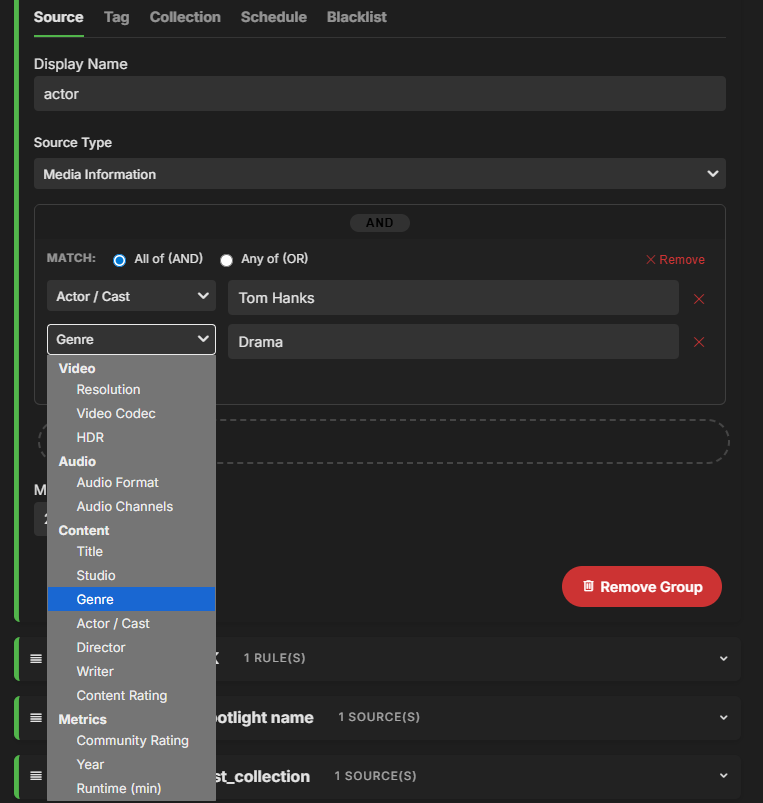
Here is a teaser I just need to get it working properly and some smaller UI fixes.
 1 point
 -
Some buttons I made for "Base" libraries. Included in the zip are the images seen below, an image with more icons, a blank background button to make more or change colors, as well as the PSD file that contains all of the ones shown. Also included in pink are buttons for Smart home devices and status. MediaButtons.zip1 point
-
A few people are having this same issue. At least 4 people, so the problem is not on our side. There are 2 other threads on this issue that the Emby team abandoned, thinking the issue was on our end, even though I explained that I tried everything in their guide and never heard back from them, so don't hold your breath. nothing will be done about it until the Emby team stops blaming our setups for the issue and actually takes it seriously and looks at the code. The reason I'm saying this is cause I brought it up in 2 other people's threads and even my own thread, and was ignored on that issue. btw guys, hmmmm, before the update, it was working, then after the update, not working, so it kind of looks like it's on Embys ' end. Also, btw, I have been using Emby for 8 years and have never had to open my ports, but just for peace of mind, I tried everything in their guide,, and nothing worked.0 points