Leaderboard




Popular Content
Showing content with the highest reputation on 05/22/26 in Posts
-
@youcinezI don't like ads, specially not ones that disguise them self as normal conversation! To anyone reading this, i suggest staying off the website he linked. Edit: Thank you @GrimReaper3 points
-
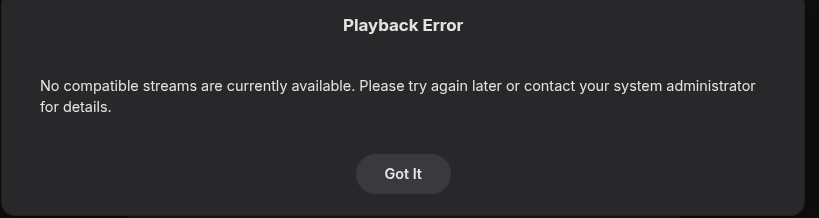
Hey, I am writing to request playback support for module files (.mod, .xm, .it, etc). Currently, Emby tries to play these but fails. There are several C# .NET libraries for mod playback, eg. SharpMik: https://github.com/thegouldfish/SharpMik I would be interested in fulfilling this need as a plugin, but I did not find any information on how to get the currently playing audio stream into a plugin. If someone can help me with this, then maybe I will be able to write a plugin for this purpose. Or are playback decoder plugins even possible? Alternatively, please tell me how to have Emby ignore module files in folders marked as Music. As I said, currently, mod files in my music folders get an attempted play, that results in an error message. I would primarily like to fix this error message by having a plugin that provides the playback capabilities, but if that's not possible, I would like at least to be able to avoid the error messages, which also stop playback! For reference, attached is the error I'm getting.
 2 points
 -
Ok, well I can report that compiling ffmpeg with flags --enable-libopenmpt --enable-libmodplug yields a version that can open these files. Can you please help me do that? I could not find the Diagnostics Plugin in the Plugin Catalog; closest was Emby Statistics Plugin, which seems like a different thing. Also, https://mediabrowser.github.io/Emby.DiagnosticsPlugin/ says "The diagnostic options are volatile and not being saved anywhere". Will this also apply to the ffmpeg path? If so, that would mean I'd need to set it on each restart of Emby. Yes, that's exactly what this is about! I have a lot of tracker music from back in the day, from sites like Trax in Space and so on... I'm glad to hear this would be useful to others, as well!2 points
-
I have been testing several Android TV Box processors specifically for 4K AV1 streaming performance with Emby in 2026. Sharing the results here as it might help others choose the right hardware. Test Setup: Emby server with 4K AV1 encoded content Same network connection via ethernet 60 minute continuous playback session Room temperature 25C Results: Amlogic S928X 4K AV1 playback: Smooth 60fps throughout Peak temperature: 52C 8K support: Yes Verdict: Best choice for Emby 4K AV1 MediaTek MT8695 4K AV1 playback: Consistent 60fps Peak temperature: 58C 8K support: Yes Verdict: Excellent for Emby 4K streaming Amlogic S905X4 4K AV1 playback: Drops to 30fps after 28 minutes Peak temperature: 68C thermal throttle 8K support: No Verdict: Not recommended for 4K AV1 with Emby Key takeaway: AV1 codec saves 34% bandwidth vs H.264 at same quality — but only devices with dedicated AV1 hardware decoders can handle sustained 4K playback without throttling. [redacted] Has anyone tested Rockchip RK3588 with Emby 4K AV1 content? Curious about its performance compared to S928X.1 point
-
@alucrydAfter looking into it, the culprit was a parameter on my service in docker-compose: "init: true". It spawns tini process as PID 1 instead of the real service in order to properly manage SIGTERM signals. s6-overlay seems to not tolerate this anymore on newer versions. It works fine now without that option, thanks.1 point
-
I can't seem to duplicate your error.. Try with the latest release and see if that fixes it, i made a small adjustment how the home sections is tracked. Pls report back1 point
-
I'm sorry how much $749.99. What! That is ridiculous.1 point
-
This is great that you've done this, but AV1 is still not ready for prime time. We need to wait for the community to stop creating fork after fork after fork. There are currently at least 5 different forks, each for a different type of media to encode, and they all have different command(s)/lines and different base lines. It's insane. No one should move to AV1 unless they are perfectly fine using an pre-alpha codec.1 point
-
You are a genius! Never occurred to me! Many thanks1 point
-
Nor it ever did. And considering general practice of directing users towards Universal Android app and AndroidTV app basically being in quasi-maintenance mode and getting minimal new features to kerp up with newer server version and inevitable sunset, I wouldn't put too much hope that that particular issue will ever be addressed.1 point
-
Is your JF instance running? As it'd be using same default http port, 8096.1 point
-
btw all I had to do was reset my router from my laptop! not by unplugging it.1 point
-
It was some weeks ago so I don't remember it exactly, but it was something like "unable to connect". I searched for log files but it was useless.. Meanwhile these days I saw un update available for emby container con truenasSCALE and I patched it. Now it's working Really hard to troubleshoot now and say, what's the cause... Meanwhile thank you1 point
-
I'm sorry. I forgot to include the field "Overview" in the field list for the "Fields=" parameter just for this very collection type. Before posting here I asked MS Copilot if returning an empty value for this particular field would be a known issue and got a positive answer. This lead me even more astray. Everything is shiny now Sorry for the fuss. Best, Jan1 point
-
This topic has now been put under Moderated status. All new comments will require moderator approval before they will be displayed publicly. GR1 point
-
1 point
-
HI, we'll take a look at it. Thanks for reporting.1 point
-
They are larger because you are using Quicksync (simplest explanation, but in reality it's more complicated and I don't think you want a novel here). Hardware encoding takes several generations before it can match software encoding. It took quite some time for Quicksync to match x264 slow, almost 15 years. This is common knowledge to those of us who encode, and we discuss at lot of these things at the Doom9 forums. Switch to software encoding and your file sizes will be much smaller, and the quality will be superior. Yes your encode times will increase exponentially, but that's the price you pay for quality. If you want to know how to encode properly with Quicksync, there is a long hardware encoding thread on the Doom9 forums that covers an entire decade. There is a LOT of information there that you could put to good use.1 point
-
Advanced Video Coding / H.264 / MPEG-4 Part 10 seems to the the Codec of choice. It is as you can see, part of the H264 family. I would also venture to say that the promised lower bit rates etc. for h265 are not what you get at 60 FPS, 4k, with HDR as H265 was made to make the "between pictures" stuff take less space. 4k 60 fps files converted using Handbrake and Quicksync from AVC to HEVC are LARGER than the original AVC file (in my experience.)1 point
-
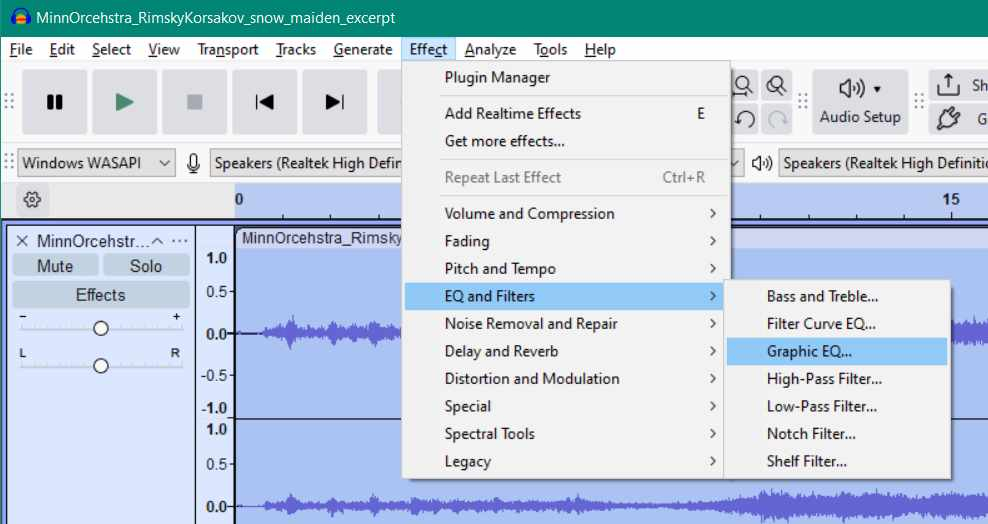
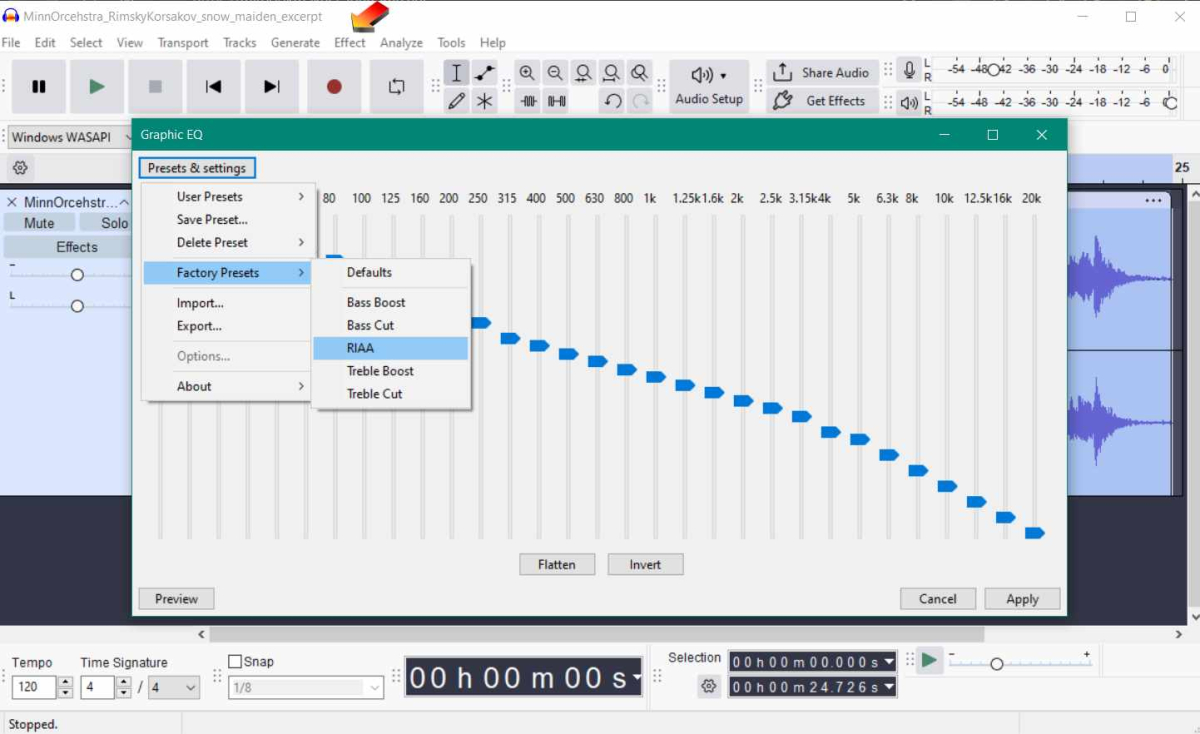
You need a RIAA EQ filter curve or a phono pre-amp (stand alone, or part of a proper amplifier) running between the LP playback and the digitial recording, in order to correctly EQ a LP disc to a digital copy. You would get a incorrectly EQ'd copy, if you connect a turntable directly to digital recording Aux input on a computer. It's possible to get good quality by treating such a bad EQ digital copy after it is recorded by running the RIAA EQ filter inside Audacity. I think a quality phono pre-amp might do a better job of it. You might have a RIAA filter, built into some turntables with USB out. I am not familiar with that hardware.
 1 point
 -
Yes, after tons of googling seems there is 'Samsung Legacy Platform'. Unfortunatelly I coidn't find any information in the TV itself.1 point
-
I think you misunderstood me. A landing page with help on how to use the client, how to connect to the server with those clients, etc. would be configured and maintained by the server admin not Emby devs themselves. Same goes for Jellyfin, Plex, etc. they all do the same thing they're clients connecting to a server, no piracy involved. They market their things as personal media servers, there's a reason... I could spool up my own webserver with said landing page and be done with it, but it would not have the looks of the Emby client and would not be integrable in the main client. My goal here is to integrate it in Emby itself, and then could be used in other ways like having a link at the top right to go check the help page, etc. The said "landing" page placeholder would be made by Emby devs, with whatever they judge good for us to be able to do with it, in a secure manner, etc. that being fixed editable fields, or custom HTML, etc. The new banner stuff you're talking about have no idea what it is. If it could somehow be useful for the usage of the server once connected that's a big plus, half of what I need.1 point
-
Welp, Emby team... take advantage of the situation, and send an announcement or something saying "Our product is awesome with apps available for tons of devices and we aren't disrespecting our users bank accounts!"1 point
-
I cancelled my lifetime plexpass in 2022 (which I'd had since 2013) after one of their security breaches, and the only way I could get them to delete my data was to close my account and lifetime plexpass. I'd never use their software again though, even if you paid me.1 point
-
Thanks for the suggested documentation links. The Tutorial: SSH into Synology NAS with Useful Examples really helped me figure out ssh and once I deleted the system.xml file, I was back up and running! I still need to figure out my remote access problem. It is only an issue with Emby because remote access to Synology apps doesn't seem to be an issue, no matter where you are.1 point
-
The main thing that would need to change to implement this feature: Client apps need to check for a DNS HTTPS RR or respect server Alt-Svc I would say this is the most important part of the feature request, as anyone who really cares about squeezing the most performance will already be using a reverse proxy like Caddy or NGINX, which have both implemented QUIC already. The "nice to have" feature for people who don't use their own web server (and also probably a ton of work): Built-in web server needs to advertise alpn=h3,h2 and bind to UDP This seems like an inconsequential feature, but it's actually incredibly useful for folks who like to connect to their Emby server far away or over networks with high jitter and packet loss like LTE/5G (increasingly common with 5G FWA becoming mainstream). Connection ID tracking would be even cooler (although AFAIK not completely implemented in .NET as of late), so folks moving between networks don't have their stream drop. I spent some time implementing it for an internal app for live video streams at <job> using quic-go and the performance impact is noticeable and significant on congested networks (and more importantly, not worse than http/2 in low-loss scenarios like a local network). The one thing I was caught on is WebSockets, I'm not sure how much Emby uses WSS (outside of knowing that it uses them), but this feature request is mainly about reducing the amount of time Emby is spending loading the menu or media itself on iffy or otherwise congested networks, so it might be outside of the scope. Unencrypted HTTP is also out of scope, since there's no such thing as unencrypted HTTP/3 (IIRC local connections use IPv4 + HTTP only). I noticed that the Emby Web Client will happily work over HTTP/3 with my Caddy server in front of it, and it even shows up in the Activity dashboard as HTTP/3 when I log in, so I hope that it's a simple change on the rest of the Emby clients (we can all dream). Also happy to help out testing/implementing if it would speed things along.1 point
-
In dotnet 8 it is marked as experimental, so that is why we have not enabled it. But we can add an option to do so.1 point
-
Hi, the Emby LG app hasn't yet been updated with these new features, but it is coming. Thanks.1 point
-
I started with Kodi, then tried Plex, then Jellyfin, then Emby. Emby felt more solid than Jellyfin, plus had support for shared playlists which was important to me as a music user.1 point
-
ProjectM, which is OpenSource with favorable licensing, written in C++ and afaik not dependent on DirectX as milkdrop, should be possible to integrate into emby-server(!) with reasonable effort. https://github.com/projectM-visualizer/projectm Demo: https://www.youtube.com/watch?v=jJmLQGhYWys&list=PLFLkbObX4o6TK1jGL6pm1wMwvq2FXnpYJ Imo this feature doesn't belong into the client and, just as the OT mentioned, the rendering should be lifted by the server. In this ecosystem the server is the heavy machine and the clients are not. And this circumvents any individual client-problems, as the rendered video is just played out as any other video.1 point
-
i got the same issue yesterday,but it's work fine now.1 point
-
Just to give an update it looks like this is back up and working now. Thanks everyone who helped on this.1 point
-
I disagree that Emby setup should cover basic TCP/IP Networking its not their responsbility.1 point
-
Artist, Album and Song responses should be more consistent now1 point
-
Try searching for "emb" without the "y"1 point
-
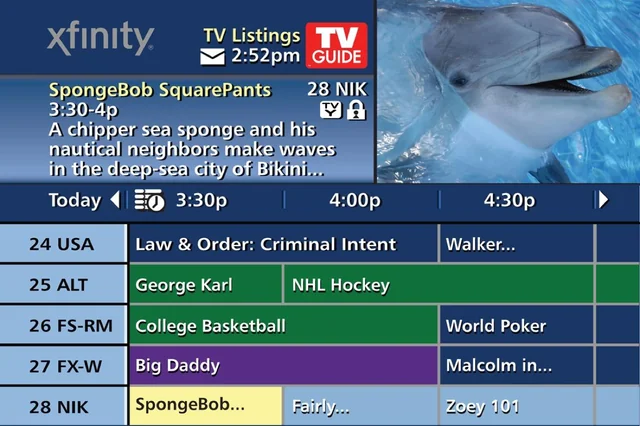
It would be nice to have the option to have what your currently watching on Live TV go in a box in the corner while you scroll through the guide or navigate other parts of Emby. I know some client allow you to have it play in the background but I would prefer a box in the corner so the video is not being obstructed in anyway. I use an Apple TV 4k and there isn't an option to have the video play in the background either but I think a mini player box option would make the most sense. If anyone ever had cable from Comcast a while ago they had a similar function and it worked great. Here's an example of what I have in mind:
 1 point
 -
HI, yes it is certainly a possibility. Thanks.1 point
-
vidaa os is now version 9. maybe it is time to retry1 point
-
the vidaa os is now U9.0, maybe they have changed their policy since1 point
-
if you want to delete all tags from your emby nfo files before running a fresh sync from radarr/sonarr --> emby: import os import sys # REMOVES ALL TAGS FOUND IN NFO FILES MEDIA_DIRS = [ "/mnt/media/movies", "/mnt/media/tv", ] def remove_tags_from_nfo(nfo_file_path): """Remove all lines containing both '<tag>' and '</tag>' from an NFO file.""" with open(nfo_file_path, "r") as file: nfo_data = file.read() lines = nfo_data.splitlines(keepends=True) cleaned_lines = [line for line in lines if not ("<tag>" in line and "</tag>" in line)] cleaned_data = "".join(cleaned_lines) if cleaned_data != nfo_data: with open(nfo_file_path, "w") as file: file.write(cleaned_data) return True return False def main(): total_cleaned = 0 total_scanned = 0 for media_dir in MEDIA_DIRS: if not os.path.exists(media_dir): print(f"WARNING: {media_dir} does not exist, skipping...") continue print(f"Scanning {media_dir}...") for root, dirs, files in os.walk(media_dir): for filename in files: if filename.endswith(".nfo"): nfo_path = os.path.join(root, filename) total_scanned += 1 try: if remove_tags_from_nfo(nfo_path): print(f" Cleaned: {nfo_path}") total_cleaned += 1 except Exception as e: print(f" ERROR: {nfo_path} - {e}") print(f"\nDone. Scanned {total_scanned} NFO files, cleaned tags from {total_cleaned}.") if __name__ == "__main__": main()1 point
-
Sorry to revive an old thread but as my issue is almost identical I thought I would avoid another new thread. I'm in the process of migrating from SSD transcoding to RAM. I was looking into the current setup and noticed Emby is not making any transcode temp files. It will not make the directory and no files are stored, I know it's not a permission issue as I can use the docker console to make new directories. I changed the internal binding to /transcode as a test and same issue. Found this post: Rotated the log and confirmed the new path but same issue. Removed it to have it make the default directory, it doesn't. The files still transcode/convert, I just can't find where the heck the local files are being saved. I even tried turning off hardware acceleration and same issue with CPU converting. Update: now it's working, ok. Don't know where it was making the files before or how it was working but sorted.1 point
-
Playback history is recorded by provider ID (IMDB, TVDB, TMDB, etc). If you remove a movie for example, then re-add that same movie by either re-adding the original file in a new location or adding a whole new file that matches the same movie; it'll still be marked as watched. In short: you can move your library and re-scan the new location without worry. It'll keep the watch history.1 point
-
@user24 I took your suggestion and rescanned the album with some minor tweaks to dBpoweramp and it seems to have worked. Now it shows just one album as it should be. Thanks.1 point
-
The entry-point you should call is /opt/Emby-Beta/Emby1 point
-
I mentioned it in another thread, but thought I'd put it here since this looks like a new section--just for posterity. Would like to have a bulk meta data editor function. For example, if I have 750 videos whose producing studio is the same, I want to select those videos and apply the name of the studio to those videos. Similarly, if there is a custom tag I want to apply to a subset of those movies, I want to be able to select them in bulk and apply the tag to those videos (instead of selecting them one by one).1 point
-
Be able to create playlist based on a certain criteria, like genre and or year, in order to create a dynamic playlist that it refreshes automatically when new content is added. This way you can for example, create a tv comedy playlist from the 90's, or a new sci-fi Movies playlist. Some other criteria for rules could be the rating, watched/unwantched, score, tags, language, audio codec, etc The possibilities could be endless1 point
-
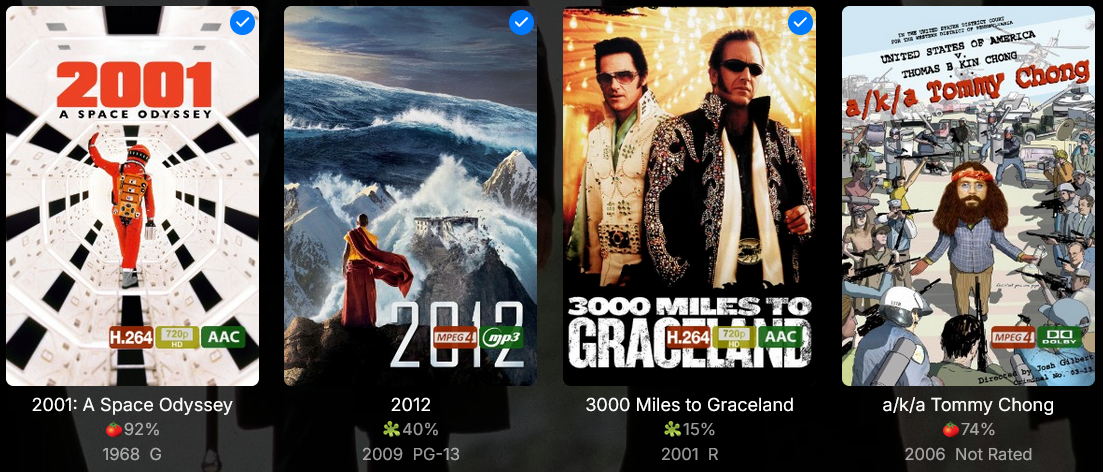
And here's a smaller variant Preview Download Overlays-smaller-smokex.zip
 1 point
 -
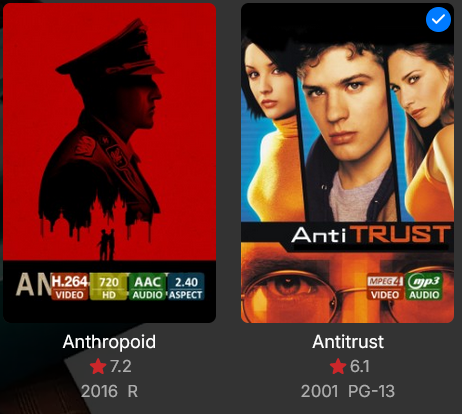
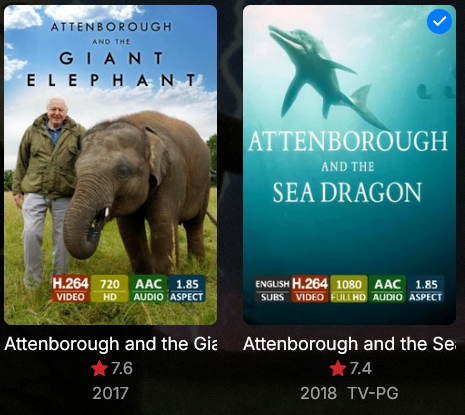
Here are some overlays that I've made. Previews Download Overlays-smokex.zip
 1 point
 -
well my ultimate goal would be to replicate what was possible with windows media centre and dvrmstoolbox which did indeed analyse recordings on the fly and i guess re-read the created edl file regularly to allow skipping of commercials in in-progress recordings. do you see any possibility of working towards that?1 point
-
Great plugin! Custom icons make a huge difference for the overall Emby experience on Android TV. Speaking of Android TV visual experience — we have been testing different Android TV Box processors for 4K AV1 streaming performance alongside Emby. The hardware decoder support varies dramatically between chips. Amlogic S928X handles 4K AV1 at 60fps smoothly with Emby — no dropped frames or stuttering. MediaTek MT8695 performs similarly well. However Amlogic S905X4 struggles with 4K AV1 content above 30fps and thermal throttles during extended playback sessions. For anyone running Emby on Android TV with 4K AV1 content, choosing the right processor makes a significant difference. [redacted]0 points