Leaderboard



Popular Content
Showing content with the highest reputation on 05/12/26 in Posts
-
Quite a number of times now I've lost metadata I was editing because I clicked in the wrong part of the screen, or hit the wrong key on the keyboard. If I do something to exit the metadata editor other than clicking the Save button, and I've made changes to the metadata, it ought to prompt if I want to discard them.3 points
-
The provided server log doesn't correspond to the ffmpeg log. Seems pretty straightforward to me, it's transcoding the audio and your transcoding temp directory is on C. I don't see any mention of throttling being active, so it's processing as fast as it can. The server log that corresponds would show the time taken by the client to request for the ts segments. Between the video and audio bitrates it's actually getting quite close to the 100 Mbit limit of the ethernet jack on pretty much any TV. Ironically wifi can often be faster, but there are a lot of factors. Looks like a bandwidth problem to me.3 points
-
I might understand this wrong, but afaik those people are asking for the ability to use a forwarding proxy, not a reverse proxy. Emby does not only work as a _server_, but also as a _client_ for certain features. Like gathering metadata or downloading plugins. This is not about proxying other clients that access the emby-server, but proxying the connections going out from emby-server (which works in this case as a client). And i actually like the idea to put into every metadata-plugin for example a separate proxy-setting. So that all outgoing connections to this specific provider go through a specific http/socks-proxy. I myself have also problems with tmdb rate-limiting very aggressively and would like to have an easy option to put a proxy-server into the tmdb-plugin to go around this specific problem. But as we see for other countries this is absolutely needed to circumvent certain firewall or NAT-situations. And regarding the "limiting the proxy to a certain site", afaik this only works on ip-base, not hostname/DNS base. That means you would have to make first a database of all the IPs that tmdb, github or whatever are using, then you would be able to route access to this IPs to a certain gateway/proxy. And those IPs are changing constantly since they nowadays all use obscure content delivery networks and what not.2 points
-
Honestly at this point, people should be migrating to Tailscale for their VPN needs as it's far easier and works great.2 points
-
It's a third Playstate so that Shows, Movies, etc. no longer show on screen (when filtered). Most of us already filter to "Unplayed" on our servers so that we can easily choose what to watch next. By introducing "Not Interested" (), it would also remove these items from the Main Screen, such as Latest and Suggestions. If you ever wanted to see them again, you just filter back to "Any." There is no need for bickering or comments back and forth about deleting media or talking to your users. If you like the idea of hiding media with a new icon/playstate, please like the original post on Page 1. If you don't, please move on.2 points
-
I frequently use the filter of Unwatched for movies and TV shows. And with music, you get recommendations based upon "similar" artist or songs. I would like a flag option to mark media as "Not Interested" or whatever verbiage would be better for the masses. This would have to be at the user level and not stored in a NFO file since I would like to filter out things my family likes, but only on my profile. As my libraries grow, I am having more content for my family. Since I am the only male in the house, my users have tastes that are distinctly different from mine. Whether it be real surgery shows, true murder, sappy romances, or telenovelas; these are things that I will never - and I do mean never - watch. The same thing goes for the music collection. I don't mind classic musical soundtracks, but my daughters collection of Broadway musicals is vast. And annoying. Now I could make them as Watched, but then that would go into the algorithm "Since you watched this, you might like this...", I would like to avoid doing that. I've poked around quite a bit, but I don't see anything like this currently nor did I see anything like this requested. If it has been requested but called something else, I would love to know about it so I can like that post. Thanks in advance.1 point
-
Emby doesn't use AI tools. As mentioned there is something goofy with how your metadata is setup. You should also follow the proper naming scheme https://emby.media/support/articles/TV-Naming.html Emby is only as smart as the person who is in charge of the server. If you don't have your files named properly, it won't know what it's dealing with and will give you bad results when it can't query sources properly.1 point
-
@marcelosoreThere is already subtitle settings for Emby on Apple TV you need to open the Emby App on the Apple TV, go to Settings > Subtitles, then scroll down to Subtitle Appearance. Make sure you are up to date for the Emby App, past versions didn't have this feature1 point
-
This option.
 1 point
 -
Hi. If you can find the appropriate server log, it may have a clue but it could have been anything on the machine that was also I/O intensive - anti-virus scan, Emby library scan, some other disc management software doing something...1 point
-
Of course I do, I am the one who acquires all the crap that I don't like. Don't get me wrong, I love them all, but they can't figure out how to save youtube streams to mp3 and downloading from Archive.org is completely over their head. Don't ask me why, I've shown them all a hundred times. Looking at your signature/machine spec, that is almost pornographic and I'm ain't gonna lie, I am green with envy. I don't have a single computer that has specs that good. One of my servers hostname is thanksgiving, because I made it with leftovers! I'm gonna go out on a limb and say you are single? If not, your partner is awesome agreeing to spec out machines like that. There is a old adage that literally drips with wisdom. Happy wife, happy life. If my wife doesn't want to learn any nerd basics and she wants something on the server, it's getting put on the server come hell or high water!1 point
-
Hi, yes there is room for improvement there. Thanks.1 point
-
Thanks @quickmic. I don't actually think the plugin resulted in the issue. But I thought I should flag it just in case. I'll post back after restoring my LibreElec setup and updating again. I've been running LibreElec stable for awhile, so I guess I was due for a hiccup. I wish I'd stayed on top of things with backing up the SD card with my install. Rolling back several months will not likely go well ;-)...fingers crossed.1 point
-
The Beta site is brand new and didn't even exist 3 weeks ago. That's why the URL can't be found anywhere yet and the information for accessing the beta was included on the FAQ page (which is no longer necessary). You are right that this was confusing. I have updated the FAQ page as well now.1 point
-
While native Media3 support gets finally implemented on Android, can you try to implement this driver for the time being?1 point
-
Why not have a setting to reorder? Or toggle them on/off, or list them in the about section? Or put them after the actors? Why prioritize them first? Movie posters and advertising don't include images of the writers/directors (except maybe a few Hitchcock titles). Half the time, there aren't even images available for them, especially writers. For me, it makes the page look half-ass with generic icons listed first.1 point
-
Tbh I delete what I don't want on my server. Its my server, my rules1 point
-
While native Media3 support gets finally implemented on Android, can you try to implement this driver for the time being?1 point
-
Okay, my iPad does not have cell service so I think it knows immediately that there is no network and that's why the difference.1 point
-
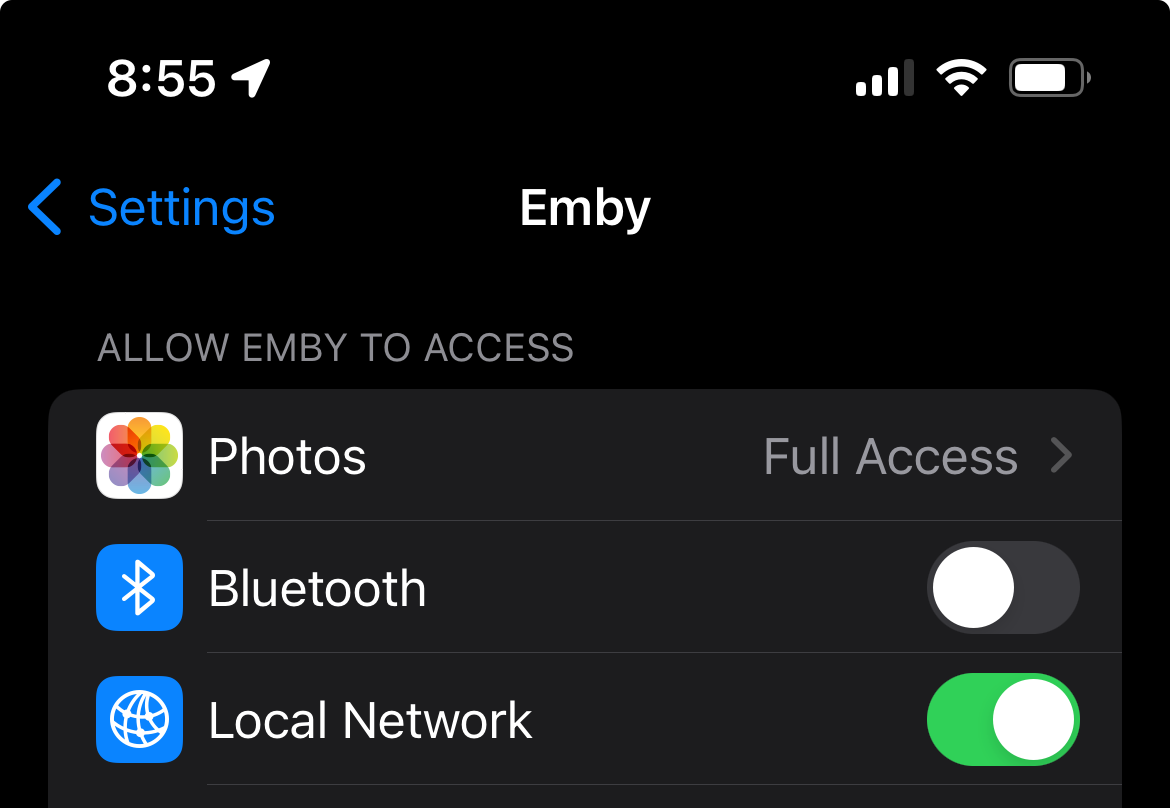
Oh!!!! This fixed it. I was looking on the server side for some reason when you made your first post. As soon as I switched this on, it let me watch content locally. It was perplexing because I could still play videos from my ‘Music’ library. Nevertheless, this fixed it. TYSM!
 1 point
 -
@Mac18@podonnell - this issue may be affecting both iOS and macOS client Emby apps when accessing LAN content whilst on the LAN (but not via a VPN like Tailscale and not when access content in a folder or share on you local computer or phone). @podonnellthe settings I'm taking out are the Apple settings to allow the Emby app to access the Local Network. In iOS 18 these are under the Settings app on your iPhone or iPad (Settings > Apps > Emby > Local Network). Installing iOS 18 required these settings to be re-accepted to allow Network Access (and the iOS app works properly once this is done - but without it the app cannot access media over the local network but can via a VPN etc). In macOS 15 these settings are in the macOS system settings under Settings > Privacy & Security > Local Network > Emby. As per iOS Local Network access needs to be allowed otherwise the macOS Emby app cannot access media over the local network. The trouble with the macOS Emby app is that (1) if the Local Network access permission in macOS is turned off, the app will crash when trying to play network content; and (2) after any reboot you need to toggle this setting off and on again to get it to properly apply (otherwise you get the "no compatible streams" message when trying to play media over the local network (but local / VPN access continue to work without issue).1 point
-
HI, yes we are working on improving this. Thanks for the feedback.1 point
-
Personally I think EMBY should take the closest resolution and transcode that. Why downscale 4K down to 720p, that's a waste of resources.1 point
-
I thought this would be clear enough...
 0 points
 -
Your a normal user..? blocking content from a library is not up to a normal looser! It's up to the Admin to sort that out!! This is what this thread is all about. They can use Bulky or another tool to get the job done.0 points