Leaderboard




Popular Content
Showing content with the highest reputation on 05/10/26 in Posts
-
So I haven't heard from the devs when or if this can come out of beta. Since you have static content this plugin doesn't really make sense cause you're generating subtitles again every time , this is only really good for live tv Check out Bazarr for generating content for your media library2 points
-
The device is reporting support for only 2-channels with AAC. Therefore, we are converting to something that supports multi-channel (AC3/DD). I'm not sure what could have changed here in the app that would affect this. Most of the time, it is kinda the other way around - the device reports support for 5.1 AAC (because it can accept it as an input) but, when fed that, it mixes it down to 2-channel. That's why we have the option that we do to preserve the surround mix in that instance. In this instance though the system is only reporting support for 2 channels so we are converting regardless of the option setting. I wonder if a Roku firmware update has made this change - now reporting support for only 2-channel instead of 5.1 like it used to.1 point
-
@Lukeyeah, sorry about that,in the middle of moving my server to a new setup, will do it when its done. Thanx!1 point
-
Right now, seems anytime anyone touches search, it completely cripples the server for about 3-5 mins or so until whatever is happening times out/completes, this is a huge issue, it's not just the lack of being able to search (unless you wait and twiddle thumbs) which is only a relative minor annoyance. No users can navigate anything during that time. Do you need additional logs from us, is there any info we can provide to speed this up? If it's easier, can we include an option to disable to the search box?1 point
-
I've been looking for it but I just can't find it. Was sure I'd saved it but alas no. When I get half an hour I'll try and recreate the situation.1 point
-
Sure. Will let you know.1 point
-
Hi, we'll look at improving this. Thanks.1 point
-
I've not tried as I was waiting for an update from you guys, thought you were working on an update/fix I'll download again and give it a try1 point
-
Hi! Updated the app to latest update, and the problem has now dissaperad and i was unable to recreate the problem. Tried with exactly same file and now there is no problem. N./1 point
-
Hi, when mpv is used, yes we could pass it the option to do this.1 point
-
Hello, Sorry, I already gave up. I am using with the collection workaround. I add the videos to a collection when I download a new DV movie, that is all. cheers1 point
-
Hi, the latest update to the Emby Apple TV app has added this to the guide screen. Thanks.1 point
-
Doing this would make things infinitely more complicated for the dev team, and there are far more pressing items for them to take care of. You would be best served to follow the naming guidelines properly.1 point
-
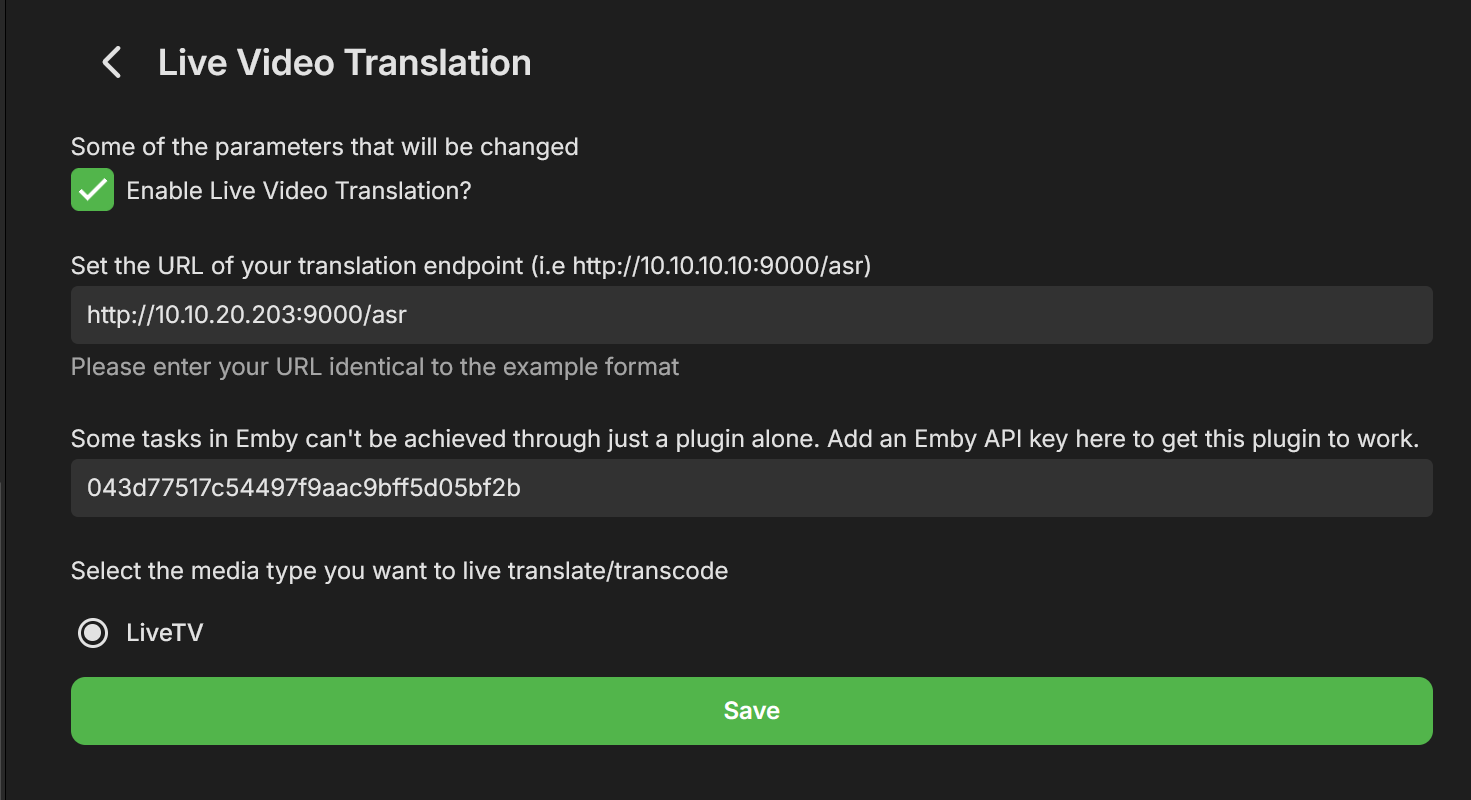
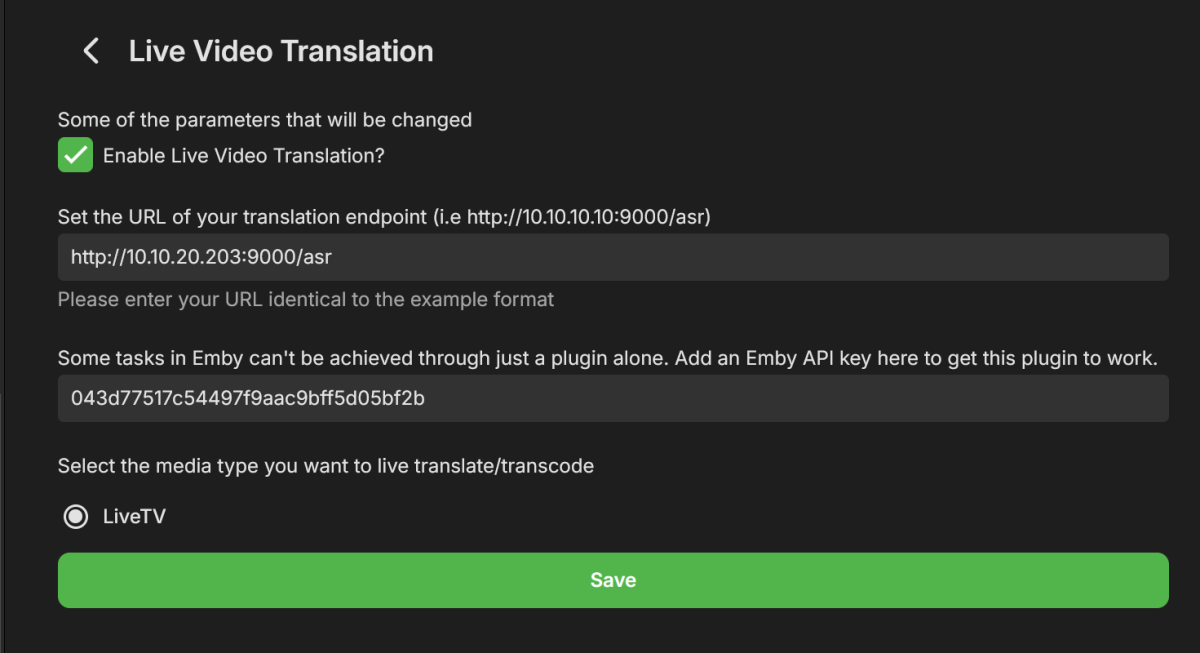
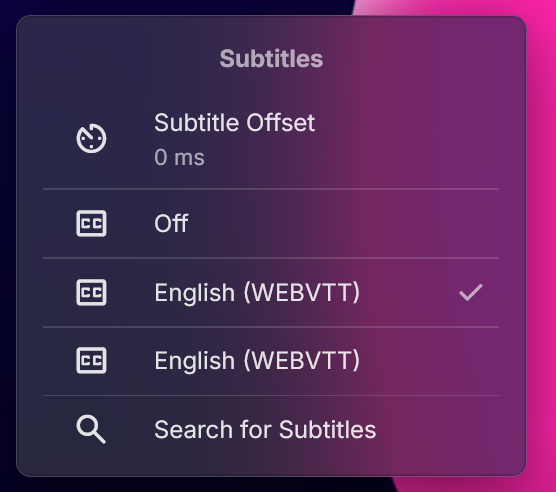
Hey All, After a few weeks of work I'm happy to present a new plugin Beta, called "Live Video Translation". The plugin uses Whisper, Open Ai's translation/transcription service (https://github.com/openai/whisper), to generate translated subtitles on the fly. This allows you to watch TV with live generated subtitles. If the original source is detected as English you'll get transcribed subtitles (English to English). If the original language is any of the supported languages, you'll get English subtitles. Languages supported are: https://github.com/openai/whisper?tab=readme-ov-file#available-models-and-languages How to Install 1. Run the following Whisper docker container somewhere that emby can access it. Make sure to run this docker container using the "GPU" flag. I have not tested CPU mode, but we do need good performance here which may not be available with just a CPU and LLMs. https://github.com/ahmetoner/whisper-asr-webservice 2. Run the docker container using either the "small" or "medium" models. In my testing at 1070 was good enough to keep up with near real time translation using small or medium models. The model download took about 10 minutes the first time. 3. Place the attached dll into the plugin directory. 4. Configure your plugin like so, with the full URI to the Whisper service, and with an EMBY API key. There was one thing that can't be accomplished with just a plugin. (a rapid way to add a library and scan just that library for new files). 5. Click on "Enable" at the top, and restart emby. How it works Currently the plugin only supports LiveTV. There are free LiveTV providers on the first few results of google that can allow you to test this for free. 1. User finds a Live TV Channel in Emby and Clicks "Play" 2. Plugin detects that the user wants to watch a Live TV Channel (and only live tv for now) 3. Emby starts playing the Channel, while in the background the plugin also starts consuming the same channel using ffmpeg. (For a short period of time there are 2 separate connections consuming the same channel) 4) The plugin adds a temporary library to emby that contains a single file. That file is a link to play the translated Channel Stream. It does not scan all the files that ffmpeg is creating, just a static stream file which points to our Plugin API, which serves files for that translation session. 5). The plugin starts creating chunks of the video and translating it, and generating a valid stream that emby can play. 6) Once a buffer of a few files has been created, the Plugin stops the initial stream, and starts the newly translated stream and immediately: - Pauses it - Displays a message to the user to wait for ~20 seconds until a bigger buffer is created - Restarts playback about 20-30 seconds passes These delays are very conservative to allow for any LiveTV ingestion hiccups. I have been able to watch near real time, with just in time delivery of the subtitiles, but have noticed certain IPTV providers hiccup and don't serve video in a timely manner, so this is a way of riding out those hiccups. 7)The new TV stream uses WEBVTT subtitles, which means emby properly parses them, and you can adjust the subtitle offsets, even though they should already be pretty accurate. 8 ) When the user stops playback (only on stopping playback, not closing an app, or closing a browser window), the ffmpeg consumer is killed, the folder deleted, and the newly added library is deleted. The library may still show up if you navigate home immediately, but if you refresh the page it'll be gone. Caveats/Future Improvements - The logs for this plugin, for this Beta, are very verbose in order to help troubleshooting. - Sometimes an IPTV provider is rocky and does not serve video files in a timely manner. Which means you'll be watching the translated stream and it'll overrun the buffer. This happens infrequently in my testing. - I have two test instances a) Windows with CUDA , I had to disable hardware transcoding to get this to work, unsure why. b) Linux with CUDA, works fine with hardware trans-coding enabled. - If there is interest in this I could add live translation to TV Shows/Movies. - I don't control the translation. Sometimes AI hallucinates, but overall it is very good. Sometimes if there is no audio, it seems like the docker container returns "Thanks for watching". - Sometimes the pausing/message on screen does not work. If it's been longer than 30 seconds feel free to click play in the translated stream. Questions for the devs - Sometime the plugin consuming FFMPEG receives corrupted packets from the provider and isn't able to handle it, and it stops. - Sometimes emby's consuming FFMPEG (the ones that consumes the plugin's translated stream) consumes a corrupted packet, and just stops consuming the stream. I'm unsure which one is the problem first here. Seeking guidance from the devs on how I can modify my translation ffmpeg command to account for this. You'll see what the translation ffmpeg command is in the logs shortly after a playbackstart. The translation ffmpeg command just "consumes" the stream to output video files, translation is done separately. - Sometimes sending a command like this, just does not work. Almost as if my code skips it, but it should be called each time. var pause_request = new PlaystateRequest { Command = PlaystateCommand.PlayPause }; _sessionManager.SendPlaystateCommand(null, sessionId, pause_request, CancellationToken.None); Troubleshooting If this isn't working for you, please provide: embyserver.txt - this will have a link to your IPTV in it, and maybe a username, you can obfuscate that if you'd like. The most recent ffmpeg logs which represent the emby's ffmpeg that is trying to play the translated stream. What OS are you using, is hardware trans-coding enabled? Occasionally monitor the buffer health (look at how much video is "left" in the stream). It should be growing as you watch) If it isn't that means either the translation or consuming ffmpeg has encountered an error and I'll need to see the logs as to why. If you watch that same TV channel, with the plugin disabled, does it fail in a similar way? Please provide an ffmpeg log of that. Thanks! LiveVideoTranslation.dll
 1 point
 -
It's a must have feature in my opinion as well. would love to contribute further if possible. +11 point
-
Thanks, i didn't think it was this long, but it does explain how I can restart Emby while "direct plays don't get interrupted!" It seems that it would be useless to make the buffer bigger. as everyone is limited to there connection speed.1 point
-
Tracearr Dev just released a plugin that exposes sever sent events to supporting applications like next version of Tracearr. https://github.com/Tracearr/Media-Server-SSE1 point
-
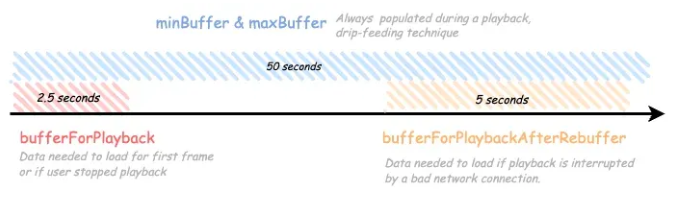
For ExoPlayer (which is what we use on Android devices) it works like this: The min and max buffer are both set at 50 seconds. If that's not enough buffer, then the bitrate needs to be reduced.
 1 point
 -
I'm not proposing that you change the apps to display buffer size. Just list them in this thread or somewhere on the site (KB?) if that info is available. That's all. Lack of information is why so many debates in these forums just go on and on.1 point
-
New BETA version available 12.4.20: Delta changelog 12.4.19 -> 12.4.20 improve Kodi events stability fix watched status update Chinese language file fix themes when widgets are refreshed1 point
-
Thanks, I can see something odd in your logs, can you please send me another log including the initial sync (repair sync). I wanna see if something crashed while init sync.1 point
-
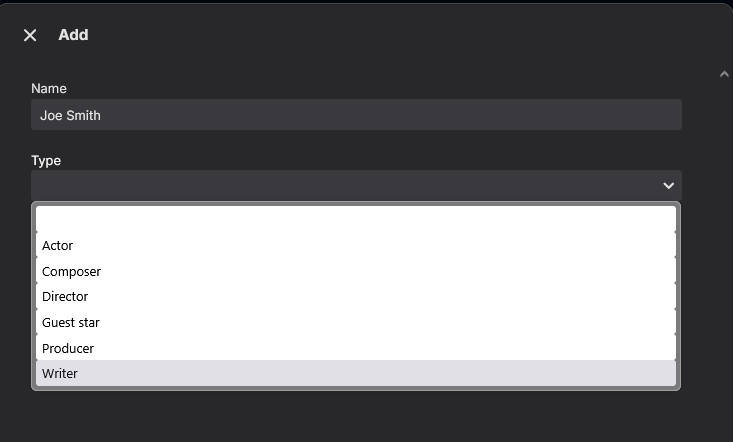
Have a similar request........ In adding a new "People" for a Movie (or TV) You have the options for Actor, Director, Writer etc but no option for blank or other. Adding a Cinematographer and have to leave it blank so that only the name shows (no option to add Role if one of the existing jobs is not selected). An "Other" option would be great and you could add the description in the Role field. Would only affect the dropdown list I think not adding actual fields.
 1 point
 -
After consulting with AI, I changed the system.xml to prioritize IPV6, which resolved the issue1 point
-
Hi Luke I have adjusted that setting and so far have not managed to replicate the issue in normal use. I haven’t had the time to sit down with it and stress test it though. cheers.1 point
-
Tested my entire workday and not once did Emby stop playing, since I changed all "automatic" quality settings to the highest possible settings. Will probably go for a run tonight, so I'll be able to longer test the app via 4/5g as well and will post about that as well.1 point
-
I do this all the time, if i have the english srt subtitle. Using lingarr-translate/lingarr: Lingarr is an application that supports both local and SaaS translation services to translate subtitle files into a specified target language. With automated translation options, Lingarr simplifies translating subtitles.1 point
-
Other vote for app on VIDAA HiSense. I pay for premium subscription and keep this platform exluded is not tollerable in 2026.1 point
-
If you're going to break your libraries into lettered sub folders, you absolutely MUST add each of the lettered sub directories as root folders of your library: So for the structure: /movies/A/Aladdin (1992)/[movie files] Add: /movies/A/ /movies/B/ /movies/C/ Etc Do NOT just add /movies/ I've also taken to adding tvdb id's to my folder names, to ensure proper matching: /Movies/Aladdin (1992) [tmdbid=812]/ Movies and shows with identical titles, or lots of similar titles sometimes get mis-matched even with perfect naming. The various looney toons shows for example. Adding the IDs fixes this. If you use tools like radarr/sonarr, you can tweak the naming settings to include these for you.1 point
-
This is a great idea for providing subtitles on-the-fly when there are no subtitles available. I started using gui-subtrans to generate subtitles with LLMs but it's a slow process. One cool feature of gui-subtrans is that it feeds small batches instead of line by line so the LLM has bigger context to provide a more accurate translation.Is there a similar feature in Whisper ASR that can be configured? One more thing: you noted that "Windows with CUDA , I had to disable hardware transcoding to get this to work, unsure why". Does that mean that we need to disable Cuda transcoding in Windows Emby server for this to work?1 point