Leaderboard




Popular Content
Showing content with the highest reputation on 05/06/26 in Posts
-
New minor release - Version 4.1.0.0 Download .dll and full release notes: https://github.com/soderlund91/HomeScreenCompanion/releases/tag/v4.1.0.0 This update contains mostly improvements on the AI source. Added support for Ollama and some other fixes. Also added an ability to create a Playlist from the source target. This is independent from all other settings (eg home section). It will take the source list and post the corresponding movies and series into a Playlist for the selected user(s). IMPORTANT! Minimum required Emby server v4.10.0.10 Release notes NEW Playlist You can now create Playlists from the selected source. A playlist is created and maintained by the plugin for selected users and updates according to the configured source. Updates AI Source: Added support for Ollama for local AI (experimental) AI Source: Added a function for how often to update the AI list (Eg. every 2 days). Only applies to full sync, so if you manually run that single group it will still send the promt. AI Source: In settings we can now modify the system promt that is sent to the selected AI-provider. (Only change this if you know what you are doing) Local media information: Added: TVDB ID, Folder path contains, Country Fixes Top-list: Fixed an issue where the "max items" for a top-list was not respected when doing a full sync. Schedule: Fixed an issue where date might have been interpreted wrong depending on timezone. ________________________________________ Dev notes This will probably be the last update in a while since I'm getting another kid any day now. I will still support and work on the plugin, but focus will mostly be on fixing bugs and updating support for newer Emby server releases. Feature ideas are still welcomed, but I will probably not be developing the plugin as rapidly as I have in the past. Keep reporting bugs and all good ideas you guys have! Without your input this plugin would not be what is is today! HomeScreenCompanion.dll2 points
-
Good catch. Why indeed. I just saw the post and went.. its supposed to do that.. (but not the hang part with a spinner) didn't look at the forum section.2 points
-
Hmm why is this a Feature Request2 points
-
New version "2.5.7.0" in the catalog. Replaced the black frame detection method with a new much faster method. Settings now auto save except the rules system which still needs the save button. Please notes: Any set rules MIGHT have to be updated as i had to change some things in the rules, very sorry about that!2 points
-
New BETA version available 12.4.19: Delta changelog 12.4.18 -> 12.4.19 fix dedulication fix minor sync issues fix minor shutdown issue fix playcount for songs2 points
-
Home Screen Companion Plugin https://github.com/soderlund91/HomeScreenCompanion Below is a summary for this plugin, visit GitHub for latest release and full documentation. Home Screen Companion is a plugin for Emby Server that automatically manages home screen sections using tags and collections for your Movies and TV Shows — and keeps your home screen sections in sync across multiple users. It works by connecting one or more sources to a tag and/or collection in your Emby library. Sources can be external lists from Trakt, MDBList or TMDb, rules-based filters on your own library, AI-generated recommendations, or your existing local collections and playlists. Each source runs on a schedule, and the plugin makes sure your tags and collections always reflects the current state — adding and removing movies and series automatically. The plugin can then use the tags or collections to create a home section and give you a living and curated home screen experience. With Home screen companion you can also manage the home screen sections for all users - copy, manage and create home sections directly from selected source. No need to set it up for every individual user, just copy it from one user and you can have a server wide home screen! Important Requires minimum Emby server 4.10.0.10 Key Features Different source types — External List, Smart Playlist, AI List, Local Collection, Local Playlist Automatic tagging and collections — items are added and removed as lists change Advanced scheduling — annual, weekly, or specific date windows Per-entry home screen sections — automatically managed sections for any tag or collection Home screen sync — mirror one user's home screen layout to any number of other users Top-List — Create a "Top 10 movies of today", and the plugin will create a new home section for selected users with numbered posters Home screen sync — mirror one user's home screen layout to any number of other users Source Types External List Connect to curated lists on Trakt or MDBList. The plugin fetches the list on a schedule, matches items to your library by IMDB ID, and keeps tags and collections in sync automatically. Smart Playlist Build dynamic lists directly from your library using a flexible rule builder. No external service needed — the plugin scans your library and tags items that match your criteria. AI List Generate recommendations using AI. Write a natural language prompt and the plugin calls an AI model to produce a list of movies and shows, then matches them against your library. Local Collection and Local Playlist Tag items based on an existing Emby Collection. Combine with scheduling to create time-limited promotions of curated content — no external API needed. Tags The plugin take the source type you have and put a tag on Movies and Series. You can choose at what level to put the tag, either the Series, Seasons, or the episode. Collections Any source type can automatically maintain an Emby Collection alongside its tag. Playlist Any source type can automatically maintain an Emby Playlist for all or selected users. Scheduling Set up advanced rules when the tag or collection should be active. For example you only want to tag a Christmas list during December, or you only want your collection be available during Halloween. With the scheduler, tags and collections get added and removed automatically. Home screen Add a dedicated home screen section to any tag/collection entry. The plugin creates, updates, and removes the section automatically on each sync, no manual Emby configuration needed. Just select your source and enable the home screen option - and you will have this source as a row on your home screen for all selected users. Home Screen Sync - server wide home screen With this function you can easily copy a users full home screen sections to all other users. No need to set this up for every user now! Just configure the home screen sections and library order for one user, and you can have a server wide home screen that looks the same for all selected users in the blink of an eye. Top-List The plugin can create a "Top 10" style of home section for selected users. This can be done by either manually select what movies you want, or use existing tags to have a list that is auto-updated. Installation Download the latest .dll from the Releases page (GitHub). Place the .dll file in your Emby plugins folder. Restart Emby Server. Screenshots More screenshots in below spoiler1 point
-
Just did a quick test of this movie. I set the metadata to French. And I dont see the issue with Metadata - Genres But without logs, op can hop and dance as it likes.

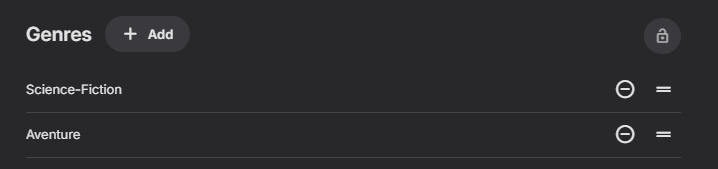
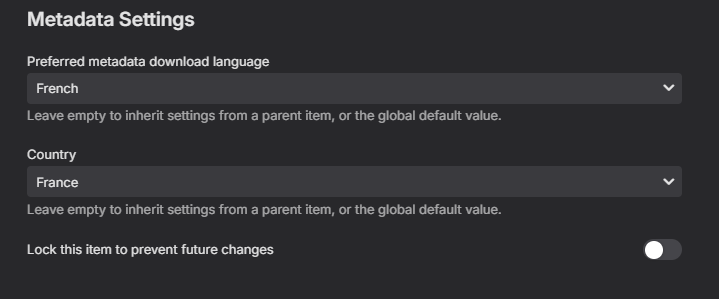
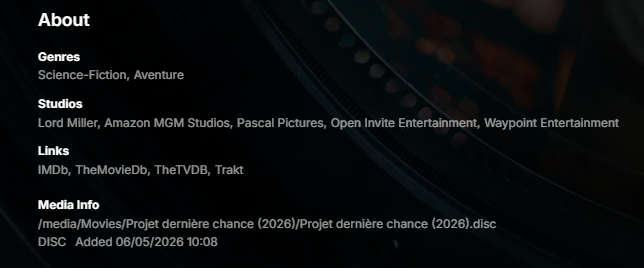 1 point
 -
You can lend your support here:1 point
-
Closing this, as current versions show plenty of items in "Continue Watching".1 point
-
I can no longer reproduce this, marking as solved.1 point
-
So to be clear on what my exact use case was... My provider includes both Live TV and VOD content. In IPTVBoss, VOD content is pushed through so it is accessible in Tivimate and other streaming clients. When using the typical API call "<url>/get.php?username=<user>&password=<pwd>", the output will contain live TV plus VOD content. My idea was to use this tool I found that will reformat the file to exclude VOD content: https://github.com/ovosimpatico/xtream2m3u So then I was able to set my Emby TV source like this: http://localhost:5000/m3u?url=http://iptv.com&username=user&password=passinclude_vod=false I probably tested this for a few minutes, didn't see an issue, and then called it a day. But I think there was a setting I didn't consider where it is using a proxy to try to mask the stream URLs may have been causing the problem with Emby.1 point
-
OK I think currently the subtitle downloads always get saved to the app's private data folder. This is why it works in the Emby app. We'll have to revisit why we did that. Thanks.1 point
-
Yes, several times. It only states that it's invite only and I originally asked "How does one get into the beta as it seems like it's an invite only affair". Anyway I ended finding the correct link in an old thread but the beta has the same issue \EDIT - A restart sorted it, Beta is now working.1 point
-
This was today's log forgot to attach to the last message embyserver (18).txt1 point
-
4.10.0.11 is way better overall, but it still has this long pause issue when searching. Any task just stops for about 4-6 seconds, and the app looks like it's crashed or frozen, then it picks back up and is fine again. We had two TVs on today (kitchen and front room), and I noticed when I tested the search in the front room that the kitchen stream paused during the search too. It seems like the whole server just locks up for those few seconds. Hope this helps identify or trace the problem.1 point
-
Well, for sync issue review I need kodi.log(s). I don't use touchscreen beside running tests on my phone.1 point
-
I got tired of waiting for the Play Store process, whatever that is, and grabbed the latest from the website. 3.5.34 Looks good!
 1 point
 -
Hi! I have something practical for fellow Premiere subscribers on Apple Silicon while we wait for the official build. First — for anyone wondering whether Emby is actually working on this: **yes, they are, and there's strong evidence inside the binary itself.** While building the plugin I had to look at the existing VideoToolbox classes in `Emby.Server.MediaEncoding.dll` and `Emby.Ffmpeg.Lib.dll`, and what I found was that almost the entire HEVC VideoToolbox infrastructure is already in place in the shipped DLLs: A complete `hevc_videotoolbox` ffmpeg encoder wrapper class (with profile/option definitions for `main`, `main10`, `allow_sw`, `realtime`, `prio_speed`, etc.) lives in `Emby.Ffmpeg.Lib.dll`. A `VideoToolboxDeviceInfo` codec device-info type, profile/level lists, and the relevant base classes (`VideoEncoderHevcBase`, `VideoDecoderH264Base`, `VideoDecoderHevcBase`) are all present in `Emby.Server.MediaEncoding.dll`. The H.264 VideoToolbox encoder is fully implemented and registered (Premiere-gated) — it just lacks an HEVC sibling, and there are no VT decoders registered. In other words, the team has clearly built ~90% of the HEVC VT encoder and the decoder hookups already; they just aren't wired into the `ICodecProvider` graph yet. This is also consistent with Luke from the Emby team confirming on the M3/M4 thread (April 2025) that the work is in active development. So this post isn't a workaround for something forgotten; it's a stop-gap until the first-party implementation ships, and it's deliberately written to plug into the *existing* Emby classes so a future official build replaces it cleanly. @PowerCC's architectural notes earlier in this thread also turned out to be exactly right — I hit every one of them. Filter graph limitations and HDR tone-mapping forcing CPU paths are real and unavoidable from a plugin alone. But the basic codec gaps are addressable purely through Emby's standard `ICodecProvider` plugin API, without modifying any Emby DLLs. What I built A single 11 KB plugin DLL that registers the VideoToolbox codecs the official osx-arm64 build doesn't: VideoToolbox **H.265 (HEVC) encoder** — `hevc_videotoolbox` VideoToolbox **H.264 decoder** with `-hwaccel videotoolbox` VideoToolbox **H.265 decoder** with `-hwaccel videotoolbox` The plugin **does not patch any Emby DLLs**, **does not modify the EmbyServer.app bundle**, and **does not bypass any license checks** — it's purely additive, using only public Emby API surfaces (`ICodecProvider`, `VideoEncoderHevcBase`, `VideoDecoderH264Base`, `VideoDecoderHevcBase`). It's intended for Emby Premiere subscribers running 4.10.x on Apple Silicon. The H.264 VT encoder is still gated by Premiere in the official build, and this plugin doesn't change that gate — it just adds the codecs that aren't registered at all (HEVC encoder, decoders). Results — Mac mini M4, Emby 4.10.0.10 Beta 1080p H.264 → 720p HEVC at 3.6 Mbps: **153 fps, ~25% of one core** Three concurrent 1080p VC1 → 1080p HEVC transcodes: **~70% total of one core** `VTEncoderXPCService` and `VTDecoderXPCService` daemons spawned — confirmed real GPU offload via Activity Monitor HEVC encoder selects `-profile:v main`/`main10` based on bit depth, sets `-allow_sw 0` to prevent silent SW fallback Limitations (architectural, can't fix from a plugin) **HDR → SDR transcoding stays on CPU.** The bundled ffmpeg has no `scale_vt` / `tonemap_videotoolbox` filters, so any 4K HDR → 1080p SDR pipeline forces a per-frame GPU↔CPU roundtrip plus software downscale + tone map. Verified via `ffmpeg -filters` — only software `scale`/`tonemap` are compiled in. SDR→SDR transcodes that don't change format dimensions stay fully GPU. **VC1 decode stays software** — Apple silicon has no hardware VC1 decoder. **No HW icon for partial-HW transcodes.** Emby's UI flags HW only when decode + encode + filter graph all stay GPU; software filters (subtitle burn, scale, tone map) correctly result in no badge. **AV1 decode not registered** even though M3+ supports it (could be added; I haven't tested). Install The DLL and the C# source file are both attached to this post — either grab the prebuilt or build from the source yourself. 1. Download `EmbyHwAddon.dll` (attached). 2. Copy it to your Emby plugins directory: `<config>/plugins/` 3. Restart Emby Server (quit from tray, relaunch). 4. Server → Transcoding → set **Hardware acceleration when available** to **Advanced** → tick the new **VideoToolbox H.264 (Decoder)**, **VideoToolbox H.265 (Decoder)**, and **VideoToolbox H.265** boxes. Save. Verification After playing a transcode, your latest `ffmpeg-transcode-*.txt` log should show: >>>>>> Selected Codecs Decoder VideoToolbox H.265 (Decoder) Encoder VideoToolbox H.265 And the actual ffmpeg command line should include: -c:v hevc -hwaccel:v videotoolbox ... -c:v hevc_videotoolbox -profile:v main10 -allow_sw 0 Build from source The plugin is a single 224-line C# file (`HevcVideoToolbox.cs`, also attached to this post). You don't have to trust the binary — build it yourself with .NET 6 SDK. Steps: mkdir lib # copy these DLLs from your EmbyServer.app/Contents/MacOS/ into lib/ cp /Applications/EmbyServer.app/Contents/MacOS/{Emby.Server.MediaEncoding,Emby.Ffmpeg,Emby.Ffmpeg.Lib,Emby.Ffmpeg.Base,Emby.Media.Model,MediaBrowser.Model,MediaBrowser.Controller,MediaBrowser.Common,Emby.Web.GenericEdit}.dll lib/ dotnet build EmbyHwAddon -c Release # Output: EmbyHwAddon/bin/Release/net6.0/EmbyHwAddon.dll A note for the Emby team If anyone on the Emby side wants to use the registration shape from this plugin as a reference for the official implementation, please do — that's the easiest path to "this becomes obsolete because Emby ships it natively," which is the goal. Happy to discuss in this thread. Hopefully this is useful to other Premiere subscribers waiting on the official build. License: MIT. EmbyHwAddon.dll EmbyHwAddon.csproj HevcVideoToolbox.cs1 point
-
You’re not wrong—what you’re describing is exactly the “happy path,” and Apple Silicon + FFmpeg with VideoToolboxis genuinely very fast and very reliable for straightforward transcoding. If you’re doing Tdarr-style batch jobs or CLI transcodes with relatively clean inputs (H.264/HEVC, simple scaling, no complex filter chains), you’re mostly staying inside the hardware-accelerated path, so it’s not surprising you’ve had zero issues. Where the distinction comes in is that a media server like Emby is not doing “one job at a time transcoding.” It’s doing dynamic, real-time pipeline construction based on client behavior. That’s where FFmpeg + VideoToolbox behaves differently than people expect. The “limitation” isn’t that FFmpeg can’t use hardware acceleration on Apple Silicon—it absolutely can. The issue is that hardware acceleration in FFmpeg is not end-to-end guaranteed across the full filter graph, especially in server-driven scenarios. For example, in real playback situations you can hit cases like: subtitle burn-in forcing CPU paths HDR → SDR tone mapping breaking hardware chains certain scaling + filter combinations causing hwdownload/hwupload transitions mixed codec/container edge cases depending on client profile switching mid-stream So even though encode/decode is fast (what you’re seeing in Tdarr), the pipeline integrity under dynamic conditions is what differs. That’s also where Intel Quick Sync tends to behave more predictably in FFmpeg-based servers, because more of the filter pipeline has mature hardware-accelerated equivalents, so fewer stages fall back to CPU mid-graph.1 point
-
about the home, movie, tv and playlist, YES What I want is just to be able to seperate thats buttons functionlity1 point
-
HI, yes there's room for improvement here. Thanks.1 point
-
What if a user did not know that there account was compromised? Also what if a user shares their account with other people that I don't want on the server but I don't know that they have done this? The device limit works for both of these scenarios. Hopefully there is no harm in at least leaving it as is. Thanks1 point
-
Possibly related and might help with HDR10 playback (US use only) https://apps.microsoft.com/detail/9n4wgh0z6vhq?hl=en-US&gl=US0 points
-
Firefox supports almost all of them..As for offline line play, if it's your own server, you just connect to it over the network and grab the files. Conversely, you could also use Kodi. Edit: I know you Windows ARM users aren't happy, but you have to understand there are less of you than there are Mac users..it's probably not a priority for the team.0 points
-
I'd say just use the web browser. Browsers have come so far in regards to their ability to play back media it's ridiculous. You really no longer need a dedicated app if you're using Chromium based browsers as they will handle MKV files perfectly fine pretty much regardless of the contents.0 points