Leaderboard




Popular Content
Showing content with the highest reputation on 05/02/26 in Posts
-
I did and this serie works!2 points
-
Working for me in version .342 points
-
Hi, this is resolved in the next update to Emby for Android. Thanks.2 points
-
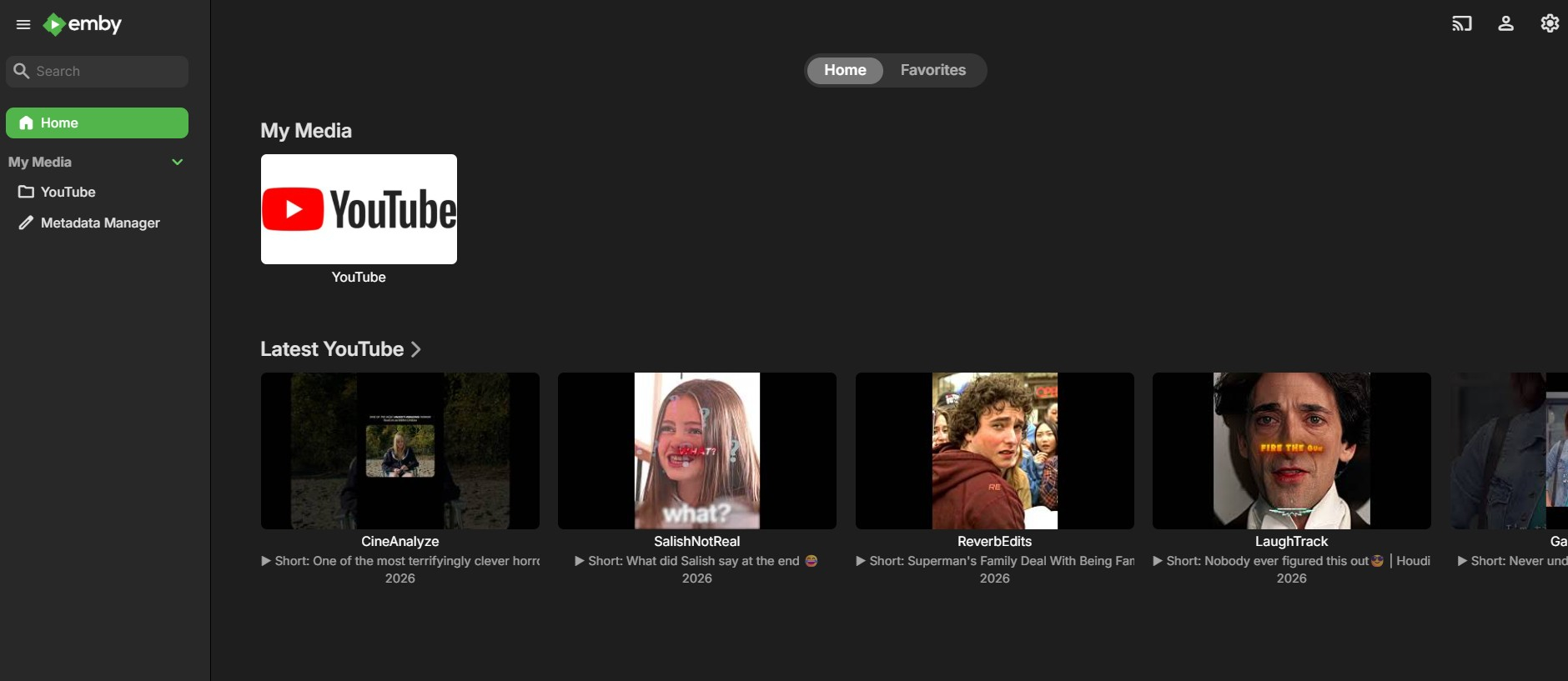
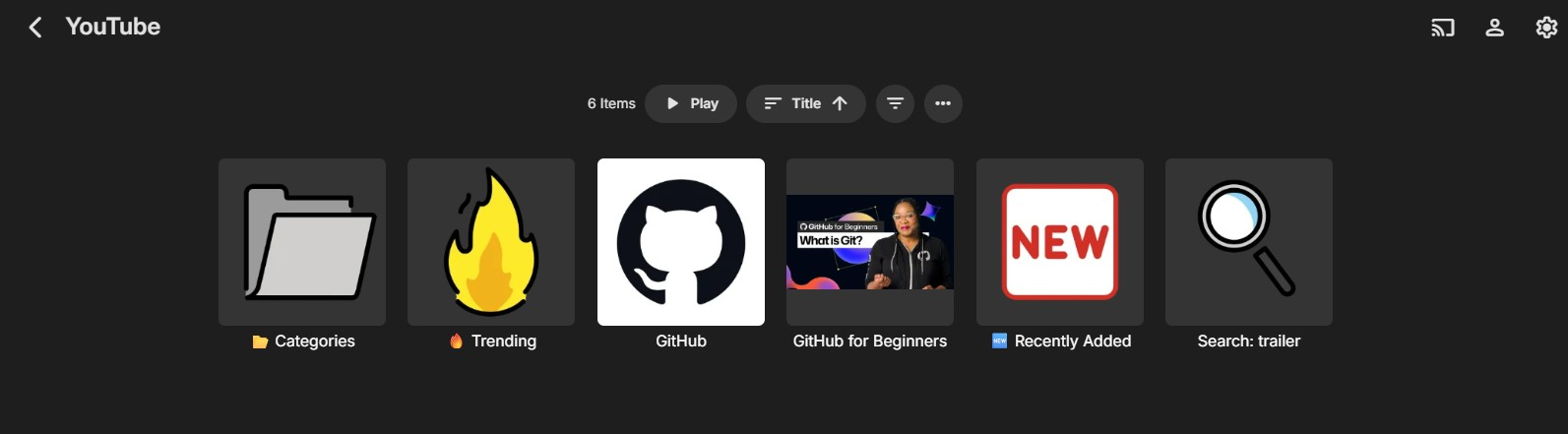
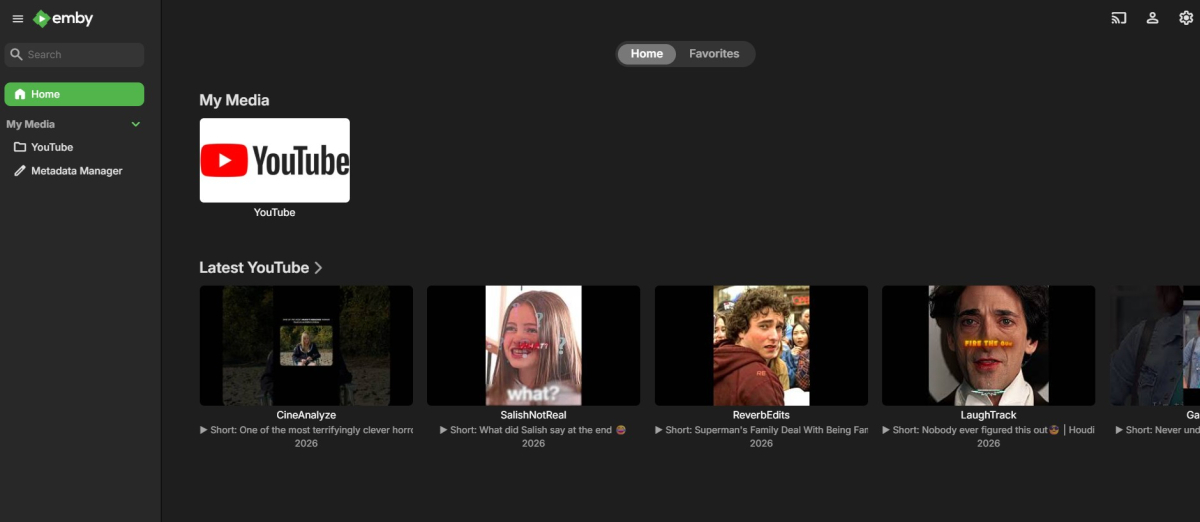
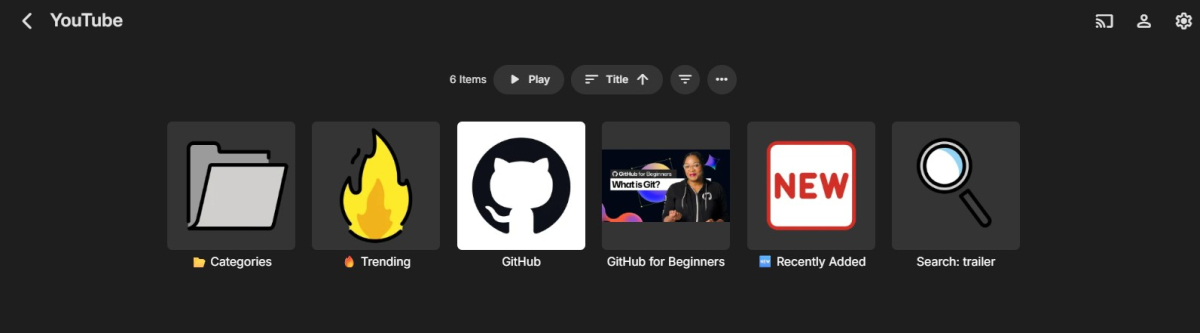
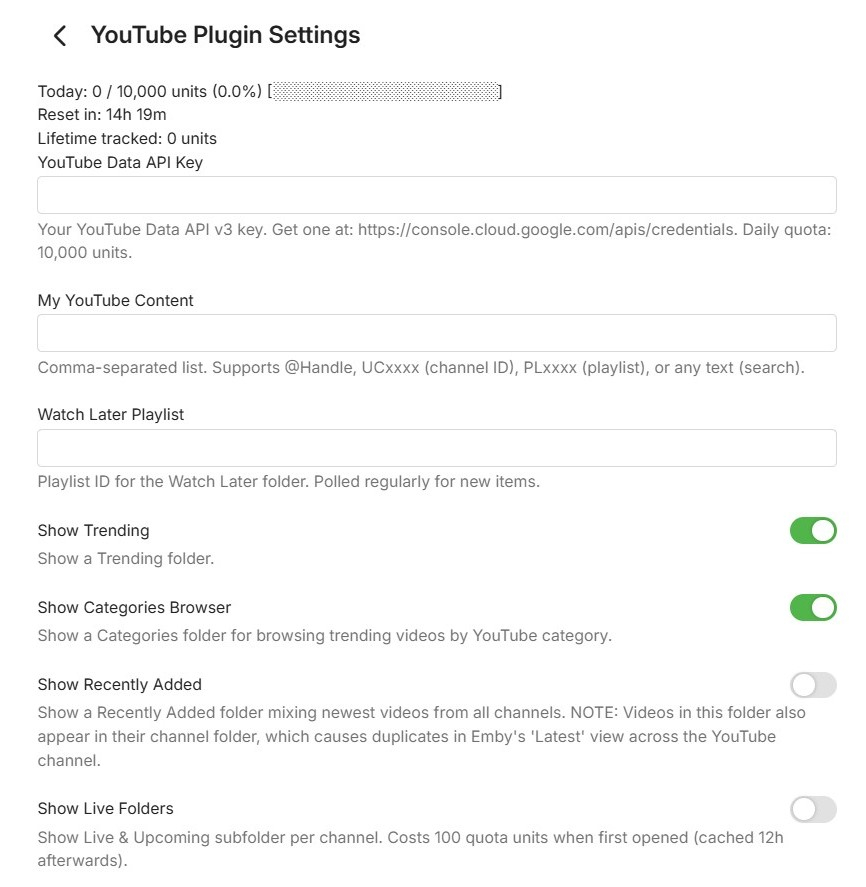
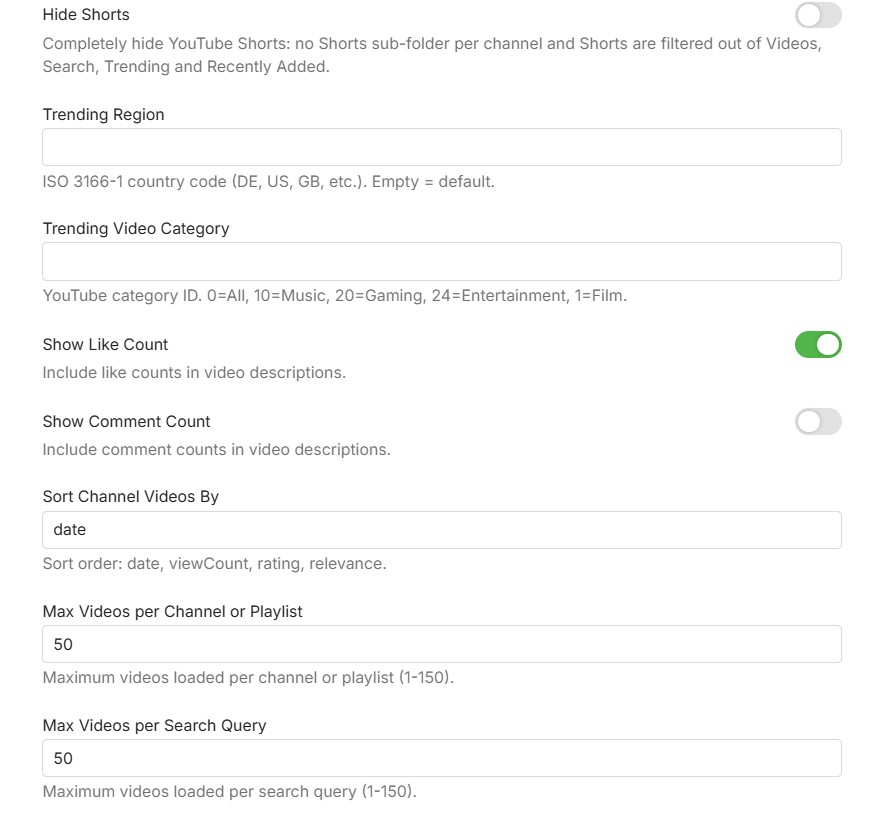
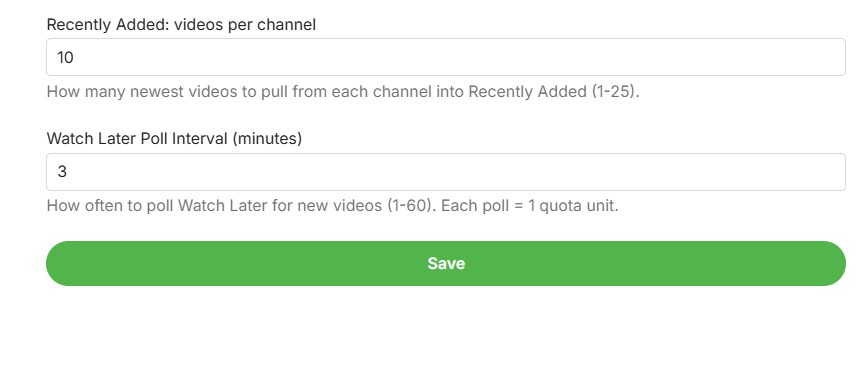
Hi everyone, I would like to share a beta version of my YouTube plugin for Emby. This plugin is focused on clean integration using the official YouTube Data API v3 and embedded YouTube playback. Main plugin overview inside Emby: What the plugin can do: Browse YouTube channels, playlists, and search results directly in Emby Support @handles, UC channel IDs, PL playlist IDs, and free-text search Channel subfolders for Videos, Shorts, and Live/Upcoming Trending view with region/category options Recently Added view across configured channels Optional Watch Later polling Optional Hide Shorts toggle to fully remove Shorts from browsing views Quota tracking shown in the plugin settings Plugin settings: Requirements: Emby Server 4.9 or newer YouTube Data API v3 key Known limitations: Playback uses the YouTube watch page in the embedded web player Resume position cannot be reliably forced by the plugin in this playback mode Audio track/language behavior is controlled by YouTube account/browser settings, not by plugin-side URL forcing Download: Get the latest release from https://github.com/eliasbruno124-dev/Emby-Youtube-Plugin Thank you for testing and helping improve the plugin.
 1 point
 -
Quick follow-up that directly answers the codec-vs-pipeline question with hard numbers. I grabbed jellyfin-ffmpeg 7.1.3 (official portable macOS arm64, built April 2026) and ran it on the same M4 Mac mini against Emby's bundled ffmpeg. Same hardware, only the ffmpeg build differs. Emby's is 5.1 fork built with --disable-metal. Jellyfin's is 7.1.3 with Metal on. Filters Jellyfin has and Emby doesn't: - scale_vt (GPU resize) - tonemap_videotoolbox (Metal HDR to SDR) - overlay_videotoolbox (subtitle burn-in on GPU) - bwdif_videotoolbox / yadif_videotoolbox (GPU deinterlace) - tonemapx (SIMD-vectorized CPU tonemap, way faster than plain "tonemap") - the full opencl filter suite Encoders are identical (h264/hevc/prores videotoolbox). Concrete impact on my Hobbit case (4K HDR HEVC -> 1080p SDR HEVC, ~500% CPU on Emby): Emby graph (forced): hevc(VT) -> hwdownload -> libswscale -> tonemap(SW) -> hevc_videotoolbox Jellyfin graph (possible): hevc(VT) -> tonemap_videotoolbox -> scale_vt -> hevc_videotoolbox That's the difference between ~50% and ~500% CPU on the same chip. So to sharpen @PowerCC's question: the immediate root cause is the ffmpeg build. --disable-metal is a one-flag change, and Jellyfin proves the filters compile fine on macOS arm64 in current ffmpeg (same machine, same OS). The C# wrapper layer (zero VT/Metal entries among 320 filter classes) is downstream — even if the pipeline builder knew to emit scale_vt, the binary couldn't execute it today.1 point
-
Thanks for the detail but yeah I confirm it doesn't show up at all in the Plugin library on my server. I'm on Linux and I putted it not in the system but where all files created by emby are and where I putted the EmbyIcons one but found out it had wrong rights on file sorry for that I'll try again later when I can restart Emby server to check if it shows up and will let you know1 point
-
I am wondering why you are dancing around a clear answer about these questions. Please lighten us up which permier features impact device limits and which don't. If a third party client wants to access live tv, does it have to send an API call which pulls a device license to work? BR1 point
-
I've pushed a new version that should fix this issue. After updating, please trigger a manual channel refresh once to apply the changes. Then let me know if you run into any further problems! Thanks for your patience.1 point
-
Understandable. I just couldn't be bothered doing anything my self as i have enough to do with my other plugins.1 point
-
Your solution worked. Thanks1 point
-
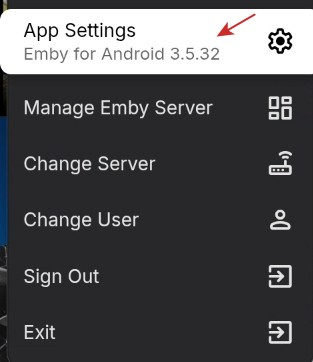
I can't try it yet, still on earlier version on a 2109 Shield Pro. Waiting for it to appear in that device's Play Store.
 1 point
 -
Well run the source code through AI to find any bugs, thats called AI checking AI here har a list of most of his plugins, I have helped test most of them. yocksers (yock) / Repositories1 point
-
Thanks for the share @yockerunhappy I'm unable to check the source code so can't use the plugin (sorry but 0 faith in AI stuffs1 point
-
Hi Luke, unfortunately, I’m sorry to report that in the new version 3.5.34, the focus issue persists. I did my usual test: fast-forwarding through several MKV files, letting them play for a few seconds, and then stopping. It always focuses on 'Play from beginning' instead of 'Resume.' For reference, as always, I am using the Nvidia Shield TV Pro as my set-top box. Also, as per the log I sent a few days ago, I still have movies that won't play at all, giving me a server error. On the Android TV version (2.1.46), I have no issues playing these same MKV files. Regarding the resume focus, if you'd like, I can post another video clip showing the behavior with any MKV. In the meantime, thank you as always for the work you guys do. Have a great day!1 point
-
Omg i didn't even think of that. Thanks heaps. I feel stupid now .... Haha I didn't even notice the correlation between the unwatched EPS not showing the image.1 point
-
@LukeHopefully, this should help track down the bug. Thanks emby_bug_report.html emby_android_1777611608448.txt1 point
-
Sorry, it was late , have fixed now. I appreciate the help.1 point
-
New BETA version available 12.4.19: Delta changelog 12.4.18 -> 12.4.19 fix dedulication fix minor sync issues fix minor shutdown issue fix playcount for songs1 point
-
Can confirm, 2.0.6 fixed it.1 point
-
Hey @sa2000 Sorry I just saw this msg. I just downloaded the 3.5.33 and confirm this issue has been resolved. Thanks. You guys are awesome!1 point
-
Hi, can you please try again with 3.5.34? Thanks.1 point
-
Hi, please attach the ffmpeg log as well. thanks.1 point
-
@AWG97I don't have an update right now but yes this is something we can look at. Thanks.1 point
-
On passkey specifically, no, but on easier login methods, stay tuned ...1 point
-
Hi, this is resolved in the next update to Emby for Android. Thanks.1 point
-
That one is to extract images from song files.1 point
-
2.0.6 has been released. Thanks guys.1 point
-
I just saw that 3.5.34 is available and the music notes are working!
 1 point
 -
Hi! I have something practical for fellow Premiere subscribers on Apple Silicon while we wait for the official build. First — for anyone wondering whether Emby is actually working on this: **yes, they are, and there's strong evidence inside the binary itself.** While building the plugin I had to look at the existing VideoToolbox classes in `Emby.Server.MediaEncoding.dll` and `Emby.Ffmpeg.Lib.dll`, and what I found was that almost the entire HEVC VideoToolbox infrastructure is already in place in the shipped DLLs: A complete `hevc_videotoolbox` ffmpeg encoder wrapper class (with profile/option definitions for `main`, `main10`, `allow_sw`, `realtime`, `prio_speed`, etc.) lives in `Emby.Ffmpeg.Lib.dll`. A `VideoToolboxDeviceInfo` codec device-info type, profile/level lists, and the relevant base classes (`VideoEncoderHevcBase`, `VideoDecoderH264Base`, `VideoDecoderHevcBase`) are all present in `Emby.Server.MediaEncoding.dll`. The H.264 VideoToolbox encoder is fully implemented and registered (Premiere-gated) — it just lacks an HEVC sibling, and there are no VT decoders registered. In other words, the team has clearly built ~90% of the HEVC VT encoder and the decoder hookups already; they just aren't wired into the `ICodecProvider` graph yet. This is also consistent with Luke from the Emby team confirming on the M3/M4 thread (April 2025) that the work is in active development. So this post isn't a workaround for something forgotten; it's a stop-gap until the first-party implementation ships, and it's deliberately written to plug into the *existing* Emby classes so a future official build replaces it cleanly. @PowerCC's architectural notes earlier in this thread also turned out to be exactly right — I hit every one of them. Filter graph limitations and HDR tone-mapping forcing CPU paths are real and unavoidable from a plugin alone. But the basic codec gaps are addressable purely through Emby's standard `ICodecProvider` plugin API, without modifying any Emby DLLs. What I built A single 11 KB plugin DLL that registers the VideoToolbox codecs the official osx-arm64 build doesn't: VideoToolbox **H.265 (HEVC) encoder** — `hevc_videotoolbox` VideoToolbox **H.264 decoder** with `-hwaccel videotoolbox` VideoToolbox **H.265 decoder** with `-hwaccel videotoolbox` The plugin **does not patch any Emby DLLs**, **does not modify the EmbyServer.app bundle**, and **does not bypass any license checks** — it's purely additive, using only public Emby API surfaces (`ICodecProvider`, `VideoEncoderHevcBase`, `VideoDecoderH264Base`, `VideoDecoderHevcBase`). It's intended for Emby Premiere subscribers running 4.10.x on Apple Silicon. The H.264 VT encoder is still gated by Premiere in the official build, and this plugin doesn't change that gate — it just adds the codecs that aren't registered at all (HEVC encoder, decoders). Results — Mac mini M4, Emby 4.10.0.10 Beta 1080p H.264 → 720p HEVC at 3.6 Mbps: **153 fps, ~25% of one core** Three concurrent 1080p VC1 → 1080p HEVC transcodes: **~70% total of one core** `VTEncoderXPCService` and `VTDecoderXPCService` daemons spawned — confirmed real GPU offload via Activity Monitor HEVC encoder selects `-profile:v main`/`main10` based on bit depth, sets `-allow_sw 0` to prevent silent SW fallback Limitations (architectural, can't fix from a plugin) **HDR → SDR transcoding stays on CPU.** The bundled ffmpeg has no `scale_vt` / `tonemap_videotoolbox` filters, so any 4K HDR → 1080p SDR pipeline forces a per-frame GPU↔CPU roundtrip plus software downscale + tone map. Verified via `ffmpeg -filters` — only software `scale`/`tonemap` are compiled in. SDR→SDR transcodes that don't change format dimensions stay fully GPU. **VC1 decode stays software** — Apple silicon has no hardware VC1 decoder. **No HW icon for partial-HW transcodes.** Emby's UI flags HW only when decode + encode + filter graph all stay GPU; software filters (subtitle burn, scale, tone map) correctly result in no badge. **AV1 decode not registered** even though M3+ supports it (could be added; I haven't tested). Install The DLL and the C# source file are both attached to this post — either grab the prebuilt or build from the source yourself. 1. Download `EmbyHwAddon.dll` (attached). 2. Copy it to your Emby plugins directory: `<config>/plugins/` 3. Restart Emby Server (quit from tray, relaunch). 4. Server → Transcoding → set **Hardware acceleration when available** to **Advanced** → tick the new **VideoToolbox H.264 (Decoder)**, **VideoToolbox H.265 (Decoder)**, and **VideoToolbox H.265** boxes. Save. Verification After playing a transcode, your latest `ffmpeg-transcode-*.txt` log should show: >>>>>> Selected Codecs Decoder VideoToolbox H.265 (Decoder) Encoder VideoToolbox H.265 And the actual ffmpeg command line should include: -c:v hevc -hwaccel:v videotoolbox ... -c:v hevc_videotoolbox -profile:v main10 -allow_sw 0 Build from source The plugin is a single 224-line C# file (`HevcVideoToolbox.cs`, also attached to this post). You don't have to trust the binary — build it yourself with .NET 6 SDK. Steps: mkdir lib # copy these DLLs from your EmbyServer.app/Contents/MacOS/ into lib/ cp /Applications/EmbyServer.app/Contents/MacOS/{Emby.Server.MediaEncoding,Emby.Ffmpeg,Emby.Ffmpeg.Lib,Emby.Ffmpeg.Base,Emby.Media.Model,MediaBrowser.Model,MediaBrowser.Controller,MediaBrowser.Common,Emby.Web.GenericEdit}.dll lib/ dotnet build EmbyHwAddon -c Release # Output: EmbyHwAddon/bin/Release/net6.0/EmbyHwAddon.dll A note for the Emby team If anyone on the Emby side wants to use the registration shape from this plugin as a reference for the official implementation, please do — that's the easiest path to "this becomes obsolete because Emby ships it natively," which is the goal. Happy to discuss in this thread. Hopefully this is useful to other Premiere subscribers waiting on the official build. License: MIT. EmbyHwAddon.dll EmbyHwAddon.csproj HevcVideoToolbox.cs1 point
-
My playback issue is fixed in 4.1.59 (Emby Roku App). Thanks!1 point
-
Hi. After upgrading to the beta version of the Emby for Android client 3.5.33 the issue was resolved. Thank you @Lukeand to everyone who solved the problem. @tollgate @Neminem1 point
-
Nice Happy you got it back working. So the solution was to look at you logs And I did that, and you marked it as your own solution1 point
-
Thank you, this gave me the hint I needed. I was in the box and failed to plug a drive back in, I didn't notice it was missing when booted back up. All fixed now, thank you again.1 point
-
Completely agree. Let me shortly describe what i went through past few days. I had Premiere for 10 years, bought lifetime and than extended lifetime. So i had 45 devices with new (wrong) calculation. I have like 20 ppl family and friends. On top of my premiere licensees around 10 people BOUGHT / UNLOCKED androidTV apps when it was possible. In last week i started to change apps form TV version to new unified android. At the end, emby server blocked alot of people because "i was over the limit ) Simply unbelievable and not possible in any universe. i had 45 + 10 unlocked. And that super mega feature where emby need 7-8 days to drop old device is super dumb if u ask me. Anyways i needed to wrote this just to show where emby devs have gone...., and how they are simply killing their user base. Jellyfin is already installed, heavy testing ongoing, really good results for now. Alot of new quality apps are available, just search for it, moofin, fladder , etc... For anyone interested, only thing jellyfin cant do right now is very big music library, there are some small issues if u have really big music library, everything else is on par with emby, or even better (spotlight for example).1 point
-
Calling out to all unRaiders. When you update to unRaid 7.2.5 you might have issues with Nvidia support in your docker containers. Read this https://forums.unraid.net/topic/198521-unraid-os-version-725-available/#findComment-1620492 to fix it. I'm still not sure if this fix will persist a shutdown or reboot of unRaid. Here is a quick how to. unRaid 7.2.5 Nvidia Bug Might needs to be done after Reboot and after shutdown. I really like my UPS right now Stop Docker Open terminal copy / paste the following lines into terminal. 1 line at a time. nvidia-ctk cdi generate --output=/etc/cdi/nvidia.yaml nvidia-ctk runtime configure --runtime=docker --cdi.enabled Start Docker Here is a better fix. https://forums.unraid.net/topic/98978-plugin-nvidia-driver/page/232/#findComment-16205571 point
-
I've managed to fix this issue, with a lot of help of Claude. And I've asked it to summarize what happened: Situation: Emby Server 4.9.3.0 running in a privileged Debian 12 LXC on Proxmox, with media stored on a Synology NAS mounted via NFS. After migrating Emby data from the Synology (instaled as package) to the LXC, Emby could not read the media files. The UI returned "Access to the path is denied" when adding a library folder, and playback gave "No compatible streams are currently available." Environment: Proxmox host mount: 192.168.xx:/volume1/data → /mnt/yyyy-media LXC bind-mount: mp0: /mnt/yyyy-media,mp=/media NFS export on Synology: no_root_squash, files owned by UID xxxx, group users (GID xxx) Directory permissions: rwxrwxrwx (777) Emby user: uid=999(emby) gid=996(emby) groups=996(emby),44(video),104(render) Symptom: Root could read the files without issues. The emby user could not, despite 777 permissions on all directories. Both the Emby UI folder browser and playback failed with permission errors. Root cause: NFS access control operates at the UID/GID level, not just on permission bits. The emby user (UID 999) did not match the file owner (UID xxxx) and was not a member of the users group (GID xxx) that owned the files at the group level. Even though the permission bits showed world-readable/writable, the NFS client-side access check denied the emby user access. Fix: bash usermod -aG users emby systemctl restart emby-server usermod -aG users emby systemctl restart emby-server Adding the emby user to the users group (GID xxx) — matching the group owner of the files on the NFS share — resolved the issue. After restarting Emby, both library browsing and playback worked immediately. Takeaway: when running Emby with NFS-mounted media, don't just check directory permissions. Verify that the emby user is a member of the group that owns the files on the NFS server. Permission bits alone don't tell the full story with NFS.1 point
-
Don't get me wrong - Emby perfectly matches all of my requirements, and is IMHO a well architected and supported commercial product. Despite my tech background, I have no appetite to get into GNU / open source development platforms with associated issues, troubleshooting and workarounds - it just needs to work flawlessly and deliver a great UX both of which Emby does. Another key feature that is not all that common in this space is the ability to search on folder names - one would think this is a 101 feature, but its hard to find - I moved away form Synology Photos for that reason. (Not sure where immich stands on that). Additionally there is ease of deployment: getting Emby up and running was a breeze. The only "nice to have" feature I was hoping for was the preservation of image metadata - I just find that it would be helpful if any and all metadata would be portable, hence the discussion around NFO files. Another idea mentioned by the developer was to write metadata directly to the file itself, I an not sure though whether there is enough "space" on an image file to include lengthy descriptions as an example. Apart from that Emby gets the job done perfectly.1 point
-
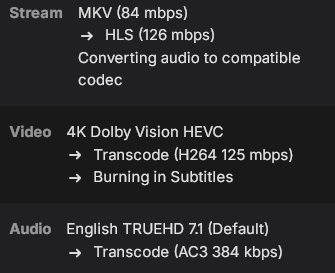
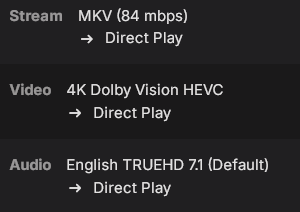
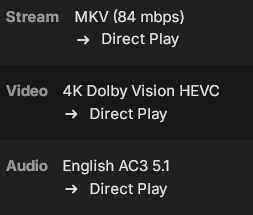
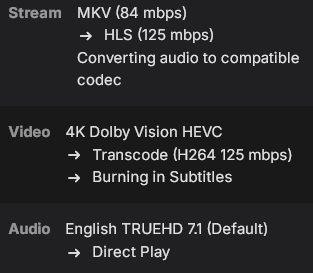
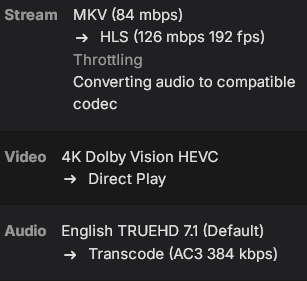
@LukeUpon further testing I've found what causes it to transcode, its the audio format.When the user has full transcoding permissions and it converts the audio, the video also gets converted which causes the burn in. Also I wanted to mention I do have the player on the App configured to auto. Here are the tests Iran: TrueHD audio selected, PGS Subtitles enabled and Transcoding permissions enabled fully, including container changing: Also the PGS subtitles are displayed incorrectly when they are burned in (They are very large and will go off the screen at times) TrueHD audio selected, PGS Subtitles enabled and all Trancoding permissions disabled, including container changing: This displays the PGS subtitles correctly and has proper Dolby Vision colors AC3 audio selected, PGS Subtitles enabled and Transcoding permissions enabled fully, including container changing: TrueHD audio selected, PGS Subtitles enabled and Transcoding permissions for audio and container changing disabled. Only video transcoding is Enabled: It says converting audio although it is disabled and still causes a video transcode, also if I enabled AC3 audio it will direct play fine but the Dolby Vision colors will be improper (green tint) TrueHD audio selected, PGS Subtitles enabled and Transcoding permissions for audio and container changing enabled. Only video transcoding is disabled: The subtitles don't even show up when using these settings and the Dolby Vision colors improper (green tint). Enabling AC3 will show the subtitles but the Dolby Vision colors are still wrong When the audio conversions are being done on the Apple TV itself it allows for PGS subtitles to be displayed properly and as an added benefit doesn't affect the Dolby Vision colors. Seems like the solution would be to have the Emby server pass Truehd Audio along to the Apple TV instead of transcoding it server side. Also when TrueHD audio is converted by the apps embedded ffmpeg build on the Apple TV isn't it converted to PCM rather than AC3? if that's the case that would actually be a higher quality format since PCM is lossless.
 1 point
 -
Thanks! I hope you can get it working as the performance improvements are very promissing Let me know if there is anything I can help you with Cheers1 point
-
I don't think that's the issue in my case. I've never had this issue before, and now I have it constantly. With the same media. I don't want to junx it, but I've installed the latest version, and I think, I THINK, the issue is gone. But I have to test it more thoroughly.1 point
-
Forgot to mension i am now on version 4.10.0.10, it seems a little faster but still a clear pause, no error messages any more.1 point
-
THANKS. This is exactly what I was looking for, except I didn't expect anyone to program it for me. I just wanted to see if it had been done before and use whatever the previous person used. THANK YOU for going above and beyond! Rick1 point
-
@LukeI need your help1 point
-
Hallo zusammen, Ja bei mir läuft es auch besser (Beta 4.10.0.4) am Smartphone getestet. Fire TV (Cube) und Web teste ich am Wochenende1 point
-
Transcoded streaming over mobile network with the iOS app1 point
-
So I've seen an increasing number of threads highlighting the limitations of LG's (and other manufacturers) decision to only use a 100Mbit Ethernet port. While this provides perfectly acceptable throughput for internet based 4K streaming, on high quality native (REMUX) 4K movies streamed locally from Emby - this bandwidth is sometimes not sufficient. My C8 only has USB 2.0 (again, on a very expensive 2018 TV - really LG?) but even on half duplex, this should be ~200 Mbps, better than the 100 Mbps of the Ethernet. So I purchased an Anker USB 3.0 to Gig Ethernet adapter (Model A7610) - plugged it into the USB 2.0 Port on the TV, turned on the TV and it worked first time ! Ethernet connection is now 1 Gig, but of course as the TV only has USB 2.0 - an nperf/fast.com speedtest is only getting 170 Mbps down - but that is still a significant improvement over 100Mbps Ethernet which only gets about 94 Mbps on the same speedtest. Interestingly, you have to turn OFF both the wifi and ethernet (disable the port/unplug) for it to work - but everything works just fine thus far. I'm about to download the jellyfish 4K bitrate files to see at what point it breaks - but @ 170 Mbps - I think I'll be safe for a while. I'll update this thread with the results.1 point