Leaderboard




Popular Content
Showing content with the highest reputation on 04/28/26 in Posts
-
Moonfin beta just released on tvOS! I really dislike the UI but playback has been perfect! Av1 with no stutter! No HomePod andio issues! It also has full Emby support with live tv! https://github.com/Moonfin-Client/2 points
-
How does non emby developed app interacts with premium devices ? Are this devices that runs client like this couted in premiere ? It would be nice that @ebr comments on this i didn't see nothing about external apps and influence on premiere part of server.2 points
-
Jellyfin had no issues adding support in 10.8 back in 2022. Plex had no issues also adding support in 2022. ffmpeg added support for hardware accelerated transcoding for macOS on ARM64 in version 4.4, back in 2021. Emby refusing to add it simply feels like spite at this point.2 points
-
Why don't you subscribe for a Monthly Premiere plan for 5 bucks, little more than a price of cappuccino, and have a month to test it?2 points
-
Is it possible to link items in your Emby library to other items in the overview section of albums, artists, playlists and collections?1 point
-
Hi everyone, I wanted to share something I’ve been working on that may be useful for some Emby users with projector, scope screen, or Constant Image Height setups. It’s called Aspecta Cinema Player, and it’s an Android TV / Google TV external player designed to automatically detect black bars and resize video to suit your selected screen format. The main idea is simple: if you use a projector or scope screen and are tired of manually changing zoom modes, Aspecta can help keep the presentation consistent by automatically adapting to the movie’s aspect ratio. It supports common active display area presets, including: 16:9 1.85:1 1.90:1 2.00:1 2.20:1 2.35:1 2.39:1 2.40:1 This is especially useful for people using wider screens, where normal 16:9 playback can leave you constantly adjusting projector zoom, lens memory, or display modes. Some key features: - Automatic black-bar / aspect-ratio detection - Constant Image Height style resizing - Handles variable aspect ratio content - Designed for Android TV / Google TV devices - Works well for projector and scope screen setups - Dolby Vision / HDR playback support where supported by the device - HD audio passthrough support depending on the device and playback chain - Subtitle positioning designed to stay within the active display area - Anamorphic lens support for 2.39:1 and 2.40:1 setups I originally built this for my own home cinema setup because I wanted a simpler and more affordable way to get smart aspect-ratio handling without needing an expensive external video processor. For Emby users, the goal is for Aspecta to be used as an Android TV external player where that workflow suits your setup. You keep using Emby as your media library/server, then hand playback over to Aspecta when you want automatic CIH / scope screen handling. I’d be very interested to hear from other Emby users, especially anyone using: - NVIDIA Shield TV / Shield Pro - Android TV projectors - Google TV boxes - Scope screens - Anamorphic lenses - 21:9 / vertical squeeze projector modes - Dolby Vision or HDR media libraries I’m still improving device compatibility and real-world testing, so feedback from serious Emby users would be really valuable. The app is available on Google Play as Aspecta Cinema Player. Thanks everyone. Happy to answer questions or hear how people are currently handling CIH / scope screen playback with Emby.1 point
-
Interesting project, this seems to be like a mini version of MadVR concentrating on the aspect ratio scaling, very clever!! Unfortunately even though I have a projector my 120 inch screen is in 16:9. But I’ll take a look later.1 point
-
@SilviuBme pasa exactamente lo mismo, que tengo que desactivarlos, usar otros (si los hay) y volver a activarlo, y pensaba que era error de mi peliculas, gracias por comentarlo, un saludo.1 point
-
As I'm starting to use Emby more and more as a media player, I'm also starting to discover more and more features. I just now wanted to add the song I was listening to, to my favorites to see if I could try and use that feature. So I opened the tab and tried looking for the "add to favorites"-button: Hm, there doesn't seem to be an action to add the item to my favorites here? Maybe I'll check the playlist: Maybe the context menu? There it is! While making this post I also found out there's a hover-action on the album art, which also has the favorites and settings buttons: In my opinion it would be nice to have the "add to favorites"-button also within the player itself, always visible. If it took me a little while to find these I can imagine other, less tech-savvy people not being able to find them at all.
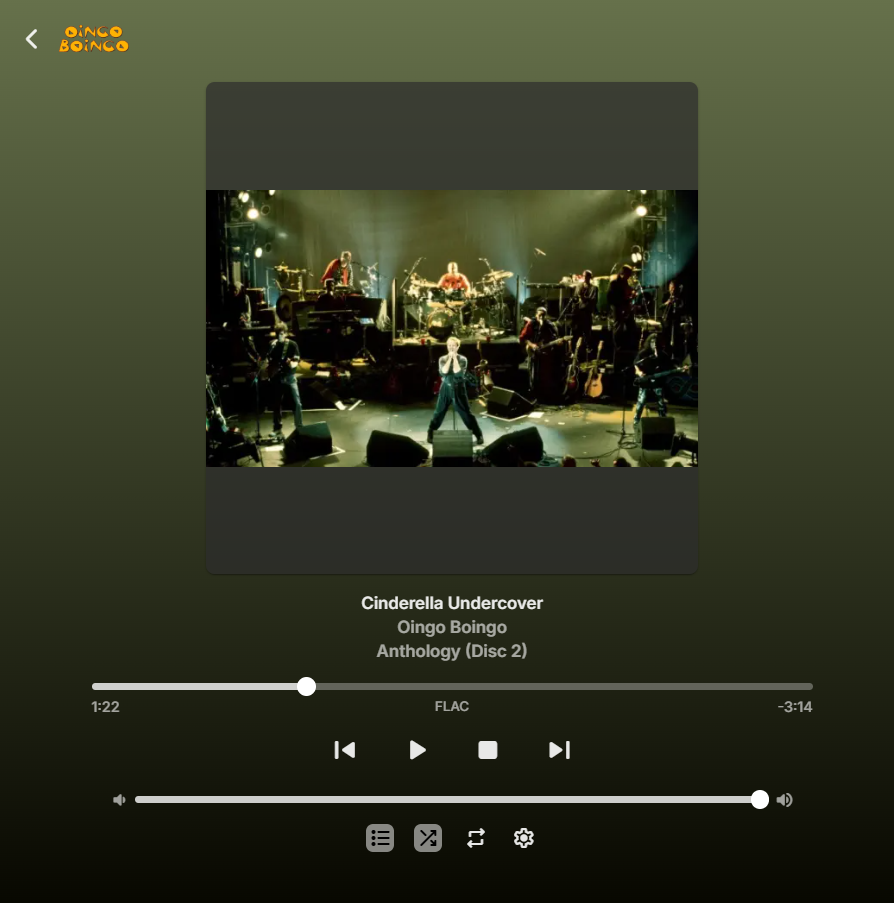

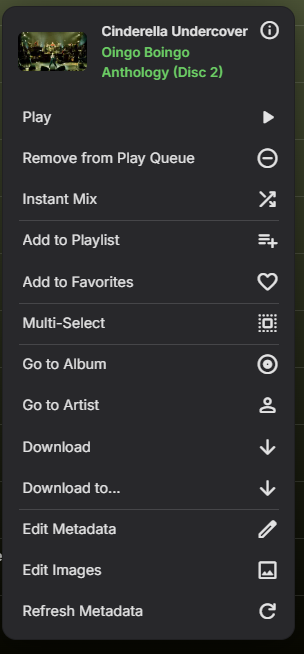
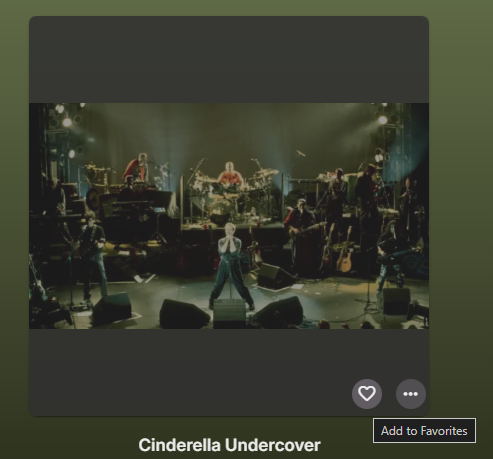 1 point
 -
The resume button looks at the UserData object and specifically at the PlaybackPositionTicks. If there is something there above zero it will prompt the resume button to appear. But the Video Player hand off is where things can go wrong. This is probably what was happening. Where the UI understand the resume point exists, but in passing through to the video player it loses this. Usually this happens when the media is not encoded correctly for the container. The actual runtime of the streams might exceed the runtime of the container. The seek chapters might be stored after the streams rather than before them. But...if the media was playing just fine without any issues with resume and today is problematic it might just be the video player. If you reboot the device it might fix it since that would wipe any cache. But the issue isn't the code itself otherwise the resume button wouldn't appear on the UI either.1 point
-
In you experience this can happen. 1) you have manually installed the plugin. 2) or went back a version. What is usually fixing it for me is. 1) delete the dll in the plugin folder. 2) install again from plugin catalog. Until now I have not lost my settings, since they are all in this EmbyCredits.xml file. But I also play around with a lot of different version of this plugin to test
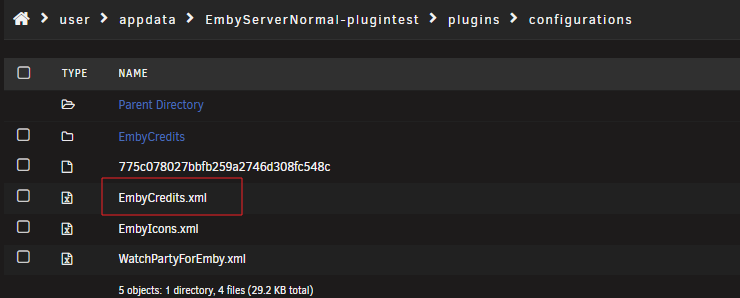 1 point
 -
Clicking the resume button is an event that triggers a function by calling the function variable name that points to the resume. If the resume function cannot see the variable that defines the timecode, then it would default probably to start from the beginning. The default variable time value has to have been saved and called by the resume function. If that variable is out of scope and not available starting from the beginning would result. It would be good to review the code to see if the variable time value is not cached and available (out of scope), or the code is asking for a variable with the wrong name. Either bug can happen especially when code is copied and pasted in some version update. This is just a guess.1 point
-
This happened to me too. Only way I could find to fix it was to start video from the beginning and set quality to auto. Quality setting then reverted to normal options.1 point
-
Could be, but as I mentioned above, I already tried manually changing it to mpv in the settings without any improvement before Luke told me to change it back to auto.1 point
-
Hello ! I just uninstalled the gizmeteo addon, we'll see if it improves smthg or not... Thank you nevertheless for your help ! regards1 point
-
Thanks for the post, I would never have come across this client app otherwise. The iOS app is certainly a fresh look, I like the information density as it makes the presentation very rich which I like. I tried the Android TV version and I'm not sure I like the speed and layout on there as much, maybe a bit too busy for my liking but hey at least it's an option for people out there. This really does need more recognition and publicity!1 point
-
UPDATE, I: 1. Uninstalled Emby for windows 2. Installed Emby Beta for windows 3. Emby Beta for windows would not load past the splash screen – the same problem I was having with Emby for windows (stable) 4. As Windows Admin, ran DISM.exe /Online /Cleanup-image /Restorehealth 5. As Windows Admin, ran sfc /scannow. Result = “Windows Resource Protection found corrupt files and successfully repaired them” 6. Restarted Windows 7. Emby Beta for windows now works.1 point
-
I checked my server for performance while transcoding and tonemapping even though I normally always direct play. I have a Xeon E3-1245 which is quad core 2nd gen Intel (Sandy Bridge) and a Nvidia GTX 1050 2GB in an Unraid server running Emby I can transcode a 4K HEVC HDR @ 80Mbps movie to 4K H264 SDR @ 60Mbps using hardware transcoding and hardware tonemapping. The GPU utilisation reported is 55% and 760MB/2GB RAM used. It works fine.1 point
-
Hmmmmm possibly, but there's so much convoluted logic already in place it would be impossible to cover it all else you'd be spending a minute just to type all the arguments at which point it's simpler to just run the script itself - if it were implemented (and for sure it won't be for some time as I'm quite stretched re: time available as it stands), it'd cover few most common scenarios only, like just a few basic default toggles/modes. But no promises.1 point
-
HI, we are looking into it. Thanks.1 point
-
This happens to all users of Emby for Android version 3.5.32. The previous version, 3.5.28, does not have this error.1 point
-
New version up in the catalog (v2.5.5.0) Added: 1) Indicator for running ffmpeg threads. 2) Settings for number of parallel ffmpeg threads. 3) More rules. 4) Confidence score setting for chromeprint (hash). Note: This is not the final confidence score but for comparison between episodes, i find a setting of around 55% gives the best results. Changed: 1) Tracer now also shows episodes that has had detection done automatically. 2) Removed some settings for schedule tasks as they can (and should) be set in Emby instead. Fixed: 1) Bug where automatic detection could not find the library path on some systems and there for failing. 2) Bug with the detection system that would make the plugin not run one some H265 files. 3) General improvements. This should finally fix the problems some people have had with the automatic detections and new episodes.1 point
-
Sign out. Once you have signed out and are at the login page: -login -select 'no' when asked if you want to require a pin. -select 'change user' -login as your roommate -select 'no' when asked if you want to require a pin. Now, the other signed in users name is lised beside the sign out and switch user buttons. As long as neither of you ever click the sign out button, you can freely switch between users by clicking on each others usernames and never be prompted for a pin or password. This works perfectly fine, you just have to use it correctly. Follow the instructions exactly as written and this will work for you. You will also need to teach your roommate to never click sign out, or you will be required to sign in with both users again. Setting your admin password to a single digit is a really really bad idea if your server is exposed to the internet.1 point
-
I would really like to see ReplayGain support for music. I cast music via Chromecast using Symfonium. Although Symfonium has support for RG it would be a lot nicer to have this running on the Emby server.1 point
-
1 point
-
Hello! Currently, when editing an item's metadata, genres must be added one by one. This process becomes tedious and slow when adding multiple genres or subgenres. I suggest allowing users to input multiple genres in a single line, separated by commas (e.g., Action, Adventure, Sci-Fi), so they are automatically recognized and added as individual tags upon saving. Thanks!"1 point
-
Actions speak louder than words, and at this stage, the only assumption you could make is that the emby development team don't really care about security. There are multiple security issues and feature requests dating back several years, none of which have been addressed. After an actual security breach last year, which had been raised as an issue on this forum years before that, you would have thought they might have learned a lesson? ALL security issues/requests should be addressed before any new features are added to emby. Security should be the number 1 priority, not some after thought years later.1 point
-
I've been part of the threads on github reporting these issues. The key issue is HDR10PLUS and DV - simply does not work unless you strip the HDR10PLUS metadata, leaving just HDR10. HDR10 and DV (to make DV8) DOES work just fine however, but the 4K Max seems to be very strict on the format. I've found remuxing/correcting with the dovi scripts from RESET_999 does the trick, and I have 100% success rate here. This is with the standard AndroidTV/FireTV Emby client - it works just fine.1 point
-
Extra options for to choose. Just rename the ones that you want. Also added hdr icons - but they are NOT supported at this time. I’m hoping that a future update would include this option - I’m just trying to will it into existence. PLAIN - METALLIC (BRONZE, SILVER, GOLD & PLATINUM) EXTRAS Overlays-Craig 97px.zip


 1 point
 -
@horstepipe@kikinjowe will never know Its Emby's business plan0 points