Leaderboard




Popular Content
Showing content with the highest reputation on 03/17/26 in Posts
-
Yep, that fixed it. Thank you!1 point
-
Hi. The email you purchased Premiere with is only used for key retrieval. It does not affect your account here or any sever logins. You can continue on with what you have for those.1 point
-
Ok, any ETA, please? It seems apparent that plenty of users would appreciate this feature implemented.1 point
-
Send an email with details to:1 point
-
@Abobader1 point
-
We have just added a checklist for troubleshooting such issues to make it easier - see Troubleshooting Connectivity Issues Checklist You say "main router" - do you have more than one ? If you do, then you may be having a Double NAT. There is a specific section in the article about multiple routers and what to do to ensure the port forward reaches the target machine1 point
-
I'm an avid user of the Missing Episodes feature. For those who don't know it, it can be found via Metadata Manager -> Views -> Missing Episodes. This section will then gather all the individual episodes that are missing from the shows on Emby. Before 4.9.3.0, we could use the "Lock this item to prevent future changes" function on tv shows, so that they wouldn't appear in the Missing Episodes section. Since 4.9.3.0, a bug has been fixed and now that functionality no longer works. Previous thread: .Considering I have many older digitized shows, of which I will probably never get the first seasons or only want the latest seasons or where the reporting (remote dataset) doesn't apply or is for another region. For example I have a boxset of "How It's Made", containing 5 seasons. Missing Episodes now reports I'm missing 25 seasons, about 800 episodes, greatly polluting this view. Not to mention other long running shows like South Park or Bold and the Beautiful. Can we have a functionality to "skip missing episodes for this show" (via a checkbox or so)?1 point
-
In the meanwhile I've found a workaround to prevent certain shows from polluting Missing Episodes: 1. Go to Metadata Manager -> Views -> Missing Episodes and find a show that's polluting your view 2. Go to the Show -> Settings -> Edit Metadata 3. Remove ALL External Ids (imdb, themoviedb, thetvdb, zap2it) 4. Enable "Lock this item to prevent future changes" 5. Save the show 6. Go back to Metadata Manager -> Views -> Missing Episodes The show should no longer pollute the Missing Episodes view. The biggest drawback of this workaround is that you still won't be able to hide/sort large(r) series that are still running. I'd really like a view to filter / sort Missing Episodes still. The most practical would be to be able to sort the latest episodes first.1 point
-
I know it doesn't really sound sensible, but there are certain "cases" where audio tracks "suddenly" contain musicbrainz / discogs tags, if you catch my drift.1 point
-
Yes, it's the ID.s, the path doesn't matter.1 point
-
HI, we are working on improving this. Thanks.1 point
-
“Backup and Restore” should work just fine to preserve the user-watched status, even if the files are on different paths than before. No need for Trakt. You can actually recreate the paths on Ubuntu “/Volume1/public/Films”, using /mnt/… It's just a suggestion, not a requirement. (SMB or NFS) Just mount them properly in /etc/fstab. Regardless of the paths, "Save artwork to media folders" and "Save metadata to NFO files" will make the scan go much quicker if the paths change. YMMV, so test before punishing your users! Don’t disable your current setup; both can run concurrently (yes, the same Premier key can be used on both). And you can always try again. I don’t use “Emby Connect”, so I can’t help with that.1 point
-
Yeah, figured that out, as noted in my next message. Thanks1 point
-
Unfortunately their online tech support chat, isn't much help at all. Thanks for looking into it; if you didnt see any Emby related issues in the log then the problem is probably on the provider side. Thanks.1 point
-
Worked great! Thanx! N.1 point
-
OK we'll look at improving it. Thanks.1 point
-
Hi Yeah, i know that i can use Android Studio to do that, and i have done it by either removing the device needing a Store signature, or adding a signature to the app(s) after decompiling, and recompiling it again for programming purposes but also to modify appereances in the past. I have for example taken a theme already in an app, prefferably white/light or dark/black and used those settings to push my own theme. These are apps with open soure and have fullfilled no other purpose than satisfing mu own desitre to learn new things. I am fully aware that Google hads a pretty high bar when it comes to certain things, but getting something approved in an app store have never been an option. I would never distribute an app that i have done this with and its quite the process, so my query was if there would be a way that emby devs implemented this into an option within the official app itself. N1 point
-
This should fix the issue. EmbyIcons.dll1 point
-
+1 Just wanted to say that I am also interested in this feature.1 point
-
+1 because some countries make so many local movies it's worth it to make playlists or collections or even libraries for them.1 point
-
Hi Luke, Thanks for the reply. To be honest, it’s a bit frustrating that this question is still being asked after all these years. User groups are one of the most basic features in any system with multiple users. What people (myself included) have been asking for is the ability to define permission sets once and assign them to multiple users. The current "copy from user" approach is inefficient and unmanageable, especially when changes need to be made across the board. If I want to restrict access to a library or feature for several users, I have to go through each one manually – which is time-consuming, error-prone, and simply not scalable. A proper group system would turn this into a few clicks instead of a tedious routine. This isn’t some obscure or niche feature request. It’s a fundamental need for anyone managing more than a handful of users. Let me put it this way: Imagine trying to run this very forum without a user group system – no moderator roles, no admin roles, just individual users each with manually assigned permissions. Sounds fun, right? So instead of asking what we want to do with groups, the real question should be: Why hasn’t this been implemented after 7 years of repeated community feedback? It’s standard in every comparable media server solution – and frankly, it’s long overdue in Emby. Thanks, Patrick1 point
-
does this mean that i have to versions of a movie i.e. Theatrical and Extended Edition i can't see extras from either or both of them? Folder structure is Superman (1978) |____ Movie File - Theatrical.m4v |____ Movie File - Extended.m4v |____extras when indexed the extras go away1 point
-
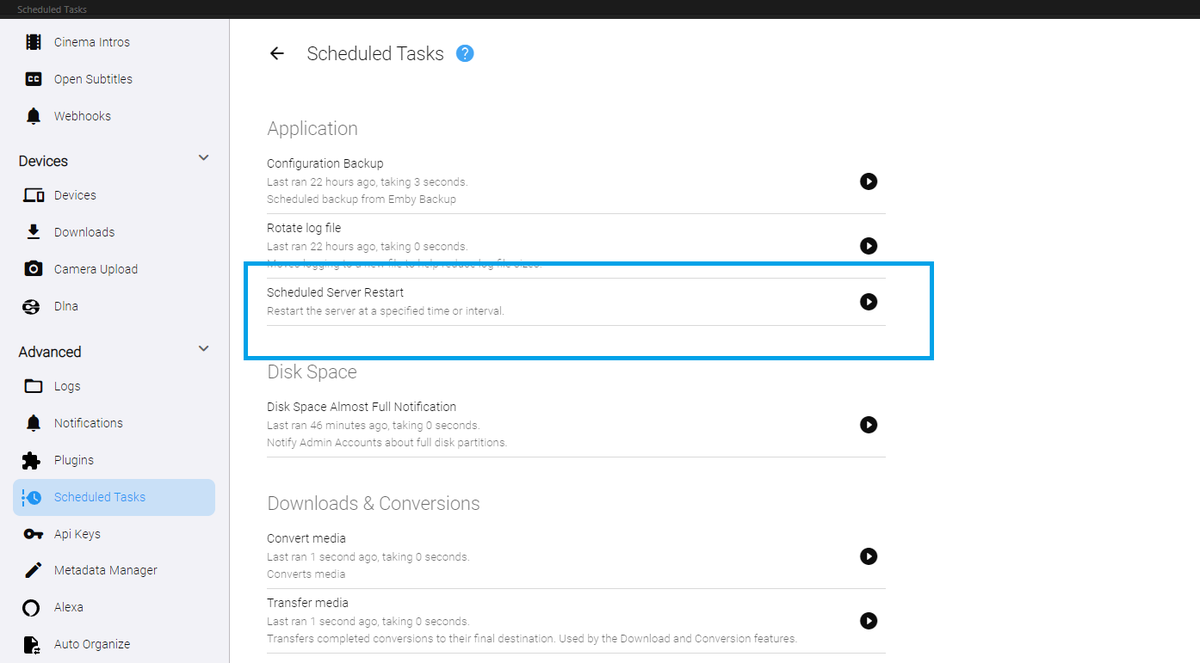
Yeah. I don't know what happened to the original version of this. EDIT: Actually... it might have been blocked. Should I have done this? I recreated it, and it works now. DOWNLOAD: Restart_v1.zip I realize the built in emby version will only restart when updates are available. But, this will restart the server no matter who is using it, every day at 3:45 am (default). Is that what you guys wanted. It could check for users being connected before restarting, and then wait for the next appropriate time to do it...
 1 point