Leaderboard




Popular Content
Showing content with the highest reputation on 03/12/26 in Posts
-
There’s an app and service called JustWatch, its primary aim is you add what streaming services you have or are interested in. So when you search for a particular film or show it’s shows which service it is available on, or where you can find it to rent/buy/watch. You can also favourite your own shows/movies you like and it will give you recommendations. Trakt is another one although this you can sync with your libraries as well, although I’ve not used it in a few years now so have no idea how well it works now.3 points
-
In effetti ho riconfigurato ora e funziona nuovamente. Grazie @exus!2 points
-
@LukeSorry for bothering with this but i would love to know if Emby overwriting the chapter markers is intentional or something that will be fixed. It's affecting Embys own intro markers as well plus it creates havoc for this plugin.2 points
-
Hi, I clean streamer cache and make reset. I checked again, and now emby app plays without lag or buffering with both 1080p and 4K YouTube links. I’ll stay with this standard Emby version for now. When a new version of Emby for Android TV is released, I’ll test it again. Thanks.2 points
-
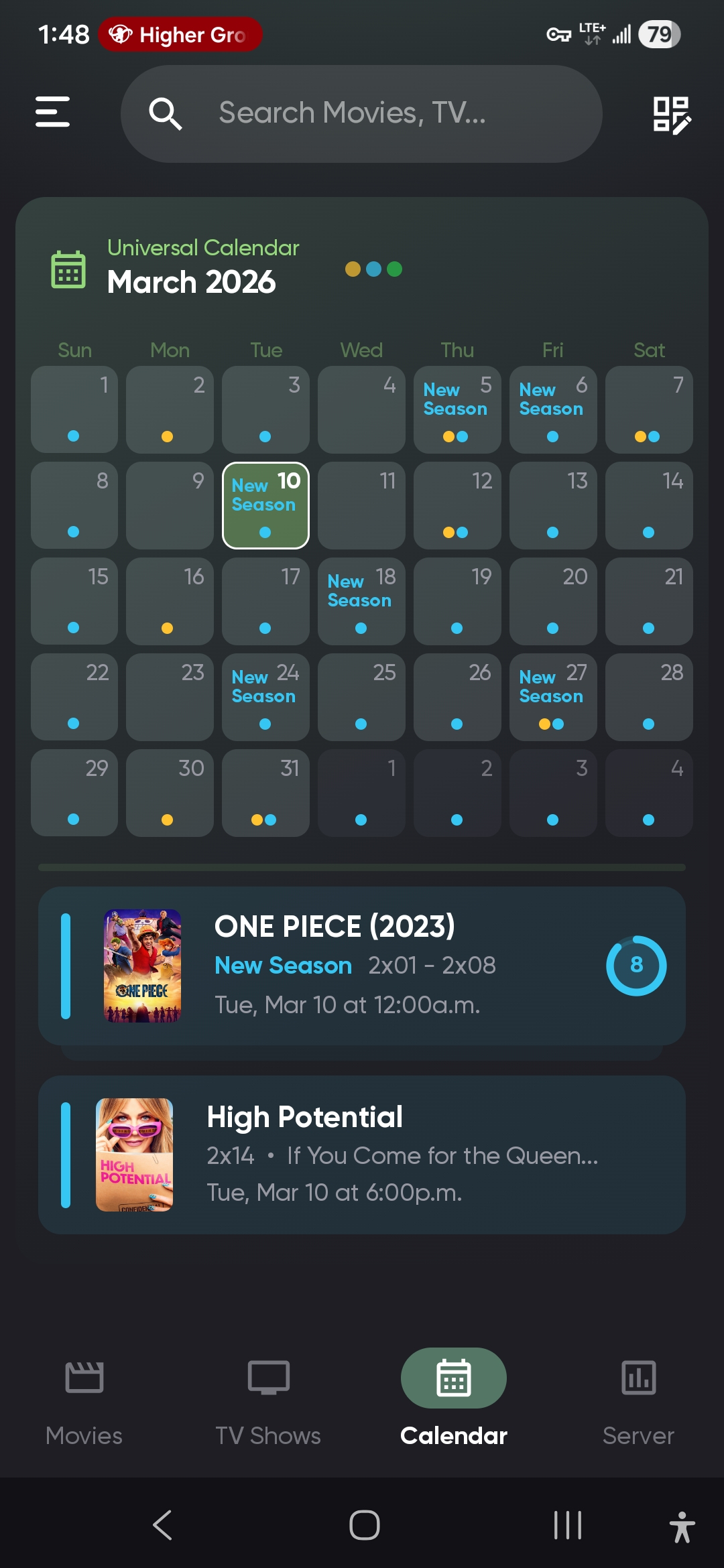
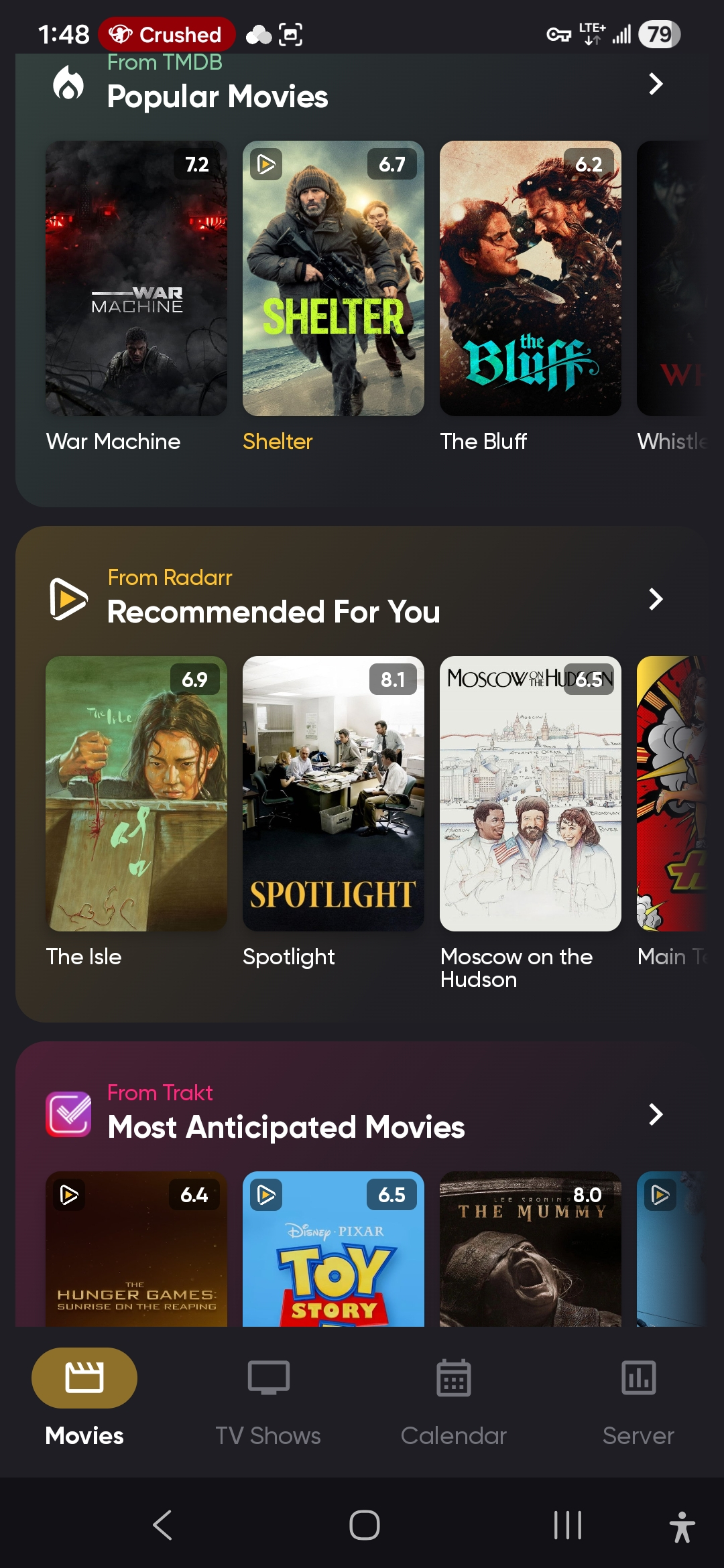
https://play.google.com/store/apps/details?id=com.kevinforeman.nzb360 NZB360. Integrates with Sonarr, Radarr, Lidarr, Qbit/sabnzbd, Prowlarr, and more. Gives several 'upcoming', 'recently released', 'popular', and similar recommendation categories from a variety of sources, to browse and add to your library. Plus it integrates the calendar from all three apps nicely, displaying all of your 'to be downloaded' media in one place. One of my favorite tools outside the actual 'arr stack itself.
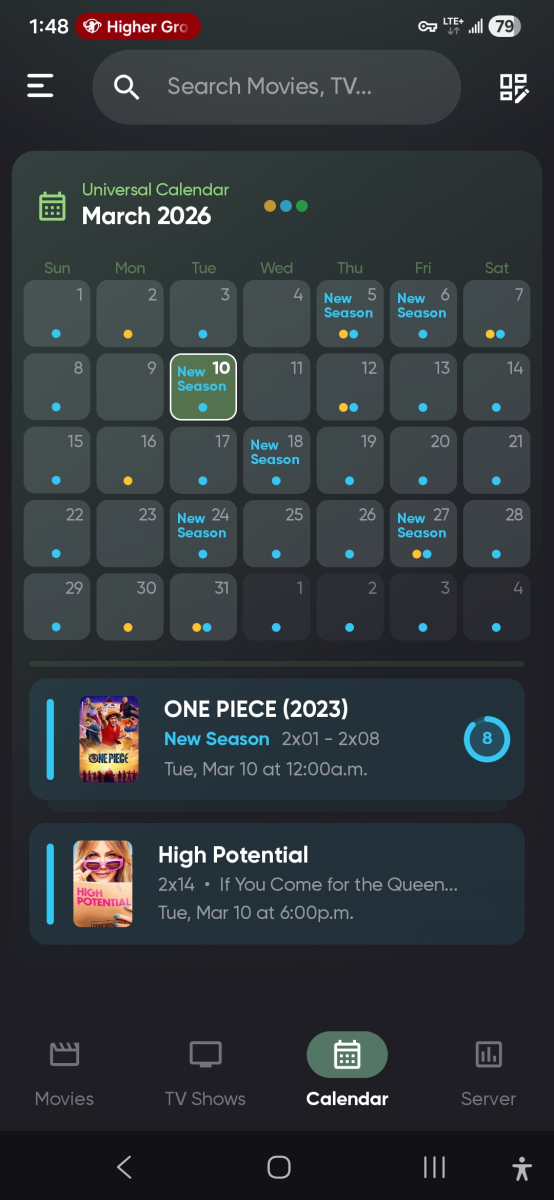
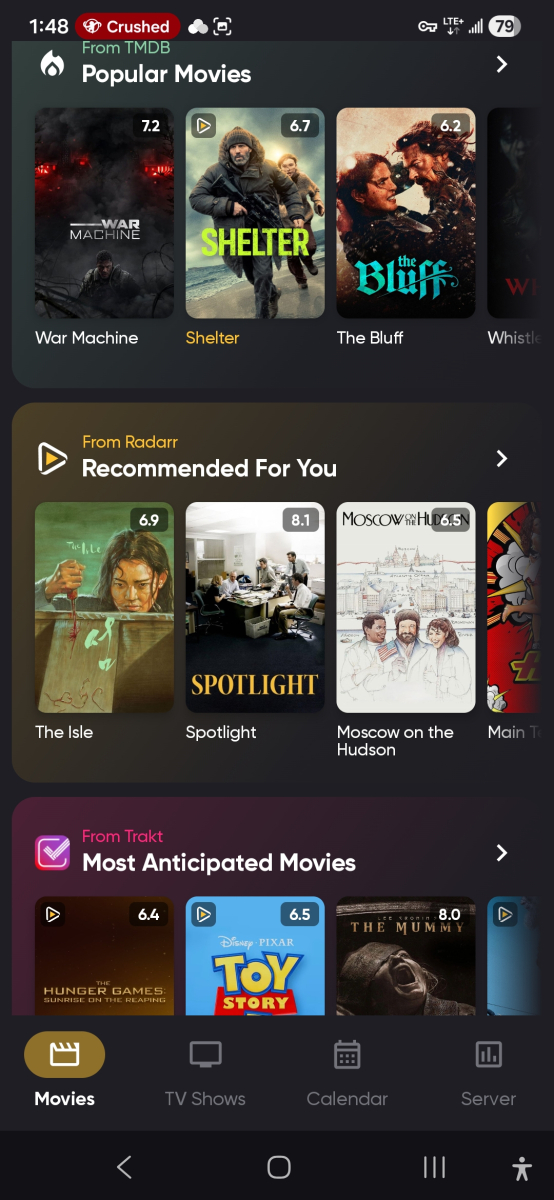 2 points
 -
Is there plans on the roadmap for OpenID. I have searched but not found any indication this is in development. With many admins taking up SSO through Authelia or Authentik to enhance security it would be great for Emby to support it. One of the easier open standards is OpenID which the aforementioned support. Users could continue to use LDAP if they wish while others can use the arguably better SSO experience.1 point
-
Many, many thanks. Still nice to have permission! I will be sure to write in the plugin that it's inspired by Chapter API!1 point
-
Your welcome! I tried to be educational but it's difficult and quickly becomes extremely complicated when you start mixing different logical rules. Just let me know if anyone want help with some special rules or outcome and we'll try to figure it out Yes there is an any user parameter. When you select for example Watched / Unwatched you can filter for All, Any or a specific user. And in this example; All Users - will give you movies and shows that every user has completed. For example, all users have seen Batman and then it get on the list. But it is enougt that only one user have not seen that movie to brake the rule. Any User - here you get all movies that John has seen, AND all movies Maria has seen, AND all movies Donald has seen, and so on...
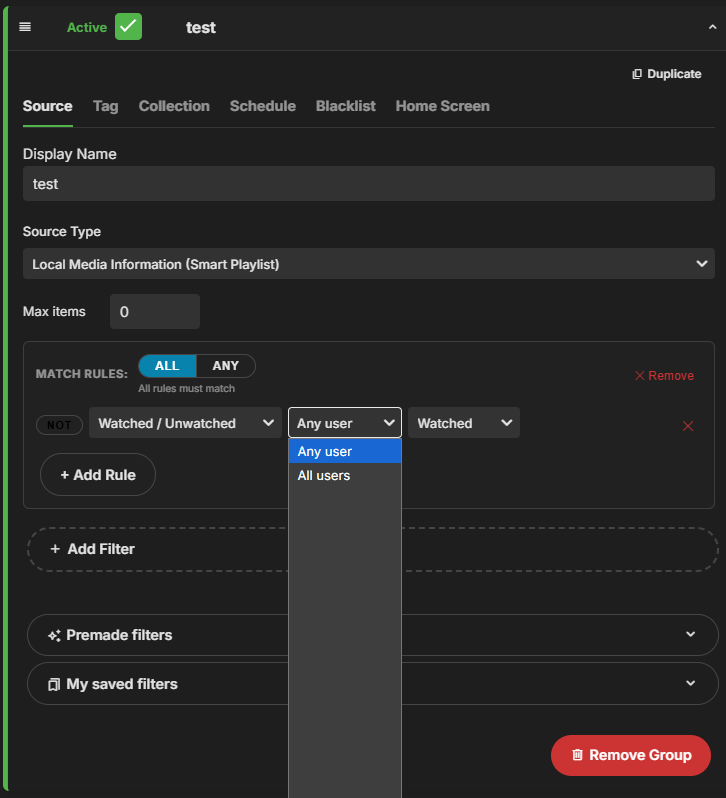 1 point
 -
You mean the UI not updating? All. The. Time. But not this "new derivative".1 point
-
Thank you. @TeamBWill it be okay?1 point
-
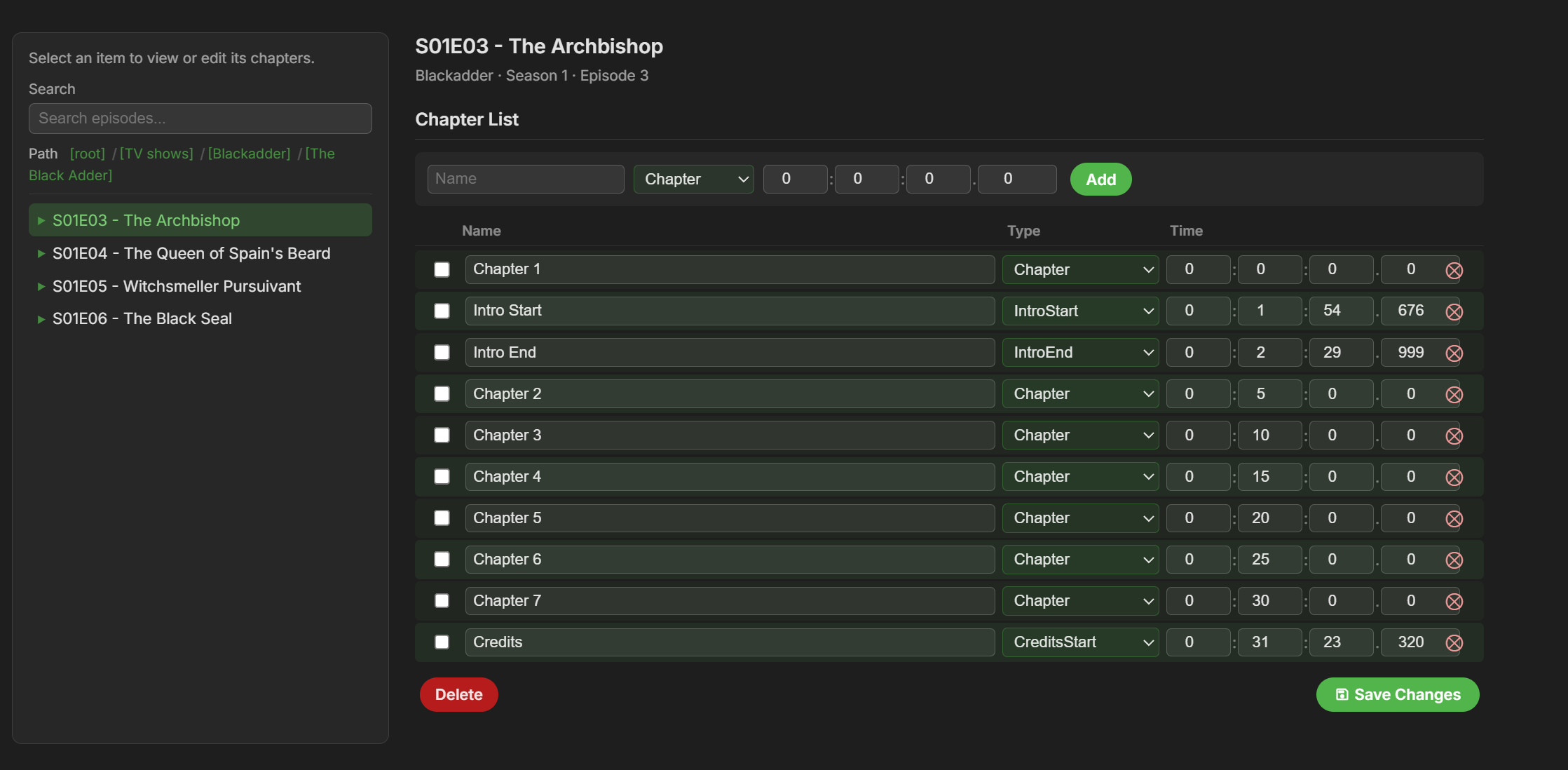
A little sneak preview of next version. This is !!!HEAVILY!!! inspired by Chapter API (a great plugin that i use a lot and can recommend). @rbjtechYou were involved in making Chapter API correct? Is it okay i release this? If not then i will change it instantly and apologize. The layout and functionality of Chapter API is pretty much perfect and people have been asking me to include something like it in this plugin.
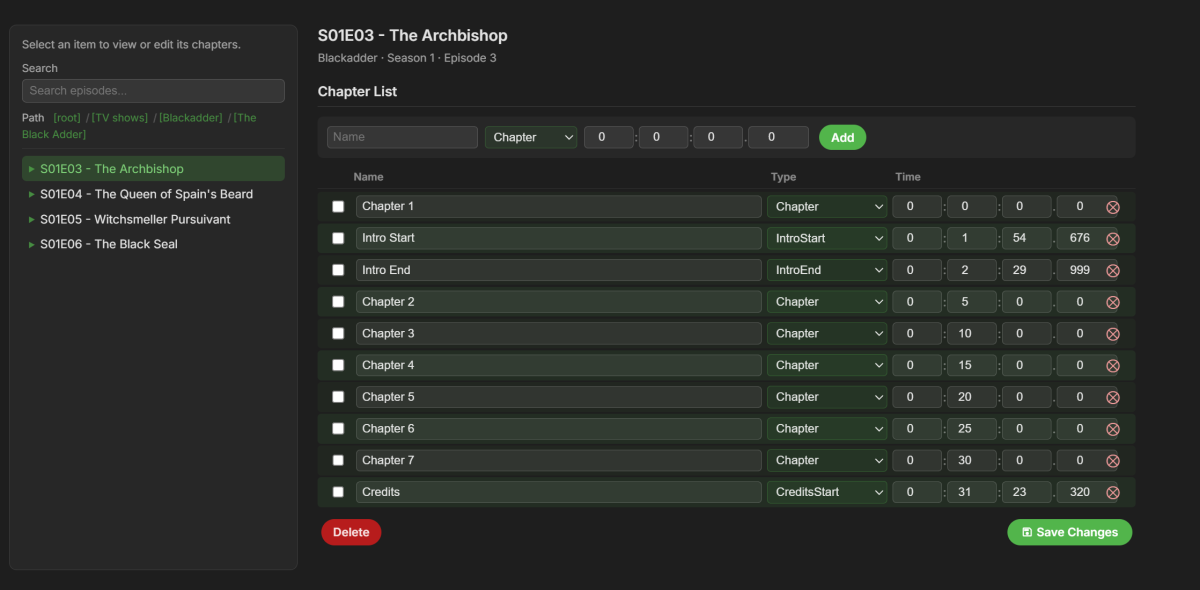 1 point
 -
I'll try, thank you for the quick response, I appreciate it.1 point
-
HI, try refreshing the metadata on the series and see if that helps.1 point
-
For now this is the way it will work although the next time there is a major overhaul it's probably something that we'll be thinking about.1 point
-
It should, hence was asking for: as troubleshooting in general terms seldom results in a solution. Not that pre-selection only applies to un-played files, you might want to "Clear saved track selection".1 point
-
ET, Interesting that there are 3 options, plus possible embedded default tags and default choice with separate subtitle files. Just a quick glance without testing, what happens when the 3 options contradict each other? Does the last option override the previous two options? That would be sort of expected with code. Whatever function starts lower in the code overrides the previous function. I don't have access to test this at the moment, I just wanted to point out for one user, if there is a remembered subtitle from an earlier media play, that may override everything else. A way to test would be to try all possible combinations of embedded subtitles vs. separate files, user previous selection, change the preferred language and turn off always play. Use media that has embedded subs with default tags and without, media that only has separate subtitles, with default in the filename and without and then media that has both. WIth all that testing, then you can determine if something does not seem right. It would almost be easier to set up a spreadsheet with expected results and list actual results. I know that sounds like a lot of work, but it's the way to get to the bottom of any bugs.1 point
-
Just want to clarify what you mean by ‘DMZ host open’ and port forwarding. Port forwarding is when you allow one port or a selection of ports you specify to a particular host on your network. It also allows you to port map, which is best practise in my opinion so externally you configure your Emby clients to hit tcp port 60666 for example and the port maps it to 8096 or 8920. It just stops casual scanning and easy identification that you have an Emby server in your house. The DMZ option places a single host into a totally open port forwarding area, exposing the OS of machine to the internet. So anyone on the internet can hit your Emby server machine with whatever they want. Effectively placing your Emby server out on the street for anyone to probe and mess around with. You should not need to use both port forwarding and the DMZ host option for the same machine. In fact the DMZ host option should never be used unless you really know what you’re doing and have a security hardened machine. I can go into more detail if you need, for now I would turn off the DMZ host option and maybe just remove all port forwarding altogether until you’ve recovered your Emby instance and know it’s good.1 point
-
Chapter API, only for view Intro Summary yes, it really is slow, it takes about 15 minutes per episode, considering that I have changed these 2 values: Search Start Position I have adjusted it to 5 minutes from the end and the fps to 0.7, I am very happy with the result. Precisely because of how long it takes I restore the last backup before scanning new files1 point
-
The Plugin uses two external apps - mediainfo (command line) and mkvtoolnix. It's possible the version of mediainfo that you are/were using is/was different, thus the issue - but the DLL version I posted above, caters for both the old format and new, so it should not matter what version of mediainfo you are using. Can you also let me know what version of mediainfo you are using ? Tks.1 point
-
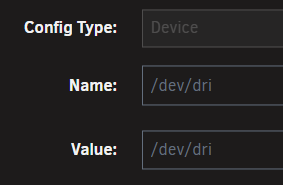
Mine does not have the trailing slash, and HW acceleration works fine in 4.10.0.5 Did you mean Unraid 7.2.3 ? And you confirmed you have installed the Intel GPU Top plugin?
 1 point
 -
Hi everyone, I wanted to share a setup I've built for automatically converting Blu-ray ISO files to MKV on my Synology NAS. It might be useful for others running Emby on NAS hardware. What it does The script iso_convert.sh converts Blu-ray ISO files to MKV using MakeMKV and MKVToolNix, running inside a Docker container on Synology DSM 7. It uses a simple queue-based folder structure — you drop a movie folder with an ISO file into a queue directory, start the container in Portainer, and it handles the rest. The script automatically selects the correct title from the ISO based on duration and file size, converts it to MKV, and places the result in a done folder ready for Emby to pick up. If something goes wrong, the file ends up in a failed folder with a log, and an email notification is sent either way. The folder workflow /volume1/iso/queue/ — drop your movie folder + ISO here /volume1/iso/done/ — converted MKV lands here /volume1/iso/failed/ — failed conversions with log /volume1/iso/manual/ — for anything needing manual attention Tech stack Synology NAS with DSM 7 Docker + Portainer for container management MakeMKV 1.18.3 (compiled from source inside the container) MKVToolNix for post-processing msmtp for email notifications The container runs once per job and exits (restart: no), keeping resource usage minimal A few notes The Docker image is built locally on the NAS since it compiles MakeMKV from source — the build takes about 10–15 minutes but only needs to be done once (or when MakeMKV updates). The MakeMKV beta key is passed as an environment variable in Portainer, so updating the monthly key is just a quick edit without touching the image. This fits nicely into a broader media pipeline alongside Radarr, Sonarr, and qBittorrent — ISOs get converted to MKV and land directly where Emby can import them. Disclaimer If anyone wants to use this script, please be aware that you do so entirely at your own risk. I take no responsibility for any errors, data loss, or unintended consequences that the script may cause. That said, I strongly recommend always copying your ISO file into the /queue directory rather than moving it — that way your original file is safe if anything goes wrong during conversion. Happy to answer questions if anyone wants to set something similar up.1 point
-
To give you a better understanding of what the script does and how it works, I have attached the installation manual. It covers the full workflow, folder structure, Docker setup, Portainer configuration, and all available environment variables. If you have any questions, or if you would like access to the script itself, feel free to reach out — either in this thread or by private message. iso_convert_manual_en.pdf1 point
-
@Neminemthanks for your answer. I made my own thread before discovering this general Unraid thread: I installed IGPU TOP and I see no action there...1 point
-
Here you go DV example.json1 point
-
TheAudioDB is a free community API that i think supplies the info. I believe IMDb supplies the data if you can get access to the API. I think it's free for individual users so maybe an option for users to enter their own API key? Havn't checked but TMDB might also provide some info.1 point
-
I mostly use this TV Insider - TV News, Show Reviews, Sneak Peeks, What To Watch and this What to Watch: In Theaters and On Streaming | Rotten Tomatoes or this Movies & TV Series - Release Calendar or TV Premiere Dates (2026) - Metacritic The list goes on Use google and search for upcoming tv shows and movies Or trending tv shows and movies Its 1 search away1 point
-
I turned my TV off for 5mins then the issue was fixed. Before I made this post I was turning my TV off and on for 10secs at a time. Not sure what triggered it, hopefully doesnt reoccur.1 point
-
I've tested the ass subtitles. Mkvs in my synology nas doesn't have fonts attached but the .ass subtitles have. I see that .ass subtitles with attached fonts are being succesfully rendered by Emby for android version on SHIELD TV. We're willing to see this feature in Emby Android TV App.1 point
-
Have sent privately, cheers.1 point
-
ordered SIM cards just waiting for delivery1 point
-
I've been meaning to post for a while to thank @Luke and the team once again for getting the folder view fix put in. Although some of title art had disappeared on account of some of the upgrade weirdness, I've taken this as an opportunity to redo all of my NFO and art, this time saving it in the media folders, so my overall library is now much robust and more easily recoverable in the event any other surprises ever crop up during a future upgrade. Which hopefully won't happen, but in any case, it has been very fulfilling to tweak and perfect my library, and I am very pleased to have everything put back together. Thanks so much for preserving the old Folder View functionality for those of us who use it so heavily! Not to detract from my Folder View praise, but there is one very minor usability issue (at least in 4.10.0.1) where when the "Auto open single items in folder view" display setting is enabled. It works fine for getting to the content, but after playing such content (e.g. a standalone single-title-folder title within a containing parent folder), the post-playback navigation is broken. After the title ends, Emby returns to a mostly "blank" screen, only displaying the folder title and nothing else--almost as if it's trying to return to the folder that got jumped over. It's not a huge issue (the back button still works to return to the parent folder level and resume navigation like normal) but just figured I'd mention it since it does seem to be an unintended bug with this function. I'm not sure if the bug is unique to Legacy scanning or not. Please let me know if you need more information to troubleshoot, and I can post some examples.1 point
-
Found it - for some reason there the option under streaming ==> advanced ==> limit single channel streaming per tuner had been ticked for some reason. Untick and I can watch multiple channels at once to my hearts content. Phew1 point
-
Same for me.1 point
-
As a feature, it is good to see what soundtrack is playing (song and artist) in the movie or in the episode. so that people can go and listen to the song they like on Spotify or other services. The tunefind website provides data on the songs playing in each episode in a series and movies. i think they have the api too. Here is a sample video to illustrate what i mean. sample.mp41 point
-
I am looking to see if a SAML2/OAuth plugin is something others would use. I myself would love this feature to share Emby publicly with family members and friend and worry a little less about insecure passwords that some may use. I personally am a big advocate for security as I work in IT and see how a lack of good security can cause havoc. I love Okta and what it offers. Anyone can sign up and use it for free under 1000 users if you sign up as a Developer. That is just plain awesome. Let's see who else is interested. I am excited to find out! Thanks1 point
-
It is something to keep in mind. Every plugin you install will come with a cost in resources.1 point
-
Hi @Luke, can I may ask the status of this? Since emby did support multi-version naming (LINK) for a long time, it would be really great if emby can support/understand the naming of plex (for all users which use both or want to switch etc). The current naming theme by emby must be (quote): Each version must begin with the folder name, followed by " - ".If using the dash method anything following the dash will be what you see in the Emby client app. Can you implement a relaxed/alternative version/pattern recognition which ignore the folder name and scans for {edition-...} in the file, where <...> is the edition name? It should not be that hard because emby already support the pattern {...} just for ID tags like tmdb/tvdb/imdb ID's. emby naming: https://emby.media/support/articles/Movie-Naming.html Plex naming: https://support.plex.tv/articles/naming-and-organizing-your-movie-media-files/1 point
-
That's not true either. You can amplify a digital audio track. Simply increasing amplitude. I've never had this problem with kodi but it already has an amplification part to its software. As I said I already reincode the videos with a higher volume and that seems to work fine. It's just unfortunate it's not already built into MB1 point
-
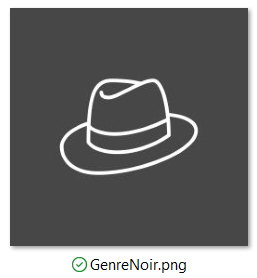
Sure! Added to the attached RAR. -M EmbyIcons_v6.6.rar
 1 point
 -
I have the Millennium Trilogy Blu-rays, which are in Swedish with burned-in English subtitles. The only options I have in Emby are to falsely mark the dialogue as English, falsely list the film as having no subtitles, or create a blank SRT file and falsely give the impression subtitles can be disabled. There is no option to have a non-selectable indication that there are English subtitles, at least as far as I'm aware?1 point
-
Disable admin account from outside and use VPN when needing to use the admin account should make files secure. Keep an eye on where users connect from once in a while, there are plugins for that. Blacklist countries you have no users in. Make sure users don't set 1234 as password.. Emby needs a feature for minimum lenght and special character passwords Correctly set up proxy instead of direct Emby access. Tailscale funnel also works very nicely and doesn't require "outsiders" to have tailscale. Not saying 2fa isn't needed, just that there are other ways to secure the server.0 points












.thumb.jpg.d1639af2d080f59454a5d8102bcb977e.jpg)