Leaderboard




Popular Content
Showing content with the highest reputation on 03/08/26 in Posts
-
Very simple little plugin. Customize the new banner feature in the Emby server beta. Cycle between messages - It's not a live cycle so requires reload of mainpage. Show Movie, Show, Episode, Video count. Show latest movie and/or TV show. Add Emojis (for what ever reason ) Can look into adding more if people want it. ONLY WORKS WITH EMBY SERVER BETA!! Can be found at: yocksers/EmbyBanner.
 2 points
 -
YAY It's arrived - 2.2.8 *finally* here in New Zealand and it's sorted the Trailer issue (finally). Thanks @Lukeand @FrostBytefor all the help. I still feel the Samsung machine is the biggest part of this problem as it should not have taken this long to work its way through the machine but I'm glad it's finally here and I don't have to continually side-load.2 points
-
@yockerI think he wants to link to his Paypal / Buy Me Coffee account so people can pay him, for sharing his server. Not sure though2 points
-
Just wondered if there was any more news on the smart playlist feature, not just the homepage revamp?2 points
-
This!2 points
-
On top of that if you were to force Emby to bind only on the localhost address then no other LAN clients would be able to connect unless you were using a local proxy.1 point
-
I'm not 100% sure about this but it looks like: 1. Emby for some reason removed all detections, even their own intro detections, when Emby last updated. 2. Emby also removed all detections including their own intro when doing a metadata refresh even when it's said to only look for missing metadata. I don't know why the devs made it like that or if it's a bug. It's not the plugin removing the detections.1 point
-
There's nothing wrong with this, it's still listening on ipv4. I have ipv6 completely disabled on my system and it still appears like that with netstat. EDIT: I think the help text underneath the field explains what it does. Emby will listen on all addresses, but advertise that address to the apps for LAN.1 point
-
Hi yes the Home Screen is just the start of it. Thanks.1 point
-
Emby Connect allows a user to link their Emby.Media account to their local user account on your server. They can then login via app.emby.media, which will connect them to your server. This allows users to select from a list of servers if they have more than one linked to their Emby Connect account, without having to remember each ones address. It will keep track of changing addresses if you're just using a raw dynamic IP instead of a domain for external connections. It also allows users to reset their passwords on their own (via emby.media password reset), as a local user cannot reset their own forgotten password without involving a server admin (changing this has been an open feature request for years...). Essentially a DNS service with a few extra features specific to Emby.1 point
-
Aha, I will also be interested in an answer to that. I have no idea.1 point
-
Media I, As admin you would control access for remote users by giving them your confidential Emby server access. That would start as an IP address that would show up in your Admin General page once everything is setup correctly. You should not post this IP address anywhere in the forum or make it public online. It is only for your invited members to know. The IP could be convert to an actual domain name link, if you setup SSL, which is a 3rd party service offered by hosts. Sometimes this can cost as much as $150 or so a year or it can be free, depending on if you let your host do it or do it more yourself with some some 3rd party services setup. Once the user has the IP or domain name address, they will also need a login and password to get to your Emby server home page. All this has to be setup correctly and there are a few steps involving your server settings, your firewal and your router. For some people, who lease a router from a host, there can be more steps because the host locks some settings down. The entire setup is moderately advanced. If you have done no network setups before, you would be better off asking for someone local who knows networks better to help you. Hope that helps.1 point
-
If only the admin account then a VPN would be easier and better.1 point
-
I agree and that should not be added !! Even if you could1 point
-
Yeah i had a feeling that would be the case. Thanks for testing. Tbh a donate link there would be too much of a pirate netflix service to me anyway.1 point
-
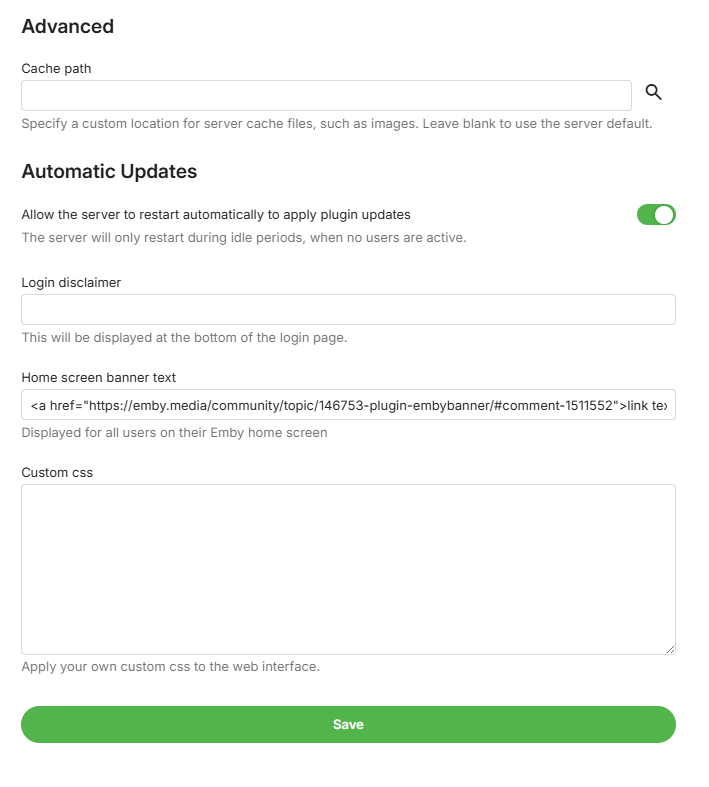
Well you can type in anything but its just shown a text. Using the normal way without your plugin. Here is a example off html link to this forum thread. <a href="https://emby.media/community/topic/146753-plugin-embybanner/#comment-1511552">link text</a> So I guess you will not be able to insert any link in that text field, not even using html.

 1 point
 -
Ahh, that could be. Not used to people making a request like that. Don't think the Emby Banner supports links so will not be possible.1 point
-
Samsung client at least doesn't seem to support it. My GFX card is sweating because of the transcodes from my family with Samsung TVs.1 point
-
Reviewing the thread, I note that you state that external access hasn't worked for a couple of years. To my mind this makes it more likely that either there has been an IP address change that slipped past you , or that you have indeed been put behind cgNAT by your ISP. How do you access you server externally - do you use your WAN IP address directly, or do you have a domain name (maybe from a dynamic DNS server)? Have you checked for cgNAT? If your router tells you that your WAN address is 100.etc (more detail is then needed to confirm), or in any "local" address range, then you are. If you go to a website like https://whatismyipaddress.com/ do you get the answer you expect (i.e. does it match what your router tells you, and what Emby shows in the dashboard)? Using a site like https://canyouseeme.org/ does the port you use for accessing Emby show as open or not? You mentioned that Plex continues to work. Note that Plex has a built-in mechanism for getting around cgNAT - this involves going via their servers, so Emby does not replicate this so as not to compromise your privacy. Paul1 point
-
Not really, unless you have different vlan's in your network. Like op has, where he has VPN vlan and local vlan. I have 4 vlan's in my network VPN / local / Docker and IOT, and I don't want any IOT devices to talk to my server.1 point
-
It may well be random for upcoming movies; I don't select those so I don't know. It's not random for older movies, as Luke indirectly confirmed above.1 point
-
That's an interesting idea. But, from reading other posts about external links, it seems that Emby are generally not in favor of this because of potential security risks. Would still be nice to have though. Perhaps a variation of this would be to have an internal links option, to be able to direct people straight to the relevant Emby server page that the banner may be promoting. I have no idea if this poses the same security issues???1 point
-
It would be great to be able to add a clickable link, for example a PayPal or Buy Me Coffee link.1 point
-
Thank you very much, I'm looking for the plugin and it works.1 point
-
Write something in this setting in Emby to activate, then use the plugin.
 1 point
 -
I may not have the latest on what's going on though1 point
-
I use NGINX to do the following (other RP’s should work too). I use Certbot and Let's Encrypt for SSL (TLS v1.2+) on custom port(s). I also use geo-blocking via MaxMind (free version). I ignore (444=drop) direct IP# requests (the DDNS name must be used for access). I use a custom port (5 digits) that hackers usually don’t scan. (And yes, my 85-year-old mother can use this easily.) List of assigned ports. With this setup, it’s hard for anyone to access my LAN or Emby without explicit instructions.1 point
-
Disable admin account from outside and use VPN when needing to use the admin account should make files secure. Keep an eye on where users connect from once in a while, there are plugins for that. Blacklist countries you have no users in. Make sure users don't set 1234 as password.. Emby needs a feature for minimum lenght and special character passwords Correctly set up proxy instead of direct Emby access. Tailscale funnel also works very nicely and doesn't require "outsiders" to have tailscale. Not saying 2fa isn't needed, just that there are other ways to secure the server.1 point
-
This looks like a file that's been converted, probably incorrectly. The format is shown as: Format : AAC LC Format/Info : Advanced Audio Codec Low Complexity But the track title is: Title : DTS-HD MA 6.11 point
-
Just for information, I’ll take a break from this for a few days and just enjoining the weekend. Letting you guys play and test the latest beta. I feel I have reached a milestone with the plugin and all the features I wanted to have (and more thanks to your suggestions) is there. Im gonna focus one or two releases into bug fixes and smaller improvements, then I believe this is ready for the official Emby plugin catalog. If you encounter any bugs, have any suggestions for improvements, or any feature ideas, it would help me if you post them on GitHub. It’s fine posting it here as well, but I might miss it or forget. https://github.com/soderlund91/HomeScreenCompanion/issues Thanks!1 point
-
Version 14.0.0 Notes: This is a major version update. Please be sure to read the full changelog. Please remember to leave an updated written review on the Play Store. Your feedback is essential for improving the app’s ranking and helping secure Symfonium’s future. Added: Added many new now playing settings: Added new waveform bar type. (5 modes with precise settings over bars and reflection) Added icon color, overlay transparency and size settings for string buttons. Added precise size control and transparency level to control buttons. Added configurable protection for lyrics over cover. Added new spacer type for buttons, allowing more asymmetric designs. Added 5 toggleable booleans to custom strings, allowing more dynamic screens. Added more precise control of background blur level. Added text formatting controls for custom strings (Bold, Italic, Uppercase, Underline and Strike). Added share file as a possible button and string action. Added horizontal text position setting for the top bar. Added vertical text alignment setting for multiline fixed-size strings. Added control over transparency levels for most overlays and protections. Added new background overlay types and cleaned up the current implementation. Added 3 new customizable strings over cover. Added option to invert overlay and protection colors. Added option to force black overlays. Added new animated glow expanded background style. (Apple Music style, Android 13+). Added new fill size setting for cover in landscape to have it use as much space as possible in its side position. You can now customize the back and forward amount for expanded and compact player buttons. Added option to keep wave bar slider mode even if the data is missing or loading. Added option to swap buttons and collapse button in top bar. Added “album.type”, “output.current”, “renderer.current”, “renderer.type”, “sleep.timer”, “sleep.timer.seconds”, “sleep.timer.eos”, “player.repeat.mode”, “player.shuffle.mode”, “player.paused”, “filepath”, “filename”, “bool1” to “bool5” as possible custom string values. Added many new “string.*” as translatable custom string values to help making custom styles multi languages. Added a few new default now playing styles. Added fixed tertiary container as possible compact player background color. Added many new page settings: Added different background overlay types and transparency levels. Added precise header and image size controls. Added title and version bold and scale factor. Added subtitle and artists as text scale factor. Added option to show Favorite, Composer filter and More buttons in the button row, with option to split them from the playback actions. Added precise blur level control. Added center text, spacing and size control to albums in album and artist pages. Added option to space evenly buttons. Added option for album page to only show distinct artists in song list. Added custom string support as subtitle for Album and Artist page. Added random sorts to albums in Album and Artist pages. Added option to hide track numbers in Album page. Added many new media lists settings: Minimum columns for grids is now 1. Added nearly all display modes to all item types. Added Single line list, Text only list, Round card grid, Overlay grid, Vertical overlay, Landscape background overlay and Landscape overlay display modes. Landscape grid modes now have round and square versions everywhere. You can now hide unwanted buttons from the top button row. Added new settings to enable offline status and/or favorite status as overlay icons in lists for all media types. Added new setting to enable text centering on square grid display mode. Added new setting to control if Text only display mode is single line or not. Added many new home settings: Added precise size control for the top icon. Added 2 more possible shortcuts rows. Added Sync all as possible shortcut. Added tertiary container color as a possible header color. Added custom text as home row header title. Added precise control of header text font size, vertical padding, number of lines and center text option. Refactored overview style selection to split display modes and styles. Enabled many styles for overview items. Added setting to control visibility of the More button for overview lists. Sizes, spacing and padding can now be configured precisely. Added new Overlay grid, Vertical overlay, Landscape background overlay and Landscape overlay styles. Added new Multiline row and Carousel display modes. Added per-row controls to display Favorite, Offline status and Playlist type overlay icons. Added setting to hide subtitles in overview items. Added button to easily copy settings from another home row. Added option to change playlist affected to pinned playlist row. Added new row Recently added album artist. Added back Polish translation, thanks Medo for the work. Added support for MusicBee Love rating tags. (Loved to Favorite, Banned to Excluded from mixes). Added support for channel selection for PEQ filters (All, left or right) and lowered the minimum frequency to 5Hz. Added new setting to disable background and surface color changes when using dynamic colors. Added Stereo to Mono converter to the DSP. Added new Crossfade Setting: “Mix only” allows for seamless track overlaps without fading the volume. Added option to disable lyrics translations colors and word sync. Added option to disable lyric voice color indicator. Added new option to invert sort arrows. Added support for mixed “&&” and “||” operators with parenthesis support to the template system. Added support for mka, webm tag extraction to custom tag parser. Added new main navigation styles: Bottom docked toolbar, Bottom floating toolbar and Bottom floating toolbar with FAB. Added new “originaldate.year” and “releasedate.year” custom strings to only extract year from those values. Added new API calls to toggle the hide status bar and ignore camera hole settings. Changed: There is major changes in many interface settings, most settings should be properly migrated, but it’s possible some special cases requires you to configure again some details. Many default application and now playing styles have been updated. You can still easily modify them to fit your needs. If you never tweaked your interface now if the perfect time to try the new styles. Player keep paused state option is also applied to now playing cover swipes. Now playing queue properly updates favorites, ratings, … on external changes. Application styles export and import now also contain any custom home icon you have configured allowing to share full interface. Song mood and language smart filters now support all range of text filters. Updated the template engine to support combined && and ||, negative integers, double values and many more tweaks. If your custom strings relied on previous engine quirks, it is highly possible that you need to update your templates. Now playing top bar standard subtitle text now displays their associated icon if present. Use custom strings to remove them if necessary. Hopefully small performance gain in the custom tag parser without regression. Please open issue with tag extraction. Fixed: Fixed selection menu sometimes not visible. Fixed unwanted skip count increments in rare cases. Fixed Jellyfin quick connect sometimes not working. Fixed PEQ/GEG pre amp sometimes not applied after a track change. Fixed Plex offline caching (transcoding) sometimes generating bad mp3 instead of opus. Added a workaround to allow playback of invalid mp3 generated by Plex transcoding. Fixed some mp3 tag and images extraction issues on some cloud providers. Starting a radio mix or instant mix from current song in now playing no more restart the current song. Fixed possible Google Drive authentication issue with some accounts. https://support.symfonium.app/t/version-14-0-0-released/127871 point
-
OK so this is external and looks like it polls the api? It would be more efficient if instead it received webhook notifications from emby server. Then it could notify discord based on that and you'd get the same features without the constant polling. But this is ready made and works, so obviously that's nice.1 point
-
Tracearr is even better and has Emby support. https://tracearr.com/1 point