Leaderboard




Popular Content
Showing content with the highest reputation on 03/07/26 in Posts
-
Have you checked your Spam folder? How is the Emby Premiere Key Delivered to Me? If still did not receive it, send an email to:2 points
-
Does all the user have a static ip? What if there DHCP lease renews? What if they go mobile? Personally I use geo blocking in my firewall.2 points
-
Very simple little plugin. Customize the new banner feature in the Emby server beta. Cycle between messages - It's not a live cycle so requires reload of mainpage. Show Movie, Show, Episode, Video count. Show latest movie and/or TV show. Add Emojis (for what ever reason ) Can look into adding more if people want it. ONLY WORKS WITH EMBY SERVER BETA!! Can be found at: yocksers/EmbyBanner.
 1 point
 -
As requested for years elsewhere in these forums, the ability to download a usable playlist (the audio files and a modified m3u or whatever that points to those downloaded files where they now reside on the device) is what's needed to make the download function fully useful. I hope that's actually going to happen soon, please. Even without that functionality, using Emby via Android Auto doesn't make the "dowloaded" files directly accessible from the main Emby dashboard screen, which diminishes the benefit of downloading before a road trip to avoid heavy wireless data usage and/or dead zones. Please add "Downloaded files" as a main-screen selection button, in addition to "Recents," "Favorites," etc.1 point
-
Correct. Latest Beta version is v2.1.43.1 point
-
I may not have the latest on what's going on though1 point
-
Ya it's not being updated though, only the beta channel is. I would assume eventually you will only see the one, but many people paid for ATV so it's still there.1 point
-
Okay, I think the YT trailers were fixed in 2.1.28 You can either sign up for the beta channel to get it from the store or just download the apk from the link below and sideload it.1 point
-
I honestly don't understand the 2fa on just admin accounts. I don't want ANYONE logging into my server that I don't know, admin or not.1 point
-
You have already been replied to in your first topic, why are you creating another?1 point
-
They will, give them a little time. @ebr1 point
-
LOVE Emby for local on-LAN playback. Practically perfect for me. However, I bought Premiere specifically for offline music play, only to learn it doesn't really work yet. What is the state of this feature, "planned" per Emby responses to requests for this going back at least as far as 2022? Is this close and coming soon? Whether it is or isn't close, here's specifically what I request and suggest you add if any of these are not already included in your development. Ability to establish per device syncing by at least: artist, playlist, and genre where "sync" means that any changes or additions on the server will automatically download those some changes to the Android client when it next connects to the Emby server. If I add an album to the Rock genre, and I've told Emby client to Sync the Rock genre, it should get that new album at its next connection to the server. Changes to song metadata on the server should also update metadata on the device. This is basic concept of sync rather than download. Recognize changes on the server and update files on the client to match (one-way sync, Server -> Client, is fine). An option to sync everything in a Library (in my case, it's my Music library) to the current device. My current Android phone finally has enough room for all my music. In that case, for simplicity's sake, while I don't necessarily need EVERY song, I'd rather just have an option to get it all and keep the phone in sync with my full Library, rather than have to go through artists and albums and select which I want and which I don't. Offline ability to view the list of playlists, artists, genres, albums, songs, then open to drill down through the layers to individual songs. Currently, Emby only lets you sort downloaded music by album or song, which is not really helpful with hundreds of artists, many of whom have several albums. I never want to scroll through hundreds of albums to find an album. I want to see all the albums by a particular artist to select one to play or to navigate to a specific song. If I could only have 1 listing structure, it would be by artist -> album -> song. Occasionally, for things like Christmas music that may span multiple artists on a single album, sorting by genre or album do make more sense (but that's the minority of cases). Especially important for Android Auto so I can make selections easily on the console screen while driving (important safety measure): provide an easy, big-button way to jump to a particular letter. E.g., if I want to get to Yes or ZZ Top, don't make me scroll through pages and pages of artists starting with AC/DC and Aerosmith; just let me hit Y or Z to jump to the end of the alphabet. UI should be roughly the same whether online or offline. Don't make me learn a whole new and different UI because I'm outside my house and no longer connected to the server. Use the same UI, with the sole change being to show only the subset of songs that I have synced/downloaded for offline playback. (Kudos: the Emby UI is great when online, so be proud to keep it available for offline playback) I think those are all the base expectations any user would have for offline music play. I'm happy to add further details or help clarify any of these if you need. LOVE Emby for online use, but equally upset and disappointed that its offline play for music is not really usable, especially because you charged me money for it as a premium feature that doesn't really exist. Please share a general idea and rough timeframe for if and when these are coming. If it's not by sometime in the summer of 2026, you should probably remove the offline claim for Premiere and not accept customer money for this missing feature. Thanks, Colin1 point
-
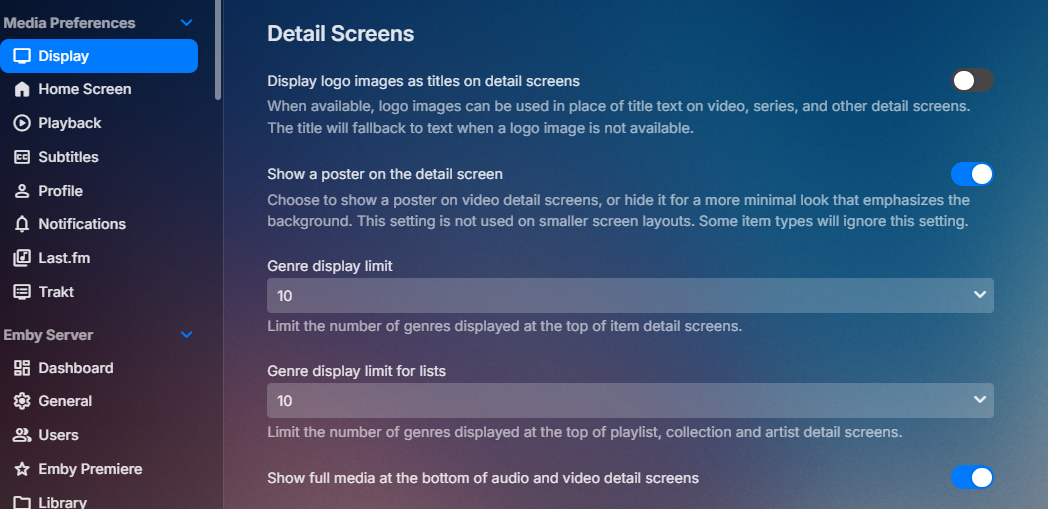
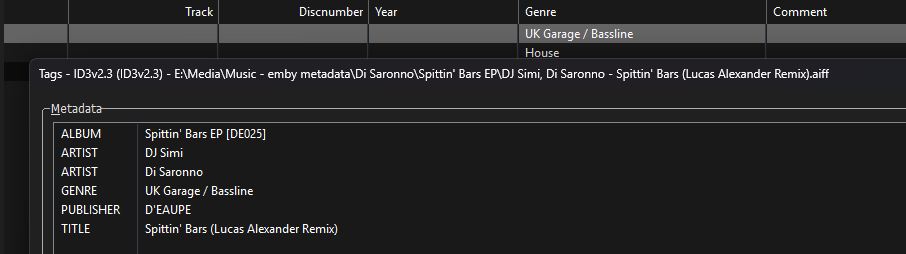
Yes what is your details screen setting? Sorry but coma delimiter is not supported. Semicolon or forward slash and I believe double back slash. @LukeKB probably needs to extend this rule to other fields. Music Naming | Emby Documentation
 1 point
 -
New PUBLIC TESTING version available 12.4.14: Delta changelog 12.4.13 -> 12.4.14 unblock database opens fix minor progress update issue fix livetv progress improve kodi scan detection fix picture viewer cleanup code fix cinemamode for native content when autoplay next is enabled several minor bugfixes fix progress for fake themes improve themes play1 point
-
This is really awesome and works amazingly well connected to my Emby server. I’ve been testing today while out and about in the car with no issues at all. Emby could never be quite the perfect dedicated music player as it does so many things, but this is going to be my go to when playing music at home. Thank you.1 point
-
Oh, wow. Many thanks! Will test out and let you know. Appreciated as always.1 point
-
Three months to fix a problem, which is clearly a major problem for those who watch in VOST, this is absolutely ridiculous.....1 point
-
Would also find it very convenient as an admin to copy across settings/display/homescreen sections from one user (that I can manually configure) to other existing users.1 point
-
Tried the new version? @zerodayzThe has control for audio/video transcoding blocking as well.1 point
-
Just for information, I’ll take a break from this for a few days and just enjoining the weekend. Letting you guys play and test the latest beta. I feel I have reached a milestone with the plugin and all the features I wanted to have (and more thanks to your suggestions) is there. Im gonna focus one or two releases into bug fixes and smaller improvements, then I believe this is ready for the official Emby plugin catalog. If you encounter any bugs, have any suggestions for improvements, or any feature ideas, it would help me if you post them on GitHub. It’s fine posting it here as well, but I might miss it or forget. https://github.com/soderlund91/HomeScreenCompanion/issues Thanks!1 point
-
Smart Playlists 2.0 allows filtering by playcount. I think its implementation is quite good. It allows you to select which users to use in calculating playcount in the filters. The only improvement I would request is adding All Users so that it is a bit easier to select a server wide filter.1 point
-
Hi, yes bulk edit features are planned for future updates. Thanks for the feedback.1 point
-
I already switched some time back to Narjo - https://narjomusic.com/ Which works perfectly with CarPlay and Emby.1 point
-
Ok, so i came across this post, and thought FINALLY! not being super comfortable with this kind of stuff... i decided to give this a try on my new Windows Server 2025 rebuild for my media server. Why did i go Server 2025 instead of staying on Win11? Got a new SAS card for my drives, and figured that using this guide would get me is a better state than previously on Win11.. I also took a stab at using ZimaOS.... this was an amazing OS to try out... BUT... having used Drive Bender as my software raid on Win11.. it was just so simple... and when a rebuild was required, i didnt have to worry about encrypted drives, or having drives converted when adding to pools etc. I have now moved onto Stablebit Drive Pool - pretty nifty too! Used the script, and had tons of errors (downloads failed, installations failed due to downloaded files not being found in temp folders etc... IIS configs failed etc) So, i downloaded the apps manually, installed them... followed the guide on page 1 - manual setup... Got through all that pretty well. All is working as expected, SSLLabs gives me an A+ when testing my domain. Just wanted to say a big thank you for this guide... and maybe it could be updated again someday with newer tools.. updated script etc.... for that eventual scenario when a rebuild is required again!1 point
-
I experienced the same. Using the standard Android version, trailers work on my nVidia Shield.1 point
-
Hi is there any chance in the future getting music downloads in emby on android auto to show up as a feature ?1 point
-
Four years later, any progress on this?1 point
-
Hello, I'm an Emby Premiere user since multiple years and love it. When I switched to an iPhone and started using Carplay, I was so happy to see Emby supports it. But when I found out it does not work with the files downloaded to my phone, I was honestly shocked. Most apps which offer music content allow offline downloads to be working with Carplay. It's even more strange to me, since Carplay is an advertised feature working with Emby Premiere only. Please add offline media support, at least for music, to Carplay. It's a very important feature to many I guess and I think it's missing way too long.1 point
-
+1 for feature request to be able to play video as audio only (to save data when mobile). For those who don't know, there is a setting in the android (and presumably iPhone) app to enable you to leave the screen or lock the screen and still play audio. But your device is technically still streaming full video, even if it's not showing.1 point
-
I know everyone has their own priorities and wishlists, but offline CarPlay is by far at the top of my family's feature wishlist. We've put a lot of work into configuring Emby and creating our collections and playlists, but not being able to use Emby in the car is really disappointing. Thanks for all your work on Emby!1 point
-
Hi, yes these are both planned for future updates. Thanks for the feedback.1 point
-
HI there, yes it's planned for the future. thanks.1 point
-
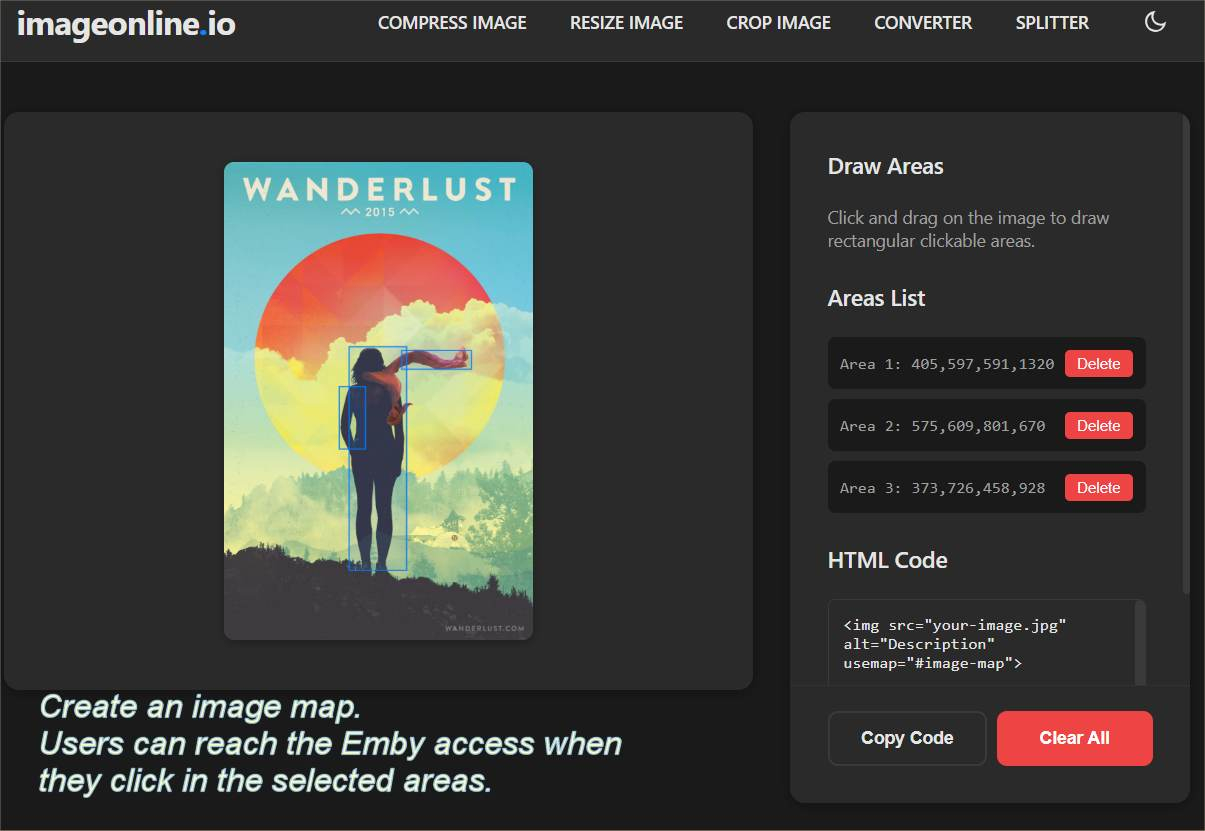
Media I, Security idea that might be useful for users who like using the web client only. I like setting up a hidden page online on a website I control, with a fun image and an image map. The user clicks some part of the image and they are taken to the Emby IP address. Security benefits: You set the IP address and the port, inside some area of the image of some fun photo (image map). It is less likely to be grabbed by any bot. https://imageonline.io/image-map-generator/ https://www.image-map.net/ Users get a link to the hidden page, where you put any promotions, updates, notices or reviews. If you decide to change the port or have to move to a new IP address, you update the hidden page link and you're done. You never have to suggest users go to an IP address, which, for many mobile browser is not actually easy or practically impossible to do. Example code to be added to a page where you are the admin of the site. (It does not work with social media member sites). Replace the 192 address with your remote access address. <a href="http://192.168.1.5:8096"><img src="your-image.jpg" alt="Member only access to the media server" title="Member only access to the media server" usemap="#image-map" height="750" width="500"></a> <h1>Welcome to Ralph's collection</h1> <p>Some promotion or review...</p> <map name="image-map"> <area shape="rect" coords="405,597,591,1320" href="#" alt="Area 1"> <area shape="rect" coords="575,609,801,670" href="#" alt="Area 2"> <area shape="rect" coords="373,726,458,928" href="#" alt="Area 3"> </map>0 points